

A $500 desktop-class box and a $500 laptop solve very different problems. The mini PC vs laptop decision isn’t just about screen size; it’s about where the money goes. With a laptop, part of the budget buys the display, battery, keyboard, webcam, speakers, hinge, and thin chassis. With a compact desktop or small tower, more of that spend can go toward cooling, ports, storage, and upgrade room. That’s why a buyer comparing mini PCs for office work, 1080p gaming mini PCs, and budget laptops should start with the real job: fixed desk, travel, casual gaming, media server, or school bag.
Matchup at a glance
A mini PC is the better fit when you’ll use the same monitor, keyboard, and mouse most days. It keeps the desk tidy, it’s usually quieter than a bargain gaming laptop under load, and it can be easier to repair because RAM, storage, fans, and external cables aren’t buried under a glued or tightly packed notebook shell. You do need peripherals, though. No screen. No battery. No built-in webcam unless you add one.

A laptop wins on mobility and all-in-one convenience. You can move from desk to couch, carry it to class, or keep working during a power blink. The trade is value concentration. A $569.99 machine that includes a panel and battery often has less thermal headroom than a desktop using the same broad CPU or GPU class. For buyers who won’t travel, that portability tax matters. Quite a bit.

Spec sheet showdown
| Spec | Mini PC or compact desktop | Budget laptop | Budget tower example | Who benefits most |
|---|---|---|---|---|
| Portability | Small, but needs power and peripherals | Built-in screen, keyboard, battery | abytespark Core i7 office tower at $499.99 | Travelers pick laptop; desk users pick desktop |
| Cooling | More airflow than thin notebooks if chassis is vented well | Limited by thin fans and shared heat pipes | WIWB tower with Ryzen 5 up to 4.1G and RX 560 4G | Long sessions favor the desktop side |
| Graphics | Usually integrated in tiny boxes unless it’s a gaming model | Integrated or entry discrete GPU at this price | RX 560 4G on the WIWB model | Casual gaming leans desktop if a discrete card is included |
| Upgrade path | Often RAM and SSD, sometimes Wi-Fi | Often SSD only, sometimes soldered RAM | 16GB DDR4 RAM and 512GB SSD listed on WIWB | Tinkerers and home-server users |
| Included gear | Usually no monitor or battery | Everything in one chassis | Needs monitor, keyboard, mouse | First-time buyers may save with laptop |
Mini PC strengths
The strongest mini PC argument is efficiency at a fixed workstation. If you’ve already got a 24-inch or 27-inch monitor, a good keyboard, and speakers, you don’t need to buy those parts again inside a laptop. That lets the computer budget focus on the board, CPU, memory, storage, Wi-Fi, and cooling. For spreadsheets, browser tabs, light photo work, Plex duties, or a living-room setup, a compact box can feel faster than a similarly priced laptop because it isn’t fighting a tiny chassis every minute.
Mini PCs also age more gracefully in one important way: they don’t become e-waste because the battery is tired or the hinge gets loose. Many models let you swap an M.2 SSD or replace memory, and they’re easy to pair with a better monitor later. For a home server, HTPC, or docked office setup, that’s a clean path. Small box. Big usefulness. If your workload is always near an outlet, a laptop battery is dead budget.
Laptop strengths
A laptop’s advantage is obvious the first time you leave the desk. The screen, trackpad, keyboard, webcam, microphone, speakers, Wi-Fi, and battery are already there, so the whole system moves as one piece. Students, travelers, shared-space households, and anyone working between rooms shouldn’t underrate that. Even a modest 15.6-inch laptop is a complete computer without buying a monitor or packing a cable bundle.
Laptops also reduce setup friction. You open the lid, log in, and work. There’s no monitor input mismatch, no missing HDMI cable, no separate webcam, and no need to carve out a permanent desk. The downside is that repairs and upgrades can be less forgiving, and sustained performance can dip when a thin chassis gets warm. Still, if the computer has to commute, the laptop doesn’t just win. It wins by default.

Pros
- Ryzen 5 3500X 6-core CPU bosts to 4.1GHz for smooth 1080p esports CPU load.
- Discrete RX 560 4GB handles DirectX 12 and Vulkan esports titles better than integrated graphics.
- 512GB SSD as bot drive keps Windows load times and app launches snappy out of box.
Cons
- Limited owner feedback at time of writing, no verified reviews to validate build quality.
- RX 560 is a legacy entry-tier GPU, skip if you want modern AAA at 1080p high.
- Ryzen 5 3500X sits on aging AM4, upgrade path is caped at Zen 3 with a BIOS update.
The WIWB is a budget prebuilt tower built around a Ryzen 5 3500X, RX 560 4GB, 16GB DDR4, and a 512GB SSD. It targets students, home office users, and casual gamers who want a plug-and-play box for esports at 1080p rather than a rig for current AAA titles.
The defining pairing here is the 3500X and RX 560. The 6-core, 6-thread CPU bosting to 4.1GHz is still competent for League, CS2, Valorant, and Overwatch, and typically pushes well above 100FPS at 1080p low-to-medium when paired with this GPU class. The RX 560 4GB is the bottleneck for anything heavier.
Trade-offs are typical at this tier. The RX 560 predates FSR frame generation and struggles with modern UE5 titles even at 1080p low. AM4 with a 3500X caps future CPU upgrades at Zen 3, and the case, PSU wattage, VRM phases, and included cooler are not specified, so headroom for a stronger GPU later is unclear.
Buy this if you need a cheap, pre-assembled Windows tower for schoolwork, browsing, and light esports at 1080p. Skip this if you plan to play current AAA releases, stream at 1080p60, or want a platform with a real multi-year upgrade path.
CPU workload: The Ryzen 5 3500X is a 6-core, 6-thread Zen 2 part with a 3.6GHz base and 4.1GHz boost. It stays viable for 1080p esports and light productivity like image editing and IDE work, but lacks SMT, which hurts streaming and modern CPU-bound AA titles.
GPU class and resolution fit: The RX 560 4GB GDDR5 is an entry esports card. Expect high frame rates in CS2, League, and Overwatch at 1080p low-to-medium, and playable frame rates in older AAA titles at 1080p low. 1440p and modern AA at medium are outside its envelope.
Memory and storage: 16GB DDR4 is the current baseline for gaming and multitasking, and the 512GB SSD covers Windows plus roughly 3 to 5 modern game installs. Exact DDR4 speed, dual-channel status, and SSD interface (SATA vs NVMe) are not specified.
Connectivity and upgrade path: WiFi 6 is included, and the board exposes an M.2 slot plus spare DDR4 slots for later expansion. PSU wattage, connector layout, case clearance, and waranty length beyond the stated 1-year coverage are not specified, so plan GPU upgrades cautiously.
Real-world scenarios
For a desk-based home office
Choose the mini PC or compact desktop if you already have a monitor. A $499.99 abytespark Core i7 office tower, rated 4.4, puts its cost into the system itself rather than a panel and battery you’ll barely use. You’ll get cleaner cable management with a mounted mini PC, and a tower gives more room if you later add storage.
For school, commuting, or couch work
Pick the laptop. It’s the only option here that works in a library, classroom, hotel, or kitchen without rebuilding your desk. A mini PC can be physically small and still be functionally anchored to power, display, and input devices.
For casual 1080p gaming
A desktop-class machine has the better odds if it includes a discrete GPU. The WIWB tower lists a Ryzen 5 up to 4.1G, RX 560 4G graphics, 16GB DDR4 RAM, 512GB SSD, and Wi-Fi 6 at $569.99 with a 4.7 rating. That’s not a high-end rig, but for older esports titles and lighter settings, the discrete card matters more than laptop convenience.
For media, Plex, and always-on use
A mini PC is usually the cleaner call for Plex-style streaming or an always-on home server. It can sit behind a TV, under a router shelf, or beside a NAS without occupying a chair or opening a lid. Quiet idle power matters here, and so does easy access to external drives.
Pricing and availability
At $400 to $700, the laptop side often looks cheaper at checkout because it includes the parts you see: display, keyboard, charger, speakers, webcam, and battery. If you don’t own peripherals, that matters. A $500 mini PC plus a $130 monitor, $30 keyboard, and $20 mouse can become a $680 setup fast. If you already own a 144Hz monitor or a comfortable mechanical keyboard, though, the laptop bundle can feel wasteful because you’re buying second-rate versions of gear you won’t use.
If you already own those extras, the math flips. The desktop budget can buy more sustained cooling, a bigger SSD, a nicer Wi-Fi module, or upgrade room. The WIWB tower at $569.99 and the abytespark Core i7 office tower at $499.99 are examples of budget desktops that target home office, student, and casual gaming use without charging for a built-in screen. That’s the real split.
Which to buy
Buy a laptop if movement is part of the job. Not once a year, but weekly. If you need the machine at school, in meetings, on trips, or between rooms, the convenience is worth the performance trade. You’ll also spend less time troubleshooting display cables and accessories. Simple wins.
Buy a mini PC or compact desktop if the computer will live at one station. You’ll usually get better comfort from a larger monitor, better ergonomics from a real keyboard, and a better upgrade story. For buyers comparing mini PC vs laptop strictly by value, the fixed-desk user should lean desktop, while the mobile user should buy the best laptop they can afford. Don’t ignore noise, either: a thicker desktop chassis can move heat with larger fans, while a thin laptop may spin up sooner during browser-heavy work or light games.
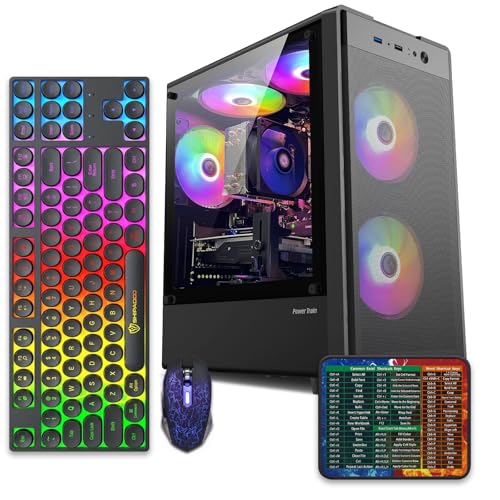
Pros
- 512GB SSD bot drive avoids the HDD bottleneck common in budget prebuilts
- RX 590 8GB VRAM buffer handles 1080p textures better than 4GB budget cards
- Complete bundle with RGB peripherals means no extra spend to start using
- Genuine Windows 11 Home 64-bit preinstalled, no activation hassle out of box
Cons
- Limited owner feedback at time of writing, verify seller reputation before purchase
- Core i7-4770 is Haswell era LGA150, no upgrade path and weak IPC versus modern CPUs
- Windows 11 on 4th-gen Intel is unsupported by Microsoft and may miss feature updates
- No CD/DVD-ROM support and RAM/GPU generation limits future workload headroom
This is an entry-tier prebuilt tower built around an Intel Core i7-4770 Haswell CPU, 16GB RAM, a 512GB SSD, and an AMD Radeon RX 590 8GB GDDR5 GPU. It targets budget buyers who need a working office and light gaming PC with peripherals bundled, not enthusiasts chasing current-gen performance.
The defining feature is the RX 590 8GB paired with a 512GB SSD, an uncommon combo at this price band. Cards in this class typically handle 1080p esports titles at 60+ FPS on medium to high, matching the vendor claim for CS:GO, League of Legends, Apex, and Overwatch. Newer AA titles will need lowered settings.
Trade-offs are significant. The i7-4770 launched in 2013, so IPC, single-thread performance, and platform features like NVMe bot, PCIe Gen4, and modern USB are limited. Windows 11 runs here but sits outside Microsoft's official supported CPU list. There is no realistic CPU or socket upgrade path on LGA1150.
Buy this if you need a plug-and-play 1080p esports and office tower with keyboard, mouse, and RGB included at a low outlay. Skip this if you want current-gen platform support, sustained AA 1440p gaming, or a build with a meaningful upgrade runway.
GPU class: The AMD Radeon RX 590 8GB GDDR5 is a Polaris-refresh card roughly equivalent to a GTX 1060 6GB tier. Expect 1080p 60+ FPS in esports titles like CS:GO, Overwatch, Apex, League, and Fortnite on medium settings, matching the listing's claims.
AAA and modern titles: The vendor lists GTA V, Warzone, Hogwarts Legacy, and The Division 2. Realistically, these run at 1080p low to medium with FSR upscaling where suported.Ray tracing is unsupported on RX 590. No DLSS, no frame gen, no AV1 encode.
CPU bottleneck: The Core i7-4770 quad-core with 8threads at up to 3.9GHz will bottleneck the RX 590 in CPU-heavy titles like Warzone and Escape from Tarkov. Expect frame time inconsistency in large team fights even when average FPS looks aceptable.
Storage and RAM fit: 512GB SSD holds Windows plus 3 to 5 modern game installs before space pressure. 16GB DR3-era RAM is adequate for current esports but leaves no headroom for heavy streaming, browser tabs, and OBS NVENC alongside a game session.
Common questions
Is a mini PC faster than a laptop?
It can be, but size alone doesn’t decide it. A well-cooled mini PC can hold boost clocks longer than a thin laptop with a similar processor class. A premium laptop can still beat a cheap mini PC, so compare CPU generation, RAM capacity, SSD size, and cooling design.
Can a mini PC replace a laptop?
Yes, if you work mostly at one desk. Add a monitor, keyboard, mouse, webcam, and speakers, and a mini PC can handle office apps, web work, media, and light creative jobs. It won’t replace a laptop for travel because it has no battery or built-in display.
Is a mini PC good for gaming?
Some are, especially models built for 1440p gaming or compact 1080p play. Very small office mini PCs usually rely on integrated graphics, so they’re better for esports and older titles at reduced settings. If gaming is central, prioritize the GPU first.
Which lasts longer, a laptop or a mini PC?
A mini PC often has fewer wear items because there’s no hinge, internal screen, or battery. Laptops can last years, but battery health and keyboard wear are real concerns. For a permanent desk setup, the mini PC usually has the easier maintenance path.
Do mini PCs use less power than laptops?
Many do at idle, but the full setup includes the monitor. A laptop’s screen is already part of its power budget, while a desktop setup draws from both the computer and display. For always-on server duties, a low-power mini PC can still be very efficient.


































Write Your Review
No reviews yet. Be the first to share your experience!