

Spend $800 on a prebuilt and you get a machine that games. Spend $2,000 and you get one that games at high settings for years. The gap between those tiers is where most buyers agonize, because the spec jumps aren’t linear and marketing muddies which upgrades actually matter. We researched how far each tier stretches, using real budget-class desktops as anchors. If you’re weighing options, our picks for the best budget prebuilt PC for 2026 and the best budget prebuilt for 1440p gaming give concrete starting points.
Matchup at a glance
The $800 tier is about getting in the door. These builds target solid 1080p gaming with mainstream parts, enough to run current titles at good settings without drama. You’re buying capability now and accepting you’ll upgrade sooner. The value is real, especially for a first gaming PC or a casual-play household that isn’t chasing ultra settings.
The $2,000 tier buys headroom. Faster GPUs, more RAM, roomier SSDs, and better cooling mean 1440p or even 4K gaming and a longer useful life before anything feels slow. The catch is diminishing returns, you don’t get 2.5x the frames for 2.5x the money. Our two real anchors here both sit in the affordable bracket, so we’re honest that they represent the entry end, and we scale the analysis up from there rather than pretending a $500 tower is a $2,000 rig.
Spec sheet showdown
| Spec | abytespark i7 Tower ($499.99) | WIWB Ryzen 5 Tower ($569.99) | Typical $800 Build | Typical $2000 Build |
|---|---|---|---|---|
| CPU | Intel Core i7 | Ryzen 5 up to 4.1GHz | Ryzen 5 / Core i5 | Ryzen 7 / Core i7 |
| GPU | Not specified | RX 560 4GB | Entry-mid dedicated | Upper-mid to high-end |
| RAM | Not specified | 16GB DDR4 | 16GB DDR4/DDR5 | 32GB DDR5 |
| Storage | Not specified | 512GB SSD | 512GB-1TB SSD | 1TB-2TB NVMe |
| Networking | Tower desktop | Wi-Fi 6 | Wi-Fi 6 | Wi-Fi 6E / 7 |
| Rating | 4.4 stars | 4.7 stars | Varies | Varies |
$800 tier strengths
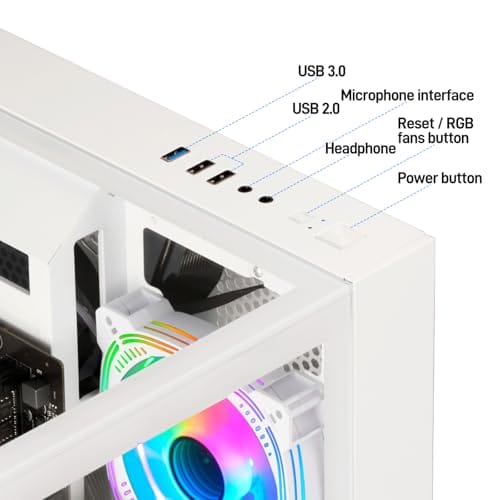
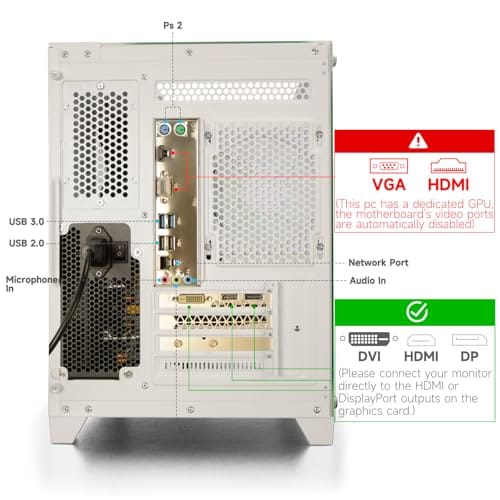
The budget tier’s strength is accessibility. You get a complete, ready-to-game desktop for the price of a mid-range GPU alone. The WIWB Ryzen 5 tower at $569.99, rated 4.7 stars, shows what the affordable end delivers: a Ryzen 5 boosting up to 4.1GHz, an RX 560 4GB graphics card, 16GB DDR4, a 512GB SSD, and Wi-Fi 6, in a white tower aimed at home, office, student, and casual gaming. That’s a genuinely usable machine for esports titles and older games at 1080p.
The abytespark Intel Core i7 tower at $499.99, rated 4.4 stars, leans on its i7 CPU for office and business work, though its listing doesn’t specify the GPU, RAM, or storage, which is common at this price and a reason to read budget listings carefully. Both prove the point: entry desktops handle everyday computing and light gaming well. The weakness is ceiling. A 4GB card like the RX 560 runs modern AAA titles only at low settings and 1080p, and 512GB fills fast with a few big installs. You’re buying a fine starting point, not a future-proof rig.

Pros
- Ryzen 5 3500X 6-core CPU bosts to 4.1GHz for smooth 1080p esports CPU load.
- Discrete RX 560 4GB handles DirectX 12 and Vulkan esports titles better than integrated graphics.
- 512GB SSD as bot drive keps Windows load times and app launches snappy out of box.
Cons
- Limited owner feedback at time of writing, no verified reviews to validate build quality.
- RX 560 is a legacy entry-tier GPU, skip if you want modern AAA at 1080p high.
- Ryzen 5 3500X sits on aging AM4, upgrade path is caped at Zen 3 with a BIOS update.
The WIWB is a budget prebuilt tower built around a Ryzen 5 3500X, RX 560 4GB, 16GB DDR4, and a 512GB SSD. It targets students, home office users, and casual gamers who want a plug-and-play box for esports at 1080p rather than a rig for current AAA titles.
The defining pairing here is the 3500X and RX 560. The 6-core, 6-thread CPU bosting to 4.1GHz is still competent for League, CS2, Valorant, and Overwatch, and typically pushes well above 100FPS at 1080p low-to-medium when paired with this GPU class. The RX 560 4GB is the bottleneck for anything heavier.
Trade-offs are typical at this tier. The RX 560 predates FSR frame generation and struggles with modern UE5 titles even at 1080p low. AM4 with a 3500X caps future CPU upgrades at Zen 3, and the case, PSU wattage, VRM phases, and included cooler are not specified, so headroom for a stronger GPU later is unclear.
Buy this if you need a cheap, pre-assembled Windows tower for schoolwork, browsing, and light esports at 1080p. Skip this if you plan to play current AAA releases, stream at 1080p60, or want a platform with a real multi-year upgrade path.
CPU workload: The Ryzen 5 3500X is a 6-core, 6-thread Zen 2 part with a 3.6GHz base and 4.1GHz boost. It stays viable for 1080p esports and light productivity like image editing and IDE work, but lacks SMT, which hurts streaming and modern CPU-bound AA titles.
GPU class and resolution fit: The RX 560 4GB GDDR5 is an entry esports card. Expect high frame rates in CS2, League, and Overwatch at 1080p low-to-medium, and playable frame rates in older AAA titles at 1080p low. 1440p and modern AA at medium are outside its envelope.
Memory and storage: 16GB DDR4 is the current baseline for gaming and multitasking, and the 512GB SSD covers Windows plus roughly 3 to 5 modern game installs. Exact DDR4 speed, dual-channel status, and SSD interface (SATA vs NVMe) are not specified.
Connectivity and upgrade path: WiFi 6 is included, and the board exposes an M.2 slot plus spare DDR4 slots for later expansion. PSU wattage, connector layout, case clearance, and waranty length beyond the stated 1-year coverage are not specified, so plan GPU upgrades cautiously.
$2000 tier strengths
The premium tier’s strength is longevity and resolution. Double or triple the budget and the GPU leaps from an entry 4GB card to something that pushes 1440p at high settings, RAM doubles to 32GB, and storage moves to 1TB or 2TB of fast NVMe. That combination means you’re not touching settings sliders as often and you won’t feel starved for space or memory for years. For anyone playing current AAA games seriously, that headroom is the whole reason to spend up.
You also get better cooling, stronger power delivery, and often nicer cases with real airflow, all of which help the machine hold performance under sustained load and stay upgradeable. The honest caveat is value curve. The frame-rate gain from $800 to $2,000 is large but not proportional to the price, since a chunk of the extra money buys refinement and future headroom rather than raw fps today. If you play at 1080p and don’t mind medium settings, the premium tier is more than you need. If you want 1440p high-refresh gaming with room to grow, it’s the right call.
Real-world scenarios
First gaming PC for a student
A budget tower nails this. Something like the WIWB Ryzen 5 build handles schoolwork, browsing, and 1080p esports for well under $600. A student rarely needs 4K or ultra settings, and the money saved matters more than headroom they won’t use. Start here, upgrade the GPU later if gaming ambitions grow. It’s the sensible entry that our best budget prebuilt for 1080p gaming guide focuses on.
Serious 1440p AAA gamer
This buyer needs the $2,000 tier. Modern AAA titles at 1440p high settings demand a strong GPU, 32GB of RAM, and fast NVMe storage, none of which the entry tier provides. Spending up front here saves the frustration of a machine that already struggles on day one. The premium build’s longevity pays for itself across several years of new releases.
Home office with occasional gaming
Split the difference toward budget. The abytespark i7 tower’s strength is productivity, so an i7-class machine handles spreadsheets, video calls, and multitasking easily, with light gaming as a bonus. If gaming is truly occasional, there’s no reason to pay for a 4K-capable GPU. A budget or lower-mid build covers this use for hundreds less than a premium tower.
Pricing and availability
Real-world budget prebuilts often land below the $800 headline, as our two anchors show at $499.99 and $569.99, which means the entry tier can be even more affordable than the round number suggests. That’s good news for first-time buyers, though it comes with the caveat that ultra-cheap listings sometimes omit key specs, so confirm the GPU, RAM, and storage before buying. A vague listing is a yellow flag.
The $2,000 tier is more consistent in what you get, since sellers at that price compete on named, current parts. Availability at both tiers is generally solid, but GPU pricing swings can push premium builds up or down noticeably. Watch for sales, and compare the actual component list rather than the marketing tier name. A well-specced $1,500 build can beat a padded $2,000 one.
Which to buy
Buy the budget tier if you game mostly at 1080p, play esports or older titles, or want a capable everyday desktop with light gaming on the side. A machine like the WIWB Ryzen 5 tower at $569.99, with its RX 560 4GB, 16GB DDR4, 512GB SSD, and Wi-Fi 6, covers that brief for a fraction of the premium cost, and its 4.7-star rating reflects buyers who got what they expected. Just go in knowing it’s an entry point you may upgrade.
Buy the $2,000 tier if you’re serious about 1440p or 4K gaming, run demanding AAA titles at high settings, or want a rig that stays fast for years without early upgrades. The extra money buys a stronger GPU, 32GB RAM, and fast NVMe storage, headroom the entry tier can’t match. For most casual and first-time buyers, though, the budget tier is the smarter spend, and our best budget prebuilt roundup shows how much value lives down there.
Pros
- 512GB SSD bot drive avoids the HDD bottleneck common in budget prebuilts
- RX 590 8GB VRAM buffer handles 1080p textures better than 4GB budget cards
- Complete bundle with RGB peripherals means no extra spend to start using
- Genuine Windows 11 Home 64-bit preinstalled, no activation hassle out of box
Cons
- Limited owner feedback at time of writing, verify seller reputation before purchase
- Core i7-4770 is Haswell era LGA150, no upgrade path and weak IPC versus modern CPUs
- Windows 11 on 4th-gen Intel is unsupported by Microsoft and may miss feature updates
- No CD/DVD-ROM support and RAM/GPU generation limits future workload headroom
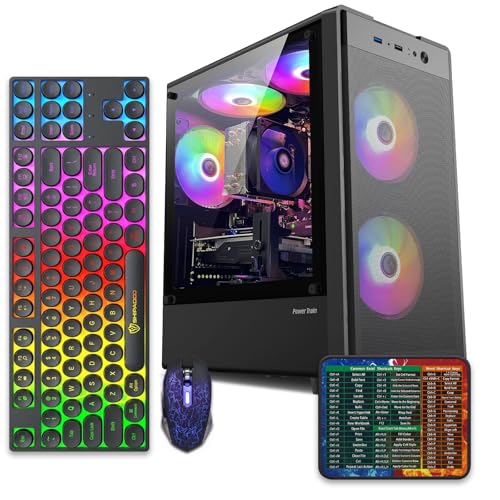
This is an entry-tier prebuilt tower built around an Intel Core i7-4770 Haswell CPU, 16GB RAM, a 512GB SSD, and an AMD Radeon RX 590 8GB GDDR5 GPU. It targets budget buyers who need a working office and light gaming PC with peripherals bundled, not enthusiasts chasing current-gen performance.
The defining feature is the RX 590 8GB paired with a 512GB SSD, an uncommon combo at this price band. Cards in this class typically handle 1080p esports titles at 60+ FPS on medium to high, matching the vendor claim for CS:GO, League of Legends, Apex, and Overwatch. Newer AA titles will need lowered settings.
Trade-offs are significant. The i7-4770 launched in 2013, so IPC, single-thread performance, and platform features like NVMe bot, PCIe Gen4, and modern USB are limited. Windows 11 runs here but sits outside Microsoft's official supported CPU list. There is no realistic CPU or socket upgrade path on LGA1150.
Buy this if you need a plug-and-play 1080p esports and office tower with keyboard, mouse, and RGB included at a low outlay. Skip this if you want current-gen platform support, sustained AA 1440p gaming, or a build with a meaningful upgrade runway.
GPU class: The AMD Radeon RX 590 8GB GDDR5 is a Polaris-refresh card roughly equivalent to a GTX 1060 6GB tier. Expect 1080p 60+ FPS in esports titles like CS:GO, Overwatch, Apex, League, and Fortnite on medium settings, matching the listing's claims.
AAA and modern titles: The vendor lists GTA V, Warzone, Hogwarts Legacy, and The Division 2. Realistically, these run at 1080p low to medium with FSR upscaling where suported.Ray tracing is unsupported on RX 590. No DLSS, no frame gen, no AV1 encode.
CPU bottleneck: The Core i7-4770 quad-core with 8threads at up to 3.9GHz will bottleneck the RX 590 in CPU-heavy titles like Warzone and Escape from Tarkov. Expect frame time inconsistency in large team fights even when average FPS looks aceptable.
Storage and RAM fit: 512GB SSD holds Windows plus 3 to 5 modern game installs before space pressure. 16GB DR3-era RAM is adequate for current esports but leaves no headroom for heavy streaming, browser tabs, and OBS NVENC alongside a game session.
Common questions
Is an $800 prebuilt good enough for gaming?
For 1080p gaming and esports, yes. Budget prebuilts run current titles at good settings and older or competitive games easily. What they can’t do is 1440p or 4K at high settings on demanding AAA releases, and their smaller SSDs fill quickly. If your target is 1080p and you’re fine upgrading the GPU later, the entry tier is genuinely good enough.
What does the extra money in a $2,000 build actually buy?
Mainly a much stronger GPU, double the RAM at 32GB, larger and faster NVMe storage, and better cooling. Together those enable 1440p or 4K gaming and years of headroom before anything feels slow. You’re paying for resolution, longevity, and refinement, not just raw frames. The gain is large but not proportional to the price difference, which is normal.
Why do some cheap prebuilts not list the GPU?
Budget listings sometimes omit the graphics card, RAM, or storage because they use whatever entry parts keep the price low, or rely on integrated graphics. The abytespark i7 tower is an example that highlights its CPU but not its GPU. Always confirm the full spec before buying a cheap prebuilt, since a missing dedicated GPU changes whether it can game at all.
Can I upgrade a budget prebuilt later?
Usually yes, and it’s a smart path. Adding a better GPU, more RAM, or a bigger SSD to a solid budget tower like the WIWB Ryzen 5 build extends its life and spreads the cost over time. Check the power supply wattage and case space first, since very cheap builds sometimes limit how big a GPU you can fit. Plan upgrades before you buy.
Is a mini PC a better buy than a tower at these prices?
For gaming, towers usually win at both price tiers because they fit full-size GPUs and cool them better. Mini PCs shine for space-saving office and media use, not demanding games. If gaming is your goal, a tower like these gives more performance and easier upgrades per dollar. Choose a mini PC only when desk space or portability outweighs raw gaming power.


































Write Your Review
No reviews yet. Be the first to share your experience!