

One dead key on a mechanical keyboard is maddening in a way a fully broken board isn’t. Everything else works, so you keep reaching for that letter out of habit and getting nothing, or getting it twice, or getting it a half-second late. Maybe it’s your spacebar, maybe it’s the E you press a thousand times a day. The good news is that a single non-responsive switch is usually a repair, not a replacement, and mechanical boards are built to make that repair possible. This guide walks through the causes we researched most often, from debris to a genuinely dead switch, and what actually fixes each one. If your board turns out to be beyond saving, our mechanical keyboard deals and the budget mechanical keyboard picks are a decent landing spot.
First check the obvious (the 30-second check)
Before you open anything, rule out the boring stuff. Unplug the keyboard, wait five seconds, and plug it back into a different USB port directly on the machine, not through a hub. Hubs are a common culprit for flaky input. Then try the keyboard on a second computer if you have one handy. If the same key fails everywhere, the problem is the board. If it works fine elsewhere, your issue is software or a port, not hardware.

While you’re at it, open an online key checker in your browser and press the dead key a few times. Watching whether it registers nothing, registers late, or fires twice tells you a lot about which cause you’re chasing. That single observation saves you from guessing.

Two more quick software checks belong here. First, confirm you haven’t accidentally remapped the key. Gaming software, macro tools, and even some keyboards’ onboard firmware let you reassign or disable individual keys, and a stray profile can make a perfectly healthy switch look dead. Reset the layout to default in whatever app came with the board. Second, check for stuck modifier or lock states. A jammed Fn layer, a Game Mode that disables the Windows key, or an active NKRO toggle can all mute specific keys without anything being physically wrong. Rule those out and you’ve eliminated half the panic scenarios in under a minute.
Cause #1: Debris or dust under the keycap
The most common reason a single key stops responding has nothing to do with electronics. Crumbs, hair, and dust work their way under the keycap and jam the stem so the switch can’t fully actuate. It feels mushy, sticks halfway, or does nothing at all. This is the first thing to rule out because the fix costs nothing.
Pull the keycap straight up with a wire keycap puller, or gently with two fingers if you don’t own one. Look at the switch underneath. Blow it out with a can of compressed air, holding the can upright so no liquid sprays, and press the switch stem a dozen times by hand to feel whether it springs back cleanly. Reseat the cap and check the key. Owner reports suggest a surprising share of dead keys are solved right here, before any real disassembly.
If air alone doesn’t clear it, go one step further. A soft brush dislodges grit that compressed air skips over, and a cotton swab lightly dampened with isopropyl alcohol, 90 percent or higher, cleans grime off the stem and housing without leaving residue. Let it dry fully before you power back on. Larger keys like the spacebar, Enter, and Shift add a wrinkle: they ride on stabilizers, and a popped or gunked-up stabilizer wire can make the key feel dead or bind on one side even when the switch is fine. Reseat the stabilizer, add a tiny dab of dielectric grease if it’s rattly, and the key often comes back to life.
Cause #2: Key chatter or a worn switch contact
If the key registers twice from one press, or fires randomly when you aren’t touching it, you’ve got chatter. That’s a worn or oxidized metal contact inside the switch bouncing when it should stay clean. It tends to show up on older boards or on a heavily used key like the spacebar or E after a few million presses. Cleaning sometimes helps, but a chattering switch is often on its way out.
A drop of electronics-safe contact cleaner into the switch, worked in with a few dozen presses, can buy time. For a permanent fix you’ll want to replace the switch, which is easy on a hot-swap board and a soldering job on a fixed one. If you’re shopping for a board built around easy repair, a hot-swap panel like the Newmen GM325Pro at $20.89 lets you pop switches out by hand with no iron, and its 4.8 owner rating and metal-panel build make it a practical spare or upgrade for anyone tired of chatter.
There’s also a firmware-side angle worth knowing. Some keyboards and remapping tools offer a debounce setting, which is the small delay the board waits before accepting a second press. Nudging the debounce time up a few milliseconds can mask mild chatter on a switch that’s only starting to wear, buying you weeks before a physical swap. It’s a stopgap, not a cure, since a failing contact only gets worse, but it’s a free one worth trying while your replacement switches ship.

Pros
- Hot-swap sockets allow switch experimentation without soldering tools or PCB risk
- Metal top plate delivers firmer typing feel than plastic budget boards at this tier
- Full-key rollover and linear red switches handle rapid inputs for casual gaming
Cons
- Limited owner feedback at time of writing, so long-term reliability is unproven
- RGB is restricted to side lighting only, per-key backlight is fixed rainbow patterns
- ABS keycaps typical at this tier tend to shine and wear faster than PBT
The Newmen GM325Pro is a budget full-size 104-key wired mechanical keyboard aimed at first-time mechanical buyers and casual gamers who want a hot-swap PCB without moving up to enthusiast pricing. It ships with linear red switches, a metal top plate, ABS keycaps, and side-edge RGB lighting.
The defining feature here is the hot-swap socket combined with linear red switches. That gives new users a low-friction path to swap inactile or silent switches later without soldering. Typing fel on metal-plate boards at this tier is usually firmer and less hollow than all-plastic budget pers, based on category norms.
Trade-offs are typical for the price class. Per-key RGB is not suported, only side lighting is true RGB while the top backlight runs 13 preset rainbow effects. ABS keycaps tend to develop shine within months of heavy use, and Newmen does not publish switch lifecycle, polling rate, or NKRO wired specs in the source data.
Buy this if you want a cheap full-size hot-swap platform to learn on and plan to upgrade switches or keycaps later. Skip this if you need per-key RGB, PBT caps, a documented polling rate, or a keyboard with a dep owner review history to validate QC.
Switches and layout: Linear red switches on a full 104-key ANSI layout, with full-key rollover claimed by the manufacturer. Actuation force, travel, and switch brand are not specified in the source. Linear reds typically sit near 45g actuation and 4m total travel in this category.
Hot-swap PCB: Sockets accept standard MX-style switches, so tactile, clicky, or silent linear options from third parties drop in without soldering. Pin compatibility (3-pin vs 5-pin) is not specified, buyers should confirm before ordering replacement switches.
Build and lighting: Metal top plate over ABS black keycaps. RGB is limited to the side edge, while the top backlight cycles through 13 preset rainbow patterns rather than per-key addressable RGB. Case material below the plate is not specified.
Connectivity and software: Wired only via a detachable 1.8m USB cable. FN combos cover F1 to F11 media and calculator shortcuts. Customization software suports key remap, macro recording, and lighting tweaks, though poling rate and software platform support are not specified.
Cause #3: A genuinely dead switch
Sometimes the switch is simply finished. No amount of cleaning brings it back, the key checker shows nothing on every press, and neighboring keys work fine. On a hot-swap board this is a five-minute job. Power down, pull the keycap, grip the switch housing with a switch puller, rock it straight out, and press a fresh switch of the same type into the socket, making sure the two pins go in straight and don’t bend. Reseat the cap and you’re done.
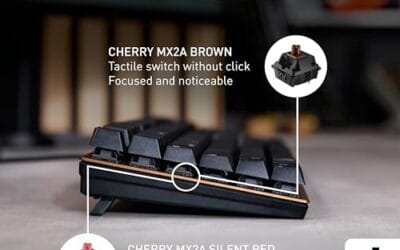
On a soldered board, you’ll need to desolder the old switch and solder in a new one, which means an iron, solder wick or a pump, and a steady hand. It’s very doable, just slower. Either way, match the switch type so the replaced key feels like its neighbors. Linear red switches feel light and smooth, tactile browns have a bump, and clicky blues make noise on purpose. Mixing those on one board feels odd fast. If your current board isn’t hot-swappable and you’d rather sidestep the iron entirely, a reliable prebuilt like the Cherry KC 200 MX with MX2A Silent Red switches at $56.31 gives you a fresh, quiet office board with a metal plate frame and Cherry’s own switches, a sensible route when repair costs approach replacement.
Don’t ignore bent hot-swap socket leaves either. If a switch pin misses the socket and folds under the switch, the key won’t register even though the switch itself is healthy. Pull the switch back out, straighten both metal pins with tweezers, and look into the socket with a flashlight. The two tiny contacts should sit evenly. If one is pushed open, very careful pressure with a fine pick can restore contact, but be gentle. Too much force can break the socket from the PCB, and then a quick switch job turns into board repair.

Pros
- MX2A Silent Red linears actuate quietly, good fit for open-plan offices
- Metal plate frame keeps chassis stiff and reduces caseping under typing
- Cherry Gold-Crosspoint contacts rated for 50 million keystrokes on this variant
- Full-size layout with dedicated numpad suits data entry and spreadshet work
Cons
- Renewed unit with no owner fedback loged yet, cosmetic and wear condition varies
- Silent Red linears lack tactile bump, typists who prefer fedback should pick Brown
- Source data omits connectivity, cable type, polling rate, and dimensions
The Cherry KC 200 MX is a full-size office-focused mechanical keyboard sold here as a Renewed unit in Bronze with MX2A Silent Red linear switches. It targets office typists, developers, and finance or admin users who want Cherry switch fel and a metal plate frame without the RGB and gamer styling of enthusiast boards.
The defining feature is the MX2A Silent Red switch, Cherry's updated linear with dampened stems aimed at reducing bottom-out and return noise. Cherry rates this variant for 50 million keystrokes. Based on the linear profile, expect smooth actuation with no tactile bump, which suits fast touch typists and users on frequent video calls.
Trade-offs are typical at this tier and Renewed status. Silent Red linears are polarizing, users coming from Browns or Blues will miss the tactile feedback, and the source does not specify polling rate, connection type, cable, keycap material, or dimensions. As a Renewed listing, cosmetic condition and remaining switch life depend on the refurbisher rather than a factory-fresh baseline.
Buy this if you want a quiet full-size Cherry mechanical for office or shared-space use and value the metal plate build over RGB features. Skip this if you prefer tactile or clicky switches, need confirmed wireless or USB-C connectivity, or want a waranty profile equivalent to new stock.
Switches: Cherry MX2A Silent Red, linear with integrated dampeners, made in Germany with Gold-Crosspoint contacts. Rated for 50 million keystrokes on this variant, versus 100 million on MX2A Brown. Linear travel with no tactile bump favors light, fast keypresses over deliberate typing fedback.
Build: Metal plate frame under the switches, which stiffens the deck and cuts flex compared with plastic-only office boards. Cherry positions the KC 200 MX as a slim modern design, though exact case height, weight, and keycap material are not specified in the source data.
Layout and indicators: Full-size layout retains the dedicated numpad and function row, which maters for spreadsheet,ERP, and accounting workflows. White LED status indicators are built into Caps Lock, Scroll Lock, and Num Lock keys, avoiding a separate indicator strip and keeping the top edge clean.
Gaming fit: Silent Red linears work for casual gaming and MMO or productivity crossover use given their light linear fel, but the source does not list polling rate, N-key rollover, or onboard profiles, so competitive esports buyers should confirm specs before committing.
Preventive maintenance
Most dead keys are earned over months of neglect. Keep food and drinks away from the board, blow it out with compressed air every few weeks, and pull the keycaps for a deeper clean every few months if you eat at your desk. A cheap dust cover helps if the machine sits idle for long stretches. None of this is fussy, and it heads off the debris problem that starts most of these failures.
Two habits matter more than the rest. Wash your hands before long sessions, since skin oil and grime are what bind keycaps to switches over time, and unplug the board before any wet cleaning so a stray drop can’t short the PCB. If you own a hot-swap keyboard, keep three or four spare switches in a drawer that match your board. When a key finally goes, the repair takes minutes instead of a shipping wait, and you never lose a work session to a single dead letter.
When to call a pro vs DIY
Debris, chatter, and a dead switch on a hot-swap board are all firmly DIY. You need patience, a puller, and maybe a $5 can of air. The moment soldering enters the picture on a board you care about, weigh your comfort with a hot iron against the cost of the keyboard. On a $40 board, replacing it often makes more sense than risking a scorched PCB. On a $150 custom, careful desoldering, or a trip to someone who solders regularly, protects your investment.
One more line to draw: if the key checker shows several keys failing in a row or a whole column going dead, stop treating it as a single-switch problem. That pattern points to a controller or trace fault on the PCB, not one worn switch, and no amount of cleaning or swapping fixes a broken trace at home. A warranty claim or a professional board repair is the right move there. A single isolated dead key almost never falls into that camp, which is why the fixes above solve the large majority of cases.
Tools and parts needed
For the common fixes, keep a small kit on hand: a wire keycap puller, a switch puller for hot-swap boards, a can of compressed air, and electronics-safe contact cleaner. For replacements, stock a few spare switches that match your board’s type. If you’ll be working on soldered boards, add a temperature-controlled iron, solder, and wick or a desoldering pump. For a hot-swap keyboard you can service without any of the soldering gear, the Newmen GM325Pro covered above fits the bill, and programmer-focused shoppers can also browse our keyboard picks for programmers.
Common questions
Why does only one key on my mechanical keyboard stop working?
Because each key has its own independent switch. When one dies or gets jammed with debris, the rest keep working normally. That’s why the fix is usually isolated to a single switch rather than the whole board.
Can I fix a dead key without soldering?
Yes, if your board is hot-swappable. You pull the old switch out by hand with a switch puller and press a new one in, no iron required. On soldered boards you’ll need basic soldering gear to swap the switch.
Is a chattering key worth fixing or should I replace the board?
If it’s a hot-swap board, replacing the one switch is cheap and quick, so fix it. On an inexpensive soldered board where the repair time and parts approach the cost of a new keyboard, replacement is often the smarter call.
My spacebar feels dead on one side, is the switch broken?
Often not. Wide keys ride on stabilizers, and a dislodged or dirty stabilizer wire makes the key bind or fail to register on one edge while the switch is perfectly fine. Reseat the stabilizer and clean it before you blame the switch.

































Write Your Review
No reviews yet. Be the first to share your experience!