

Few things kill a gaming session faster than your Bluetooth headset dropping out mid-match. One second you’re calling shots to your squad, the next there’s silence, then a robotic stutter, then it reconnects just in time for you to miss everything that mattered. It’s maddening, and it’s rarely random. A headset that keeps disconnecting is almost always fighting one of a handful of specific problems: interference, a dying battery, a stale driver, or a pairing that’s gone sour. The fix is usually straightforward once you know which cause you’re chasing.
We researched the common failure points and owner reports to build a diagnostic path you can follow start to finish. If the trail ends at a replacement, our roundups of the best wireless gaming headsets and the best budget gaming headsets in 2026 cover strong options, and if desk clutter is part of the problem, the best headset stand in 2026 guide helps keep things tidy. Let’s stop the dropouts.
First check the obvious
Spend 30 seconds ruling out the simple stuff before diving deep. Is the headset charged? A low battery is the single most common cause of dropouts, since many headsets get flaky as the charge fades and cut out entirely near empty. Plug it in, let it charge, and see if the problem vanishes. Next, check the distance and line of sight to the source. Bluetooth range is limited, and walls or even your own body between the headset and the PC can weaken the link enough to drop it.
Also confirm nothing else is fighting for the connection. If your headset is paired to your phone and your PC at the same time, it may be trying to switch between them, causing stutters and drops. Disconnect it from the devices you’re not using. And make sure you’re actually on Bluetooth rather than a flaky secondary mode. These quick checks solve a surprising share of dropout complaints before you touch a single setting.
One more easy check: look at what’s physically between you and the source. Bluetooth uses a weak signal, and a metal PC case sitting on the floor under your desk can shadow the antenna badly, especially if the headset’s radio is on the ear cup facing away from the tower. Simply raising the Bluetooth source onto the desk, or plugging a small USB extension so a dongle sits out in the open, clears a shocking number of dropouts. Try that before assuming the hardware is at fault.
Cause #1: Wireless interference on the 2.4GHz band
Bluetooth shares the crowded 2.4GHz spectrum with WiFi, microwaves, wireless mice, and plenty of other gadgets, and when that band gets congested, your headset connection suffers. Interference shows up as stuttering audio, brief cutouts, and full disconnects, usually worse in a busy apartment or a room packed with wireless devices. If your dropouts happen more when the microwave runs or your router is right next to your PC, interference is the likely culprit.
You can fight this a few ways. Move the Bluetooth source closer to the headset and clear line of sight, keep the headset away from your router and other 2.4GHz gear, and if your router supports it, shift heavy WiFi traffic to the 5GHz band to free up 2.4GHz. For gaming specifically, many headsets sidestep the interference problem entirely with a dedicated 2.4GHz USB dongle instead of Bluetooth. A headset like the Picun G2, a $59.99 wireless model rated 4.5 that offers 2.4GHz, Bluetooth 5.4, and wired modes with 5ms low latency, lets you switch to its dedicated 2.4GHz dongle connection, which is far more stable for gaming than shared Bluetooth.

Pros
- Three connection modes on a single headset: 2.4GHz dongle, Bluetooth 5.4, and 3.5mm wired fallback.
- Vendor-rated 5ms 2.4GHz latency keps audio synced in competitive shooter scenarios.
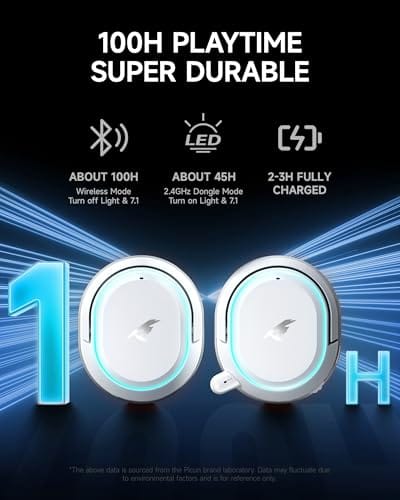
- Long rated runtime, up to 100 hours in Bluetooth with RGB disabled for travel use.
- RetractableENC microphone tucks away, useful when switching between gaming and general listening.
Cons
- Limited owner feedback at time of writing, real-world reliability and QC signal is unverified.
- 7.1 surround is virtual DSP, not true multi-driver, so positional accuracy varies by title andear.
- RGB lighting materially cuts battery life, cited100-hour figure requires lighting turned off.
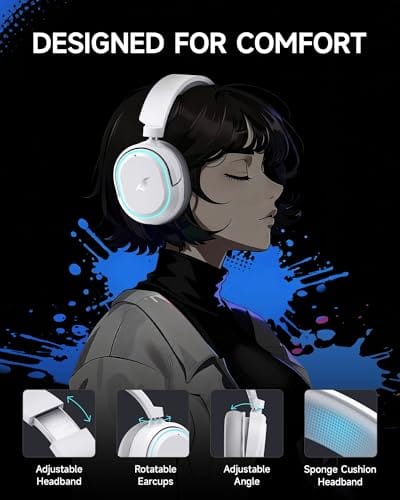
The Picun G2 is a budget-tier wireless gaming headset built around 40mm drivers, virtual 7.1 surround, and tri-mode connectivity across2.4GHz, Bluetooth 5.4, and 3.5m wired. Target buyer is a multi-platform player rotating between PC, PS5, PS4, and Switch who wants low-latency wireless without moving up to established brand pricing.
The defining feature is the tri-mode radio stack. The 2.4GHz USB-A or Type-C dongle is rated at 5ms latency, which is competitive for the tier and adequate for most FPS titles, while Bluetooth 5.4 handles phones and tablets. Headsets in this class typically deliver serviceable rather than reference-grade imaging, and virtual 7.1 leans on DSP rather than discrete drivers.
Trade-offs are typical at this tier. Battery figures are optimistic: 100 hours assumes Bluetooth with RGB off, and 2.4GHz drops the number to 42 to 45 hours. Driver material, impedance, frequency response, clamp force, and weight are not specified, so tonal balance and long-session comfort cannot be verified from source data alone.
Buy this if you want one headset that jumps between a PS5, a Switch dock, and a work laptop over Bluetooth, and you accept spec-sheet-only marketing. Skip this if you rely on measured frequency response, discrete suround, or detachable bom mics with broadcast-grade pickup for streaming.
Drivers and tuning: Picun specifies 40mm dynamic drivers paired with virtual 7.1 surround processing. Impedance, sensitivity, and frequency response are not specified, so bass extension and treble air cannot be quantified from source. Virtual 7.1 is DSP-based positional widening, useful for FPS cues but not equivalent to true multi-driver surround.
Connectivity and latency: Three modes are covered: 2.4GHz via USB-A or USB-C dongle, Bluetooth 5.4, and 3.5mm analog. The 2.4GHz link is rated at 5ms latency. Bluetooth codec support (SBC, AAC, aptX) is not specified, which maters for wireless music quality on phones and tablets.
Battery and power: Rated up to 100 hours on Bluetooth with RGB off, and 42 to 45 hours on 2.4GHz wireless. Play-while-charging is supported, so a USB cable can extend sessions past the rated ceiling. Charge time and battery capacity in mAh are not specified.
Microphone: Retractable omnidirectional bom with ENC noise reduction. Sample rate, bit depth, and pickup pattern beyond omni are not specified.ENC filtering targets background noise on the transmit side, adequate for party chat but below dedicated USB mic quality.
That dongle approach is the single most effective interference fix. If your current headset only does Bluetooth and drops constantly in a busy wireless environment, moving to a headset with a dedicated 2.4GHz connection often ends the problem outright.
Cause #2: Outdated or corrupted Bluetooth drivers
Software is the quiet cause behind a lot of dropouts. Windows Bluetooth drivers, and the drivers for your specific Bluetooth adapter, can become outdated or corrupted, leading to unstable connections that drop without an obvious physical reason. If your headset works fine on your phone but keeps disconnecting from your PC, that’s a strong sign the problem lives in your computer’s Bluetooth stack rather than the headset itself.
Start by updating the driver. Open Device Manager, find your Bluetooth adapter, and update its driver, or better, grab the latest version directly from your motherboard or adapter manufacturer’s site since Windows sometimes ships an older one. If updating doesn’t help, uninstall the device and let Windows reinstall it fresh on reboot, which clears a corrupted install. Also check Windows power management, where a setting that lets the system turn off the Bluetooth adapter to save power is a frequent, sneaky cause of dropouts. Disable that option for the adapter and the headset both.
Cause #3: A degraded battery or a bad pairing
Batteries wear out, and an aging headset battery is a common reason for connection trouble that gets worse over time. As the cells degrade, the headset can’t hold a stable charge, and it may disconnect as voltage sags under load, even showing a healthy charge percentage that lies about its real capacity. If your dropouts started after a year or two of heavy use and worsen as the session goes on, the battery is a prime suspect, and that’s often not something you can fix on a sealed headset.
A stale pairing causes similar symptoms. Bluetooth pairings can get corrupted, leaving the connection unstable even when everything else is fine. The fix is to remove the headset entirely from your PC’s Bluetooth device list, then pair it again fresh. This clears out a bad handshake and often resolves stubborn drops. If a fresh pairing and a full charge still leave you with constant cutouts on an older headset, the hardware is likely failing, and a replacement is the honest answer. A reliable wireless model like the Logitech G733 Lightspeed, a $124.92 headset rated 4.0 with Lightspeed wireless, a suspension headband, and Blue VO!CE mic tuning, uses Logitech’s dedicated Lightspeed wireless connection built for stable, low-latency gaming rather than relying on shared Bluetooth.

Pros
- Lightspeed wireless with 20 meter range handles typical living room and desk distances
- Up to 29 hours battery life covers multi-day use between charges
- Blue VO!CE mic processing in G HUB improves clarity for Discord and streaming
- Suspension headband and low mass design reduce clamp fatigue during long sessions
- Dual-zone Lightsync RGB with 16.8M colors is customizable through G HUB
Cons
- PS4 output limited to stereo, no suround on older PlayStation hardware
- Driver size, frequency response, and mic pattern not specified in source data
The Logitech G733 is a mid-tier wireless gaming headset targeting PC, PS5, PS4, and Nintendo Switch users who want a lightweight all-day fit. It leans on Lightspeed 2.4GHz wireless, PRO-G drivers, Blue VO!CE mic processing, and a reversible suspension headband, aimed at multi-hour gamers and streamers.
The defining feature is the combination of Lightspeed wireless with a quoted 20 meter range and up to 29 hours of battery. In practice this covers full workdays plus evening sessions without a charge cycle. PRO-G drivers, per Logitech, reduce distortion, and headsets in this tier typically deliver a mildly V-shaped tuning suited to positional FPS cues.
Trade-offs are typical at this price point. PS4 users are locked to stereo output with no virtual surround. Driver diameter, impedance, and frequency response are not published in the source data, so absolute output quality is hard to benchmark against wired competitors. There is no Bluetooth fallback listed, so mobile pairing is not supported.
Buy this if you want a light, long-battery 2.4GHz wireless headset for PC or PS5 with a usable broadcast-style mic. Skip this if you need wired low-latency USB, Bluetooth multipoint, or vendor-published driver and frequency response specs before purchase.
Drivers and tuning: Logitech lists PRO-G drivers tuned for reduced distortion, though exact driver diameter and frequency response are not specified in the source. Headsets in this tier typically ship with 40 to 50mm dynamic drivers and a mildly V-shaped response suited to explosions and footstep cues in FPS gameplay.
Connection and latency: Lightspeed 2.4GHz wireless with a stated 20 meter range covers desk and living room use. Compatibility is confirmed for PC, PS5, PS4 (stereo only), and Nintendo Switch. Bluetooth and wired 3.5mm fallback are not listed in the source, so single-dongle 2.4GHz is the only documented path.
Battery life: Rated up to 29 hours per charge, enough for roughly three to four full evening sessions before recharging. Exact charge time and USB-C versus micro-USB charging port are not specified in the source data.
Microphone: Detachable mic with Blue VO!CE filters configured in G HUB, providing EQ, noise reduction, and de-eser presets useful for Discord and Twitch chat. Mic polar pattern, sensitivity, and frequency range are not disclosed in the source specifications.
The Lightspeed connection, like a good 2.4GHz dongle, avoids the congestion and instability that plague Bluetooth in a busy setup, which is why dedicated-wireless gaming headsets tend to hold their link where Bluetooth-only models drop.
Preventive maintenance
A little routine care keeps dropouts away. Charge the headset regularly rather than draining it flat every time, since deep discharges wear the battery faster and a battery kept in a healthier range lasts longer and holds a steadier connection. Keep the firmware current too; manufacturers push updates that improve connection stability, so check the companion app every few months for a new version. That single habit heads off a lot of trouble.
Manage your wireless environment as well. Don’t pile your router, phone, and other 2.4GHz gadgets right on top of your PC, and keep the Bluetooth source in clear line of sight to where you sit. Remove old, unused Bluetooth pairings from your PC so the adapter isn’t juggling stale connections. And store the headset properly on a stand rather than tangled in cables, which protects both the hardware and the charging contacts. Small habits, steadier connection.
It’s worth setting a reminder to top the battery off before long sessions too, rather than relying on the last-minute low warning. Headsets tend to drop hardest in the final stretch of charge, and starting a raid or a ranked night at 20 percent is asking for a mid-match cutout. Charge to a comfortable level beforehand, and if your model supports wired mode, keep the cable within reach so you can plug in and keep going the moment the battery runs low instead of disconnecting entirely.
When it’s not fixable, what to replace
Sometimes the headset is simply worn out, and no amount of driver updates or re-pairing will save it. If you’ve charged it fully, updated drivers, cleared the pairing, and ruled out interference, and it still drops constantly, the internal battery or Bluetooth radio has likely failed. On most sealed consumer headsets, those aren’t user-replaceable parts, so the practical move is a new headset rather than a repair that costs more than the unit is worth.
When you replace, the smartest upgrade for gaming is a headset with a dedicated wireless connection rather than Bluetooth alone. A model that includes a 2.4GHz USB dongle, like the Picun G2’s dongle mode, or a proprietary low-latency link like Logitech’s Lightspeed, sidesteps the interference and instability that cause most Bluetooth dropouts. You get lower latency and a far steadier connection for gaming, which is exactly what a wireless headset should deliver. Buy the connection type that matches how you use it.
Tools and parts needed
You won’t need much to work through this. A charging cable to top the headset off, access to Device Manager and Windows Bluetooth settings for the software fixes, and the manufacturer’s companion app for firmware updates cover nearly everything. If the diagnosis points to a failing unit, the main part is a replacement headset, ideally one with a dedicated 2.4GHz dongle or proprietary wireless for gaming stability. A USB Bluetooth adapter is worth considering too if your PC’s built-in Bluetooth is the weak link, since a quality external adapter can improve range and stability without replacing the whole headset.
A short USB extension cable is the cheapest upgrade of the bunch and often the most effective. It lets you move a dongle or adapter off the back of the case and onto the desk near where you sit, clearing the metal shadow that causes so many drops. If your motherboard’s rear Bluetooth antenna is the problem, a plug-in USB adapter with an external antenna sidesteps it entirely for a few dollars. Have these small parts ready before you conclude the headset itself has failed, because the real culprit is frequently the connection path, not the hardware on your head.
Common questions
Why does my Bluetooth headset keep cutting out during games?
Usually interference or latency on the shared 2.4GHz band, made worse by other wireless devices competing for airtime. Bluetooth also prioritizes stable audio over low latency, so gaming pushes it hard. A low battery or an outdated driver can add to it. For gaming specifically, switching to a headset with a dedicated 2.4GHz dongle or proprietary wireless like Lightspeed usually solves the cutouts, since those connections are built for stability.
How do I fix a headset that disconnects when it still shows a charge?
A charge percentage can lie on an aging battery, so try a full charge first, then remove and re-pair the headset to clear a corrupted pairing. Update your Bluetooth driver and disable the Windows power setting that lets the system turn off the adapter to save power. If it still drops after all that on an older headset, the battery has likely degraded and a replacement is the realistic fix.
Is a 2.4GHz dongle really better than Bluetooth for gaming?
For stability and latency, yes. A dedicated 2.4GHz dongle creates a direct link between the headset and your PC without sharing the connection the way Bluetooth does, which cuts interference and lowers latency. That’s why many gaming headsets, including the Picun G2 with its dongle mode and Logitech’s Lightspeed models, use dedicated wireless. Bluetooth is convenient for phones and casual use, but for gaming, a dedicated connection holds up far better under pressure.


























Write Your Review
No reviews yet. Be the first to share your experience!