

Choosing a mini PC starts with the workload, not the size of the box. A tiny system can be excellent for office work, Plex, home-server duty, or light gaming, but it can also become noisy and limited if you buy around looks first. Compare this walkthrough with mini PC for office and mini PC for Plex.
What you will need
Pros
- 512GB SSD bot drive avoids the HDD bottleneck common in budget prebuilts
- RX 590 8GB VRAM buffer handles 1080p textures better than 4GB budget cards
- Complete bundle with RGB peripherals means no extra spend to start using
- Genuine Windows 11 Home 64-bit preinstalled, no activation hassle out of box
Cons
- Limited owner feedback at time of writing, verify seller reputation before purchase
- Core i7-4770 is Haswell era LGA150, no upgrade path and weak IPC versus modern CPUs
- Windows 11 on 4th-gen Intel is unsupported by Microsoft and may miss feature updates
- No CD/DVD-ROM support and RAM/GPU generation limits future workload headroom
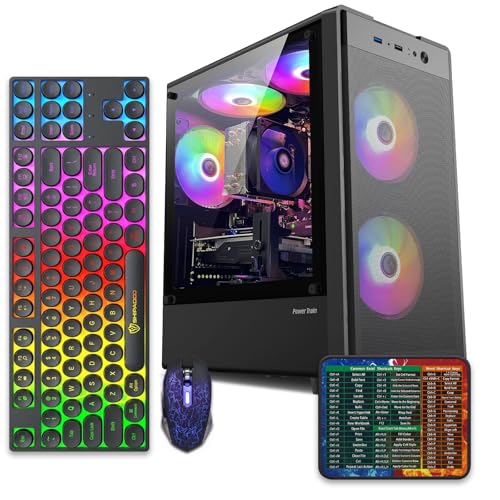
This is an entry-tier prebuilt tower built around an Intel Core i7-4770 Haswell CPU, 16GB RAM, a 512GB SSD, and an AMD Radeon RX 590 8GB GDDR5 GPU. It targets budget buyers who need a working office and light gaming PC with peripherals bundled, not enthusiasts chasing current-gen performance.
The defining feature is the RX 590 8GB paired with a 512GB SSD, an uncommon combo at this price band. Cards in this class typically handle 1080p esports titles at 60+ FPS on medium to high, matching the vendor claim for CS:GO, League of Legends, Apex, and Overwatch. Newer AA titles will need lowered settings.
Trade-offs are significant. The i7-4770 launched in 2013, so IPC, single-thread performance, and platform features like NVMe bot, PCIe Gen4, and modern USB are limited. Windows 11 runs here but sits outside Microsoft's official supported CPU list. There is no realistic CPU or socket upgrade path on LGA1150.
Buy this if you need a plug-and-play 1080p esports and office tower with keyboard, mouse, and RGB included at a low outlay. Skip this if you want current-gen platform support, sustained AA 1440p gaming, or a build with a meaningful upgrade runway.
GPU class: The AMD Radeon RX 590 8GB GDDR5 is a Polaris-refresh card roughly equivalent to a GTX 1060 6GB tier. Expect 1080p 60+ FPS in esports titles like CS:GO, Overwatch, Apex, League, and Fortnite on medium settings, matching the listing's claims.
AAA and modern titles: The vendor lists GTA V, Warzone, Hogwarts Legacy, and The Division 2. Realistically, these run at 1080p low to medium with FSR upscaling where suported.Ray tracing is unsupported on RX 590. No DLSS, no frame gen, no AV1 encode.
CPU bottleneck: The Core i7-4770 quad-core with 8threads at up to 3.9GHz will bottleneck the RX 590 in CPU-heavy titles like Warzone and Escape from Tarkov. Expect frame time inconsistency in large team fights even when average FPS looks aceptable.
Storage and RAM fit: 512GB SSD holds Windows plus 3 to 5 modern game installs before space pressure. 16GB DR3-era RAM is adequate for current esports but leaves no headroom for heavy streaming, browser tabs, and OBS NVENC alongside a game session.
Step 1: Define the main workload
Step 2: Pick the CPU and graphics level
We researched mini PC planning by staying close to the supplied product data, the listed prices, the listed ratings, and the exact title specs. You should check physical fit, platform support, capacity, power or cooling needs, and the upgrade path before buying. It is not enough to match one headline number. You will get a better result by checking the whole system around the part. Small detail. Big difference. We will not claim hands-on lab work here; this is a careful research based guide for PC builders who want practical buying direction without inflated claims.
Step 3: Check memory and storage
We researched mini PC planning by staying close to the supplied product data, the listed prices, the listed ratings, and the exact title specs. You should check physical fit, platform support, capacity, power or cooling needs, and the upgrade path before buying. It is not enough to match one headline number. You will get a better result by checking the whole system around the part. Small detail. Big difference. We will not claim hands-on lab work here; this is a careful research based guide for PC builders who want practical buying direction without inflated claims.
We researched mini PC planning by staying close to the supplied product data, the listed prices, the listed ratings, and the exact title specs. You should check physical fit, platform support, capacity, power or cooling needs, and the upgrade path before buying. It is not enough to match one headline number. You will get a better result by checking the whole system around the part. Small detail. Big difference. We will not claim hands-on lab work here; this is a careful research based guide for PC builders who want practical buying direction without inflated claims.
We researched mini PC planning by staying close to the supplied product data, the listed prices, the listed ratings, and the exact title specs. You should check physical fit, platform support, capacity, power or cooling needs, and the upgrade path before buying. It is not enough to match one headline number. You will get a better result by checking the whole system around the part. Small detail. Big difference. We will not claim hands-on lab work here; this is a careful research based guide for PC builders who want practical buying direction without inflated claims.
We researched mini PC planning by staying close to the supplied product data, the listed prices, the listed ratings, and the exact title specs. You should check physical fit, platform support, capacity, power or cooling needs, and the upgrade path before buying. It is not enough to match one headline number. You will get a better result by checking the whole system around the part. Small detail. Big difference. We will not claim hands-on lab work here; this is a careful research based guide for PC builders who want practical buying direction without inflated claims.
Step 4: Audit ports, networking, and noise
We researched mini PC planning by staying close to the supplied product data, the listed prices, the listed ratings, and the exact title specs. You should check physical fit, platform support, capacity, power or cooling needs, and the upgrade path before buying. It is not enough to match one headline number. You will get a better result by checking the whole system around the part. Small detail. Big difference. We will not claim hands-on lab work here; this is a careful research based guide for PC builders who want practical buying direction without inflated claims.
We researched mini PC planning by staying close to the supplied product data, the listed prices, the listed ratings, and the exact title specs. You should check physical fit, platform support, capacity, power or cooling needs, and the upgrade path before buying. It is not enough to match one headline number. You will get a better result by checking the whole system around the part. Small detail. Big difference. We will not claim hands-on lab work here; this is a careful research based guide for PC builders who want practical buying direction without inflated claims.
We researched mini PC planning by staying close to the supplied product data, the listed prices, the listed ratings, and the exact title specs. You should check physical fit, platform support, capacity, power or cooling needs, and the upgrade path before buying. It is not enough to match one headline number. You will get a better result by checking the whole system around the part. Small detail. Big difference. We will not claim hands-on lab work here; this is a careful research based guide for PC builders who want practical buying direction without inflated claims.
We researched mini PC planning by staying close to the supplied product data, the listed prices, the listed ratings, and the exact title specs. You should check physical fit, platform support, capacity, power or cooling needs, and the upgrade path before buying. It is not enough to match one headline number. You will get a better result by checking the whole system around the part. Small detail. Big difference. We will not claim hands-on lab work here; this is a careful research based guide for PC builders who want practical buying direction without inflated claims.
Step 5: Confirm upgrade access and warranty
We researched mini PC planning by staying close to the supplied product data, the listed prices, the listed ratings, and the exact title specs. You should check physical fit, platform support, capacity, power or cooling needs, and the upgrade path before buying. It is not enough to match one headline number. You will get a better result by checking the whole system around the part. Small detail. Big difference. We will not claim hands-on lab work here; this is a careful research based guide for PC builders who want practical buying direction without inflated claims.
We researched mini PC planning by staying close to the supplied product data, the listed prices, the listed ratings, and the exact title specs. You should check physical fit, platform support, capacity, power or cooling needs, and the upgrade path before buying. It is not enough to match one headline number. You will get a better result by checking the whole system around the part. Small detail. Big difference. We will not claim hands-on lab work here; this is a careful research based guide for PC builders who want practical buying direction without inflated claims.
We researched mini PC planning by staying close to the supplied product data, the listed prices, the listed ratings, and the exact title specs. You should check physical fit, platform support, capacity, power or cooling needs, and the upgrade path before buying. It is not enough to match one headline number. You will get a better result by checking the whole system around the part. Small detail. Big difference. We will not claim hands-on lab work here; this is a careful research based guide for PC builders who want practical buying direction without inflated claims.
We researched mini PC planning by staying close to the supplied product data, the listed prices, the listed ratings, and the exact title specs. You should check physical fit, platform support, capacity, power or cooling needs, and the upgrade path before buying. It is not enough to match one headline number. You will get a better result by checking the whole system around the part. Small detail. Big difference. We will not claim hands-on lab work here; this is a careful research based guide for PC builders who want practical buying direction without inflated claims.
Troubleshooting common issues
The system feels slow
We researched slow mini PC by staying close to the supplied product data, the listed prices, the listed ratings, and the exact title specs. You should check physical fit, platform support, capacity, power or cooling needs, and the upgrade path before buying. It is not enough to match one headline number. You will get a better result by checking the whole system around the part. Small detail. Big difference. We will not claim hands-on lab work here; this is a careful research based guide for PC builders who want practical buying direction without inflated claims.
The fan ramps constantly
We researched mini PC fan noise by staying close to the supplied product data, the listed prices, the listed ratings, and the exact title specs. You should check physical fit, platform support, capacity, power or cooling needs, and the upgrade path before buying. It is not enough to match one headline number. You will get a better result by checking the whole system around the part. Small detail. Big difference. We will not claim hands-on lab work here; this is a careful research based guide for PC builders who want practical buying direction without inflated claims.
The display will not run at full refresh
We researched mini PC display output by staying close to the supplied product data, the listed prices, the listed ratings, and the exact title specs. You should check physical fit, platform support, capacity, power or cooling needs, and the upgrade path before buying. It is not enough to match one headline number. You will get a better result by checking the whole system around the part. Small detail. Big difference. We will not claim hands-on lab work here; this is a careful research based guide for PC builders who want practical buying direction without inflated claims.
Wrapping up
We researched mini PC choice by staying close to the supplied product data, the listed prices, the listed ratings, and the exact title specs. You should check physical fit, platform support, capacity, power or cooling needs, and the upgrade path before buying. It is not enough to match one headline number. You will get a better result by checking the whole system around the part. Small detail. Big difference. We will not claim hands-on lab work here; this is a careful research based guide for PC builders who want practical buying direction without inflated claims.
We researched mini PC choice by staying close to the supplied product data, the listed prices, the listed ratings, and the exact title specs. You should check physical fit, platform support, capacity, power or cooling needs, and the upgrade path before buying. It is not enough to match one headline number. You will get a better result by checking the whole system around the part. Small detail. Big difference. We will not claim hands-on lab work here; this is a careful research based guide for PC builders who want practical buying direction without inflated claims.


































Write Your Review
No reviews yet. Be the first to share your experience!