

The difference between Z890 and B860 is mostly about freedom. Both chipsets are built for Intel’s newer desktop platforms, but they don’t aim at the same buyer. Z890 is the fuller-featured enthusiast option, the board family you choose when you want CPU overclocking support, more high-speed I/O, broader expansion, and fewer limits around storage and connectivity. B860 is the mainstream option. It’s for people who want a current Intel system without paying for features they won’t use.
That matters because the motherboard can quietly decide how flexible your PC feels two years from now. If you’re comparing boards for a Core i7 build, our motherboard picks for the i7-14700K show how power delivery, slots, and connectivity change by tier. For gaming-first builds, the same idea shows up in AMD land too, especially in guides like best motherboard for 9800X3D and Ryzen 9800X3D motherboard options. Different socket, same lesson: the chipset doesn’t make the PC fast by itself, but it can decide what you can attach, tune, and upgrade later.
The short answer
Z890 is the higher-end chipset. Pick it if you want an unlocked Intel build, more PCIe and USB flexibility, stronger board designs on average, more M.2 slots, and room for premium networking or add-in cards. B860 is the value-focused chipset. Pick it if you’re building around a locked or lightly tuned CPU, you don’t plan to overclock the processor, and you mainly need one graphics card, one or two NVMe drives, and everyday USB.
A simple way to think about it: Z890 is for builders who want control, while B860 is for builders who want compatibility at a lower board price. Not glamorous. Useful. If your plan is a high-wattage Core Ultra 7 or Core Ultra 9 system with fast storage and lots of peripherals, Z890 makes more sense. If the goal is a reliable gaming or productivity box with a sensible CPU and one GPU, B860 will usually do the job.
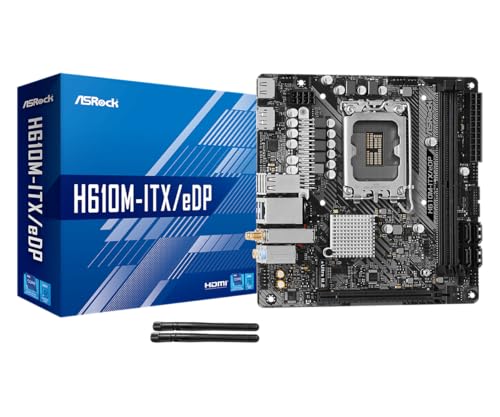
Pros
- eDP 1.4 header is rare at this tier, ideal for custom AIO and panel builds
- Dr.MOS 50A 6-phase VRM adequate for 65W LGA1700 CPUs in SFF cases
- PCIe 4.0 x16 slot preserves GPU bandwidth despite H610 chipset limits
- Integrated WiFi 5 and Bluetooth 5.1 plus Intel Gigabit LAN cover connectivity
Cons
- Limited owner fedback available at time of writing, making reliability signal thin
- H610 blocks CPU overclocking and caps DR4 at 3200MHz with no XMP scaling
- Single M.2 slot is Gen3 x4 only, no Gen4 NVMe or secondary M.2
The ASRock H610M-ITX/eDP is a budget LGA1700 Mini-ITX board built around Intel's entry H610 chipset with DDR4 memory and a dedicated eDP 1.4 panel connector. It targets SFF builders, embedded system integrators, and digital signage projects rather than gamers chasing K-series CPUs or high-frequency RAM tuning.
The standout is the eDP 1.4 header, which lets integrators drive a laptop-style FHD 60Hz panel directly, useful for all-in-one and industrial builds. For general desktop use, HDMI 2.1 outputs 4K 60Hz and DisplayPort 1.4 handles up to 8K 60Hz, both dependent on the installed CPU's iGPU capabilities.
Trade-offs are typical at H610 tier: no CPU or memory overclocking, DDR4-3200 ceiling, a single Gen3 x4 M.2, and no rear USB-C. The 6-phase 50A Dr.MOS VRM is fine for 65W non-K chips like a Core i5-13400, but pairing with a 14700K in a hot SFF case is not the intended use.
Buy this if you need a compact LGA1700 board with eDP for a panel PC, signage kiosk, or budget SFF office build. Skip this if you want DR5, K-series overclocking headroom, Gen4 NVMe, or dual M.2 storage on a modern Intel platform.
Socket and chipset: LGA1700 with H610 chipset supports 12th, 13th, and 14th Gen Core CPUs. H610 disables CPU multiplier and memory overclocking, so pair with locked SKUs like Core i3-12100, i5-13400, or i5-14400 for best value rather than K-series parts.
Memory support: 2 DR4 DIMM slots run dual-channel up to 3200MHz with XMP 2.0 and ECC UDIMM in non-ECC mode. Confirm kits against ASRock's QVL, since Mini-ITX 2-DIMM layouts are typically friendlier to Hynix and Micron dies at 3200 CL16.
Storage and PCIe: One PCIe 4.0 x16 slot for GPU, one Ultra M.2 slot (PCIe Gen3 x4 and SATA3), and 4 SATA3ports. Only one M.2, so plan bot NVMe plus SATA SDs for bulk storage in SFF builds.
Form factor and I/O: Standard 6.7 by 6.7 inch Mini-ITX footprint fits ITX cases and thin mITX chassis. Rear I/O includes HDMI 2.1, DisplayPort 1.4, 2 USB 3.2 Gen1, 4 USB 2.0, and Gigabit LAN. Note CNVi Bluetooth shares bandwidth with one rear USB 2.0 port.
The longer explanation
A chipset is the motherboard’s traffic controller. The CPU handles the most important direct connections, including the main graphics slot and some high-speed storage lanes, while the chipset provides the rest of the platform plumbing. That includes extra USB ports, SATA ports, networking attachments, audio paths, secondary M.2 slots, and other onboard features. Two boards can support the same processor family and still feel completely different because the chipset and board design give the manufacturer different resources to work with.
Z890 gives board makers more room to build loaded designs. That doesn’t mean every Z890 board is automatically excellent, because a cheap Z-series board can still cut corners. But the chipset tier encourages richer layouts: more Gen 4 or Gen 5 storage options, more rear USB, stronger VRM heatsinks, debug features, and sometimes Wi-Fi 7 or 5GbE networking on better models. B860 boards are more constrained. They can still be clean, stable, and fast in normal use, but the manufacturer has less reason to add extras that the typical buyer won’t pay for.
History / how we got here
Intel has separated enthusiast and mainstream desktop chipsets for years. The pattern is familiar: Z-series boards sit at the top for unlocked CPUs and fuller expansion, while B-series boards bring the same broad platform to cheaper PCs. Older examples included Z690 versus B660 and Z790 versus B760. The exact lane counts and I/O details changed generation by generation, but the buying logic stayed similar.
Z890 and B860 continue that split for newer Intel desktop systems. The names changed, the platform moved forward, and board vendors added modern features like faster wireless modules, more USB-C, and better M.2 cooling on select models. But the core question didn’t change: are you paying for a platform you can push and expand, or are you paying for a board that simply runs the CPU well at normal settings?
Why it works this way
Chipsets are segmented because not every PC needs the same amount of bandwidth or tuning support. A workstation-style desktop with several NVMe drives, capture hardware, high-end networking, and lots of USB devices can run out of board resources quickly. A simple gaming tower with one graphics card, one 2TB SSD, Ethernet, and a few USB devices won’t. Intel and motherboard vendors can keep B860 boards cheaper by leaving out some of the extra chipset capability and premium board-level hardware that Z890 buyers often expect.
CPU overclocking is the clearest dividing line. Z-series boards are the home for unlocked Intel CPUs and manual CPU tuning. B860 isn’t built for that same role. Memory tuning can still exist in different forms depending on the board and CPU support, but if your goal is multiplier tweaking, higher power limits, and a BIOS full of enthusiast controls, Z890 is where you should be shopping. You’ll also usually see better diagnostic features there, like onboard buttons, postcode displays, BIOS flashback options, and heavier heatsinks. Small things. They help when a build gets fussy.
When you’d want this
Choose Z890 if the motherboard is part of the hobby for you. Maybe you’re pairing a higher-end Intel CPU with a large liquid cooler, planning several NVMe drives, adding a high-bandwidth capture card, or keeping the platform for multiple GPU and storage upgrades. Z890 also makes sense if you care about rear I/O quality. A premium Z890 board may offer more USB-C, faster networking, better audio implementation, and more M.2 slots with proper heatsinks.
Choose B860 if you want the current platform without the enthusiast tax. A B860 board is a natural match for a gaming PC that runs stock settings, a family desktop, a compact office build, or a creator machine that doesn’t need many add-in cards. It can be the smarter buy when the saved money goes into the GPU, RAM, SSD, or monitor. If you’re cross-shopping high-end Intel builds, our motherboard guide for the i9-13900K and alternate i9-13900K motherboard roundup show why board tier matters more as CPU power draw and expansion needs rise.

Pros
- Q-Flash Plus enables BIOS update without CPU installed, essential for Ryzen 5000 out-of-box support.
- 55A DrMOS phases are adequately rated for Ryzen 5 and Ryzen 7 non-X chips at stock settings.
- Intel WiFi AC and Bluetooth onboard saves a PCIe slot in a platform with zero spare slots.
- Three rear display interfaces (DP plus two HDMI) give APU builders real multi-monitor flexibility.
Cons
- A520 chipset lacks PCIe 4.0 and overclocking support, ruling out XFR tuning and fast NVMe Gen4 drives.
- Single M.2 slot at PCIe 3.0 x4 speeds caps sequential reads well below modern Gen4 SSDs.
- Only two DIMM slots with no OC headroom means RAM configuration and speed are locked to JEDEC or limited EXPO profiles.
The Gigabyte A520I AC is a budget-tier Mini-ITX motherboard on the AMD AM4 socket, targeting builders who need a compact, self-contained system around a Ryzen 5000 or 3000 series CPU. It is best suited for home theater PCs, small office machines, or entry-level SFF gaming rigs where size and wireless connectivity matter more than overclocking.
The standout feature is Q-Flash Plus, which allows BIOS updates from a FAT32 USB drive with no CPU or RAM installed. For buyers picking up a Ryzen 5000 CPU with an older BIOS on the shelf, this is a genuine convenience that removes the need to borrow a compatible CPU. The 55A DrMOS 6-phase VRM is adequate for Ryzen 5 5600 and Ryzen 7 5700X at stock, though sustained all-core loads on higher-TDP chips may see thermal limits without active airflow over the heatsink.
The A520 chipset is the real constraint here. There is no CPU overclocking, no PCIe 4.0 support, and the single M.2 slot runs at PCIe 3.0 x4, capping sequential reads around 3,500 MB/s. With only two DIMM slots and no XMP/EXPO tuning above JEDEC defaults on this chipset, RAM flexibility is limited. Case builders should also confirm GPU length clearance in their chosen Mini-ITX enclosure before purchasing.
Buy this if you are building a compact Ryzen 5000 system where integrated WiFi and Q-Flash convenience matter and overclocking is not on the table. Skip this if you plan to run a Ryzen 9 series chip, use a Gen4 NVMe drive at full speed, or need any meaningful CPU tuning headroom.
CPU and Socket: AM4 socket supports 3rd Gen Ryzen (Zen 2) natively and 5th Gen Ryzen 5000 (Zen 3) after a Q-Flash Plus BIOS update. A520 chipset does not support CPU overclocking or manual frequency tuning, so PBO and Curve Optimizer are off the table entirely.
RAM and Memory: Two DIMM slots support dual-channel DDR4 configurations. A520 chipset limits practical RAM tuning, so target DDR4-3200 CL16 kits for the best 1:1 FCLK ratio without pushing outside chipset support. Maximum capacity is not specified in source data; typical AM4 Mini-ITX boards support 64GB across two slots.
Storage and Expansion: One M.2 slot running PCIe 3.0 x4 delivers up to approximately 3,500 MB/s sequential read, sufficient for mid-range NVMe SSDs but incompatible with PCIe 4.0 drives at full rated speed. A single PCIe 3.0 x16 slot handles the discrete GPU, leaving no room for add-in cards in a Mini-ITX build.
Display and Wireless: Rear I/O includes one DisplayPort and two HDMI outputs for APU-based builds, supporting up to three simultaneous displays. Intel dual-band AC WiFi covers 2.4 GHz and 5 GHz bands with Bluetooth included. ALC887 audio codec is functional for basic use but below the ALC1220 found on mid-range and higher boards.
What to look for in a Z890 or B860 motherboard
Start with socket and CPU compatibility, then move to the board features you can actually use. For Z890 and B860, don’t buy from the chipset name alone. Check the exact CPU support list, memory type, slot layout, VRM heatsink size, M.2 count, rear USB, networking, BIOS update method, and case fit. ATX gives you more room. Micro-ATX can save money. Mini-ITX is great for small builds but makes every port and slot decision more important.
The product data in this assignment also shows why chipset names need context. The ASRock H610M-ITX/eDP is a $89.99 Mini-ITX Intel LGA1700 board with DDR4, PCIe 4.0, eDP, HDMI, DisplayPort, Intel Gigabit LAN, Wi-Fi 5, and Dr.MOS, with a 4-star rating. It isn’t a Z890 or B860 board, but it’s a useful reminder that older and lower-tier boards can still serve compact, budget-conscious Intel builds. The Gigabyte A520I AC is a $126.61 AMD AM4 Mini-ITX board with direct 6 phases digital PWM, 55A DrMOS, Gaming GbE LAN, Intel WiFi plus Bluetooth, NVMe PCIe 3.0 x4 M.2, three display interfaces, Q-Flash Plus, and a 4.3 rating. Again, different platform, but the shopping lesson is the same: read the real feature list, not just the chipset badge.
Common misconceptions
The first misconception is that Z890 makes every PC faster. It doesn’t. If you run the same compatible CPU, same RAM speed, same GPU, and same SSD under normal settings, a well-made B860 board can feel identical in everyday apps and games. The difference shows up in tuning, I/O headroom, storage options, and board extras, not magic frame-rate gains.
The second misconception is that B860 means cheap junk. Some B860 boards will be bare-bones, sure, but others will have decent power delivery, Wi-Fi, multiple M.2 slots, and enough USB for a normal gaming setup. The third misconception is that you should always buy the more expensive chipset to be safe. That’s how people overspend. If you’ll never overclock, never add multiple expansion cards, and never fill four M.2 slots, a sensible B860 board can be the cleaner choice.
Frequently asked
Is Z890 faster than B860?
Not automatically. Z890 can support higher-end board designs and CPU overclocking, but the chipset alone doesn’t make a stock CPU run faster in normal gaming or desktop use. With the same CPU, GPU, memory configuration, and SSD, performance can be very close. The reason to buy Z890 is expansion and control, not a guaranteed speed boost.
Can I overclock on B860?
B860 is not the right choice for traditional unlocked CPU overclocking. If you bought an unlocked Intel CPU because you want manual multiplier control and deeper tuning options, shop Z890 instead. B860 can still offer useful BIOS settings, fan control, and memory-related options depending on the board. But it’s not the enthusiast overclocking tier.
Should a gaming PC use Z890 or B860?
Most gaming PCs can use B860 if the board has the ports, M.2 slots, memory support, and power delivery your CPU needs. Put the saved money toward the graphics card first. Z890 makes more sense for high-end CPUs, heavy storage setups, premium networking, and builders who like tuning. If you’re building once and leaving settings mostly alone, B860 is often enough.
Does Z890 give me more M.2 slots?
Often, yes, but you still need to check the exact board. Z890 gives manufacturers more room for richer storage layouts, and premium models commonly advertise several M.2 slots with heatsinks. Some B860 boards still offer more than one M.2 slot, which is plenty for many people. Count the slots, check their PCIe generation, and see whether using one slot disables a SATA port or changes another slot’s behavior.
Is B860 a bad match for a Core i9?
Not always, but it’s where you need to be careful. A power-hungry Core i9 deserves a board with strong VRM design, good heatsinks, and a BIOS that handles sustained loads cleanly. Some B860 boards may be fine for stock operation, while cheaper models may be a poor match for long heavy workloads. For a no-compromise Core i9 build, Z890 is usually the safer board class.
What’s the easiest way to choose between them?
List what you’ll install on day one and what you realistically might add later. If that list is one GPU, one or two SSDs, Wi-Fi, Ethernet, and normal USB devices, B860 probably covers it. If the list includes CPU overclocking, several NVMe drives, premium rear I/O, debug tools, and lots of upgrade room, buy Z890. Simple as that.




























Write Your Review
No reviews yet. Be the first to share your experience!