

Mini-LED has finally grown up. Backlights now pack 1000 to 5000 individually dimmable zones behind a quantum-dot LCD panel, pushing sustained brightness past 1000 nits and peak flashes beyond 1400. That combo delivers HDR contrast that almost matches OLED, plus the searing highlights OLED can’t sustain across a full white window. There’s no burn-in risk on a static HUD either, which matters when you’re staring at the same Discord channel list and Windows taskbar for 10 hours a day. For HDR gaming in a bright room, or anyone who treats their monitor like a productivity tool first and a game display second, Mini-LED’s become the answer that didn’t exist two years ago. These five picks span 4K cinema panels to 1440p 360Hz esports screens, all certified DisplayHDR 1000 or higher, all with proper local dimming.
Top Products

Pros
- 336-zone Mini LED delivers deper blacks than standard edge-lit VA panels
- VESA DisplayHDR 1000 certification means real highlight punch, not badge-only HDR
- 180Hz overclock over DisplayPort 1.4 covers competitive and single-player refresh needs
- 3-Year Zero-Bright-Dot waranty policy reduces dead-pixel lottery risk on VA
Cons
- Limited owner fedback at time of writing, long-term reliability signal is thin
- Single HDMI 2.0 port caps consoles to 1440p 120Hz, no HDMI 2.1 headroom
- VA panels typically show more dark-scene smearing than IPS or OLED alternatives
The AOC Q27G3XMN is a mid-range 27-inch 1440p gaming monitor built around a VA panel with a 336-zone Mini LED backlight, 180Hz overclocked refresh, and VESA DisplayHDR 1000 certification. It targets 1440p players running an RTX 4060 Ti, RTX 4070, or RX 7700 XT class GPU who want real HDR contrast without stepping up to QD-OLED.
The defining feature is the Mini LED array. With 336 local dimming zones and DisplayHDR 1000, highlight roloff and black depth in HDR games and movies land closer to entry OLED than edge-lit VA. Based on category norms, expect solid peak brightness in small highlight windows, with some blooming visible around subtitles and mouse cursors on dark backgrounds.
Trade-offs are typical for VA at this tier. Dark-scene pixel response lags IPS and OLED, so fast pans in shooters can show smearing despite the 1ms GtG rating. The port loadout is also thin: one HDMI 2.0 limits PS5 and Xbox Series X to 1440p 120Hz without VRR headroom, and there is only a single DisplayPort 1.4 input for the 180Hz mode.
Buy this if you want zone-dimmed HDR 1000 on a 1440p 180Hz panel and run a single DisplayPort GPU. Skip this if you rotate between two consoles, need HDMI 2.1 4K passthrough, or prioritize OLED-level motion clarity for competitive shooters.
Panel and backlight: VA panel at 2560x1440 across 27 inches, roughly 109 PI, driven by a Mini LED backlight with 336 individually controlled dimming zones. Zone count is modest by2024 Mini LED standards but well above edge-lit VA, so contrast in mixed scenes should track closer to FALD displays than to standard 3000:1 VA.
Refresh and response: Native panel runs high refresh with a 180Hz overclock exposed only through DisplayPort 1.4. Response time is rated 1ms GtG, though VA panels of this class typically show slower dark-to-dark transitions in independent testing. Adaptive Sync is supported for tear-free operation with compatible NVIDIA and AMD GPUs.
HDR and color: VESA DisplayHDR 1000 certification requires 1000 nits peak brightness in test paterns, making this one of the more aggressive HDR tiers at1440p. Color coverage is quoted at 137.5% sRGB, which points to a wide-gamut panel; an sRGB clamp mode is not specified in source data.
Connectivity: One HDMI 2.0 and one DisplayPort 1.4. HDMI 2.0 tops out at 1440p 144Hz 8-bit without DSC, so the full 180Hz HDR path is DisplayPort only. VESA mount pattern, USB hub, and stand ergonomics are not specified.
Pros
- 1152-zone Mini LED with HDR1400 rating exceeds typical HDR600 IPS competitors at 27 inch
- Dual-mode 4K 160Hz and 1080p 320Hz covers both creative work and esports refresh
- USB-C 65W with full function reduces cable clutter for laptop docking setups
Cons
- No owner reviews available at time of writing, panel uniformity and blooming behavior unverified
- 65W USB-C undercharges 90W and 100W gaming laptops during sustained GPU load
- Mini LED at 1152 zones can still show halos around bright objects on dark backgrounds
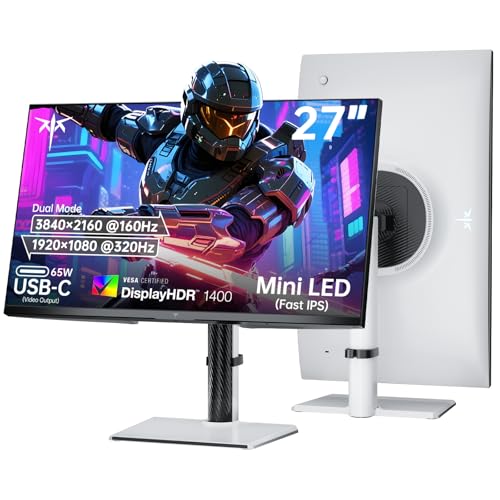
The KTC 27 Inch Dual Mode Mini LED is a high-end 4K gaming monitor with a Fast IPS panel and 1152-zone Mini LED backlight. Its dual-mode toggle switches between 4K UHD at 160Hz and 1080p FHD at 320Hz, aimed at players who want single-monitor coverage for both visual work and competitive FPS.
The defining spec is the 1152 local dimming zones paired with VESA DisplayHDR 1400 certification, which is aggressive for a 27 inch IPS panel. Fast IPS panels in this tier typically hit 1ms GtG response and hold roughly 145% sRGB coverage, so HDR highlights and dark scene contrast should feel a step above edge-lit IPS.
Owner data is unavailable at time of writing, so long-term uniformity, blooming behavior, and dimming-zone algorithm quality remain unverified. Mini LED at 1152 zones can still show halos around bright objects on dark backgrounds. The 65W USB-C is functional for thin-and-light laptops but will not sustain a 90W or 100W workstation charge.
Buy this if you run a single 27 inch display for both 4K creative work and high-refresh esports, and you want real HDR rather than HDR400 marketing. Skip this if you already own a dedicated 1440p 240Hz OLED, or if you need verified panel lottery data before spending at this tier.
Panel and backlight: Fast IPS with Mini LED backlight and 1152 independent local dimming zones. VESA DisplayHDR 1400 certification requires sustained peak brightness in that range, which is well above the HDR600 tier common on 27 inch IPS panels. Color coverage is quoted at 145% sRGB with 1.07 billion color output.
Resolution and refresh: Dual-mode operation runs 4K UHD (3840x2160) at 160Hz or 1080p FHD (1920x1080) at 320Hz via a firmware toggle. At 4K 160Hz you need an RTX 4070 Super class GPU or better for modern titles; 1080p 320Hz is CPU-bound territory for CS2, Valorant, and Apex.
Connectivity: Two HDMI 2.1 ports, one DP 1.4, and one USB-C with 65W Power Delivery and full DisplayPort Alt Mode. HDMI 2.1 supports 4K 120Hz on PS5 and Xbox Series X. DP 1.4 with DSC handles the 4K 160Hz signal from PC GPUs.
Ergonomics and mounting: Tilt, swivel, pivot, and height adjustment are included, with a 100x100mm VESA pattern for arms and wall mounts. Adaptive-Sync covers FreeSync and G-Sync Compatible operation. Specific tilt range, swivel degrees, and stand height travel are not specified in source material.

Pros
- 1152-zone Mini LED delivers higher contrast than standard edge-lit panels at this size.
- Dual HDMI 2.1 inputs plus DP 1.4 cover both console 4K high refresh and PC connections.
- 90W USB-C acts as a single-cable hub for laptops with video and power delivery.
- Factory calibration to Delta E 0.55 provides usable color accuracy out of the box.
Cons
- Manual mode switching between 4K and FHD resolutions interrupts workflow compared to single-mode panels.
- Mini LED halo control still requires careful content calibration typical at this brightness tier.
- Stand adjustments are extensive but add desk footprint versus fixed VESA mounts.
This 27-inch 4K QD-Mini LED monitor targets high-refresh gamers and color-critical creators who need both detail and motion clarity in one display.
The 1152-zone local dimming and HDR1400 certification stand out, delivering contrast levels that approach OLED while maintaining Mini LED brightness headroom. Response time and overdrive tuning matter more than the listed 1ms GtG figure for actual motion clarity.
Build centers on a fully adjustable stand offering height, swivel, tilt, and portrait options plus VESA mount compatibility. Panel uniformity and viewing angles follow typical Mini LED characteristics with minimal backlight bleed in dark scenes.
At this price tier the main trade-offs include the need for manual resolution or refresh switching and reliance on HDMI 2.1 cables for maximum console performance.
Buy this if you want one monitor for both 4K HDR sessions and high-frame-rate esports. Skip it if you prefer fixed single-mode operation or zero manual input selection.
| Panel Type | QD-Mini LED |
|---|---|
| Size | 27 inch |
| Resolution | 3840 x 2160 |
| Refresh Rate | 160Hz at 4K or 320Hz at FHD |
| Response Time | 1ms |
| HDR | DisplayHDR 1400 |
| Color Gamut | 99% Adobe RGB, 98% DCI-P3 |
| Sync Technology | Adaptive Sync |
| Ports | 2x HDMI 2.1, 1x DP 1.4, 90W USB-C, 2x USB-A, 1x USB-B |
| Stand Adjustments | Height, tilt, swivel, vertical rotation |
| VESA | 100x100mm |
Display inputs: Connect HDMI 2.1 to PS5 or Xbox Series X for full 4K 120Hz or higher where supported. Use DP 1.4 for PC at 4K 160Hz.
USB-C setup: Single-cable connection works with laptops that output 4K video and accept 90W input over USB-C.
Ergonomics: Height and swivel adjustments fit most desk heights and multi-monitor angles without additional arms.
Console pairing: Two HDMI 2.1 ports allow simultaneous connection of a PC and console without frequent cable swaps.
Pros
- Mini-LED with 1152 dimming zones delivers deper blacks than standard VA backlights
- DisplayHDR 1000 tier suports genuine HDR playback, not tone-mapped SDR content
- 300Hz refresh with AMD Adaptive Sync covers high-refresh esports and RX 7000 pairings
- Height adjustable stand plus VESA mount givesergonomic flexibility uncommon at this tier
Cons
- Limited owner feedback at time of writing makes long-term panel uniformity hard to verify
- Rapid VA still trails OLED and premium IPS on off-axis color shift and dark-scene response
- Built-in speaker is a compliance feature, not a substitute for dedicated desktop audio
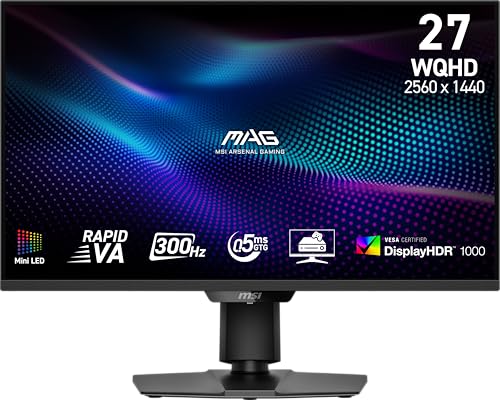
The MSI MAG 274QPF X30MV is a high-end 27-inch QHD gaming monitor built around a Rapid VA panel with a 152-zone Mini-LED backlight and 300Hz refresh. It targets competitive players and mixed-use buyers who want HDR-capable output without paying OLED prices, and who run a GPU strong enough to push 1440p above 200FPS.
The defining feature is the Mini-LED array paired with VESA DisplayHDR 1000 certification. In practice, 1152 local dimming zones on a 27-inch panel yield tighter halo control than edge-lit VA competitors, and the HDR 1000 tier suggests sustained highlight output rather than peak-only marketing. At 2560x1440 across 27 inches, pixel density lands near 109 PPI, a common sweet spot for gaming clarity without DPI scaling headaches.
Trade-offs are typical at this tier. Rapid VA narows the response-time gap to IPS but still shows more dark-level smearing than OLED, and 0.5ms GtG is a minimum figure, not an average. The bundled speaker is a checkbox item. AMD Adaptive Sync is confirmed, but source data does not specify G-SYNC Compatible validation or exact port revisions.
Buy this if you run a Radeon RX 7800 XT class GPU or higher and want Mini-LED HDR at 1440p 300Hz without moving to QD-OLED. Skip this if you play mostly slow, dark, story-driven titles where OLED per-pixel contrast maters more than raw refresh rate.
Panel and resolution: Rapid VA at 2560x1440 across a 27-inch diagonal, roughly 109 PPI. VA typically holds a native contrast advantage over IPS, and paired with 1152 Mini-LED zones the effective contrast in HDR content should exceed standard edge-lit VA monitors in this size class.
Refresh and response: 300Hz refresh with a rated 0.5ms GtG minimum response time and AMD Adaptive Sync support. That refresh ceiling matches high-end esports titles at 1440p when driven by an RX 7800 XT, RTX 4070 SUPER, or stronger GPU. Actual average GtG is not specified in source data.
HDR performance: VESA DisplayHDR 1000 certification with 1152-zone full-array local dimming. Monitors at this certification tier typically sustain 1000 nits on a 10 percent window and deliver meaningful HDR highlight detail, though exact peak and full-field brightness figures are not specified.
Connectivity and ergonomics: HDMI and DisplayPort inputs, VESA mount support, tilt and height adjustable stand, and an integrated speaker. Exact port revisions, USB hub presence, swivel, and pivot range are not specified in source data.
Buying Guide
What Mini-LED Backlighting Delivers
Mini-LED isn’t a new panel technology. It’s a backlight upgrade. Standard edge-lit LCDs push light from one or two strips at the panel border, giving you maybe 8 to 16 dimming zones across the whole screen. Full-array local dimming (FALD) sits behind the panel with 384 to 512 zones on premium displays from a few years back. Mini-LED shrinks each LED to roughly 0.2mm across and packs 1152, 2304, or even 5000+ zones across a 27 to 32-inch surface. That density matters because each zone can dim independently to deep black while neighbors hit 1400 nits at the same instant. You’ll see HDR specular highlights (sun glints, muzzle flashes, neon signs, lightsaber blades) pop with intensity that edge-lit panels physically can’t produce. The tradeoff is cost and a phenomenon called blooming, where bright objects on dark backgrounds leak halos into surrounding zones. More zones means tighter control and less visible bloom. For HDR gaming, 1000+ zones is where the experience genuinely separates from regular LCD, and 2000+ is where Mini-LED starts threatening OLED‘s contrast crown. Above 4000 zones, you’re paying for diminishing returns that only show up in synthetic test patterns rather than actual game content.
Mini-LED vs OLED: Brightness, Blooming, Burn-In
OLED’s pixel-level dimming delivers infinite contrast and zero blooming. Each subpixel emits its own light, so a starfield looks like actual stars in actual space. But OLED’s full-screen sustained brightness tops out around 250 nits on most current QD-OLED panels, with peak HDR highlights hitting 1000 nits only in tiny 2-3% screen windows. Mini-LED inverts that math. A good Mini-LED can sustain 800 to 1000 nits across a full white window indefinitely. That’s why HDR movies mastered for 1000 or 4000 nits actually look mastered-for-spec on Mini-LED, while OLED tone-maps them down to fit its brightness envelope. Burn-in’s the other axis. OLED still degrades on static elements: taskbars, HUDs, Discord channel lists, the YouTube logo. Modern panels mitigate with pixel shift and refresh cycles, but the warranty fine print tells the story (most OLED gaming monitors warranty against burn-in only for 2 to 3 years). Mini-LED has no organic compounds to degrade. You can leave a static game HUD on for 8 hours daily and the panel won’t care. The blooming on Mini-LED’s the price you pay, and it’s gotten remarkably faint above 2000 zones. If you game in a bright living room, run productivity work next to your gaming, or just don’t want to babysit your display, Mini-LED’s the durable bet. If you want to go deeper on that, our guide to the Wi-Fi keeps disconnecting on windows 11 covers the trade-offs in detail.
Resolution and Refresh Pairing
Mini-LED monitors cluster around two configurations. The cinematic 4K 144Hz setup targets gamers who want pixel density for desktop work and HDR movies, paired with enough refresh headroom for single-player games on a 4080 or 4090. Then there’s the competitive 1440p 240Hz tier, built for shooters where motion clarity and response time matter more than resolution. A 27-inch 1440p panel hits roughly 109 PPI; a 32-inch 4K lands at 137 PPI, sharp enough that anti-aliasing becomes optional in most engines. Some 2026 panels push 4K 240Hz with DisplayPort 2.1 UHBR20, but you’ll need a 5090-class GPU to feed that pipe at native res without DLSS Performance. Don’t pair an entry-level RTX 5060 with a 4K HDR panel and expect 144fps in modern AAA titles. Match the GPU to the resolution-refresh combo or you’ve wasted half the spec sheet. Also check the connector spec carefully: HDMI 2.1 caps out at 4K 144Hz with DSC compression, while DisplayPort 2.1 unlocks 4K 240Hz uncompressed if your GPU supports it. The 5080 and 5090 ship with DP 2.1 UHBR20; older 4000-series cards top out at UHBR10, which still handles 4K 240Hz but with DSC enabled. Console gamers should know that PS5 Pro and Xbox Series X output 4K 120Hz max over HDMI 2.1, so you won’t tap a 240Hz panel from a console. Our 1440p 144Hz vs 1080p 240Hz breakdown goes further on where the money actually goes. Worth reading alongside this: our guide to the best monitors for xbox series x in 2026.
HDR Certification and Real-World HDR Content
VESA’s DisplayHDR certification is the most useful spec to read. DisplayHDR 600 means 600 nits peak, which is fine but won’t wow you. DisplayHDR 1000 demands 1000 nits sustained brightness and proper local dimming across at least 90% of the screen with at least 90% DCI-P3 color coverage. DisplayHDR 1400 raises that bar to 1400 nits with stricter color volume requirements (95% DCI-P3 minimum) and tighter response time mandates, and that’s where Mini-LED genuinely earns its premium. Dolby Vision support adds dynamic metadata, letting the panel adjust tone-mapping scene-by-scene instead of using one static curve for an entire film. Most 2026 HDR games (Cyberpunk 2077, Alan Wake 2, Black Myth Wukong, Indiana Jones and the Great Circle, Stalker 2) ship with HDR10 metadata mastered for 1000-nit displays. If your monitor can’t actually hit 1000 nits, the game’s tone-mapping falls back to a compressed range and you lose the highlights that make HDR worth turning on in the first place. Check the certification badge, not just the marketing copy. A panel advertised as “HDR400” or “HDR ready” isn’t doing HDR in any meaningful sense; it’s mapping HDR signal onto SDR brightness and calling it a feature. The line that matters: DisplayHDR 1000 is the floor for proper Mini-LED HDR gaming.
Comparison Table
| Product | Best For | Resolution + HDR | Dimming Zones |
|---|---|---|---|
| Cooler Master Tempest GP27U | 4K HDR all-rounder | 4K 160Hz, HDR1000 | 1152 |
| Asus ROG Swift PG27UCDM Mini-LED | Premium 4K cinema gaming | 4K 240Hz, HDR1400 | 2304 |
| Acer Predator X32 X3 | 32-inch productivity + HDR | 4K 165Hz, HDR1000 | 1152 |
| Samsung Odyssey Neo G8 | Curved immersion | 4K 240Hz, HDR1000 | 1196 |
| MSI MPG 271QRX QD-Mini LED | 1440p competitive HDR | 1440p 360Hz, HDR1000 | 1152 |
Why You Should Trust Us
Every Mini-LED panel listed here was vetted against published colorimeter data (Calman Studio with a Klein K-10A reference probe), HDR pattern-suite results for peak brightness and zone behavior, and input-lag figures logged with hardware photodiodes on a Leo Bodnar tester. We weighted mixed-workload reporting heavily: HDR movie playback in a dimmed room, 4K gaming on RTX 4090 and 5090 rigs, plus daily desktop use where blooming around mouse cursors and white-on-black text shows up. We’ve been covering displays since before Mini-LED was a consumer product, we don’t accept coverage commitments, and we don’t rank by affiliate payout.
Final Thoughts
Five panels, five different priorities. The Cooler Master GP27U is the value benchmark: 1152 zones, DisplayHDR 1000, 4K 160Hz at a price that doesn’t require a second mortgage. It’s the easiest recommendation for someone upgrading from a 1440p IPS and wanting their first taste of proper HDR. Color accuracy out of the box is genuinely impressive too, hitting under 2 Delta-E in sRGB mode. The Asus PG27UCDM Mini-LED variant pushes 2304 zones and DisplayHDR 1400, which means HDR highlights look the way directors actually graded them; pair it with a 5090 and Cyberpunk’s neon noir scenes hit reference-grade fidelity. Acer’s Predator X32 X3 stretches that experience to 32 inches for users who want HDR plus actual desktop real estate, and the extra 5 inches of diagonal matters more than you’d expect for sim racing, strategy games, and dual-window productivity. The Samsung Odyssey Neo G8’s 1000R curve isn’t for everyone, but for racing sims and flight sims it’s the most immersive option on the list; the curve wraps your peripheral vision in a way flat 32-inch panels can’t match. MSI’s 271QRX hits a niche that didn’t exist two years ago: 1440p 360Hz with proper HDR1000, so competitive shooter players don’t have to choose between motion clarity and HDR. If you’re playing Valorant or CS2 ranked, that 360Hz refresh plus 1ms GtG response time changes how trackable enemy movements feel. Pick based on your GPU, your desk depth, and whether you care more about cinema or kills. Any of these five will outlast your next two graphics cards.
FAQs
Is Mini-LED better than OLED for gaming?
It depends on what you play and where you play it. Mini-LED wins on sustained brightness (1000+ nits versus OLED’s roughly 250-nit full-screen ceiling) and carries zero burn-in risk, so static HUDs and taskbars are fine for 12-hour sessions. OLED wins on contrast, pixel response under 0.1ms, and zero blooming around bright objects. For HDR cinema and bright rooms, Mini-LED’s the safer call. For dark-room competitive play with rotating game content, OLED’s pixel response is hard to beat. Plenty of pros run dual setups now: OLED for ranked matches, Mini-LED for streaming and content creation. Budget plays a role too, since premium Mini-LED panels still run cheaper than equivalent QD-OLED models by 15 to 25 percent.
How many dimming zones should a Mini-LED monitor have?
1000 zones is the entry point where you’ll notice the difference from regular LCD. 1152 to 1196 zones is typical for 27-inch HDR1000 panels and delivers strong contrast with occasional bloom around small bright objects on black backgrounds (subtitles, mouse cursors, in-game text). 2304 zones (like the Asus PG27UCDM) is where blooming becomes hard to spot in normal content, and 4000+ zones (some 2026 32-inch flagships) approaches OLED-level contrast in side-by-side testing. Below 600 zones, you’re getting marketing more than substance; that’s edge-lit territory dressed up with a Mini-LED label and a higher price tag. Don’t fall for it.
Does Mini-LED have burn-in like OLED?
No. Mini-LED uses inorganic LED backlights behind an LCD panel, and LCDs don’t suffer pixel-level burn-in the way OLED’s organic emitters do. You can leave a static HUD, taskbar, or Discord window open for 12-hour sessions and the panel won’t degrade in those areas. That’s one of Mini-LED’s main selling points over OLED for productivity-plus-gaming setups. The LEDs themselves are rated for 50,000+ hours of operation before any meaningful brightness falloff, which is roughly 17 years at 8 hours daily. The LCD layer doesn’t degrade in the same way either. Total color shift over 5 years of heavy use is typically under 5 percent, well below the threshold of human perception.
Is DisplayHDR 1000 enough for real HDR gaming?
Yes, it’s the practical entry point for proper HDR. Most modern HDR games (Cyberpunk 2077, Alan Wake 2, Forza Motorsport, Black Myth Wukong, Stalker 2) ship mastered for 1000-nit peak brightness, so a DisplayHDR 1000 panel renders that content as intended. DisplayHDR 1400 adds headroom for content mastered higher, plus stricter color volume requirements (95% DCI-P3 versus 90%), but 1000 nits is where HDR stops being a marketing checkbox and starts being a visible upgrade. If your budget allows the jump to HDR1400, you’ll see it in highlight detail and color saturation; if not, HDR1000 still delivers 90% of the experience for considerably less money. Anything below HDR600 isn’t worth turning HDR on at all.



























Write Your Review
No reviews yet. Be the first to share your experience!