

A dash cam under $200 is worth buying if it covers the part of the road you want to document and saves clips you can actually retrieve. The VIOFO A229 Plus 2CH is the best all-around choice here. It records the road ahead and behind at 1440p, so the rear view gets the same resolution as the front. For front-only coverage, the compact VIOFO A119 Mini 2 is the better use of your money.
The bigger decision is where you need a second view. If a car follows too closely before hitting you, a forward camera can show what was happening ahead of you but can’t show the approach from behind. If you move the camera between cars and just want a record of the lane ahead, running a rear cable may be more trouble than it’s worth. All five picks were below $200 as new cameras when we checked U.S. offers on November 26, 2026. Allow room for a memory card or parking power if the bundle doesn’t include them.
Five dash cams under $200 compared
| Pick | Dash cam | Recording | Best for | Main trade-off |
|---|---|---|---|---|
| Best overall | VIOFO A229 Plus 2CH | 1440p front and rear | Drivers who want more detail from the rear camera | Less room in the budget for extras |
| Best front-only | VIOFO A119 Mini 2 | 1440p front, up to 60 fps | A compact setup with a choice of frame rate or HDR | HDR mode runs at 30 fps |
| Lowest cost | 70mai M310 | 1296p front at 30 fps | Basic daytime commuting coverage | Phone app for framing and playback |
| Best low-cost 4K dual kit | 70mai A810 Lite | 4K front and 1080p rear | More front resolution on a tight budget | Front frame rate drops in dual mode |
| Best with an included card | REDTIGER F7NP | 4K front and 1080p rear | Getting both views and storage in one purchase | 1080p rear and a larger front housing |
VIOFO A229 Plus 2CH is the best dash cam under $200 for most drivers
Choose the A229 Plus 2CH if you’re buying specifically for front and rear coverage. Its two Sony STARVIS 2 IMX675 sensors capture 2560 × 1440 video, and VIOFO supports HDR on both views. The rear stream contains about 78% more pixels per frame than a 1920 × 1080 stream. That’s useful resolution to have for reviewing a vehicle approaching from behind. The glass, light, distance and motion still determine what detail survives in the clip.

VIOFO lists built-in GPS and dual-band Wi-Fi, so you can check the framing and transfer clips with a phone. The rear camera mounts to the back glass and connects to the front unit by cable. Think through that route before buying if you’ve got a liftgate, a long cabin or heavily tinted rear glass. A plain cable run can be the difference between a system you’ll fit this weekend and a box that sits in the trunk.
Look for the 2CH bundle, which supplies both road cameras. The A229 Plus is also sold in other configurations. At the checked price of $159.99, the two-camera kit leaves about $40 before tax for extras. If you also want the optional HK4 hardwire kit and professional fitting, price the full job up front.
VIOFO A119 Mini 2 is the best front-only dash cam
The A119 Mini 2 records the road ahead at 2560 × 1440 and uses a Sony STARVIS 2 IMX675 sensor. Its most important setting is the choice between up to 60 fps and HDR. VIOFO specifies 30 fps with HDR enabled. In daylight, 60 fps gives you more frames between two points in a maneuver. At night, HDR can help hold detail in scenes with bright headlights and dark surroundings, so the 30 fps HDR mode is worth trying first if that’s when you drive.

The Mini 2 has Wi-Fi and GPS, and its small housing is easier to tuck near the rearview mirror than a camera with a large display. Before peeling the adhesive backing, sit in your normal driving position and make sure you can reach the controls and remove the card. Use the live view to keep the hood low in the frame and give the camera a useful view of the road ahead.
At $95.98 when checked, this is where I’d stop if I wanted good front-camera settings and a simple install. If the reason you’re shopping is an incident behind the car, put the money toward a two-camera kit from the start.
70mai M310 is the cheapest pick for basic front coverage
The M310 is a small front-only camera for someone who mainly needs to show what happened ahead of the car. Its 2304 × 1296 recording runs at 30 fps, and 70mai lists a 130-degree field of view. At $39.99 when checked, it leaves enough room in the budget for a compatible endurance card. It’s the pick for documenting routine drives when you don’t need a second view or a camera screen.

The phone app is how you check the framing and review a clip over local Wi-Fi. Set it up on a day when you have time to confirm it reconnects, then practice pulling a short recording onto your phone. If you’d rather be able to check the camera angle on a built-in screen, the F7NP is a better fit. And if a power outlet stays on after you’ve switched the car off, check how it behaves before you leave the camera plugged in for days.
70mai lists its separately sold UP03 hardwire kit for the M310’s parking features. At this price, it makes sense to start with recording while you drive and pay for parking coverage only if you regularly need it. Choose the listing labeled M310 if you’re comparing these specs. The M310 Plus is a different model.
70mai A810 Lite is the best low-cost 4K front and rear kit
The A810 Lite is the dual kit to buy if you want to spend less than $100 on the camera and give the forward view more pixels. 70mai lists 3840 × 2160 for the front and 1920 × 1080 for the rear, with HDR on the front. The checked front-and-rear offer was $79.99. That leaves considerably more room for a card and installation than the A229 Plus does, as long as the offer stays at that price.

Read the frame rates by recording mode. The front can record at 30 fps when it runs alone. With both cameras connected, 70mai lists 24 or 25 fps up front, depending on the selected frequency, and 25 fps at the rear. If you plan to use both cameras from day one, those are the modes to compare. A listing that says 4K tells you the frame size. The manufacturer’s spec table tells you how many frames you get per second in your setup.
The A810 Lite uses a supercapacitor and supports microSD cards from 32GB through 512GB according to 70mai. Confirm which accessories come with the specific bundle you buy. I’d favor this model for front resolution at a low price. I’d spend more for the A229 Plus if the rear recording mattered just as much as the front.
REDTIGER F7NP is the easiest pick to buy with storage
The F7NP makes sense if you’re starting from scratch and want a kit that supplies a card. The $109.99 offer we checked explicitly included one. REDTIGER specifies 4K front video, 1080p rear video and a 3.18-inch display. That screen comes in handy when you’re aiming the front camera or want to check that the rear feed is connected without reaching for your phone.

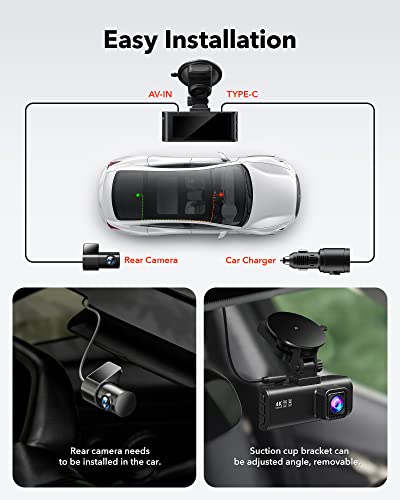
Look at what’s in the box at checkout. Different F7NP bundles can have different card capacities or include a hardwire kit. Even when a card comes with the camera, check the available recording history after a couple of ordinary drives. Multiple video streams use space faster than a single stream of the same bitrate. You’ll want to know how quickly older clips disappear before depending on the card for a longer trip.
The trade-off is a front unit that takes up more windshield space than the Mini 2 and a rear stream with fewer pixels than the A229 Plus. Choose the F7NP if the included storage and visible screen save you more hassle than a smaller front camera or a higher-resolution rear view would.
How We Evaluated
We compared manufacturer documentation for the exact models, focusing on recording resolution by channel, HDR and frame-rate modes, storage, and what it takes to power each camera while parked. We evaluated the products from published specifications and current retail offers.
We used the prices of new, available U.S. camera bundles on November 26, 2026. The $200 cap applies to the listed camera package before taxes, shipping, optional gear and installation. We gave the top spot to the A229 Plus because it supplies a 1440p rear stream alongside a 1440p front stream, a useful combination for people who value both road views.
How to choose a dash cam under $200
Which part of the road do you need to record?
Start with the last situation you wish you’d captured. An unsafe merge ahead? A front unit usually covers that angle. Somebody came up behind you on the freeway? Budget for a rear camera. Two views. Two different accounts of the same moment. You can use a front-and-rear kit to show traffic ahead and what happened behind without inferring the second part from the movement of your own car.
Check the sightline before committing to a rear setup. Cargo, a steeply sloped window, dark tint and a dirty exterior can each reduce what the camera sees. On a hatchback, confirm there’s enough cable slack for the hatch to open normally. Follow the vehicle and camera instructions for routing, especially around airbags. Ask an installer if you’re unsure where the cable can safely run.
How much detail will you get at night?
Resolution is only part of the answer. The contrast between a brightly lit plate and the surrounding street can be large, and relative motion may blur the lettering within a single frame. HDR can help balance light and dark areas where it’s supported. If you often drive after dark, read the camera’s night-mode settings and verify what it records on your own route. Clean the windshield around the lens and look for dashboard reflections in the saved clip.
Watch a saved clip on a larger screen before deciding that the app preview is good enough. If your laptop lacks the port for your card reader, see our USB-C hub versus docking station guide for the kinds of ports a compact hub can add. Check whether your reader or hub takes microSD directly or requires a full-size SD adapter.
What will the complete installation cost?
Add the recommended memory card, any parking hardware and labor before comparing prices. If your car’s accessory socket switches off with the ignition, the usual plug-in adapter can’t keep recording while parked. A compatible hardwire kit can supply power and let supported models switch modes. Choose an appropriate low-voltage cutoff with the installer and check your vehicle’s instructions before deciding how long to leave the camera powered.
For the card, start with the manufacturer’s approved capacities and speed classes. Pick a supported endurance model made for repeated writes if you need to buy one separately. Format it using the camera’s instructions and confirm that a clip plays from each channel. Save important recordings to a computer or a separate drive before they loop out. Our external hard drive picks cover simple storage options if you keep footage from several vehicles.
Dash cam FAQs
Is it hard to install a front-only dash cam?
A plug-in front camera is usually the simplest option. Position it with a clear view through the swept part of the windshield, check its framing, then route its power cable according to your vehicle’s instructions. On the first drive, verify that it starts recording with the car and saves playable footage. A rear camera adds a longer run, and parking power can make either install more involved.
Do I need parking mode?
It’s worth budgeting for if you leave the car on a busy street or in a lot where scrapes often happen while it’s unattended. If you primarily want a record of your drive, you can skip the extra hardware for now. Check which events the mode records and which views stay active. Event-triggered parking recording can miss activity outside the camera’s view.
Can a budget dash cam read plates at night?
Sometimes, depending on distance, lighting, angle and how fast the cars are moving relative to each other. Even when the characters are blurred, the clip can still help show the car’s color, lane position or direction of travel. After an incident, preserve the original clip and nearby segments from both cameras. The lead-up can be as useful as the moment of contact.
Bottom Line
Get the VIOFO A229 Plus 2CH if you want useful detail from both traffic directions and can fit the rear cable. Buy the VIOFO A119 Mini 2 if one compact front camera covers your needs. If the whole setup has to fit a strict $200 ceiling, price the card and installation before deciding. The 70mai A810 Lite leaves more room for those costs while giving you both road views.




























Write Your Review
No reviews yet. Be the first to share your experience!