

AMD’s B650 and X670 chipsets share the same AM5 socket, take the same Ryzen 7000 and 9000 processors, and run the same DDR5 memory. So why does an X670 board routinely cost $80 to $150 more than a B650 with a comparable power stage? For a pure gaming build, that premium mostly buys connectivity you’ll never plug in. We researched both tiers against real gaming workloads, from a Ryzen 5 up to a 7800X3D, and the honest answer is that your CPU and GPU set the frame rate, not the chipset label. If you’re speccing a board around a 7800X3D, our best 7800X3D motherboard picks line up neatly with everything below.
Matchup at a glance
Here’s the split in plain terms. B650 is the mainstream AM5 tier. It gives you PCIe 5.0 for the graphics slot or storage on most boards, solid DDR5 support, and enough M.2 slots for a gaming rig. X670 doubles up the chipset (it’s literally two B650 dies working together), which unlocks more PCIe lanes, more USB ports, and more M.2 real estate. That extra silicon is genuinely useful if you’re building a workstation. For gaming, it mostly sits idle. A single GPU and one or two SSDs don’t come close to saturating what B650 already offers.
The pricing reality drives the decision. Decent B650 boards start near $130 and top out around $220. X670 boards begin where good B650 boards end, often $250 and up. That $100-ish delta could instead go toward a faster GPU tier or a jump from a Ryzen 5 to a Ryzen 7. If you’re pairing a chip like the 9800X3D, our best motherboard for 9800X3D roundup shows how many strong options land on B650 alone.
Spec sheet showdown
| Spec | B650 | B650E | X670 | X670E |
|---|---|---|---|---|
| Socket | AM5 | AM5 | AM5 | AM5 |
| Chipset dies | One | One | Two | Two |
| PCIe 5.0 GPU slot | Optional | Guaranteed | Optional | Guaranteed |
| Typical M.2 slots | 2 to 3 | 2 to 3 | 3 to 4 | 3 to 4 |
| USB port count | Moderate | Moderate | High | High |
| Street price range | $130-$220 | $180-$280 | $250-$400 | $300-$700 |
Notice the “E” suffix matters more than the base number. B650E guarantees PCIe 5.0 to both the GPU slot and a primary M.2, while plain B650 leaves that up to the board maker. So a well-chosen B650E can match an X670’s fast lanes for less money. The chipset tier alone doesn’t tell you if you get Gen5 graphics.
Here’s the lane math that actually decides this. The AM5 CPU itself supplies 24 usable PCIe 5.0 lanes regardless of chipset: 16 for the graphics slot, 4 for the primary M.2, and 4 for the chipset link. That budget is identical on B650 and X670, which is why a B650E feeds a full x16 Gen5 GPU slot and a Gen5 NVMe drive with no help from the chipset at all. Where X670 pulls ahead is downstream of that link. Its two-die design breaks out extra Gen4 lanes for additional M.2 sockets and expansion slots, so the difference is about how many secondary drives and cards you can hang off the board, not how fast your primary GPU or boot SSD runs. A single RTX 4080 and one PCIe 5.0 SSD hitting 12,000 MB/s live entirely on CPU lanes on either tier.
B650 strengths
B650 is the value tier that refuses to feel cheap. The VRM on mid-range B650 boards handles a 105W Ryzen 7 or a 120W Ryzen 9 without throttling, and for the 7800X3D, which sips under 90W in games, even entry B650 boards have plenty of headroom. You get DDR5 EXPO profiles, at least two M.2 slots, and 2.5Gb LAN on most models above $150. That’s everything a gaming PC actually uses.
On overclocking, B650 gives you more than the price suggests. The X3D chips ship with locked multipliers, so tuning happens through Precision Boost Overdrive and Curve Optimizer rather than raw clock pushing, and any decent B650 VRM feeds those undervolt-and-boost routines cleanly. Memory is where the real headroom sits: mid-range B650 boards handle DDR5-6000 EXPO at the coupled 1:1 fabric ratio that Ryzen loves, and many push DDR5-6400 with manual tuning. A 12-phase or 14-phase power stage with 50A to 80A DrMOS stages stays cool enough that the memory controller, not the board, becomes the limit.
The efficiency angle helps too. A single chipset die draws less power and heat, so many B650 boards skip the tiny chipset fan that some X670 designs carry. Fewer moving parts, less noise. Our best motherboard for Ryzen 9800X3D guide leans on B650 and B650E for exactly this reason.
There’s a quieter benefit that owners bring up a lot: BIOS maturity. B650 launched alongside AM5 and has seen wave after wave of firmware updates, so memory training times have dropped and EXPO stability has firmed up on the popular boards. First-boot memory training that used to take a minute now often clears in seconds. For someone building their first AM5 rig, that polish removes a real headache, and it costs nothing extra.
X670 strengths
X670 earns its keep when you outgrow a single-GPU gaming box. The dual-chipset layout feeds more PCIe lanes, so you can run three or four NVMe drives plus a capture card or a 10Gb network card without stealing bandwidth from the graphics slot. The two dies are chained, and that internal link runs at Gen4 x4, roughly 8GB/s of shared bandwidth. Push a full drive array plus fast networking through it at once and you can bottleneck the link, but no realistic gaming load gets close.
USB is the other tangible gap. Where a B650 board might expose eight to ten rear ports, X670 designs routinely offer twelve to sixteen, including multiple 10Gbps and 20Gbps USB-C connectors driven by the second chipset die. That matters if you’ve got a stream deck, an audio interface, an external drive array, and a webcam all live at once. X670 boards also tend to carry heavier VRMs, 16-phase or larger with 90A stages, giving a high-clocked Ryzen 9 9950X extra thermal margin under sustained all-core loads. Content creators and heavy multitaskers feel the difference; gamers rarely do.
The other draw is longevity headroom. If you think you’ll add hardware over the next few years, the extra lanes give you room to grow. That said, most gamers never hit those limits. A compact AMD board like the Gigabyte A520I AC shows how much a small board can pack in, with a Direct 6-phase digital PWM, 55A DrMOS, Intel WiFi plus Bluetooth, and a PCIe 3.0 x4 M.2 slot on a Mini-ITX frame for $126.61 at a 4.3-star rating. It’s an older AM4 platform, so it’s a stepping stone rather than an AM5 rival, but it proves compact doesn’t mean stripped down.

Pros
- Q-Flash Plus enables BIOS update without CPU installed, essential for Ryzen 5000 out-of-box support.
- 55A DrMOS phases are adequately rated for Ryzen 5 and Ryzen 7 non-X chips at stock settings.
- Intel WiFi AC and Bluetooth onboard saves a PCIe slot in a platform with zero spare slots.
- Three rear display interfaces (DP plus two HDMI) give APU builders real multi-monitor flexibility.
Cons
- A520 chipset lacks PCIe 4.0 and overclocking support, ruling out XFR tuning and fast NVMe Gen4 drives.
- Single M.2 slot at PCIe 3.0 x4 speeds caps sequential reads well below modern Gen4 SSDs.
- Only two DIMM slots with no OC headroom means RAM configuration and speed are locked to JEDEC or limited EXPO profiles.
The Gigabyte A520I AC is a budget-tier Mini-ITX motherboard on the AMD AM4 socket, targeting builders who need a compact, self-contained system around a Ryzen 5000 or 3000 series CPU. It is best suited for home theater PCs, small office machines, or entry-level SFF gaming rigs where size and wireless connectivity matter more than overclocking.
The standout feature is Q-Flash Plus, which allows BIOS updates from a FAT32 USB drive with no CPU or RAM installed. For buyers picking up a Ryzen 5000 CPU with an older BIOS on the shelf, this is a genuine convenience that removes the need to borrow a compatible CPU. The 55A DrMOS 6-phase VRM is adequate for Ryzen 5 5600 and Ryzen 7 5700X at stock, though sustained all-core loads on higher-TDP chips may see thermal limits without active airflow over the heatsink.
The A520 chipset is the real constraint here. There is no CPU overclocking, no PCIe 4.0 support, and the single M.2 slot runs at PCIe 3.0 x4, capping sequential reads around 3,500 MB/s. With only two DIMM slots and no XMP/EXPO tuning above JEDEC defaults on this chipset, RAM flexibility is limited. Case builders should also confirm GPU length clearance in their chosen Mini-ITX enclosure before purchasing.
Buy this if you are building a compact Ryzen 5000 system where integrated WiFi and Q-Flash convenience matter and overclocking is not on the table. Skip this if you plan to run a Ryzen 9 series chip, use a Gen4 NVMe drive at full speed, or need any meaningful CPU tuning headroom.
CPU and Socket: AM4 socket supports 3rd Gen Ryzen (Zen 2) natively and 5th Gen Ryzen 5000 (Zen 3) after a Q-Flash Plus BIOS update. A520 chipset does not support CPU overclocking or manual frequency tuning, so PBO and Curve Optimizer are off the table entirely.
RAM and Memory: Two DIMM slots support dual-channel DDR4 configurations. A520 chipset limits practical RAM tuning, so target DDR4-3200 CL16 kits for the best 1:1 FCLK ratio without pushing outside chipset support. Maximum capacity is not specified in source data; typical AM4 Mini-ITX boards support 64GB across two slots.
Storage and Expansion: One M.2 slot running PCIe 3.0 x4 delivers up to approximately 3,500 MB/s sequential read, sufficient for mid-range NVMe SSDs but incompatible with PCIe 4.0 drives at full rated speed. A single PCIe 3.0 x16 slot handles the discrete GPU, leaving no room for add-in cards in a Mini-ITX build.
Display and Wireless: Rear I/O includes one DisplayPort and two HDMI outputs for APU-based builds, supporting up to three simultaneous displays. Intel dual-band AC WiFi covers 2.4 GHz and 5 GHz bands with Bluetooth included. ALC887 audio codec is functional for basic use but below the ALC1220 found on mid-range and higher boards.
Real-world scenarios
Pure 1440p gaming with a 7800X3D
This is the clearest case for B650. The 7800X3D barely stresses a VRM, one GPU fills the Gen5 x16 slot, and a single fast SSD covers storage on the CPU’s own Gen5 M.2 lane. Spending on X670 here changes nothing you’ll see on screen, because none of the extra chipset lanes come into play. Put the difference into the graphics card.
Gaming plus streaming and editing
Now X670 starts to look reasonable. Multiple capture drives, an encode SSD, and more rear USB for peripherals all lean on the extra I/O and the second chipset die’s downstream lanes. A high-clocked Ryzen 9 benefits from the beefier VRMs common on X670 boards during long export renders. If you’re routing that around a 9800X3D specifically, our best motherboard for Ryzen 7 9800X3D notes cover which features actually pay off.
Future upgrade path
Planning to add drives and cards over three or four years? X670’s lane budget gives you slack for a third or fourth NVMe drive without dropping the GPU slot to x8. But a good B650E already carries Gen5 graphics and Gen5 storage, so the “future-proofing” argument is thinner than it sounds for most gamers.
Pricing and availability
Both tiers are widely stocked, and that’s part of why the choice matters. B650 boards from every major brand sit between $130 and $220, with the popular mid-range models clustered around $170. X670 boards rarely dip below $250, and X670E flagships climb past $400. The dollars you save on chipset can move you up a whole GPU class, which is the upgrade you’ll actually notice in benchmarks.
If you’re cross-shopping Intel instead, the math shifts but the principle holds: mid-tier chipsets cover gaming, and the halo tier is for heavy I/O. Our best motherboard for i7-14700K guide walks through the same value-versus-features tradeoff on the LGA1700 side. Don’t assume the expensive board is the smart board.
Which to buy
For a gaming-first AM5 build, buy B650 or B650E and pocket the difference. It runs every current Ryzen chip, feeds a single GPU at full Gen5 x16 speed, and handles the storage a gamer realistically installs. Reach for X670 or X670E only if you’re stacking multiple NVMe drives, high-speed networking, or a rack of USB devices alongside gaming. That’s a workstation profile, not a gaming one.
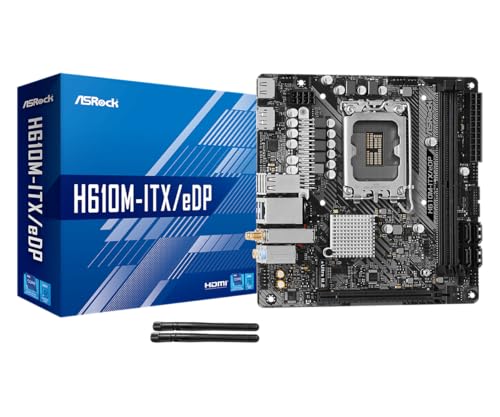
Budget or small-form-factor builders leaning Intel have a similar entry point. The ASRock H610M-ITX/eDP is a Mini-ITX LGA1700 board at $89.99 with a 4-star rating, supporting Intel 14th, 13th, and 12th Gen Core chips on DDR4, with PCIe 4.0, Intel Gigabit LAN, Wi-Fi 5, and Dr.MOS power delivery. It’s an Intel budget counterpoint rather than an AM5 board, but it makes the same point B650 does: a sensible mainstream board covers gaming without the flagship tax.
Pros
- eDP 1.4 header is rare at this tier, ideal for custom AIO and panel builds
- Dr.MOS 50A 6-phase VRM adequate for 65W LGA1700 CPUs in SFF cases
- PCIe 4.0 x16 slot preserves GPU bandwidth despite H610 chipset limits
- Integrated WiFi 5 and Bluetooth 5.1 plus Intel Gigabit LAN cover connectivity
Cons
- Limited owner fedback available at time of writing, making reliability signal thin
- H610 blocks CPU overclocking and caps DR4 at 3200MHz with no XMP scaling
- Single M.2 slot is Gen3 x4 only, no Gen4 NVMe or secondary M.2
The ASRock H610M-ITX/eDP is a budget LGA1700 Mini-ITX board built around Intel's entry H610 chipset with DDR4 memory and a dedicated eDP 1.4 panel connector. It targets SFF builders, embedded system integrators, and digital signage projects rather than gamers chasing K-series CPUs or high-frequency RAM tuning.
The standout is the eDP 1.4 header, which lets integrators drive a laptop-style FHD 60Hz panel directly, useful for all-in-one and industrial builds. For general desktop use, HDMI 2.1 outputs 4K 60Hz and DisplayPort 1.4 handles up to 8K 60Hz, both dependent on the installed CPU's iGPU capabilities.
Trade-offs are typical at H610 tier: no CPU or memory overclocking, DDR4-3200 ceiling, a single Gen3 x4 M.2, and no rear USB-C. The 6-phase 50A Dr.MOS VRM is fine for 65W non-K chips like a Core i5-13400, but pairing with a 14700K in a hot SFF case is not the intended use.
Buy this if you need a compact LGA1700 board with eDP for a panel PC, signage kiosk, or budget SFF office build. Skip this if you want DR5, K-series overclocking headroom, Gen4 NVMe, or dual M.2 storage on a modern Intel platform.
Socket and chipset: LGA1700 with H610 chipset supports 12th, 13th, and 14th Gen Core CPUs. H610 disables CPU multiplier and memory overclocking, so pair with locked SKUs like Core i3-12100, i5-13400, or i5-14400 for best value rather than K-series parts.
Memory support: 2 DR4 DIMM slots run dual-channel up to 3200MHz with XMP 2.0 and ECC UDIMM in non-ECC mode. Confirm kits against ASRock's QVL, since Mini-ITX 2-DIMM layouts are typically friendlier to Hynix and Micron dies at 3200 CL16.
Storage and PCIe: One PCIe 4.0 x16 slot for GPU, one Ultra M.2 slot (PCIe Gen3 x4 and SATA3), and 4 SATA3ports. Only one M.2, so plan bot NVMe plus SATA SDs for bulk storage in SFF builds.
Form factor and I/O: Standard 6.7 by 6.7 inch Mini-ITX footprint fits ITX cases and thin mITX chassis. Rear I/O includes HDMI 2.1, DisplayPort 1.4, 2 USB 3.2 Gen1, 4 USB 2.0, and Gigabit LAN. Note CNVi Bluetooth shares bandwidth with one rear USB 2.0 port.
Common questions
Does X670 give higher gaming FPS than B650?
No. With the same CPU, GPU, and memory, frame rates are effectively identical. The chipset handles I/O, not rendering, and the GPU runs on CPU-supplied lanes on both tiers, so it doesn’t move your gaming numbers.
Can B650 run a Ryzen 9 or an X3D chip?
Yes. Mid-range B650 boards have VRMs sized for a 120W Ryzen 9, and X3D chips like the 7800X3D draw well under that in games. Just check the specific board’s power stage if you plan heavy all-core loads.
What’s the difference between B650 and B650E?
The “E” guarantees PCIe 5.0 to both the GPU slot and a primary M.2. Plain B650 leaves Gen5 graphics optional per board. If you want Gen5 everywhere on a budget, look for B650E.
Do I need the extra M.2 slots on X670?
Most gamers don’t. One or two NVMe drives fit comfortably on B650. The extra slots matter for large game libraries, video projects, or a dedicated scratch disk.
Is X670 worth it for a high-end Intel-to-AMD switch?
Only if your workload demands the I/O. Coming from a heavy Intel platform like an i9-13900K board, you might value the lane count, but for gaming alone B650E delivers the same experience for less.




























Write Your Review
No reviews yet. Be the first to share your experience!