

The best budget motherboard 2026 buyers should care about is not always the cheapest board on the shelf. A good budget pick has to match your CPU socket, memory type, case size, storage plan, and networking needs without forcing you to pay for features you’ll never use. We researched five boards across current Intel, older Intel, AM4, and newer premium creator-class platforms, with prices running from $89.99 to $424.65 and ratings from 4.0 to 4.9 where available.
If you’re building around a high-end chip, budget gets more complicated because a weak board can hold back the rest of the parts. Our deeper guides to the best motherboard for i9-13900K and the best motherboard for 9800X3D are better fits for flagship CPUs, but this guide is for builders trying to keep the board spend under control. Small case. Office tower. DDR4 reuse. Maybe a new DDR5 Intel build. That’s the lane here.
Pros
- eDP 1.4 header is rare at this tier, ideal for custom AIO and panel builds
- Dr.MOS 50A 6-phase VRM adequate for 65W LGA1700 CPUs in SFF cases
- PCIe 4.0 x16 slot preserves GPU bandwidth despite H610 chipset limits
- Integrated WiFi 5 and Bluetooth 5.1 plus Intel Gigabit LAN cover connectivity
Cons
- Limited owner fedback available at time of writing, making reliability signal thin
- H610 blocks CPU overclocking and caps DR4 at 3200MHz with no XMP scaling
- Single M.2 slot is Gen3 x4 only, no Gen4 NVMe or secondary M.2
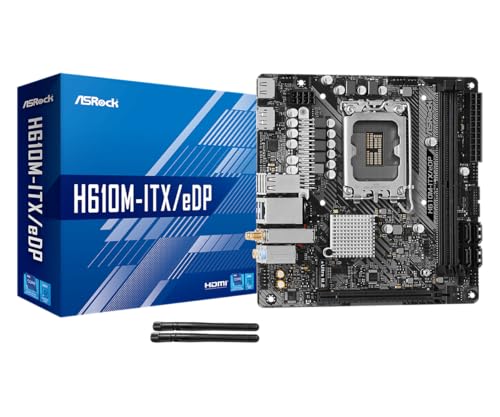
The ASRock H610M-ITX/eDP is a budget LGA1700 Mini-ITX board built around Intel's entry H610 chipset with DDR4 memory and a dedicated eDP 1.4 panel connector. It targets SFF builders, embedded system integrators, and digital signage projects rather than gamers chasing K-series CPUs or high-frequency RAM tuning.
The standout is the eDP 1.4 header, which lets integrators drive a laptop-style FHD 60Hz panel directly, useful for all-in-one and industrial builds. For general desktop use, HDMI 2.1 outputs 4K 60Hz and DisplayPort 1.4 handles up to 8K 60Hz, both dependent on the installed CPU's iGPU capabilities.
Trade-offs are typical at H610 tier: no CPU or memory overclocking, DDR4-3200 ceiling, a single Gen3 x4 M.2, and no rear USB-C. The 6-phase 50A Dr.MOS VRM is fine for 65W non-K chips like a Core i5-13400, but pairing with a 14700K in a hot SFF case is not the intended use.
Buy this if you need a compact LGA1700 board with eDP for a panel PC, signage kiosk, or budget SFF office build. Skip this if you want DR5, K-series overclocking headroom, Gen4 NVMe, or dual M.2 storage on a modern Intel platform.
Socket and chipset: LGA1700 with H610 chipset supports 12th, 13th, and 14th Gen Core CPUs. H610 disables CPU multiplier and memory overclocking, so pair with locked SKUs like Core i3-12100, i5-13400, or i5-14400 for best value rather than K-series parts.
Memory support: 2 DR4 DIMM slots run dual-channel up to 3200MHz with XMP 2.0 and ECC UDIMM in non-ECC mode. Confirm kits against ASRock's QVL, since Mini-ITX 2-DIMM layouts are typically friendlier to Hynix and Micron dies at 3200 CL16.
Storage and PCIe: One PCIe 4.0 x16 slot for GPU, one Ultra M.2 slot (PCIe Gen3 x4 and SATA3), and 4 SATA3ports. Only one M.2, so plan bot NVMe plus SATA SDs for bulk storage in SFF builds.
Form factor and I/O: Standard 6.7 by 6.7 inch Mini-ITX footprint fits ITX cases and thin mITX chassis. Rear I/O includes HDMI 2.1, DisplayPort 1.4, 2 USB 3.2 Gen1, 4 USB 2.0, and Gigabit LAN. Note CNVi Bluetooth shares bandwidth with one rear USB 2.0 port.

Pros
- Q-Flash Plus enables BIOS update without CPU installed, essential for Ryzen 5000 out-of-box support.
- 55A DrMOS phases are adequately rated for Ryzen 5 and Ryzen 7 non-X chips at stock settings.
- Intel WiFi AC and Bluetooth onboard saves a PCIe slot in a platform with zero spare slots.
- Three rear display interfaces (DP plus two HDMI) give APU builders real multi-monitor flexibility.
Cons
- A520 chipset lacks PCIe 4.0 and overclocking support, ruling out XFR tuning and fast NVMe Gen4 drives.
- Single M.2 slot at PCIe 3.0 x4 speeds caps sequential reads well below modern Gen4 SSDs.
- Only two DIMM slots with no OC headroom means RAM configuration and speed are locked to JEDEC or limited EXPO profiles.
The Gigabyte A520I AC is a budget-tier Mini-ITX motherboard on the AMD AM4 socket, targeting builders who need a compact, self-contained system around a Ryzen 5000 or 3000 series CPU. It is best suited for home theater PCs, small office machines, or entry-level SFF gaming rigs where size and wireless connectivity matter more than overclocking.
The standout feature is Q-Flash Plus, which allows BIOS updates from a FAT32 USB drive with no CPU or RAM installed. For buyers picking up a Ryzen 5000 CPU with an older BIOS on the shelf, this is a genuine convenience that removes the need to borrow a compatible CPU. The 55A DrMOS 6-phase VRM is adequate for Ryzen 5 5600 and Ryzen 7 5700X at stock, though sustained all-core loads on higher-TDP chips may see thermal limits without active airflow over the heatsink.
The A520 chipset is the real constraint here. There is no CPU overclocking, no PCIe 4.0 support, and the single M.2 slot runs at PCIe 3.0 x4, capping sequential reads around 3,500 MB/s. With only two DIMM slots and no XMP/EXPO tuning above JEDEC defaults on this chipset, RAM flexibility is limited. Case builders should also confirm GPU length clearance in their chosen Mini-ITX enclosure before purchasing.
Buy this if you are building a compact Ryzen 5000 system where integrated WiFi and Q-Flash convenience matter and overclocking is not on the table. Skip this if you plan to run a Ryzen 9 series chip, use a Gen4 NVMe drive at full speed, or need any meaningful CPU tuning headroom.
CPU and Socket: AM4 socket supports 3rd Gen Ryzen (Zen 2) natively and 5th Gen Ryzen 5000 (Zen 3) after a Q-Flash Plus BIOS update. A520 chipset does not support CPU overclocking or manual frequency tuning, so PBO and Curve Optimizer are off the table entirely.
RAM and Memory: Two DIMM slots support dual-channel DDR4 configurations. A520 chipset limits practical RAM tuning, so target DDR4-3200 CL16 kits for the best 1:1 FCLK ratio without pushing outside chipset support. Maximum capacity is not specified in source data; typical AM4 Mini-ITX boards support 64GB across two slots.
Storage and Expansion: One M.2 slot running PCIe 3.0 x4 delivers up to approximately 3,500 MB/s sequential read, sufficient for mid-range NVMe SSDs but incompatible with PCIe 4.0 drives at full rated speed. A single PCIe 3.0 x16 slot handles the discrete GPU, leaving no room for add-in cards in a Mini-ITX build.
Display and Wireless: Rear I/O includes one DisplayPort and two HDMI outputs for APU-based builds, supporting up to three simultaneous displays. Intel dual-band AC WiFi covers 2.4 GHz and 5 GHz bands with Bluetooth included. ALC887 audio codec is functional for basic use but below the ALC1220 found on mid-range and higher boards.

Pros
- 14+1 DRPS VRM with 55A DrMOS and extended heatsink targets sustained i9-14900K loads
- Dual 8-pin EPS connectors provide current headroom for K-SKU overclocking
- Integrated WiFi 6E, Bluetooth 5.3, and 2.5Gbps LAN skip add-in card cost
Cons
- Limited owner feedback at time of writing, real-world BIOS and QVL behavior unverified
- Source omits M.2 slot count, PCIe lane split, and USB port breakdown
- DDR5-only platform, no DDR4 fallback for reusing existing memory kits
The MSI PRO Z790-P WiFi is a mid-range Z790 ATX motherboard for LGA1700 builds, supporting 12th, 13th, and 14th Gen Intel Core processors with DDR5 memory and PCIe 5.0. It targets Intel builders wanting a workstation-leaning ProSeries board without paying flagship Z790 pricing.
The defining feature is the enhanced power design: 14+1 DRPS with 55A DrMOS, dual 8-pin EPS connectors, and an extended VRM heatsink with 7W/mK MOSFET thermal pads. That layout should handle i7-14700K and i9-14900K sustained loads without VRM throttling, based on the phase count and DrMOS current rating alone.
Trade-offs at this tier are common. Source data does not list M.2 slot count, PCIe lane split, or rear I/O breakdown, so full build planning needs the MSI product page. With no owner feedback yet available, BIOS maturity for 14th Gen, DR5-7000+ QVL behavior, and WiFi 6E stability remain unverified.
Buy this if you want a ProSeries LGA1700 ATX board with DR5, PCIe 5.0, WiFi 6E, and strong VRM headroom for a 14th Gen K-SKU. Skip if you need Thunderbolt 4, 10G LAN, or prefer waiting until a broader owner review sample confirms long-term reliability.
Socket and CPU support: LGA1700 covers 12th, 13th, and 14th Gen Intel Core, Pentium Gold, and Celeron. The 14+1+1 DRPS VRM with 55A DrMOS and dual 8-pin EPS layout gives clear headroom for i5-14600K through i9-14900K, though shipping BIOS microcode maturity for 14th Gen is not confirmed in source.
Memory: DDR5 up to 7000+ MHz via OC is listed alongside MSI Memory Boost. Kit density support (192GB is typical at this tier), full QVL, and daily-stable sped on 4-DIMM configurations are not specified, so verify against MSI QVL before buying high-capacity DDR5-7000+ kits.
Expansion and storage: PCIe 5.0 is confirmed, typically applied to the x16 GPU slot on Z790-P class boards. Exact M.2 slot count, Gen4 vs Gen5 M.2 allocation, and PCIe bifurcation options are not specified. M.2 Shield Frozr heatsink is listed for NVMe thermal control on at least one slot.
Networking and I/O: 2.5Gbps LAN, WiFi 6E, and Bluetooth 5.3 cover current-gen wireless and wired networking. Rear I/O includes HDMI and DisplayPort for iGPU output plus USB 3.2 Gen2. Specific USB port counts, USB-C rear presence, and front-panel USB 3.2 Gen2x2 header are not listed in source.

Pros
- 16+2+1+2 teamed VRM with ProCool II connectors handles Core Ultra 9 without throttling.
- Dual Thunderbolt 5 plus 10 Gb LAN and WiFi 7 covers pro I/O without add-in cards.
- Five M.2 slots with Q-Release, Q-Slide, and Q-Latch simplify tool-less multi-drive builds.
Cons
- Limited owner feedback at time of writing, so long-term BIOS and stability data is thin.
- DR5-only LGA1851 platform blocks any CPU or memory reuse from LGA1700 systems.
- Four of five M.2 slots are PCIe 4.0, not Gen 5, limiting top-tier NVMe scaling.
The ASUS ProArt Z890-CREATOR WIFI is a high-end LGA1851 ATX motherboard aimed at content creators running Intel Core Ultra Series 2 desktop CPUs. With a 16+2+1+2 teamed VRM, dual Thunderbolt 5, 10 Gb plus 2.5 Gb Ethernet, and WiFi 7, it targets Blender, DaVinci Resolve, and Premiere workstation builds.
The 16+2+1+2 power stage design is the defining feature, giving stable current delivery for higher-core Core Ultra 9 SKUs during sustained render loads. Z890 boards in this tier typically hold VRM temps under 70C with a case fan sweeping the heatsink, based on category norms since owner benchmarks are not yet available.
Trade-offs are typical of the platform: DDR5-only memory rules out cheaper DDR4 kits, Core Ultra Series 2 requires a fresh CPU purchase rather than a drop-in upgrade, and Thunderbolt 5 accessories remain scarce. The five M.2 slots include four PCIe 4.0 rather than all Gen 5, so plan storage tiers accordingly.
Buy this if you need Thunderbolt 5, 10 Gb LAN, and a five-slot M.2 layout for a Core Ultra 9 workstation handling video editing or AI inference. Skip this if you game only on a Core Ultra 5, since a cheaper board covers that workload without paying the ProArt tax.
Socket and chipset: LGA1851 with Z890 chipset, ready for Intel Core Ultra Series 2 desktop CPUs (Core Ultra 9, 7, and 5). No backward compatibility with LGA1700 Raptor Lake or Alder Lake, so a full platform swap is required for upgraders coming from 12th, 13th, or 14th gen builds.
VRM and power: The 16+2+1+2 teamed power stage layout with ProCool II connectors and alloy chokes is overbuilt for Core Ultra 9 sustained loads, giving thermal headroom during Blender or Premiere renders. AI Overclocking and NPU boost are exposed in BIOS for tuning without manual voltage tweaks.
Memory and storage: DDR5 only, no DDR4 fallback. Five M.2 slots total: one PCIe 5.0 plus four PCIe 4.0, all with Q-Release, Q-Slide, and Q-Latch tool-less mounts. This suits creators running scratch, cache, project, and archive drives on separate NVMe volumes rather than a single boot SD.
Expansion and I/O: Two PCIe 5.0 x16 slots with full support for next-gen GPUs, plus one additional PCIe 5.0 slot. Rear I/O includes dual Thunderbolt 5 Type-C, one Thunderbolt 4, 10 Gb and 2.5 Gb Ethernet, WiFi 7, and a USB 20 Gbps front-panel header.

Pros
- Native support for 14th Gen Intel CPUs out of the box per the product listing.
- Advanced networking with Wi-Fi 6E and 2.5G Ethernet for modern connectivity standards.
- Six-layer PCB with 2oz thickened copper improves overall heat dissipation and signal integrity.
- Multiple PCIe x16 slots provide expansion flexibility for additional AICs like capture cards.
- User-friendly BIOS with XMP profile optimization for easy memory performance tuning.
Cons
- DDR4 only, which lacks the higher bandwidth ceiling of modern DDR5 platforms.
- B760 chipset does not support CPU multiplier overclocking for K-series processors.
- Limited to PCIe 4.0 speeds, missing the PCIe 5.0 bandwidth found on higher-end Z790 boards.
The MSI PRO B760-P WiFi DDR4 is a business-oriented ATX motherboard that occupies the mid-range segment of the Intel LGA 1700 ecosystem. It is specifically tailored for professionals and builders who require a stable, no-frills platform for 12th, 13th, or 14th Gen Intel Core processors without the price premium of the Z-series chipsets. By sticking with the DDR4 standard, it offers a pragmatic path for users upgrading from older systems who wish to carry over their existing memory kits.
Performance is anchored by a 12+1 Duet Rail Power System. While the B760 chipset lacks the overclocking capabilities of enthusiast-tier boards, this VRM configuration is more than capable of handling high-performance i5 and i7 chips at stock power limits. Users can expect consistent boost clocks during rendering or compilation tasks, provided they use adequate cooling. The inclusion of an extended heatsink and high-rated 7W/mK thermal pads suggests MSI has prioritized thermal stability for long-duration workloads.
The board design is clean and functional, featuring a black and grey aesthetic that fits well in professional workstations or stealth gaming builds. Connectivity is a high point, as MSI has integrated Intel Wi-Fi 6E, which utilizes the 6GHz band for reduced interference in crowded wireless environments. The 2.5Gbps LAN port is another welcome addition for users with high-speed NAS setups or fiber internet connections.
There are some trade-offs inherent to the B760 chipset and the DDR4 choice. You will not find PCIe 5.0 support here, meaning you are limited to PCIe 4.0 bandwidth for both your GPU and NVMe storage. While this is currently sufficient for almost all consumer hardware, it is a consideration for those looking for maximum platform longevity. Additionally, the secondary PCIe x16 slot is limited to x4 speeds, which is typical for this tier but worth noting for multi-card expansion.
Final verdict: This is an excellent choice for a stable i5-13600K or i7-14700 build where the user prefers to allocate their budget toward a better GPU or more storage rather than expensive DDR5 memory. Skip this if you are an enthusiast looking to push CPU overclocks or if you require the absolute highest memory bandwidth available on the market.
| Chipset | Intel B760 |
| Socket | LGA 1700 |
| Form Factor | ATX |
| Memory Support | 4x DDR4 DIMM (128GB Max, 5333MHz OC) |
| VRM Design | 12+1 Duet Rail Power System |
| Expansion Slots | 2x PCIe 4.0 x16 (Supports x16/x4), 3x PCIe 3.0 x1 |
| Storage | 2x M.2 PCIe 4.0 x4 slots, SATA ports not specified |
| Networking | Realtek 2.5Gbps LAN, Intel Wi-Fi 6E, Bluetooth 5.3 |
| USB Ports | USB 3.2 Gen 2 Type-C (10Gbps), USB 3.2 Gen 2 Type-A |
| Audio | 7.1 Channel HD Audio (Realtek) |
| Video Output | HDMI, DisplayPort |
CPU and Socket: This board uses the LGA 1700 socket and supports Intel 12th, 13th, and 14th Gen processors. For 14th Gen chips, ensure the BIOS is updated, though many recent batches ship with updated firmware. It is best paired with non-K or K-series i5 and i7 processors.
Memory Configuration: This is a DDR4-specific motherboard. It will not accept DDR5 modules. For optimal performance and stability, install two matched sticks in the second and fourth slots (A2 and B2) to enable dual-channel mode and utilize XMP profiles in the BIOS.
Storage Planning: The primary M.2 slot features a Shield Frozr heatsink and should be used for your OS drive to prevent thermal throttling. Both M.2 slots support PCIe 4.0 x4 speeds, making them ideal for drives like the Samsung 980 Pro or WD Black SN850X.
Power Requirements: The board features an 8-pin and a 4-pin CPU power connector. While it can run on a single 8-pin for lower-power CPUs, it is recommended to populate both if using an i7 or i9 processor to distribute the current load and reduce cable heat.
Case and Cooling: As a standard ATX board, it fits in most mid-tower cases. Ensure your case has clearance for the extended VRM heatsink if you are using a top-mounted liquid cooling radiator, as the heatsink height can occasionally interfere with thick radiator/fan combos.
Who this guide is for
This guide is for PC builders who want a motherboard that does the job cleanly without turning the board into the most expensive part of the system. That includes first-time builders, living-room PC owners, compact Mini-ITX fans, and anyone reusing DDR4 memory to save cash. It also fits buyers who already know their CPU family and want a plain-English way to compare LGA1700, AM4, and LGA1851 options.
It is not aimed at extreme overclockers, custom-loop showcase builds, or workstations that need every expansion slot loaded at once. We didn’t chase RGB headers, bundled accessories, or oversized heatsinks as the main selling points. Instead, we focused on socket support, memory generation, PCIe level, M.2 storage, networking, display outputs, and price. Boring? A little. Useful? Definitely.
What to look for in a motherboard
Start with socket and CPU support. The ASRock H610M-ITX/eDP supports Intel 14th, 13th, and 12th Gen Core processors on LGA1700, while the MSI PRO B760-P WiFi DDR4 and MSI PRO Z790-P WiFi also support 12th, 13th, and 14th Gen Intel chips on LGA1700. The Gigabyte A520I AC is an AMD Ryzen AM4 Mini-ITX board, so it’s for older Ryzen platforms rather than new AM5 builds. The ASUS ProArt Z890-CREATOR WIFI moves to LGA1851 for Intel Core Ultra Processor Series 2.
Then check memory and expansion. DDR4 boards can be cheaper if you already own compatible RAM, while DDR5 boards make more sense for a new build where you’re buying everything fresh. PCIe 4.0 is still enough for many graphics cards and NVMe drives, PCIe 5.0 adds headroom for newer storage and GPUs, and M.2 support matters if you don’t want cable clutter. Networking is another real differentiator: Wi-Fi 5, Wi-Fi 6E, WiFi 7, Gigabit LAN, 2.5Gbps LAN, and even 10Gb LAN appear across these five boards.
How we evaluated
We researched these five motherboards by comparing the product-title specs, listed prices, available ratings, platform fit, and likely build scenarios. Review counts weren’t available in the supplied data, so we did not treat popularity as a metric or claim large owner volume. Instead, we weighed each board against a specific buyer: compact Intel builders, compact AM4 builders, DDR5 Intel users, creator-class buyers, and DDR4 value shoppers.
Value mattered, but cheapest didn’t automatically win. A $89.99 Mini-ITX board can be excellent if it fits your CPU and case, yet a $137.99 ATX board with Wi-Fi 6E, Bluetooth 5.3, 2.5Gbps LAN, PCIe 4.0, and DDR4 may be the better all-around choice for a standard mid-tower. We also looked for avoidable traps, such as buying AM4 for a future-focused build, paying for Thunderbolt 5 when you don’t own compatible gear, or mixing a DDR5 board with a DDR4 memory kit.
Our top picks
Best Overall: MSI PRO B760-P WiFi DDR4
The MSI PRO B760-P WiFi DDR4 is the board we’d point most budget Intel builders toward first because it balances price, platform support, and features without drifting into luxury-board money. At $137.99 with a 4.6 rating, it supports 12th, 13th, and 14th Gen Intel processors on LGA1700, uses DDR4, and includes PCIe 4.0, M.2, 2.5Gbps LAN, USB 3.2 Gen2, HDMI/DP, Wi-Fi 6E, and Bluetooth 5.3. That’s a strong list for a mainstream ATX build, especially if you’ve already got a DDR4 kit from a previous system.
The appeal is simple: it lets you build a current Intel desktop without buying DDR5 or paying Z790 pricing. You won’t get the newest PCIe 5.0 feature set from the MSI PRO Z790-P WiFi, and the ATX size means it isn’t for tiny cases. Still, for a gaming PC, office workstation, or general-purpose tower, this board covers the basics better than most ultra-cheap options. It’s the sensible default. Not flashy, just well matched to the job.
Best Budget: ASRock H610M-ITX/eDP
The ASRock H610M-ITX/eDP is the cheapest board in this group at $89.99, and its 4.0 rating comes with a very specific strength: compact Intel builds. It supports Intel 14th, 13th, and 12th Gen Core processors on LGA1700, uses DDR4, and brings PCIe 4.0, eDP, HDMI, DisplayPort, Intel Gigabit LAN, Wi-Fi 5, and Dr.MOS to a Mini-ITX layout. For a small productivity box, media PC, or compact everyday desktop, that’s an unusually broad spec list at this price.
The tradeoff is that H610 and Mini-ITX both demand realistic expectations. You don’t buy this for a heavily expanded workstation or a showpiece build with multiple add-in cards. Wi-Fi 5 is also older than Wi-Fi 6E or WiFi 7, so buyers with fast wireless networks may want a newer connectivity stack. But if your goal is a tiny LGA1700 system with DDR4 and basic modern display outputs, the ASRock is easy to understand. Small board, small price.
Best Compact AM4: Gigabyte A520I AC
The Gigabyte A520I AC is the AMD pick for builders who still want a Mini-ITX Ryzen AM4 system. At $126.61 with a 4.3 rating, it uses the A520 platform and lists direct 6 phases digital PWM with 55A DrMOS, Gaming GbE LAN, Intel WiFi plus Bluetooth, NVMe PCIe 3.0 x4 M.2, three display interfaces, and Q-Flash Plus. That combination fits compact AM4 builds where the CPU, case size, and reuse value matter more than chasing the newest socket.
Its biggest limitation is platform age. AM4 remains useful for affordable Ryzen builds, but it isn’t the forward-looking AMD choice if you’re starting from zero and planning several CPU upgrades. PCIe 3.0 x4 M.2 is also behind the PCIe 4.0 and PCIe 5.0 options in this roundup. Still, not everyone needs a new-platform build. If you’ve got an AM4 chip, want Mini-ITX, and care about onboard wireless and simple firmware updating through Q-Flash Plus, the Gigabyte makes sense.
Best DDR5 Intel Value: MSI PRO Z790-P WiFi
The MSI PRO Z790-P WiFi is the right step-up board if you want LGA1700 support with DDR5 and a richer chipset feature set. At $179.99 with a 4.9 rating, it supports 12th, 13th, and 14th Gen Intel processors, uses DDR5, and lists PCIe 5.0, M.2, 2.5Gbps LAN, USB 3.2 Gen2, HDMI/DP, Wi-Fi 6E, and Bluetooth 5.3. Compared with the B760 DDR4 board, this one is for buyers who’d rather spend more now for a newer memory path and PCIe 5.0 support.
The catch is total platform cost. DDR5 memory can raise the build budget if you don’t already own a kit, and Z790 can be more board than a locked or modest CPU really needs. You should choose it because the build plan calls for DDR5, faster expansion headroom, and a more capable Intel board, not because the name sounds more premium. For a modern LGA1700 gaming or productivity PC, though, it lands in a very reasonable middle tier.
Best Creator Upgrade: ASUS ProArt Z890-CREATOR WIFI
The ASUS ProArt Z890-CREATOR WIFI is not a budget board in the normal sense, but it earns a spot as the premium reference point in this price-tier roundup. At $424.65 with a 4.5 rating, it targets Intel Core Ultra Processor Series 2 on LGA1851 and lists a Z890 chipset, 16+2+1+2 power stages, PCIe 5.0, DDR5, Thunderbolt 5 Type-C, 10+2.5Gb LAN, WiFi 7, five M.2 slots, and AI OC. That’s a serious spec sheet for creator workstations and high-end new-platform builds.
For most budget buyers, it’s overkill. Paying more than $400 for the motherboard only makes sense if you need the LGA1851 platform, Thunderbolt 5, very fast networking, WiFi 7, and five M.2 slots. If you’re building a simple gaming PC, the MSI B760 or MSI Z790 boards are easier to justify. But if the rest of your system includes high-speed external storage, multiple NVMe drives, and a newer Intel Core Ultra CPU, the ProArt is the board that shows what the upper tier adds.
Buying mistakes to avoid
The first mistake is buying by price before checking compatibility. LGA1700, AM4, and LGA1851 are not interchangeable, and DDR4 memory won’t fit in a DDR5 board. A Mini-ITX board also changes your case and expansion planning, while an ATX board like the MSI PRO B760-P WiFi DDR4 needs a case that supports it. Slow down before checkout. Match socket, memory, case size, and CPU generation first.
The second mistake is paying for premium I/O because it sounds impressive. Thunderbolt 5, 10Gb LAN, WiFi 7, five M.2 slots, and PCIe 5.0 can be valuable, but they’re wasted if your setup uses one NVMe drive, one GPU, and basic peripherals. On the other hand, don’t underspend so hard that you lose the features you actually need, such as onboard Wi-Fi, Bluetooth, enough display outputs, or 2.5Gbps LAN. Cheap is only good when it fits.
Bottom line
For most people searching for the best budget motherboard 2026, the MSI PRO B760-P WiFi DDR4 is the safest overall pick. Its $137.99 price, 4.6 rating, DDR4 support, LGA1700 compatibility, PCIe 4.0, M.2, 2.5Gbps LAN, Wi-Fi 6E, and Bluetooth 5.3 make it a strong fit for a mainstream Intel tower. It’s not the cheapest board here, but it avoids the biggest budget-board compromises.
Choose the ASRock H610M-ITX/eDP if the lowest price and Mini-ITX Intel support matter most. Pick the Gigabyte A520I AC if you’re building compact around AM4. Move to the MSI PRO Z790-P WiFi if DDR5 and PCIe 5.0 are part of your plan. Save the ASUS ProArt Z890-CREATOR WIFI for a creator build where Thunderbolt 5, WiFi 7, 10+2.5Gb LAN, and five M.2 slots are requirements rather than bragging rights.
Common questions
What is the best budget motherboard for most Intel builds in 2026?
For most mainstream Intel builds, the MSI PRO B760-P WiFi DDR4 is the most balanced option in this group. It supports 12th, 13th, and 14th Gen Intel processors on LGA1700, uses affordable DDR4, and includes Wi-Fi 6E, Bluetooth 5.3, 2.5Gbps LAN, M.2, and PCIe 4.0. That mix keeps the price controlled without stripping away everyday features.
Should I buy DDR4 or DDR5 for a budget motherboard?
DDR4 makes sense if you already own a compatible kit or want the lowest total build cost. DDR5 makes more sense if you’re building fresh and want a newer memory platform, as with the MSI PRO Z790-P WiFi. Don’t mix them up, though. A DDR4 kit won’t work in a DDR5-only board.
Is Mini-ITX worth it for a budget PC?
Mini-ITX is worth it if you specifically want a small PC and are comfortable with fewer expansion options. The ASRock H610M-ITX/eDP and Gigabyte A520I AC both target compact builds, but they serve different CPU platforms. If you don’t need a tiny case, an ATX board can be easier to build around and may offer more room for upgrades.
Do I need PCIe 5.0 on a budget motherboard?
Most budget systems don’t require PCIe 5.0 yet, especially if you’re using a mainstream graphics card and a PCIe 3.0 or PCIe 4.0 NVMe drive. PCIe 5.0 is still useful for buyers who want newer expansion headroom, which is why the MSI PRO Z790-P WiFi is the better DDR5 step-up pick. If price is the priority, PCIe 4.0 remains a sensible target.
Why is the ASUS ProArt Z890-CREATOR WIFI included if it costs $424.65?
It is included as a high-end comparison point, not as the default budget recommendation. The ASUS board supports LGA1851 Intel Core Ultra Processor Series 2 and brings Thunderbolt 5 Type-C, 10+2.5Gb LAN, WiFi 7, five M.2 slots, DDR5, and PCIe 5.0. For ordinary builds it’s too expensive, but for creator systems that need those features, it shows what paying up actually buys.




























Write Your Review
No reviews yet. Be the first to share your experience!