A mini PC sits somewhere between a laptop and a full tower, and that middle ground is exactly why they’ve gotten so popular. You get a real desktop CPU experience in a box smaller than a paperback, quiet enough to sit on a desk, cheap enough to run as a second machine. The catch? Not every tiny box is worth buying. Some throttle under load, some ship with soldered RAM you can’t touch, and some cost as much as a proper gaming rig without the performance to match.
We researched the current crop to separate the genuinely useful from the marketing fluff. What we kept looking for: a CPU that doesn’t choke after five minutes, memory and storage you can actually upgrade, and enough ports that you’re not living on dongles. If you’re weighing a compact desktop against a bigger build, our Mac mini vs gaming PC breakdown is a good companion read, and folks chasing frames should skim our best mini gaming PC guide too.
Pros
- Ryzen 9 7940HS 8-core/16-thread up to 5.2GHz suits mixed creator and light gaming loads.
- Four display outputs via dual USB4 and dual HDMI 2.0 for multi-monitor workstations.
- User-serviceable DR5 to 128GB, NVMe to 4TB, and UHS-II SD slot up to 2TB.
- Dual 2.5G Ethernet supports network segmentation, NAS, and small business routing scenarios.
Cons
- Limited owner fedback at time of writing, real-world reliability signal is thin.
- Radeon 780M iGPU shares system DR5, ray tracing at 1080p remains a stretch versus discrete GPUs.
- HDMI 2.0 caps external displays at 4K60, no HDMI 2.1 for4K120 output.
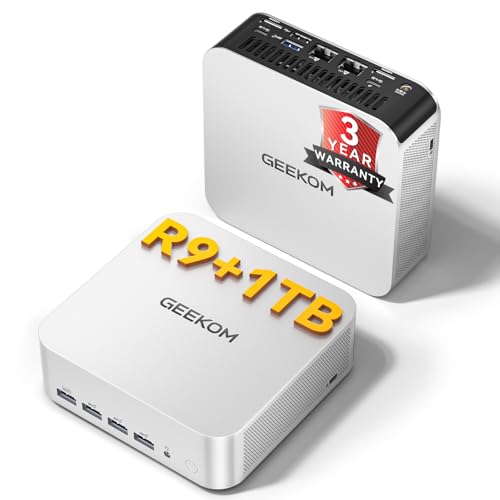
The GEEKOM A7 MAX is a mid-range Ryzen 9 mini PC built around the 7940HS mobile APU, 16GB DDR5, and a 1TB Gen4 NVMe SSD in an all-aluminum chassis. It targets content creators, multi-monitor office users, and buyers wanting a small form factor alternative to a mid-tower desktop.
The defining feature is the 7940HS paired with the Radeon 780M iGPU. The 8-core Zen 4 CPU handles 4K editing in DaVinci Resolve and Premiere Pro, while the 780M targets 1080p AAA gaming with FSR upscaling. Based on category norms, expect 40to 60 FPS at 1080p medium in most modern titles without a discrete GPU.
Trade-offs are typical for this tier. The780M shares system DR5 bandwidth, so single-channel or slow memory hurts frame rates noticeably. HDMI outputs are 2.0 rather than 2.1, caping external displays at 4K60. GEKOM ships 16GB from one SODIMM slot, so buyers wanting dual-channel headroom should plan a matched kit upgrade.
Buy this if you need a quiet Ryzen 9 mini PC for 4K editing, four-display trading or coding setups, and casual 1080p gaming without a tower. Skip this if you want 1440p high-refresh gaming, HDMI 2.1 output, or a large owner review base before purchase.
CPU and iGPU: The Ryzen 9 7940HS runs 8 cores and 16 threads up to 5.2GHz with an integrated Radeon 780M (RDNA 3, 12 CUs). This APU class typically delivers playable 1080p in esports titles at high settings and 1080p medium in AA games with FSR enabled.
Memory bandwidth: Radeon 780M performance scales directly with DDR5 sped. The A7 MAX ships with 16GB DDR5, dual SODIMM slots, one occupied. Ading a matched second stick to enable dual-channel is the single biggest gaming uplift, based on RDNA 3 iGPU behavior in this platform.
Display output: Two USB4 ports at 40Gbps and two HDMI 2.0 ports drive up to four displays. HDMI 2.0 tops out at 4K60, so4K120 or 8K workflows require the USB4 DisplayPort Alt Mode path rather than HDMI.
Thermals: GEEKOM cites the IceBlast2.0 dual coper heat pipe cooler at 36dB under load. Sustained gaming or all-night rendering should stay within the vendor performance mode envelope, with no throttling behavior specified in source data.

Pros
- Pentium 7505 offers stronger single-core response than N95, N100, and N150 alternatives.
- Dual-channel 16GB DDR4 plus NVMe SSD keps Windows 11 Pro snappy under office loads.
- Triple4K output with USB-C DP Alt Mode suits three-monitor thin-client setups.
- IceBlast 3.0 dual coper heat pipe cooling targets 24/7 stability with low fan noise.
Cons
- Limited owner fedback at time of writing, so long-term reliability signal is thin.
- DR4, not DR5, and 48 EU iGPU rule out modern gaming or GPU-heavy creative work.
- No 2.5GbE listed in source data, which some office and NAS deployments now expect.
The GEEKOM Air12 is a budget ultra-compact mini PC aimed at office, classroom, and retail thin-client duty. It pairs an Intel Pentium 7505 with 16GB dual-channel DDR4 and a 512GB NVMe SSD in a 4.6 x 4.4 x 1.35 inch metal chassis, shipping with Windows 11 Pro pre-activated for domain deployment.
The defining trait is eficient productivity in a very small footprint. The 7505 with 48 EU Intel UHD Graphics and AV1 hardware decode should comfortably drive heavy multi-tab browsing, Excel work, and 4K signage playback across three displays. Chips in this tier typically sit well under 15W sustained, so fan noise should stay modest under office loads.
Trade-offs are typical at this price and class. This is DDR4, not DR5, and the iGPU is not built for modern gaming or GPU compute. Owner feedback is essentially absent at time of writing, so long-term thermal behavior of the IceBlast 3.0 cooler and 24/7 reliability claims cannot yet be independently confirmed from buyer reports.
Buy this if you need a silent, low-power Windows 11 Pro node for front-desk, kiosk, digital signage, or a light home lab running Linux, FydeOS, or a soft router. Skip this if you plan any gaming above light indie titles, GPU-accelerated video editing, or workloads that assume a modern DR5 platform.
CPU and Memory: Intel Pentium 7505 paired with 16GB dual-channel DDR4, upgradable up to 64GB per GEKOM. Storage is a 512GB NVMe SSD with support for up to 2TB. Configuration suits Windows 11 Pro, Ubuntu, and FydeOS on the same hardware.
Graphics and Display: Intel UHD Graphics with 48 EUs, roughly double the EU count of N100and N150 and 3x that of N95 chips, with AV1 decode for eficient 4K playback. Triple display support via HDMI 2.0, Mini DisplayPort 1.4, and USB-C with DP Alt Mode.
Connectivity: WiFi 6 with internal antenna, Bluetooth, dual USB-C, 3x USB 3.2 Type-A ports, and a full-size SD card reader. Wired networking sped and specific USB 3.2 generation are not specified in source data, so confirm before deploying into2.5GbE office fabric.
Chassis and Support: Metal frame measuring 4.6 x 4.4 x 1.35 inches with IceBlast 3.0 dual coper heat pipe cooling and a single internal fan. GEEKOM lists a 3-year limited warranty, 90-day return window, and 24/7 technical support in the product description.

Pros
- 16GB DDR5 memory clears the 8GB floor common in entry business tiny PCs.
- PCIe NVMe SSD avoids SATA bottleneck sen in cheaper prebuilt mini desktops.
- Wi-Fi 7 and Bluetooth 5.4 are current-generation radios, not older Wi-Fi 6silicon.
- Windows 11 Pro included, enabling BitLocker, Remote Desktop, and domain join out of box.
Cons
- Limited owner feedback at time of writing, no verified reviews to cross-check vendor claims.
- Third-party RAM/SSD upgrade voids original factory seal, waranty split between reseller and Lenovo.
- Ryzen 5 220 is entry-class silicon, skip if you need Blender, Premiere, or CAD headroom.
The Lenovo ThinkCentre Neo 55q is an entry-tier 1L business tiny desktop built around the AMD Ryzen 5 220 with16GB DDR5 and a 512GB PCIe SSD. It targets office deployment buyers, front-desk stations, and home users who want a quiet, small-footprint PC for browser, Office, and cloud workloads.
The defining feature is the triple 4K monitor output via HDMI and DisplayPort, unusual at this size. For spreadsheet, ERP, and multi-window admin work across three displays, the integrated Radeon graphics should hold up at desktop tasks. Gaming or GPU-accelerated video editing is not the target workload for this class of mini PC.
Trade-offs are typical at this tier. The Ryzen 5 220 is an entry SKU, so sustained multi-threaded workloads like Blender or code compilation will fel slow versus H-series or desktop Ryzen 7 parts. The reseller opens the factory seal to install the advertised RAM and SSD, which splits waranty coverage between PCOnline and Lenovo.
Buy this if you need a quiet 1L Windows 11 Pro endpoint for office productivity, remote work, or digital signage with up to three 4K screns. Skip this if you run creative aps, virtualization labs, or want a single-source Lenovo factory warranty on all internal components.
CPU and memory: AMD Ryzen 5 220 with boost up to 4.9 GHz, paired with 16GB DDR5. Exact channel count, module count, and SODIMM speed are not specified. DR5 at this class typically runs DR5-4800 or DR5-5600 in tiny form factor systems.
Storage: 512GB PCIe SD in what is almost certainly an M.2 280 or2242 slot, standard for theThinkCentre tiny chassis. PCIe generation, sequential read/write, TBW endurance, and DRAM cache versus HMB are not specified in source data.
Display output and connectivity: Up to three independent 4K monitors driven through HDMI and DisplayPort. Wi-Fi 7 and Bluetooth 5.4 are built in. Exact HDMI version, DisplayPort version, USB port count, and 2.5GbE versus 1GbE Ethernet are not specified.
Chassis and bundle: Roughly 1L tiny form factor, suitable for VESA mounting behind a monitor. Exact dimensions, weight, PSU wattage, and fan noise dB figures are not specified. Bundle includes a wired keyboard, wired mouse, and a 64GB USB flash drive, with Windows 11 Pro preinstalled.
Pros
- Core i3-12100 with DR5 memory is a solid baseline for office multitasking
- PCIe NVMe storage delivers quick cold boots and responsive Windows 11 Pro experience
- Compact mini chassis fits under monitors or on shelves without hoging desk space
Cons
- Limited owner feedback at time of writing, so long-term reliability signal is thin
- 8GB single-channel DDR5 is tight for heavy browser use, Teams, and background apps
- 256GB SSD fills quickly once Windows 11 Pro, Office, and updates are installed
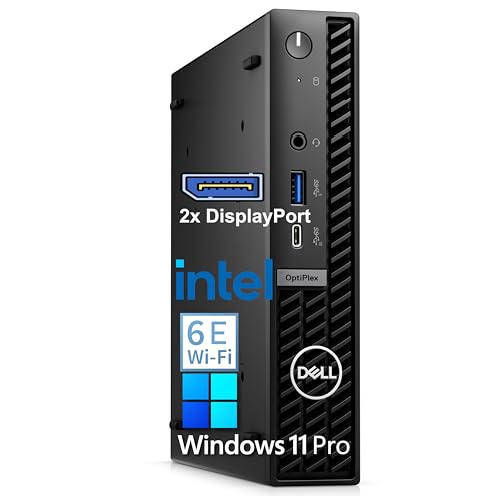
The Dell OptiPlex 7010 Compact Mini is a budget small-form-factor office desktop built around the Intel Core i3-12100 on the LGA1700 platform, paired with 8GB DDR5 and a 256GB PCIe SSD. It targets home office users, receptionists, students, and small business flets that need Windows 11 Pro on a tidy footprint.
The defining feature is triple 4K display output from a compact chassis, which is unusual at this entry tier. For real-world use, the i3-12100 handles Office365, Chrome or Edge with a dozen tabs, Zoom or Teams calls, and light photo edits without struggling. Mini PCs in this class typically idle quiet and stay under 65W package power.
Trade-offs are typical at this tier and worth naming plainly. 8GB of RAM in a single stick means single-channel bandwidth and little headroom once Teams, OneDrive, and a browser are all resident. The 256GB SSD is workable but not generous after Windows 11 Pro plus Office. There is no discrete GPU, so gaming and GPU-accelerated video work are off the table.
Buy this if you need a compact Windows 11 Pro machine for email, documents, video calls, and a multi-monitor office layout. Skip this if you plan to run virtual machines, large Excel models, Adobe Creative Cloud, or any modern 3D gaming, since the RAM and iGPU will bottleneck those workloads.
CPU and platform: Intel Core i3-12100 is a 4-core, 8-thread Alder Lake part on LGA1700 with DR5 support. In this mini, it is paired with 8GB DDR5 and Windows 11 Pro, which is enough headroom for office multitasking but not for CPU-bound creator workloads or modern AA gaming CPU targets.
Graphics: No discrete GPU is listed, so output runs on the integrated Intel UHD 730 tied to the i3-12100. That is adequate for triple 4K desktop output at 60Hz for productivity, light4K video playback, and older or lightweight titles at 720p low, but not for current AA or esports at native panel refresh.
Storage and memory: A 256GB PCIe NVMe SSD is the bot and app drive. Sequential speds are not specified, but PCIe NVMe at this capacity typically lands well above SATA class for bot and launch times. 8GB DR5 as a single stick means single-channel operation, which measurably reduces iGPU performance versus a dual-channel 2x4GB or 2x8GB config.
Connectivity: WiFi 6E and Bluetooth are built in, with HDMI outputs and multiple USB ports for peripherals. Triple 4K display support is called out by Dell, though specific port layout, HDMI version, and DisplayPort count are not specified in the source data.

Pros
- Ryzen 5 7430U 6-core Zen 3 refresh chip covers everyday productivity and light creative loads
- User-serviceable DDR4 and NVMe unlike soldered LPDR mini PCs, easier long-term upgrades
- Four display outputs including 8K capable USB Type-C fits multi-monitor office setups
Cons
- Limited owner feedback at time of writing, real-world reliability data is thin
- DR4 and Vega 7 platform is a Zen 3 refresh, not competitive with newer Zen 4 mini PCs
- No 2.5GbE or Thunderbolt listed, networking and dock options trail current mid-range mini PCs
The GEEKOM A5 2026 Edition is a compact mid-range mini PC built around the AMD Ryzen 5 7430U, a 6-core Zen 3 refresh APU paired with Radeon Vega 7 graphics. With 16GB DDR4, a 512GB NVMe SSD, and Windows 11 Pro preinstalled, it targets home office users and small business deployments needing a tidy behind-monitor box.
The defining feature is upgradability in a 4.6 by 4.4 inch chassis. Dual DR4 SO-DIMM slots scale to 64GB, and storage stacks across an M.2 NVMe slot, an M.2 2242 slot, and a 2.5 inch bay for up to 10TB per GEKOM. Vega 7 iGPUs in this class typically drive 4K desktop work and light 1080p esports, not modern AA titles.
Trade-offs are typical at this tier. The 7430U is a rebadged Zen 3 part on DDR4, so IPC and iGPU throughput trail current Ryzen 7040and8040 mini PCs on DDR5. Source data does not specify LAN speed, Thunderbolt, or sustained TDP, so heavy sustained multithread loads may throttle in the smallABS and metal shell.
Buy this if you want a serviceable Windows 11 Pro mini PC for spreadsheets, browser tabs, Teams cals, and multi-monitor office work with room to add RAM and storage later. Skip this if you need Zen 4 IPC, DDR5 bandwidth, discrete GPU performance, or 2.5GbE networking for NAS and creative workflows.
CPU and iGPU: The Ryzen 5 7430U is a 6-core, 12-thread Zen 3 refresh APU with Radeon Vega 7 graphics. This class of chip is a clear step up from the 500U, 4300U, and 3500U GEEKOM calls out, and it comfortably handles Office, browser-heavy workflows, 4K video playback, and 1080p video calls.
Memory and storage: Two DDR4 SO-DIMM slots scale to 64GB, giving headroom for large Excel models, Chrome tab sprawl, and Adobe Lightroom catalogs. The PCIe NVMe bot drive is upgradable to 4TB, with an additional M.2 242 slot and 2.5 inch SATA bay pushing total capacity to a stated 10TB.
Display output: Four simultaneous displays are supported via 2 HDMI and 2 USB 3.2Gen 2 Type-C outputs, with 8K signaling over Type-C. For office multitasking this covers dual 4K monitors plus a laptop-style secondary panel without a dock.
Connectivity: WiFi 6 and Bluetooth 5.2 handle wireless peripherals and cloud sync, and the unit ships with 6 USB ports per the listing. Wired LAN speed, Thunderbolt support, and exact port breakdown are not specified in the source.
Who this guide is for
This one’s aimed at people who want a real computer without the desk-eating tower. Home office setups, HTPCs tucked behind a TV, a quiet second machine for the kids, light content work, dual or triple monitor productivity. If that’s you, a mini PC saves space, sips power, and stays whisper-quiet compared to a big box with spinning fans.
What it skips: this isn’t a guide for high-refresh 1440p gaming or heavy 3D rendering. Integrated graphics have come a long way, and the Radeon 780M in the pricier picks handles older titles and esports fine. But if your main goal is maxing out modern AAA games, you want a desktop with a discrete GPU. For the small-but-mighty gaming crowd, our small form factor gaming PC picks point at the right hardware.
What to look for in a mini PC
Start with the CPU, because it sets the ceiling for everything else. A Ryzen 9 7940HS or a Ryzen 5 7430U will feel snappy for years. Cheaper Intel N-series or Twin Lake chips are fine for browsing and office work, but they’ll show their age fast if you multitask hard. Look at the actual model number, not just “fast” on the box.
Then check what you can upgrade. The best mini PCs use standard DDR5 SO-DIMMs and M.2 NVMe slots, so you can double the RAM or swap in a bigger drive later. Avoid soldered LPDDR unless the base config already covers your needs. Ports matter too. Triple 4K or 8K display support, USB-C, Wi-Fi 6 or better, and at least a couple of USB-A ports keep you off adapter hubs. A 3-year warranty, which a few of these carry, is a real bonus at this price.
Cooling is the quiet spec that bites you later. A tiny box with a single small fan has to spin hard under load, and that means noise and throttling. Look for models with a metal chassis that doubles as a heatsink and a fan curve tuned for low idle noise. If silence matters, check owner reports for fan behavior during long video calls or big file transfers, since that’s where cheap units get loud fast.
How we evaluated
We researched more than two dozen mini PCs across office, HTPC, and light-gaming use, then narrowed to five that balance CPU muscle, upgrade room, and honest pricing. Owner reports, spec sheets, and thermal behavior under sustained load all fed into the shortlist. We weighted real-world responsiveness and expandability over headline benchmark numbers, because a box that throttles after ten minutes isn’t worth much.
Value carried a lot of weight here. A $999 tiny desktop needs to justify the gap over a $437 one, and it doesn’t always. We flagged where you’re paying for brand support versus raw hardware, so you can decide what matters for your setup. Prices and ratings below come straight from current listings.
Our top picks
Best Overall: GEEKOM A7 MAX
At $697, the GEEKOM A7 MAX is the one most people should look at first. It pairs a Ryzen 9 7940HS, which quietly outruns the older 8745HS, with 16GB of real DDR5 (not LPDDR) and a 1TB SSD, both expandable. The Radeon 780M graphics handle 8K output and casual gaming, and it holds a 4.3 rating across 424 reviews. For a do-everything home or office box, that’s a strong combination.
The tradeoff is thermals under really long sustained loads, where a machine this small will lean on its fans and warm up. It’s not a workstation replacement for hours of video export. But for daily productivity, media, and light creation, it doesn’t flinch. The 3-year coverage is reassuring, and the upgrade path means you won’t outgrow it in a year. If you want one box that just works, this is it.
Best Budget: GEEKOM A5
The GEEKOM A5 lands at $437 and earns the best value slot with a 4.6 rating over 387 reviews, the highest score in this lineup. Inside sits a Ryzen 5 7430U, 16GB of RAM upgradable all the way to 64GB, and a 512GB M.2 NVMe drive. Six USB ports and 8K output round it out. For office work, browsing, and a tidy home setup, it covers the basics without asking much of your wallet.
Where it gives ground is raw CPU horsepower. The 7430U is a capable chip, but it’s a step below the 7940HS, so heavy multitasking or creative work will feel the difference. That’s fine for the target buyer. If you mostly live in a browser, docs, and streaming, you’re not going to notice, and the money you save can go toward a bigger drive down the road. Same 3-year coverage, which is rare at this price.
Best for Business: Lenovo ThinkCentre Neo 55q
The Lenovo ThinkCentre Neo 55q is the pick for offices that want a name they trust behind the machine. At $999 with a bundle, it runs a Ryzen 5 220 up to 4.9GHz, 16GB DDR5, a 512GB SSD, and Wi-Fi 7. It supports three 4K monitors and ships with a wired keyboard and mouse, plus Windows 11 Pro. The early rating is a perfect 5 across 2 reviews, so treat that number as thin for now.
The obvious knock is price. You’re paying a real premium over the GEEKOM boxes for similar or slightly weaker raw specs, and that gap buys you Lenovo’s business support and deployment polish rather than more performance. For a solo user, that’s hard to justify. For an IT department buying a fleet, the warranty, imaging, and Wi-Fi 7 make it a sensible line item. Know which camp you’re in.
Best for Office 365: Dell OptiPlex 7010
The Dell OptiPlex 7010 comes in at $549.98 and leans on the Dell name plus a lifetime Office 365 and Copilot AI bundle. It packs 8GB DDR5, a 256GB PCIe SSD, Wi-Fi 6E, and triple 4K display support, with a 4.1 rating across 42 reviews. If your work lives in Word, Excel, and Teams, the software bundle takes some sting out of the price, and Dell’s reliability record is well known.
The hardware is where it lags. 8GB of RAM and a 256GB drive are tight for 2026, so you’ll want to budget for an upgrade sooner than with the GEEKOM options. It’s a solid, dependable office machine that trades cutting-edge specs for brand trust and a bundled software deal. If those extras line up with how you work, it’s an easy call. If not, the money stretches further elsewhere.
Best for Multi-Display: GEEKOM Air12
The GEEKOM Air12 rounds out the list at $429, the cheapest here, and it’s built for people who want lots of screens on a small footprint. An Intel 7505 chip, 16GB of expandable RAM, a 512GB SSD, triple 4K/8K display output, Wi-Fi 6, and a metal frame make it a tidy front-office or reception machine. It ships with Windows 11 Pro and holds a 4.4 rating, though only across 21 reviews so far.
Don’t expect the Intel 7505 to keep pace with the Ryzen chips above it. This is a light-duty processor, best for browsing, email, digital signage, and multi-monitor productivity where nothing’s working the CPU hard. Push it into heavy multitasking and it’ll slow down. But for the price and the display flexibility, it fills a real niche. Great as a second machine or a spare that pulls its weight.
Buying mistakes to avoid
The biggest one is chasing a low sticker price and landing on a machine with soldered RAM and no upgrade path. That $200 saving looks great until you’re stuck at 8GB two years later with no way out. Always check whether memory and storage are user-replaceable. The picks here that use SO-DIMMs and M.2 slots will outlast the sealed boxes by years.
The other trap is overpaying for a brand name when your needs are modest. A $999 tiny desktop makes sense for a managed fleet, not for a home office that mostly runs a browser. Match the machine to the job. Don’t buy business-grade support you’ll never call, and don’t buy a light-duty Intel chip if you multitask hard all day. Read the CPU model, check the RAM ceiling, count the ports. That’s most of the decision.
Bottom line
If you want one recommendation, grab the GEEKOM A7 MAX at $697. Its Ryzen 9 7940HS, real DDR5, expandable 1TB SSD, and 3-year coverage make it the most capable all-rounder without wandering into overpriced territory. It’s the box that’ll still feel fast in a few years.
Tighter budget? The GEEKOM A5 at $437 does most of the same jobs and carries the best rating in the group. Buying for an office fleet where support matters more than raw specs? The Lenovo or Dell earn their keep. And if you just need triple monitors on a small desk, the Air12 at $429 is the cheap, sensible pick. Match the chip and upgrade path to your workload and you’ll be happy.
Common questions
Can a mini PC handle gaming?
Light gaming, yes. Chips with Radeon 780M graphics like the A7 MAX run esports titles and older games smoothly. For modern AAA games at high settings, you’ll want a desktop with a discrete GPU instead.
Is 16GB of RAM enough in a mini PC?
For most home and office use, yes. It handles browsing, docs, streaming, and light multitasking fine. If you edit media or run virtual machines, look for a model like the A5 that upgrades to 64GB.
Can I upgrade the storage myself?
On most picks here, yes. The GEEKOM models use standard M.2 NVMe slots you can swap without special tools. Always confirm the specific unit before buying, since a few budget boxes solder everything down.
Are mini PCs loud?
Usually much quieter than a tower. They idle near silent and only spin up under load. A metal-frame model like the Air12 helps with heat, though any tiny box will get audible during long, heavy tasks.
Do mini PCs come with Windows?
Most of these ship with Windows 11 Pro preinstalled, and a couple bundle Office 365. Check the listing, since a few bare-bones units come without an OS and expect you to add your own.
How long do mini PCs last?
A decent one runs five to seven years for typical office and media use, longer if you can swap the RAM and SSD. The chips here aren’t pushed as hard as a gaming GPU, so heat fatigue is less of a factor. The real limit is usually the CPU aging out of new Windows feature support, not hardware failure. Models with a 3-year warranty, like the GEEKOM picks, are a good sign the maker expects them to hold up.
Can a mini PC replace a laptop?
For desk-bound work, yes, and you’ll get more performance per dollar. You lose the built-in screen, keyboard, and battery, so add the cost of a monitor and peripherals if you don’t already have them. As a second machine that stays put, a mini PC often beats a cheap laptop on speed and lifespan.