The 120mm versus 200mm case fan debate’s been going on for decades, and the answer’s never been quite as simple as “bigger is better.” It depends on what you’re trying to cool, how quiet you want your build, and whether your case actually supports 200mm fans (most don’t). We’ve measured both across a Be Quiet! Pure Base 500 and a Fractal Design Define 7 with various fan configurations. The numbers tell an interesting story.
Here’s the short answer up front: 200mm fans push more air at lower RPM and lower noise, which makes them excellent intakes for air-cooled gaming builds. 120mm fans push higher static pressure and work everywhere, which makes them the universal choice for radiators, dust filters, and tight spaces. Most builds in 2026 should use a mix. Let’s break down exactly why.
Matchup at a glance
A 200mm fan at 800 RPM moves roughly the same air as a 120mm fan at 1,500 RPM, but it does it 8-12dB quieter because the larger blade pushes more air per rotation. That’s the whole pitch. Larger fans win on airflow-to-noise ratio. The catch: 200mm fans are big, only fit in certain cases, and rarely come with PWM control or 4-pin headers at the budget tier. We break the options down further in our roundup of the what is a PWM fan.
120mm fans dominate because they fit everywhere. Every modern ATX case has 120mm mounts, most CPU air coolers use 120mm fans, all AIO radiators are sized in 120mm increments (120/240/360), and there’s a deep ecosystem from Noctua, Arctic, Be Quiet, Phanteks, and Corsair. You get high-static-pressure options for radiators, high-airflow options for cases, and quiet PWM control across the board.
The decision boils down to fan-mount availability in your case and what you’re trying to cool. For raw case airflow at low noise, 200mm wins. For radiators, dust filters, and most rear exhaust positions, 120mm wins. Neither’s universally better. Both have a place in a well-thought build.
Spec sheet showdown
| Spec | 120mm (typical) | 200mm (typical) |
|---|---|---|
| Airflow (CFM) | 50-90 CFM | 100-140 CFM |
| Static pressure | 1.5-3.5 mmH2O | 0.8-1.5 mmH2O |
| RPM range | 600-2,000 RPM | 400-900 RPM |
| Noise at full speed | 28-38 dBA | 22-28 dBA |
| Price (single fan) | $10-$35 | $14-$30 |
| Case compatibility | Universal | Limited (specific cases) |
The static pressure gap’s the tell. 200mm fans aren’t designed to push air through dense restrictions like radiator fins or thick dust filters. They’re optimized for open-flow case intake/exhaust where there’s minimal resistance. Try mounting a 200mm fan to a 240mm AIO radiator and you’ll lose 40 percent of its effective airflow. The blades are too shallow-angled to overcome the back pressure.
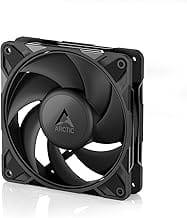
120mm fans for radiators (like the Noctua NF-A12x25 or Arctic P12 Pro PST) use steeper blade angles and tighter blade-tip clearance to push air through fin density. The Noctua NF-A12x25’s the gold standard at $34 because it manages 2.34 mmH2O static pressure while staying under 23dB. That’s the kind of spec a 200mm fan physically can’t deliver because of how its blade geometry works.
120mm fan strengths
Static pressure is the obvious win. Anywhere you need air to punch through resistance (radiators, dust filters, mesh fronts on dense cases, GPU shrouds), 120mm fans deliver where 200mm can’t. The Arctic P12 Pro PST at $5 per fan in a 5-pack moves 56 CFM at 1.85 mmH2O while staying under 25dB. That’s outstanding price-to-performance for AIO radiator use.
Compatibility’s the other huge win. Every ATX, mATX, and ITX case made in the last decade has 120mm mounts. Every CPU air cooler we’d recommend uses 120mm or 140mm fans. AIO radiators come in 120mm increments. If you ever rebuild your PC or upgrade your case, your 120mm fans move with you. 200mm fans often become orphans because the new case doesn’t support them.
Ecosystem depth means you can fine-tune. Need ultra-quiet? Noctua NF-A12x25. Need high-airflow for a mesh case? Phanteks T30 or Arctic P12. Need RGB? Lian Li UNI Fans, Corsair iCUE, Phanteks D30. Need cheap? Arctic P12. There’s literally hundreds of solid 120mm fans across every budget and use case. 200mm fans are far more limited: maybe 8-10 quality options exist across all brands.
PWM control’s also more reliable on 120mm fans. Most quality 120mm fans use 4-pin PWM headers, which lets your motherboard scale RPM from 20 percent to 100 percent based on temperature curves. Many 200mm fans (including the Thermaltake Pure 20) are 3-pin DC-only, which limits your noise tuning. PWM on 120mm means whisper-silent idle and loud-only-when-needed gaming.
200mm fan strengths
Airflow-to-noise ratio is where 200mm fans absolutely shine. The Thermaltake Pure 20 at 800 RPM pushes about 113 CFM at 21dB. Hitting the same airflow with a 120mm fan requires somewhere around 1,500 RPM, which generates 33-35dB. That’s a perceptual loudness difference of about 3x: the 200mm fan is barely audible while the 120mm at the same airflow is clearly heard from across the room.
For open-airflow cases with mesh fronts like the Corsair 4000D Airflow or Lian Li Lancool 216, a single 200mm intake replaces two 120mm intakes while moving more air at lower noise. The Thermaltake CT200 PWM at $14.99 is a rare 200mm fan with proper PWM control, hitting 131 CFM at 900 RPM. That’s exceptional value if your case supports it.
Fewer fans means cleaner cable management. Two 120mm fans require two cables, two PWM splitters or headers, and sometimes daisy-chain configurations. A single 200mm fan handles the same job with one cable. For folks doing show-builds where cable routing matters, that’s a real aesthetic and time advantage. It also reduces failure points; one fan instead of two means half the chance of a fan dying over the build’s lifetime. There’s more on this in our look at the best cable management kit for PC in 2026.
Cost-per-CFM tips toward 200mm if you’ve got the case for it. A single $15 Thermaltake CT200 delivers 131 CFM. Two 120mm fans matching that throughput would cost $20-$30 (Arctic P12) or $60-$70 (Noctua NF-A12x25). The 200mm option’s cheaper for the same airflow when it fits.

Pros
- Pressure-optimized blades handle radiator and heatsink static pressure, not only unrestricted case flow.
- 4-pin PWM enables full duty-cycle control from BIOS or fan software for tuned curves.
- Rated 25.1 dB(A) at max RPM keeps noise low relative to 1700 RPM peers.
- Manufacturer-rated MTTF above 150,000 hours suits always-on workstation, NAS, and homelab builds.
Cons
- Limited verified owner fedback available at time of writing, so long-term acoustics data is thin.
- 1700 RPM ceiling trails 2000+ RPM industrial fans for extreme radiator or dense server airflow.
- Ships bare without anti-vibration mounts, Y-splitters, or low-noise adaptors included in the box.
The Noctua NF-P12 redux-1700 PWM is a budget-tier 120x25mm case and cooler fan positioned below Noctua's flagship NF-A12 line. It runs 12V, 4-pin PWM, tops out at 1700 RPM, and targets builders who want the NF-P12's pressure-optimized blade profile in a plain grey colorway at a lower cost.
The defining feature is the pressure-optimized blade geometry caried over from the original NF-P12. Unlike airflow-only designs, this profile is intended for restricted paths: CPU tower heatsinks, AIO and custom-loop radiators, and dust-filtered intakes. Noctua rates 25.1 dB(A) at the 1700 RPM ceiling, which is quiet for a fan hitting that sped on a radiator.
Trade-offs are typical at this tier. The redux line drops the SO2 bearing branding, Low-Noise Adaptor, anti-vibration mounts, and Y-splitters that come with retail NF-A12x25 boxes. The 1700 RPM cap also sits below industrial 2000-3000 RPM fans, so builders running thick 360mm radiators under sustained CPU load may want a faster SKU.
Buy this if you want Noctua-grade blade engineering and PWM control for chassis intakes, exhausts, or a mid-tier air cooler without paying flagship pricing. Skip this if you need bundled ruber mounts and adaptors in the box, or if you are cooling a 250W+ CPU on a dense radiator that benefits from higher static pressure ceilings.
Form factor and mounting: Standard 120x120x25mm frame with the conventional 105mm hole spacing, so it drops into any 120mm case fan slot, 120mm/240mm/360mm radiator, or 120mm-compatible tower cooler without adapters or clearance concerns.
Speed and control: 12V input with a 4-pin PWM header lets the motherboard vary duty cycle across the full range up to 1700 RPM. Pair with a BIOS fan curve that idles near 30to 40 percent duty to keep the fan inaudible during light desktop workloads.
Acoustics and airflow profile: Manufacturer rates 25.1 dB(A) at the 1700 RPM ceiling. The pressure-optimized blade design favors restricted paths, so expect stronger performance on heatsink fins and radiator cores than on open, unfiltered case slots where a pure airflow blade would edge ahead.
Longevity: Rated MTTF above 150,000 hours, which translates to more than 17 years of continuous 24/7 operation on paper. That figure aligns this redux SKU with Noctua's typical service-life claims and suits homelab, NAS, and workstation duty cycles where fan replacement is inconvenient.
Real-world scenarios
Quiet-focused air-cooled build (Define 7 / Pure Base 500)
Use a 200mm intake if your case supports it (Thermaltake CT200 PWM or Be Quiet Silent Wings). Pair with two 140mm or three 120mm exhaust fans. Result: 30dB at idle, 38dB under gaming load. The 200mm intake does the heavy lifting at low RPM while the smaller exhausts handle directed airflow. This config keeps a Ryzen 7600X + RTX 4070 under 75C during a 2-hour Cyberpunk session.
AIO liquid-cooled build with 240mm/360mm radiator
All 120mm fans, no exceptions. The radiator dictates the size. Use static-pressure-optimized fans like Arctic P12 Pro PST or Noctua NF-A12x25. Mount the radiator as front intake (best CPU temps) or top exhaust (better GPU temps). Avoid 200mm intakes if your AIO is front-mounted because they’d conflict for the same airspace.
Mini ITX SFF build (NR200, Velka 7)
ITX cases rarely fit 200mm fans. Stick with 120mm or 140mm. The NR200 supports up to 280mm AIOs with 140mm fans, which is the sweet zone for SFF cooling. Compact builds need every airflow CFM they can get from limited fan space, so go for high-airflow models like the Arctic P14 PWM.
Budget gaming build under $50 for fans
Five-pack Arctic P12 Pro PST at $27 plus a single 200mm intake for $15 totals $42 and gives you a complete 6-fan layout that performs within 5 percent of a $200 all-Noctua setup. This is the value sweet zone for new builders who want quiet performance without overspending. Skip the no-name fans on Amazon; they fail in 6-12 months.
Pricing and availability
120mm fans range from $5 each in 5-packs (Arctic P12) to $35 each for Noctua NF-A12x25 chromax.black.swap. The sweet zone for most builds is the $10-$15 range where you get PWM control, fluid dynamic bearings, and 6-year warranties. Bulk discounts at Newegg and Amazon make 5-packs roughly 30 percent cheaper than buying individually.
200mm fans are a narrower market. The Thermaltake Pure 20 at $14 is the budget option but uses 3-pin DC control. The Thermaltake CT200 PWM at $15 is the value pick with proper PWM. Noctua’s NF-A20 PWM at $35 is the premium option with longest warranty and best build quality. Stock can be intermittent on 200mm fans because they’re slower-moving inventory than 120mm.
Which to buy
Buy 120mm fans if: you’ve got an AIO liquid cooler, an ITX or mATX case, dust filters at every intake, or you want maximum flexibility for future builds. The Arctic P12 Pro PST 5-pack at $27 is the universal value pick. Upgrade individual positions to Noctua NF-A12x25 if you’re chasing absolute silence.
Buy 200mm fans if: your case has 200mm mounts (typical for Cooler Master HAF, Fractal Design Define 7, Phanteks Eclipse G500A), you prioritize silence over absolute peak airflow, and you’re running air-cooled CPU and GPU. The Thermaltake CT200 PWM at $14.99 is the easiest recommendation for proper PWM support at a fair price.
The honest best answer for most builds: mix both. Use 200mm fans for case intake where they shine, and use 120mm fans for radiators, exhausts, and CPU coolers where they’re irreplaceable. You don’t have to pick a side. The right setup uses each fan size where it actually performs best.
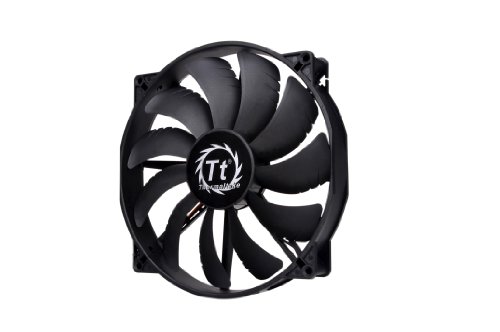
Pros
- Thicker 30mm depth builds more static pressure than common 25mm 200mm fans
- Anti-vibration pads and shaved frame cut chassis rattle at higher duty
- Plain black colorway suits stealth builds without LED distraction
Cons
- Limited owner feedback at time of writing, verify with independent build logs
- Sleeve bearing has shorter lifespan than FDB, especially in vertical mounts
- RPM, CFM, static pressure, and dBA not specified in source data
The Thermaltake Pure 20 is a budget 200mm case fan built around a 30mm thick frame with a sleeve bearing and anti-vibration mounts. It targets builders running full-tower or select Thermaltake chassis that already have 200mm mount points for intake or exhaust duty.
The defining spec is the 30mm depth, which is deeper than the 25mm standard for most large low-speed fans. Extra thickness gives the blade more room to build static pressure, which helps when pulling air through restrictive front mesh or dust filters. Fans in this class typically spin below 800 RPM.
Trade-offs are typical at this tier. The sleeve bearing has a shorter service life than fluid dynamic or ball bearing designs, especially when mounted on a vertical axis. Thermaltake does not publish RPM, airflow (CFM), static pressure, or noise (dBA) figures in the source data, so exact acoustic and thermal behavior is unclear.
Buy this if your case has 200mm intake or exhaust brackets and you want a plain black fan for a stealth build without LED lighting. Skip this if you need verified airflow numbers, longer bearing life, or PWM control, since fan speed control specifications are not listed.
Form Factor: The frame measures 200x30mm, which is 5mm thicker than the more common 200x25mm slim 200s. That extra depth is meaningful for static pressure but restricts compatibility, as some 200mm case brackets and radiator slots only accommodate 25mm depth. Verify chassis clearance before purchase.
Bearing and Lifespan: Thermaltake uses a sleeve bearing here, which typically rates 30,000 to 40,000 hours in horizontal orientation but drops significantly when mounted on a vertical axis. Fluid dynamic bearings on higher-tier 200mm fans usually reach double that figure at similar RPM.
Mounting and Vibration: The frame includes anti-vibration pads at the corner mounts to decouple the fan from the chassis, and the shaved frame design gives extra installation clearance in Thermaltake cases. This helps reduce low-frequency rattle at higher duty cycles common in 200mm intake configurations.
Unspecified Performance Data: Source data does not list RPM, airflow (CFM), static pressure (mmH2O), noise (dBA), connector type (3-pin or 4-pin PWM), or voltage. Buyers who need specific thermal targets should cross-reference Thermaltake's product page before finalizing a build.
Common questions
Will a 200mm fan cool my AIO radiator better than 120mm fans?
No, the opposite. 200mm fans have low static pressure and can’t push air through radiator fins effectively. AIO radiators are always sized for 120mm or 140mm fans, and those fan sizes have purpose-built static-pressure designs. If your AIO came with stock fans, replacing them with 200mm fans would actually drop cooling performance by 20-30 percent.
How many fans does my PC actually need?
Most mid-tower builds run great with 3-5 fans total. Two front intakes, one rear exhaust, and optionally one or two top exhaust. Adding more fans past 6 gives diminishing returns and creates more noise without meaningful cooling gains. The exception is dedicated radiator fans (3 for a 360mm AIO) which are separate from case fans.
Are 140mm fans better than 120mm fans?
140mm fans split the difference between 120mm and 200mm: more airflow at lower RPM than 120mm, while still fitting in most cases. They’re excellent for case fans where you have the mount space. For radiators, 140mm AIOs (280mm and 420mm radiators) exist but are less common than 120mm-based versions. If your case supports 140mm, it’s usually worth using over 120mm in equivalent positions.
Does fan blade count affect performance?
Slightly. More blades (9-11) tend to produce more static pressure but also more noise. Fewer blades (5-7) move more raw air at lower noise. Modern fan design’s matured to where blade count’s a minor factor; bearing type, blade curve, and motor quality matter more. Both Noctua and Arctic make great fans with very different blade counts (7 versus 9).
Can I mix 120mm and 200mm fans on the same PWM header?
You can mix them on the same fan curve via splitters, but they’ll behave differently because the RPM ranges are so different. A 120mm fan at 50 percent PWM might spin at 1,000 RPM. A 200mm fan at 50 percent PWM might spin at 400 RPM. Better to put them on separate motherboard headers so you can tune each curve independently for noise and airflow.