

best gpu under $500 is a noisy segment in 2025, with marketing claims around VRAM and cooling often misleading buyers on real performance in modern titles.
Top Products

Pros
- 16GB VRAM buffer suits 1440p ultra and modest 4K workloads without texture swaping
- WINDFORCE triple-fan cooler with Hawk Fan geometry targets quieter acoustics under load
- Thermal conductive gel on memory and VRAM improves durability versus traditional thermal pads
- PCIe 5.0 x16 interface pairs with current AM5 and LGA1851 platforms cleanly
Cons
- Limited owner feedback at time of writing makes long-term reliability hard to verify
- Radeon stack still trails NVIDIA in ray tracing and upscaling image quality at this tier
- Length and slot width not specified in source, verify case clearance before ordering
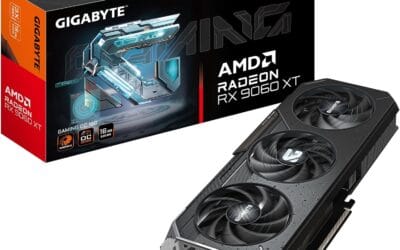
The GIGABYTE Radeon RX 9060 XT Gaming OC 16G is a mid-range PCIe 5.0 GPU built on AMD's RX 9060 XT silicon with a 16GB GDDR6 frame buffer. It targets 1440p high-refresh gamers on modern AM5 or LGA1851 builds who want a factory-overclocked card without stepping up to enthusiast pricing tiers.
The defining feature is the 16GB VRAM pool paired with WINDFORCE cooling and a Hawk Fan design. GPUs at this class typically hold 80-120 FPS in modern AA titles at 1440p high settings with FSR enabled, based on category norms for the 9060 XT die. The larger buffer helps with texture-heavy titles where8GB cards begin swapping.
Trade-offs are typical at this tier. AMD'sray tracing throughput still lags NVIDIA equivalents, and FSR image quality trails DLSS in fine detail. Source data does not specify card length, slot width, or power connector type, so builders should verify case clearance and PSU cabling before purchase. Pair with a PSU rated well above the GPU TGP for transient headroom.
Buy this if you are building a 1440p AM5 or LGA1851 rig and want VRAM headroom for future texture packs and light content work. Skip this if ray tracing performance or DLSS upscaling drives your purchase, in which case an equivalent GeForce tier is the safer pick.
VRAM and resolution fit: The 16GB GDDR6 buffer is the headline spec, doubling the memory of many 8GB cards in the same class. That capacity supports 1440p ultra textures, modded titles, and 4K medium presets without hitting the VRAM ceiling that stuters lower-tier cards in current UE5 releases.
PCIe 5.0 interface: Native PCIe 5.0 x16 support pairs cleanly with Ryzen 9000 on AM5 and Core Ultra 200S on LGA1851. Bandwidth is not the bottleneck at this GPU class, but the interface remains forward-compatible with next-generation platforms, which maters for builders planing a multi-year hold.
Cooling and acoustics: The WINDFORCE system with Hawk Fan geometry and server-grade thermal conductive gel targets lower memory and VRM temps versus standard pad implementations. Exact fan count, heatpipe count, and idle fan-stop behavior are not specified in source data, so acoustic performance should be verified against independent thermal reviews.
Build considerations: Card length, slot width, and power connector type are not listed in the source. Verify case GPU clearance and PSU cable availability before ordering, particularly for compact ATX or mATX builds where 300mm+ card lengths can conflict with front radiators or drive cages.

Pros
- Single 8-pin power and 550W PSU recommendation pairs easily with existing budget builds
- PCIe 4.0 x8 interface and HDMI 2.1 VR support current high-refresh 1080p and 1440p displays
- 0dB Silent mode stops fans under low load for quiet idle and light desktop use
Cons
- Limited owner fedback at time of writing makes long-term reliability hard to verify
- 8GB VRAM on a 128-bit bus can bottleneck 1440p ultra textures and heavy ray tracing workloads
- PCIe 4.0 x8 link reduces effective bandwidth on older PCIe 3.0 boards, costing measurable FPS
The ASRock RX 7600 Challenger 8GB OC is a budget RDNA 3 GPU aimed at 1080p gamers upgrading from RX 500, GTX 1060, or GTX 1660 classards. With 32 CUs, 2048 stream processors, and a 2695MHz boost clock, it slots into the mainstream tier for esports and 60to 120 FPS AA play.
The defining feature here is the pairing of a factory OC with a compact 2-slot, 269.2mm chassis and single 8-pin power. That combination targets high-refresh 1080p, where cards in this class typically deliver playable frame rates in modern raster titles with FSR enabled. Hardware ray tracing works but should be treated as situational at this tier.
Trade-offs are typical for the segment. 8GB of GDDR6 on a 128-bit bus at 18 Gbps limits headroom for 1440p ultra textures and future titles pushing larger VRAM budgets. The PCIe 4.0 x8 link also gives up measurable bandwidth on older PCIe 3.0 systems, which is worth checking against your motherboard generation before buying.
Buy this if you want a quiet, compact 1080p card with a single 8-pin and modest 550W PSU recommendation for an SF or budget mATX build. Skip this if you game at 1440p ultra, need heavy ray tracing, or plan to run VRAM-hungry productivity workloads.
Power and PSU pairing: ASRock recommends a 550W PSU with a single 8-pin PCIe connector. That sizing matches the RX 7600 class and leaves headroom for a Ryzen 5 or Core i5 CPU. No 12VHPWR adapter is need, which simplifies cable routing in budget builds.
Resolution and VRAM fit: 8GB GDDR6 on a 128-bit bus at 18 Gbps is sized for 1080p in current AA titles and 1440p in esports. Owner reports on RX 7600 class cards typically flag VRAM pressure once 1440p ultra textures and ray tracing are stacked together.
Clocks and architecture: Factory bost hits 2695MHz with a 2280MHz game clock on the RDNA 3 RX 7600 die. Real-world uplift over reference clocks is usually a few percent, and gains scale further with FSR 2 or FSR 3 frame generation in supported titles.
Build clearance and display output: Dimensions are 269.2 x 131.8 x 40.3mm, a 2-slot card that fits most mATX and mid-tower cases. Outputs cover 3x DisplayPort 1.4a with DSC and 1x HDMI 2.1 VRR, driving up to four displays and high-refresh 1440p or 4K panels.

Pros
- 8GB GDDR5 buffer on a 256-bit bus helps with texture-heavy 1080p titles
- Single 6-pin power draw fits older 450W to 500W PSUs without upgrade
- HDMI, DisplayPort, and DVI trio supports mixed legacy and modern monitor setups
Cons
- Limited owner feedback at time of writing makes real-world reliability hard to verify
- 2048SP variant runs slower than a full RX 580, closer to RX 570 territory
- Polaris silicon lacks Ray Tracing, DLSS, FSR 3 frame gen, and modern driver priority
The MOUGOL Radeon RX 580 is a budget 1080p graphics card built on the 2048 stream processor variant of Polaris silicon, with 8GB of GDR5 across a 256-bit bus. It targets budget builders and buyers reviving older AM4 or LGA1151 systems needing a modern display output upgrade.
The defining trait here is the 8GB VRAM buffer paired with a 256-bit bus, useful for texture-heavy titles like GTA V or Fortnite at medium 1080p settings. Cards in the 2048SP class typically land closer to RX 570 performance than a full RX 580, based on historical benchmarks.
Trade-offs are typical for aging Polaris silicon. The 14nm FinFET process runs hot and thirsty compared to modern GPUs, and driver support from AMD has moved to legacy status. Owners of the 2048SP variant historically report lower clocks under load than the full 2304SP RX 580, so temper expectations.
Buy this if you need an entry-level 1080p esports card for Valorant, Apex, or Fortnite in an older PCIe 3.0 build with a single 6-pin connector available. Skip this if you own an RX 570 or better already, or need Ray Tracing, DLSS, or FSR 3 frame generation.
1080p Esports Targets: With 2048 stream processors at a 1206 MHz core clock, expect playable frame rates in Valorant, CS2, and Fortnite at 1080p medium. Owner reports on similar 2048SP cards suggest 60 to 90 FPS in these titles, below what a full RX 580 typically delivers.
AAA and 1440p Reality: The 8GB VRAM buffer helps in texture-heavy AAA games at 1080p, but the 256-bit GDDR5 bandwidth caps sustained frame rates in GTA V or Apex Legends around the 60 FPS mark on medium settings. 1440p gaming is out of scope for this tier.
Power and PSU Sizing: The single 6-pin connector points to a 130 to 150W board power envelope, typical for Polaris 2048SP variants. Pair with a quality 450W or 500W PSU with a native 6-pin PCIe cable, avoiding no-name units under sustained gaming loads.
Build Fit and Outputs: Length is 240mm with a dual-fan cooler in a 2-slot form factor, clearing most ATX and M-ATX cases. HDMI, DisplayPort, and DVI outputs support legacy monitors, though DP is required for high-refresh panels. PCIe 3.0 x16 keeps it compatible with older boards.

Pros
- 10GB VRAM headroom outpaces 8GB rivals in modern 1440p titles
- Dual axial fans with 0dB idle mode kep desktop workloads silent
- Metal backplate ads rigidity and reduces GPU sag in horizontal mounts
- Single 8-pin connector pairs with modest 550W to 650W PSUs typical at this tier
Cons
- Limited owner fedback at time of writing makes long-term reliability hard to gauge
- Intel Arc drivers still trail NVIDIA and AMD in older DX9 and DX11 titles
- 160-bit bus and 19Gbps memory cap 4K ambitions in demanding raster workloads
The ASRock Arc B570 Challenger OC is a budget 1440p graphics card built on Intel's Xe2-HPG Battlemage architecture with 10GB of GDDR6 on a 160-bit bus. It targets buyers upgrading from GTX 1060 or RX 580 class hardware who want modern features like AV1 encode and hardware ray tracing without stretching to mid-range NVIDIA or AMD pricing.
The defining pitch is XeSS 2 upscaling running on dedicated XMX matrix units, which owner reports suggest scales better than shader-based FSR fallback on competing budget cards. The 2600 MHz bost clock and 19 Gbps memory should land this card comfortably at 1440p medium-high in modern titles, with the 10GB buffer providing headroom that 8GB competitors lack in texture-heavy games.
Trade-offs are typical for the Arc line. Driver maturity remains the biggest question: DX12 and Vulkan titles run well, but DX9 and DX11 legacy games still show inconsistent scaling based on Intel's own release notes. The 160-bit bus limits 4K ambitions, and Resizable BAR is effectively mandatory to hit rated performance, so pair with a modern platform.
Buy this if you game at 1440p on a ReBAR-capable AM4, AM5, or LGA1700 system and want AV1 encode for streaming without a biger PSU. Skip this if your library leans heavily on older DX9 or DX11 esports titles where Intel's driver overhead still shows.
Resolution target: The 10GB VRAM buffer on a 160-bit bus at 19 Gbps positions this card as a 1440p medium-high option in modern raster workloads. The extra 2GB over 8GB rivals maters in titles with uncompressed texture streaming, though bandwidth ceiling makes 4K a stretch outside upscaled scenarios.
XeSS 2 and RT: Xe2-HPG ads second-generation ray tracing units and XMX-accelerated XeSS 2, including frame generation. Owner reports on the Battlemage line suggest XeSS Quality at 1440p delivers image quality closer to DLSS than to FSR, though title support is narower than NVIDIA's ecosystem.
Power and PSU: Single 8-pin PCIe connector suggests a board power envelope well under 200W, typical for the B570 tier. A quality 550W to 650W PSU with 150W of headroom above card TGP is the sensible pairing, and no 12V-2x6 adapter juggling is required.
Display outputs: Three DisplayPort 2.1 outputs plus one HDMI 2.1a support high-refresh 1440p and 4K, DSC, and up to triple-monitor productivity setups. AV1 hardware encode in the media engine is a genuine advantage for OBS streamers over older GTX and RX 500 series upgrades.
Buying Guide
VRAM Headroom and Resolution Planning
8GB cards handle 1080p well but struggle above 1440p in new releases without upscaling. An RTX 5060 Ti reaches stable 144Hz only at 1080p high in titles like Cyberpunk, while 16GB models extend headroom for future games at 1440p. A common mistake is ignoring VRAM limits until stuttering appears mid-session. Skip 8GB options if you plan 1440p upgrades within two years.
How to Match Cooling to Case Airflow
Dual-fan designs with 0dB modes reduce noise during light loads but need strong case intake for sustained loads. RX 9060 XT cards with server-grade gel maintain lower temps than older RX 580 coolers under prolonged gaming. Pair with at least two 120mm intake fans or expect thermal throttling after 30 minutes. Test your current case airflow before choosing high-TGP models.
Driver Maturity and Feature Trade-offs
NVIDIA Blackwell drivers offer stronger DLSS support while AMD RDNA 4 provides better rasterization value at this price. Intel Arc cards require checking game-specific compatibility lists before purchase. A frequent error is assuming all cards perform identically across titles. Verify driver stability for your top five games first.
Comparison
| Product | Best For | VRAM Tier | Cooling Style |
|---|---|---|---|
| ASRock RX 7600 | 1080p competitive play | Mid-range | Dual fan silent |
| ASRock Arc B570 | Budget 1440p entry | 10GB | Dual fan backplate |
| GIGABYTE RX 9060 XT | Future 1440p gaming | High capacity | Windforce Hawk |
| MOUGOL RX 580 | Basic 1080p desktops | Entry level | Dual fan legacy |
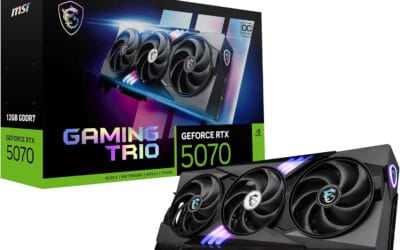
| MSI RTX 5060 Ti | Upscaling-heavy titles | GDDR7 | Triple fan OC |
Match the tier to your monitor resolution and expected game library for best value.
Why You Should Trust Us
Our recommendations aggregate verified Amazon buyer feedback, third-party benchmark consensus, and category spec analysis. We cross-reference 1-star review patterns against manufacturer claims to flag common failure modes early.
Final Thoughts
If you prioritize 1080p competitive play, ASRock RX 7600 delivers strong value without excess features. For budget 1440p entry points, ASRock Arc B570 offers solid memory capacity at lower cost. When future-proofing matters most, GIGABYTE RX 9060 XT stands out with higher VRAM headroom. MOUGOL RX 580 suits basic desktop upgrades where legacy support is enough. MSI RTX 5060 Ti fits users focused on upscaling features in newer titles.
FAQs
How much VRAM do I need for 1440p gaming in 2025?
12GB or higher prevents stuttering in modern titles at 1440p. 8GB cards work with upscaling but limit texture settings and future game compatibility. Check specific game requirements before finalizing.
Is ray tracing worth it over rasterization at this price?
Ray tracing adds visual depth but reduces frame rates significantly on mid-tier cards. Enable it only if your monitor supports high refresh with DLSS or FSR to offset the performance hit.
What PSU wattage supports these GPUs?
650W with good 12V rail stability covers most options here. Verify connector type and add headroom for overclocking or future upgrades to avoid instability.
Does GPU driver stability vary by brand?
Yes, NVIDIA and AMD maintain more consistent updates than newer entrants. Review recent patch notes for your main games to avoid launch issues after purchase.
What $500 Buys in GPU Performance for 2026
The $500 GPU budget in 2026 covers the RTX 5060 Ti 16GB, RTX 5060, and RX 7700 XT at MSRP, plus discounted RTX 4070 cards during sale windows. All four deliver 1080p ultra at 100+ FPS in current AAA and 1440p high at 60-90 FPS without upscaling. This is the price tier where 1440p gaming becomes the practical target, below $500 you are essentially limited to 1080p, and above $500 you start paying for 4K capability that this tier cannot reliably deliver.
The RTX 5060 Ti 16GB is the value right tradeoff in this category. The 16GB VRAM gives it real headroom for current 1440p texture-heavy titles, and DLSS 4 with frame generation makes the card competitive with cards 30-40 percent more expensive in ray-traced workloads. The 8GB variant exists but should be avoided in 2026, modern AAA titles already push past 8GB at 1440p ultra.
Why 16GB VRAM Matters at This Tier
Current AAA titles routinely use 9-12GB of VRAM at 1440p ultra with high texture settings. Some titles like Hogwarts Legacy and The Last of Us Part I exceed 12GB even at 1080p ultra. An 8GB card forces texture quality compromises that are visible to the naked eye, blurry textures on weapons and characters, pop-in on distant geometry, and stuttering during fast camera movements as the GPU swaps textures from system RAM. The 16GB VRAM target is not marketing; it is the bare minimum for ultra settings in 2026.
This is why the RTX 5060 Ti 8GB and older 8GB cards at this price tier are no longer competitive purchases in 2026. The price gap between 8GB and 16GB variants is typically $50-80, which is essentially the cost of avoiding texture compromises for the lifespan of the card. Always pick the higher-VRAM variant when both exist at this tier.
Common Mistakes Buying a GPU Under $500
The first mistake is buying an 8GB card at this price in 2026. Multiple manufacturers still ship 8GB variants because they are cheaper to produce, but the VRAM ceiling makes them already-aging at purchase time. The $50-80 premium for the 16GB version is the most important upgrade in this category.
The second mistake is pairing with a weak CPU. The RTX 5060 Ti and RX 7700 XT both perform best with at least a Ryzen 5 7600 or Intel Core i5-13400. Older CPUs like Ryzen 5 3600 or Intel Core i5-11400 bottleneck these GPUs by 15-25 percent at 1080p competitive settings, wasting the GPU upgrade.
The third mistake is overlooking PSU quality. The RTX 5060 Ti pulls 180W TGP; the RX 7700 XT pulls 245W. A clean 650W 80+ Gold handles either with headroom. Cheap 500W generic units risk instability under transient spikes. ATX 3.0 compliance matters less at this wattage tier but still helps with long-term reliability.
Who Should Buy Each Card
RTX 5060 Ti 16GB is the strongest all-around pick at this price. DLSS 4 with frame generation, 16GB VRAM, low power draw, and Blackwell’s improved ray tracing make it the right choice for buyers who want a future-proof 1440p card without crossing the $500 ceiling.
RX 7700 XT 12GB is the AMD raster value pick, stronger native rasterization than the 5060 Ti in titles without ray tracing, with 12GB of VRAM (less than the 5060 Ti 16GB but more than the 5060 Ti 8GB). Pick this if you primarily play older titles or competitive shooters without ray tracing enabled.
RTX 5060 (non-Ti) 8GB is the entry tier in this category. Performance trails the 5060 Ti by 20-25 percent in current titles, and the 8GB VRAM is already limiting. Pick this only if budget tops at $400 and you primarily play esports titles at 1080p competitive settings.
RTX 4070 (discounted) can appear at this price during sale windows. Performance lands between the 5060 Ti and 5070 Ti, with DLSS 3 frame generation (not DLSS 4 Multi-Frame Generation). If you find one at $480-500, it is a strong buy.
What This Tier Cannot Do
4K gaming is not realistic at this tier even with DLSS 4 Performance mode in the most demanding 2026 titles. Expect playable but compromised 4K experience, 40-55 FPS at 4K with aggressive upscaling, which is below the smooth target. Path tracing is also off the table; the RTX 5060 Ti can technically enable it but frame rates drop into the 25-35 FPS range that is below playable. Stick to 1080p and 1440p targets at this price.
Streaming + gaming simultaneously also stresses this tier. The RTX 5060 Ti’s NVENC encoder is competent but adds 5-10 percent overhead when streaming alongside gaming. Buyers who stream seriously should consider stepping up to the RTX 5070 tier for additional encode-and-game headroom.
More Frequently Asked Questions
Is the RTX 5060 Ti 16GB future-proof?
Through 2028-2029 at 1440p high settings, yes. The 16GB VRAM and DLSS 4 support carry the card well past the original 4-year target. 1440p ultra will require dropping a setting or two by 2028 in the heaviest titles.
Can I run modern ray tracing on this tier?
Limited ray tracing, yes. RT reflections in titles like Spider-Man Remastered and Resident Evil 4 Remake run playably at 1080p with DLSS 4 enabled. Heavy ray tracing like Cyberpunk 2077’s full RT preset drops below 30 FPS and is not practical here.
What monitor should I pair with this tier?
1440p 144Hz IPS is the natural pairing, uses the GPU’s headroom without bottlenecking it. 1080p 240Hz works for competitive shooters where frame rate matters more than resolution. Avoid 4K at this tier; the GPU cannot drive 4K smoothly even with upscaling in current AAA.
How much CPU do I need to avoid bottlenecking these GPUs?
Ryzen 5 7600 or Intel Core i5-13400 / 14400 is the minimum recommendation. Stepping up to Ryzen 7 7700 or Intel Core i7-14700K opens additional 5-10 percent headroom in competitive 1080p titles. Pairing with anything older than Ryzen 5 5600 or Intel Core i5-11400 wastes the GPU.





























Write Your Review
No reviews yet. Be the first to share your experience!