

Micro-ATX is the first size I’d look at for a gaming PC with one graphics card. Choose ATX if you need room for extra cards, Mini-ITX if the case needs to fit on a shelf or in a bag, and E-ATX if a particular board has features you need and you’ve checked its dimensions against the case.
The main difference is the amount of board you have to mount and work around. ATX is 305 × 244 mm, full-size micro-ATX is 244 × 244 mm, and Mini-ITX is 170 × 170 mm. E-ATX boards are wider than standard ATX, and that extra width varies. Here’s how to turn those measurements into a parts list that fits.
Motherboard form factors at a glance
| Form factor | Board size | Add-in cards | Case requirement | Good starting point for |
|---|---|---|---|---|
| ATX | 305 × 244 mm | More room for multiple slots and wider spacing | ATX mounting support | A tower with a GPU and extra cards |
| Micro-ATX (mATX) | Up to 244 × 244 mm | Fewer positions than ATX. Check what a thick GPU covers. | Micro-ATX mounting support | A compact gaming tower with a single GPU |
| Mini-ITX | 170 × 170 mm | One PCIe expansion position on typical desktop boards | Mini-ITX mounting support | A small-form-factor or portable PC |
| Extended ATX (E-ATX) | Varies by model. One example is 305 × 277 mm. | Check the specific layout and lane wiring | Compatible mounting and enough width for the exact board | A build that needs a specific wide board |
Look at the first dimension to see how far down the case the board reaches in a conventional tower. The second dimension tells you how far it extends from the rear I/O toward the front of the case. A full-size micro-ATX board is 61 mm shorter than ATX. Mini-ITX takes away another 74 mm in both directions compared with a full-size micro-ATX board. You’ll notice the size difference most when it comes time to route cables or install a second card.
What each motherboard size gives you
Extended ATX
E-ATX shows up on some boards with elaborate layouts. Take the ASUS ROG Crosshair X870E Extreme, which is 305 mm tall and 277 mm wide. That adds 33 mm at the front edge compared with standard ATX. In a case with cable openings close to the board, those 33 mm can change how easily you can plug in the main power cable. Buy around the exact board and case pairing if you’re going this route.
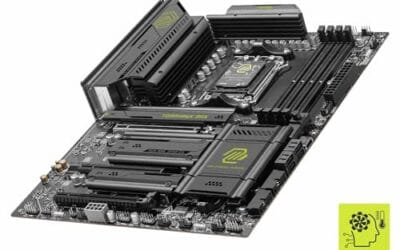
MSI’s MEG X670E Godlike manual lists a 305 mm tall, 288 mm wide board under the same E-ATX label. If your case specifies a 280 mm maximum motherboard width, the ASUS example is within that limit and the MSI example exceeds it. The width check comes first. After that, confirm where the board attaches and whether the cables can reach their sockets.
ATX
ATX gives board makers room to spread out the slots below the graphics card. That matters if you’re building with a capture card or a faster network adapter, or you want room to add one later. It also gives you a wider range of board layouts to compare when you already own a case with ATX mounts. Start with the slot diagram in the manual and see where each card would land.
Micro-ATX
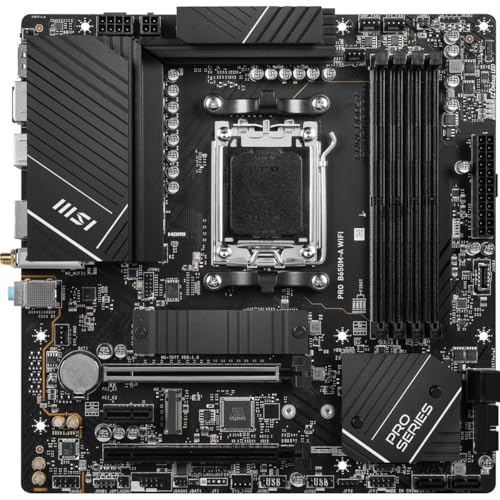
Micro-ATX is a good match for a straightforward desktop. One graphics card, an SSD, and a pair of memory sticks. You can still get four memory slots on a board such as the MSI PRO B650M-A WiFi. The shorter board gives you fewer positions to work with below the GPU, so the exact placement of the remaining slots matters more.
Mini-ITX
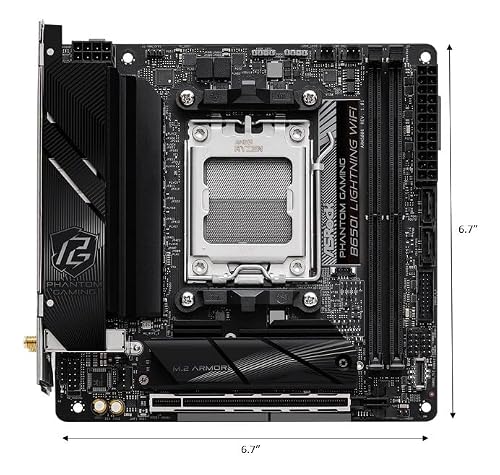
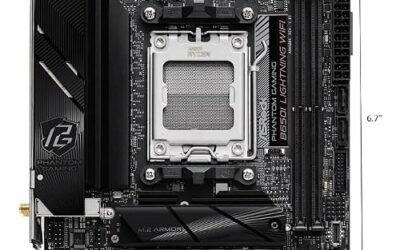
A 170 mm square board makes genuinely small cases possible. On the ASRock B650I Lightning WiFi, the two DDR5 slots sit to the right of the CPU socket and the single full-length PCIe slot runs along the bottom. With a graphics card in that slot, use the board’s built-in connections or external peripherals for anything else you need. Check the rear USB ports before buying if you regularly plug in several drives or controllers.
Expansion slots, memory, and performance
Count the PCIe slots you can actually use with your GPU installed. Say you need a graphics card and a capture card. A thick GPU can cover a nearby slot even when the case has an open rear bracket. Compare the GPU’s thickness with the motherboard diagram and check the capture card’s lane requirement. A lower slot shaped like x16 might be wired for x4, which can be enough for an add-in card that calls for four lanes.
Read the storage footnotes, too. The ASUS TUF Gaming B650-Plus WiFi specifications, for example, say that using its third M.2 socket disables its second full-length PCIe slot. If you’re planning three SSDs and an add-in card, check how your board routes those connections before you buy. The size of the PCB doesn’t tell you how many lanes the CPU makes available.
Memory comes down to the slots and supported configuration on the board. If you expect to need 64 GB in a two-slot Mini-ITX build, check support for a 2 × 32 GB kit first. On a four-slot board, consult the memory support list for your planned configuration if you’ll fill all four sockets later. A compatible CPU and GPU can deliver similar gaming performance across sizes when power settings, memory, and cooling are comparable.
To see what a micro-ATX layout can fit, the MSI PRO B650M-A WiFi manual lists four DDR5 slots and two full-length PCIe connectors. Check the lower connector’s position against your GPU before counting on it for a second card.

Case fit, cooling, and the rest of the build
Start with the case manual’s supported motherboard list. The standard Fractal Design North lists ATX, micro-ATX, and Mini-ITX. When you reuse that kind of case for a smaller board, move or remove standoffs as needed so that each one lines up with a mounting hole. With a wide E-ATX board, confirm the supported width and look for obstructions at the front edge, especially a cable cover or radiator bracket.
Once the board fits, check three other dimensions. GPU length with a front radiator installed. GPU thickness and clearance for its power lead beside the panel. CPU cooler height with the case closed. A mini build can work with a large GPU if the case is designed for it, but you’ll want to know which of those limits applies to your exact parts before ordering. If you need a smaller PSU as well, compare SFX and ATX power supply dimensions and confirm what the case can mount.
Price the case, cooler, and PSU alongside the board. A micro-ATX tower that accepts the power supply and cooler you already have can cost less to assemble than a smaller build that calls for both parts to be replaced. If you’re trying to free up space under a desk, compare the actual outer dimensions in our micro-ATX case guide. Case width and depth can matter more to you than height.
Which motherboard size should you choose?
- One-GPU gaming PC: Start with micro-ATX. Choose a board with the ports and storage you need, then find a case with enough space for the graphics card and cooler.
- Gaming and streaming with an internal capture card: Start with ATX. Map the cards to two usable slots before you buy and check the storage footnotes if you’ll use multiple NVMe drives.
- Small living-room PC: Start with Mini-ITX. Pick the case first if it has to fit inside a cabinet, and leave room behind it for cables and around it for airflow.
- Build around a particular wide board: Pick E-ATX once you can confirm its size, mounting points, and cable access in the case you want. This is especially worth doing before buying an expensive case or custom cables.
If your build needs to be as small as possible, our Mini-ITX motherboard buying guide rounds up options for AMD and Intel. For an AM5 example, the ASRock B650I Lightning WiFi has two DDR5 DIMM slots and a single full-length slot for a GPU. Check that layout against your needs, particularly if your last PC had an expansion card doing a job you’d miss.

Motherboard size FAQ
Does a reverse-connector motherboard fit any case of the same size?
You’ll need a tray with cutouts behind the board where the power and other cables plug in. Fractal Design lists reverse ATX and reverse micro-ATX separately in the North XL RC’s case specifications. Compare the case’s reverse-connector compatibility list and tray drawings with your board before buying. Two cases that support regular micro-ATX may have different cutouts.
Do I need an ATX power supply if I use an ATX motherboard?
Check the PSU mounting space in the case and the connectors your board and graphics card require. The motherboard’s form factor describes its board size and mounting. A smaller SFX unit can power a larger board if the electrical connectors, cable reach, and wattage work for that build and the case has a suitable mount or bracket.
Can I move my CPU to a smaller motherboard?
You can if the new board supports the exact CPU. Check the socket, the manufacturer’s CPU support list, and the minimum BIOS version for your processor. Then check the memory type and cooler mount before you reuse those parts. A move from a larger AM5 board to a Mini-ITX AM5 board can also reduce the number of memory sticks or drives you can bring over, so compare the full parts list before taking the old PC apart.


























Write Your Review
No reviews yet. Be the first to share your experience!