

The difference between a prebuilt PC and building a PC yourself is control. A prebuilt gives you a working system faster, with one seller responsible for assembly. A custom build lets you choose every part, route every cable, and decide exactly where the budget goes. The two example systems here are budget-leaning prebuilts: an abytespark Intel Core i7 tower at $499.99 and a WIWB Ryzen 5 desktop with RX 560 4G graphics at $569.99. If you’re comparing ready-made options, see our budget prebuilt PC guide and prebuilt gaming PC for 1440p guide.
The short answer
Buy a prebuilt if you want convenience, warranty simplicity, and a working PC without learning every compatibility rule. Build your own if you want better part control, easier upgrades, and the satisfaction of knowing exactly what’s inside. Neither path is automatically smarter. It depends on time, confidence, and budget.
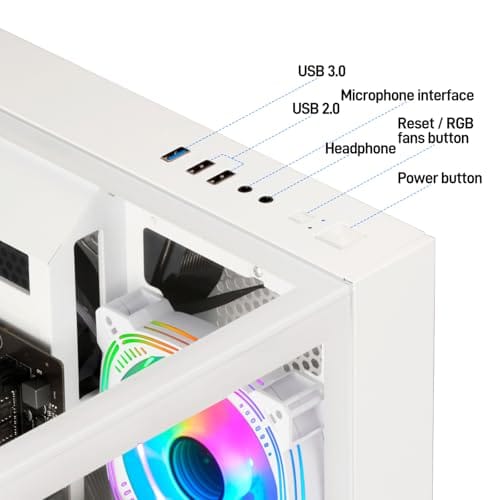
The WIWB prebuilt is a concrete example: $569.99, 4.7 rating, Ryzen 5 up to 4.1G, RX 560 4G graphics card, 16GB DDR4 RAM, 512GB SSD, Wi-Fi 6, and a white tower for home office, student use, and casual gaming. That’s a ready-to-run spec list for someone who doesn’t want to assemble parts.
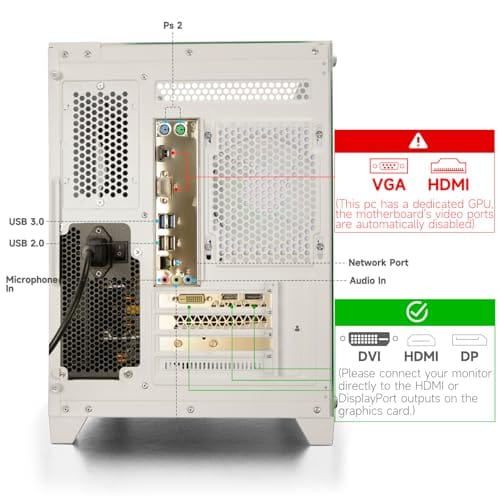

Pros
- Ryzen 5 3500X 6-core CPU bosts to 4.1GHz for smooth 1080p esports CPU load.
- Discrete RX 560 4GB handles DirectX 12 and Vulkan esports titles better than integrated graphics.
- 512GB SSD as bot drive keps Windows load times and app launches snappy out of box.
Cons
- Limited owner feedback at time of writing, no verified reviews to validate build quality.
- RX 560 is a legacy entry-tier GPU, skip if you want modern AAA at 1080p high.
- Ryzen 5 3500X sits on aging AM4, upgrade path is caped at Zen 3 with a BIOS update.
The WIWB is a budget prebuilt tower built around a Ryzen 5 3500X, RX 560 4GB, 16GB DDR4, and a 512GB SSD. It targets students, home office users, and casual gamers who want a plug-and-play box for esports at 1080p rather than a rig for current AAA titles.
The defining pairing here is the 3500X and RX 560. The 6-core, 6-thread CPU bosting to 4.1GHz is still competent for League, CS2, Valorant, and Overwatch, and typically pushes well above 100FPS at 1080p low-to-medium when paired with this GPU class. The RX 560 4GB is the bottleneck for anything heavier.
Trade-offs are typical at this tier. The RX 560 predates FSR frame generation and struggles with modern UE5 titles even at 1080p low. AM4 with a 3500X caps future CPU upgrades at Zen 3, and the case, PSU wattage, VRM phases, and included cooler are not specified, so headroom for a stronger GPU later is unclear.
Buy this if you need a cheap, pre-assembled Windows tower for schoolwork, browsing, and light esports at 1080p. Skip this if you plan to play current AAA releases, stream at 1080p60, or want a platform with a real multi-year upgrade path.
CPU workload: The Ryzen 5 3500X is a 6-core, 6-thread Zen 2 part with a 3.6GHz base and 4.1GHz boost. It stays viable for 1080p esports and light productivity like image editing and IDE work, but lacks SMT, which hurts streaming and modern CPU-bound AA titles.
GPU class and resolution fit: The RX 560 4GB GDDR5 is an entry esports card. Expect high frame rates in CS2, League, and Overwatch at 1080p low-to-medium, and playable frame rates in older AAA titles at 1080p low. 1440p and modern AA at medium are outside its envelope.
Memory and storage: 16GB DDR4 is the current baseline for gaming and multitasking, and the 512GB SSD covers Windows plus roughly 3 to 5 modern game installs. Exact DDR4 speed, dual-channel status, and SSD interface (SATA vs NVMe) are not specified.
Connectivity and upgrade path: WiFi 6 is included, and the board exposes an M.2 slot plus spare DDR4 slots for later expansion. PSU wattage, connector layout, case clearance, and waranty length beyond the stated 1-year coverage are not specified, so plan GPU upgrades cautiously.
The longer explanation
A prebuilt PC bundles parts, assembly, Windows setup, and seller support into one purchase. That can be valuable if you’re buying for a family member, a student, a small office, or your first gaming setup. You can unbox, plug in, update drivers, and get moving. Less friction. Less research.
Building a PC separates every decision. You choose the motherboard, memory speed, SSD size, PSU quality, cooler, case, and GPU model. That gives you better control, but it also means you’re responsible for compatibility, assembly mistakes, BIOS updates, and troubleshooting if the system doesn’t start the first time.
There’s also a time cost people rarely price in. A first-time build can take an afternoon, plus extra time if a part is faulty or a cable is loose. A prebuilt trades that time and uncertainty for a fixed price and a single support contact. Neither answer is wrong. It depends on whether you enjoy the process or just want a working PC by tonight.
History / how we got here
Years ago, building a PC was often the clear value move because prebuilt markups were higher and parts were easier to price individually. Then GPU shortages, bundle deals, and aggressive system integrators changed the equation. Sometimes a prebuilt can be competitive because the seller buys parts in volume or clears inventory through complete systems.
At the same time, DIY building became easier. Cases improved, modular PSUs are common, M.2 SSDs remove cable clutter, and motherboard manuals are better than they used to be. You don’t need to be an engineer. You do need patience and a willingness to read.
Why it works this way
Prebuilts trade customization for convenience. The seller chooses parts that hit a price target, and the buyer gets a complete machine. That’s why some prebuilts include vague PSU details, basic motherboards, or smaller SSDs. The headline CPU and GPU sell the system, while quieter parts may be less exciting.
DIY builds trade convenience for transparency. You can choose a better PSU, a case with cleaner airflow, or a larger SSD even if it doesn’t make the spec sheet look flashy. You can also make bad choices if you don’t check compatibility. Freedom cuts both ways.
Volume buying explains part of the price story. A system integrator can source CPUs, GPUs, and drives in bulk, then sell complete machines at margins that individual shoppers can’t always match on parts alone. That’s why a prebuilt like the WIWB at $569.99 can look competitive against a self-sourced list, even before you count your own time.
When you’d want this
A prebuilt makes sense when you need a computer quickly, don’t have spare parts for troubleshooting, or want one purchase for warranty handling. The abytespark prebuilt costs $499.99 with a 4.4 rating and lists an Intel Core i7 business office tower computer. The title is broad and doesn’t disclose every component, so it’s better framed as a convenience-first office tower than a transparent enthusiast build.
Building makes sense when you care about exact part quality or future upgrades. For example, if you want a specific airflow case, a known 80 Plus Gold PSU, 2TB storage, and a GPU with a particular cooler, DIY gives you that control. For ready-made casual gaming, the WIWB’s listed 16GB DDR4, 512GB SSD, Wi-Fi 6, Ryzen 5, and RX 560 4G specs are at least more explicit.
Pros
- 512GB SSD bot drive avoids the HDD bottleneck common in budget prebuilts
- RX 590 8GB VRAM buffer handles 1080p textures better than 4GB budget cards
- Complete bundle with RGB peripherals means no extra spend to start using
- Genuine Windows 11 Home 64-bit preinstalled, no activation hassle out of box
Cons
- Limited owner feedback at time of writing, verify seller reputation before purchase
- Core i7-4770 is Haswell era LGA150, no upgrade path and weak IPC versus modern CPUs
- Windows 11 on 4th-gen Intel is unsupported by Microsoft and may miss feature updates
- No CD/DVD-ROM support and RAM/GPU generation limits future workload headroom
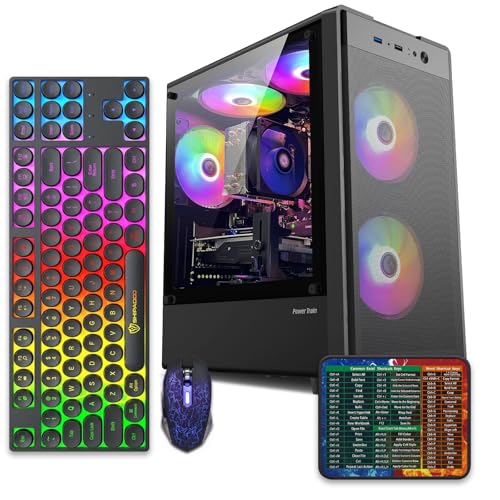
This is an entry-tier prebuilt tower built around an Intel Core i7-4770 Haswell CPU, 16GB RAM, a 512GB SSD, and an AMD Radeon RX 590 8GB GDDR5 GPU. It targets budget buyers who need a working office and light gaming PC with peripherals bundled, not enthusiasts chasing current-gen performance.
The defining feature is the RX 590 8GB paired with a 512GB SSD, an uncommon combo at this price band. Cards in this class typically handle 1080p esports titles at 60+ FPS on medium to high, matching the vendor claim for CS:GO, League of Legends, Apex, and Overwatch. Newer AA titles will need lowered settings.
Trade-offs are significant. The i7-4770 launched in 2013, so IPC, single-thread performance, and platform features like NVMe bot, PCIe Gen4, and modern USB are limited. Windows 11 runs here but sits outside Microsoft's official supported CPU list. There is no realistic CPU or socket upgrade path on LGA1150.
Buy this if you need a plug-and-play 1080p esports and office tower with keyboard, mouse, and RGB included at a low outlay. Skip this if you want current-gen platform support, sustained AA 1440p gaming, or a build with a meaningful upgrade runway.
GPU class: The AMD Radeon RX 590 8GB GDDR5 is a Polaris-refresh card roughly equivalent to a GTX 1060 6GB tier. Expect 1080p 60+ FPS in esports titles like CS:GO, Overwatch, Apex, League, and Fortnite on medium settings, matching the listing's claims.
AAA and modern titles: The vendor lists GTA V, Warzone, Hogwarts Legacy, and The Division 2. Realistically, these run at 1080p low to medium with FSR upscaling where suported.Ray tracing is unsupported on RX 590. No DLSS, no frame gen, no AV1 encode.
CPU bottleneck: The Core i7-4770 quad-core with 8threads at up to 3.9GHz will bottleneck the RX 590 in CPU-heavy titles like Warzone and Escape from Tarkov. Expect frame time inconsistency in large team fights even when average FPS looks aceptable.
Storage and RAM fit: 512GB SSD holds Windows plus 3 to 5 modern game installs before space pressure. 16GB DR3-era RAM is adequate for current esports but leaves no headroom for heavy streaming, browser tabs, and OBS NVENC alongside a game session.
What to look for in a prebuilt or DIY plan
For prebuilts, demand clear specs. CPU model, GPU model, RAM capacity and type, SSD capacity, PSU wattage, motherboard chipset, case airflow, and warranty terms should be visible. If a listing says only “Core i7” without generation, treat it carefully. A ten-year-old i7 and a current i7 are not the same experience.
For DIY, build a full parts list before buying anything. Check socket, RAM type, case clearance, GPU length, PSU connectors, and motherboard BIOS support. Don’t buy one discounted part that forces three awkward compromises. Our AMD prebuilt gaming PC guide can also help you benchmark what ready-made systems include at similar prices.
Warranty structure is another difference buyers miss. A prebuilt usually gives you one seller to contact if the machine arrives dead or unstable, which can be comforting. With DIY, each part has its own warranty, so you may need to isolate whether the issue is memory, motherboard, PSU, or GPU before a manufacturer will help. That’s manageable. It just takes time and spare patience.
Software setup also changes the experience. Many prebuilts arrive with Windows installed, drivers loaded, and sometimes extra vendor software you may want to remove. A custom build starts cleaner, but you’ll install Windows, network drivers, chipset drivers, GPU drivers, and BIOS updates yourself. If that sounds fun, DIY feels empowering. If it sounds like a chore, a prebuilt earns its markup.
Common misconceptions
One misconception is that prebuilts are always overpriced. Some are, but not all. A discounted prebuilt can be a good deal if the parts are clearly listed and the support is solid. Another misconception is that DIY always saves money. After shipping, Windows, tools, and mistakes, the savings may shrink.
People also assume building is too hard. It isn’t impossible, but it is detail-heavy. Most connectors fit only one way, and modern cases are friendly. Still, if troubleshooting a no-display boot sounds miserable, paying for assembly can be worth it.
Another misconception is that every prebuilt uses low-quality parts. Some do cut corners, but others are perfectly reasonable for the price. The key is disclosure. A listing that gives a named CPU, GPU, RAM amount, SSD size, wireless spec, and case style gives you more to judge than a vague tower that leans on “i7” branding without generation details.
There’s also a myth that DIY is always more upgradeable. A custom ATX build usually is, but a poorly planned DIY system can still trap you with a weak PSU, cramped case, or board with too few slots. Upgradeability isn’t automatic. You design it into the parts list.
Frequently asked
Is a prebuilt PC good for beginners?
Yes, especially if the listing is clear and the seller support is decent. Beginners can learn upgrades later without building the whole system from scratch.
Is building a PC cheaper?
Sometimes. DIY can save money or improve part quality, but discounts on complete systems can narrow the gap. Compare full platform cost, not just CPU and GPU.
What prebuilt specs should I avoid?
Avoid vague CPU generations, unnamed PSUs, tiny SSDs, single-channel RAM, and cases with poor airflow. If the listing hides too much, assume corners were cut.
Can I upgrade a prebuilt later?
Often, yes, but check PSU connectors, case space, motherboard slots, and warranty terms first. Some office towers use proprietary parts that make upgrades harder.
Which path is better for gaming?
DIY is better if you want exact GPU, PSU, and cooling choices. A prebuilt is better if you find a well-priced system with clear specs and you want to play sooner.
For casual 1080p gaming, a prebuilt like the WIWB example can be enough if you understand the RX 560 4G is an entry-level graphics card by modern standards. For higher refresh rates, 1440p, or a future GPU upgrade, DIY control becomes more valuable because you can choose the PSU, motherboard, and case airflow around that future plan. That’s where building starts to pay back the extra effort.
If you’re buying for someone else, convenience matters more than enthusiast pride. A parent buying a student PC may prefer one receipt and a ready desktop over a box of parts and an evening of assembly. An enthusiast buying for themselves may prefer the opposite. The better route is the one that matches the buyer, not the loudest opinion in a forum thread.
One last tip: read real owner feedback on any prebuilt before buying. Listings can look great while hiding a weak PSU or noisy cooler, and buyer comments often reveal those details. For DIY, use a compatibility checker and confirm every part before ordering. A little research on either path prevents the most expensive mistakes. Measure the plan. Then commit.


































Write Your Review
No reviews yet. Be the first to share your experience!