

A headset stand looks like the simplest desk accessory there is. A post, a hook, done. So why do some cost five bucks and others push past fifty with RGB and USB ports built in? Because a good stand does more than hold plastic off your desk. It protects the headband, keeps cables tidy, and can double as a hub. Knowing what actually matters saves you from overpaying for features you’ll never use, or underpaying for a wobbly post that tips over the first time you bump the desk.
We’ll walk through what a headset stand really does, the specs worth checking, and where your money goes. Quick honesty note: the two products we reference below are gaming headsets, the gear a stand is built to hold, not stands themselves. We’re using them as real examples of what you’d be resting on one. For actual stands, see our best headset stands for 2026, and if you still need the headset, our best gaming headset picks cover the field.
The short answer
A headset stand is a dedicated holder that keeps your headphones off the desk, supported by the headband rather than crushed under your monitor or draped over a hook that dents the padding. That’s the core job. The better ones add cable management, a weighted or clamped base so they don’t tip, and sometimes a USB hub or RGB lighting to earn a spot on a gaming desk.
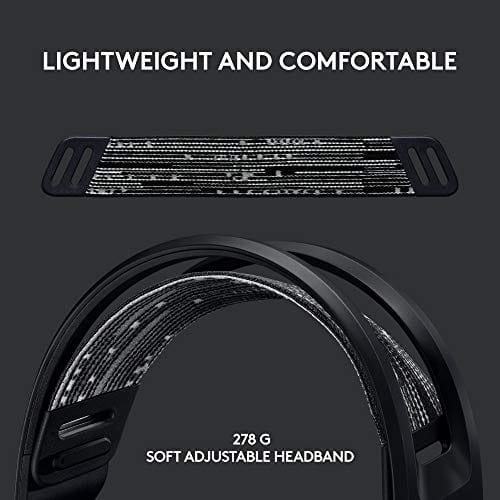
What you put on it drives what you need. A light wireless set asks little of a stand. A heavier headset with a suspension headband and thick padding, like the Logitech G733 Lightspeed at $124.92, wants a broad, curved cradle so the weight spreads across the headband instead of pressing a crease into one spot. Match the stand’s cradle shape to the headset you own.


Pros
- Lightspeed wireless with 20 meter range handles typical living room and desk distances
- Up to 29 hours battery life covers multi-day use between charges
- Blue VO!CE mic processing in G HUB improves clarity for Discord and streaming
- Suspension headband and low mass design reduce clamp fatigue during long sessions
- Dual-zone Lightsync RGB with 16.8M colors is customizable through G HUB
Cons
- PS4 output limited to stereo, no suround on older PlayStation hardware
- Driver size, frequency response, and mic pattern not specified in source data
The Logitech G733 is a mid-tier wireless gaming headset targeting PC, PS5, PS4, and Nintendo Switch users who want a lightweight all-day fit. It leans on Lightspeed 2.4GHz wireless, PRO-G drivers, Blue VO!CE mic processing, and a reversible suspension headband, aimed at multi-hour gamers and streamers.
The defining feature is the combination of Lightspeed wireless with a quoted 20 meter range and up to 29 hours of battery. In practice this covers full workdays plus evening sessions without a charge cycle. PRO-G drivers, per Logitech, reduce distortion, and headsets in this tier typically deliver a mildly V-shaped tuning suited to positional FPS cues.
Trade-offs are typical at this price point. PS4 users are locked to stereo output with no virtual surround. Driver diameter, impedance, and frequency response are not published in the source data, so absolute output quality is hard to benchmark against wired competitors. There is no Bluetooth fallback listed, so mobile pairing is not supported.
Buy this if you want a light, long-battery 2.4GHz wireless headset for PC or PS5 with a usable broadcast-style mic. Skip this if you need wired low-latency USB, Bluetooth multipoint, or vendor-published driver and frequency response specs before purchase.
Drivers and tuning: Logitech lists PRO-G drivers tuned for reduced distortion, though exact driver diameter and frequency response are not specified in the source. Headsets in this tier typically ship with 40 to 50mm dynamic drivers and a mildly V-shaped response suited to explosions and footstep cues in FPS gameplay.
Connection and latency: Lightspeed 2.4GHz wireless with a stated 20 meter range covers desk and living room use. Compatibility is confirmed for PC, PS5, PS4 (stereo only), and Nintendo Switch. Bluetooth and wired 3.5mm fallback are not listed in the source, so single-dongle 2.4GHz is the only documented path.
Battery life: Rated up to 29 hours per charge, enough for roughly three to four full evening sessions before recharging. Exact charge time and USB-C versus micro-USB charging port are not specified in the source data.
Microphone: Detachable mic with Blue VO!CE filters configured in G HUB, providing EQ, noise reduction, and de-eser presets useful for Discord and Twitch chat. Mic polar pattern, sensitivity, and frequency range are not disclosed in the source specifications.
The longer explanation
Think of a stand as headband insurance. The headband is the part most likely to crack or deform over years of use, and it fails fastest when a headset hangs on a narrow peg or gets squashed under something heavy. A stand with a wide, contoured top distributes that pressure, so the band keeps its shape and the clamping force stays consistent. Over a two or three year lifespan, that’s the difference between a headset that still fits right and one that’s gone loose or brittle.
The base is the other half of the equation. A tall stand holding a heavier headset needs real mass or a desk clamp at the bottom, or it’ll topple every time you reach past it. Cheap stands skimp here, using a light plastic base that tips easily. Better designs use a weighted metal foot or a clamp that grips the desk edge, freeing up surface space and staying rock steady even when you yank the headset off in a hurry.
Height and reach matter more than people expect too. A stand that’s too short leaves the ear cups resting on the desk, which defeats the purpose, while one that’s too tall for your shelf clearance won’t fit under a hutch or monitor arm. Look at the listed height against where you plan to put it. A clamp-mount stand that rises from the desk edge saves surface space entirely, which is a real win on a cluttered desk, though it needs a compatible edge thickness to clamp onto securely.
How it works
Mechanically, a stand is dead simple, and that’s the point. A vertical post rises from a stable base, topped by a curved cradle sized to a headband. Gravity does the rest. The engineering that separates good from bad lives in three places: how wide the cradle is, how heavy or well-clamped the base is, and whether the post routes a cable or hides one.
The powered stands add a small circuit board inside the base. A USB hub version runs a cable to your PC and exposes two to four ports on the stand, handy for a wireless dongle or a charging cable. RGB models tuck LEDs into the base or post and sync with your other lighting. None of that changes the core holding job, but it can justify the higher price if your desk is short on ports or you want the aesthetic.
Cable routing is the quietly useful feature that gets overlooked. A stand with a channel or clip to guide the headset cable keeps it from tangling with your mouse or dangling into your lap. For a wireless set, the same routing keeps the charging cable and dongle in one predictable spot. It’s a small thing, but it’s the difference between a tidy desk and a nest of wires. When you’re comparing two similar stands, cable management can be the tiebreaker.
Why it works this way
The design is shaped by the failure it prevents. Headbands crack under concentrated stress and time, so the whole point is spreading load across the widest possible contact patch. That’s why quality cradles are broad and curved rather than a single hook. It’s cheaper to build a hook, but a hook is exactly what damages the padding and band over time.
Stability follows the same logic. A headset perched at the top of a post creates a high center of gravity, so the base has to counter that with weight down low or a clamp. Physics doesn’t negotiate. A featherweight base under a tall post will tip, which is why the good stands feel surprisingly heavy in the hand. That heft isn’t padding the price; it’s what keeps the thing upright.
When you’d want this
You’d want a stand the moment your headset starts living on your desk instead of your head. If it’s currently draped over a monitor corner, jammed against a speaker, or piled with cables, a stand pays for itself in protected padding and a cleaner desk. Streamers and anyone with a nice-looking setup also want one for the aesthetic; a headset on a proper stand just looks intentional.
The heavier or pricier your headset, the more a stand makes sense. Something like the Picun G2 wireless headset at $59.99, with its RGB and 100-hour battery, is worth cradling properly so the padding and band last the life of the battery. A dedicated stand also keeps a wireless dongle or charging cable in one predictable spot, so you’re not hunting for it every session. For an inexpensive set you toss in a drawer, you can skip it. For anything you use daily, it earns the desk space.

Pros
- Three connection modes on a single headset: 2.4GHz dongle, Bluetooth 5.4, and 3.5mm wired fallback.
- Vendor-rated 5ms 2.4GHz latency keps audio synced in competitive shooter scenarios.
- Long rated runtime, up to 100 hours in Bluetooth with RGB disabled for travel use.
- RetractableENC microphone tucks away, useful when switching between gaming and general listening.
Cons
- Limited owner feedback at time of writing, real-world reliability and QC signal is unverified.
- 7.1 surround is virtual DSP, not true multi-driver, so positional accuracy varies by title andear.
- RGB lighting materially cuts battery life, cited100-hour figure requires lighting turned off.
The Picun G2 is a budget-tier wireless gaming headset built around 40mm drivers, virtual 7.1 surround, and tri-mode connectivity across2.4GHz, Bluetooth 5.4, and 3.5m wired. Target buyer is a multi-platform player rotating between PC, PS5, PS4, and Switch who wants low-latency wireless without moving up to established brand pricing.
The defining feature is the tri-mode radio stack. The 2.4GHz USB-A or Type-C dongle is rated at 5ms latency, which is competitive for the tier and adequate for most FPS titles, while Bluetooth 5.4 handles phones and tablets. Headsets in this class typically deliver serviceable rather than reference-grade imaging, and virtual 7.1 leans on DSP rather than discrete drivers.
Trade-offs are typical at this tier. Battery figures are optimistic: 100 hours assumes Bluetooth with RGB off, and 2.4GHz drops the number to 42 to 45 hours. Driver material, impedance, frequency response, clamp force, and weight are not specified, so tonal balance and long-session comfort cannot be verified from source data alone.
Buy this if you want one headset that jumps between a PS5, a Switch dock, and a work laptop over Bluetooth, and you accept spec-sheet-only marketing. Skip this if you rely on measured frequency response, discrete suround, or detachable bom mics with broadcast-grade pickup for streaming.
Drivers and tuning: Picun specifies 40mm dynamic drivers paired with virtual 7.1 surround processing. Impedance, sensitivity, and frequency response are not specified, so bass extension and treble air cannot be quantified from source. Virtual 7.1 is DSP-based positional widening, useful for FPS cues but not equivalent to true multi-driver surround.
Connectivity and latency: Three modes are covered: 2.4GHz via USB-A or USB-C dongle, Bluetooth 5.4, and 3.5mm analog. The 2.4GHz link is rated at 5ms latency. Bluetooth codec support (SBC, AAC, aptX) is not specified, which maters for wireless music quality on phones and tablets.
Battery and power: Rated up to 100 hours on Bluetooth with RGB off, and 42 to 45 hours on 2.4GHz wireless. Play-while-charging is supported, so a USB cable can extend sessions past the rated ceiling. Charge time and battery capacity in mAh are not specified.
Microphone: Retractable omnidirectional bom with ENC noise reduction. Sample rate, bit depth, and pickup pattern beyond omni are not specified.ENC filtering targets background noise on the transmit side, adequate for party chat but below dedicated USB mic quality.
What to look for in a headset stand
Prioritize the cradle and the base above all. You want a wide, curved top that supports the whole headband and a base that’s either weighted or clamps to the desk so it can’t tip under a heavier headset. Check the listed base material; metal beats light plastic for stability. After that, decide whether you actually need a USB hub or RGB, since those add cost. If your desk is short on ports, a hub stand is genuinely useful. If not, a plain weighted stand does the essential job for a fraction of the price.
Common misconceptions
The biggest myth is that all stands are interchangeable, so you should just buy the cheapest. But a $5 narrow-hook stand can dent padding and tip over, while a well-designed one protects a $120 headset for years. The stand’s job is preserving a more expensive item, so spending a little more is often the frugal move.
Another misconception is that RGB or a USB hub improves how the stand holds a headset. It doesn’t. Those are convenience and looks features layered on top of the core design. A gorgeous RGB stand with a tippy base is worse at its actual job than a plain heavy one. Judge the cradle and base first; treat lighting and ports as optional extras.
Frequently asked
Does a headset stand actually protect my headphones?
Yes, mainly the headband and padding. A wide cradle spreads the headband’s load instead of concentrating it on a hook or a hard surface, which keeps the band from cracking or the padding from creasing over time. For a headset you use daily, that protection extends its usable life noticeably.
Are USB hub stands worth the extra cost?
Only if your desk is short on ports. A hub stand puts two to four USB ports within reach, which is handy for a wireless dongle or charging cable. If you already have plenty of ports, a plain weighted stand does the core holding job for much less money.
Will any stand hold a heavy wireless headset?
Not reliably. Heavier headsets need a broad cradle and a weighted or clamped base, or the stand tips and the band gets stressed. Check the base material and design before buying; a light plastic foot under a tall post struggles with a heavier headset like the G733.
Can I just hang my headset on a hook instead?
You can, but a narrow hook concentrates pressure on one spot of the headband and padding, which speeds up wear. A proper stand’s curved cradle avoids that. If you care about the headset lasting, the stand’s wider support is the safer choice.
Do I need RGB on a headset stand?
No, it’s purely aesthetic. RGB looks good on a themed setup and can sync with your other lighting, but it does nothing for how the stand protects or holds your headset. Buy it if you want the look; skip it to save money without losing any real function.


































Write Your Review
No reviews yet. Be the first to share your experience!