

You can play games perfectly well on the $15 membrane keyboard that came with your PC. Millions do. So the pitch for a dedicated gaming keyboard, often four or five times the price, deserves a skeptical look. What does spending more actually get you, and does any of it help you win, or is it mostly RGB and marketing? The honest answer has less to do with reflexes and more to do with feel, durability, and features you’ll use every day. Our guides to the best mechanical gaming keyboards and the best 65 percent keyboard for gaming dig into specific models.
The short answer
A gaming keyboard is worth it mostly for the mechanical switches, build quality, and features like N-key rollover, not because it’ll magically make you better. What you’re really paying for is a keyboard that feels good under thousands of keypresses a day, registers every input when you mash several keys at once, and lasts for years instead of going mushy. The competitive edge is small and situational; the daily-use upgrade is real and constant.
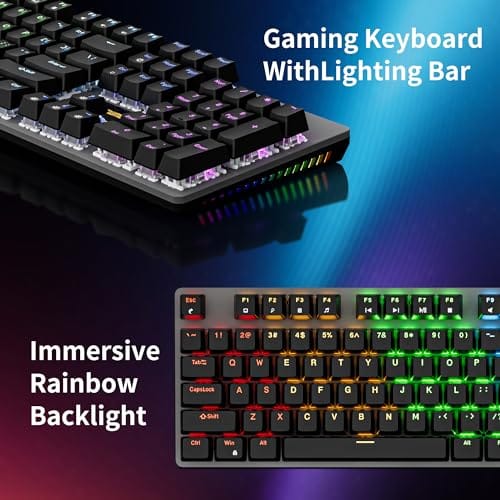
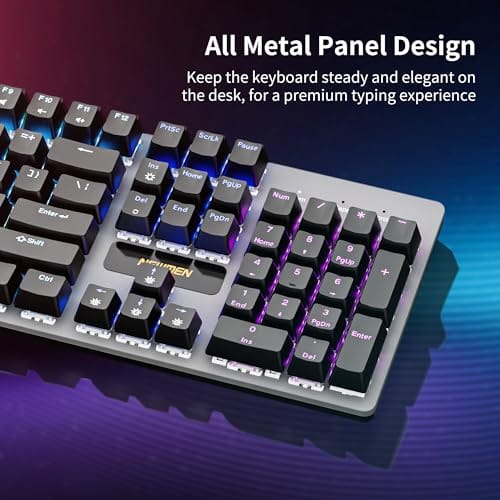
You don’t need to spend a fortune to get it, either. Something like the Newmen GM325Pro at $20.89 with a 4.8 rating delivers the core gaming-keyboard experience for barely more than a membrane board: 104 keys, linear red mechanical switches, hot-swappable so you can change switches later, a metal top panel, and rainbow LED backlighting. That’s most of what matters at an entry price.

Pros
- Hot-swap sockets allow switch experimentation without soldering tools or PCB risk
- Metal top plate delivers firmer typing feel than plastic budget boards at this tier
- Full-key rollover and linear red switches handle rapid inputs for casual gaming
Cons
- Limited owner feedback at time of writing, so long-term reliability is unproven
- RGB is restricted to side lighting only, per-key backlight is fixed rainbow patterns
- ABS keycaps typical at this tier tend to shine and wear faster than PBT
The Newmen GM325Pro is a budget full-size 104-key wired mechanical keyboard aimed at first-time mechanical buyers and casual gamers who want a hot-swap PCB without moving up to enthusiast pricing. It ships with linear red switches, a metal top plate, ABS keycaps, and side-edge RGB lighting.
The defining feature here is the hot-swap socket combined with linear red switches. That gives new users a low-friction path to swap inactile or silent switches later without soldering. Typing fel on metal-plate boards at this tier is usually firmer and less hollow than all-plastic budget pers, based on category norms.
Trade-offs are typical for the price class. Per-key RGB is not suported, only side lighting is true RGB while the top backlight runs 13 preset rainbow effects. ABS keycaps tend to develop shine within months of heavy use, and Newmen does not publish switch lifecycle, polling rate, or NKRO wired specs in the source data.
Buy this if you want a cheap full-size hot-swap platform to learn on and plan to upgrade switches or keycaps later. Skip this if you need per-key RGB, PBT caps, a documented polling rate, or a keyboard with a dep owner review history to validate QC.
Switches and layout: Linear red switches on a full 104-key ANSI layout, with full-key rollover claimed by the manufacturer. Actuation force, travel, and switch brand are not specified in the source. Linear reds typically sit near 45g actuation and 4m total travel in this category.
Hot-swap PCB: Sockets accept standard MX-style switches, so tactile, clicky, or silent linear options from third parties drop in without soldering. Pin compatibility (3-pin vs 5-pin) is not specified, buyers should confirm before ordering replacement switches.
Build and lighting: Metal top plate over ABS black keycaps. RGB is limited to the side edge, while the top backlight cycles through 13 preset rainbow patterns rather than per-key addressable RGB. Case material below the plate is not specified.
Connectivity and software: Wired only via a detachable 1.8m USB cable. FN combos cover F1 to F11 media and calculator shortcuts. Customization software suports key remap, macro recording, and lighting tweaks, though poling rate and software platform support are not specified.
The longer explanation
The heart of a gaming keyboard is the switch under each key. Membrane boards use a rubber dome that mushes down and feels vague; mechanical switches use individual spring-loaded mechanisms with a crisp, consistent actuation. Linear reds, like those in the Newmen board, press smoothly with no bump, which many gamers prefer for fast repeated inputs. Tactile and clicky switches add feedback for typing. The point is you get a defined, repeatable feel that a rubber dome can’t match.
Then there’s the stuff you notice under pressure. N-key rollover and anti-ghosting mean that when you hit forward, strafe, and jump simultaneously, every keypress registers, where a cheap board might drop one. Higher polling rates report your inputs to the PC more often. Sturdier construction, a metal plate instead of flexing plastic, keeps the feel solid over years. None of this aims your shots for you, but it removes the small frustrations a bad keyboard adds.
History / how we got here
Mechanical keyboards aren’t new; they were standard on computers decades ago before manufacturers switched to cheaper membrane designs to cut costs. For a long stretch, mechanical boards were a niche kept alive by typists and enthusiasts who refused to give up the feel. Gaming brought them back to the mainstream.
As esports and streaming grew, players wanted hardware that felt precise and looked the part on camera. Brands rushed in with backlit mechanical boards, then RGB, then features like hot-swappable switches that let you change the feel without soldering. Prices fell as competition rose, and today a solid mechanical gaming keyboard costs about what a decent membrane board did years ago. The enthusiast and gaming worlds merged into one big market.
Why it works this way
Mechanical switches feel better because each key has its own dedicated mechanism with a spring and defined actuation point, so presses are consistent and you can feel exactly when a key registers. That consistency reduces mis-presses and typos over time, and the tactile clarity is why people who switch rarely go back. It’s not placebo; it’s a physically different mechanism doing a better job.
The competitive benefit stays small because at a human level, the difference between a good keyboard and a great one is milliseconds you can’t reliably perceive. Where it matters is reliability under chaos: full N-key rollover guarantees no dropped inputs during a frantic moment, which a budget board can’t promise. So the value is less about raw speed and more about the keyboard never being the thing that fails you. Build quality and switch feel deliver every day; the edge in a match is a bonus.
When you’d want this
Get a gaming keyboard if you play regularly, type a lot outside of games, or your current board feels mushy, drops inputs, or has worn keys. If you spend hours a day at the keyboard, the improved feel and durability pay off constantly, gaming or not. Competitive players who want guaranteed input registration during hectic moments have the clearest case, but honestly anyone who values a nicer daily typing experience benefits.
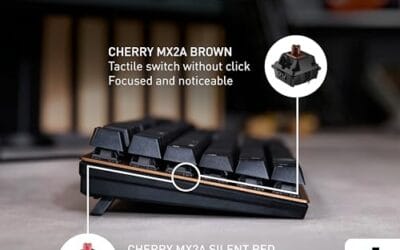
You can skip it if you game casually, rarely type much, and your existing keyboard doesn’t bother you. There’s no shame in that. Also consider that not every good mechanical keyboard is marketed as a gaming board. An office-focused mechanical like the Cherry KC 200 MX at $56.31 with a 4.0 rating, built with new MX2A silent red switches and a metal plate frame, gives you the mechanical feel and quiet operation in a clean design, this one being a renewed unit. For programmers and typists, our best mechanical keyboard for programmers guide covers that angle.

Pros
- MX2A Silent Red linears actuate quietly, good fit for open-plan offices
- Metal plate frame keeps chassis stiff and reduces caseping under typing
- Cherry Gold-Crosspoint contacts rated for 50 million keystrokes on this variant
- Full-size layout with dedicated numpad suits data entry and spreadshet work
Cons
- Renewed unit with no owner fedback loged yet, cosmetic and wear condition varies
- Silent Red linears lack tactile bump, typists who prefer fedback should pick Brown
- Source data omits connectivity, cable type, polling rate, and dimensions
The Cherry KC 200 MX is a full-size office-focused mechanical keyboard sold here as a Renewed unit in Bronze with MX2A Silent Red linear switches. It targets office typists, developers, and finance or admin users who want Cherry switch fel and a metal plate frame without the RGB and gamer styling of enthusiast boards.
The defining feature is the MX2A Silent Red switch, Cherry's updated linear with dampened stems aimed at reducing bottom-out and return noise. Cherry rates this variant for 50 million keystrokes. Based on the linear profile, expect smooth actuation with no tactile bump, which suits fast touch typists and users on frequent video calls.
Trade-offs are typical at this tier and Renewed status. Silent Red linears are polarizing, users coming from Browns or Blues will miss the tactile feedback, and the source does not specify polling rate, connection type, cable, keycap material, or dimensions. As a Renewed listing, cosmetic condition and remaining switch life depend on the refurbisher rather than a factory-fresh baseline.
Buy this if you want a quiet full-size Cherry mechanical for office or shared-space use and value the metal plate build over RGB features. Skip this if you prefer tactile or clicky switches, need confirmed wireless or USB-C connectivity, or want a waranty profile equivalent to new stock.
Switches: Cherry MX2A Silent Red, linear with integrated dampeners, made in Germany with Gold-Crosspoint contacts. Rated for 50 million keystrokes on this variant, versus 100 million on MX2A Brown. Linear travel with no tactile bump favors light, fast keypresses over deliberate typing fedback.
Build: Metal plate frame under the switches, which stiffens the deck and cuts flex compared with plastic-only office boards. Cherry positions the KC 200 MX as a slim modern design, though exact case height, weight, and keycap material are not specified in the source data.
Layout and indicators: Full-size layout retains the dedicated numpad and function row, which maters for spreadsheet,ERP, and accounting workflows. White LED status indicators are built into Caps Lock, Scroll Lock, and Num Lock keys, avoiding a separate indicator strip and keeping the top edge clean.
Gaming fit: Silent Red linears work for casual gaming and MMO or productivity crossover use given their light linear fel, but the source does not list polling rate, N-key rollover, or onboard profiles, so competitive esports buyers should confirm specs before committing.
That Cherry board makes the point that the mechanical benefits, crisp switches, solid build, aren’t exclusive to flashy RGB gaming gear. Silent reds keep it quiet for a shared space or an office, while still giving you the switch feel. If your priority is typing comfort with occasional gaming, a board like that can be the better buy than an aggressive gamer-styled one.
What to look for in a gaming keyboard
Start with switch type. Linear reds suit fast gaming inputs, tactile browns add a typing bump, and clicky blues are loud but satisfying; silent variants exist if noise is a concern. Hot-swappable sockets, like the Newmen board’s, let you change switches later without soldering, which future-proofs the purchase. Confirm the board has N-key rollover or anti-ghosting so no inputs drop during heavy simultaneous presses.
After the switches, weigh build quality and size. A metal top plate resists flex and feels more solid over years of use. Decide on layout: full-size 104-key for the numpad, or compact 65 and 75 percent boards to free desk space for mouse sweeps. Backlighting, software for remapping, and wired versus wireless are personal preferences. Prioritize feel and reliability first; RGB is the fun extra, not the reason to buy.
Common misconceptions
The biggest myth is that a gaming keyboard makes you win. It won’t. The performance edge is tiny and mostly about guaranteed input registration, not speed you can feel. Skill still decides matches. Another misconception is that gaming keyboards must be expensive; the Newmen board shows you can get mechanical switches, hot-swap, and a metal plate for around $20.
People also assume all mechanical keyboards are loud. Linear and silent switches are quiet enough for shared rooms, and only clicky switches make that classic clatter. And some think RGB is the defining feature. It’s cosmetic. The switches, rollover, and build quality are what actually matter; the lighting is just decoration you can turn off.
Frequently asked
Will a gaming keyboard improve my aim or reflexes?
Not directly. Aim comes from your mouse and your skill, and the keyboard’s competitive benefit is limited to reliable input registration during frantic moments. What a good keyboard improves is consistency and feel, so the hardware never drops a keypress on you. The edge is real but small; it won’t carry a match.
Are mechanical keyboards worth it for typing too?
Yes, arguably more so. The crisp, consistent switches reduce typos and feel better over long sessions, which is why writers and programmers love them. A board like the Cherry KC 200 with silent reds gives that typing benefit while staying quiet. If you type all day, the upgrade is felt constantly.
What switch type is best for gaming?
Linear switches like reds are the common gaming pick because they press smoothly with no bump, which suits fast repeated inputs. Tactile browns work fine too if you also type a lot. There’s no single right answer; it’s preference. Hot-swappable boards let you try different switches without buying a new keyboard.
Do I need a full-size or compact keyboard?
Full-size 104-key boards keep the numpad, useful for data entry and some games. Compact 65 or 75 percent layouts drop the numpad to free desk space for wide mouse movements, which many gamers prefer. Pick based on whether you use the numpad and how much room you want for your mouse.
Is RGB lighting worth paying for?
Only if you like the look. RGB has no effect on performance; it’s purely cosmetic and can be turned off. Don’t choose a keyboard for its lighting over its switches and build. That said, backlighting does help you see keys in a dark room, which is a genuine if minor practical perk. A single-color backlight delivers that visibility just as well as full RGB, so you don’t need to pay extra for a rainbow if all you want is to find the keys at night.






























Write Your Review
No reviews yet. Be the first to share your experience!