

Double your storage budget from $100 to $250 and you don’t just get more gigabytes, you cross into a different class of drive. A hundred bucks today buys a solid 1TB to 2TB SATA or entry NVMe SSD; $250 pushes you into fast 2TB Gen4 territory or a roomy 4TB drive, with the sequential speeds and endurance ratings that actually change how a build feels. We researched what each tier delivers and where the extra $150 pays off. If you’re mapping out capacity, our picks for the best 2TB NVMe drives and the best budget SSDs pair well with this breakdown. One honest note up front: the two products carded below aren’t standalone SSDs, they’re complete systems whose bundled NVMe storage we’re using to illustrate the tiers.
Matchup at a glance
The $100 tier is about covering the basics well. You get enough space for Windows, a handful of big games, and your everyday files, usually on a SATA SSD or a mid-range Gen3/Gen4 NVMe stick. It’s the smart floor for most builds, and honestly it’s where the majority of people should start. Fast enough that boot and load times feel instant compared to a hard drive.

The $250 tier is about capacity and speed you won’t outgrow. Here you’re looking at 2TB of quick Gen4 NVMe or 4TB of value storage, higher endurance ratings, and the bandwidth that matters for large game installs, video scratch work, or a big Steam library you never want to prune. It’s not twice as fast for twice the money, but the total value, space plus speed plus longevity, tilts the calculation for heavier users.

One thing worth stressing early: both tiers deliver the single biggest upgrade a PC can get, the move from a spinning hard drive to solid state. That leap cuts boot times from a minute to seconds and turns game load screens into a brief flash. Past that point, the gains get smaller and more specialized. So the $100-versus-$250 question isn’t about whether your PC will feel fast. Both will. It’s about how much room and headroom you’re buying for the specific things you do, and whether those things actually stress a drive.
Spec sheet showdown
| Spec | $100 storage tier | $250 storage tier | What it means | Who benefits |
|---|---|---|---|---|
| Typical capacity | 1TB-2TB | 2TB-4TB | Room for OS, games, files | Heavy users need the top end |
| Interface | SATA or Gen3/Gen4 NVMe | Fast Gen4 NVMe | Sets peak bandwidth | Creators, big-library gamers |
| Sequential read (approx) | 550MB/s SATA to ~5,000MB/s NVMe | ~7,000MB/s Gen4 NVMe | Large-file transfer speed | Video and dataset work |
| Endurance (TBW) | Lower | Higher | Total writes before wear | Anyone writing lots daily |
| Best for | Boot + a few games | Everything at once | Overall headroom | Depends on workload |
The $100 tier strengths
The hundred-dollar tier wins on pure value per build. For most people, a 1TB or 2TB SSD at this price is genuinely all they need, and spending more is money that could go toward a better GPU or more RAM. A modern NVMe drive here already loads Windows in seconds and cuts game load screens dramatically versus a hard drive. You’re paying for the leap that matters most, from mechanical to solid state, and that leap is nearly the same at $100 as at $250.
It’s also the tier that keeps a budget build balanced. Storage is important, but it’s rarely the bottleneck in gaming, so pouring cash here has diminishing returns for the average player. A $100 drive leaves headroom in the budget and still delivers snappy, responsive everyday performance. If your library is a dozen games and your files are documents and photos, this tier isn’t a compromise, it’s the correct answer. Don’t overspend on space you won’t fill.
The $250 tier strengths
The $250 tier is for people who fill drives and hate managing space. At this budget you’re buying 2TB of fast Gen4 NVMe or 4TB of value storage, which means you install what you want and stop uninstalling games to make room. The higher sequential speeds, often around 7,000MB/s on a good Gen4 drive, matter for moving large files, editing video off the drive, or loading massive open-world titles that stream assets constantly. It’s speed you feel in specific, heavy tasks.
Endurance climbs too. Bigger, pricier drives usually carry higher terabytes-written ratings, so they last longer under heavy daily writes from creators or anyone shuffling large datasets. To illustrate the top of this thinking, consider a complete high-end system that bundles fast bundled NVMe storage rather than leaving you to add it. The MSI Codex Z2 gaming desktop, for one, ships with 2TB of m.2 NVMe SSD alongside an RTX 5070 and 32GB DDR5, a real example of the “buy roomy fast storage once” philosophy at the system level.

Pros
- RTX 5070 Blackwell GPU is well above average for this prebuilt price tier
- 32GB DDR5 at 6000 MHz avoids the need for a near-term RAM upgrade
- 2TB NVMe SSD is a practical capacity for a modern game library
- WiFi 6 and Bluetooth built in with no added cost
Cons
- No verified owner reviews at time of writing, making real-world reliability hard to assess
- Ryzen 7 8700F uses Socket AM4, limiting CPU upgrade path compared to AM5 platform alternatives
- RTX 5070 ships with 12GB GDDR6, which may become a ceiling in demanding 4K scenarios by 2027
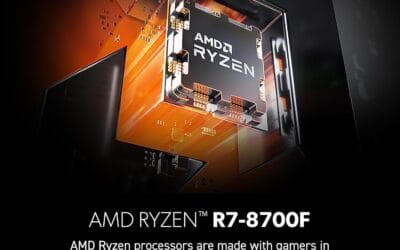
The MSI Codex Z2 is a mid-to-high-end gaming tower aimed at buyers who want RTX 5070-class performance without building from scratch. Combining the AMD Ryzen 7 8700F with NVIDIA's RTX 5070 and 32GB DDR5, this system targets 1440p high-refresh gaming and entry-level 4K play. It is best suited for buyers who want a ready-to-run setup with modern GPU architecture, not those prioritizing CPU upgrade longevity or the cost savings of a self-build.
The RTX 5070 is the headline component here. Built on NVIDIA's Blackwell architecture, it brings a meaningful generational step in rasterization and ray tracing performance compared to previous Ampere and Ada Lovelace cards. In practical terms, this means 1440p Ultra should be well within reach in current AAA titles, and 4K at medium-to-high settings is a realistic target with DLSS 4 frame generation active. Paired with the 8-core Ryzen 7 8700F boosting to 5.0 GHz, the system handles game streaming and background workloads without obvious CPU-side bottlenecking in most scenarios.
MSI has put some effort into the thermal design. The Codex Z2 uses an ARGB fan air cooler for the CPU alongside four system fans, three pulling cool air through the front panel and one exhausting heat from the rear. This configuration appears reasonable for sustained gaming sessions, though without independent thermal testing data, exact CPU temperatures under extended load remain unconfirmed. The compact tower footprint at 16 x 8.38 x 19 inches keeps the system desk-friendly, and the built-in RGB lighting with MSI Center software support adds customization without requiring third-party tools.
There are several considerations worth taking seriously before purchasing. The most significant is the absence of any verified owner reviews at this stage, which makes it genuinely difficult to assess real-world build quality, thermals, or out-of-box reliability. Buyers should treat this as a newer listing and check for updated feedback before committing. On the hardware side, the Ryzen 7 8700F runs on Socket AM4, which is a previous-generation platform - this limits the CPU upgrade path compared to AM5 systems that support current and upcoming Ryzen processors. Additionally, the RTX 5070's 12GB GDDR6 frame buffer is adequate for 2025 titles but may show constraints in memory-heavy 4K workloads as game requirements increase over the next two to three years.
Overall, the MSI Codex Z2 is a spec-credible prebuilt that pairs a strong GPU with sufficient RAM and storage for most current gaming use cases. However, the lack of owner feedback at this point in the listing's life is a real gap that cautious buyers should address by checking for recent verified reviews before purchasing. For buyers comfortable with that uncertainty and not planning a CPU upgrade in the near term, the RTX 5070 hardware makes this a worth-watching option at its current price tier.
Real-world scenarios
The mainstream gamer
You keep six to ten games installed and rotate through them. A $100 2TB NVMe covers that with space to spare, and you won’t notice the difference a pricier drive would make in load times. Save the money. This is the clearest case for the lower tier.
The video editor or creator
You’re scrubbing 4K footage, exporting large projects, and writing tens of gigabytes daily. Here the $250 tier’s speed and higher endurance genuinely pay back. The faster sequential reads cut export and transfer waits, and the tougher write rating means the drive holds up. Worth every dollar.
The someone who never deletes anything
Massive Steam library, every game installed, plus movies and backups. You’ll fill a 1TB drive in a month. The $250 tier’s 4TB of space, or a system with generous bundled storage, saves you the constant juggling. Capacity, not raw speed, is what you’re buying, and it’s the right buy.
The AI or heavy-data workstation user
Large datasets and models eat both space and bandwidth. At the extreme, purpose-built systems bundle fast Gen4 NVMe for exactly this. The ASUS Ascent GX10, an AI-focused machine with 128GB LPDDR5x and a 1TB PCIe Gen4 NVMe SSD, shows how the top tier prioritizes fast storage for data-heavy work. Overkill for gamers, apt for researchers.
Pricing and availability
Standalone SSDs at these tiers are widely stocked and prices drift with NAND supply, so watch for sales where a 2TB Gen4 drive dips near $100 or a 4TB slides toward $200. That’s when the value tips hardest in your favor. The complete systems referenced above sit far above pure-storage budgets, the MSI Codex Z2 around $2,067 and the ASUS Ascent GX10 near $3,971, because you’re buying whole machines, not drives. They’re context for how storage scales inside a build, not a $100-versus-$250 SSD purchase. When you shop standalone drives, check the warranty length too, since better drives back their endurance claims with five-year coverage that a rock-bottom bargain unit often won’t match.
Which to buy
If you’re a mainstream gamer or general user, the $100 tier is the honest recommendation. A good 2TB NVMe at that price delivers the responsiveness that matters and frees budget for parts that move the needle more. You won’t feel shortchanged, and you can always add a second drive later when prices fall. Most readers should stop here.
Step up to $250 only if you’re a creator, a data-heavy user, or someone whose library genuinely overflows. There the extra capacity, speed, and endurance earn their keep in real, felt time savings. And if you’d rather buy the whole system with fast storage already inside, a machine like the MSI Codex Z2 with its 2TB NVMe skips the add-a-drive step entirely. For pure drive shopping, weigh capacity against how you’ll actually use it, and check our current SSD deals before you commit.

Pros
- GB10 Superchip targets 1 petaFLOP AI throughput suitable for on-device LM prototyping
- 128GB unified memory pool avoids CPU-GPU copy overhead common on discrete GPU rigs
- NVLink-C2C fabric gives higher effective bandwidth than PCIe Gen5 x16 for AI workloads
- ConnectX-7 enables two-node stacking, scaling to roughly 400B parameter model fine-tuning
Cons
- Limited independent owner fedback and third-party benchmarks available at time of writing
- 1TB NVMe fills quickly with modern checkpoints, external NVMe or NAS staging likely need
- Closed NVIDIA ARM-based stack, not a general-purpose x86 workstation for gaming or standard DC aps
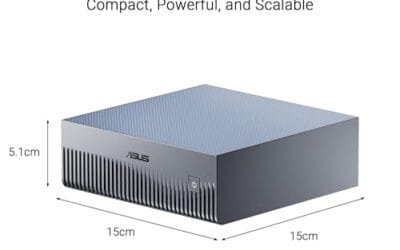
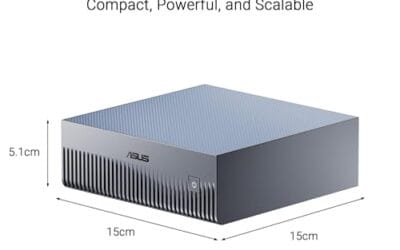
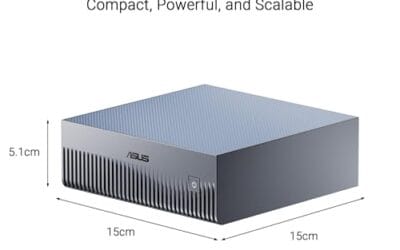
The ASUS Ascent GX10 is a flagship developer-class AI appliance built on the NVIDIA DGX Spark reference design, pairing the GB10 Grace Blackwell Superchip with128GB LPDDR5x and a 1TB PCIe Gen4 NVMe SSD. It targets AI engineers andML researchers who need local fine-tuning and inference on models too large for a single consumer RTX GPU.
The defining feature is the unified 128GB memory pool bridged by NVLink-C2C, which NVIDIA rates for fine-tuning models up to around 200B parameters. Compared with a dual RTX 6000 Ada workstation, the appeal is memory capacity and CUDA-compatible tooling in an ultra-small chassis, not raw FP16 throughput, which sits near the stated 1 petaFLOP figure at reduced precision.
Trade-offs are typical of this tier and platform. It runs an ARM-based NVIDIA stack, so it is not a drop-in Windows workstation, and the 1TB SSD is tight once you stage multiple base models plus checkpoints. Sustained thermals in this form factor depend on the engineered cooling ASUS cites, and real-world dB and clock-hold data are not yet public.
Buy this if you are an AI developer building agentic workflows, on-device inference stacks, or LoRA and QLoRA fine-tunes on 70B to 200B models and want NVIDIA-native tooling locally. Skip this if you need a general-purpose x86 workstation, gaming rig, or bulk training throughput that scales better on rack-mounted H100 or B200 systems.
Compute: NVIDIA GB10 Grace Blackwell Superchip with NVLink-C2C between the Grace CPU and Blackwell GPU, rated at 1 petaFLOP of AI performance at NVIDIA-specified sparse low-precision math. Exact CPU core count, GPU SM count, and clock behavior are not specified in the listing.
Memory and storage: 128GB LPDDR5x unified memory shared between CPU and GPU, sized for fine-tuning models up to 200B parameters per NVIDIA. Storage is a single 1TB PCIe Gen4 NVMe SSD. Additional M.2 slots, DRAM channel count, and TBW endurance are not specified.
Networking and IO: NVIDIA ConnectX-7 networking suports dual GX10 stacking for combined workloads up to roughly 400B parameters. Wireless is WiFi 7 and Bluetooth 5.4. Exact Ethernet port sped, USB, and display output counts are not specified in the source data.
Chassis and software: Stackable ultra-small form factor with engineered cooling for sustained AI loads. Ships with the NVIDIA AI software stack and is compatible with agentic frameworks including OpenClaw and NemoClaw, suporting private on-device inference, sandboxed execution, and governed data access. PSU wattage, dimensions, and weight are not specified.
Common questions
Is a $250 SSD twice as fast as a $100 one?
No. The bigger jump in real speed comes from moving off a hard drive to any SSD. Between a $100 NVMe and a $250 Gen4 NVMe you’ll see higher sequential numbers, but in gaming the felt difference is small. The $250 tier mostly buys capacity and endurance, not double the responsiveness.
Do I notice NVMe speed over SATA in games?
Rarely in a dramatic way. Both feel instant compared to a hard drive, and most games load only marginally faster on NVMe than SATA. Titles built for DirectStorage can benefit more, but for now the practical difference in gaming is minor. NVMe’s real edge shows in large file transfers.
Should I buy one big drive or two smaller ones?
One larger drive keeps things simple and avoids splitting your library across volumes. Two drives let you separate the OS from bulk storage and can be cheaper if you catch sales. Either works. If your board has multiple m.2 slots, starting with one and adding later is a flexible, budget-friendly path.
Is bundled storage in a prebuilt a good deal?
It’s convenient, not always cheapest. Systems like the MSI Codex Z2 ship with fast 2TB NVMe already installed, which saves setup, but you pay for the whole machine. If you’re building yourself, buying the drive separately gives you control over the exact model and speed tier. Match the approach to how you’re getting the rest of the machine, building it yourself or buying it complete.
How much endurance do I actually need?
For gaming and everyday use, even a modest drive’s rating far outlasts the years you’ll own it. Endurance matters mainly for creators and data users writing large volumes daily. If that’s not you, don’t pay a premium for a high TBW figure you’ll never approach. Capacity and price should drive your choice instead.




























Write Your Review
No reviews yet. Be the first to share your experience!