

You’ve seen it stamped on every memory kit: a string like CL18 or CL40 buried in the product name. That number is CAS latency, and it quietly shapes how snappy your RAM feels. Yet most buyers glance past it and chase megatransfers instead. Here’s the plain-English version of what CAS latency does, why a lower number isn’t automatically a faster kit, and how to weigh it against speed when you shop. If you’re building a memory-focused rig, our DDR5 shortlist and the budget RAM guide put these ideas into practice.
The short answer
CAS latency, short for Column Address Strobe latency, is the number of clock cycles your RAM waits between receiving a request for data and delivering the first bit of it. It’s the “CL” figure in a spec like CL18-22-22-42. Lower cycles mean the memory responds sooner. That’s the whole idea in one sentence: it’s a delay, measured in cycles, and less delay is generally better.
But cycles aren’t time. A cycle’s length depends on the clock speed, so CL alone doesn’t tell you how fast a kit actually answers. That catch is why two kits with different CL numbers can feel identical, and it’s the part most spec sheets never explain. We’ll unpack it below, using the G.SKILL RipjawsV DDR4 at CL18 and a Corsair Vengeance DDR5 kit at CL40 as reference points.


Pros
- DDR4-3600 XMP at 1.35V is the Ryzen AM4 sweet spot, aligning FCLK 1:1 at 1800MHz for best latency.
- Matched 2x16GB kit is factory-tested as a pair, reducing dual-channel instability compared to mixing sticks.
- Compatible with both Intel XMP and AMD DOCP/A-XMP BIOS profiles without manual sub-timing adjustments.
- Ships with JEDEC SPD fallback so the system always boots safe at default clocks before XMP is enabled.
Cons
- CL18 primary latency is mid-range; DDR4-3600 CL16 kits exist for buyers prioritizing tighter timings.
- No ECC support, so workstation or Threadripper ECC builds need a different kit entirely.
The G.SKILL RipjawsV F4-3600C18D-32GVK is a mid-range DDR4 desktop kit targeting Intel and AMD mainstream platform builders who want 32GB capacity at DDR4-3600 without overpaying for CL14 or CL16 enthusiast kits. It ships as a matched 2x16GB dual-channel pair in the standard 288-pin U-DIMM form factor.
The defining spec here is the XMP profile: DDR4-3600 at CL18-22-22-42, 1.35V. On AMD AM4 Ryzen systems, 3600MHz is the well-documented sweet spot for achieving a 1:1 FCLK ratio at 1800MHz, which keeps infinity fabric latency in check and translates to measurable gains in lightly-threaded workloads and gaming frame times compared to DDR4-3200 or lower.
CL18 is a genuine trade-off at this speed. Competing DDR4-3600 kits with CL16 or CL14 exist and offer lower absolute latency, though they typically carry a price premium. Owners report stable XMP operation across a wide range of B450, X570, and Z490/Z590 boards, but reaching rated speed on some budget AM4 boards may require manual sub-timing adjustments or AGESA microcode updates.
Buy this if you are building or upgrading an AM4 Ryzen or Intel LGA1700 desktop and want reliable 32GB DDR4-3600 dual-channel performance without tuning. Skip this if you need CL16 or tighter for competitive latency, or if your board has a limited QVL and you have not verified compatibility via G.SKILL's configurator tool first.
Platform Support: This kit uses 288-pin DDR4 U-DIMM and is compatible with Intel LGA1700 (Z690/Z790) and AMD AM4 (B450/X470/B550/X570) platforms. AM5 uses DDR5 exclusively, so this kit is not compatible with Ryzen 7000/9000 series builds on AM5 boards.
XMP and DOCP Activation: Rated speed of DDR4-3600 CL18-22-22-42 at 1.35V requires enabling XMP (Intel) or DOCP/A-XMP (AMD) in BIOS. Default JEDEC SPD boots at DDR4-2133 or DDR4-2400. On AM4, DDR4-3600 aligns FCLK at 1800MHz for a 1:1 ratio, which is the recommended operating point for Ryzen 3000 and 5000 series CPUs.
Slot Population and Mixing: Install both sticks in the recommended dual-channel slots per your motherboard manual, typically A2 and B2 in a 4-slot board. G.SKILL explicitly warns against mixing this kit with other modules; doing so voids the matched-pair guarantee and risks instability at XMP speeds.
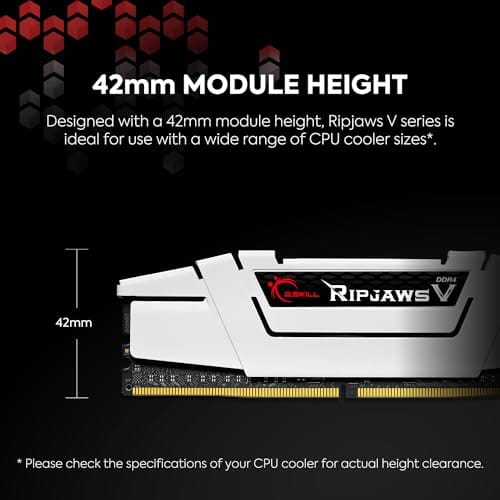
Cooler Clearance: Exact heatspreader height is not specified in the source data, but RipjawsV modules are noted for a lower profile than Trident Z or RGB variants, reducing conflicts with wide tower coolers. Verify clearance if using a low-clearance cooler on a tight ITX board.
The longer explanation
Think of RAM as a giant grid of rows and columns. When your CPU asks for a value, the memory first activates the right row, then strobes the correct column to fetch the data. CAS latency is the count of clock cycles between that column request and the moment the first chunk of data starts flowing out. It’s one of four primary timings, which is why you see four numbers grouped together like the RipjawsV kit’s CL18-22-22-42.
Those four numbers are tCAS, tRCD, tRP, and tRAS. CAS latency is the first and the one people quote, because it’s the delay that hits most often in everyday access patterns. The others cover row activation and precharge steps. You don’t need to memorize all of them, but knowing that CL is only the opening figure of a longer sequence helps you read a kit’s label without getting fooled by one flashy number.
Why does this delay exist at all? Memory chips are dense grids, and reading a cell isn’t instant. The controller has to select a row, wait for the charge to settle, then strobe a column. CAS latency is the settling time for that final column step, expressed in clock ticks so it stays meaningful as speeds change. It’s not a defect or a sign of cheap parts. Every stick of RAM ever made has had it, from the earliest SDRAM to today’s DDR5. The number just gets reported differently as the technology evolves.
How it works: cycles versus real time
Here’s the math that unlocks everything. Real latency in nanoseconds equals CL divided by the clock speed, times 2000 for a double-data-rate module. Take the G.SKILL RipjawsV at CL18 running 3600 MT/s. That works out to roughly 10 nanoseconds of true latency. Now take the Corsair Vengeance DDR5 at CL40 running around 5200 MT/s. Despite the scary CL40, it lands near 15 nanoseconds, and higher-clocked DDR5 kits close that gap further.
So a CL40 kit isn’t slow because 40 is bigger than 18. The faster clock means each cycle is shorter, so more cycles can still add up to a competitive real-world delay. That’s the trap. People see DDR5’s inflated CL numbers, panic, and assume DDR4 is quicker. In true nanoseconds the two often sit closer than the labels suggest, and DDR5 makes up ground everywhere else with bandwidth.
History: how we got here
Rewind to early DDR3 and CAS latencies of CL7 to CL9 were normal at clocks around 1600 MT/s. DDR4 arrived and clocks climbed past 3000, 3600, even 4000 MT/s, so CL figures crept up to CL15, CL16, and CL18. The G.SKILL RipjawsV at CL18 and 3600 MT/s sits right in that mature DDR4 window. Then DDR5 launched near 4800 MT/s with CL40 ratings, and forums filled with people convinced memory had gotten slower.
It hadn’t. Each jump traded a bigger cycle count for a much shorter cycle. The nanosecond math kept the real delay roughly flat generation to generation while bandwidth roughly doubled. That pattern repeats every time a new standard ships. History says: ignore the panic over rising CL numbers at launch, because the effective latency stays in the same ballpark while everything else gets faster.
Why it works this way
Memory makers push clock speeds up every generation because bandwidth scales with frequency. But the physical cells inside the chips don’t get proportionally faster at the same rate, so timings expressed in cycles have to climb to keep pace. That’s why DDR5 launched with CL30, CL36, and CL40 ratings while late DDR4 sat at CL14 to CL18. It isn’t regression. It’s the cycle count stretching to match a faster clock.
The upshot is that you can’t judge a generation by CL alone. A CL40 DDR5 kit and a CL18 DDR4 kit can deliver similar response times while the DDR5 module moves far more data per second. Bandwidth and latency are separate axes, and modern platforms lean on bandwidth for gaming and content work alike.
When you’d want tighter latency
Low latency pays off most where the CPU makes constant small, random memory requests. Gaming is the classic case, especially with chips that love fast memory. High-frame-rate esports titles and simulation-heavy games respond to tight timings and quick memory, which is why enthusiasts obsess over CL on those builds. If you’re pairing memory with a latency-sensitive CPU, our 9800X3D memory guide and the gaming RAM roundup are worth a read.
For a value DDR5 build, a kit like the Corsair Vengeance at $234.99 with a CL40 rating, EXPO and XMP 3.0 profiles, and up to 5200 MT/s gives you an easy one-click tune and solid all-around response. It won’t chase record-breaking timings, but for a mainstream gaming or productivity box it’s the sensible route. Enable the profile in BIOS and you’re set.

Pros
- AMD EXPO profile activates 5200MHz CL40-40-40-77 with a single BIOS toggle on Ryzen 7000 boards.
- Low 35mm module height clears virtually any AM5 or LGA1700 tower cooler without physical conflict.
- 1.25V operating voltage sits within DDR5 spec, reducing thermal stress on integrated PMIC under sustained load.
- Aluminum heatspreader aids passive heat dissipation in open-air cases without requiring active cooling.
Cons
- 16GB total capacity is increasingly marginal for content creation workflows and modern open-world titles running texture packs.
- 5200MHz CL40 offers modest latency compared to DDR5-6000 CL30 kits that hit the Ryzen 7000 FCLK 1:1 ratio sweet spot.
The CORSAIR Vengeance DDR5 16GB 2x8GB is a mid-range DDR5 kit targeting AMD Ryzen 7000 series and Intel 12th-generation-or-newer desktop builds. It ships with both AMD EXPO and Intel XMP 3.0 profiles, making it broadly compatible across AM5 and LGA1700 or LGA1851 platforms without manual timing configuration.
The standout feature is dual-profile support at a frequency that loads with a single BIOS toggle. At 5200MHz CL40-40-40-77 and 1.25V, it sits within DDR5 JEDEC specification territory, and onboard voltage regulation on the module itself reduces dependency on motherboard power delivery for the memory rail, which matters on budget AM5 boards with fewer VRM phases dedicated to DRAM.
The honest trade-off at this tier is frequency positioning. Ryzen 7000 performs best at DDR5-6000 with CL30 timings, where FCLK and memory controller run at a clean 1:1 ratio. This kit at 5200MHz places it below that threshold, meaning buyers on AM5 leave some CPU bandwidth on the table. The 16GB total capacity is also worth scrutinizing for any workload beyond gaming or light productivity.
Buy this if you are building a budget-to-mid AM5 or Intel DDR5 system and need reliable plug-and-play EXPO or XMP activation without manual overclocking. Skip this if your platform is AM5 and you plan to run a Ryzen 7000 CPU near its performance ceiling, where DDR5-6000 CL30 kits deliver measurably better throughput and latency at comparable pricing.
Platform Requirements: DDR5 requires AMD 600-series or newer motherboards paired with Ryzen 7000 series or newer CPUs, or Intel 600-series or 700-series boards with 12th-generation Core or newer. DDR5 is not backward compatible with DDR4 slots. Verify your motherboard QVL lists this kit before purchasing.
EXPO and XMP Activation: The rated 5200MHz speed requires enabling AMD EXPO or Intel XMP 3.0 in BIOS. Without activation, the kit defaults to DDR5-4800 JEDEC. On Ryzen 7000, DDR5-6000 is the accepted 1:1 FCLK sweet spot; this kit at 5200MHz runs below that threshold, which carries a small but measurable bandwidth and latency penalty versus a tuned DDR5-6000 kit.
Physical Clearance: Module height is 35mm, which clears nearly all air coolers without conflict. The 1.25V operating voltage and onboard PMIC mean power comes from the module itself rather than solely from the motherboard, reducing stress on budget boards with lighter DRAM power stages.
Capacity and Channel Config: The 2x8GB configuration fills two slots in dual-channel. CORSAIR explicitly advises against mixing kits, so expansion to 32GB requires replacing both modules with a validated 2x16GB kit rather than adding a second 2x8GB pair.
What to look for in a memory kit
Read CL and clock speed together, never in isolation. Do the nanosecond math if you’re comparing across generations, or just trust that a modern CL30 to CL36 DDR5 kit at 6000 MT/s is a strong balance for most rigs. Also confirm the kit ships with the right profile for your platform: EXPO for AMD, XMP for Intel, though many kits like the Corsair Vengeance carry both.
Capacity and kit layout matter too. The G.SKILL RipjawsV is a 32GB two-stick set at $229.99, while the Corsair Vengeance is a 16GB two-stick DDR5 kit. Two sticks beat four for stability and easy tuning. Match voltage to spec as well, like the 1.35V rating on the RipjawsV, and make sure your board supports the frequency you’re buying.
One practical tip: check your motherboard’s QVL, the qualified vendor list, before you buy. A kit rated for 6000 MT/s only hits that speed if your board and CPU memory controller can sustain it, and four-DIMM boards sometimes cap lower than two-DIMM boards. Buying a matched kit rather than mixing loose sticks also avoids timing conflicts, since the modules are binned and validated to run together at the advertised CL.
Common misconceptions
The biggest myth is that a lower CL number always means faster memory. It doesn’t, because CL counts cycles, not time. A CL40 DDR5 kit can match or beat a CL16 DDR4 kit once you factor in the clock. The second myth is that CAS latency dominates real-world speed. For most people the difference between a good kit and a slightly tighter one is a couple of percent in games and near nothing in daily use.
Another common mix-up is treating CL as the only timing that matters. It’s the headline, sure, but tRCD, tRP, and tRAS all contribute, and a well-balanced kit tunes the whole set. Don’t buy a kit purely because it advertises the lowest first number while hiding loose secondary timings.
Frequently asked
Is lower CAS latency always better?
Not on its own. Lower CL is better only when the clock speed is equal. Compare true nanoseconds instead: CL divided by speed, times 2000. A CL18 DDR4-3600 kit and a CL40 DDR5-5200 kit end up closer than the raw numbers imply, and the DDR5 kit moves more data overall.
Does CAS latency matter for gaming?
It matters more for gaming than for most tasks, since games fire off frequent small memory requests. Even so, the gains from tighter timings are usually a few percent, and memory speed plus capacity often move the needle more. It’s one factor among several, not the deciding one.
Why does DDR5 have such high CL numbers?
Because DDR5 runs at much higher clock speeds, and CL counts cycles. Each cycle is shorter, so a bigger cycle count can still deliver a competitive real-time delay. That’s why the Corsair Vengeance DDR5 shows CL40 while older DDR4 kits like the G.SKILL RipjawsV show CL18.
Can I lower CAS latency myself?
Sometimes, through BIOS tuning, but it takes patience and stability checks. Most users are better served enabling the rated EXPO or XMP profile and leaving it there. Manual timing changes can shave a cycle or two, though the payoff is small and the risk of an unstable boot is real.
How much RAM speed and latency do I actually need?
For a modern gaming or work build, a 6000 MT/s DDR5 kit around CL30 to CL36 hits a strong balance, and 32GB is the comfortable target. The 32GB G.SKILL RipjawsV at $229.99 suits DDR4 platforms, while the Corsair Vengeance DDR5 at $234.99 fits a value DDR5 rig. Match the kit to your board and CPU first, then fine-tune timings only if you enjoy the process.

































Write Your Review
No reviews yet. Be the first to share your experience!