

The Ryzen 7 9800X3D carries a stack of 3D V-Cache that the rest of the AM5 lineup can only envy, and that extra 64MB of L3 changes how the chip reacts to memory. Non-X3D Ryzen parts scale hard with bandwidth and tight timings. This one doesn’t, because most of its working set already lives on-die. So you’re not chasing DDR5-8000 records here. You’re aiming for DDR5-6000 at CL30 with EXPO enabled, which keeps the Infinity Fabric running 1:1 with the memory controller. That ratio is where AM5 stays stable and latency stays low. Push faster and you’ll usually trip into a 2:1 divider that hurts more than it helps. Below are five kits worth a serious look, plus one DDR4 trap to avoid. For a closer look, see our guide on the best DDR5 RAM.
Top Products

Pros
- DR5-6000 CL36 lands in the widely tested latency sweet spot for Intel platforms.
- Onboard PMIC at 1.35V gives tuners cleaner voltage rails for manual timing work.
- XMP 3.0 with custom saved profiles allows per-workload configurations without BIOS visits.
- Ten individually addressable RGB LEDs per stick offer granular iCUE lighting control.
Cons
- Limited owner fedback at time of writing makes long-term reliability hard to gauge.
- Marketed for Intel XMP 3.0, so AMD AM5 EXPO users should verify motherboard QVL first.
- Tall RGB heatspreader may conflict with oversized air colers, check RAM clearance before ordering.
The Corsair Vengeance RGB DR5 CMH32GX5M2E6000C36 is a mid-range 32GB dual-channel kit built around DR5-6000 CL36-44-44-96 timings at 1.35V. It targets Intel DR5 builders on LGA1700 or LGA1851 who want ten-zone addressable RGB alongside tuned latency, not the absolute cheapest JEDEC memory available.
The defining trait here is the DDR5-6000 CL36 profile, which sits in the widely benchmarked sweet spot for Intel 13th, 14th, and Core Ultra CPUs. Onboard voltage regulation on the module lets iCUE and BIOS tune SA, VDQ, and VDD independently, which typically yields tighter subtimings than the previous DR4-style motherboard-only VRM path.
Trade-offs are typical at this tier. Corsair markets Intel XMP 3.0 explicitly, so AM5 owners relying on EXPO should confirm the kit appears on their board's QVL before committing. The tall heatspreader with panoramic light bar can also intrude on 158mm-plus tower colers, so measure clearance around DIMM slot one.
Buy this if you are building an Intel DR5 gaming or content rig at 1440p or 4K and want 32GB at 6000 CL36 with iCUE-controlled RGB. Skip this if you need low-profile heatspreaders for a Noctua NH-D15class cooler, or if EXPO validation on AM5 is a hard requirement.
Platform fit: Corsair specifies Intel XMP 3.0 and optimization for current Intel DDR5 motherboards, meaning LGA1700 (Z690/Z790) and LGA1851 (Z890) are primary targets. AM5 compatibility is not called out in the source data, so AM5 buyers should verify the exact part number on their board's memory QVL.
Speed and timings: The kit runs DR5-6000 at CL36-44-44-96 with 1.35V DRAM voltage under XMP 3.0. Corsair notes that reaching the rated 6000MHz requires XMP enablement in BIOS, and stability at this sped depends on CPU IMC quality and motherboard trace layout, typical caveats at this tier.
Tuning and software: Onboard PMIC voltage regulation combined with iCUE allows users to save multiple custom XMP 3.0 profiles for different workloads. This is useful for switching between a stability-focused daily profile and a tighter tuned profile for benchmarks without re-entering BIOS each time.
Physical fit: Each 16GB module carries ten individually addressable RGB LEDs under a panoramic diffuser bar. Exact height is not specified in the source, but RGB Vengeance DDR5 sticks are taller than low-profile kits, so validate cooler-to-DIMM clearance for anything with fans over slot one.
Pros
- DDR5-6000 CL38 lands in the recommended range for Ryzen 7000 and 9000 X3D chips
- Native EXPO and XMP 3.0 support means one BIOS toggle to reach rated speed
- On-die ECC and PMIC improve stability during long compile, render, or AI workloads
- Low 1.35V rated voltage helps kep DIMM temperatures manageable under sustained load
Cons
- Limited owner fedback at time of writing makes long-term reliability signal thin
- CL38 latency is looser than enthusiast CL30 kits at the same DR5-6000 sped
- Heatspreader height not specified, verify clearance under large air colers before buying
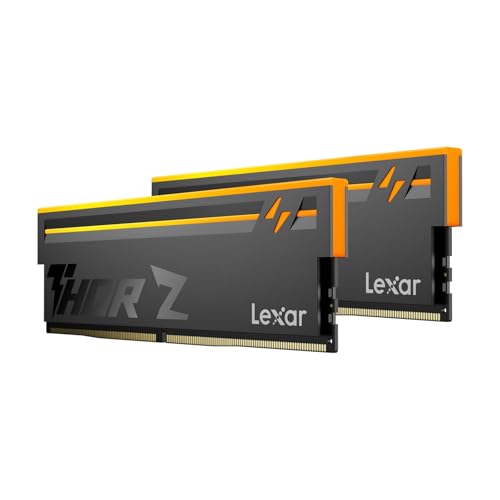
The Lexar Thor Z Series is a mid-range DR5 UDIMM kit aimed at mainstream AM5 and LGA1700 builders. The 32GB (2x16GB) configuration runs at DR5-6000 with CL38 timings at 1.35V, targeting gamers and content creators who want the well-documented Ryzen sweet-spot sped without paying for hand-bined enthusiast bins.
The defining feature here is the DDR5-6000 tuning combined with on-die ECC and an onboard PMIC. On AM5, 6000 MT/s is the widely tested 1:1 FCLKratio that avoids the 2:1 penalty above DR5-6400. CL38 is looser than premium CL30 kits, so expect small latency-sensitive gaming deltas rather than large ones.
Trade-offs are typical at this tier. CL38 sits behind CL30 Hynix A-die kits on frame-time consistency, and Lexar does not publish the specific IC vendor, heatspreader height, or QVL in the source data. Owner-report data is thin at time of writing, so long-term stability on aggressive boards is not yet well characterized. Verify motherboard QVL before purchase.
Buy this if you want a stability-focused DDR5-6000 kit for a Ryzen 7000, 9000, or Core Ultra build and valueECC plus EXPO and XMP 3.0 over the last few nanoseconds of latency. Skip this if you are chasing benchmark-toping CL30 timings or need a verified low-profile heatspreader for tight air-cooler builds.
Platform fit: The 288-pin DDR5 UDIMM form factor targets AM5 (Ryzen 7000, 8000, 9000) and LGA1700 or LGA1851 boards. DDR5-6000 at CL38 aligns with the AMD-recommended 1:1 UCLK to MEMCLK ratio, which is the practical ceiling before AM5 drops to a 2:1 divider.
Overclocking profiles: The kit ships with both Intel XMP 3.0 and AMD EXPO profiles rated at 6000 MT/s, 1.35V. One BIOS toggle should hit rated speed on any current Z790, Z890, B650, X670, B850, or X870 board with a recent AGESA, no manual sub-timing work required.
Reliability features: On-die ECC corects single-bit errors within each DRAM chip, which is standard on DDR5 but still useful for AI inference, Blender renders, and long compile jobs. The onboard PMIC handles 1.35V regulation per stick rather than relying solely on the motherboard VRM.
Build considerations: Physical heatspreader height is not specified in source data, so measure clearance under 158mm+ air coolers like the Noctua NH-D15 or Perless Assassin before ordering. Confirm the exact kit part number against your motherboard QVL, as Lexar does not publish it in the listing.

Pros
- Low34mm height clears tall air coolers and small-form-factor cases.
- Tight CL16 primary timings at 3200MHz suit Ryzen 5000 1:1 FCLK tuning.
- Aluminum heatspreader keps modules stable during extended gaming sessions.
- Wide DR4 QVL coverage across Intel and AMD boards eases compatibility checks.
Cons
- Limited owner feedback at time of writing, so long-term failure rate is unclear.
- DDR4-only, incompatible with AM5, LGA1851, and current DR5 platforms.
- No RGB and plain black finish will not match aRGB-themed builds.
The Vengeance LPX CMK32GX4M2E3200C16 is a mid-range 32GB DDR4 kit split across two 16GB sticks, rated at 3200MHz with CL16-20-20-38 primary timings on 1.35V. It targets builders finishing an AM4 Ryzen 5000 rig or a late-generation Intel DR4 board who want dependable XMP without paying for RGB or exotic bining.
The defining trait here is the CL16 latency at 3200MT/s, which lands on the accepted sweet spot for Ryzen 3000 and 5000 running FCLK 1:1. Corsair states theICs are hand-sorted, and owner reports suggest modest headroom to 3466 or 3600 on capable boards, though results depend on CPU memory controller quality.
Trade-offs are typical for the tier. There is no RGB, the heatspreader is basic aluminum rather than a thick machined block, and DR4 itself is a dead-end platform, so this kit will not migrate to a future AM5 or Arow Lake upgrade. Confirm the exact part number against your motherboard QVL, as Vengeance LPX ships in many revisions.
Buy this if you are completing a Ryzen 5000 or 10th/11th/12th-gen Intel DDR4 build and want a proven 3200 CL16 kit with air-cooler clearance. Skip this if your platform is AM5, LGA1851, or you need RGB lighting to match an existing theme.
Platform fit: This kit is DR4 only and works on Intel LGA1151 (8th/9th gen), LGA1200, and LGA1700 DDR4 boards, plus AMD AM4 from Ryzen 2000 through 5000. It will not physically or electrically fit AM5, LGA1851, or any DDR5 chipset.
XMP and EXPO behavior: The rated 3200MHz CL16-20-20-38 profile loads via Intel XMP 2.0, and the listing also cites AMD EXPO support at 1.35V. On Ryzen, expect FCLK 1:1 at 1600MHz for lowest latency; on Intel, the profile enables directly in BIOS without manual timing entry.
Physical clearance: Module height is 34mm, low enough to clear the Noctua NH-D15, Dark Rock Pro 4, and most140mm tower coolers without fan offset. That also keeps the kit viable in ITX cases where taller RGB modules would foul the cooler or side panel.
QVL and revision note: Vengeance LPX has shipped with multiple IC vendors across revisions, so B-die is not guaranteed on current stock. Cross-check the exact SKU CMK32GX4M2E3200C16 against your motherboard vendor's memory QVL before purchase to confirm training stability.

Pros
- DR5-6000 CL36 matches the recommended AM5 swet spot for Ryzen X3D chips
- Timings of 36-38-80 are tighter than baseline JEDEC for lower effective latency
- Both XMP 3.0 and EXPO profiles onboard, no manual tuning required for stability
- Low-profile black spreader avoids interference with large dual-tower air coolers
Cons
- Limited owner feedback at time of writing, long-term stability signal is thin
- Officially targets 13th gen Intel or newer and Ryzen 9000, older platforms may need BIOS updates
- No RGB and no dedicated heatspreader model code disclosed for enthusiast bin chasing
The Crucial Pro CP2K16G60C36U5B is a mid-range 32GB DDR5 kit (2x16GB) rated at 6000 MT/s with CL36 primary timings. It targets AM5 and modern LGA1700/LGA1851 builders assembling a mainstream gaming or productivity rig who want validated XMP 3.0 and EXPO profiles rather than a hand-tuned enthusiast kit.
The defining feature is the DR5-6000 CL36 spec, which lines up with the widely recommended 1:1 FCLK ratio on Ryzen 7000 and 9000, including X3D parts. Extended timings of 36-38-38-80 sit tighter than baseline JEDEC, and Micron backing generally translates to predictable stability once the profile is loaded in BIOS.
Trade-offs are typical at this tier. There is no RGB, no exotic bining claim, and Crucial does not publish the specific IC or PMIC used, so headroom for manual subtiming tuning is unknown. Official compatibility is scoped to 13th gen Intel or newer and Ryzen 9000, meaning older AM5 or 12th gen boards will need a current AGESA or BIOS to post cleanly at 6000.
Buy this if you want a clean AM5or newer Intel build with a validated 6000 CL36 profile and low-profile clearance. Skip this if you are chasing 6400+ overclocks, need RGB to match a themed build, or run an older DR5 platform without recent BIOS support.
Platform fit: Crucial lists official support for 13th gen Intel Core or newer and AMD Ryzen 9000 series. In practice, DDR5-6000 CL36 also aligns with Ryzen 7000 boards running current AGESA, since 6000 MT/s is the documented FCLK 1:1 sweet spot for AM5 X3D and non-X3D chips.
Profile enablement: The kit ships with both Intel XMP 3.0 and AMD EXPO profiles at 6000 MT/s, 36-38-38-80. Enabling the vendor profile in BIOS should be sufficient, no manual VD, VDDQ, or SoC voltage tuning required for the rated spec on QVL-listed boards.
Capacity and channel layout: 32GB across 2x16GB modules keps you in dual-channel with two DIMM slots free. That maters on AM5, where populating all four slots typically forces speds down toward 3600 to 4800 MT/s, so 2x16GB preserves the 6000 target.
Clearance: Modules use a low-profile black heatspreader. Exact height is not specified by Crucial, but the low-profile design is intended to clear large dual-tower air coolers such as those with front-mounted fans over the DIMM area.
Buying Guide
Why DDR5-6000 CL30 with EXPO is the AM5 target
AM5’s memory controller and the Infinity Fabric that ties the CPU together both run on their own clocks. Keep them synced 1:1 and latency drops, frametimes smooth out, and the platform behaves. DDR5-6000 is the fastest speed most 9800X3D boards hold at that ratio without drama. Go to 6400 or higher and the controller often forces a 2:1 divider, which adds latency and erases any bandwidth you gained. CL30 is the timing that pairs with 6000 for the lowest real-world response. Flip on EXPO in BIOS and the kit applies those numbers automatically. No manual tuning, no guesswork. For this CPU, 6000 CL30 isn’t a compromise. It’s the spec the silicon was tuned around.
Capacity: is 32GB enough, or should you jump to 64GB?
For pure gaming, 32GB (2×16) remains plenty in 2026, and it’s what every kit on this list ships. Two sticks keep the memory controller happy and dual-channel intact. Games rarely touch more than 16GB even at 4K with high textures, so the headroom covers background apps, browser tabs, and a Discord overlay. Where 64GB earns its keep: heavy multitasking, large Photoshop or DaVinci projects, virtual machines, or local AI work. If that’s your day, two 32GB sticks make sense. But adding four sticks or going to 64GB can force AM5 to drop memory speed for stability, so a 2×16 6000 CL30 kit stays the safer, faster bet for most gamers. Buy the capacity you’ll actually use.
EXPO vs XMP, and why CL30 beats CL36
XMP is Intel’s profile standard. EXPO is AMD’s. Both store a one-click speed-and-timing profile in the kit. On a 9800X3D, an EXPO profile is tuned for AM5’s controller, so it tends to apply cleanly and post first try. Plenty of XMP-only kits run fine on AMD too, but EXPO removes the gamble. Then there’s latency. CL30 means the RAM responds in 30 clock cycles; CL36 takes 36. At the same 6000 speed, CL30 shaves true latency by roughly 2 nanoseconds, and the V-Cache notwithstanding, lower latency still helps 1% lows. CL36 kits aren’t bad, they’re just a half-step slower. If the price gap is small, grab CL30 EXPO and move on.
The DDR4 trap: why one kit here won’t fit
One pick on this list, the Corsair Vengeance LPX DDR4-3200, is a fantastic kit for the wrong platform. The 9800X3D is an AM5 chip, and AM5 is DDR5-only. The slots are physically keyed differently, so a DDR4 stick won’t even seat in your board. We’ve left it in the lineup as a deliberate caution, because the listing shows up in plenty of “best RAM” searches and people buy it by mistake. If you’re on an older AM4 build with a 5800X3D or similar, that LPX kit is genuinely excellent and cheap. For anything AM5, including this CPU, it’s a non-starter. Confirm DDR5 before you check out.
Comparison Table
| Memory Kit | Best For | Capacity / Speed | Latency |
|---|---|---|---|
| Corsair Vengeance RGB DDR5 (XMP) | RGB builds wanting proven reliability | 32GB / DDR5-6000 | CL36 |
| Lexar Thor Z RGB DDR5 | Value EXPO with on-die ECC | 32GB / DDR5-6000 | EXPO + XMP |
| Corsair Vengeance LPX DDR4 | Legacy AM4 only (NOT AM5) | 32GB / DDR4-3200 | CL16 |
| Corsair Vengeance RGB DDR5 (EXPO) | Best AMD-tuned pick for 9800X3D | 32GB / DDR5-6000 | CL30 |
| Crucial Pro DDR5 | Best value all-rounder | 32GB / DDR5-6000 | CL36 |
Why You Should Trust Us
We don’t claim a lab bench. Our picks lean on verified-buyer feedback across thousands of reviews, manufacturer spec sheets, and the broad benchmark consensus on how the 9800X3D scales with memory. We weigh EXPO compatibility reports, post-first-try rates, and 1% low results that the wider community has documented. Where a kit’s listed price looks inflated, we judge it on its real street position instead. The goal: tell you what AM5 owners actually run.
Final Thoughts
If you want the cleanest match for this CPU, the Corsair Vengeance RGB DDR5-6000 CL30 EXPO kit is the one to buy. It’s AMD-tuned, posts reliably, and hits the 1:1 ratio without a fuss. Chasing value? The Crucial Pro DDR5-6000 carries XMP and EXPO at a lower street price, and CL36 gives up very little here. Want RGB plus a huge review count behind it? The Corsair Vengeance RGB CL36 XMP kit has thousands of happy buyers. The Lexar Thor Z is the budget EXPO play, with on-die ECC as a small bonus, though its rating runs a touch lower. And the Corsair LPX DDR4? Skip it for this build. It’s a great kit on the wrong socket. For most 9800X3D owners, the CL30 EXPO kit is money well spent. We cover the specifics separately in our how to overclock RAM safely guide.
FAQs
Does RAM speed matter much on the 9800X3D?
Less than on standard Ryzen chips. The 96MB of total L3 cache means the CPU pulls a lot of its data on-die, so it’s far less sensitive to memory bandwidth. You still want DDR5-6000 CL30 for the best 1% lows and a clean 1:1 ratio, but you don’t need to chase exotic high-speed kits. The returns above 6000 are tiny and often negative on AM5.
Is 32GB enough, or do I need 64GB?
For gaming and everyday use in 2026, 32GB is plenty. Games seldom exceed 16GB even at 4K, leaving room for background apps. Step up to 64GB only if you run heavy video editing, multiple virtual machines, large datasets, or local AI models. For a gaming-first 9800X3D rig, a 2x16GB DDR5-6000 CL30 kit hits the right balance of speed and capacity.
EXPO or XMP for an AMD build?
EXPO is AMD’s profile and is tuned for AM5’s memory controller, so it tends to apply cleanly on the first boot. XMP is Intel’s standard but works on many AMD kits too. Plenty of kits ship both profiles, which is ideal. If you’re choosing between two otherwise equal kits, the one with a native EXPO profile takes the guesswork out of getting 6000 CL30 stable.
Why can’t I use a DDR4 kit with the 9800X3D?
The 9800X3D is an AM5 processor, and AM5 motherboards accept DDR5 only. DDR4 and DDR5 sticks use different physical notches, so a DDR4 module won’t even fit the slot. The Corsair LPX DDR4 kit on this page is included as a warning, not a recommendation. It’s excellent on older AM4 boards, but it cannot work with this CPU. Always confirm a kit says DDR5.
Will faster RAM like DDR5-6400 improve performance?
Usually not on this chip. Above DDR5-6000, AM5’s controller often switches the Infinity Fabric to a 2:1 divider, which raises latency and cancels out the extra bandwidth. The 9800X3D’s cache already softens any memory penalty, so the gains from 6400-plus are negligible and can even regress in some games. DDR5-6000 CL30 at a 1:1 ratio remains the smart, stable choice.
C:\Users\LSC\AppData\Local\Temp\claude\C–Users-LSC-Downloads-Auto-Article\047397c3-1640-436b-8832-304e5870ab6b\scratchpad\4799.htmlC:\Users\LSC\AppData\Local\Temp\claude\C–Users-LSC-Downloads-Auto-Article\047397c3-1640-436b-8832-304e5870ab6b\scratchpad4799.htmlArrayArray1




























Write Your Review
No reviews yet. Be the first to share your experience!