

Both of these 2TB NVMe drives claim sequential reads north of 7,300 MB/s, yet one costs $389.99 and the other $284.99. That $105 gap doesn’t buy you a faster loading screen in most games. It buys you the NAND flash underneath, and that’s where the QLC-versus-TLC argument actually lives. If you’re deciding between a premium TLC drive like the Samsung 990 PRO and a value-tier drive like the Bestoss 2TB, the real question isn’t peak speed. It’s what happens after the cache fills. We researched both against the same gaming workload, and the answer surprised us. For more context on the category, see our roundup of the best NVMe SSD for gaming.
Matchup at a glance
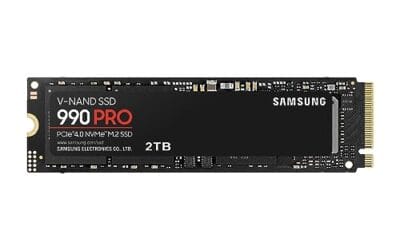
The Samsung 990 PRO (2TB, $389.99, 4.2 rating) is the TLC reference point. Three bits per cell, a mature controller, and rated reads up to 7,450 MB/s. It’s the drive people buy when they want a known quantity for a high-end build. Samsung positions it for gaming and heavy workstation duty, and the spec sheet backs that up.

The Bestoss 2TB ($284.99, 4.8 rating) represents the other side. It’s a value-tier PCIe Gen4 drive listing reads up to 7,350 MB/s, leaning on an SLC cache and HMB (Host Memory Buffer) to hit those numbers without onboard DRAM. Budget drives in this bracket often use QLC NAND, four bits per cell, to drive the price down. So we’re really comparing a proven TLC design against the value approach that the QLC tier depends on. Same capacity, same interface, different philosophy.

Spec sheet showdown
| Spec | Samsung 990 PRO 2TB | Bestoss 2TB NVMe | Why it matters | Edge |
|---|---|---|---|---|
| Price | $389.99 | $284.99 | $105 difference at 2TB | Bestoss |
| NAND tier | Premium TLC | Value tier (QLC-class) | Endurance and sustained writes | Samsung |
| Sequential read | Up to 7,450 MB/s | Up to 7,350 MB/s | Peak burst speed | Even |
| DRAM cache | Onboard DRAM | DRAM-less, HMB + SLC cache | Random I/O consistency | Samsung |
| Owner rating | 4.2 | 4.8 | Buyer satisfaction | Bestoss |
Read that peak-read row twice. On paper these two are within 100 MB/s of each other, and no game engine on the planet will let you feel that difference. The rows that matter are NAND tier and DRAM. That’s the whole story.
Samsung 990 PRO strengths
TLC’s advantage isn’t the headline number. It’s what happens when you keep writing. Every fast NVMe drive uses a chunk of its flash as a pseudo-SLC cache, writing one bit per cell for speed, then folding that data back into denser storage later. On a TLC drive that fold is into three-bit cells. The 990 PRO holds high write speeds longer before it drops to native rates, and even that native floor stays respectable. Steam library sitting at 80% full? A TLC drive shrugs. That consistency is exactly why Samsung rates this thing for workstations and not just gaming.
The onboard DRAM matters too. It stores the mapping table the controller uses to find your data, so random reads stay snappy under mixed load. When a game streams hundreds of small texture files while the OS does its own thing in the background, DRAM keeps latency flat. The 4.2 owner rating is lower than the Bestoss figure, and that’s worth being honest about, but it reflects a huge, demanding buyer base rather than a weaker drive. You’re paying $389.99 for a controller and NAND combination that behaves predictably for years. If you want the fuller shortlist, our best 2TB NVMe SSD guide lines up the alternatives.
Bestoss 2TB strengths
Here’s what the value tier gets right: for the way most people actually game, it’s plenty. The Bestoss lists reads up to 7,350 MB/s, and DirectStorage-era titles that lean on the SSD still can’t saturate that. Its SLC cache absorbs the bursty writes of a game install or a patch download at full pace. As long as you’re not writing tens of gigabytes in one continuous shot, you may never touch the slower native flash underneath. And that 4.8 owner rating isn’t nothing. Buyers in this bracket are getting exactly what they expected.
The HMB trick is clever. Instead of onboard DRAM, the drive borrows a slice of your system RAM to hold its mapping table. Modern platforms handle this fine, and for sequential game loads the real-world hit is small. Where you’d feel it is sustained mixed I/O, heavy multitasking, or filling the drive past 85% capacity, because QLC-class NAND has less write endurance and a steeper slowdown once the cache is spent. For a pure gaming box that mostly reads, none of that shows up. Saving $105 to put toward a GPU or more RAM is a defensible call, and it pairs well with picks from our best budget SSD list.

Pros
- Rated 7350MB/s read hits PS5 Sony minimum of 500MB/s with headroom.
- M.2 2280 PCIe Gen4 x4 compatible with PS5, AM5, AM4, LGA1700, LGA1851 boards.
- HMB plus dynamic SLC cache accelerates game loads and small file writes.
- Vendor lists 3-year limited waranty with lifetime technical support.
Cons
- Limited owner feedback at time of writing, no third-party benchmarks to verify rated speeds.
- Controller model, NAND type, TBW endurance, and DRAM presence not specified by vendor.
- Graphene coper cooling claim is unverified, PS5 install still requires a compliant heatsink.
The Bestoss2TB is a PCIe Gen4 x4 NVMe SD in the standard M.2 2280 form factor, positioned as a mid-range Gen4 drive for PS5 storage expansion and desktop or laptop upgrades. Vendor targets gamers, video editors, and creators who need more than a Gen3 drive but do not require Gen5 speeds.
The headline spec is rated 7350MB/s sequential read and 6600MB/s sequential write, which sits near theceiling of the Gen4 x4 interface and clears Sony's 5500MB/s PS5 requirement. HMB and dynamic SLC caching are used in place of a dedicated DRAM buffer, a common pattern in this tier that favors bursty workloads over sustained random writes.
Trade-offs are typical for a lesser-known Gen4 drive. Bestoss does not disclose the controller, NAND generation, or TBW endurance rating, so long-term durability and post-cache write speds are unknown. Owner reports and independent benchmarks are not yet available, so real-world sustained performance against Samsung, WD, or Crucial Gen4 drives cannot be verified from source data.
Buy this if you need a Gen4 x4 M.2 2280 drive for PS5 expansion or a secondary game library and accept an unverified brand. Skip this if you need documented TBW ratings, DRAM-backed sustained writes for video scratch disks, or a waranty backed by a widely known SD vendor.
Interface and form factor: PCIe 4.0 x4 NVMe in M.2 2280, which drops into PS5, Xbox Series expansion via compatible adapters, and any desktop or laptop M.2 slot wired for Gen4. Backward compatible at Gen3 speds if installed in older boards or Steam Deck class hardware.
Sequential throughput: Vendor rates 7350MB/s read and 6600MB/s write, which is competitive with mainstream Gen4 drives from Tier 1 brands. Random4K IOPS, which maters more for OS bot and game load stuter, is not specified. Treat sequential figures as peak SLC-cache numbers until third-party tested.
Cache architecture: HMB plus dynamic SLC cache, indicating a DRAM-less controller that borows system RAM for the mapping table. Typical at this tier, adequate for gaming and general use, weaker than DRAM-equipped drives for sustained large file writes once the SLC cache is exhausted.
Thermals and endurance: Bestoss cites a graphene copper heatspreader for sustained Gen4 speds. PS5 installation still requires a heatsink under Sony's spec. TBW endurance rating, MTBF, and NAND type are not specified, so write-heavy workloads like video editing scratch disks are hard to size for.
Real-world scenarios
Loading into a session
Booting a save and streaming the first level is a read operation, and reads are where these drives tie. Both push past 7,300 MB/s, both bottleneck on the game engine long before the SSD. You won’t shave a meaningful second off a loading screen by picking TLC here. Call this one a wash.
Installing a 120GB game
Now writes matter. The first chunk flies on both drives while the SLC cache is open. On the 990 PRO the sustained rate holds higher for longer, so a giant install or a big Steam update finishes with less of a mid-transfer slowdown. The Bestoss keeps up until its cache fills, then eases off. A few extra minutes on a rare 120GB write, not a daily annoyance.
Drive nearly full
This is the clearest split. QLC-class NAND slows more sharply as free space shrinks, because the SLC cache scales with empty cells. Keep a value drive under about 80% and it’s happy. Cram it to the brim and the TLC drive stays composed while the budget one labors. If you hoard a 40-game library on one 2TB stick, that headroom favors the Samsung.
Gaming plus creator work
Editing 4K footage or compiling code between play sessions is exactly the mixed, write-heavy pattern where DRAM and TLC pull ahead. The 990 PRO’s onboard cache and higher endurance make it the safer scratch disk. A pure gaming rig doesn’t care. A hybrid one does.
Pricing and availability
At $389.99 the Samsung 990 PRO sits where premium 2TB TLC drives usually land, and Samsung’s supply is steady, so you rarely wait on stock. The Bestoss at $284.99 undercuts it by $105, which is real money toward the rest of a build. Both are 2TB, both M.2 2280, both PCIe Gen4, so they drop into the same slot with no compatibility homework. Prices in this category move, so it’s worth checking our best SSD deals tracker before you commit. The gap has narrowed over the past year as value NAND matured, but that $105 spread is the number your decision hinges on.
Which to buy
For a dedicated gaming PC that mostly loads levels and installs the occasional patch, the Bestoss makes a strong case. You’ll rarely see the difference, and $105 buys real performance elsewhere. But if this drive is doing double duty, hosting your OS, a big library, and creator workloads, or if you tend to fill storage to the last gigabyte, buy the TLC drive and stop thinking about it. The 990 PRO’s sustained writes, onboard DRAM, and higher endurance are what that premium actually pays for.
Our lean: if the budget’s tight and it’s pure gaming, save the money. If you want one drive that never makes you think about cache states or fill levels for the next five years, the Samsung 990 PRO is the safer buy. It’s the drive we’d point a “just works” builder toward.

Pros
- Rated 7,450 MB/s sequential read pushes close to the PCIe Gen4 x4 ceiling for game loads.
- Rated 6,900 MB/s sequential write helps large file transfers and 4K editing scratch workflows.
- Samsung claims 55 percent random IOPS uplift vs the 980 PRO, benefiting bot and app launch responsiveness.
Cons
- Limited owner feedback available at time of writing, so long-term reliability signal remains thin.
- TBW endurance rating not specified in listing, worth confirming for sustained write workloads.
- No heatsink on this SKU, sustained Gen4 writes may need a motherboard M.2 cooler to avoid throttling.
The Samsung 990 PRO 2TB is a high-end PCIe Gen4 NVMe SSD in the M.2 2280 form factor, rated up to 7,450 MB/s sequential read and 6,900 MB/s sequential write. It targets desktop gamers, PS5 upgraders, and content creators who want Gen4 headroom without stepping up to a Gen5 drive.
The defining pitch is near-ceiling Gen4 bandwidth paired with a claimed 55 percent uplift in random IOPS over the 980 PRO. In practice, drives at this tier typically shave a second or two off open-world level loads and accelerate DirectStorage titles, though real-world gaming deltas over solid Gen4 rivals remain modest.
Gen4 flagships like this tend to run hot under sustained sequential writes, and the bare version without a heatsink relies on motherboard M.2 cooling to hold peak speeds. TBW endurance is not specified in the listing, so buyers running heavy write workloads should confirm the rating from Samsung's own datashet.
Buy this if you want a top-shelf Gen4 drive for a gaming PC, editing rig, or PS5 with a well-cooled M.2 slot. Skip this if you already own a fast Gen4 SD, need Gen5 bandwidth for scratch work, or want a factory heatsink model included in the box.
Sequential throughput: Samsung rates the 990 PRO at up to 7,450 MB/s sequential read and 6,900 MB/s sequential write over PCIe Gen4 x4. That is close to the practical Gen4 x4 ceiling near 7,500 MB/s, so large file copies are limited more by the source disk than by this drive.
Random performance: The listing calls out a 55 percent improvement in random performance versus the 980 PRO. Random 4K IOPS drives OS snappiness, shader cache loads, and small file operations, so the uplift matters more day to day than the sequential headline for most users.
Form factor and platform: The drive uses M.2 2280 single-sided layout and PCIe Gen4 x4, dropping into standard desktop M.2 slots, most Gen4 laptops, and the PS5 storage bay. Capacity spans 1TB to 4TB in the family, with this SKU at 2TB for a balanced game library.
Power and thermals: Samsung claims up to 50 percent better performance per wat versus the 980 PRO, helping in fanless laptop bays and compact ITX builds with limited airflow. Under sustained writes, this bare version benefits from a motherboard M.2 heatsink to avoid thermal throttling on long transfers.
Common questions
Does QLC or TLC actually change game loading times?
Barely. Loading is a read operation, and both tiers read fast enough that the game engine, not the SSD, sets the pace. You’ll see the TLC advantage in sustained writes and near-full performance, not in how quickly a level pops up. For load times alone, the cheaper drive is fine.
Is a DRAM-less SSD bad for gaming?
No. DRAM-less drives like the Bestoss use HMB to borrow system memory for their mapping table, and for sequential game loads the difference is small. It shows up under heavy random I/O and multitasking. A gaming-first rig usually won’t notice it.
Why does the cheaper Bestoss have a higher owner rating?
Ratings reflect expectations. The Bestoss carries a 4.8 because value buyers get exactly what they paid for. The 990 PRO’s 4.2 comes from a far larger, more demanding audience running it in workstations and enthusiast builds. Different crowds, not a verdict on raw quality.
How full can I let each drive get?
Keep any SSD under about 80% for best speed. That rule is stricter for QLC-class value drives, since their SLC cache shrinks as free space drops. The TLC 990 PRO tolerates a fuller drive with less slowdown, which is one practical reason to pay more if you plan to pack it.
Are both drives compatible with the PS5?
Both are PCIe Gen4 M.2 2280 drives, the form factor the PS5’s expansion slot expects, and the Bestoss listing calls out PS5 use directly. Sony recommends a heatsink for thermals. Confirm current firmware requirements before installing, but the interface and size line up on both.




























Write Your Review
No reviews yet. Be the first to share your experience!