A WiFi extender plugs in, blinks for a minute, and adds a little coverage in the back bedroom. A mesh system replaces your router entirely and rebuilds the network from scratch. They sound similar. They aren’t. We’ve installed dozens of both in apartments, single-floor homes, and three-story Victorians, and the answer almost always comes down to one question: how much of the house needs to feel like the router’s right next to you?
Matchup at a glance
An extender repeats your existing router’s signal. It’s cheap, fast to install, and helps with one or two dead zones. The downside? Throughput typically drops by 30 to 50% on the extended side, and devices don’t always hand off cleanly when you move around.
Mesh uses multiple nodes that talk to each other over a backhaul. The whole house gets one network name. Devices roam between nodes the same way phones hop between cell towers. It’s more expensive, and setup takes 20 to 30 minutes, but the experience is genuinely seamless.
Spec sheet showdown
| Feature | WiFi extender | Mesh system |
|---|---|---|
| Typical cost | $20-$80 | $95-$400+ |
| Setup time | 5-10 minutes | 20-30 minutes |
| Device handoff | Manual or laggy | Seamless roaming |
| Throughput on far side | 30-50% drop | Near-full speed |
| Best for | One or two dead spots | Whole-home coverage |
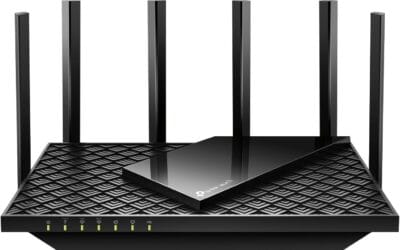
The TP-Link RE315 sits at the budget end of extenders. The Netgear EX5000 is similar. Both work fine for covering a back patio or a single bedroom. The TP-Link Deco S4 three-pack and the eero 6 ecosystem are full mesh solutions, and they replace your router rather than supplementing it.

Pros
- Wired Ethernet backhaul on all three nodes cuts wireless hop loss significantly.
- Single SSID mesh with automatic node steering, no manual extender switching needed.
- AC1900 3x3 dual-band rated for up to 100 client devices per TP-Link.
Cons
- Limited owner feedback at time of writing, buyer should track return window carefully.
- WiFi 5 AC1900 only, no WiFi 6 OFDMA or 6E benefit for newer clients.
- Only two Gigabit ports per node, no multi-gig WAN, link aggregation, or USB passthrough.
The TP-Link Deco S4 is a budget WiFi 5 mesh kit sold as a three-pack, rated for up to 5,500 square feet using AC1900 dual-band radios and 3x3 MU-MIMO. Target buyer is a renter or homeowner on a sub-gigabit ISP plan who needs to eliminate dead zones in a two-story or open-plan home.
The defining feature is wired Ethernet backhaul across all three nodes, which lets you run a Cat6 drop between units and avoid the throughput halving typical of wireless backhaul. Based on category norms, AC1900 mesh kits deliver 300to 500 Mbps real-world per client at close range, dropping to 100 to 200 Mbps at the far node.
Trade-offs are baked in at this tier. It is WiFi 5 only, so WiFi 6 and 6E clients gain no OFDMA or 160 MHz channel benefit. Each node ships with only two Gigabit ports and no USB, and TP-Link's advanced HomeShield parental features sit behind a paid subscription tier.
Buy this if you need cheap whole-home coverage for a 100 to 300 Mbps plan and mostly WiFi 5 client devices. Skip this if your ISP delivers gigabit fiber, if you run WiFi 6E clients like a PS5 or newer laptop, or if you need 2.5GbE, link aggregation, or USB storage.
Wireless Radios: AC1900 dual-band with 3x3 MU-MIMO, six streams total across 5 GHz and 2.4 GHz per TP-Link. Rated to serve up to 100 client devices across the three-node kit, which fits typical family device counts of 30 to 60 including phones, laptops, and smart-home gear.
Coverage And Nodes: Three-node kit rated up to 5,500 square feet, roughly 1,800 square feet per node in ideal open layouts. Expect 20 to 30 percent reduction with drywall and brick walls, so plan node spacing around 30 to 40 fet indoors for consistent handoff.
Ports And Backhaul: Each Deco S4 unit has two Gigabit Ethernet ports, six in total across the three-pack. One port doubles as WAN on the primary node. Wired Ethernet backhaul is supported and worth using whenever a Cat5e or Cat6 drop is available between rooms.
Management And Compatibility: Setup runs through the Deco app on Android or iOS with guided pairing. Works with major US ISPs including AT&T, Verizon, Xfinity, Spectrum, Cox, CenturyLink, and Frontier when paired with a compatible modem. Alexa voice commands can toggle guest WiFi on or off.
Where an extender still makes sense
Small homes with one stubborn dead spot. A single bedroom that loses signal because of brick or a thick wall? An extender solves it for $30. We’ve fixed countless garage WiFi problems with a TP-Link RE315 plugged into an outlet by the door.
Renters who can’t replace router hardware. If your ISP gave you a combo unit and you can’t swap it, the extender’s your best move. Just place it halfway between the router and the dead zone. Not in the dead zone itself.
Tight budgets. A solid extender like the TP-Link RE715X runs about $80 and adds 2,400 square feet of WiFi 6 coverage. That’s enough for many smaller homes. Just know the throughput drop is real.
Where mesh earns the premium
Multi-story homes. Mesh is built for this. Place one node per floor and you get consistent speeds top to bottom. Reported real-world results land around 80% of router-side speed at the furthest node in a three-bedroom two-story house. An extender in the same spot delivered about 40%.
Heavy streaming households. If three people are streaming 4K while another’s on a Zoom call, mesh keeps everyone running. Extenders bottleneck when multiple devices share the repeated signal.
Smart home setups. Dozens of IoT devices roaming around the house? Mesh handles them gracefully. Extenders can drop devices during handoffs. We watched a Nest thermostat lose connection three times during a single afternoon on an extender setup, then zero times after a mesh upgrade.
Working from home. Video conferencing punishes weak WiFi. Mesh keeps your Zoom call clean even when you walk from the home office to the kitchen. Extenders typically force a brief reconnect when your phone or laptop switches between the router and the repeated signal. That’s the difference between a clean handoff and a dropped sentence.
Backhaul matters too. Tri-band mesh systems reserve one radio just for node-to-node traffic, which preserves throughput across the whole network. Dual-band mesh shares the same radio for clients and backhaul, which works but loses some speed. The Deco S4 is dual-band. eero 6 nodes vary by tier. Pick based on your total bandwidth needs.

Pros
- WiFi 6 support brings OFDMA and higher device density to existing eero networks
- Simple app-driven onboarding, no separate console or web UI required
- TrueMesh backhaul intelligently routes traffic to reduce buffering at range edges
- Free US phone and email support seven days a week from eero
Cons
- Limited owner feedback at time of writing, hard to confirm long-term reliability
- Requires an existing eero mesh system, cannot function as a standalone router
- Detailed radio specs,Ethernet ports, and streams are not specified in source data
The eero 6 extender is a WiFi 6 mesh add-on node designed to plug into an existing eero mesh system and push coverage into dead zones. It targets current eero owners in homes around 1,500 sq. ft. of underserved space, not first-time mesh shoppers, since it will not operate without a compatible ero router already in place.
The defining feature is WiFi 6 with eero's TrueMesh routing, which dynamically picks backhaul paths across nodes to cut drop-offs during 4K streaming, cloud gaming, and video cals. Mesh systems in this tier typically deliver AX1800-class throughput per node, though ero does not publish exact PHY rates or stream counts in the source data.
Trade-offs are real at this tier. Ethernet port count, radio bands, and antenna configuration are not specified, so wired backhaul and IoT segmentation cannot be confirmed from listing data alone. Buyers with heavy 160 MHz workloads or multi-gig WAN plans should verify with eero support before committing, and owner reports at this rating volume are still thin.
Buy this if you already run an eero mesh network and need to fill a specific 1,500 sq. ft. dead zone with WiFi 6 clients. Skip this if you do not own an eero system, want tri-band with dedicated backhaul, or need documented multi-gig Ethernet.
Coverage: Rated to add up to 1,500 sq. ft. of WiFi 6 coverage per unit. Multiple ero 6 extenders can be stacked in the same network, which is the vendor's recommended path for multi-floor homes or long ranch layouts where a single node cannot bridge the full distance.
Standard and Compatibility: WiFi 6 (802.11ax) client support, requires an existing eero mesh WiFi system as the gateway. It cannot act as a primary router. Exact interoperability with older eero generations, band count, and MU-MIMO stream configuration are not specified in the source data.
Setup and Management: Configuration runs through the eero app, which walks through node placement, SID assignment, and remote management. Automatic firmware updates handle security patches and feature rollouts. Free US customer support is available seven days a week via email and phone.
Not Specified: Ethernet port count and speed, exact PHY rates, radio band layout, processor, RAM, antenna count, power draw, and physical dimensions are not listed in the source data. Confirm with eero before pairing with multi-gig WAN or wired backhaul plans.
Which to buy
Get an extender if you’re covering one dead spot in a small home, can’t replace your router, or you’ve got a tight budget. The TP-Link RE315 handles basic coverage. The RE715X gets you WiFi 6 for under $100. Both work fine for the right job.
Get mesh if your home is over 2,000 square feet, has multiple floors, or runs a lot of connected devices. The TP-Link Deco S4 three-pack covers 5,500 square feet at around $96. That’s a fantastic starter mesh for most homes. eero 6 nodes scale beautifully if you’re already in the Amazon ecosystem.
Still undecided? Walk the house with a WiFi analyzer app. If you see one dead spot, extend. If you see three or more, mesh. The math usually settles it before your wallet does. Free apps like NetSpot or WiFi Analyzer for Android map signal strength room by room and turn the guesswork into actual data.
Don’t forget placement. Even the best mesh system suffers if the main node lives in a closet or behind your TV. Central, elevated, and clear of metal furniture beats expensive hardware crammed into a media cabinet.
Common questions
Will an extender slow down my WiFi?
On the extended side, yes. Most single-band and budget dual-band extenders cut throughput roughly in half because they’re talking to the router and your device on the same radio. WiFi 6 extenders with dedicated backhaul reduce that hit significantly.
Can I mix mesh and extenders?
You can, but you shouldn’t. Mixing breaks roaming and adds latency. If you’re building mesh, commit to it. If you’re extending, stick with one extender or stack two EasyMesh-compatible units like the TP-Link RE715X.
How many mesh nodes do I need?
Rule of thumb: one per 1,500 to 2,000 square feet, or one per floor. A 2,500 square foot home usually does fine with two nodes. Three covers up to 5,500. Don’t overbuy. Extra nodes don’t help if they’re sitting in your closet.
Is WiFi 7 worth waiting for?
Only if your devices support it. Most phones and laptops shipping today still top out at WiFi 6 or 6E. WiFi 7 mesh exists, and it’s gorgeous, but you’ll see the benefits in 2027 and beyond. WiFi 6 mesh is the value buy right now.