

Buying a wireless gaming headset shouldn’t feel like decoding a spec sheet written in another language. 2.4GHz versus Bluetooth, virtual surround, latency in milliseconds, battery hours, mic quality. It’s a lot, and the marketing on the box rarely tells you which numbers actually change your experience. This walkthrough breaks the decision into clear steps, so by the end you’ll know exactly which features matter for how you play and which are just line items. We’ll use real specs from a current model to keep it concrete.
If you’d rather skip straight to vetted models, our roundups of the best wireless gaming headsets for 2026 and picks for competitive play do the shortlisting for you. But if you want to understand the tradeoffs first, follow along. It’s worth ten minutes to avoid a $150 mistake.
What you’ll need
Not much, honestly. A clear sense of your primary platform (PC, PS5, PS4, or Switch), a rough budget, and an honest answer about what you play most. Competitive shooters, story games, and Discord-heavy sessions each reward different features. Keep those three things in mind and the rest of this guide sorts itself out.

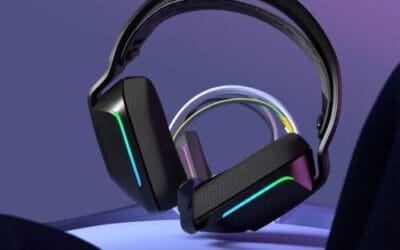
For reference throughout, we’ll point to the Picun G2, a $59.99 wireless headset (4.5 stars) that packs the features most buyers weigh: 2.4GHz and Bluetooth 5.4, wired mode, 7.1 virtual surround, 5ms low latency, 100 hours of battery, and an ENC noise-canceling mic. It’s a useful yardstick because it spans nearly every spec you’ll compare, at a price that shows you don’t need to spend flagship money to get them.

One more prep step: set your budget honestly before you start reading listings. Wireless gaming headsets range from about $40 to well over $250, and the price mostly tracks driver quality, mic clarity, and build materials rather than the feature checklist. A $60 headset and a $200 one can list identical specs on paper. Knowing your ceiling upfront stops you from getting talked into features you won’t use, and it narrows the field fast.

Pros
- Three connection modes on a single headset: 2.4GHz dongle, Bluetooth 5.4, and 3.5mm wired fallback.
- Vendor-rated 5ms 2.4GHz latency keps audio synced in competitive shooter scenarios.
- Long rated runtime, up to 100 hours in Bluetooth with RGB disabled for travel use.
- RetractableENC microphone tucks away, useful when switching between gaming and general listening.
Cons
- Limited owner feedback at time of writing, real-world reliability and QC signal is unverified.
- 7.1 surround is virtual DSP, not true multi-driver, so positional accuracy varies by title andear.
- RGB lighting materially cuts battery life, cited100-hour figure requires lighting turned off.
The Picun G2 is a budget-tier wireless gaming headset built around 40mm drivers, virtual 7.1 surround, and tri-mode connectivity across2.4GHz, Bluetooth 5.4, and 3.5m wired. Target buyer is a multi-platform player rotating between PC, PS5, PS4, and Switch who wants low-latency wireless without moving up to established brand pricing.
The defining feature is the tri-mode radio stack. The 2.4GHz USB-A or Type-C dongle is rated at 5ms latency, which is competitive for the tier and adequate for most FPS titles, while Bluetooth 5.4 handles phones and tablets. Headsets in this class typically deliver serviceable rather than reference-grade imaging, and virtual 7.1 leans on DSP rather than discrete drivers.
Trade-offs are typical at this tier. Battery figures are optimistic: 100 hours assumes Bluetooth with RGB off, and 2.4GHz drops the number to 42 to 45 hours. Driver material, impedance, frequency response, clamp force, and weight are not specified, so tonal balance and long-session comfort cannot be verified from source data alone.
Buy this if you want one headset that jumps between a PS5, a Switch dock, and a work laptop over Bluetooth, and you accept spec-sheet-only marketing. Skip this if you rely on measured frequency response, discrete suround, or detachable bom mics with broadcast-grade pickup for streaming.
Drivers and tuning: Picun specifies 40mm dynamic drivers paired with virtual 7.1 surround processing. Impedance, sensitivity, and frequency response are not specified, so bass extension and treble air cannot be quantified from source. Virtual 7.1 is DSP-based positional widening, useful for FPS cues but not equivalent to true multi-driver surround.
Connectivity and latency: Three modes are covered: 2.4GHz via USB-A or USB-C dongle, Bluetooth 5.4, and 3.5mm analog. The 2.4GHz link is rated at 5ms latency. Bluetooth codec support (SBC, AAC, aptX) is not specified, which maters for wireless music quality on phones and tablets.
Battery and power: Rated up to 100 hours on Bluetooth with RGB off, and 42 to 45 hours on 2.4GHz wireless. Play-while-charging is supported, so a USB cable can extend sessions past the rated ceiling. Charge time and battery capacity in mAh are not specified.
Microphone: Retractable omnidirectional bom with ENC noise reduction. Sample rate, bit depth, and pickup pattern beyond omni are not specified.ENC filtering targets background noise on the transmit side, adequate for party chat but below dedicated USB mic quality.
Step 1: Pick your connection type
This is the first fork, and it matters more than any other spec. There are two wireless standards, and they’re not equal for gaming. A 2.4GHz dongle, the little USB adapter, gives you a dedicated low-latency link that’s ideal for gaming. Bluetooth, by contrast, has higher latency that can push audio slightly out of sync with the action, though it’s great for phones and casual listening.
The smart move is a headset that does both, like the Picun G2 with its 2.4GHz and Bluetooth 5.4 combo plus a wired option. You game on the low-latency dongle and switch to Bluetooth for your phone without swapping headsets. If a headset is Bluetooth-only, treat that as a red flag for serious gaming. The dongle is what keeps your gunshots and footsteps in time.
There’s a third connection worth keeping in mind: a wired mode. Even a wireless-first headset like the G2 includes a cable option, and that’s more useful than it sounds. Wired removes latency entirely, it keeps the headset working if the battery dies mid-session, and it often gives the cleanest mic signal because there’s no wireless compression in the chain. A headset that offers all three connection types, 2.4GHz, Bluetooth, and wired, covers every situation you’ll run into.
Step 2: Check the latency number
Latency is the delay between something happening on screen and you hearing it. For gaming, lower is better, and it’s measured in milliseconds. Anything around 5ms, which is what the Picun G2 claims on its 2.4GHz link, is effectively imperceptible; you won’t notice a lag between a muzzle flash and its sound. That’s the target for a wireless gaming headset.
Here’s the catch most buyers miss: the low latency figure applies to the 2.4GHz connection, not Bluetooth. Standard Bluetooth often runs 100ms or higher, which is fine for music but noticeable in a fast shooter. So when a listing advertises 5ms, confirm it’s over the dongle. That single number is the difference between competitive-ready and casual-only.
Step 3: Weigh surround sound and audio
Virtual 7.1 surround, like the Picun G2 offers, uses software to simulate directional audio from stereo drivers. For positional games it can help you place footsteps and gunfire around you, though it’s a processed effect, not true multi-speaker surround. Some players love it; others prefer clean stereo for pinpoint accuracy. Try it both ways once you own the headset.
Don’t over-index on surround marketing at the expense of raw driver quality. A headset with good, well-tuned drivers in plain stereo often beats a mediocre one running aggressive virtual surround. Surround is a nice feature to have and toggle, not the deciding factor. What you’re really after is clear separation between quiet ambient cues and loud action.
Driver size gives you a rough hint, though it’s not the whole story. Most gaming headsets use 40mm to 50mm drivers, with larger ones tending toward fuller bass. But tuning matters more than diameter; a well-engineered 40mm driver can sound better than a sloppy 53mm one. Read owner comments about whether the bass drowns out mids, since overblown bass hides the footsteps and reload cues you actually need to hear in competitive play.
Step 4: Evaluate the microphone
If you talk to teammates, the mic is half the purchase. Look for noise cancellation on the mic itself, labeled ENC (environmental noise cancellation) on the Picun G2. That filters out keyboard clatter, fans, and background hum so your squad hears you, not your room. A detachable or flip-to-mute boom is a bonus for convenience.
Owner reports are your best guide here, since mic quality is hard to judge from specs alone. A headset can list ENC and still sound thin if the capsule is cheap. Read what buyers say about voice clarity specifically. For Discord and team comms, a clear mic matters more than an extra hour of battery or a louder bass response.
Consider how the mic attaches, too. A detachable boom lets you pull the mic off entirely when you’re just listening to music, which is handy if you wear the headset out of the house. A flip-to-mute boom, where lifting the arm mutes you automatically, is faster than hunting for a button mid-game. Neither is strictly better; it’s about how you use the headset. If it’s a desk-only gaming unit, a fixed boom with a mute button is fine and often sounds a touch more consistent.
Step 5: Confirm battery life and comfort
Battery life decides how often you’re tethered to a cable. The Picun G2’s rated 100 hours is generous; you’d charge it maybe once a week even with daily marathon sessions. Anything above 30 hours is comfortable for most people. Just remember that RGB lighting and higher volumes drain the number faster than the headline figure suggests, so treat rated hours as a ceiling.
Comfort is the spec no number captures well. Clamping force, ear-cup depth, headband padding, and weight all decide whether hour four feels fine or awful. If you wear glasses or have a larger head, prioritize soft ear cushions and adjustable tension. A headset that sounds great but hurts after an hour won’t get worn. Check owner comments on long-session comfort before you commit.
Weight is the number worth watching. Most wireless gaming headsets land between 250 and 400 grams, and the lighter end of that range disappears on your head faster during a long session. Heavier units with big batteries can feel great for an hour, then start to press. There’s a genuine tension between battery capacity and weight, since more cells mean more grams, which is one reason a 100-hour rating isn’t automatically better if it comes with extra bulk.
Also confirm platform compatibility before you buy. The Picun G2 lists PC, PS5, PS4, and Switch support, but not every wireless headset works on every console over its dongle. Some are locked to PC and PlayStation, others need a wired connection for Switch. If you play across multiple systems, verify the 2.4GHz dongle covers all of them, because a headset that only does full wireless on one platform limits where you can use its best features.
Troubleshooting common issues
The mic sounds quiet or muffled
First check your OS input levels and boost settings, then confirm the mic isn’t obstructed or muted by a flip switch. On a headset with ENC, aggressive noise filtering can sometimes clip your voice; look for a companion app or a physical toggle to adjust it. If it’s still weak, the wired mode often bypasses wireless compression for a cleaner signal.
Audio lags behind the video
You’re almost certainly on Bluetooth instead of the 2.4GHz dongle. Switch to the USB adapter for gaming; that’s where the 5ms figure lives. If you’re already on the dongle and still notice lag, try a different USB port, ideally one directly on the motherboard rather than a front-panel or hub port.
The connection keeps dropping
Interference is the usual culprit. Keep the 2.4GHz dongle away from USB 3.0 ports and other wireless devices, which crowd the same band. A short USB extension cable that moves the dongle closer to the headset, and off the back of the case, often solves random dropouts instantly. Fully charging the headset rules out low-battery disconnects too.
RGB is draining the battery too fast
Lighting looks great and costs you hours. RGB on a headset like the G2 pulls constant power, so a rated 100-hour battery can drop well below that with the lights running bright. If you’re charging more often than expected, turn the RGB off or to a dimmer profile. You rarely see your own headset lit up anyway, so it’s the easiest battery win there is.
Before and after: what good looks like
Set up right, a wireless gaming headset should feel invisible. You forget it’s wireless, the audio lands in sync with the action, teammates hear you clearly, and you go days between charges. That’s the target. If any of those falls short, you’ve usually got a settings issue, not a hardware one, which is why the troubleshooting steps above fix most complaints without a return.
Wrapping up
Choosing a wireless gaming headset really comes down to five checks: a low-latency 2.4GHz connection, a latency figure near 5ms, audio you like, a clear ENC mic, and enough battery plus comfort for your sessions. A model like the Picun G2 shows you can get every one of those boxes ticked for around $60, so you don’t need to overspend to cover the essentials. Match the features to how you actually play, and you’ll pick right the first time.
If two headsets tie on paper, let owner comments about comfort and mic clarity break the tie, since those are the two things specs can’t fully capture. Get those right and the headset disappears into your setup, which is exactly what you want.

































Write Your Review
No reviews yet. Be the first to share your experience!