

Streamers argue about this one constantly: do you need a hardware capture card, or is OBS software capture enough? The honest answer hinges on your setup and budget. Single-PC streamers on a modern GPU can often skip the $150-plus card entirely, since OBS leans on NVENC or AMD’s encoder to do the heavy lifting. Two-PC and console creators lean the other way. Let’s break down what each price tier actually buys you, because the wrong choice either wastes money or costs you frames.
We researched both paths against real streaming workflows. If you’re building out a capture setup, our picks for the best capture card for 2026 and the best capture card for streaming in 2026 are the natural next reads, and console streamers should check the best USB-C hub for console capture. This is a head-to-head, hardware versus software, and by the end you’ll know which side your rig belongs on.
Matchup at a glance
OBS software capture is free, flexible, and lives entirely on your existing PC. It grabs your game via display or game capture, encodes with your GPU’s built-in encoder, and sends it out. Zero extra hardware, zero cabling, but it borrows resources from the same machine that’s running your game. On a strong GPU, that’s a fine trade. On a mid-range rig, those borrowed cycles can cost you in-game frames.
![WiMiUS [Built-in Apps/4K Support] Smart Outdoor Projector with WiFi product image](https://thepcbolt.com/wp-content/uploads/capture-card-vs-obs-software-amazon-gallery-2.jpg)
A hardware capture card offloads the incoming video signal, which is what makes it essential for console streaming and two-PC setups. It ingests HDMI from a PS5, Xbox, or a second gaming PC and hands clean video to your streaming machine. That isolation is the whole point: your gaming device never knows it’s being recorded. The cost is money and a bit more cabling. Two philosophies, one goal.
![WiMiUS [Built-in Apps/4K Support] Smart Outdoor Projector with WiFi product image](https://thepcbolt.com/wp-content/uploads/capture-card-vs-obs-software-amazon-gallery-3.jpg)
Spec sheet showdown
| Factor | OBS Software Capture | Hardware Capture Card | Best For |
|---|---|---|---|
| Upfront cost | Free | $120 to $300-plus | OBS on a budget |
| CPU/GPU load | Uses your gaming PC’s encoder | Offloads video ingest | Card for weak rigs |
| Console support | Not directly | Yes, via HDMI | Card only |
| Two-PC setup | Needs NDI or extra tools | Native | Card |
| Setup complexity | Software only | Drivers plus cabling | OBS is simpler |
OBS software capture strengths
The pitch for OBS is unbeatable value. It’s free, open-source, and endlessly configurable, with scenes, overlays, filters, and plugins for days. For a single-PC streamer on a recent NVIDIA or AMD GPU, the built-in NVENC or AV1 encoder handles 1080p60 with almost no measurable hit to game performance. You’re already paying for that silicon, so using it costs nothing extra. That’s genuinely hard to argue against.
Flexibility is the other win. Software capture updates for free, adapts to any resolution your GPU supports, and doesn’t add a box to your desk or a point of hardware failure. Want to restream, record locally, and push to two platforms at once? OBS does it. The catch is that everything runs on one machine, so a demanding game plus a demanding encode can compete for resources on a weaker system.
Hardware capture card strengths
A capture card’s superpower is isolation. By taking the video signal off your gaming device entirely, it removes the encode burden from the machine you’re playing on. That’s non-negotiable for console streaming, where you can’t run OBS on the console itself, and it’s the clean answer for two-PC setups where a dedicated streaming rig handles all the encoding. Your frames stay yours.
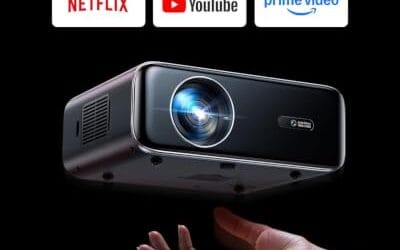
Cards also bring consistency. A quality external card delivers reliable 1080p60 or 4K passthrough without you tuning encoder settings for hours, and passthrough lets you play on your main monitor at full refresh while capturing a clean feed. As a note on the products below, the two items we’re showing are outdoor AV projectors rather than dedicated capture cards, so we’re presenting them transparently as adjacent home-theater gear a streamer might also research, not as capture hardware. The WiMiUS P62 Pro, $299.99 at 4.2 stars, is a 4K-supporting WiFi and Bluetooth projector with Dolby audio and dual speakers.

Pros
- Native 1080P with HDR10 and 4K signal aceptance covers Prime Video and YouTube playback
- 600ANSI brightness rating outperforms typical sub-300ANSI outdoor projectors in mixed ambient light
- Dual HDMI with ARC and CEC lets a soundbar and consolexist without swapping cables
Cons
- Limited owner fedback at time of writing makes long-term reliability hard to verify
- 4K content is downscaled to native 1080P, so true 4K sharpness is not delivered
- Dual 10W speakers and Dolby decode are adequate outdoors but weaker than a dedicated soundbar
The WiMiUS P62 Pro is a mid-range smart outdoor projector built around a native 1080P panel with 4K signal acceptance, HDR10, and a claimed 600ANSI brightness. It targets backyard movie viewers and casual living-room users who want built-in Prime Video and YouTube without ading a Fire TV or Chromecast dongle.
The defining feature is the smart OS with an app store plus WiFi 6, AirPlay, and Miracast. For1080P streaming outdoors after dusk, 600ANSI is workable on a 80 to 120 inch scren based on category norms, though slightly lit patios will push it toward the High picture mode. Auto focus and auto keystone handle quick tripod repositioning.
Trade-offs are typical at this tier. 4K labeled content is downscaled to 1080P, so buyers expecting true UHD detail will be disappointed. The dual 10W speakers with Dolby decode are fine for casual viewing but benefit from HDMI ARC to a soundbar or Bluetooth 5.2 headphones. Owner feedback is limited at time of writing, so long-term panel and lamp behavior is unverified.
Buy this if you want a plug-and-play outdor projector with native streaming aps, WiFi 6, and dual HDMI for a console plus soundbar. Skip this if you need genuine 4K resolution, cinema-grade contrast, or a documented track record from established owner reviews.
Panel and Image: Native 1080P resolution with 4K signal support and HDR10 decoding. Rated 600ANSI lumens with High and Standard picture modes. Zoom range is 50 to 100 percent, and auto focus plus auto keystone with obstacle avoidance and screen alignment handle setup on tripod,ceiling, or wall.
Connectivity: Two HDMI inputs, with HDMI 1 suporting CEC and HDMI 2 supporting ARC and CEC, two USB ports, a 3.5mm audio output, and top control buttons. Wireless is WiFi 6 with AirPlay for iOS and Miracast for Android and Windows, plus two-way Bluetooth 5.2 for speakers or headphones.
Audio: Dual 10W Hi-Fi speakers with Dolby audio decode and AI sound balancing. Two-way Bluetooth 5.2 allows the unit to act as a standalone speaker or output to external Bluetooth audio. HDMI ARC provides a clean path to soundbars or AV receivers.
Mounting and Support: Four M5 screw holes on the base plus a center M6 thread for tripods and ceiling mounts. Coverage includes a 2-year money-back guarantee, 3-year repair coverage, and lifetime technical support per the listing. Carrying case is not included.
Real-world scenarios
Single-PC streamer, strong GPU
If you’re on one modern gaming PC with a capable GPU, OBS software capture wins outright. NVENC or AV1 encoding handles your stream with a negligible frame hit, and you save the entire cost of a card. There’s no reason to add hardware you don’t need. Put that money toward a better mic or lighting instead.
Console streamer
Streaming a PS5 or Xbox? You need a capture card, full stop. Consoles won’t run OBS, so a card is the only way to get that HDMI feed into your streaming PC. This scenario is where software capture simply can’t compete, because there’s no PC in the loop to run it.
Two-PC streaming setup
Running a dedicated gaming PC plus a separate streaming PC is the classic capture-card use case. The card ingests the game feed on the streaming machine, freeing the gaming rig to run at full tilt. You can approximate this with NDI over your network, but a card is more reliable and lower-latency for serious creators.
Budget streamer just starting out
New to streaming with limited cash? Start with OBS and your existing GPU. It’s free, it teaches you the software everyone uses, and it’s plenty for building an audience at 1080p. Add a capture card later only if you move to console content or a two-PC rig. Don’t buy hardware you can’t yet justify.
Pricing and availability
OBS costs nothing and downloads in minutes, which is why it’s the default entry point. Hardware capture cards range widely, from around $120 for reliable 1080p60 units to $300-plus for 4K-capable external boxes. The adjacent projectors we referenced sit in a similar price band, with the ONOAYO ONO5Pro 2.0 at $493.99 and the WiMiUS P62 Pro at $299.99, but again those are home-theater display devices, not capture gear. Budget for a card only when your workflow demands the isolation it provides.
Which to buy
Choose OBS software capture if you’re a single-PC streamer with a modern GPU. It’s free, capable, and the encode hit is minimal on current hardware. There’s no sense spending on a card your rig doesn’t need. Master OBS first, then decide if your ambitions outgrow it.
Choose a hardware capture card if you stream consoles or run a two-PC setup, where isolating the video signal isn’t optional. For everyone in between, let your growth decide. And to close the loop on the adjacent gear, the ONOAYO ONO5Pro 2.0 outdoor projector at $493.99 with a 4.2-star rating, a 4K WiFi and Bluetooth unit with 3500 brightness, AI auto-focus, and 60W Dolby audio, is the kind of big-screen display a streamer might add for watch parties, presented honestly as a home-theater pick rather than a capture solution.

Pros
- Built-in licensed streaming apps and Chromecast cut the need for a separate HDMI streaming device
- Dual 60W Dolby-tuned drivers fill small to medium rooms without external speakers or a soundbar
- Auto focus, keystone, and obstacle avoidance simplify quick setup on uneven wals or outdoor surfaces
Cons
- Limited verified owner fedback available at time of writing, so long-term reliability remains unproven
- Vendor-cited 3500 brightness figure lacks an ANSI lumen disclosure, typical of LED projectors at this tier
- Native panel resolution not specified in source, likely a 1080p panel accepting a 4K input signal
The ONOAYO ONO5Pro 2.0 is a smart LED home projector positioned in the budget to lower mid-range 4K-input segment, bundling Smart TV OS 2.0, WiFi 6, HDMI 2.1, and dual 60W speakers. It targets casual buyers who want a plug and play movie and streaming setup for bedrooms, living rooms, or occasional backyard screnings.
The defining pitch is the integrated audio, with dual 60W Dolby-tuned drivers claimed to cover 540 square feet. In practice, LED projectors at this price typically deliver 200 to 400 ANSI lumens regardless of marketing figures like 3500, so plan for a dark room and a screen size around 80 to 100 inches for the sharpest image.
Native resolution is not stated in the source data, which is common for units marketed as 4K support rather than native 4K. Expect a 1080p or lower panel accepting a 4K signal. The 18ms input latency is vendor-claimed and applies only inside game mode, not across general viewing modes or upscaling paths.
Buy this if you want an all in one streaming projector for casual movie nights and light PS5 or Xbox gaming in a controled-light room. Skip it if you need calibrated color, verified ANSI brightness for daylight viewing, or a true native 4K panel for critical film watching.
Image and Resolution: Accepts 4K input with vendor claims of 98% NTSC coverage and 1.07 billion colors via an AI Image Engine. Native panel resolution is not specified, so treat this as a 4K-compatible LED projector rather than a native 4K unit. The 3500 brightness figure is not stated in ANSI lumens.
Audio System: Dual 60W speakers with Dolby Audio tuning cover a manufacturer-cited 540 square feet, adequate for typical bedroom or living-room setups. Driver size and bass extension are not specified, so external subwoofers may still be preferred for action-heavy content. Audio outputports are not listed in source.
Smart Platform and Connectivity: Runs Smart TV OS 2.0 with licensed apps for YouTube, Prime Video, and Disney+, plus WiFi 6, a Bluetooth remote, HDMI 2.1, and built-in Chromecast. CEC support allows single-remote control across connected devices. Exact HDMI and USB port counts and wattage draw are not specified.
Setup and Calibration: VisionIQ handles auto focus, keystone correction, obstacle avoidance, screen fit, and orientation detection, with a claimed 3-second alignment. Dynamic zoom scales the image between 50 and 100 percent without moving the chassis. Throw ratio, native throw distance, and mounting thread specifications are not stated in source.
Common questions
Do I need a capture card for single-PC streaming?
No. On a single modern gaming PC, OBS with your GPU’s NVENC or AV1 encoder handles streaming with a minimal performance hit. A capture card only becomes necessary when you add a console or a second PC to the setup. Save the money unless your workflow changes.
Will OBS software capture lower my game’s frame rate?
A little, but far less than people fear on current hardware. Modern GPU encoders like NVENC run on dedicated silicon, so the hit to in-game frames is usually just a few percent at 1080p60. On a weaker mid-range GPU the impact grows, which is when offloading to a capture card starts to make sense.
Can I use both a capture card and OBS together?
Absolutely, and most card-based setups do exactly that. The card ingests the video signal, and OBS on your streaming PC handles scenes, overlays, and the final encode to your platform. They’re complementary, not competing. The card feeds OBS a clean source that OBS then packages and broadcasts.
Is a 4K capture card worth it?
Only if you’re capturing 4K sources and have the upload bandwidth and streaming PC to handle it. Most viewers watch at 1080p, and a solid 1080p60 card costs far less while covering the vast majority of streams. Buy 4K capture when your content and audience genuinely call for it, not by default.
What GPU do I need for smooth OBS streaming?
Any recent NVIDIA RTX card or comparable AMD GPU with a hardware encoder handles 1080p60 streaming comfortably. The newer the encoder generation, the better the quality-to-bitrate ratio, with AV1 on the latest cards being especially efficient. If your GPU is several generations old, that’s when a dedicated capture card or a two-PC setup pays off.
Does a capture card add latency to my stream?
A quality card with passthrough adds almost no perceptible latency to your own gameplay, since you play off the passthrough output at full refresh while the card captures a separate feed. Your viewers always see a slight delay because of encoding and platform buffering, but that’s true of any streaming method. For the person playing, a good card feels lag-free. Cheap cards without proper passthrough are where latency complaints usually start, so buy a reputable one.

































Write Your Review
No reviews yet. Be the first to share your experience!