

The Lenovo LOQ with an RTX 4050 and 16GB of RAM is the best Ryzen 5 laptop here for someone who primarily wants to game at 1080p. The Acer Nitro 16 is the more appealing desk setup if you want a taller screen and plan to upgrade the memory. For class, office work, and a lighter gaming schedule, the Lenovo IdeaPad Slim 3 gives you 16GB and a touchscreen for considerably less.
Start with what you’ll run on the laptop. An AMD Ryzen 5 gaming laptop with dedicated graphics makes sense if your game library calls for it. If most of your day is spent in a browser or office apps, you can put that money toward memory or a better screen. The five configurations below span $445 to $1,119 in our November 26, 2026 check of US listings. Each recommendation applies to the hardware listed in the table.
Our Ryzen 5 Laptop Picks at a Glance
| Pick | Laptop | Key specs | Best for | Tradeoff |
|---|---|---|---|---|
| Best for most gamers | Lenovo LOQ 15.6 | Ryzen 5 7235HS, RTX 4050, 16GB, 144Hz FHD | Plugged-in 1080p gaming | Four-core CPU with no integrated graphics |
| Best larger gaming screen | Acer Nitro 16 AN16-41-R148 | Ryzen 5 7640HS, RTX 4050, 8GB, 165Hz WUXGA | Gaming on a taller 16-inch display | Budget for a RAM upgrade |
| Lowest-cost gaming pick | HP Victus 15.6 | Ryzen 5 7535HS, RTX 2050, 8GB, 512GB SSD | Older games and lighter multiplayer titles | Entry-level dedicated GPU |
| Best for everyday multitasking | Lenovo IdeaPad Slim 3 15.3 | Ryzen 5 8540U, Radeon 740M, 16GB, touchscreen | School, office work, and casual play | Integrated graphics share system memory |
| Lowest-cost everyday pick | ASUS Vivobook Go 15 E1504FA-AS54 | Ryzen 5 7520U, Radeon 610M, 8GB, 512GB SSD | Documents, streaming, and basic browsing | 8GB of onboard memory |
1. Lenovo LOQ 15.6 for 1080p Gaming Out of the Box
Pick this LOQ if you want 16GB of DDR5 from day one and expect most gaming sessions to happen near an outlet. It pairs an RTX 4050 Laptop GPU with a 15.6-inch, 1920 × 1080 screen rated for 144Hz. There’s a 512GB SSD for Windows, launchers, and a rotation of games. The straightforward appeal here is the memory and graphics combination. You can use a voice chat app alongside a game without starting your ownership with a RAM purchase.

The Ryzen 5 7235HS has four cores and eight threads, and AMD lists it as requiring discrete graphics. That matters during ordinary use, too. The laptop can’t switch to integrated graphics for lighter work because the processor doesn’t have any. AMD Ryzen 5 7235HS specifications. If you’ll spend most of the day away from a charger, the IdeaPad is a better fit for your routine. If you frequently render or stream while playing, consider the six-core Nitro and factor in its memory upgrade.
The 144Hz panel is useful for games where your settings and hardware can deliver a high frame rate. In demanding games you may prefer to turn down a few graphics settings and aim for consistent motion. If you’re flexible about CPU brand, our entry-level gaming laptop picks give you more configurations to compare at the same price.
2. Acer Nitro 16 AN16-41-R148 for a Taller Gaming Display
The Nitro is the one I’d pick if the laptop screen will be my only screen and I’m comfortable upgrading RAM. Its 16-inch IPS display has a 1920 × 1200 resolution and a listed 165Hz refresh rate. Compared with a 1080p panel, the extra 120 vertical pixels give you more room for game menus, web pages, and whatever you’re reading while a download finishes. That extra height is the draw. The two RTX 4050 picks are close in price.

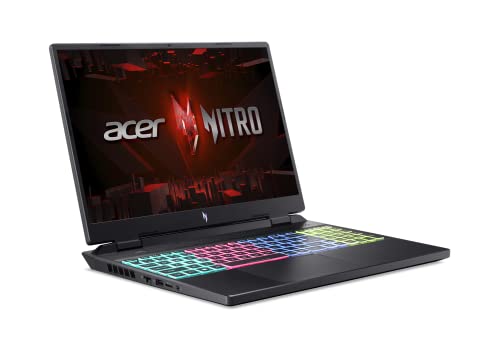
Acer lists a six-core Ryzen 5 7640HS, an RTX 4050 with 6GB of dedicated graphics memory, and a 512GB SSD. One upgrade to budget for. The Nitro ships with 8GB of system RAM. Acer documents two memory slots for this model. Acer Nitro 16 specifications. Check how the installed memory is arranged and price a compatible upgrade before ordering. With 16GB as your target, compare the full cost against the ready-to-go LOQ.
When you play at the Nitro’s native resolution, the GPU has about 11 percent more pixels to draw than it would at 1920 × 1080. That’s a reason to tune graphics settings to the game rather than chasing the display’s maximum refresh rate. The taller panel is useful even when the frame rate is well below 165.
3. HP Victus 15.6 for Gaming on a Tighter Budget
At $779 in the price check, this Mica Silver Victus was the lowest-priced dedicated-graphics model on the shortlist. Its Ryzen 5 7535HS is a six-core processor, paired here with a GeForce RTX 2050, 8GB of memory, and a 512GB SSD. It’s a sensible fit if you mainly play older games or lighter competitive titles and want to keep the upfront cost down. Look up the recommended requirements for the most demanding game you expect to play, then plan your settings around the RTX 2050.

The graphics card is the main tradeoff. Choose one of the RTX 4050 configurations if your plans include more demanding releases or you prefer to start with more room for graphics settings. More system RAM could help if you’re running out of memory with a game and other apps open. The graphics capabilities of the RTX 2050 will stay the same.
Pay close attention to which Victus you’re ordering. HP sells many systems under that name. Check the CPU, GPU, and memory on the specific configuration, and confirm the display refresh rate with the seller if it matters to you. While shopping, compare the Victus against the current offers in our gaming laptops under $1,000 guide. A sale can change which graphics card makes sense at your budget.
4. Lenovo IdeaPad Slim 3 15.3 for Work, School, and Light Gaming
The IdeaPad makes the best everyday pick if you expect to move between a browser, spreadsheets, and video calls. This configuration pairs the six-core Ryzen 5 8540U with 16GB of DDR5, a 512GB SSD, and a 15.3-inch touchscreen. The 16GB gives you more room to keep work apps open than the 8GB on the Vivobook. If you’re choosing something for school, that’s a practical difference when you switch among notes, research, and a call throughout the day.

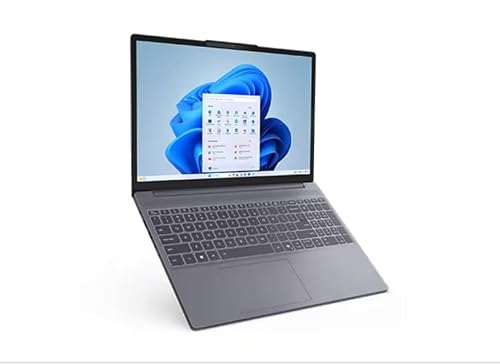
Lenovo documents a 1920 × 1200, 300-nit touch option for this platform, while the retailer describes this unit as a 300-nit FHD touchscreen. Confirm the exact pixel dimensions if you’re buying it for the extra vertical space. The touch panel makes the most sense if you’ll use it to scroll through documents or tap around a presentation while the laptop is on a desk.
The Radeon 740M uses shared system memory and is a better fit for casual play than for a library of demanding 3D games. If you plan to run games that call for dedicated graphics, set aside the extra money for the Victus or an RTX 4050 model. If you’re weighing this machine against everyday alternatives from other brands, start with our general laptop buying guide.
5. ASUS Vivobook Go 15 for Basic Work at the Lowest Price
A 15.6-inch screen, a 512GB SSD, and a $445 price in the November snapshot. The Vivobook Go 15 E1504FA-AS54 is the clear budget choice when the laptop’s job is email, documents, web lessons, and streaming. AMD’s Ryzen 5 7520U has four cores and eight threads, with Radeon 610M integrated graphics. You get enough storage for a sensible collection of files and apps without paying for dedicated graphics you’ll rarely use.

The main compromise is its 8GB of onboard memory. If you tend to leave dozens of tabs open, work on large spreadsheets, or run a video meeting while sharing your screen and juggling apps, I’d spend more on the 16GB IdeaPad. You’re buying extra room for the kind of work you already do. The Vivobook still makes sense for a household laptop that mostly opens one or two things at a time.
ASUS sells several E1504F display configurations, including OLED variants. Confirm the panel type on the exact model before paying a premium for the family name. This recommendation is based on the listed processor, memory, and SSD. If your work calls for precise color, put a documented screen specification ahead of the price difference between these two everyday picks. ASUS Vivobook Go 15 specifications.
How We Evaluated These Laptops
We compared new US retail configurations against AMD’s processor documentation and laptop manufacturers’ specifications. For gaming, we started with the exact GPU and screen resolution, then looked at installed RAM and the cost of reaching 16GB. For work and school, we emphasized memory, storage, and useful screen features. We used the November 26 retail check to compare prices and availability. Listings change, so compare the exact configurations at checkout.
The recommendations come from the published configurations and the workloads they fit. Where a laptop family offers several screens, memory layouts, or GPUs, the recommendation applies to the specific retail listing. We’ve kept model-dependent details conditional where those options vary.
How to Choose a Ryzen 5 Laptop
Which games and apps will you run?
Write down the two or three most demanding things you expect to use. For a game, check the recommended GPU and system RAM. If it calls for dedicated graphics, shop in the LOQ, Nitro, or Victus tier. For browser-based work, office apps, and streaming, the IdeaPad or Vivobook will usually be easier to justify. The full CPU model also matters. A Ryzen 5 7235HS and a Ryzen 5 8540U carry the same tier label but differ in core count and graphics capabilities.
How much memory and storage should you start with?
Start with 16GB if the laptop will be your primary work machine or you want to keep a game, chat, and browser open together. An 8GB system is reasonable for simpler workloads or if you’ve already priced a compatible upgrade. Check whether the memory is soldered and how the slots are populated. For storage, look up the installed sizes of the games you actually play. A 512GB SSD also has to hold the operating system, apps, and downloads.
Will you mostly use the built-in screen?
A taller 16:10 panel pays off when you spend long stretches reading or working on the built-in display. If you typically connect an external monitor, prioritize the GPU, RAM, and the right video output. Also check the size and weight of the power adapter if you’ll carry it every day. If you work away from outlets often, look up battery results for the exact configuration and a workload close to yours.
Frequently Asked Questions
Can a Ryzen 5 laptop run modern games?
Yes, with the right graphics hardware and settings for the game. Use the specific laptop GPU and the game’s requirements to make that call. A Ryzen 5 with an RTX 4050 Laptop GPU is aimed at a different workload from a Ryzen 5 with Radeon 610M integrated graphics, even though both machines can say Ryzen 5 on the lid or listing.
Does a 144Hz screen mean games will run at 144 frames per second?
No. Refresh rate tells you how often the display can update, while frame rate depends on the game, graphics settings, resolution, and hardware. For competitive games, lowering some visual settings may help you make better use of a fast panel. For a detailed single-player game, you might prefer a more modest frame rate with higher image quality.
Is 8GB enough for a student laptop?
It can be enough for writing, email, and classroom sites. If your coursework involves large files, creative apps, or several browser tools at once, choose 16GB up front. The price difference matters more on a machine with fixed memory because changing workloads could otherwise mean replacing the laptop sooner.
Bottom Line
Buy the Lenovo LOQ if you want a 1080p gaming laptop with an RTX 4050 and 16GB already installed. Choose the Acer Nitro 16 for the taller display if you’re willing to budget for memory, or the HP Victus to spend less on a system for lighter games. For everyday use, the IdeaPad Slim 3 is the better fit for frequent multitasking, and the Vivobook Go 15 keeps costs down for basic work.


























Write Your Review
No reviews yet. Be the first to share your experience!