

The best gaming PC build for most buyers in 2026 pairs a Ryzen 5 7600 with a Radeon RX 9070 for 1440p. Start around $1,000 for 1080p, choose the $1,750 GeForce build for DLSS in supported games, or set aside up to $2,000 for a 4K-focused Radeon RX 9070 XT tower.
These are DIY tower budgets before tax, shipping, a Windows license and peripherals. The graphics card prices are U.S. offers checked on November 26, 2026. The remaining amounts are spending limits for the rest of each build. Price your whole cart before buying the first component.
Compare five gaming PC builds by budget
Start with your monitor and the games you play. A 1080p display for competitive games calls for a different split than a 4K display for single-player games. The amount in the last column covers everything that goes in the tower besides the graphics card.
| Tower budget | Graphics card | Processor | Best fit | Left after GPU |
|---|---|---|---|---|
| $2,000 | PowerColor Reaper RX 9070 XT 16GB | Ryzen 5 9600X | 4K with adjustable settings | $1,000.05 |
| $1,750 | MSI RTX 5070 Shadow 2X OC 12GB | Ryzen 5 9600X | 1440p with DLSS | $767.86 |
| $1,500 | ASUS Prime RX 9070 EVO OC 16GB | Ryzen 5 7600 | 1440p all-rounder | $602.00 |
| $1,250 | XFX Swift RX 9060 XT OC 16GB | Ryzen 5 7600 | Entry 1440p with room for textures | $500.01 |
| $1,000 | ASUS Prime RTX 5060 OC 8GB | Ryzen 5 5600X | 1080p, especially with parts you can reuse | $465.01 |
Subtract the cost of the motherboard, CPU, memory, SSD, cooler, case and power supply from your target. That gives you the most you can spend on the graphics card. A $1,500 build with $640 of other components has an $860 GPU ceiling. At the checked offer of $898, that cart needs $38 in savings or a different card.
Pick parts that fit the budget and each other
For the four AM5 builds, the ASUS Prime B650M-A AX II is a concrete starting board. It’s microATX, uses DDR5 and has two M.2 slots. ASUS lists BIOS 2613 for the Ryzen 5 9600X and Ryzen 7 9800X3D. If you’re buying old stock, confirm the installed version with the seller or read the board’s BIOS FlashBack instructions before assembly. The $1,000 build uses a separate AM4 board and DDR4 memory.
Check GPU length, card thickness and space for the power cable against the assembled case, including its front fans. The original Corsair 4000D Airflow lists 360 mm of GPU clearance and 170 mm of CPU cooler clearance. The ASUS RX 9070 EVO OC is 304 mm long and calls for two 8-pin PCIe connectors and a 650 W supply. That gives you a concrete fit check for the suggested $1,500 combination. Repeat it for the model you order.
Leave room for the essentials first. A suitable power supply with the specified connectors, front intake and rear exhaust, and a matching two-stick memory kit belong in the cart before a case display panel or decorative fans. A mesh-front case you already own can free up enough money to move from a 1 TB SSD to 2 TB.
$2,000 gaming PC build with PowerColor Reaper RX 9070 XT
Parts list. Ryzen 5 9600X, ASUS Prime B650M-A AX II, Thermalright Peerless Assassin 120 SE, 32 GB DDR5 as 2 × 16 GB, 2 TB M.2 NVMe SSD, Corsair 4000D Airflow, Corsair RM850e and PowerColor Reaper Radeon RX 9070 XT 16GB.

At $999.95, the card leaves about half this budget for the rest of the tower. AMD lists 304 W typical board power for the RX 9070 XT, up from 220 W for the RX 9070. I’d use part of the extra budget for the 850 W supply, a case with clear airflow and enough storage for several large games. Check the exact card’s connector requirements when buying and use the cables supplied with your PSU.
Start here if you’ve got a 4K display and play games where detail and resolution matter. Plan to adjust settings or use a supported upscaler in heavier titles. If you play simulation games at high refresh rates and your favorite titles benefit from a faster CPU, compare the cost of the eight-core Ryzen 7 9800X3D and a suitable cooler. For a finished tower with a system warranty, compare the 4K prebuilt gaming PC options.
$1,750 gaming PC build with MSI RTX 5070 Shadow 2X OC
Parts list. Ryzen 5 9600X, ASUS Prime B650M-A AX II, Thermalright Peerless Assassin 120 SE, 32 GB DDR5 as 2 × 16 GB, 2 TB M.2 NVMe SSD, Corsair 4000D Airflow, Corsair RM750e and MSI GeForce RTX 5070 12G Shadow 2X OC.

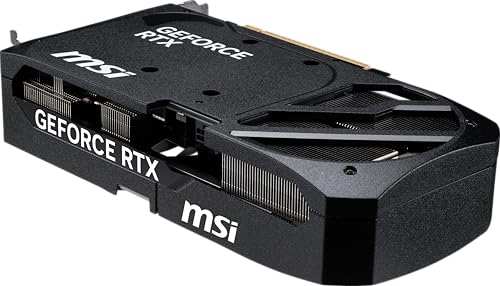
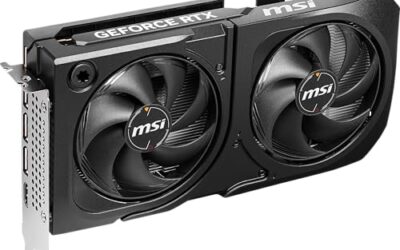
The MSI card was $982.14, within $18 of the PowerColor RX 9070 XT at the checked prices. Buy this configuration when you specifically want DLSS in the games you play. NVIDIA lists 12 GB GDDR7 and a 650 W system power recommendation for the RTX 5070 reference design. The 750 W unit leaves additional capacity. Follow the card maker’s power instructions and leave room to route the cable clear of the side panel.
For 1440p, begin with the image quality settings you care about and adjust ray tracing separately. Frame generation can make motion look smoother in supported games, but the underlying frame rate still matters for control response. If you rarely use DLSS, compare the $1,500 Radeon build first. The dedicated 1440p build guide covers another configuration for this resolution.
$1,500 gaming PC build with ASUS Prime RX 9070 EVO OC
Parts list. Boxed Ryzen 5 7600 with Wraith Stealth cooler, ASUS Prime B650M-A AX II, 32 GB DDR5 as 2 × 16 GB, 1 TB M.2 NVMe SSD, Corsair 4000D Airflow or a lower-cost case with equivalent card clearance, Corsair RM750e and ASUS Prime Radeon RX 9070 EVO OC 16GB.

This is where I’d start for a new 1440p machine. The $898 card comes with 16 GB of graphics memory, and the boxed 7600 includes a cooler. That leaves $602 for the rest of the system. Prioritize the two-stick 32 GB kit and buy 1 TB of storage now if 2 TB pushes the cart over budget. The board has a second M.2 slot for an expansion later.
In games with high-resolution texture packs, you’ll have room to experiment with the texture preset. Check loading and motion in demanding scenes before raising several settings together. If you can spend roughly $102 more on the GPU and still cover the essentials, compare the 9070 XT and account for its higher board power. Keep the 9070 if that jump means replacing a usable PSU or buying a larger case.
$1,250 gaming PC build with XFX Swift RX 9060 XT OC
Parts list. Boxed Ryzen 5 7600 with Wraith Stealth cooler, ASUS Prime B650M-A AX II, 16 GB DDR5 as 2 × 8 GB or 32 GB if the cart allows, 1 TB M.2 NVMe SSD, mesh-front microATX case, a 650 W PSU that meets the card requirements and XFX Swift Radeon RX 9060 XT OC 16GB, model RX-96TS316B7.

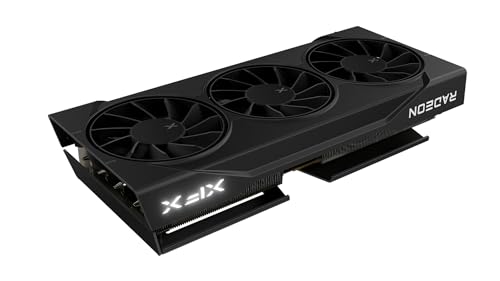
Sixteen gigabytes on the graphics card. That matters here because the RX 9060 XT also comes in an 8 GB version, so check the full listing before ordering. The pictured XFX model uses a three-fan cooler. Measure the case for that card with its front fans installed and confirm the connector against the card instructions.
At $749.99, the GPU leaves only $500.01. This tier makes the most sense if you already have a compatible AM5 board, case or SSD, or if your new parts fit the remaining limit. The RX 9070 was $148.01 more in the same snapshot. If you can cover that jump and still buy the rest of the build, move up a tier. If you’re starting from scratch and the parts exceed the cap, wait for a lower card price or choose the 1080p build.
$1,000 gaming PC build with ASUS Prime RTX 5060 OC
Parts list. Boxed Ryzen 5 5600X with Wraith Stealth cooler, ASUS Prime B550M-A WiFi II, 16 GB DDR4-3200 as 2 × 8 GB, 1 TB M.2 NVMe SSD, mesh-front microATX case, a 550 W or higher PSU with a PCIe 8-pin cable and ASUS Prime GeForce RTX 5060 OC 8GB.

A straightforward 1080p build. ASUS specifies a 550 W recommended supply and one 8-pin power connector for this card. At $534.99, the rest of the tower has a $465.01 limit. This becomes an easier budget to hold if you already own a compatible AM4 board, memory or a case with space for the 268.3 mm card. Check the board’s CPU support list and installed BIOS if you’re reusing an older board.
Start at 1080p and lower texture quality if an 8 GB card struggles in a demanding game. Use the graphics card’s display ports when you connect the monitor for first boot. If a new AM4 cart comes close to the cost of AM5, compare the dedicated $1,000 DIY parts list and decide how much you’re willing to spend on the newer platform.
How We Evaluated
We compared each new card’s U.S. offer, graphics memory, power requirements and how much the price leaves for the rest of the tower. We consulted AMD, NVIDIA and component-maker specifications for sockets, clearances, memory, connectors and power. Resolution labels describe intended use. Game settings, upscaling support and the rest of your hardware affect what you can expect. Use the checked GPU price as one line in your cart and compare the total against the tier’s spending limit.
Assemble the PC and check first boot
- Prepare the board. Unplug the power supply and work on a clean, stable surface. Install the CPU, memory and M.2 drive. Use the socket alignment marks, the board’s recommended two-stick DIMM slots and the M.2 standoff for your drive length.
- Mount the cooler and board. Follow the cooler’s instructions for your socket. Check that the fans clear the memory and connect the CPU fan header. Match the case standoffs to the board’s mounting holes before lowering it into place.
- Finish the power and case connections. Seat the GPU and secure its bracket. Attach the 24-pin motherboard power, CPU EPS power, graphics power and front-panel connectors. Check the board diagram for the front-panel pins.
- Confirm hardware in UEFI. Connect the display to the graphics card. Allow time for first-boot memory training, then check that UEFI recognizes the full RAM capacity and the SSD. Start with default memory settings, install Windows and get the chipset and graphics drivers from the manufacturers.
If there’s no picture, check the monitor input and cable first. Then power down and check the GPU, memory and EPS connection. Diagnostic LEDs can narrow the search if your board has them. For the full sequence, see the step-by-step gaming PC assembly guide.
Gaming PC build FAQ
Is $2,000 a good budget for 4K gaming?
Yes for a DIY tower if the whole cart fits. A 16 GB RX 9070 XT is a sensible starting point at the checked offer. In new games with demanding visual settings, plan on adjusting ray tracing, using a supported upscaler or reducing settings to reach the frame rate you prefer.
Should I start with 16 GB or 32 GB of RAM?
Choose 32 GB when it fits, especially if you keep a browser, voice chat or recording software open alongside games. At $1,000, a 16 GB kit gives you room for the GPU and SSD. Check the memory type before ordering. The AM4 board above uses DDR4, and the AM5 board requires DDR5.
Which parts should I reuse from an older tower?
Start with the case and any healthy SSD that fits. A PSU can carry over if its rating, connectors and condition meet the new build’s needs. Keep its original modular cables with it. If you’re switching CPU platforms, budget for the matching board and memory before you compare the price of two graphics cards.
Bottom Line
For 1440p, start with the Ryzen 5 7600 and ASUS Prime RX 9070 EVO OC. If the rest of the tower costs $602 or less at the checked GPU price, that build fits $1,500. Choose the RTX 5060 for a 1080p system you can assemble from less expensive parts, or the RX 9070 XT if you’re building around a 4K display. Let your complete cart decide when to buy.


























Write Your Review
No reviews yet. Be the first to share your experience!