

For an Intel desktop, a Core i3 is the budget choice for everyday work, a Core i5 is the starting point for a gaming build, and a Core i7 is worth pricing out for frequent editing, compiling, or gaming alongside other demanding apps. A Core i9 makes the most sense when heavily threaded work takes up enough of your week to justify paying for more cores.
Start with the full model number. This comparison uses four 14th Gen desktop chips so you can see what each step buys on one platform. If you’re comparing laptops, mixing generations, or shopping for a Core Ultra system, the model and platform matter just as much as the tier. Already own a motherboard? Check its CPU support list before you shop.
Intel Core i3 vs i5 vs i7 vs i9 at a glance
| 14th Gen desktop model | Cores and threads | Max turbo | Base / max turbo power | Integrated graphics |
|---|---|---|---|---|
| Core i3-14100 | 4P, 0E / 8 threads | 4.7 GHz | 60 W / 110 W | UHD 730 |
| Core i5-14600K | 6P, 8E / 20 threads | 5.3 GHz | 125 W / 181 W | UHD 770 |
| Core i7-14700K | 8P, 12E / 28 threads | 5.6 GHz | 125 W / 253 W | UHD 770 |
| Core i9-14900K | 8P, 16E / 32 threads | 6.0 GHz | 125 W / 253 W | UHD 770 |
P stands for performance core and E stands for efficiency core. Intel quotes a peak turbo frequency for each chip. Sustained clocks depend on the workload, power, and cooling. The power figures are Intel’s processor ratings. Your PC’s draw at the wall also includes the GPU and the rest of the system.
Specifications come from Intel’s product pages for the i3-14100, i5-14600K, i7-14700K, and i9-14900K.
What each Intel Core tier is good for
Core i3 for a low-cost everyday PC
Four performance cores and eight threads make the i3-14100 a reasonable fit for documents, web apps, and video calls. Its UHD 730 graphics can drive a display through a compatible motherboard output, so there’s no need to budget for a separate card just to get a picture. A basic study or office PC. An i3 is also worth considering for a tight gaming budget when the savings get you a better graphics card and your games run well on four cores.
Core i5 for gaming and a bit of everything
The i5-14600K has six performance cores and eight efficiency cores. It’s a good reference point for a desktop that will spend the evening gaming and the occasional weekend editing a video. Core i5 covers several configurations, so look up the exact chip if you’re comparing two listings. The 14600K is unlocked, and its 181 W maximum turbo rating deserves a cooling budget of its own.
Core i7 for frequent multitasking and creative work
The i7-14700K steps up to eight performance cores, 12 efficiency cores, and 33 MB of Intel Smart Cache, versus 24 MB on the 14600K. Its extra cores are easier to justify if you regularly render on the CPU, build large software projects, or keep demanding work running while you do something else. The motherboard and cooler need to suit that workload, too.
Pros
- 20-core, 28-thread layout handles 1440p gaming plus OBS NVENC streaming without stutter
- 5.6 GHz max boost keeps CPU-bound esports titles competitive at high refresh rates
- Unlocked multiplier on 700-series Z boards allows per-core tuning and BCLK adjustments
Cons
- Limited owner feedback at time of writing, so long-term reliability signal is thin
- Reported package power can exceed 250W under all-core loads, needs 240mm+ AIO minimum
- LGA1700 is end-of-line, no upgrade path to newer Intel sockets like LGA1851
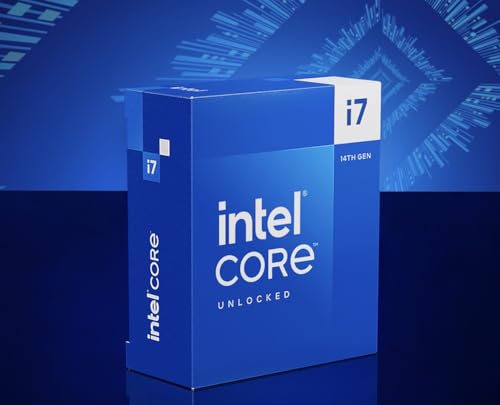
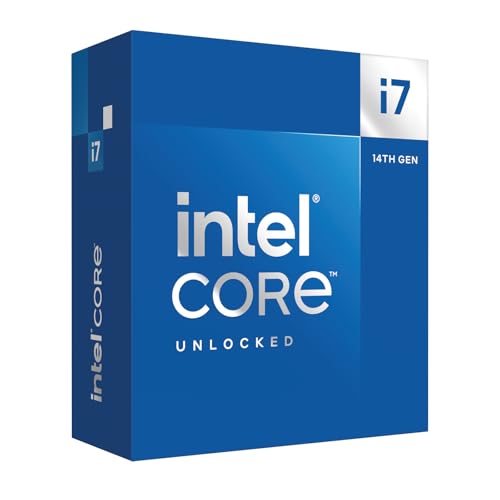
The Intel Core i7-14700K is a high-end unlocked LGA1700 desktop CPU with 8 performance cores, 12 efficient cores, and 28 threads. It targets gamers who also stream, compile, or render, and who want one chip that pushes high frame rates without forcing an immediate DDR5 upgrade.
The defining feature is the 5.6 GHz Turbo Boost Max 3.0 frequency paired with the extra four E-cores over the previous i7. In practice, that means 1080p and 1440p titles stay GPU-bound with a mid to high-tier GPU, while background workloads like OBS NVENC or Docker containers get parked on E-cores rather than hitting the P-core budget.
Trade-offs are typical for this tier. All-core loads push package power well past 200W, so 240mm AIO cooling is a practical floor and B760 boards with weak VRMs will thermal-throttle. LGA1700 is a dead-end socket, and the integrated UHD 770 is display-only, not for gaming. DDR5-7200 tuning also depends heavily on motherboard QVL.
Buy this if you want a 1440p or 4K gaming CPU that doubles for Blender, code compiles, or multi-app streaming on an existing LGA1700 board. Skip this if you already own a 13700K, need a future upgrade path, or plan to pair it with a B760 board and a tower air cooler.
Socket and chipset: LGA1700 socket, compatible with Intel 600-series boards after a BIOS update and 700-series boards natively. Z790 is the pairing for unlocked multiplier tuning, while B760 works for stock operation but often limits sustained all-core boost through VRM thermals.
Memory support: Dual-channel DDR4 or DDR5. DDR5-6400 to DDR5-7200 with XMP is the practical sweet spot on tuned Z790 boards, while DDR4-3600 CL16 remains viable for upgraders reusing an existing kit. Gear 2 is standard above DDR5-6400.
Cores and boost: 8 P-cores plus 12 E-cores, 28 threads, and up to 5.6 GHz on the best P-core via Turbo Boost Max 3.0. Games mostly ride the P-cores, while E-cores absorb background threads. Windows 11 Thread Director scheduling is required to keep latency-sensitive threads off E-cores.
Cooling and power: Intel does not include a cooler in the box. Sustained multi-core workloads can pull well over 200W package power, so a 240mm or larger AIO, or a high-end dual-tower air cooler, is the realistic minimum for keeping clocks stable under Cinebench-class loads.
Core i9 for work that can keep more cores busy
The i9-14900K has the same eight performance cores as the i7-14700K, plus four additional efficiency cores and a higher peak turbo. That’s a case for buying it as a workstation part when your software can use those extra resources. If your heaviest job is a single game, look at how that game responds to the exact chips before committing the extra money.
Core i3 vs i5 for a budget gaming build
The i3-14100 and i5-14600K start with four and six performance cores respectively. The i5 also adds eight efficiency cores, which give a busy system more room to schedule concurrent work. Think of a game with a lot of simulation running alongside voice chat and a browser. That’s a better reason to choose the i5 than a small difference between the clock speeds printed on two boxes.
With a fixed budget, price two complete builds. If the cheaper CPU leaves room for a stronger GPU and the games you play are light on the processor, the i3 build may be the better fit. For simulation games or a high-refresh setup where the processor caps frame delivery, I’d give the i5 more of the budget. Check published frame times for your games with hardware close to what you plan to buy.
Core i5 vs i7 for gaming and production on one PC
Start by looking at what slows you down. If your GPU is already the limiting part in a game at your chosen resolution and settings, an i7 upgrade can leave frame rates much where they were. If you’re waiting for a CPU-heavy video export or need to keep a compile running while you work, the i7’s two extra performance cores and four extra efficiency cores become more relevant.
In our November 26, 2026 U.S. retail snapshot, the new i5-14600K was $249.95 and the new i7-14700K was $319.99. That’s about $70 for the processor step before any cooling changes. If gaming is the main purchase decision, see the i5 vs i7 gaming comparison for a closer look at that particular trade-off.
Core i7 vs i9 for a workstation
Favor the i7 when you’re building around a mix of games, everyday work, and occasional production. The i9 makes a stronger case when a job can split cleanly across many threads, as some CPU rendering and batch processing work does. A queue of renders due every morning. If that’s your use case, compare completion times in the application and settings you’ll actually use. A GPU-accelerated pipeline can change where the bottleneck sits.
Both of these K models list a 253 W maximum turbo power. That shared rating puts cooling and sustained performance on the shopping list for either chip. When choosing a tower cooler, check socket mounting, case height, and RAM clearance against the air CPU cooler guide.
Compatibility, suffixes, and the real upgrade cost
These four chips use LGA1700. Intel lists 600- and 700-series desktop chipsets for this platform and notes that an existing board may need a firmware update before it can use a newer processor. Check the support list for your exact motherboard or prebuilt, including the required BIOS version. If an update needs your old CPU, do it before the swap. The board also determines whether you buy DDR4 or DDR5 memory. See Intel’s desktop compatibility guidance.
Read the suffix before you settle on a price. K denotes an unlocked desktop model. F and KF chips require separate graphics, so a cheaper KF listing gives up the integrated display and media features of the corresponding K model. The four chips in the table include Intel Quick Sync Video. Whether an editing app uses it depends on its settings, codec, and hardware configuration. See Intel’s processor naming guide.
Building from scratch? Price the CPU, board, memory, and cooling together. Intel’s newer Core and Core Ultra branding uses names such as Core 5 and Core Ultra 5. A Core Ultra 5 245K desktop chip uses LGA1851 and DDR5, so you’d need a different motherboard from a 14th Gen Core i5 build. That changes the economics even if the two CPU listings cost the same. See the Core Ultra 5 245K specifications.
Which Intel Core processor should you buy?
- Office, school, or an inexpensive spare PC. Start with a Core i3 that has integrated graphics.
- A gaming desktop with a dedicated GPU. Start with a Core i5 and compare the full build price with alternate platforms.
- Gaming plus regular CPU-heavy work. Price a Core i7 with the motherboard and cooling you’ll need.
- Paid work that scales across cores. Put the Core i9 on the shortlist when application-specific results show it can save you time often enough.
For most gaming buyers who are keeping a compatible LGA1700 board, the 14600K is the model I’d price first among these four. You’ll get the most useful comparison by checking what the next tier costs and what it improves in your own applications.

Frequently asked questions
Can a newer Core i5 be faster than an older Core i7?
Yes. The labels tell you each processor’s position within its own lineup. A newer i5 can benefit from a different architecture, core configuration, and memory platform. Compare the two full model numbers in the work you care about, and include the cost of a new board if you’re crossing sockets.
Do laptop Core i3, i5, i7, and i9 chips follow the same rules?
Use the tiers as a starting point within the same laptop family. Mobile processors come with different power targets, and laptop makers use different cooling systems and power settings. Compare the complete CPU model, GPU, and chassis. If you’re shopping for a quiet portable or a machine that renders for hours, those details matter more than the badge on the palm rest.


























Write Your Review
No reviews yet. Be the first to share your experience!