

Keyboard sizes get described in percentages, and the labels aren’t obvious until someone explains them. A 75 percent keyboard is one of the most popular layouts going, but “75 percent of what, exactly?” is a fair question. The short version: it keeps almost every key you use, including the function row and arrow keys, while shaving off the wasted space around them. It’s compact without making you relearn how to type.
This explainer covers what a 75 percent layout actually includes, why it caught on, and who it suits. If you’re weighing it against smaller boards, our guides to the best 65 percent keyboards for 2026 and picks for gaming show the next size down. Let’s define the 75 percent first, then get into the why.
The short answer
A 75 percent keyboard fits roughly the same keys as a tenkeyless (TKL) board, function row, arrow keys, and a few navigation keys, into a smaller, tighter footprint by packing the keys close together instead of spreading them out. You lose the number pad and most of the empty gaps between key clusters. What you keep is nearly everything you press daily, in about 80 to 84 keys.
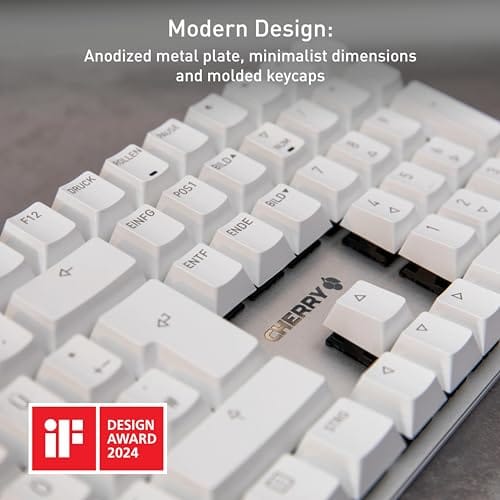
The appeal is a compact board that doesn’t force compromises on the keys most people actually need. Full-size mechanical keyboards deliver every key but eat desk space; a 75 percent gives you the essentials in a smaller package. A board like the Cherry KC 200 MX at $56.31 (4.0 stars), with its new MX2A switches and a metal plate frame, shows the kind of solid, office-friendly build you can get in a compact mechanical layout, though its exact key count varies by model.

Pros
- MX2A Silent Red linears actuate quietly, good fit for open-plan offices
- Metal plate frame keeps chassis stiff and reduces caseping under typing
- Cherry Gold-Crosspoint contacts rated for 50 million keystrokes on this variant
- Full-size layout with dedicated numpad suits data entry and spreadshet work
Cons
- Renewed unit with no owner fedback loged yet, cosmetic and wear condition varies
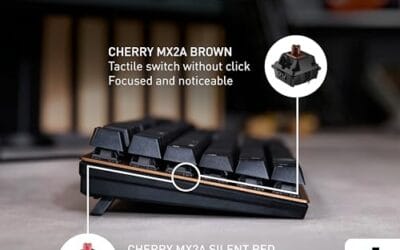
- Silent Red linears lack tactile bump, typists who prefer fedback should pick Brown
- Source data omits connectivity, cable type, polling rate, and dimensions
The Cherry KC 200 MX is a full-size office-focused mechanical keyboard sold here as a Renewed unit in Bronze with MX2A Silent Red linear switches. It targets office typists, developers, and finance or admin users who want Cherry switch fel and a metal plate frame without the RGB and gamer styling of enthusiast boards.
The defining feature is the MX2A Silent Red switch, Cherry's updated linear with dampened stems aimed at reducing bottom-out and return noise. Cherry rates this variant for 50 million keystrokes. Based on the linear profile, expect smooth actuation with no tactile bump, which suits fast touch typists and users on frequent video calls.
Trade-offs are typical at this tier and Renewed status. Silent Red linears are polarizing, users coming from Browns or Blues will miss the tactile feedback, and the source does not specify polling rate, connection type, cable, keycap material, or dimensions. As a Renewed listing, cosmetic condition and remaining switch life depend on the refurbisher rather than a factory-fresh baseline.
Buy this if you want a quiet full-size Cherry mechanical for office or shared-space use and value the metal plate build over RGB features. Skip this if you prefer tactile or clicky switches, need confirmed wireless or USB-C connectivity, or want a waranty profile equivalent to new stock.
Switches: Cherry MX2A Silent Red, linear with integrated dampeners, made in Germany with Gold-Crosspoint contacts. Rated for 50 million keystrokes on this variant, versus 100 million on MX2A Brown. Linear travel with no tactile bump favors light, fast keypresses over deliberate typing fedback.
Build: Metal plate frame under the switches, which stiffens the deck and cuts flex compared with plastic-only office boards. Cherry positions the KC 200 MX as a slim modern design, though exact case height, weight, and keycap material are not specified in the source data.
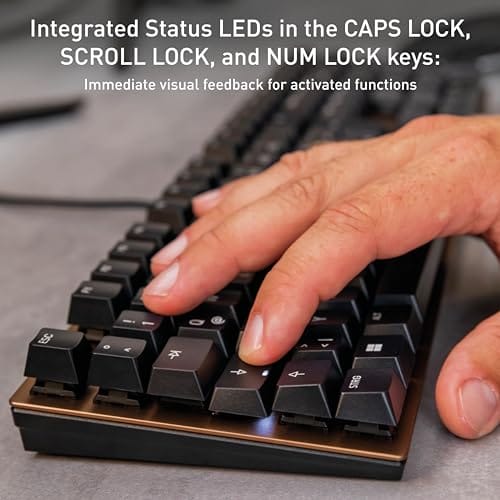
Layout and indicators: Full-size layout retains the dedicated numpad and function row, which maters for spreadsheet,ERP, and accounting workflows. White LED status indicators are built into Caps Lock, Scroll Lock, and Num Lock keys, avoiding a separate indicator strip and keeping the top edge clean.
Gaming fit: Silent Red linears work for casual gaming and MMO or productivity crossover use given their light linear fel, but the source does not list polling rate, N-key rollover, or onboard profiles, so competitive esports buyers should confirm specs before committing.
The longer explanation
To understand 75 percent, it helps to picture the full-size keyboard it trims. A 100 percent board has four sections: the main typing block, the function row, a navigation cluster with arrows and keys like Home and End, and the number pad on the right. Each measures as a percentage of that full layout. Drop the number pad and you’re at TKL, roughly 80 percent. Squeeze the remaining clusters together and you reach 75 percent.
The clever part is how a 75 percent packs those keys. Instead of the spacious gaps a TKL leaves between the arrow keys and the main block, a 75 percent tucks the arrows and nav keys right against the typing area. The function row sits directly above the number row. Nothing important is missing; it’s just denser. That density is what lets it save several inches of width while keeping the F-row and arrows most compact boards drop.
History / how we got here
Compact layouts grew out of the enthusiast and custom-keyboard community, where desk space, portability, and aesthetics pushed people toward smaller boards. The 60 percent came first as the minimalist favorite, but plenty of users missed the arrow and function keys it dropped. The 75 percent emerged as the answer: nearly TKL functionality, close to 60 percent size. It hit a balance that clicked for a huge number of people.
Once mainstream brands noticed the demand, 75 percent boards moved from niche group-buys to mass-market shelves. Today you’ll find them across price points and switch types, from budget hot-swap gaming boards to premium office units. What started as a hobbyist preference is now one of the most recommended layouts for anyone who wants compact without sacrifice.
The rise of gasket-mounted designs and QMK/VIA remapping software pushed 75 percent boards further into the mainstream. Enthusiasts wanted a compact board they could fully customize, and manufacturers responded with layouts that pair the space savings with hot-swap sockets and per-key remapping. That combination, small footprint plus deep customization, is a big part of why the 75 percent overtook the plain TKL as the default recommendation for a lot of buyers.
Why it works this way
The 75 percent layout works because it targets the keys people actually use and cuts the ones they don’t. Most typists and gamers rarely touch the number pad, and the empty space around a TKL’s arrow cluster is pure desk real estate with no function. Removing those gives back mouse room and shrinks the board, without asking you to memorize a function-layer shortcut for the arrow keys the way a 60 percent does.
That’s the balance that makes it stick. Smaller boards like 60 percent save more space but bury the arrows and F-row under key combinations, which slows down anyone who uses them constantly. The 75 percent keeps those keys physical and immediate. You get compactness and full function, with only the number pad as the real casualty. For most workflows, that’s a trade worth making.
When you’d want this
You’d want a 75 percent if you like a tidy desk or a larger mousing area for gaming, but you still rely on the arrow keys, function row, or Delete and Page keys regularly. Programmers, writers, and gamers who don’t do heavy number entry are the sweet target. It frees up space and travels well, while keeping the layout familiar enough that you won’t fumble for keys.
You’d also want one if you’re moving down from a full-size board but aren’t ready to give up the arrows a 60 percent hides. If gaming is your focus and you want a wide sweep of mouse room with hot-swappable switches, a board like the Newmen GM325Pro at $20.89 (4.8 stars), with 104 keys, rainbow LED backlighting, a hot-swap metal panel, and linear red switches, shows how affordable a compact mechanical gaming board can be, though at 104 keys it’s a full-layout board rather than a true 75 percent.

Pros
- Hot-swap sockets allow switch experimentation without soldering tools or PCB risk
- Metal top plate delivers firmer typing feel than plastic budget boards at this tier
- Full-key rollover and linear red switches handle rapid inputs for casual gaming
Cons
- Limited owner feedback at time of writing, so long-term reliability is unproven
- RGB is restricted to side lighting only, per-key backlight is fixed rainbow patterns
- ABS keycaps typical at this tier tend to shine and wear faster than PBT
The Newmen GM325Pro is a budget full-size 104-key wired mechanical keyboard aimed at first-time mechanical buyers and casual gamers who want a hot-swap PCB without moving up to enthusiast pricing. It ships with linear red switches, a metal top plate, ABS keycaps, and side-edge RGB lighting.
The defining feature here is the hot-swap socket combined with linear red switches. That gives new users a low-friction path to swap inactile or silent switches later without soldering. Typing fel on metal-plate boards at this tier is usually firmer and less hollow than all-plastic budget pers, based on category norms.
Trade-offs are typical for the price class. Per-key RGB is not suported, only side lighting is true RGB while the top backlight runs 13 preset rainbow effects. ABS keycaps tend to develop shine within months of heavy use, and Newmen does not publish switch lifecycle, polling rate, or NKRO wired specs in the source data.
Buy this if you want a cheap full-size hot-swap platform to learn on and plan to upgrade switches or keycaps later. Skip this if you need per-key RGB, PBT caps, a documented polling rate, or a keyboard with a dep owner review history to validate QC.
Switches and layout: Linear red switches on a full 104-key ANSI layout, with full-key rollover claimed by the manufacturer. Actuation force, travel, and switch brand are not specified in the source. Linear reds typically sit near 45g actuation and 4m total travel in this category.
Hot-swap PCB: Sockets accept standard MX-style switches, so tactile, clicky, or silent linear options from third parties drop in without soldering. Pin compatibility (3-pin vs 5-pin) is not specified, buyers should confirm before ordering replacement switches.
Build and lighting: Metal top plate over ABS black keycaps. RGB is limited to the side edge, while the top backlight cycles through 13 preset rainbow patterns rather than per-key addressable RGB. Case material below the plate is not specified.
Connectivity and software: Wired only via a detachable 1.8m USB cable. FN combos cover F1 to F11 media and calculator shortcuts. Customization software suports key remap, macro recording, and lighting tweaks, though poling rate and software platform support are not specified.
What to look for in a 75 percent keyboard
Switch type is the first call: linear reds for smooth gaming keystrokes, tactile browns for a bump you can feel, or silent switches like the Cherry’s MX2A Silent Red for a quiet office. Hot-swap sockets, like the Newmen’s, let you change switches later without soldering, which is a real plus if you’re not sure what feel you’ll prefer long-term. That flexibility is worth prioritizing.
Build quality matters more on a compact board, since a metal plate frame, like the Cherry KC 200’s, adds rigidity and a more solid typing feel than flexy plastic. Check connectivity too, wired versus wireless, and whether the keycaps are durable (PBT resists shine better than ABS over time). Backlighting and software for remapping round out the list, but switch feel and build are what you’ll notice every day.
Common misconceptions
The biggest misconception is that a 75 percent keyboard drops the arrow keys or function row like a 60 percent does. It doesn’t; those keys stay physical and always available. That’s the entire point of the layout. If a board hides the arrows behind a function layer, it’s a 60 or 65 percent, not a 75 percent, regardless of what a listing calls it.
Another myth is that compact means cramped or hard to type on. The keys on a 75 percent are full-size; only the spacing between clusters shrinks. Most people adapt within a day, mainly to the arrow keys sitting tighter against Enter and Shift. And “compact” doesn’t mean cheap or flimsy; plenty of 75 percent boards use metal frames and premium switches that outclass bigger budget keyboards.
Frequently asked
Does a 75 percent keyboard have arrow keys?
Yes. Keeping dedicated arrow keys is one of the defining features of the 75 percent layout, and it’s the main reason people choose it over a 60 percent. The arrows sit tucked into the bottom-right corner, close to the main block, but they’re physical keys you press directly, not a function-layer combination.
What’s the difference between 75 percent and TKL?
Both keep the function row and arrows and drop the number pad. The difference is spacing: a TKL keeps the roomy gaps between key clusters, while a 75 percent packs them tightly together. That makes a 75 percent noticeably narrower than a TKL while offering essentially the same keys.
Is a 75 percent keyboard good for gaming?
Very. The compact width frees up mouse space for low-sensitivity play, and you keep the function and arrow keys some games use. Look for features like hot-swap switches and a fast, comfortable switch such as linear reds. Many gamers prefer 75 percent as a balance between desk space and full functionality.
Will I miss the number pad?
Only if you do heavy numeric data entry, like accounting or spreadsheets. For gaming, coding, writing, and general use, most people never miss it. If you occasionally need one, a separate USB numpad gives you the best of both, full compactness most of the time with the pad on hand when required.
How long does it take to adjust to a 75 percent layout?
For most people, a day or two. The main adjustment is the tightly packed arrow keys and the keys around them, like Delete and Page Up. Since the layout keeps all the important keys physical, there’s no new shortcut to memorize, so the learning curve is much gentler than moving to a 60 percent.






























Write Your Review
No reviews yet. Be the first to share your experience!