

Your PC boots fine, games run, everything looks normal, and yet there’s this faint clicking coming from the power supply. Tick, tick, tick. Sometimes it’s steady, sometimes it only shows up under load, and it’s the kind of sound that plants a seed of worry every time you sit down at the desk. A clicking PSU isn’t always a death sentence, but it’s never something to shrug off either. The noise usually points at one of a handful of causes, from a harmless relay to a fan bearing on its way out to something inside that genuinely needs attention. This guide walks through what makes a power supply click and how to sort the benign from the serious.
We researched the common failure points and owner reports to lay out a diagnostic path you can follow at home. If the trail ends at a replacement, our guides to the best modular PSUs for a gaming PC and the best 1000W PSUs in 2026 cover solid options, and the best PSU for a 9800X3D build is worth a look if you’re pairing with a modern high-end chip. Let’s find the click.
First check the obvious
Before you panic or pull anything apart, spend 30 seconds narrowing down where the sound actually comes from. Power off, open the side panel, and listen carefully on the next boot. Is the click coming from the PSU shroud, or is it a nearby fan, a hard drive, or a coil on the motherboard? Sounds travel and bounce inside a metal case, so what feels like the PSU can easily be a mechanical drive clicking or a case fan blade ticking against a cable.
A phone helps here. Record a short clip near the PSU and play it back with the volume up, since your ears struggle to pinpoint a source inside a resonant case but a recording lets you compare the sound at different spots. You can also isolate the PSU cleanly with a paperclip jump-start on the 24-pin connector, outside the case and disconnected from other parts, so any click you hear then is coming from the supply itself and nothing else. That confirms the source before you spend a cent.
Cup your ear near the PSU exhaust and have someone start a game or a stress load. If the click tracks with load changes, it’s more likely electrical. If it’s constant regardless of what the system does, a fan or relay is the usual suspect. Rule out the easy stuff first. A cable tie brushing a spinning fan makes a surprisingly convincing clicking noise, and that’s a two-minute fix, not a new power supply.
Cause #1: A dying PSU fan bearing
The most common source of PSU clicking is the fan itself. As a sleeve or ball bearing wears out, the fan can develop a tick or click as it spins, especially at low RPM when the blades wobble slightly on a failing bearing. You’ll often notice it’s worse right after a cold boot and quiets down once the unit warms up, or it changes pitch as the fan ramps under load. That behavior is a classic worn-bearing signature.
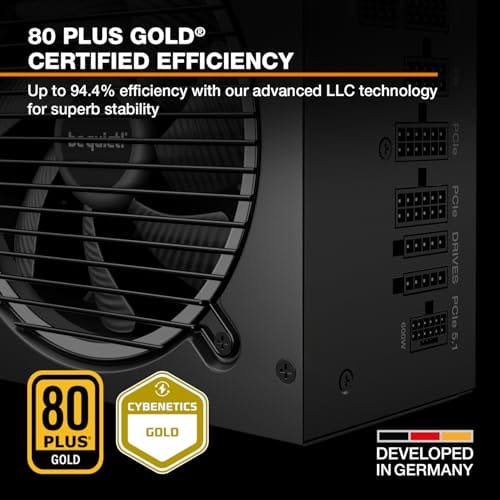
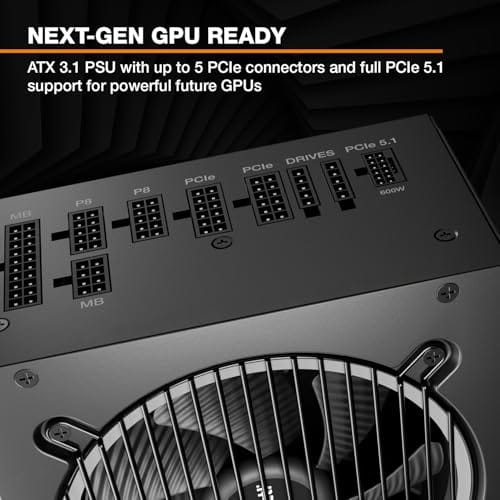
Here’s the tricky part. Many modern power supplies use semi-passive fan modes, meaning the fan stays off at low load and only spins up when the unit heats past a threshold. If your click appears only under heavier load, that’s when the fan kicks in, which points straight at the fan. A quality unit like the be quiet! Pure Power 13 M 1000W uses a semi-passive 120mm be quiet! fan designed to run quiet and stay off at light loads, which sidesteps the low-RPM clicking that plagues cheaper fans. If your current PSU’s fan is the culprit and the unit is out of warranty, a replacement supply with a better fan is the clean fix.

Pros
- Native 12V-2x6 connector on ATX 3.1 platform ready for RTX 40 and PCIe 5.1 GPUs.
- Handles power excursions up to 2000W transient, headroom for RTX 4080 and 4090 class spikes.
- Semi-passive zero-RPM mode below moderate load keps idle acoustics near inaudible.
- LLC topology with single 12V rail delivers stable voltage regulation for overclocked GPUs.
Cons
- Limited independent owner feedback available at time of writing, riple and hold-up data unverified.
- Only four PCIe 6+2-pin connectors, tight for legacy multi-GPU or high-CPU-EPS custom lop builds.
- 80 PLUS Gold trails Platinum and Titanium units at similar wattage on sustained efficiency.
The be quiet! Pure Power 13 M 1000W is a high-end ATX 3.1 PSU aimed at builders pairing a Ryzen 7000/9000 or Core Ultra CPU with an RTX 4070Ti Super,4080 Super, 4090, or RX 7900 XTX class GPU. It targets buyers who want native 12V-2x6 wiring and transient headroom without stepping up to Platinum-tier pricing.
The defining trait is ATX 3.1 compliance with power excursion handling up to double the rated 1000W, meaning brief 2000W spikes from modern GPUs should not trip OCP. Combined with the single 12V rail and LLC topology, this suits overclocked GPUs where transient behavior, not average draw, tends to triger shutdowns on older units.
Trade-offs are typical at this tier. 80 PLUS Gold is eficient but not Platinum, soustained heavy loads generate more heat than a higher-rated unit. Four PCIe 6+2-pin connectors is standard, though builders running EATX boards with dual EPS plus a 4x8-pin GPU adapter should verify cable counts against the modular panel before buying.
Buy this if you are building a single-GPU gaming or content rig around a 250-450W TGP card and want native 12V-2x6 without paying Platinum prices. Skip this if you need sub-audible acoustics under sustained full load, or if you already own a workingATX 3.0 unit with a 12VHPWR pigtail.
ATX standard: Full ATX 3.1 compliance with native 12V-2x6 connector integration, which corects the sense-pin issue found on early 12VHPWR cables. Supports PCIe 5.1 GPUs at spec, and handles transient power excursions up to 2000W, roughly double the 1000W continuous rating.
GPU pairing: Comfortable for GPUs in the 250W to 450W TGP range, including RTX 4080 Super (320W) and RTX 4090 (450W) with headroom for overclocking. Four PCIe 6+2-pin outputs cover legacy 8-pin GPUs; the native 12V-2x6 removes the need for a 4x8-pin adapter dongle.
Efficiency and cooling: 80 PLUS Gold rated up to 94.4% at optimal load, typically around 50% utilization. The 120mm be quiet! fan runs semi-passive with zero-RPM below a load threshold not specified by the manufacturer, so idle and light workloads should remain silent.
Cabling: Fully modular design, leting builders omit unused SATA and Molex leads. Exact cable lengths and connector counts beyond the four PCIe 6+2-pin and single 12V-2x6 are not specified in source material, verify against your case routing before purchase.
Opening a PSU to swap the fan yourself is not something we’d suggest. The internal capacitors can hold a lethal charge long after unplugging, so cracking the shell is genuinely dangerous. If the fan is the problem and the warranty is gone, replace the whole unit rather than fishing around inside it.
Cause #2: Relay switching and coil-related ticks
Some clicking is completely normal. Many power supplies contain a relay that engages when the unit powers on or switches between standby and active states, and that relay makes a single distinct click. If you hear one sharp tick when you press the power button or when the system wakes from sleep, that’s almost certainly the relay doing its job. It’s designed to do that, and it’s nothing to worry about.
Rapid or repeated relay clicking is a different story. If the PSU clicks over and over in a cycle, especially with the system failing to post, the unit may be entering protection and retrying. That’s an over-current, over-voltage, or short-circuit protection loop, and it usually means either the PSU is failing or something downstream is pulling a bad load. Disconnect non-essential drives and peripherals, then retry. If the cyclic clicking stops with fewer components attached, you’ve found a downstream culprit. If it continues on a bare-minimum config, the PSU’s protection circuitry is likely the issue and the unit needs replacing.
Cause #3: Coil whine mistaken for clicking, or a genuinely failing unit
Coil whine and clicking sometimes get confused. Coil whine is a high-pitched buzz or whine from inductors vibrating at certain loads and frame rates, and while it’s annoying, it’s generally harmless. It doesn’t usually click, but at certain frequencies it can produce a rapid chattering that a worried owner reads as clicking. If the sound changes pitch with your frame rate, uncapping or capping your FPS in a game, it’s coil whine, not a mechanical fault.
A genuinely failing PSU sounds different and often comes with other symptoms: random shutdowns, failure to post, burning smells, or the click accompanying a system freeze. If your clicking pairs with any of those, stop using the unit. A failing power supply can take other components with it, and no fan swap or software tweak will save it. This is where you replace with a proven, well-built unit. Something like the Corsair SF750 (2024), an 80 Plus Platinum fully modular SFX supply that’s ATX 3.1 compliant and PCIe 5.1 ready, is a strong low-noise choice for small-form-factor builds where a compact, reliable unit matters.

Pros
- ATX 3.1 compliant with PCIe 5.1 support, resists transient spikes from RTX 50 and RX 9000 series GPUs.
- Zero RPM Mode eliminates fan noise at low and medium loads, a real advantage in acoustically sensitive SFF builds.
- Fully modular design with short SFX cables reduces cable management friction in sub-10-liter cases.
- 105 degree C Japanese capacitors indicate quality component selection typical of high-tier SFX units.
Cons
- Limited owner feedback at time of writing; real-world noise, ripple, and transient performance are unverified by community data.
- Short SFX cables are unsuitable for mid-tower or full-tower cases without aftermarket cable extensions.
- 750W ceiling may fall short for extreme SFF builds pairing a 300W-plus TGP GPU with a high-core-count CPU.
The Corsair SF750 (2024) is a high-end SFX PSU targeting SFF builders who need substantial wattage in a compact footprint. With 80 Plus Platinum certification and ATX 3.1 compliance, it sits at the upper tier of the SFX market, aimed at builders pairing it with current-gen discrete GPUs inside sub-10-liter cases.
The most defining specification here is ATX 3.1 compliance combined with PCIe 5.1 readiness. This means the unit is rated to handle the sharp transient power spikes that RTX 50 and RX 9000 series GPUs can produce, where non-compliant PSUs may trigger overcurrent protection. At 750W, it covers most single-GPU SFF configurations without derating concerns.
The honest trade-off is the review data gap. At time of writing, no substantial owner feedback exists to validate Corsair's noise and ripple claims under real load. The Zero RPM Mode claim and 92mm fan acoustics are based on spec sheets only. Buyers should also note that SFX cable lengths are intentionally short and will not reach connectors in mid-tower or larger cases without extensions.
Buy this if you are building an SFF PC around a single high-TGP GPU and need confirmed ATX 3.1 compliance in a modular SFX unit. Skip this if you want a large ATX case build, need more than 750W for a dual-component high-wattage system, or require extensive owner testing before purchasing.
Form Factor and Mounting: This is a standard SFX form factor PSU, not SFX-L. Verify your case specifies SFX compatibility before purchasing. An SFX-to-ATX bracket is included, allowing installation in ATX-footprint cases, though short cable lengths will require extensions in anything larger than a compact SFF enclosure.
Power Standard and Connector: ATX 3.1 compliant with PCIe 5.1 readiness. The unit supports the 12V-2x6 connector standard, relevant for RTX 40 and RTX 50 series GPUs as well as AMD RX 7000 and RX 9000 cards with high transient draw. Non-ATX 3.1 units can trigger OCP shutdowns above 150 percent peak load spikes.
Efficiency and Thermal Operation: 80 Plus Platinum certification indicates roughly 92 percent efficiency at 50 percent load under 115V. The 92mm PWM fan uses a fluid dynamic bearing and Zero RPM Mode activates at low loads, which in SFF cases where airflow is restricted can noticeably reduce system acoustic output.
GPU Wattage Pairing: At 750W, this PSU pairs appropriately with GPUs up to approximately 300W TGP when combined with a mid-range CPU. For a 320W-plus TGP GPU alongside a 65W-plus CPU, headroom becomes tight and a higher-wattage SFX unit should be considered instead.
The SF750’s Platinum efficiency and low-noise design mean less heat and a fan that spends more time off, which reduces the mechanical noise sources in the first place. For a compact build, that combination is hard to argue with.
Preventive maintenance
Dust is the quiet enemy of any power supply fan. Every few months, power down, unplug, and blow out the PSU intake and exhaust with compressed air, holding the fan still so you don’t spin it backward. A clean fan runs cooler and quieter and lasts longer, which delays the bearing wear that causes clicking in the first place. Keep the whole case reasonably dust-free while you’re at it, since a clogged system runs hotter and pushes the PSU fan harder.
Cable management helps too. Route cables away from the PSU fan blades and any case fans so nothing can brush a spinning blade and tick. And give your supply enough headroom. Running a unit constantly near its maximum rating keeps the fan spinning hard and stresses the internals, so sizing your PSU with 20 to 30 percent overhead above your peak draw keeps it cool, quiet, and long-lived.
Placement matters more than people think, as well. A PSU mounted fan-down in a case with a bottom dust filter breathes cool air from outside the chassis, which keeps the fan RPM low and reduces mechanical noise. A unit forced to pull warm interior air works harder and clicks sooner. Make sure the bottom filter is clean and the case sits on a surface that doesn’t block the intake, since a PSU starved of airflow spins its fan up unnecessarily and wears the bearing faster.
When to call a pro vs DIY
The DIY line with power supplies is simple: you can diagnose from the outside, clean the exterior, reseat cables, and swap the entire unit. What you should never do is open the PSU casing. Those capacitors store dangerous voltage even when unplugged, and there’s no user-serviceable part inside worth the risk. If the fan or internals have failed, the safe move is a full replacement, not surgery.
If the unit is still under warranty and clicking abnormally, contact the manufacturer rather than opening it, since cracking the shell voids coverage. And if you’re seeing shutdowns, sparks, or any burning smell, stop using the system immediately and replace the PSU. That’s not a wait-and-see situation. For everything short of that, the diagnosis and the swap are well within reach of a careful builder at home.
Tools and parts needed
You won’t need much. A can of compressed air handles cleaning, a Phillips screwdriver removes the PSU mounting screws, and a flashlight helps you spot cable interference near the fan. If the diagnosis lands on replacement, the main part is a new power supply sized correctly for your system, ideally an 80 Plus Gold or Platinum unit with a quiet, semi-passive fan. Match the form factor to your case, ATX for standard builds and SFX for small-form-factor ones, and confirm the wattage covers your components with comfortable headroom.
A cheap PSU diagnostic dongle or a spare known-good supply is handy if you want certainty before buying. Swapping in a working unit for a few minutes tells you instantly whether the click follows the old PSU or stays with the system, which separates a bad supply from a downstream part pulling a strange load. Keep the original box and paperwork too, since a clicking unit still under warranty is a return rather than a purchase, and manufacturers usually cross-ship a replacement once you describe the symptom.
Common questions
Is a clicking PSU dangerous?
It depends on the cause. A single click at power-on is a normal relay and harmless. A worn fan bearing clicking is a nuisance but not immediately dangerous, though it signals the fan is aging. Rapid cyclic clicking with failure to post, or clicking paired with shutdowns or burning smells, is serious and means you should stop using the unit. Diagnose which type you have before deciding how urgent it is.
Can I fix a clicking PSU fan myself?
You can clean the fan externally with compressed air, which sometimes quiets a dusty unit, and you can make sure no cable is brushing the blades. What you should not do is open the PSU to replace the fan, because the internal capacitors hold a dangerous charge. If the fan bearing has genuinely failed and the unit is out of warranty, replacing the entire power supply is the safe and correct fix.
Why does my PSU only click under load?
Many modern supplies run in semi-passive mode, keeping the fan off at low load and only spinning it up when the unit heats under heavier draw. If your click appears only under load, that’s usually the fan engaging, which points to a fan or bearing issue. It could also be a relay or protection circuit reacting to the higher current draw. Listen for whether the sound tracks the fan ramping up to confirm.































Write Your Review
No reviews yet. Be the first to share your experience!