

You power on the PC, the fans spin up, but the power supply’s own fan sits dead still, and now you’re worried the whole unit is cooking itself. Take a breath, because a PSU fan that isn’t spinning is one of the more misunderstood symptoms in PC building. Sometimes it’s completely normal behavior by design. Sometimes it’s a warning sign. Sorting which one you’re looking at is the whole game, and we researched the common causes and fixes so you can diagnose it without yanking the unit out in a panic. If your troubleshooting ends with a replacement, our guides to the best modular PSUs for a gaming PC and the best 1000W PSUs are good next reads.
First check the obvious
Before you assume the fan is broken, rule out the single most common explanation: your PSU is working exactly as intended. Most modern power supplies ship with a “zero RPM” or semi-passive mode, which keeps the fan completely still under low load to run silent. Below roughly 40 to 50 percent load, the fan simply doesn’t spin, and that’s a feature, not a fault. So the 30-second check is this. Load the system hard, launch a demanding game or a stress utility, and watch. If the fan kicks in once temperature or load climbs, nothing is wrong.

While you’re there, confirm the basics. Is the PSU’s rear switch flipped to on? Is the main AC cable seated at both ends? Does the rest of the PC actually power up? If the system boots, posts, and games without shutting down or smelling hot, a still fan at idle is almost certainly the zero RPM mode doing its job. Only if the fan stays dead under heavy load, or the system won’t run at all, do you move into real troubleshooting.

One quick way to force the question is a controlled load check. Open a demanding game or run a combined CPU-and-GPU stress utility for ten minutes, then feel the exhaust air at the back of the PSU and watch the fan. Warm air moving and a fan that eventually turns means the unit is healthy and simply quiet at idle. Cool air, a dead fan under real load, and any random shutdown or burnt smell mean something’s actually wrong. That single check separates the harmless cases from the ones worth chasing.
Cause #1: Semi-passive zero RPM mode (usually not a problem)
This is the cause behind the vast majority of “my PSU fan won’t spin” posts, and it’s genuinely good news. Semi-passive designs keep the fan off until the unit reaches a set temperature or load threshold, then ramp it up. The be quiet! Pure Power 13 M 1000W, for example, uses a semi-passive 120mm fan by design, so at desktop idle or during light browsing its fan intentionally stays still. Owners who don’t know that panic every time, then realize the fan spins the moment they open a heavy title.
To confirm it’s this and nothing worse, stress the unit. Run a GPU-heavy game or a CPU-and-GPU load together for ten minutes and keep an eye on the fan. It should begin turning as internal temperature rises. If it does, stop worrying, your PSU is healthy and just quiet. If you’re shopping for a replacement and want this silent behavior on a high-end build, the Pure Power 13 M is an 80 Plus Gold, ATX 3.1 unit with PCIe 5.1 support at $139.90 that’s built for exactly this kind of quiet-at-idle operation.

Pros
- Native 12V-2x6 connector on ATX 3.1 platform ready for RTX 40 and PCIe 5.1 GPUs.
- Handles power excursions up to 2000W transient, headroom for RTX 4080 and 4090 class spikes.
- Semi-passive zero-RPM mode below moderate load keps idle acoustics near inaudible.
- LLC topology with single 12V rail delivers stable voltage regulation for overclocked GPUs.
Cons
- Limited independent owner feedback available at time of writing, riple and hold-up data unverified.
- Only four PCIe 6+2-pin connectors, tight for legacy multi-GPU or high-CPU-EPS custom lop builds.
- 80 PLUS Gold trails Platinum and Titanium units at similar wattage on sustained efficiency.
The be quiet! Pure Power 13 M 1000W is a high-end ATX 3.1 PSU aimed at builders pairing a Ryzen 7000/9000 or Core Ultra CPU with an RTX 4070Ti Super,4080 Super, 4090, or RX 7900 XTX class GPU. It targets buyers who want native 12V-2x6 wiring and transient headroom without stepping up to Platinum-tier pricing.
The defining trait is ATX 3.1 compliance with power excursion handling up to double the rated 1000W, meaning brief 2000W spikes from modern GPUs should not trip OCP. Combined with the single 12V rail and LLC topology, this suits overclocked GPUs where transient behavior, not average draw, tends to triger shutdowns on older units.
Trade-offs are typical at this tier. 80 PLUS Gold is eficient but not Platinum, soustained heavy loads generate more heat than a higher-rated unit. Four PCIe 6+2-pin connectors is standard, though builders running EATX boards with dual EPS plus a 4x8-pin GPU adapter should verify cable counts against the modular panel before buying.
Buy this if you are building a single-GPU gaming or content rig around a 250-450W TGP card and want native 12V-2x6 without paying Platinum prices. Skip this if you need sub-audible acoustics under sustained full load, or if you already own a workingATX 3.0 unit with a 12VHPWR pigtail.
ATX standard: Full ATX 3.1 compliance with native 12V-2x6 connector integration, which corects the sense-pin issue found on early 12VHPWR cables. Supports PCIe 5.1 GPUs at spec, and handles transient power excursions up to 2000W, roughly double the 1000W continuous rating.
GPU pairing: Comfortable for GPUs in the 250W to 450W TGP range, including RTX 4080 Super (320W) and RTX 4090 (450W) with headroom for overclocking. Four PCIe 6+2-pin outputs cover legacy 8-pin GPUs; the native 12V-2x6 removes the need for a 4x8-pin adapter dongle.
Efficiency and cooling: 80 PLUS Gold rated up to 94.4% at optimal load, typically around 50% utilization. The 120mm be quiet! fan runs semi-passive with zero-RPM below a load threshold not specified by the manufacturer, so idle and light workloads should remain silent.
Cabling: Fully modular design, leting builders omit unused SATA and Molex leads. Exact cable lengths and connector counts beyond the four PCIe 6+2-pin and single 12V-2x6 are not specified in source material, verify against your case routing before purchase.
Cause #2: A seized, clogged, or failed fan bearing
If the fan stays dead even under a real load, the next suspect is the fan itself. Dust is the usual villain. Years of debris pack into the bearing and blades until the motor can’t overcome the friction, and the fan either stutters or refuses to turn. A failing sleeve bearing shows the same behavior as it wears out. You can often spot this by looking through the grille with a flashlight, checking for a thick felt of dust, or by gently nudging a blade with a non-conductive tool while the unit is unplugged to feel for grinding resistance.
Cleaning is the first fix, and it’s free. With the PSU unplugged and removed from the case, blow compressed air through the grille in short bursts, holding the fan blade still so you don’t spin it into a voltage-generating spindle. If cleaning frees it and the fan spins under load again, you got lucky. If the bearing is truly shot, though, you cannot safely open a PSU to swap the fan, because the internal capacitors can hold a lethal charge long after unplugging. A dead fan on an out-of-warranty unit means the whole supply gets replaced, not repaired. Don’t let a stubborn fan tempt you into cracking the shell.
Cause #3: A failing power supply or bad internal control
The most serious cause is the PSU electronics themselves. If the fan won’t spin under load, the system randomly shuts off, you smell hot electronics, or you hear coil whine paired with instability, the unit’s internal fan controller or a failing component may be the culprit. A PSU that can’t spin its own cooling fan under load will overheat, and pushing it risks damaging everything downstream, so this is the point to stop using it. Don’t gamble your motherboard and GPU to save a power supply.
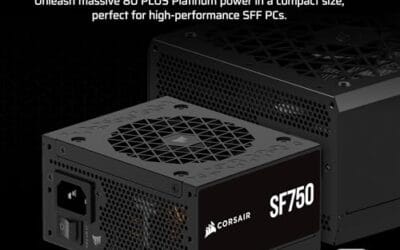
When a supply reaches this state, replacement is the answer, and it’s worth buying quality since the PSU feeds every other part. For a compact or small-form-factor build, the Corsair SF750 (2024) is a fully modular SFX unit at $159.99, 80 Plus Platinum rated, ATX 3.1 compliant, and PCIe 5.1 ready, with a bracket included for standard cases. It’s a low-noise design built to run cool and quiet, which is exactly what you want replacing a unit that failed on cooling. Match the wattage to your components with headroom to spare.

Pros
- ATX 3.1 compliant with PCIe 5.1 support, resists transient spikes from RTX 50 and RX 9000 series GPUs.
- Zero RPM Mode eliminates fan noise at low and medium loads, a real advantage in acoustically sensitive SFF builds.
- Fully modular design with short SFX cables reduces cable management friction in sub-10-liter cases.
- 105 degree C Japanese capacitors indicate quality component selection typical of high-tier SFX units.
Cons
- Limited owner feedback at time of writing; real-world noise, ripple, and transient performance are unverified by community data.
- Short SFX cables are unsuitable for mid-tower or full-tower cases without aftermarket cable extensions.
- 750W ceiling may fall short for extreme SFF builds pairing a 300W-plus TGP GPU with a high-core-count CPU.
The Corsair SF750 (2024) is a high-end SFX PSU targeting SFF builders who need substantial wattage in a compact footprint. With 80 Plus Platinum certification and ATX 3.1 compliance, it sits at the upper tier of the SFX market, aimed at builders pairing it with current-gen discrete GPUs inside sub-10-liter cases.
The most defining specification here is ATX 3.1 compliance combined with PCIe 5.1 readiness. This means the unit is rated to handle the sharp transient power spikes that RTX 50 and RX 9000 series GPUs can produce, where non-compliant PSUs may trigger overcurrent protection. At 750W, it covers most single-GPU SFF configurations without derating concerns.
The honest trade-off is the review data gap. At time of writing, no substantial owner feedback exists to validate Corsair's noise and ripple claims under real load. The Zero RPM Mode claim and 92mm fan acoustics are based on spec sheets only. Buyers should also note that SFX cable lengths are intentionally short and will not reach connectors in mid-tower or larger cases without extensions.
Buy this if you are building an SFF PC around a single high-TGP GPU and need confirmed ATX 3.1 compliance in a modular SFX unit. Skip this if you want a large ATX case build, need more than 750W for a dual-component high-wattage system, or require extensive owner testing before purchasing.
Form Factor and Mounting: This is a standard SFX form factor PSU, not SFX-L. Verify your case specifies SFX compatibility before purchasing. An SFX-to-ATX bracket is included, allowing installation in ATX-footprint cases, though short cable lengths will require extensions in anything larger than a compact SFF enclosure.
Power Standard and Connector: ATX 3.1 compliant with PCIe 5.1 readiness. The unit supports the 12V-2x6 connector standard, relevant for RTX 40 and RTX 50 series GPUs as well as AMD RX 7000 and RX 9000 cards with high transient draw. Non-ATX 3.1 units can trigger OCP shutdowns above 150 percent peak load spikes.
Efficiency and Thermal Operation: 80 Plus Platinum certification indicates roughly 92 percent efficiency at 50 percent load under 115V. The 92mm PWM fan uses a fluid dynamic bearing and Zero RPM Mode activates at low loads, which in SFF cases where airflow is restricted can noticeably reduce system acoustic output.
GPU Wattage Pairing: At 750W, this PSU pairs appropriately with GPUs up to approximately 300W TGP when combined with a mid-range CPU. For a 320W-plus TGP GPU alongside a 65W-plus CPU, headroom becomes tight and a higher-wattage SFX unit should be considered instead.
Preventive maintenance
Keeping a PSU fan healthy is mostly about keeping dust out. Blow out your power supply’s grille every few months with compressed air, more often if you own pets or run the PC on carpet. A case with a bottom-mounted PSU and a removable dust filter under it does a lot of the work for you, so clean that filter regularly. Good case airflow also matters, since a cooler interior means the PSU pulls in cooler air and its fan works less.
One more habit helps. Don’t run a power supply at the ragged edge of its rating. A unit constantly pinned near 100 percent load runs hot and spins its fan hard all the time, which shortens the fan’s life. Sizing your PSU with comfortable headroom, so it spends most of its time in the efficient mid-load band, keeps temperatures and fan wear down. That’s part of why builders lean toward higher-wattage units even on mid-range rigs.
Placement and environment matter too. A PSU mounted at the bottom of the case with its fan facing a floor vent pulls cool air from outside the case, which is ideal, but only if the area under the case stays clear and clean. Running the PC directly on carpet chokes that intake and packs the filter with fibers, so raise the tower onto a hard surface or a stand if you can. Good habits here mean the fan spends less of its life fighting heat and dust, and the whole unit lasts longer.
When it’s not fixable: what to replace
Here’s the hard rule. You never open a power supply to repair it. The primary-side capacitors can store a dangerous charge for a long time after the unit is unplugged, so opening the shell to replace a fan or a component is a genuine safety hazard, not a normal repair job. If cleaning doesn’t revive the fan and the unit is out of warranty, the correct move is to replace the entire power supply. It’s the one component where DIY internal repair isn’t worth the risk.
If the supply is still under warranty, and most quality units carry long warranties, file a claim instead of buying new, since a stuck fan is a valid failure. When you do replace, buy for your build’s needs. A high-end GPU rig wants a strong 1000W-class unit, and our roundups of the best 1000W PSUs for a high-end GPU can point you at solid options. For a small chassis, an SFX unit like the Corsair SF750 fits where a standard ATX supply won’t.
Tools and parts needed
For diagnosis and cleaning, the toolkit is short: a can of compressed air, a Phillips screwdriver to remove the PSU from the case, a flashlight to inspect the fan and grille, and a non-conductive tool if you want to gently check the blade for resistance. That’s it. Always unplug the unit and let it sit before handling. If diagnosis points to a dead supply, the part you need is a replacement PSU sized and shaped for your build, ATX for a normal case or SFX for a compact one.
When you size that replacement, add headroom rather than buying the exact wattage your parts draw at peak. A supply running at 50 to 70 percent load stays cooler, spins its fan less, and lasts longer, so a build that pulls 500W is happier on a quality 750W or 850W unit than on a 550W one pushed to its limit. Both the Corsair SF750 and the be quiet! Pure Power 13 M reflect that thinking, offering generous wattage with efficient, low-noise designs that spend most of their life in the quiet part of the fan curve.
Common questions
Is it normal for my PSU fan to not spin at idle?
Yes, on most modern units. Semi-passive or zero RPM mode keeps the fan off under light load to stay silent, then spins it up once temperature or load rises. The be quiet! Pure Power 13 M and many other quality supplies work this way on purpose. Load the system with a game or stress utility, and if the fan starts turning as it heats up, everything’s fine and nothing needs fixing.
Can I replace just the PSU fan myself?
You shouldn’t. Power supplies contain capacitors that hold a dangerous charge long after the unit is unplugged, so opening the case to swap the fan is a real safety risk, not a routine repair. If cleaning the grille with compressed air doesn’t free a stuck fan and the unit is out of warranty, replace the whole supply. If it’s still under warranty, file a claim rather than opening it up.
Will a dead PSU fan damage my other components?
It can if you keep using the unit under load. A power supply that can’t cool itself will overheat, and a failing supply can send unstable voltage to your motherboard, GPU, and drives. If the fan stays dead under heavy load, the system shuts off randomly, or you smell hot electronics, stop using the PC and replace the supply. Protecting the parts it feeds is worth far more than the price of a new PSU.






























Write Your Review
No reviews yet. Be the first to share your experience!