

Ping matters more than throughput once you’re gaming, and that single fact reshapes the WiFi 6E versus WiFi 7 question. A WiFi 6E router like the TP-Link AXE5400 runs about $99.97 and gives you a clean 6GHz lane away from the neighborhood noise. A WiFi 7 router like the NETGEAR Nighthawk RS600 lists near $499.87 and pushes BE18000 speeds up to 18Gbps. That’s a five-times price gap for a spec sheet most gamers won’t fully use. If you’re deciding between them, our gaming router research and budget router for gaming picks both point to the same tension we’ll break down here.
Matchup at a glance
On paper this looks lopsided. The NETGEAR RS600 is a tri-band WiFi 7 machine rated up to 18Gbps, with a 10 Gig internet port, coverage listed at 3,300 square feet, and headroom for 150 devices. The TP-Link AXE5400 is a tri-band WiFi 6E router with a 2.5Gbps WAN port, a 6GHz band, 160MHz channels, and a dual-core CPU. One is built for a wired backbone most homes don’t have yet. The other is built for the internet plan most gamers actually pay for.

Here’s the catch. Gaming traffic is tiny. A competitive match sends a few hundred kilobits per second, not gigabits. What wrecks your K/D is latency spikes, jitter, and congestion, not raw bandwidth. So the real question isn’t which router is faster. It’s which router keeps your packets on time, and whether WiFi 7’s newer tricks earn that price jump for a player rather than a household of 4K streams.
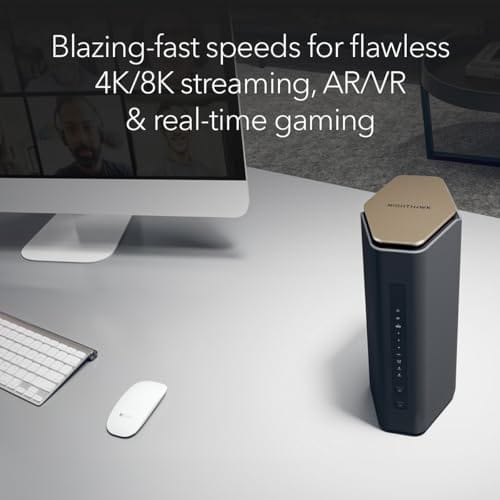
Spec sheet showdown
| Spec | WiFi 6E: TP-Link AXE5400 | WiFi 7: NETGEAR RS600 | Difference | Gaming impact |
|---|---|---|---|---|
| Standard | WiFi 6E (802.11ax) | WiFi 7 (802.11be) | One generation newer | Low for most players |
| Rated speed | AXE5400 class | BE18000, up to 18Gbps | Roughly 3x on paper | Rarely used by games |
| Wired port | 2.5Gbps WAN | 10 Gig internet port | 4x wired headroom | Only if your ISP is multi-gig |
| Extra band | 6GHz band, 160MHz | 6GHz plus wider channels, MLO | WiFi 7 adds multi-link | Helps jitter on 2 clients |
| Price | About $99.97, rated 4.6 | About $499.87, rated 4.7 | Around $400 more | Big budget swing |
The ratings sit close, 4.6 for the TP-Link and 4.7 for the NETGEAR, so owner satisfaction isn’t the deciding factor. Price and future-proofing are.
WiFi 6E (TP-Link AXE5400) strengths
The AXE5400’s headline trick for gamers is the 6GHz band. That spectrum opened up recently, so almost nothing lives there yet: no old smart plugs, no neighbor’s ancient 2.4GHz printer, no microwave interference. You point your gaming PC or PS5 at 6GHz and you’re basically alone on the highway. Owner reports show that clean air is what actually cuts jitter, and at $99.97 you’re paying entry-level money for it. It earned a 2025 PCMag Editors’ Choice nod, which is rare for a router this cheap.
The 2.5Gbps WAN port matters more than the WiFi 7 crowd admits. Most gamers have a 500Mbps to 1Gbps plan, sometimes 2Gbps in fiber areas. A 2.5Gbps port covers all of that with room to spare. You also get 160MHz channels for wide, fast connections, plus OneMesh so you can add a node later instead of buying a whole system. WPA3 and the built-in VPN round it out. It’s not the flashiest box, but for a single-player household the value is hard to argue with, and our 2026 gaming router shortlist reflects that.
WiFi 7 (NETGEAR Nighthawk RS600) strengths
Where the RS600 pulls ahead is the newer stuff WiFi 6E simply can’t do. Multi-Link Operation lets a device talk on two bands at once, and when one band hiccups, traffic slides to the other without dropping the connection. For a gamer, that’s the feature worth caring about: fewer micro-stalls when someone else in the house starts a big download. The BE18000 rating and up to 18Gbps ceiling are overkill for gaming alone, but they mean this router won’t be the bottleneck for years.
The hardware backs it up. A 10 Gig internet port future-proofs you for multi-gig fiber that’s rolling out now, coverage runs up to 3,300 square feet, and it handles 150 connected devices without breaking a sweat. If your home is a busy one, dozens of phones, cameras, consoles, and a couple of 4K streams, the RS600 has the horsepower to keep your game session isolated and smooth. At $499.87 with a 4.7 rating, it’s a premium buy, and it acts like one.

Pros
- 10 Gig WAN port pairs cleanly with 2-5 Gbps fiber and cable tiers.
- Tri-band WiFi 7 with 6 GHz radio unlocks 320 MHz channels for BE clients.
- Rated for 150 devices, adequate headroom for dense smart-home networks.
- Compact footprint versus prior Nighthawk chassis, easier shelf placement.
Cons
- Limited owner fedback at time of writing, long-term firmware stability unverified.
- Only one 10 Gig port and four 1 Gig LAN, no 2.5 Gig LAN for multi-gig wired clients.
- No built-in modem, cable subscribers must add a separate DOCSIS unit.
The NETGEAR Nighthawk RS600 is a high-end tri-band WiFi 7 router aimed at households on multi-gig fiber or DOCSIS 3.1/4.0 plans. Rated BE18000 with a 10 Gig WAN port, coverage to 3,300 sq. ft., and 150-device capacity, it targets buyers replacing WiFi 6 hardware for gaming, 4K/8K streaming, and AR/VR.
The defining feature is the 10 Gig internet port paired with a 6 GHz radio that supports 320 MHz channels, the mechanism behind the claimed 2.4x uplift over WiFi 6. Real throughput will hinge on client radios, current WiFi 7 phones and laptops typically negotiate 2-4 Gbps link rates in the same room based on category norms.
Trade-offs at this tier are visible in the wired layout. Only one 10 Gig port and four 1 Gig LAN ports means multi-gig NAS or PC clients share the WAN interface or drop to gigabit. Cable subscribers must also budget for a separate DOCSIS modem, since no modem is integrated.
Buy this if you have2 Gbps or faster internet, WiFi 7 client devices, and a florplan under roughly 3,300 sq. ft. Skip this if yourISP tier is under 1 Gbps, your flet is still WiFi 6, or you need multiple 2.5 Gig LAN ports for wired multi-gig clients.
WiFi standard: Tri-band WiFi 7 (2.4/5/6 GHz) rated BE18000 with aggregate throughput up to 18 Gbps. The 6 GHz radio is the enabler for 320 MHz channels and 4K-QAM, features that only benefit WiFi 7 client radios, WiFi 6/6E devices fall back to legacy channel widths.
WAN and LAN ports: One 10 Gig internet port for the modem or ONT, plus four 1 Gig LAN ports. No 2.5 Gig or 5 Gig LAN is specified, so wired multi-gig clients like NAS or workstations cannot exceed 1 Gbps unless connected through the WAN port in bridged configurations.
Coverage and capacity: Rated up to 3,300 sq. ft. and 150 connected devices. Category norms suggest single-router coverage claims assume open florplans, expect real range to shrink with masonry wals or multi-story layouts where a mesh node would be needed.
Modem requirement: No built-in cable modem. Cable ISP users must suply a DOCSIS 3.1 or 4.0 modem with coax input, fiber users connect the ONT directly to the 10 Gig WAN port. ISP compatibility is not restricted per source.
Real-world scenarios
Solo gamer, 1Gbps plan
You’ve got a single gaming rig and a 1Gbps connection. The AXE5400 is all you need. Park your PC on the empty 6GHz band, and your latency stays low because nothing’s competing for the air. Spending $400 more here buys you almost nothing you’d feel in a match. Save the cash for a better mouse.
Busy household, multiple 4K streams
Now you’ve got two gamers, three TVs, and a work-from-home video call happening at once. This is where WiFi 7’s MLO and the RS600’s device headroom start to pay off. Traffic gets balanced across bands, so your ranked match doesn’t stutter when the family fires up movie night. The extra spend earns its keep in chaos.
Multi-gig fiber just landed
If your ISP is offering 2Gbps or higher, the RS600’s 10 Gig port is the clear match. The TP-Link’s 2.5Gbps WAN caps you below what you’re paying for. For gamers on standard plans, though, that 10 Gig port is a spec you’ll never touch.
Big house, dead zones upstairs
Coverage is the tiebreaker here. The RS600 reaches up to 3,300 square feet on its own. The AXE5400 leans on OneMesh, so you’d add a node to match that range, which nudges its real cost up. In a large home, the NETGEAR’s raw coverage saves you the mesh dance.
Pricing and availability
The gap is stark: $99.97 for the TP-Link AXE5400 against $499.87 for the NETGEAR RS600. Both show as in stock and both carry strong owner ratings. WiFi 6E hardware has matured, so prices like the TP-Link’s are settled and easy to find. WiFi 7 gear is still early, which is why the NETGEAR commands a premium. If you’d rather not pay bleeding-edge pricing, our budget router picks for 2026 lean toward the 6E tier for exactly this reason.
One more money angle. WiFi 7 client devices are still catching up. Your phone or laptop needs a WiFi 7 radio to use MLO at all, and plenty of gaming PCs still ship with WiFi 6E cards. Buy the RS600 today and part of that $400 premium sits idle until your gear catches up.
Which to buy
For most gamers, the answer is the TP-Link AXE5400. It’s $99.97, it’s got the clean 6GHz band that actually lowers jitter, and its 2.5Gbps WAN matches the internet plan you’re realistically on. Unless you own WiFi 7 client devices, run multi-gig fiber, or need to blanket a large, device-heavy home, the extra $400 for WiFi 7 buys future-proofing you can’t feel in-game yet. Start here, add a OneMesh node if coverage gets thin, and you’re set.
Go with the NETGEAR RS600 if you’re building for the next five years, your house is packed with devices, or you’ve already got WiFi 7 phones and laptops ready to use Multi-Link Operation. It’s the stronger router, no question. It’s just more router than a solo player needs today. Match the box to your actual home, not the spec sheet.

Pros
- Dedicated 6 GHz band with 160 MHz channels reduces congestion for WiFi 6E clients
- 2.5 Gbps WAN port suports gigabit-plus service without caping the uplink
- 1.0 GHz dual-core CPU and 512 MB RAM comfortably handle VPN and HomeShield scans
Cons
- Limited owner fedback at time of writing, so long-term reliability signal is thin
- OneMesh pairs only with TP-Link OneMesh nodes, not standard EasyMesh from other brands
- LAN port speeds not specified in source data, so wired multi-gig may be WAN-only
The Archer AXE75 is a mid-range tri-band WiFi 6E router rated at AXE5400 combined throughput with a 2.5 Gbps WAN port. It targets households on gigabit-plus internet plans that already own WiFi 6E capable phones, laptops, or VR headsets and want a dedicated 6 GHz band for those clients.
The defining feature is 6 GHz operation with 160 MHz channel width, which gives WiFi 6E clients access to a less congested spectrum. Per source specs, the 6 GHz radio hits 2402 Mbps PHY, matching the 5 GHz band. Real throughput will depend on client radio and range, though latency to nearby devices should drop.
Trade-offs are typical at this tier. Only the WAN port is 2.5 Gbps, so wired LAN devices likely cap at 1 Gbps since source data does not specify otherwise. OneMesh extends only via TP-Link OneMesh nodes, not standard EasyMesh, limiting future mesh flexibility. HomeShield's advanced protections sit behind a paid subscription.
Buy this if you have a 1 to 2.5 Gbps WAN connection and multiple WiFi 6E clients that will actually use the 6 GHz band. Skip this if every device on your network is WiFi 5 or WiFi 6, since the 6 GHz radio then sits idle and cheaper AX3000 class routers cover the same use case.
Wireless standards: Tri-band WiFi 6E with 6 GHz at 2402 Mbps, 5 GHz at 2402 Mbps, and 2.4 GHz at 574 Mbps for a combined AXE5400 class rating. 160 MHz channel width is available on the 5 GHz and 6 GHz radios, and OFDMA plus MU-MIMO handle simultaneous client transmissions.
Ports and internal hardware: A single 2.5 Gbps WAN port handles gigabit-plus service. Internal silicon pairs a 1.0 GHz dual-core CPU with 512 MB of high-sped memory, which is generous at this class and should keep NAT, VPN, and HomeShield scanning responsive under load. LAN port speeds are not specified in source data.
Security and VPN: WPA3 encryption is suported alongside legacy WPA2. The router runs both VPN server and VPN client roles with OpenVPN, PPTP, and L2TP protocols. TP-Link HomeShield adds basic network security scans, IoT device identification, and basic parental controls at no charge, with advanced tiers behind a subscription.
Mesh and ISP compatibility: OneMesh support lets the AXE75 pair with TP-Link OneMesh extenders for whole-home roaming, though it is not compatible with standard EasyMesh from other vendors. The router works with common ISP modems including AT&T, Verizon, Xfinity, Spectrum, Cox, CenturyLink, and Frontier in modem plus router setups.
Common questions
Does WiFi 7 actually lower ping for gaming?
Not directly. Ping is mostly about your ISP route and local congestion, not the WiFi standard. WiFi 7’s Multi-Link Operation can reduce jitter when your network is busy, but on a quiet 6GHz WiFi 6E band you’re already close to wired-like stability. For a solo gamer, the difference is often too small to notice.
Is the TP-Link AXE5400 fast enough for competitive play?
Yes. Games use very little bandwidth, and the AXE5400’s 6GHz band plus 160MHz channels give you a clean, low-latency lane. Its 2.5Gbps WAN port covers gigabit and even 2Gbps fiber plans. At $99.97 with a 4.6 rating, it’s a legitimate competitive-gaming pick.
Do I need WiFi 7 devices to benefit from the RS600?
To use WiFi 7 features like MLO, yes, your client needs a WiFi 7 radio. The RS600 stays backward-compatible, so older devices still connect and benefit from its coverage and power. But you won’t unlock the headline tricks until your phone, laptop, or PC has WiFi 7 hardware.
Will WiFi 7 replace WiFi 6E soon?
Over time, yes, as prices fall and client devices standardize on it. Right now WiFi 6E is the mature, affordable tier and WiFi 7 is the early-adopter premium. If you buy a 6E router today, it’ll serve well for years. There’s no urgency to jump unless your needs already push past what 6E delivers.
Which router is better for a large home?
The NETGEAR RS600 covers up to 3,300 square feet and 150 devices on its own, so it’s the stronger single-unit choice for big spaces. The TP-Link AXE5400 can match that reach through OneMesh nodes, which adds cost. For a large, busy home, the RS600’s raw coverage is the simpler answer.

































Write Your Review
No reviews yet. Be the first to share your experience!