

Ask ten gamers which router brand they trust and you’ll hear Asus and Netgear more than anyone else, often in the same breath. Both sell hardware from $60 budget boxes to $1,500 tri-band mesh kits, so the real question isn’t which logo wins. It’s which price tier actually buys you more coverage, more stable pings, and fewer 2 a.m. reboots. We researched both lineups across the budget, mid, and enthusiast tiers to sort marketing from measurable value. If you’re still mapping out a first setup, our roundups on the best gaming router and the best budget router 2026 pair well with what follows.
Matchup at a glance
Asus and Netgear split the market along philosophy, not price. Asus leans toward the tinkerer. Its firmware exposes deep controls, AiMesh lets you bond mismatched routers into one mesh, and features like adaptive QoS and built-in AiProtection come free for the life of the unit. That’s a big deal if you hate subscriptions. Netgear leans toward the person who wants it handled. Orbi mesh and Nighthawk standalone units ship with polished apps, wide coverage claims, and strong raw throughput, though several premium features sit behind the Netgear Armor and Smart Parental Controls paywalls.
So the head to head really comes down to how much you value ongoing cost versus out of box simplicity. Asus tends to reward patience with a lower total cost over three years. Netgear tends to reward people who’d rather not touch a settings menu twice. Neither is wrong. They just serve different owners, and the tier you shop in changes the math quite a bit.

There is also a support angle that doesn’t show up in a flashy box label. Asus gives enthusiasts more knobs, logs, and firmware branches, which is helpful when you want to diagnose a sticky client or split a 2.4 GHz network for old smart plugs. Netgear hides more of that complexity, and many families will prefer that. Less fiddling. Fewer chances to break something. The right answer depends on who will maintain the network after the first weekend.
Spec sheet showdown
| Feature | Asus (typical line) | Netgear (typical line) | Linksys Hydra Pro 6 | Best for |
|---|---|---|---|---|
| Security subscription | Free AiProtection for life | Netgear Armor, paid yearly | App-managed, no core paywall | Budget minded owners |
| Mesh approach | AiMesh, mixes models | Orbi, matched kits only | Mesh-ready, extender replacement | Reusing old gear |
| WiFi standard | WiFi 6 and 6E common | WiFi 6 and 6E common | WiFi 6 dual-band | Modern client devices |
| Coverage claim | Varies by model | Wide, Orbi tri-band | 2,700 sq ft, 30+ devices | Mid-size homes |
| Street price sampled | $90 to $1,500 | $80 to $1,500 | $199.99 | Value shoppers |
Asus strengths
The Asus pitch is control without a recurring bill. AiProtection, powered by Trend Micro, handles malware blocking and intrusion prevention at no charge, and that alone can save you $70 or more per year versus a rival’s security tier. Owner reports consistently praise the firmware stability and the granular QoS, which lets you prioritize a game console over a roommate’s 4K stream during a raid night. For anyone building out slowly, AiMesh is the quiet hero. You can start with one router and later bolt on a second, even a different model, to blanket a stubborn back bedroom.
There’s a tradeoff. Asus firmware can overwhelm a first-timer. The app surfaces dozens of toggles, and a few of them genuinely matter for stability, so the learning curve is real. Budget Asus units also cut corners on antenna count and CPU muscle, which shows up as slower speeds once you push past 20 connected devices. If you want plug it in and walk away, Asus asks a little more of you up front. The payoff arrives over years, not on day one.
Netgear strengths
Netgear’s advantage is polish and reach. Orbi tri-band kits dedicate a full radio band to backhaul, which keeps mesh speeds high across large floor plans, and the Nighthawk app walks newcomers through setup in minutes. Raw throughput on the premium models is genuinely excellent, so a fiber connection near a gigabit sees less loss than you’d expect. For a big house where you’d rather not fuss, Netgear’s coverage story is hard to beat, and the hardware feels premium in hand.
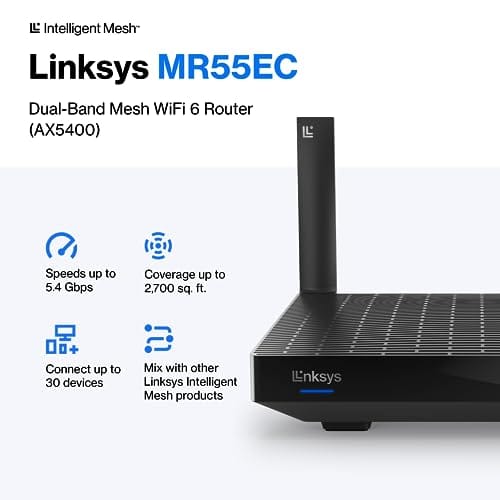
The catch is the wallet, long term. Netgear Armor and the full parental control suite renew every year, and that cost stacks up. Orbi kits also demand matched satellites, so you can’t reuse a spare router the way AiMesh allows. If you shop a tier below the flagship and want a proven mesh alternative before committing, the Linksys Hydra Pro 6 makes a strong case at $199.99. It carries a 4.4 rating, covers up to 2,700 square feet, and handles 30-plus devices as a WiFi 6 dual-band unit that doubles as an extender replacement. It’s a sensible middle ground for people who like the mesh idea but not the flagship price.

Pros
- AX5400 class dual-band throughput up to 574 plus 4804 Mbps on 5 GHz
- Six spatial streams with OFDMA reduce congestion for 30+ device homes
- Intelligent Mesh compatibility allows scaling coverage beyond the 2,700 sq ft rating
Cons
- Limited owner feedback at time of writing, so real-world reliability data is thin
- Dual-band only, no dedicated 6 GHz or wireless backhaul band at this tier
- Detailed specifications, WAN port sped, and waranty not specified in source listing
The Linksys Hydra Pro 6 (MR5500-AMZ) is a mid-range dual-band WiFi 6 mesh router aimed at households upgrading from an older AC1900 or extender-based setup. Linksys rates it for 2,700 sq ft and 30 plus devices, targeting medium apartments, condos, and small two-story homes with mixed smart home and streaming traffic.
The defining feature is six-stream AX5400 class WiFi 6 with quoted rates of 574 Mbps on 2.4 GHz and 4804 Mbps on 5 GHz. OFDMA and MU-MIMO help when many low-bandwidth clients share airtime, which is where WiFi 5 routers typically stall. Real-world 5 GHz throughput at range appears to land in the mid-hundreds of Mbps based on category norms.
Trade-offs are typical at this tier. It is dual-band, so there is no dedicated 6 GHz radio and no separate backhaul channel when you add mesh nodes, meaning throughput can halve on satellite hops. Linksys does not specify WAN port speed, USB, or processor details in the listing, so multi-gig ISP users should verify before buying.
Buy this if you want a single WiFi 6 router that can grow into a Linksys Intelligent Mesh system for a 2,000 to 3,000 sq ft home with 30 plus clients. Skip this if you need WiFi 6E, 2.5 GbE WAN, or a dedicated backhaul band for a large multi-story house.
Wireless class: AX5400 class dual-band WiFi 6 with quoted PHY rates of 574 Mbps on the 2.4 GHz band and 4804 Mbps on the 5 GHz band, totaling roughly 5378 Mbps aggregate across six spatial streams. No 6 GHz radio is listed, so WiFi 6E clients fall back to 5 GHz.
Coverage and capacity: Linksys rates the MR5500 for 2,700 sq ft and 30 plus simultaneous devices. OFDMA, MU-MIMO, and 1024-QAM are standard at this WiFi 6 tier and help maintain throughput as client count scales, though actual coverage depends heavily on wall material and node placement.
Mesh behavior: Intelligent Mesh lets you pair the MR5500 with other Linksys nodes to extend coverage. Because it is dual-band, backhaul shares the 5 GHz client band, so expect throughput to roughly halve one hop from the root node. A wired Ethernet backhaul between nodes avoids this penalty.
Not specified: WAN and LAN port speeds, USB ports, processor and RAM, warranty length, and physical dimensions are not disclosed in the source listing. Buyers pairing this with multi-gig fber or DOCSIS 3.1 plans above 1 Gbps should confirm port specs before purchase.
Real-world scenarios
The apartment gamer
In 900 square feet, coverage isn’t the fight. Latency is. A mid-tier Asus with free AiProtection and adaptive QoS gives a competitive edge here without a subscription, and you’ll rarely need mesh at all. Netgear works fine too, but you’d be paying for reach you don’t use.
The three-story house
This is Netgear’s turf. An Orbi tri-band kit with dedicated backhaul holds speed from the basement office to the attic bedroom better than a patched-together setup. Asus AiMesh can match it, but you’ll spend time tuning node placement. For pure coverage, Netgear does more work for you.
The smart home with 40 devices
Device count punishes weak CPUs. Both brands’ premium units cope well, though Asus owners report smoother handling of dense IoT swarms thanks to firmware maturity. A budget router from either camp will choke here, so this scenario argues for spending up, not brand loyalty.
Pricing and availability
Both brands sell across the same $80 to $1,500 span, so sticker price rarely decides it. What differs is the three-year cost. Add Netgear Armor at roughly $70 per year to a premium Nighthawk and the gap versus an Asus with free lifetime security widens fast. Availability is broad for both on Amazon and at major retailers, and mid-tier stock stays healthy year round. If you spot a matched Orbi kit or a ZenWiFi bundle on sale, that’s usually the moment to buy, since mesh sets discount less often than single routers.
Budget buyers should be careful with model names. A cheaper Asus or Netgear can look almost identical to a faster sibling while dropping multi-gig ports, cutting radio streams, or using a slower processor. That matters once a household has phones, tablets, consoles, TVs, cameras, and laptops all awake at once. If you’re outfitting an apartment, our budget router for apartment guide is the better lane. For whole-home coverage, prioritize node placement and backhaul quality over the brand badge.
Which to buy
Pick Asus if you want the lowest cost of ownership and don’t mind a settings menu. The free lifetime security and AiMesh flexibility reward patient owners who upgrade in stages. Pick Netgear if a big home and a clean app matter more than avoiding a yearly fee, and you’d rather the hardware handle the thinking. For a lot of people in the middle, a proven third option like the Linksys Hydra Pro 6 at $199.99 splits the difference nicely.
Our value call would be Asus for single-router homes, Netgear for big mesh layouts, and Linksys as the calmer midrange alternative if you don’t want either ecosystem. Don’t overbuy a tri-band kit for a small desk setup, and don’t underbuy a single budget router for a long house with brick walls. Simple rule: buy coverage first, firmware style second, and subscription tolerance third. That order keeps the purchase grounded.
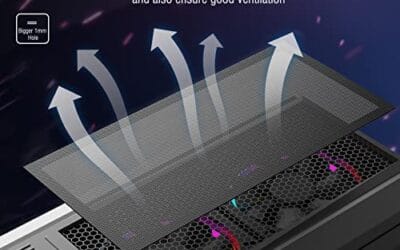
One thing owners of every brand forget: networking gear runs hot and pulls dust, and a clogged router or a dusty PC nearby throttles far sooner than the spec sheet admits. A cheap maintenance habit helps. The MoKo magnetic dust filter, a $12.99 two-pack rated 4.9, keeps intake grilles on your case and gear clean so airflow stays honest. Small spend, real longevity gain.

Pros
- Large 400x300mm sheets cover full-tower top or side panels after trimming.
- Magnetic strip and adhesive combo works on any ferrous steel case panel.
- 1mm mesh openings pass more air than tight foam filters at similar coverage.
- Two-pack plus eight strips gives enough material for multiple vents in one build.
Cons
- Limited owner feedback at time of writing, real-world durability is unverified.
- Requires ferrous steel panels, will not stick to aluminum or tempered glass cases.
- PVC and 3M adhesive strips can lose grip over time in warm, high-airflow builds.
This is a budget DIY dust filter kit, not a pre-cut case-specific filter. The package includes two 400x300mm PVC mesh sheets with a 1mm hole pattern plus eight 400mm magnetic frame strips. It targets builders with non-standard vents, modded cases, HTPC chassis, or console dust covers who want to fabricate their own filters.
The defining feature is the trim-to-fit format. You measure the vent, cut the PVC sheet with scissors, then frame the edges using the adhesive-backed magnetic strips so the assembly clamps to steel panels. The 1mm aperture is coarser than typical foam filters, which favors airflow over fine-dust capture, a reasonable trade for intake or exhaust with strong static pressure fans.
Trade-offs are typical at this tier. PVC is not as tear-resistant as nylon or stainless mesh, and 3M adhesive can soften near warm PSU or GPU exhaust zones. The magnetic attachment only works on ferrous steel, so tempered glass side panels or aluminum shells need alternative mounting. With no verified owner data yet, longevity and mesh consistency are unproven.
Buy this if you need to filter oddly shaped vents or console intakes and are comfortable cutting and framing your own mesh. Skip this if your case already ships with pre-fit magnetic filters, or if the panels are aluminum or glass where the magnets will not hold.
Sheet dimensions: Each sheet measures 400x300mm (15.75 x 11.81 inches) with a stated thickness of 0.01 inches. Two sheets ship per pack, enough surface area to cover a full-tower top vent plus a PSU shroud intake, or several smaller vents across a mid-tower build.
Mesh and material: PVC construction with a 1mm hole pattern. The 1mm aperture is coarser than fine foam or stainless woven filters, which prioritizes airflow over sub-micron dust capture. Expect it to catch pet hair, lint, and coarse household dust rather than fine particulates.
Mounting hardware: Eight 400mm magnetic strips are included, framed with 3M adhesive backing. Peel-and-stick application to the trimmed PVC edge lets the assembly clamp to any ferrous steel case panel. No screws or drilling needed, and the filter lifts off for shake-out or rinse cleaning.
Compatibility notes: Total kit weight is around 0.5 pounds. Magnetic mounting requires steel panels, it will not attach to aluminum shells, tempered glass, or plastic vents without a separate ferrous shim. Best suited to standard steel PC cases, older server chassis, HTPC builds, and console dust covers.
Common questions
Is Asus or Netgear better for gaming?
Both have strong gaming lines. Asus wins on free adaptive QoS and lower long-term cost, while Netgear counters with raw throughput and easy setup. For a small space, Asus edges it. For a large home, Netgear’s coverage helps more.
Do I really need to pay Netgear’s subscription?
No, the router routes fine without it. Netgear Armor and full parental controls are the paid extras. If you value built-in security at no charge, that’s where Asus AiProtection pulls ahead over three years.
Can I mix router brands in one mesh?
Generally no. Asus AiMesh only bonds Asus units, and Netgear Orbi needs matched satellites. You can’t blend an Asus and a Netgear into one seamless mesh, so pick a lane before you expand.
What about a third brand like Linksys?
Linksys sits comfortably between the two. The Hydra Pro 6 at $199.99 covers 2,700 square feet, supports 30-plus devices, and works as a mesh-ready extender replacement. It’s a fair pick if neither flagship excites you.
How long should a router last?
Plan on four to five years before a WiFi standard leaves you behind. Keeping the unit cool and dust-free stretches that, which is why a little airflow maintenance pays off no matter which brand you choose.

































Write Your Review
No reviews yet. Be the first to share your experience!