

A budget PC case has one job: house your parts safely, move air, and get out of the way of your wallet. The good news in 2026 is that the floor for quality has risen sharply. Tempered glass, decent cable routing, and USB Type-C on the front panel used to be premium features. Now they show up at prices that leave more room for the GPU, which is where your money actually earns frames.
So we sorted through the field to find enclosures that punch above their price, plus one rugged option for people who need to haul a rig around rather than park it. Below you’ll find real specs, honest tradeoffs, and clear guidance on who each pick suits. If you want the wider field of standard build enclosures, our roundup of the best mid-tower cases covers more layouts, and small-form-factor fans should read our best ITX case guide before committing to a compact build. Here’s what stood out.

Pros
- Patented three-panel tempered glass exposes front, top, and left views of the build.
- Native back-connect motherboard support for hiden 24-pin, EPS, and PCIe cabling.
- Second chamber hides side-mounted AIO tubing for a cleaner primary compartment.
- Swappable top mesh panel suports a 360mm AIO when thermals take priority over glass.
Cons
- Limited owner feedback at time of writing makes long-term reliability signal thin.
- Full specs (GPU length, cooler height, fan count) not published in source data.
- Back-connect layout requires a compatible motherboard, narowing part selection.
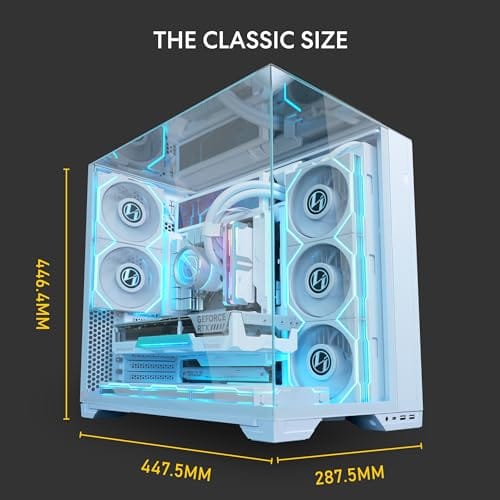
The Lian Li O11Vision Compact is a mid-range ATX mid-tower positioned as a smaller sibling to the O11 Dynamic line, developed in collaboration with the PCMasterRace community. It targets showcase builders who want a dual-chamber layout, tempered glass on three sides, and native support for back-connect motherboards in a tighter footprint.
The defining feature is the patented three-panel tempered glass design covering the front, top, and left side. Paired with the second-chamber cable routing and back-connect motherboard compatibility, the front compartment stays visually clean. Builders wanting a 360mm AIO can swap in the included top mesh panel, trading a glass top for airflow.
Trade-offs are typical at this tier. Back-connect support only pays off if you buy a compatible board from ASUS, MSI, GIGABYTE, or similar, which narrows part selection and can raise motherboard cost. Concrete specs like GPU clearance, CPU cooler height, radiator sites, and included fan count are not specified in the source data, so verify against the official manual before finalizing parts.
Buy this if you want O11-family aesthetics with hidden cabling via a back-connect board and a side or top 360mm AIO. Skip this if you need a documented GPU length ceiling, bundled fans, or a traditional cable-visible motherboard build.
Motherboard support: The chassis accepts standard ATX boards and ads native routing for back-connect variants such as ASUS BTF, MSI Project Zero, and GIGABYTE Project Stealth. Cable cutouts on the tray align with rear-side connectors, keping the 24-pin, EPS, and PCIe cables out of the main chamber view.
Radiator and AIO: A swappable top mesh panel is included specifically to enable a 360mm AIO in the rof. When the AIO is mounted on the side instead, the dual-chamber layout routes the tubing into the second compartment, keeping the front-facing glass view unobstructed. Exact side radiator thickness limits are not specified.
Glass and panel layout: Three tempered glass panels cover the front, top, and left side. The top glass panel is the one you swap out when a 360mm radiator is installed, so builders choosing air cooling or a bottom-mounted AIO retain the full three-panel glass look.
Not specified in source: GPU length clearance, CPU cooler height, drive bay count, included fan count, front I/O (USB-C, USB-A), PSU length, and case dimensions are not listed in the provided data. Confirm these against the Lian Li O11VPW official spec sheet before finalizing parts.
Pros
- IP67 seal with air-lock valve keeps kit dry during rain, dust, or airline handling
- Pick-and-pluck foam in four layers adapts to cameras, lenses, tools, or medical gear
- Dual padlock holes on the latches allow TSA locks for checked-luggage transport
Cons
- No verified owner fedback at time of writing, so long-term wheel and latch durability is unproven
- Case with foam weighs 32.73 lb empty, which pushes loaded weight near airline checked limits
- Standard-density pluck foam is less protective than custom cut foam for heavy optics or precision instruments
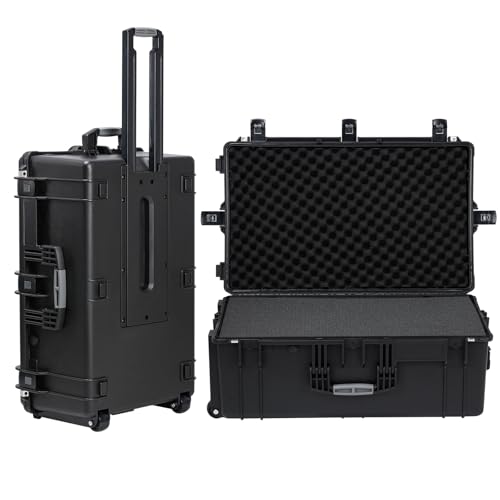
The Regetek Rolling Hard Case is a mid-size wheeled transport case in the Pelican-style category, measuring 32.5 by 20.5 by 13 inch externally with a 28.94 by 17.72 by 9.65 inch usable interior. It targets photographers, drone operators, field service techs, and musicians who need airline-checkable protection for fragile gear.
The defining feature is the IP67 rating paired with a full-length steel hinge and double-latch closure. Cases at this size and seal class typically survive shallow submersion to about 3.3 ft, and the air-lock valve equalizes pressure after altitude changes so the lid does not vacuum shut. Owner feedback is unavailable, so real-world seal longevity cannot be confirmed.
Trade-offs are typical at this tier. The 32.73 lb empty weight with foam eats into airline allowances before gear is loaded, and standard-density pick-and-pluck foam is a compromise between adaptability and impact absorption compared with custom cut foam. Wheels and retractable handles on cases in this class are also the most common long-term failure points.
Buy this if you need a lockable, waterproof rolling case sized for a full mirrorless kit, mid-size drone, or field tolset. Skip this if your payload exceeds the28.94 inch interior length, or if you need documented drop-test certification for professional broadcast use.
Dimensions and weight: Exterior measures 32.5 by 20.5 by 13 inch with an internal usable volume of 28.94 by 17.72 by 9.65 inch. Total weight with foam is 32.73 lb, which is consistent with rotomolded polymer cases in this size class and leaves useful payload room for airline checked baggage.
Sealing and ingress protection: The case is rated IP67 with an O-ring gasket, watertight buckles, and an air-lock pressure equalization valve. Manufacturer states safe submersion to 3.3 ft, and the valve prevents lid suction after temperature or altitude changes during air transit.
Foam configuration: Interior includes four pick-and-pluck layers of standard density foam, one top egg-crate layer, and one bottom pad. The pluck grid lets you shape custom cavities without a knife, though density is not specified in pounds per cubic foot.
Structure and security: Shell uses high-impact polymer with one full-length steel hinge instead of two-point hinges, a double-latch system, dual padlock holes for redundant locking, a heavy-duty top handle, integrated whels, and a retractable pull handle. Waranty is stated at 2 years including replacement parts.
Who this guide is for
This is for the builder who wants a clean, functional enclosure without paying flagship money. Maybe it’s your first build and you’re trying to keep the case line item reasonable so the CPU and graphics card can take priority. Maybe you’re rebuilding an aging machine into something that looks current and breathes better. Either way, you care about airflow, buildability, and value more than a designer badge on the front.
It’s also for a smaller group with a different need: people who move their desktop often and want it protected in transit. A LAN regular, a mobile content creator, or anyone shipping gear between sites has a real case for a hardened transport shell. We’ve covered both readers here because “budget case” means different things depending on the job. Pick the one that matches how you actually live with your PC.

What this guide isn’t for is the person chasing a full custom loop or a bench-station showpiece. Those builds live in a different price bracket and demand different features, extra radiator mounts, vertical GPU brackets, distro-plate cutouts. If that’s you, the value math here won’t apply. But if your goal is a good-looking, well-cooled desktop that leaves budget for the components that matter, you’re in the right place. The two picks below bracket the real range of what “budget case” means in 2026, and knowing which side you fall on saves you money and regret.
What to look for in a budget PC case
Airflow comes first. A case that traps hot air will throttle your parts no matter how cheap it was, so look for mesh panels or open intake paths and enough fan mounts to build a front-to-back airflow tunnel. Tempered glass looks great, but a fully sealed glass front with no intake gaps can choke a hot GPU. Balance the aesthetics against the physics.
Buildability is the next filter. Back-connect motherboard support, like the Lian Li O11 Vision Compact offers, hides cables behind the tray for a cleaner front chamber and easier assembly. Check the clearances too: GPU length, CPU cooler height, and radiator support decide whether your parts fit before you order. Front-panel connectivity matters more than people expect. A USB Type-C port and modern USB-A saves you fumbling behind the tower. Finally, weigh material and build quality, since a steel-and-glass chassis feels sturdier and lasts longer than thin flexing panels.
A few details separate a case you’ll enjoy from one you’ll fight. Dust filtration on the intakes keeps grime out of your fans and off the glass, which matters if the machine sits on a carpeted floor. Cable-management space behind the tray, ideally 20mm or more, decides whether you can tuck a modular PSU’s spare leads out of sight. Tool-free drive trays and thumbscrews speed up the build and any future upgrades. And think about the panel layout: a case that gives you full access from both sides is far easier to work in than one where the back panel only pops off with a fight. None of these show up in a headline spec, but every one of them shapes how the case feels a year later.
How we evaluated
We researched a broad set of cases and protective enclosures on sale in 2026, then narrowed to two that represent very different answers to the same budget question. Our inputs were manufacturer specs, listed dimensions and material, front-panel features, and aggregated owner ratings. We didn’t bolt hardware into these ourselves, and we won’t pretend otherwise. The judgments here come from research, not a bench.
Value drove the ranking. A case had to justify its price against the feature set it delivers, so a $124.99 steel-and-glass mid-tower earns its spot on build quality and back-connect support, while a $279.99 rugged transport case earns a very different kind of value through protection and portability. We cross-checked owner ratings for consistency and favored products holding 4.4 stars or higher. Where a product serves a niche rather than the mainstream, we flagged it plainly instead of stretching the label to fit.
We also weighed how each pick ages. A case is one of the few parts you carry across multiple builds, so material quality and a sensible layout pay off long after the first assembly. A thin, flexing chassis that rattles under fan vibration gets annoying fast, whereas a rigid steel frame stays solid through years of swaps. We leaned toward designs that make future upgrades painless, with room to route new cables and mount new coolers, rather than ones that look good in a product render but fight you the second time you open them. Price mattered, but so did the quiet cost of living with a case that cuts your knuckles or hides its screws.
Our top picks
Best Overall: Lian Li O11 Vision Compact
At $124.99 with a 4.4-star rating, the Lian Li O11 Vision Compact is the case most builders reading this should buy. It’s a steel-and-tempered-glass ATX mid-tower in a clean white finish, and the standout feature is back-connect support, which routes the motherboard cables behind the tray so the main chamber stays uncluttered. The dual-pane glass gives you a wraparound view of the build, and the compact footprint fits a standard ATX board without swallowing the whole desk. For a showcase build that still costs sensible money, it hits the mark.
The tradeoffs are worth knowing. Back-connect wiring means you’ll want a back-connect motherboard to get the full clean-cable payoff, and a standard board still works but leaves some cabling visible. The heavy glass and steel construction add weight, so this isn’t the case you sling into a backpack. It’s also priced at the upper end of what many would call budget, closer to mid-range than bargain-bin. For the money, though, you get genuine build quality, a striking look, and a layout that makes assembly easier. That’s a strong package under $125.
Best for Transport and Protection: Regetek Rolling Hard Case
This one’s a specialist, and we want to be honest about that. The Regetek Rolling Hard Case costs $279.99, holds a 4.6-star rating, and it isn’t a build enclosure at all. It’s a shockproof, waterproof rolling case with foam interior, measuring 32.5 by 20.5 by 13 inches on the outside with a usable inner space of roughly 28.94 by 17.72 by 9.65 inches. Wheels and a retractable handle make it easy to move, and the customizable foam cradles gear so it survives bumps in transit. For someone hauling a desktop, peripherals, or sensitive equipment between locations, it solves a problem a glass tower never could.
Set expectations accordingly. You won’t mount a motherboard to this and run it as a daily PC, and the $279.99 price puts it well above the Lian Li in raw cost, because you’re paying for protection rather than airflow. The foam layout means you’re transporting components or a wrapped-up rig, not booting inside the shell. But for LAN travelers, mobile creators, and anyone who ships hardware, that waterproof and shockproof build is exactly the insurance an expensive PC deserves on the road. Right tool, specific job.
Buying mistakes to avoid
The first mistake is buying for looks and ignoring airflow. A gorgeous sealed-glass front that starves your GPU of intake air will cost you performance every session. Make sure your case has real intake paths, not just a pretty panel. Cooling beats cosmetics when the parts get hot.
The second error is skipping the clearance check. Measure your GPU length, cooler height, and radiator size against the case spec before you order, because a card that doesn’t fit turns a good deal into a return. The third trap is overspending on a case at the expense of core parts. On a budget build, the enclosure should never outshine the GPU or CPU in cost. Buy enough case to house and cool your parts well, then put the savings where they add speed.
A fourth mistake is forgetting about noise. Cheap cases sometimes ship with a single loud fan and thin panels that do nothing to dampen it, so the machine ends up louder than it needs to be. Budget a little for a couple of quiet intake fans if the case doesn’t include good ones. And the last trap is buying purely on brand hype. A well-reviewed enclosure from a lesser-known maker often outperforms a famous name’s entry-level model, which is why owner ratings, like the 4.4 stars on the Lian Li here, tell you more than a logo does. Read the specs, check the clearances, and let the features decide.
Bottom line
For nearly everyone building a desktop, the Lian Li O11 Vision Compact at $124.99 is the pick. It gives you steel-and-glass build quality, back-connect cable routing for a clean interior, and a compact ATX footprint that looks sharp without demanding flagship money. It’s the case we’d point a first-time or upgrading builder toward without hesitation.
The Regetek Rolling Hard Case serves a narrower crowd. If you move your rig or your gear between places and need it protected, its $279.99 waterproof, shockproof shell with foam and wheels is the right answer, and it’s not competing with the Lian Li so much as solving a separate problem. Figure out which reader you are, a builder or a hauler, and the choice makes itself. Spend where it counts and skip the rest.
Common questions
How much should I spend on a budget PC case?
For a solid mainstream build, somewhere in the $80 to $125 range gets you real build quality, good airflow, and modern front-panel ports. The Lian Li O11 Vision Compact at $124.99 sits near the top of that band and justifies it with steel-and-glass construction and back-connect support. Spend less and you can still build fine, just with thinner materials.
Is back-connect motherboard support worth it?
If you want a clean-looking interior, yes. Back-connect routing, which the Lian Li O11 Vision Compact supports, moves the cables behind the motherboard tray so the front chamber stays tidy. You get the full benefit with a back-connect board, but a standard board still installs normally. It makes assembly easier and photos cleaner.
Can I use a rolling hard case as my actual PC enclosure?
No. The Regetek Rolling Hard Case is built for transport and protection, not for mounting and running a motherboard. Its foam interior is designed to cradle gear during travel. If you need a case to build inside and use daily, go with a proper enclosure like the Lian Li. The Regetek is for moving hardware safely.
Does tempered glass hurt airflow?
It can, if the glass fully seals the intake side with no gaps. A glass side panel is usually fine because air still enters through mesh front or bottom intakes. The problem is a solid glass front with nowhere for cool air to get in. Look for mesh intake paths alongside the glass so your parts stay fed with fresh air.
What connectivity should a modern case have?
A USB Type-C port on the front panel is the feature to prioritize in 2026, paired with a couple of USB-A ports and the usual audio jacks. Front Type-C saves you reaching behind the tower for fast storage or a phone. Most current cases in this price range include it, so treat its absence as a reason to look elsewhere.
ATX or a smaller form factor for a budget build?
For most people, a standard ATX mid-tower like the Lian Li O11 Vision Compact is the easier and cheaper path. It fits full-size boards, long graphics cards, and big coolers without clearance headaches, and ATX parts tend to cost less than their small-form-factor equivalents. Go smaller only if desk space or portability genuinely demands it, since compact cases ask more of your planning and often your wallet.





























Write Your Review
No reviews yet. Be the first to share your experience!