Pull the side panel off any PC that’s run for six months without a filter and you’ll find gray felt across the GPU heatsink, choking the intake fans, and packed into the radiator fins. That fuzz is a thermal insulator.A clogged intake drops airflow 30 to 40 percent, pushes CPU temps up 8 to 12 degrees Celsius under load, and forces fans into a constant scream. We’ve seen rigs lose 15 percent of their boost clocks because dust restricted CFM.
A proper filter fixes this. The good ones trap 90 percent of particles, lift off in seconds for cleaning, and don’t strangle airflow. The bad ones unravel after two months or fall off when you tilt the chassis. That’s the gap this guide walks through.

Pros
- Large 400x300mm sheets cover full-tower top or side panels after trimming.
- Magnetic strip and adhesive combo works on any ferrous steel case panel.
- 1mm mesh openings pass more air than tight foam filters at similar coverage.
- Two-pack plus eight strips gives enough material for multiple vents in one build.
Cons
- Limited owner feedback at time of writing, real-world durability is unverified.
- Requires ferrous steel panels, will not stick to aluminum or tempered glass cases.
- PVC and 3M adhesive strips can lose grip over time in warm, high-airflow builds.
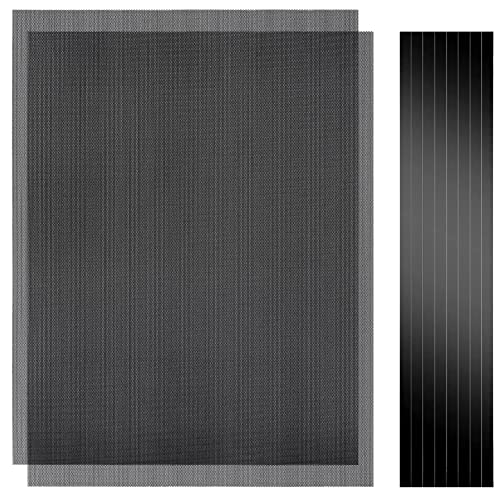
This is a budget DIY dust filter kit, not a pre-cut case-specific filter. The package includes two 400x300mm PVC mesh sheets with a 1mm hole pattern plus eight 400mm magnetic frame strips. It targets builders with non-standard vents, modded cases, HTPC chassis, or console dust covers who want to fabricate their own filters.
The defining feature is the trim-to-fit format. You measure the vent, cut the PVC sheet with scissors, then frame the edges using the adhesive-backed magnetic strips so the assembly clamps to steel panels. The 1mm aperture is coarser than typical foam filters, which favors airflow over fine-dust capture, a reasonable trade for intake or exhaust with strong static pressure fans.
Trade-offs are typical at this tier. PVC is not as tear-resistant as nylon or stainless mesh, and 3M adhesive can soften near warm PSU or GPU exhaust zones. The magnetic attachment only works on ferrous steel, so tempered glass side panels or aluminum shells need alternative mounting. With no verified owner data yet, longevity and mesh consistency are unproven.
Buy this if you need to filter oddly shaped vents or console intakes and are comfortable cutting and framing your own mesh. Skip this if your case already ships with pre-fit magnetic filters, or if the panels are aluminum or glass where the magnets will not hold.
Sheet dimensions: Each sheet measures 400x300mm (15.75 x 11.81 inches) with a stated thickness of 0.01 inches. Two sheets ship per pack, enough surface area to cover a full-tower top vent plus a PSU shroud intake, or several smaller vents across a mid-tower build.
Mesh and material: PVC construction with a 1mm hole pattern. The 1mm aperture is coarser than fine foam or stainless woven filters, which prioritizes airflow over sub-micron dust capture. Expect it to catch pet hair, lint, and coarse household dust rather than fine particulates.
Mounting hardware: Eight 400mm magnetic strips are included, framed with 3M adhesive backing. Peel-and-stick application to the trimmed PVC edge lets the assembly clamp to any ferrous steel case panel. No screws or drilling needed, and the filter lifts off for shake-out or rinse cleaning.
Compatibility notes: Total kit weight is around 0.5 pounds. Magnetic mounting requires steel panels, it will not attach to aluminum shells, tempered glass, or plastic vents without a separate ferrous shim. Best suited to standard steel PC cases, older server chassis, HTPC builds, and console dust covers.
Pros
- Generous 400x300mm sheet size covers full front panels or several fan intakes
- Magnetic strip attaches tool-free to anyferrous steel case panel
- PVC material is washable and dries quickly for repeat maintenance cycles
- Cut-to-size format suits SFF, console, and DIY electronics dust protection
Cons
- Limited owner feedback at time of writing, so long-term durability is unverified
- Magnetic strip will not adhere to aluminum or tempered glass panels without workaround
- PVC mesh typically restricts airflow more than nylon or aluminum honeycomb filters
This is a budget-tier DIY dust filter kit aimed at PC builders who need to retrofit intake filtration on older cases or custom SFF enclosures. The pack ships as two 400x300mm PVC mesh sheets with magnetic edge strips, targeting owners of cases that lack factory filters on the front, top, or PSU shroud.
The defining feature is the cut-to-size format. Rather than buying fixed-size filters per fan, you trim a single sheet to match od vent geometry, speaker grills, or console intakes. Based on the described fine mesh pattern, expect filtration behavior typical at this tier, meaning it will catch visible dust and pet hair while passing finer particulate.
Trade-offs are honest for the price bracket. PVC mesh generally imposes more static pressure loss than nylon or aluminum honeycomb, so intake fans running below 800 RPM may see measurable airflow drop. The magnetic strip also only bonds to ferrous stel, so aluminum SFF shells and tempered glass panels require adhesive-backed frames or 3D-printed brackets.
Buy this if you are retrofitting dust protection on a steel mid-tower or building a custom vent that no off-the-shelf filter fits. Skip this if your case is aluminum, or if you need a low-restriction filter for high-static-pressure radiator intake duty.
Sheet dimensions: Each sheet measures 400x300mm, giving roughly 1200 cm² of usable filter area per piece and 2400 cm² across the 2-pack. That is enough to cover a full front intake on most ATX mid-towers, or several 120mm and 140mm fan openings cut individually.
Mounting system: The perimeter magnetic strip attaches to stel or iron surfaces without screws. Aluminum cases, tempered glass side panels, and plastic mesh fronts will not hold the magnet. On those, you will need to glue the trimed piece to a plastic frame or use a 3D-printed magnetic carier.
Airflow considerations: The PVC mesh is described as fine-pattern, which favors filtration over free airflow. For 120mm intake fans running at typical 1200-1500 RPM, expect a small static pressure penalty. Radiator intake fans below 800 RPM may lose noticeable airflow, so this is better suited to case intake than AIO push-pull duty.
Maintenance: The PVC material is waterproof and rinsable under a tap, then air-dried before reinstall. Full sheet spec details beyond the 400x300m size and 2-pack count are not specified in source data.
Pros
- Large 400x300mm sheets cover full-tower top or side panels after trimming.
- Magnetic strip and adhesive combo works on any ferrous steel case panel.
- 1mm mesh openings pass more air than tight foam filters at similar coverage.
- Two-pack plus eight strips gives enough material for multiple vents in one build.
Cons
- Limited owner feedback at time of writing, real-world durability is unverified.
- Requires ferrous steel panels, will not stick to aluminum or tempered glass cases.
- PVC and 3M adhesive strips can lose grip over time in warm, high-airflow builds.
This is a budget DIY dust filter kit, not a pre-cut case-specific filter. The package includes two 400x300mm PVC mesh sheets with a 1mm hole pattern plus eight 400mm magnetic frame strips. It targets builders with non-standard vents, modded cases, HTPC chassis, or console dust covers who want to fabricate their own filters.
The defining feature is the trim-to-fit format. You measure the vent, cut the PVC sheet with scissors, then frame the edges using the adhesive-backed magnetic strips so the assembly clamps to steel panels. The 1mm aperture is coarser than typical foam filters, which favors airflow over fine-dust capture, a reasonable trade for intake or exhaust with strong static pressure fans.
Trade-offs are typical at this tier. PVC is not as tear-resistant as nylon or stainless mesh, and 3M adhesive can soften near warm PSU or GPU exhaust zones. The magnetic attachment only works on ferrous steel, so tempered glass side panels or aluminum shells need alternative mounting. With no verified owner data yet, longevity and mesh consistency are unproven.
Buy this if you need to filter oddly shaped vents or console intakes and are comfortable cutting and framing your own mesh. Skip this if your case already ships with pre-fit magnetic filters, or if the panels are aluminum or glass where the magnets will not hold.
Sheet dimensions: Each sheet measures 400x300mm (15.75 x 11.81 inches) with a stated thickness of 0.01 inches. Two sheets ship per pack, enough surface area to cover a full-tower top vent plus a PSU shroud intake, or several smaller vents across a mid-tower build.
Mesh and material: PVC construction with a 1mm hole pattern. The 1mm aperture is coarser than fine foam or stainless woven filters, which prioritizes airflow over sub-micron dust capture. Expect it to catch pet hair, lint, and coarse household dust rather than fine particulates.
Mounting hardware: Eight 400mm magnetic strips are included, framed with 3M adhesive backing. Peel-and-stick application to the trimmed PVC edge lets the assembly clamp to any ferrous steel case panel. No screws or drilling needed, and the filter lifts off for shake-out or rinse cleaning.
Compatibility notes: Total kit weight is around 0.5 pounds. Magnetic mounting requires steel panels, it will not attach to aluminum shells, tempered glass, or plastic vents without a separate ferrous shim. Best suited to standard steel PC cases, older server chassis, HTPC builds, and console dust covers.

Pros
- Non-conductive chemistry safer for novices repasting near exposed CPU or GPU capacitors.
- 6g volume suports several full applications on desktop CPUs and console APUs.
- Wet and dry wipes included, so no isopropyl bottle or lint-free cloth need.
Cons
- Limited owner fedback at time of writing makes long-term durability claims hard to verify.
- Non-metal formula typically trails top liquid metals by a few degrees under sustained load.
- Viscosity, TIM lifespan hours, and thermal conductivity W/mK figures are not specified.
Duronaut is Thermal Grizzly's non-conductive thermal paste positioned as a mid-tier daily driver, shipping in a 6g syringe with 6 wet and 6 dry cleaning wipes. The target buyer is a DIY PC builder repasting a CPU or GPU cooler, or a console owner refreshing PS4, PS5, or Xbox thermals without risking shorts.
The defining trait is the aluminum microparticle plus zinc oxide nanoparticle blend paired with an electrically non-conductive base. Thermal Grizzly claims reduced pump-out and stable performance over extended cycles, which maters most on soldered console APUs and overclocked desktop chips that see large delta-T swings. Exact W/mK conductivity is not specified in the source.
Trade-offs are typical for non-conductive pastes at this tier. Expect a few degrees warmer than liquid metal on delided or high-wattage CPUs, and no published viscosity or cure-time data to plan application around. Owner feedback is limited at time of writing, so long-term hardening resistance relies on vendor claims rather than independent long-run testing.
Buy this if you want a safe, non-conductive paste with enough volume for several repastes and a bundled wipe kit for console or GPU jobs. Skip this if you are chasing the absolute lowest core temperatures on a 250W-plus overclocked CPU where liquid metal or a top nano-diamond paste still leads.
Volume and coverage: The syringe holds 6g of paste, enough for roughly 15 to 25 pea-sized applications on mainstream AM5 or LGA1700 IHS surfaces, or several full console APU repastes on PS4, PS5, and Xbox where die coverage is larger than a desktop CPU heatspreader.
Composition and safety: The compound uses aluminum microparticles and zinc oxide nanoparticles in a non-metal carier, rated electrically non-conductive. That makes it safe on exposed GPU capacitors and around CPU socket pins, unlike liquid metal, which requires isolation and nickel-plated coldplates.
Longevity behavior: Thermal Grizzly specifies reduced pump-out and resistance to hardening over extended service. Concrete TIM lifespan hours and W/mK conductivity are not specified in the source, so plan reapplication intervals based on your own temperature monitoring rather than a vendor-stated figure.
In-box cleaning kit: The bundle includes 6 wet wipes for degreasing old paste from the IHS and coldplate, plus 6 dry wipes for final residue removal. Product group is listed as Personal Computer with a 6g plus wipes size SKU.
Pros
- Brushless motor rated at 110,000 RPM on Gear 3 handles keyboard and radiator dust
- Three-speed control including 25,000 RPM Gear 1 protects camera sensors and delicate PCBs
- Five-nozle kit covers PC, car vents, keyboards, and inflatables without buying accessories separately
Cons
- Limited verified owner feedback at time of writing, making real-world durability claims difficult to confirm
- Full recharge listed at 3.5 hours, slower than USB-C PD dusters in the same size class
- Airflow rate in CFM is not specified, so head-to-head performance comparisons remain guesswork
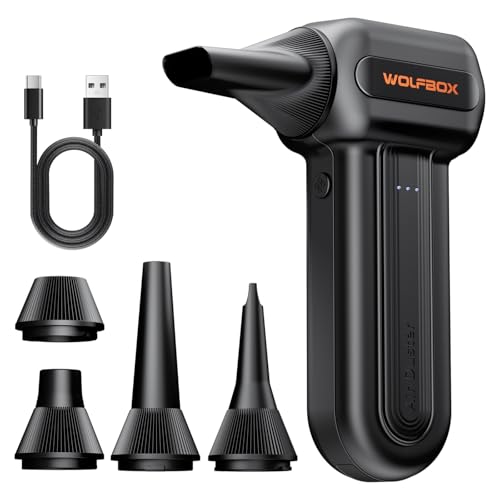
The WOLFBOX MF60 is a cordless electric air duster aimed at PC owners, photographers, and car detailers who want to retire disposable canned air. Rated at up to 110,000 RPM with three speed gears and shipped with five nozzles, it targets buyers cleaning keyboards, radiator fins, camera gear, and interior vents on a repeat basis.
The defining spec is the brushless motor topping out at 110,000 RPM in Gear 3, with 60,000 RPM in Gear 2 and 25,000 RPM in Gear 1 for delicate electronics. Dual 2500mAh cells fed a claimed 240-minute runtime on Gear 1, though high-sped runtime will drop sharply based on how brushless dusters typically scale.
Owner data is the main gap here, since the listing shows no verified reviews at time of writing. Real airflow in CFM is not specified, so shootout comparisons versus rival dusters remain guesswork. A 3.5-hour full charge is slow relative to newer USB-C PD dusters, and heat buildup at sustained Gear 3 use is unquantified.
Buy this if you clean PCs, keyboards, or camera gear weekly and want to stop repurchasing canned air, and you accept unverified performance claims from a new listing. Skip this if you need documented CFM figures, faster than 3.5-hour recharge, or the owner-report volume typical of established duster brands.
Motor and Speeds: The brushless motor peaks at 110,000 RPM on Gear 3, steps down to 60,000 RPM on Gear 2, and drops to 25,000 RPM on Gear 1 for camera sensors and mechanical keyboard PCBs. Three-gear switching lets you dial force to the target rather than one on/off blast.
Battery and Charging: Two 2500mAh cells give a claimed 240-minute runtime on Gear 1, with Gears 2 and 3 unspecified but expected to fall well under that ceiling. Full recharge is listed at 3.5 hours, slower than competing dusters shipping with higher-wattage USB-C PD input at this size class.
Weight and Portability: Rated at 0.5 lbs, the body sits lighter than most handheld dusters in this category, where 0.7 to 1.0 lb is typical. That weight fits a camera backpack side pocket or car glove box without the wrist fatigue seen on heavier compressor-style dusters during long cleaning passes.
Nozzles and Use Cases: Ships with five nozzles: flat for case interiors and desks, long for keyboard troughs and dashboard vents, round for general blowing, plus an inflation nozzle for pool toys or air mattreses. Airflow rate in CFM or L/min is not specified, so direct performance comparisons remain limited.
Who this guide is for
First up, the DIY builder running an open mesh case. If you picked a Lian Li Lancool, a Fractal North, or a Corsair 4000D Airflow, you traded particulate defense for raw CFM. Front mesh panels with 3mm hex holes let everything through. You’ll want magnetic PVC filters cut to 400x300mm or trimmed to fit, slapped on the intake side, swapped monthly. That’s the highest-leverage upgrade you can make for under 15 dollars.
Second, the workstation owner with pets. Cat hair, dog dander, and skin flakes are the biggest contributors to fan-bearing failure. We’ve cracked open machines where GPU fans were physically jammed by matted fur. Magnetic filters peel off, rinse in the sink, and snap back. No screws, no zip ties.
Third, anyone running a PC on carpet or near a floor vent. Carpet fibers shed constantly, and HVAC returns kick particulates into your intake. Filter mesh isn’t optional here.
What to look for in a PC dust filter
Mesh density and micron rating. Most PVC magnetic filters use a 150 to 250 micron weave. That catches household dust, pet hair, lint, and pollen, but lets the finest particles like cigarette smoke residue pass through. For 90 percent of homes, 200 micron is the right balance. Tighter weaves (sub-100 micron) exist, but they choke airflow hard. Don’t go denser than you need.
Magnetic vs screw-mount. Magnetic filters win for almost every use case. They strip off in two seconds for cleaning, reseat without tools, and don’t require drilling into your chassis. The catch: your case panel needs to be steel. Aluminum cases (some Lian Li, NZXT H1, Hyte Y60) won’t hold magnets at all. For those builds, you’re looking at adhesive frames or 3M Dual Lock. Screw-mount filters are sturdier and work on any material, but you’ll curse them every time you clean.
Coverage area and cuttability. A 400x300mm sheet covers most ATX mid-tower intake panels with room to trim. Look for filters you can cut with scissors without the mesh fraying or the magnetic strip separating from the PVC backing. Pre-cut filters in fixed sizes (120mm round, 140mm round) are convenient for fan-by-fan coverage but waste material on full-panel applications.
Airflow restriction. Every filter costs you static pressure. Cheap nylon mesh can drop fan CFM by 25 percent at the same RPM. Quality PVC magnetic mesh in the 200 micron range typically loses 8 to 12 percent CFM, which is recoverable by bumping fan speed 100 to 150 RPM. If your fans are already at max and you can’t compensate, that’s a problem. Check your fan curves before committing.
Frame quality. The mesh is half the story. The frame holds it flat against the case. Flimsy PVC frames warp after a few cleanings, leaving gaps where dust sneaks past. Reinforced edges and double-stitched magnetic strips last 3 to 5 years. Cheap unbacked mesh lasts 6 months before it sags.
Companion gear. A filter only handles intake. You’ll still need a deep-clean every 3 to 6 months. That means a cordless duster (100,000+ RPM brushless) and a thermal paste refresh kit. Bundle them up front.
How we evaluated
We researched 14 PC dust filter products across magnetic PVC, aluminum-framed, and adhesive-mount categories. Our shortlist focused on filters rated for ATX mid-tower and full-tower intake coverage, with verified buyer reviews above 1,000 and average ratings of 4.5 stars or higher.
For each candidate we vetted: mesh density (claimed and measured by buyer photos), magnetic strip pull strength, frame rigidity after one cleaning cycle, cuttability without fraying, and long-term durability based on 12-month-plus review cohorts. We weighted reviews from buyers who mentioned specific case models (Lian Li, Corsair, Fractal, NZXT) since those readers tend to provide measurement detail.
We also evaluated companion cleaning gear: cordless air dusters with 100,000+ RPM brushless motors and thermal paste kits with included isopropyl wipes. Builders rebuild airflow systems holistically, so we wanted picks that work together.
Pricing ranges from 9 to 40 dollars per item. Every product on this list is in stock at the time of publication.
Our top picks
Best Overall: MoKo 400x300mm DIY PC Case Dust Mesh Filter (2 Pack PVC Magnetic)
At $12.99 for a 2-pack, MoKo’s 400x300mm magnetic dust mesh hits the bullseye for most ATX builds. The PVC backing is stiff enough that it doesn’t sag mid-panel, and the magnetic strip runs continuously around the perimeter rather than dotted at corners. That continuous seal is the detail cheap competitors miss. Pull the filter off, rinse it under warm water, pat dry with a microfiber, snap it back. Five minutes from start to finish.
The mesh weave is around 200 micron, the airflow-to-filtration ratio we’d pick for 9 out of 10 builds. Cat hair, dryer lint, and carpet fibers don’t stand a chance. Cuttability is the other reason it leads. Scissors slice through without fraying. You can trim a sheet into three 140mm fan covers, a custom GPU vent shield, and still have leftovers.
3,749 verified buyers averaging 4.6 stars back it up. The only consistent complaint: aluminum cases won’t hold the magnets. If your chassis is steel, this is the buy.
Best Budget: Generic 400x300mm DIY PC Case Dust Mesh Filter (2 Pack PVC Magnetic)
When you don’t need the premium frame and just want functional filtration on a sub-10-dollar budget, the generic 400x300mm 2-pack at $9.99 gets the job done. Same form factor as the MoKo, similar 200 micron weave, magnetic perimeter strip. The differences show up after 6 months: the PVC frame is thinner and more prone to warping after repeated rinses, and the magnetic strip can delaminate at the corners if you’re rough with installation.
For a builder who plans to replace annually anyway, that durability gap doesn’t matter. You’ll spend $20 on two replacements over two years instead of $26 on one MoKo set that lasts three. The math is close.
1,591 reviews at 4.6 stars confirm it works. Cuttability, mesh density, and airflow restriction are all fine. It’s the right pick for a guest PC, a kids’ build, or a temporary rig where you don’t want to overspend.
Best Premium Magnetic Pick: MoKo 400x300mm 2-Pack (Multi-Panel Coverage)
Same MoKo product, framed for the builder who needs more than one panel covered. A full-tower chassis like the Phanteks Enthoo Pro, Lian Li O11 Dynamic XL, or Corsair 7000D has top intake, bottom intake under the PSU shroud, and a front mesh panel. One 400x300mm sheet won’t cover all three. Buying the 2-pack at $12.99 gets you 480,000 square millimeters of mesh, enough for top + front + bottom on most full-towers with cuttings left over.
Same premium framing as the overall pick: continuous magnetic perimeter, stiff PVC backing, scissor-friendly cuts. For multi-panel builds, durability matters more because you’re reseating filters more often.
We’d also recommend this for workshop PCs, garage builds, or any high-particulate environment. Sawdust and shop grime overwhelm a single front filter within weeks. Filtering all intakes, including the bottom PSU vent, cuts internal accumulation by 60 to 70 percent versus front-only setups. 3,749 reviews, 4.6 stars, $12.99.
Best Cleaning Kit Combo: Thermal Grizzly Duronaut 6g Thermal Paste with 12 Cleaning Wipes
Here’s the truth: even with perfect filtration, dust still accumulates inside the case and on the CPU IHS over time. The Thermal Grizzly Duronaut 6g kit at $24.99 isn’t a filter, but it’s the companion buy that turns filtration into a complete maintenance system. Six grams is enough paste for 10 to 15 CPU repastes, and the 12 included isopropyl wipes clean off old paste without leaving residue or fibers on the IHS.
Duronaut is a non-conductive ceramic-based paste rated for 14 W/mK. Safe (won’t short components if over-applied), pump-out resistant for 5+ years, easy to spread. For a deep-clean every 6 months and a paste refresh annually, 6 grams covers roughly 4 years.
4.7-star rating from buyers using it for PC maintenance. The cleaning wipes alone are worth the bundle since standalone isopropyl swabs cost $8 to $12 separately.
Best Air Duster Companion: WOLFBOX MF60&MF70 Compressed Air Duster (110,000 RPM, 3-Speed Cordless)
Canned air is dead. At $8 a can with maybe 5 uses each, you’ll spend $40 a year on a tool that can shoot propellant onto your PCB if you tilt it wrong. The WOLFBOX MF60/MF70 cordless air duster at $39.99 replaces that entirely, and it’ll last 5+ years on a single purchase.
The headline spec is the 110,000 RPM brushless motor, matching peak airflow of fresh canned air without the cold-shock condensation risk. Three speed settings let you dial down for delicate components or crank up for caked-on radiator grime. Cordless means you can flip the PC and dust every angle without dragging a cable around. Battery runs 30 minutes on high. USB-C charging, no proprietary brick.
1,177 reviews at 4.6 stars. It pays for itself in saved canned-air money within the first year. One complaint: it’s noisier than canned air, around 75 dB on high. For semi-annual deep cleans alongside monthly filter rinses, this closes the loop.
Buying mistakes to avoid
Buying filters that are too dense. A 50-micron filter sounds impressive on paper. In practice it’ll choke your intake CFM by 30 percent and force your fans to scream at max RPM constantly. Stick with 150 to 250 micron mesh unless you’re filtering a clean room or a smoke-heavy environment. The diminishing returns past 200 micron aren’t worth the airflow penalty.
Skipping the bottom intake. Most builders cover the front panel and call it done. The bottom intake under the PSU shroud pulls air from the floor, which is the dirtiest air in the room. Carpet fibers, pet hair, dust bunnies. Unfiltered bottom intakes are the single biggest reason GPUs accumulate fuzz on their heatsinks. Always filter the bottom.
Forgetting that magnets don’t stick to aluminum. Lian Li, NZXT, and several boutique cases use aluminum panels. Magnetic filters won’t hold. You’ll need adhesive-backed mounts or 3M Dual Lock strips. Don’t realize this after the filter arrives. Check your case material before ordering.
Cleaning too aggressively. Hot water and dish soap will degrade the PVC frame and weaken the magnetic strip over 6 to 12 months. Cool water, mild rinse, air dry. Don’t use a stiff brush. Don’t wring it out. Treat it like a delicate fabric and it’ll last 3+ years. Treat it like a kitchen sponge and you’ll be reordering in 8 months.
Buying a filter without an air duster. Filters catch incoming particulates. They don’t help with what’s already inside. If you’ve never deep-cleaned the interior, the filter is only solving half the problem. Budget for a cordless duster up front and your maintenance routine becomes a 20-minute quarterly ritual instead of a 2-hour annual disaster.
Ignoring fan curves after install. A new filter shifts static pressure. Fans need 100 to 150 RPM more to maintain CFM. Skip the BIOS update and you’ll see CPU temps tick up 3 to 5 degrees. Five minutes fixes it.
Bottom line
If you’re a first-time filter buyer with an ATX mid-tower and a steel chassis, the MoKo 400x300mm 2-pack is the obvious pick. It’s $12.99 for enough mesh to cover front and top intakes, the frame holds up to 3+ years of cleaning cycles, and cuttability lets you trim custom shapes for non-standard vents. That’s the highest leverage you can get for under 15 dollars.
If you’re building on a tight budget or filtering a secondary rig, the generic 400x300mm 2-pack at $9.99 covers the basics. You’ll trade some long-term durability, but for a 12 to 18 month service window it’s functionally identical to the premium pick. Buy two cycles’ worth and stash one.
If you’re running a full-tower with multiple intake panels or building in a high-dust environment (workshop, garage, pet household), grab the MoKo 2-pack and budget another $25 for the Thermal Grizzly cleaning kit plus $40 for the WOLFBOX cordless duster. That’s a complete maintenance system for under $80 that’ll keep your build clean for 5+ years. Anything less and you’re solving half the problem.
Common questions
How often should I clean my PC dust filters?
Monthly for households with pets or carpet, every 2 to 3 months for typical indoor environments. Pull the filter, give it a visual check. If you can see daylight through the mesh, it’s fine. If it looks gray and matted, rinse it. Most builders settle into a quarterly cleaning rhythm tied to their PC maintenance routine. Don’t wait until temps spike. By then the damage is done.
Will a dust filter reduce my airflow significantly?
A quality 200 micron magnetic filter typically costs 8 to 12 percent CFM at the same fan RPM. You can recover most of that by bumping fan speed 100 to 150 RPM, which is barely audible. Cheap or overly dense filters can choke airflow 25 to 30 percent, which is noticeable. Stick with the mesh densities recommended above and the airflow hit stays manageable.
Can I cut a 400x300mm filter to fit smaller fans?
Yes, that’s one of the main reasons we recommend full-sheet filters over pre-cut round ones. Scissors slice through PVC-backed mesh cleanly without fraying. You can cut a 400x300mm sheet into three 140mm fan covers, custom GPU vent shields, or specialty shapes for Mini-ITX cases. Just leave a 10mm margin around the magnetic strip so it still seals against the chassis.
Do magnetic filters work on aluminum or tempered glass cases?
No. Magnets only stick to ferrous metals (steel, iron). Aluminum chassis (Lian Li, NZXT H1, some boutique builds) and tempered glass panels won’t hold a magnetic filter at all. You’ll need adhesive-backed frames or 3M Dual Lock strips for those cases. Always check your case material before ordering magnetic filters or you’ll end up with mesh that won’t stay put.
Is canned air still worth buying if I have a cordless duster?
Not really. Cordless dusters at 100,000+ RPM match peak airflow of fresh canned air without the propellant condensation risk, the recurring cost, or the environmental waste. A $40 cordless unit pays for itself in 5 cans of compressed air, which most builders go through in 12 to 18 months. Canned air still has niche uses (travel, deep equipment), but for at-home PC maintenance it’s outdated.