

You unbox a shiny new prebuilt gaming PC, hit the power button for the first time, and there it is. A tray full of icons you never asked for, a trial antivirus nagging for payment, three different “system optimizer” tools, and a game launcher for a title you’ll never open. That clutter has a name. It’s bloatware, and on prebuilt desktops it’s practically a tradition. Understanding what it is, why manufacturers put it there, and how much it really costs you helps you shop smarter and clean up faster. If you’re weighing machines, our guides to the best budget prebuilt PC for 2026 and the best AMD prebuilt gaming PC are good companions to this explainer.
The short version is that bloatware is pre-installed software you didn’t choose, ranging from mostly harmless to genuinely annoying. It rarely breaks anything. It just gets in the way, eats a little disk space, and occasionally slows your first-boot experience. Let’s unpack what that actually means for your PC.
The short answer
Prebuilt bloatware is the collection of extra programs a manufacturer or system integrator loads onto a desktop before it ships. Think trial versions of paid apps, branded utilities, promotional game launchers, browser toolbars, and duplicate tools that overlap with what Windows already includes. None of it is essential to running the machine. It’s there because it earns the builder money or fills a checklist, not because you need it.
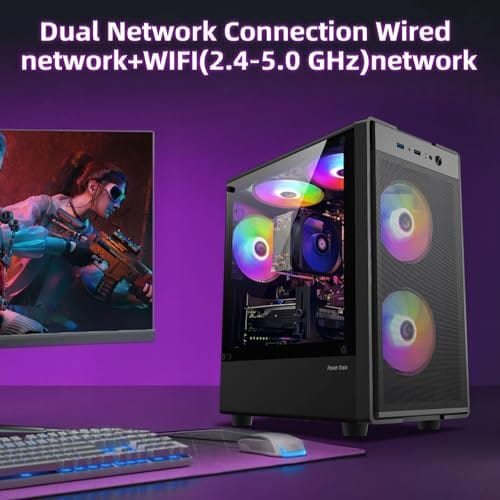
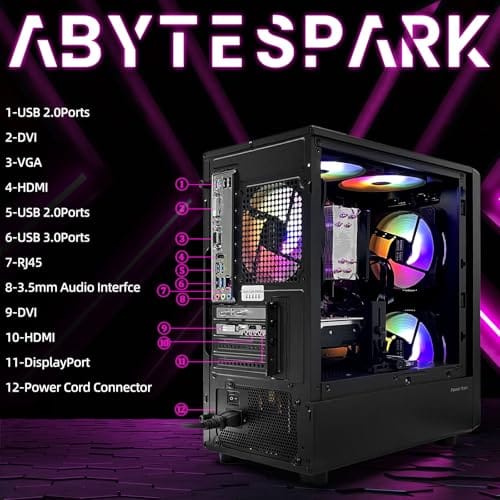
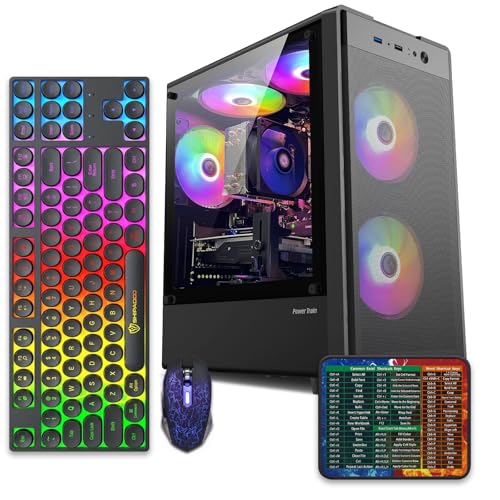
On a value-focused tower, that software layer is often the price you pay for a low sticker. Take a machine like the abytespark Prebuilt Gaming PC Desktop at $499.99 with a 4.4 rating, an Intel Core i7 office-and-gaming tower. Budget builds like this frequently arrive with a heavier software load than boutique systems, because the margins are thin and pre-install deals help close the gap. The good news is that almost all of it is removable in a few minutes.
Pros
- 512GB SSD bot drive avoids the HDD bottleneck common in budget prebuilts
- RX 590 8GB VRAM buffer handles 1080p textures better than 4GB budget cards
- Complete bundle with RGB peripherals means no extra spend to start using
- Genuine Windows 11 Home 64-bit preinstalled, no activation hassle out of box
Cons
- Limited owner feedback at time of writing, verify seller reputation before purchase
- Core i7-4770 is Haswell era LGA150, no upgrade path and weak IPC versus modern CPUs
- Windows 11 on 4th-gen Intel is unsupported by Microsoft and may miss feature updates
- No CD/DVD-ROM support and RAM/GPU generation limits future workload headroom
This is an entry-tier prebuilt tower built around an Intel Core i7-4770 Haswell CPU, 16GB RAM, a 512GB SSD, and an AMD Radeon RX 590 8GB GDDR5 GPU. It targets budget buyers who need a working office and light gaming PC with peripherals bundled, not enthusiasts chasing current-gen performance.
The defining feature is the RX 590 8GB paired with a 512GB SSD, an uncommon combo at this price band. Cards in this class typically handle 1080p esports titles at 60+ FPS on medium to high, matching the vendor claim for CS:GO, League of Legends, Apex, and Overwatch. Newer AA titles will need lowered settings.
Trade-offs are significant. The i7-4770 launched in 2013, so IPC, single-thread performance, and platform features like NVMe bot, PCIe Gen4, and modern USB are limited. Windows 11 runs here but sits outside Microsoft's official supported CPU list. There is no realistic CPU or socket upgrade path on LGA1150.
Buy this if you need a plug-and-play 1080p esports and office tower with keyboard, mouse, and RGB included at a low outlay. Skip this if you want current-gen platform support, sustained AA 1440p gaming, or a build with a meaningful upgrade runway.
GPU class: The AMD Radeon RX 590 8GB GDDR5 is a Polaris-refresh card roughly equivalent to a GTX 1060 6GB tier. Expect 1080p 60+ FPS in esports titles like CS:GO, Overwatch, Apex, League, and Fortnite on medium settings, matching the listing's claims.
AAA and modern titles: The vendor lists GTA V, Warzone, Hogwarts Legacy, and The Division 2. Realistically, these run at 1080p low to medium with FSR upscaling where suported.Ray tracing is unsupported on RX 590. No DLSS, no frame gen, no AV1 encode.
CPU bottleneck: The Core i7-4770 quad-core with 8threads at up to 3.9GHz will bottleneck the RX 590 in CPU-heavy titles like Warzone and Escape from Tarkov. Expect frame time inconsistency in large team fights even when average FPS looks aceptable.
Storage and RAM fit: 512GB SSD holds Windows plus 3 to 5 modern game installs before space pressure. 16GB DR3-era RAM is adequate for current esports but leaves no headroom for heavy streaming, browser tabs, and OBS NVENC alongside a game session.
The longer explanation
Not all bloatware is created equal, and lumping it into one pile misses the point. At the mild end you’ll find manufacturer utilities, things like a driver-update helper or an RGB control panel. Some of those are actually useful, so don’t nuke them blindly. In the middle sit trialware and promotional apps: 30-day security suites, office trials, and game store shortcuts that hope you’ll convert to a paying customer. At the annoying end are the redundant “cleaner” and “booster” tools that duplicate Windows features and sometimes push upsells through pop-ups.
The impact scales with your hardware. On a modern SSD-based system, a dozen idle background apps barely register. On a machine with limited storage or a slower drive, that same load can stretch boot times and clog the startup list. The WIWB Prebuilt Gaming PC Desktop, a $569.99 Ryzen 5 tower with a 4.7 rating, a 512G SSD, 16G DDR4, and Wi-Fi 6, has the SSD headroom to shrug off most pre-installed clutter. That’s the pattern. Faster storage and more memory soften the blow, while tighter configs feel it sooner.
How it works
Bloatware gets onto a prebuilt through the factory imaging process. Instead of installing Windows fresh on every unit, a builder creates a single disk image that already contains the operating system, drivers, and whatever partner software they’ve agreed to bundle. That image gets cloned onto every machine on the line. It’s fast and cheap for the manufacturer, which is exactly why the practice is so widespread across budget towers.
Software vendors pay for those pre-install slots, or offer revenue-share deals when a trial converts to a sale. So the bundled antivirus isn’t an accident. It’s a business arrangement baked into the image before the PC ever leaves the warehouse. Once you power on, those programs register themselves in the Windows startup routine, add themselves to the notification area, and begin their gentle campaign to be noticed. Removing them is straightforward, but the reason they exist is pure economics.
Why it works this way
Margins on budget prebuilts are razor thin. A tower selling for a few hundred dollars leaves little profit after the CPU, GPU, memory, storage, case, and Windows license are paid for. Pre-install revenue is one of the few reliable ways builders recover a bit of that margin, which is why the cheapest machines tend to carry the most bloat. It’s not malice. It’s the math of selling hardware at competitive prices.
There’s a support angle too. Manufacturers bundle their own utilities so they can push driver updates, manage warranties, and reduce support calls. Some of that genuinely helps owners. The problem is that the helpful tools get mixed in with the promotional junk, so you can’t just delete everything on sight. You have to sort the useful branded utility from the trial that only wants your credit card. That sorting is the real skill.
When you’d want this
Nobody wants bloatware itself, but there are moments when tolerating it makes sense. If a prebuilt hits a killer price precisely because the builder took pre-install deals, and the hardware inside is what you actually need, the software clutter is a minor, fixable inconvenience. Twenty minutes of cleanup for a real discount is a trade plenty of buyers happily make. The clutter doesn’t change the silicon, and the silicon is what you paid for.
This logic fits budget shoppers and first-time buyers especially well. If you’re buying a capable, well-specced tower and you’re comfortable removing a few apps, don’t let a busy desktop scare you off a good deal. A system like the WIWB Ryzen 5 build packs a real GPU, an SSD, and Wi-Fi 6 into a sub-$600 tower, and a quick cleanup pass leaves you with exactly the machine you wanted. Our best budget prebuilt PC for 1080p gaming picks apply the same reasoning.

Pros
- Ryzen 5 3500X 6-core CPU bosts to 4.1GHz for smooth 1080p esports CPU load.
- Discrete RX 560 4GB handles DirectX 12 and Vulkan esports titles better than integrated graphics.
- 512GB SSD as bot drive keps Windows load times and app launches snappy out of box.
Cons
- Limited owner feedback at time of writing, no verified reviews to validate build quality.
- RX 560 is a legacy entry-tier GPU, skip if you want modern AAA at 1080p high.
- Ryzen 5 3500X sits on aging AM4, upgrade path is caped at Zen 3 with a BIOS update.
The WIWB is a budget prebuilt tower built around a Ryzen 5 3500X, RX 560 4GB, 16GB DDR4, and a 512GB SSD. It targets students, home office users, and casual gamers who want a plug-and-play box for esports at 1080p rather than a rig for current AAA titles.
The defining pairing here is the 3500X and RX 560. The 6-core, 6-thread CPU bosting to 4.1GHz is still competent for League, CS2, Valorant, and Overwatch, and typically pushes well above 100FPS at 1080p low-to-medium when paired with this GPU class. The RX 560 4GB is the bottleneck for anything heavier.
Trade-offs are typical at this tier. The RX 560 predates FSR frame generation and struggles with modern UE5 titles even at 1080p low. AM4 with a 3500X caps future CPU upgrades at Zen 3, and the case, PSU wattage, VRM phases, and included cooler are not specified, so headroom for a stronger GPU later is unclear.
Buy this if you need a cheap, pre-assembled Windows tower for schoolwork, browsing, and light esports at 1080p. Skip this if you plan to play current AAA releases, stream at 1080p60, or want a platform with a real multi-year upgrade path.
CPU workload: The Ryzen 5 3500X is a 6-core, 6-thread Zen 2 part with a 3.6GHz base and 4.1GHz boost. It stays viable for 1080p esports and light productivity like image editing and IDE work, but lacks SMT, which hurts streaming and modern CPU-bound AA titles.
GPU class and resolution fit: The RX 560 4GB GDDR5 is an entry esports card. Expect high frame rates in CS2, League, and Overwatch at 1080p low-to-medium, and playable frame rates in older AAA titles at 1080p low. 1440p and modern AA at medium are outside its envelope.
Memory and storage: 16GB DDR4 is the current baseline for gaming and multitasking, and the 512GB SSD covers Windows plus roughly 3 to 5 modern game installs. Exact DDR4 speed, dual-channel status, and SSD interface (SATA vs NVMe) are not specified.
Connectivity and upgrade path: WiFi 6 is included, and the board exposes an M.2 slot plus spare DDR4 slots for later expansion. PSU wattage, connector layout, case clearance, and waranty length beyond the stated 1-year coverage are not specified, so plan GPU upgrades cautiously.
What to look for in a clean prebuilt
When you’re comparing machines, a few signals hint at how much software junk you’ll face. Boutique and enthusiast-focused builders often advertise a clean Windows install as a selling point, while mass-market budget towers stay quiet about it. Read owner reports and photos of the first boot if you can find them. A cluttered desktop in every unboxing picture is a fair warning. Storage matters too. A machine with a roomy SSD absorbs pre-installed apps far better than one scraping by on minimal space.
Also weigh how easy the cleanup will be. Standard Windows apps uninstall through Settings in seconds. Deeply integrated manufacturer suites sometimes resist, so a builder known for lighter bundles saves you effort. None of this should override the core specs, the CPU, GPU, RAM, and storage you’re paying for. Bloatware is a surface problem on an otherwise solid machine, and it’s worth keeping in that perspective.
Common misconceptions
The biggest myth is that bloatware is malware. It isn’t. It’s unwanted, sometimes pushy, but it’s legitimate software that you can uninstall through normal channels. Malware hides and resists removal. Bloatware sits in your Start menu waiting to be deleted. Conflating the two makes people either panic or wipe useful drivers along with the junk.
Another misconception is that bloat will cripple performance. On a modern system with an SSD and adequate RAM, a handful of idle apps has a tiny footprint. Your frame rates in games won’t move because a trial office suite exists on the drive. The real cost is clutter, a slightly longer startup list, and the occasional nag pop-up. Fix those and the machine performs exactly as its specs promise. Don’t let the busy desktop fool you into thinking the hardware is compromised.
Frequently asked
Is it safe to remove prebuilt bloatware myself?
Yes, for standard apps. Use Windows Settings to uninstall trials, promotional launchers, and duplicate cleaners. Leave genuine driver and firmware utilities from the manufacturer, since those can help with updates and warranty support. When unsure, look up the app name before deleting.
Does bloatware slow down gaming performance?
Rarely in any meaningful way. Idle background apps use little CPU or GPU, so your in-game frame rates stay put. The bigger effect is on boot time and general responsiveness if too many programs launch at startup. Trimming the startup list handles most of that.
Why do cheaper prebuilts have more bloatware?
Thin margins. Budget towers earn little profit on hardware alone, so builders take pre-install and trial-conversion deals to recover a bit of revenue. The lower the price, the more likely a machine leans on that software income. It’s a business tradeoff, not a hardware defect.
Can I just do a clean Windows reinstall instead?
You can, and many enthusiasts do. A fresh install from Microsoft’s media wipes every pre-installed extra at once. Just download the correct drivers from the component makers first, especially chipset, GPU, and network drivers, so you’re not stuck offline after the reset.
Do all prebuilt PCs come with bloatware?
No. Boutique and enthusiast builders often ship a clean or near-clean install as a selling point. Mass-market budget towers carry the most. If a minimal software load matters to you, it’s worth reading owner reports before buying to gauge what shows up on first boot.


































Write Your Review
No reviews yet. Be the first to share your experience!