

If you’ve shopped for a prebuilt tower and noticed the graphics card has no flashy brand name, no triple-fan shroud, and no RGB lighting, you’ve probably run into an OEM GPU. It’s one of those phrases that gets tossed around in forums without much explanation, and it can leave you wondering if you’re getting a lesser card or just a plainer version of the same silicon.
Here’s the plain-English version. An OEM GPU is a graphics card built for original equipment manufacturers, the companies that assemble finished computers, rather than for the retail shelf. You won’t usually find it in a boxed package at a store. It ships pre-installed inside a system. That distinction matters more than most buyers expect, and it shapes everything from your warranty to your upgrade path. If you’re weighing a full machine instead, our roundup of the best budget prebuilt PC 2026 picks and the best AMD prebuilt gaming PC guide both cover systems where these cards commonly appear.
The short answer
An OEM GPU is a graphics card that a manufacturer like NVIDIA or AMD sells directly to system builders, or that a board partner produces specifically for prebuilt machines. It uses the same core GPU chip you’d find in a retail card, but the surrounding package is stripped down. Simpler cooler. No retail box. Often no bundled cables or software. The builder installs it, and it reaches you already seated in a finished tower.
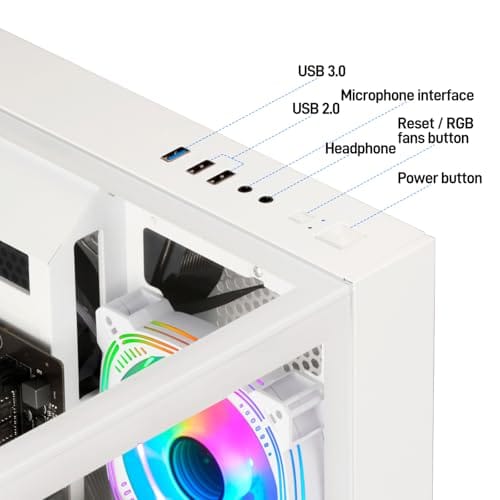
Because these cards live inside complete systems, the easiest way to buy into one is to buy the whole machine. A budget prebuilt like the WIWB Ryzen 5 desktop, which pairs an RX 560 4GB graphics card with 16GB of DDR4, a 512GB SSD, and Wi-Fi 6 for $569.99 at a 4.7 rating, is a textbook example of how an OEM card arrives in the wild.


Pros
- Ryzen 5 3500X 6-core CPU bosts to 4.1GHz for smooth 1080p esports CPU load.
- Discrete RX 560 4GB handles DirectX 12 and Vulkan esports titles better than integrated graphics.
- 512GB SSD as bot drive keps Windows load times and app launches snappy out of box.
Cons
- Limited owner feedback at time of writing, no verified reviews to validate build quality.
- RX 560 is a legacy entry-tier GPU, skip if you want modern AAA at 1080p high.
- Ryzen 5 3500X sits on aging AM4, upgrade path is caped at Zen 3 with a BIOS update.
The WIWB is a budget prebuilt tower built around a Ryzen 5 3500X, RX 560 4GB, 16GB DDR4, and a 512GB SSD. It targets students, home office users, and casual gamers who want a plug-and-play box for esports at 1080p rather than a rig for current AAA titles.
The defining pairing here is the 3500X and RX 560. The 6-core, 6-thread CPU bosting to 4.1GHz is still competent for League, CS2, Valorant, and Overwatch, and typically pushes well above 100FPS at 1080p low-to-medium when paired with this GPU class. The RX 560 4GB is the bottleneck for anything heavier.
Trade-offs are typical at this tier. The RX 560 predates FSR frame generation and struggles with modern UE5 titles even at 1080p low. AM4 with a 3500X caps future CPU upgrades at Zen 3, and the case, PSU wattage, VRM phases, and included cooler are not specified, so headroom for a stronger GPU later is unclear.
Buy this if you need a cheap, pre-assembled Windows tower for schoolwork, browsing, and light esports at 1080p. Skip this if you plan to play current AAA releases, stream at 1080p60, or want a platform with a real multi-year upgrade path.
CPU workload: The Ryzen 5 3500X is a 6-core, 6-thread Zen 2 part with a 3.6GHz base and 4.1GHz boost. It stays viable for 1080p esports and light productivity like image editing and IDE work, but lacks SMT, which hurts streaming and modern CPU-bound AA titles.
GPU class and resolution fit: The RX 560 4GB GDDR5 is an entry esports card. Expect high frame rates in CS2, League, and Overwatch at 1080p low-to-medium, and playable frame rates in older AAA titles at 1080p low. 1440p and modern AA at medium are outside its envelope.
Memory and storage: 16GB DDR4 is the current baseline for gaming and multitasking, and the 512GB SSD covers Windows plus roughly 3 to 5 modern game installs. Exact DDR4 speed, dual-channel status, and SSD interface (SATA vs NVMe) are not specified.
Connectivity and upgrade path: WiFi 6 is included, and the board exposes an M.2 slot plus spare DDR4 slots for later expansion. PSU wattage, connector layout, case clearance, and waranty length beyond the stated 1-year coverage are not specified, so plan GPU upgrades cautiously.
The longer explanation
To really get why OEM cards exist, it helps to separate the two halves of any graphics card. There’s the GPU itself, the processor designed by NVIDIA or AMD, and there’s the board around it: the power delivery, the memory chips, the cooler, and the output ports. Retail cards from brands like ASUS, MSI, or Gigabyte wrap that chip in an elaborate package aimed at enthusiasts who care about overclocking headroom and quiet fans.
OEM cards take a leaner route. A system builder ordering thousands of units doesn’t need a fancy backplate or a three-slot cooler. They need a card that fits a specific case, draws a predictable amount of power, and costs less per unit. So the board partner trims the extras. The chip underneath is genuine, but the presentation is built for volume, not for the display wall at a computer shop.
Sometimes OEM cards carry model names you won’t see at retail at all. NVIDIA has shipped variants with slightly different core counts or memory configurations exclusively to builders. That’s part of why two machines listing the “same” card can perform a little differently. The name on the spec sheet doesn’t always tell the full story, and that’s worth remembering.
History: how we got here
The OEM channel is nearly as old as the dedicated graphics card. Back when companies like Dell, HP, and Gateway dominated home computing, they bought components in staggering volume and demanded parts tuned to their assembly lines. Card makers happily obliged, producing low-profile boards, half-height brackets, and coolers sized to cramped office chassis.
That relationship never went away. As gaming prebuilts exploded in popularity, the OEM pipeline simply expanded to feed them. A boutique builder assembling towers around an Intel Core i7, like the abytespark desktop selling for $499.99 at a 4.4 rating, is doing the same thing the old giants did, just at a smaller scale. The card inside is chosen for cost, fit, and supply, and the buyer rarely gets to pick the exact board partner.
Why it works this way
The economics are simple. A retail graphics card has to justify its price against a wall of competitors, so brands pile on features and cooling to stand out. An OEM card faces none of that pressure. It just needs to hit a performance target at a fixed cost inside one specific machine. Stripping the package down shaves real money off every unit, and across a production run that adds up fast.
There’s a thermal angle too. Prebuilt cases are engineered as a whole, so the GPU cooler only has to handle the airflow that particular chassis provides. A blower-style shroud that vents heat straight out the back panel often makes more sense in a tight OEM tower than a big open-air cooler that dumps heat into the case. It isn’t a downgrade so much as a different priority. The builder optimizes for the box the card lives in.
Supply plays a role as well. During the shortages of recent years, builders with long-standing OEM contracts kept getting chips when retail shelves sat empty. That steady flow is exactly why prebuilts stayed available while loose cards spiked in price. For the manufacturer, a bulk order from a system integrator is predictable revenue, so those channels get priority. The result is a card you can only really access by buying the machine it was allocated to, which is a feature of the model, not a flaw.
When you’d want this
Most people who end up with an OEM GPU never went looking for one. They bought a complete computer, and the card came along for the ride. That’s genuinely fine for a huge share of buyers. If you want a working gaming or office machine without sourcing parts, comparing prices, and assembling anything, a prebuilt with an OEM card gets you there for less than a comparable custom build.
A machine like the abytespark Intel Core i7 tower at $499.99 shows the appeal. You get a finished system with one warranty, one point of contact, and no guesswork about compatibility. For students, casual players, or anyone furnishing a home office, that convenience is the whole point. If you’d rather explore a few configurations, our list of the best budget prebuilt PC for 1080p gaming is a useful next stop.
Pros
- 512GB SSD bot drive avoids the HDD bottleneck common in budget prebuilts
- RX 590 8GB VRAM buffer handles 1080p textures better than 4GB budget cards
- Complete bundle with RGB peripherals means no extra spend to start using
- Genuine Windows 11 Home 64-bit preinstalled, no activation hassle out of box
Cons
- Limited owner feedback at time of writing, verify seller reputation before purchase
- Core i7-4770 is Haswell era LGA150, no upgrade path and weak IPC versus modern CPUs
- Windows 11 on 4th-gen Intel is unsupported by Microsoft and may miss feature updates
- No CD/DVD-ROM support and RAM/GPU generation limits future workload headroom
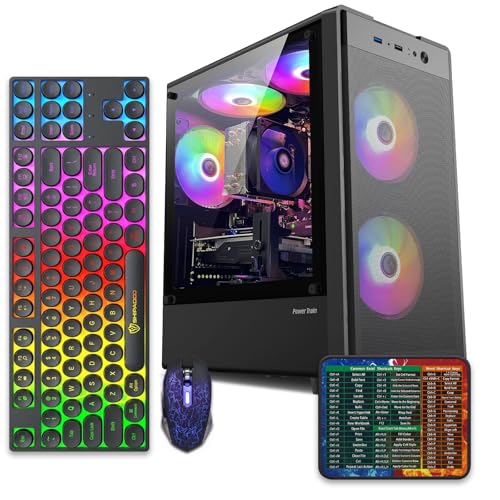
This is an entry-tier prebuilt tower built around an Intel Core i7-4770 Haswell CPU, 16GB RAM, a 512GB SSD, and an AMD Radeon RX 590 8GB GDDR5 GPU. It targets budget buyers who need a working office and light gaming PC with peripherals bundled, not enthusiasts chasing current-gen performance.
The defining feature is the RX 590 8GB paired with a 512GB SSD, an uncommon combo at this price band. Cards in this class typically handle 1080p esports titles at 60+ FPS on medium to high, matching the vendor claim for CS:GO, League of Legends, Apex, and Overwatch. Newer AA titles will need lowered settings.
Trade-offs are significant. The i7-4770 launched in 2013, so IPC, single-thread performance, and platform features like NVMe bot, PCIe Gen4, and modern USB are limited. Windows 11 runs here but sits outside Microsoft's official supported CPU list. There is no realistic CPU or socket upgrade path on LGA1150.
Buy this if you need a plug-and-play 1080p esports and office tower with keyboard, mouse, and RGB included at a low outlay. Skip this if you want current-gen platform support, sustained AA 1440p gaming, or a build with a meaningful upgrade runway.
GPU class: The AMD Radeon RX 590 8GB GDDR5 is a Polaris-refresh card roughly equivalent to a GTX 1060 6GB tier. Expect 1080p 60+ FPS in esports titles like CS:GO, Overwatch, Apex, League, and Fortnite on medium settings, matching the listing's claims.
AAA and modern titles: The vendor lists GTA V, Warzone, Hogwarts Legacy, and The Division 2. Realistically, these run at 1080p low to medium with FSR upscaling where suported.Ray tracing is unsupported on RX 590. No DLSS, no frame gen, no AV1 encode.
CPU bottleneck: The Core i7-4770 quad-core with 8threads at up to 3.9GHz will bottleneck the RX 590 in CPU-heavy titles like Warzone and Escape from Tarkov. Expect frame time inconsistency in large team fights even when average FPS looks aceptable.
Storage and RAM fit: 512GB SSD holds Windows plus 3 to 5 modern game installs before space pressure. 16GB DR3-era RAM is adequate for current esports but leaves no headroom for heavy streaming, browser tabs, and OBS NVENC alongside a game session.
What to look for in a prebuilt with an OEM GPU
Since you rarely get to choose the exact card, focus on what the listing actually tells you. Check the memory amount first. A card with 4GB of VRAM, like the RX 560 in that WIWB build, handles esports titles and older games at 1080p but strains on newer releases with high-resolution textures. Know what you plan to play, and match the card to it.
Look at the power supply and the case next. OEM builders sometimes pair a modest card with a modest PSU, which can limit your future upgrade options. A standard ATX case and a mainstream connector layout make life easier if you swap the card down the road. And confirm the machine uses a full-size slot rather than a low-profile bracket, since that quietly restricts which retail cards you can drop in later.
Pay attention to the cooling story as well. A well-ventilated case with a couple of intake fans keeps an OEM card running at its rated clocks, while a sealed budget box can let it throttle under load. Owner reports are gold here, since they reveal how a system behaves after an hour of gaming rather than in a benchmark burst. If a build like the WIWB or abytespark tower fits your budget and your games, the OEM card inside is rarely the weak link. The case, PSU, and airflow around it usually decide how happy you’ll be.
Common misconceptions
The biggest myth is that OEM cards are somehow fake or inferior silicon. They’re not. The GPU chip is the real thing, produced on the same lines as retail parts. What differs is the packaging and, occasionally, the clock speeds or memory setup. Performance can land a few percent below a decked-out retail card, but it’s the same family, not a knockoff.
Another mix-up involves warranties. A retail card carries its own multi-year coverage from the board partner. An OEM card is typically covered under the system builder’s warranty instead, which may run shorter and route all support through that one company. It’s not necessarily worse, it’s just handled differently, so read the fine print before you assume you’re protected for years.
Frequently asked
Are OEM GPUs slower than retail cards?
Usually only slightly, if at all. The core chip is identical, so raw capability matches. Any gap comes from lower factory clocks or a simpler cooler that limits sustained boost. In real games you’re often looking at a difference of a few frames, not a different tier of performance.
Can I buy an OEM GPU on its own?
Sometimes, through liquidation sellers or system-pull markets, but it’s uncommon and rarely a bargain. These cards are meant to ship inside complete machines. If you want a standalone card with full support, a retail model is the safer path. OEM units bought loose can also lack driver-friendly branding.
Do OEM GPUs get driver updates?
Yes. NVIDIA and AMD drivers recognize the underlying chip, so you’ll receive the same regular updates a retail owner does. Rare OEM-only variants can occasionally lag on a specific driver branch, but the mainstream ones behave like any other card once they’re in Windows.
Will an OEM card fit if I want to upgrade later?
That depends on the case and power supply, not the card itself. Confirm the tower has a full-length slot, enough clearance, and a PSU with the right connectors. Many budget prebuilts leave headroom, but some slim office boxes don’t, so measure before you plan a swap.
Is a prebuilt with an OEM GPU worth it?
For plenty of buyers, yes. You trade a bit of customization for a finished, warrantied machine at a lower entry price. If you value convenience and a single support contact over hand-picking every part, it’s a sensible buy. Just match the card’s VRAM and power to the games you actually play.


































Write Your Review
No reviews yet. Be the first to share your experience!