

You’ve probably seen the term “barebones PC” in kit listings and wondered what you’re actually paying for. Short version: it’s a partial computer. The vendor hands you the skeleton, the case, motherboard, power supply, and often a CPU cooler, and leaves the expensive brains for you to add. It’s a middle path between building from a pile of loose parts and buying a finished prebuilt that boots on day one.
That middle ground appeals to a specific kind of buyer. If you’re new to building and a full parts list feels intimidating, a barebones kit removes the hardest compatibility guesswork while still letting you learn. If you’re comparing finished machines instead, our roundups of the best budget prebuilt PC and the best AMD prebuilt gaming PC show what fully assembled options cost at similar price points.
The short answer
A barebones PC is a pre-assembled foundation that’s missing the parts most likely to change with your budget and needs. You typically get the case, a motherboard already installed, a power supply, and sometimes a stock cooler. You supply the CPU (or it’s included on some kits), the RAM, and the storage. Sometimes the GPU too. The idea is that the fiddly, compatibility-sensitive work is done, and you finish the build with the components you actually care about.
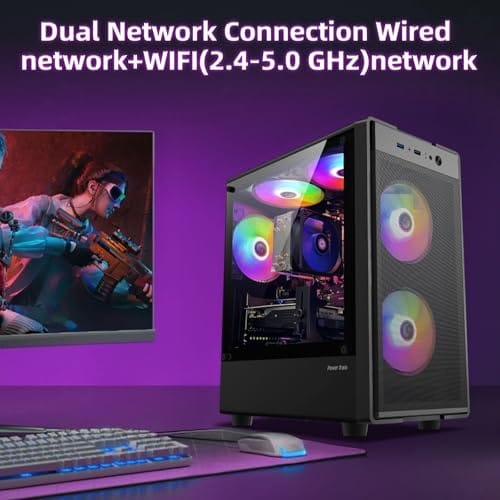
For a lot of first-time builders, that’s the reassurance they need. And if you’d rather skip building entirely, a ready-to-run tower like this Intel Core i7 prebuilt at $499.99 with a 4.4 rating shows the finished-machine alternative sitting right next to the barebones route.
Pros
- 512GB SSD bot drive avoids the HDD bottleneck common in budget prebuilts
- RX 590 8GB VRAM buffer handles 1080p textures better than 4GB budget cards
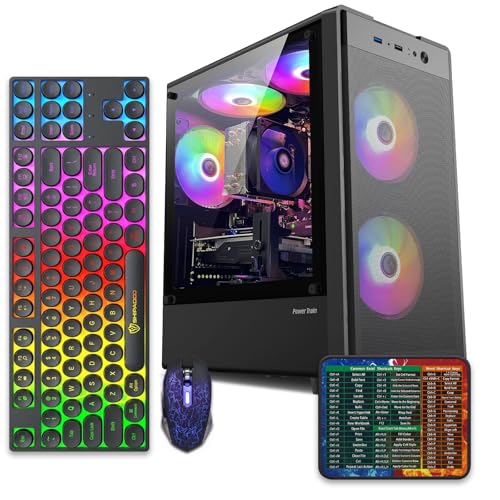
- Complete bundle with RGB peripherals means no extra spend to start using
- Genuine Windows 11 Home 64-bit preinstalled, no activation hassle out of box
Cons
- Limited owner feedback at time of writing, verify seller reputation before purchase
- Core i7-4770 is Haswell era LGA150, no upgrade path and weak IPC versus modern CPUs
- Windows 11 on 4th-gen Intel is unsupported by Microsoft and may miss feature updates
- No CD/DVD-ROM support and RAM/GPU generation limits future workload headroom
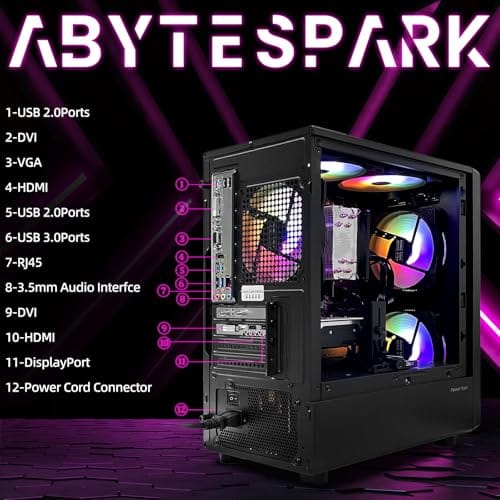
This is an entry-tier prebuilt tower built around an Intel Core i7-4770 Haswell CPU, 16GB RAM, a 512GB SSD, and an AMD Radeon RX 590 8GB GDDR5 GPU. It targets budget buyers who need a working office and light gaming PC with peripherals bundled, not enthusiasts chasing current-gen performance.
The defining feature is the RX 590 8GB paired with a 512GB SSD, an uncommon combo at this price band. Cards in this class typically handle 1080p esports titles at 60+ FPS on medium to high, matching the vendor claim for CS:GO, League of Legends, Apex, and Overwatch. Newer AA titles will need lowered settings.
Trade-offs are significant. The i7-4770 launched in 2013, so IPC, single-thread performance, and platform features like NVMe bot, PCIe Gen4, and modern USB are limited. Windows 11 runs here but sits outside Microsoft's official supported CPU list. There is no realistic CPU or socket upgrade path on LGA1150.
Buy this if you need a plug-and-play 1080p esports and office tower with keyboard, mouse, and RGB included at a low outlay. Skip this if you want current-gen platform support, sustained AA 1440p gaming, or a build with a meaningful upgrade runway.
GPU class: The AMD Radeon RX 590 8GB GDDR5 is a Polaris-refresh card roughly equivalent to a GTX 1060 6GB tier. Expect 1080p 60+ FPS in esports titles like CS:GO, Overwatch, Apex, League, and Fortnite on medium settings, matching the listing's claims.
AAA and modern titles: The vendor lists GTA V, Warzone, Hogwarts Legacy, and The Division 2. Realistically, these run at 1080p low to medium with FSR upscaling where suported.Ray tracing is unsupported on RX 590. No DLSS, no frame gen, no AV1 encode.
CPU bottleneck: The Core i7-4770 quad-core with 8threads at up to 3.9GHz will bottleneck the RX 590 in CPU-heavy titles like Warzone and Escape from Tarkov. Expect frame time inconsistency in large team fights even when average FPS looks aceptable.
Storage and RAM fit: 512GB SSD holds Windows plus 3 to 5 modern game installs before space pressure. 16GB DR3-era RAM is adequate for current esports but leaves no headroom for heavy streaming, browser tabs, and OBS NVENC alongside a game session.
The longer explanation
The word “barebones” isn’t a strict spec, it’s a range. On one end you’ll find kits that are essentially a case with a power supply and nothing else, leaving even the motherboard to you. On the other end are near-complete systems that only lack RAM and an SSD. Small-form-factor kits, the shoebox-sized units popular for home theater PCs and mini home servers, are one of the most common barebones categories because their custom boards and coolers are hard to source separately.
What ties them together is intent. A barebones kit exists so the vendor can handle the parts that are awkward to buy individually or easy to get wrong, then let you personalize the rest. You’re paying for assembly labor and compatibility assurance on the frame, and keeping the freedom to choose your processor, memory capacity, and storage speed. That’s the whole pitch. Less risk than loose parts, more control than a sealed prebuilt.
It helps to think of it as a spectrum of “done for you.” A fully sealed prebuilt is 100 percent finished. A pile of loose components is zero. Barebones kits land somewhere in the 60 to 80 percent range, and the exact number is what you’re really shopping for. A kit that includes the CPU and cooler asks very little of you. One that’s just a case and PSU asks a lot. Neither is wrong, but knowing where a given listing sits on that spectrum tells you how much work and how much research you’re signing up for.
How it works
Buying a barebones kit usually goes like this. You pick the kit based on its socket and chipset, which decide what CPUs it accepts. You confirm the RAM type it wants, DDR4 or DDR5, and how many slots it has. Then you add storage, an M.2 SSD in most modern kits. If the kit doesn’t include a processor, you buy one that matches the socket, seat it, add memory and drives, and you’re done.
The assembly you’re left with is the easy 20 percent. Dropping in a CPU, clipping in RAM, and screwing down an SSD takes most people under half an hour. The vendor already handled standoffs, front-panel wiring, and power-supply mounting, which is where new builders most often stumble. You get the satisfying part of building without the parts that make people nervous.
One step people underestimate is the first boot. After you seat the parts, you’ll enter the motherboard’s firmware to confirm the CPU and memory are recognized, enable the memory profile so your RAM runs at its rated speed, and set the boot order for your install drive. It’s a few clicks, not a science project. From there you load the operating system off a USB stick, install drivers, and you’re running. Because the vendor already validated the frame, hardware faults are rare, and the ones that do appear are usually a stick of RAM that isn’t seated fully or a loose power cable, both quick to spot.
Why it works this way
Barebones kits exist because of where the cost and the confusion cluster. Cases, power supplies, and motherboards are the components most tied to physical fit and wiring, and they’re the least likely to be the reason you’re excited about a new PC. CPUs, memory, and storage are the parts whose prices swing constantly and whose ideal size depends entirely on what you do. Splitting the machine at that seam lets the vendor sell a stable, pre-built frame while you time the volatile parts to your wallet.
There’s a supply angle too. Small-form-factor and mini-PC kits often use proprietary boards, coolers, and brackets you simply can’t buy loose. Selling them as a barebones unit is the only practical way to get that hardware into a builder’s hands. So the format isn’t just a convenience, it’s sometimes the only route to a particular chassis or layout.
When you’d want this
A barebones kit makes sense when you want some control without the full research load. Maybe you already own RAM and an SSD from an old machine and want to reuse them. Maybe you want a specific tiny chassis for a home server or a media box that no prebuilt offers. Or maybe you’re learning and want the confidence of a pre-wired frame while you handle the CPU and memory yourself. In all three cases you’re saving money or gaining fit that a sealed prebuilt won’t give you.
It’s the wrong call, though, if you want a machine that games out of the box with zero effort. In that situation a complete system is simpler and often cheaper once you price the parts you’d still need to buy. A finished tower like this WIWB Ryzen 5 build with an RX 560, 16GB of DDR4, a 512GB SSD, and Wi-Fi 6 at $569.99 with a 4.7 rating shows how close a ready-to-run machine can land to a barebones kit’s total once you add memory and storage.

Pros
- Ryzen 5 3500X 6-core CPU bosts to 4.1GHz for smooth 1080p esports CPU load.
- Discrete RX 560 4GB handles DirectX 12 and Vulkan esports titles better than integrated graphics.
- 512GB SSD as bot drive keps Windows load times and app launches snappy out of box.
Cons
- Limited owner feedback at time of writing, no verified reviews to validate build quality.
- RX 560 is a legacy entry-tier GPU, skip if you want modern AAA at 1080p high.
- Ryzen 5 3500X sits on aging AM4, upgrade path is caped at Zen 3 with a BIOS update.
The WIWB is a budget prebuilt tower built around a Ryzen 5 3500X, RX 560 4GB, 16GB DDR4, and a 512GB SSD. It targets students, home office users, and casual gamers who want a plug-and-play box for esports at 1080p rather than a rig for current AAA titles.
The defining pairing here is the 3500X and RX 560. The 6-core, 6-thread CPU bosting to 4.1GHz is still competent for League, CS2, Valorant, and Overwatch, and typically pushes well above 100FPS at 1080p low-to-medium when paired with this GPU class. The RX 560 4GB is the bottleneck for anything heavier.
Trade-offs are typical at this tier. The RX 560 predates FSR frame generation and struggles with modern UE5 titles even at 1080p low. AM4 with a 3500X caps future CPU upgrades at Zen 3, and the case, PSU wattage, VRM phases, and included cooler are not specified, so headroom for a stronger GPU later is unclear.
Buy this if you need a cheap, pre-assembled Windows tower for schoolwork, browsing, and light esports at 1080p. Skip this if you plan to play current AAA releases, stream at 1080p60, or want a platform with a real multi-year upgrade path.
CPU workload: The Ryzen 5 3500X is a 6-core, 6-thread Zen 2 part with a 3.6GHz base and 4.1GHz boost. It stays viable for 1080p esports and light productivity like image editing and IDE work, but lacks SMT, which hurts streaming and modern CPU-bound AA titles.
GPU class and resolution fit: The RX 560 4GB GDDR5 is an entry esports card. Expect high frame rates in CS2, League, and Overwatch at 1080p low-to-medium, and playable frame rates in older AAA titles at 1080p low. 1440p and modern AA at medium are outside its envelope.
Memory and storage: 16GB DDR4 is the current baseline for gaming and multitasking, and the 512GB SSD covers Windows plus roughly 3 to 5 modern game installs. Exact DDR4 speed, dual-channel status, and SSD interface (SATA vs NVMe) are not specified.
Connectivity and upgrade path: WiFi 6 is included, and the board exposes an M.2 slot plus spare DDR4 slots for later expansion. PSU wattage, connector layout, case clearance, and waranty length beyond the stated 1-year coverage are not specified, so plan GPU upgrades cautiously.
What to look for in a barebones PC
Start with the socket and chipset, because they lock in your CPU options. A kit built around an aging socket limits you to older, sometimes pricier chips. Check the RAM standard next, since a DDR4 kit and a DDR5 kit steer you toward very different memory prices. Count the M.2 and SATA slots so your storage plans fit. And look hard at the power supply’s wattage and quality, because a weak or no-name PSU is the part barebones vendors most often cut to hit a price.
Cooling and case size matter more on small kits than on full towers. A cramped chassis with a stock cooler can throttle a hot CPU, so match the processor’s power draw to what the kit can actually dissipate. Read owner feedback on noise and thermals before you commit, since a great-looking mini kit that runs loud gets old fast. Our best budget prebuilt PC for HTPC guide is worth a look if quiet, small-form-factor use is your goal.
Common misconceptions
The biggest myth is that barebones always means cheaper. It doesn’t. By the time you add a CPU, RAM, and an SSD, some kits cost more than a comparable finished prebuilt that’s on sale. The savings show up mainly when you reuse parts you already own or when you need a chassis no prebuilt sells. Another misconception is that barebones is only for experts. It’s actually one of the friendlier entry points, since the hardest wiring is already handled.
People also assume every barebones kit includes a CPU. Many don’t. Read the listing carefully, because “barebones” describes a range, and two kits at the same price can include very different parts. Confirm exactly what’s in the box before you buy, so you’re not surprised by a missing processor or a bring-your-own cooler note buried in the specs.
Frequently asked
Does a barebones PC include an operating system?
Almost never. Barebones kits ship without Windows or Linux installed, since they usually lack the storage drive an OS lives on. Budget for a Windows license or plan on a free Linux install, and have a USB drive ready to load it once your SSD is in.
Can I put a graphics card in a barebones PC?
Usually yes on standard tower kits, as long as the case has a PCIe slot with clearance and the power supply has the right connectors. Small-form-factor kits are the exception, since many only support low-profile cards or none at all. Check the GPU length and PSU wattage before buying one.
Is building from a barebones kit hard?
Not really. The parts you add, a CPU, RAM, and an SSD, are the simplest steps in any build, and the vendor already did the fiddly wiring. Most people finish in under 30 minutes with just a screwdriver. It’s a good first project for a nervous builder.
Are barebones PCs good for gaming?
They can be, if the kit accepts a capable CPU and has room plus power for a real GPU. Standard tower kits handle gaming fine. Tiny kits are better suited to light play, media, or server duty, since their cooling and slot limits cap how much graphics horsepower you can add.
How is a barebones PC different from a prebuilt?
A prebuilt arrives finished and ready to power on, while a barebones kit leaves the CPU, RAM, and storage for you to install. The barebones route trades a little assembly for more control over key parts. A prebuilt trades that control for convenience and a machine that works the moment it’s unboxed.


































Write Your Review
No reviews yet. Be the first to share your experience!