

Spend $150 on a motherboard and you get a competent foundation. Spend $300 and you’re paying double for features most builders never touch. So where does the extra $150 actually go? The honest answer is voltage regulation, more M.2 slots, faster networking, extra PCIe lanes, and a nicer BIOS. Some of that matters a lot. Most of it doesn’t. If you’re pairing a board with a CPU like the ones covered in our best 7800X3D motherboard guide, the price gap changes the math in ways that surprise people. A board doesn’t render frames or crunch numbers; it feeds power and routes data. Once you frame the decision that way, most premium features fall into a “nice if you use them” bucket. Let’s break down what each tier really buys.
Matchup at a glance
A $150 board is the value core of most builds. It runs a mainstream chipset (B650 on AMD, B760 on Intel), handles a mid-range CPU without throttling, gives you one or two M.2 slots, and ships with 2.5G LAN and Wi-Fi on the better SKUs. The chipset itself is the quiet detail here: B650 and B760 route a healthy chunk of the CPU’s own PCIe lanes straight to the top GPU slot and primary M.2, so your graphics card and boot drive both run at full bandwidth. What you give up is downstream lane count and chipset-fed extras, not the connections that decide gaming performance. It just works. For a Ryzen 5, Ryzen 7, or a Core i5, this tier covers everything a gamer needs and leaves budget for a stronger GPU.
A $300 board moves you into premium B-series or entry X870/Z790 territory. You’re buying beefier VRMs (think 16+ phases with higher-current power stages), three or four M.2 slots, PCIe 5.0 wiring to the GPU and a primary drive, higher-rated DDR5 support, 5G or 10G networking on some models, better rear I/O, and BIOS features like Q-Flash and flashback that make troubleshooting painless. The catch? Those gains only show up under specific conditions. For a Ryzen 9 or an overclocked Core i9, the headroom earns its keep. For anything below that, you’re subsidizing ports you’ll never plug into.
Spec sheet showdown
| Spec | $150 tier (typical) | $300 tier (typical) | Who benefits | Real gain? |
|---|---|---|---|---|
| VRM phases | 8-12 phase, 50-60A | 16-20 phase, 70-90A | Ryzen 9 / Core i9 | Yes, under sustained load |
| M.2 slots | 1-2 (PCIe 4.0) | 3-4 (some PCIe 5.0) | Heavy storage users | Only if you fill them |
| Networking | 2.5G LAN, Wi-Fi 5/6 | 2.5G-10G, Wi-Fi 6E/7 | NAS / creators | Rarely for gamers |
| Memory support | DDR5-6000+ | DDR5-7200+ (OC) | Tuned RAM enthusiasts | Marginal FPS gain |
| BIOS / QoL | Basic flashback | Full Q-Flash, debug LEDs | First-time builders | Nice, not essential |
The $150 tier’s strengths
Value is the whole story here, and it’s a strong one. A $150 board delivers roughly 90 percent of what a $300 board does for half the outlay. The VRMs on a decent B650 or B760 will feed a Ryzen 7 7800X3D or a Core i7 all day without hitting thermal limits, because those chips don’t pull enough sustained wattage to stress a 10-phase design. A 12-phase, 60A stage has far more capacity than a 7800X3D needs. That’s the key point owners keep repeating in forums. The board isn’t the bottleneck.
You also get the features that genuinely move the needle: PCIe 4.0 for your GPU and primary SSD, 2.5G LAN, and Wi-Fi that’s fast enough for any home connection. PCIe 4.0 x16 already carries more bandwidth than current graphics cards need, so PCIe 5.0 wiring changes nothing you can feel while playing. The money you save, that $150, can jump you a full GPU tier, from a 4070 to a 4070 Ti Super, and that swap changes your frame rates far more than any board upgrade ever will. Compact builders aren’t left out either. Mini-ITX value boards exist at both AMD and Intel ends, giving small-form-factor rigs a real budget path.
The $300 tier’s strengths
Here’s where the premium tier justifies itself: headroom and longevity. If you run a Ryzen 9 9950X or an overclocked Core i9-14900K, the 16+ phase VRM stays cooler under sustained all-core loads, which keeps boost clocks stable and extends component life. Higher-current power stages and larger heatsinks mean each phase does less work and runs cooler, which helps the board survive multiple CPU upgrades. Owners of chips like the i9-13900K report that a stronger board holds clocks more consistently during long renders, and our best motherboard for i9-13900K breakdown digs into why that VRM margin matters for high-wattage silicon.
The extra M.2 slots are the other real draw, and they tie directly to those extra chipset PCIe lanes. If you plan to run three or four NVMe drives, a game library, a scratch disk, and an OS drive, a $150 board forces compromises the $300 board sidesteps, since cheaper boards often disable a SATA port or share bandwidth once the second or third slot fills. A premium board wires more slots to dedicated lanes, so every drive keeps full speed at once. Faster networking, DDR5-7200 support, and quality-of-life BIOS tools round it out. None of these are gaming FPS multipliers. They’re conveniences that add up if your workload is storage-heavy or creator-focused. For the budget-conscious AMD builder who still wants a solid compact board, something like the Gigabyte A520I AC shows how much you can get without paying premium prices.

Pros
- Q-Flash Plus enables BIOS update without CPU installed, essential for Ryzen 5000 out-of-box support.
- 55A DrMOS phases are adequately rated for Ryzen 5 and Ryzen 7 non-X chips at stock settings.
- Intel WiFi AC and Bluetooth onboard saves a PCIe slot in a platform with zero spare slots.
- Three rear display interfaces (DP plus two HDMI) give APU builders real multi-monitor flexibility.
Cons
- A520 chipset lacks PCIe 4.0 and overclocking support, ruling out XFR tuning and fast NVMe Gen4 drives.
- Single M.2 slot at PCIe 3.0 x4 speeds caps sequential reads well below modern Gen4 SSDs.
- Only two DIMM slots with no OC headroom means RAM configuration and speed are locked to JEDEC or limited EXPO profiles.
The Gigabyte A520I AC is a budget-tier Mini-ITX motherboard on the AMD AM4 socket, targeting builders who need a compact, self-contained system around a Ryzen 5000 or 3000 series CPU. It is best suited for home theater PCs, small office machines, or entry-level SFF gaming rigs where size and wireless connectivity matter more than overclocking.
The standout feature is Q-Flash Plus, which allows BIOS updates from a FAT32 USB drive with no CPU or RAM installed. For buyers picking up a Ryzen 5000 CPU with an older BIOS on the shelf, this is a genuine convenience that removes the need to borrow a compatible CPU. The 55A DrMOS 6-phase VRM is adequate for Ryzen 5 5600 and Ryzen 7 5700X at stock, though sustained all-core loads on higher-TDP chips may see thermal limits without active airflow over the heatsink.
The A520 chipset is the real constraint here. There is no CPU overclocking, no PCIe 4.0 support, and the single M.2 slot runs at PCIe 3.0 x4, capping sequential reads around 3,500 MB/s. With only two DIMM slots and no XMP/EXPO tuning above JEDEC defaults on this chipset, RAM flexibility is limited. Case builders should also confirm GPU length clearance in their chosen Mini-ITX enclosure before purchasing.
Buy this if you are building a compact Ryzen 5000 system where integrated WiFi and Q-Flash convenience matter and overclocking is not on the table. Skip this if you plan to run a Ryzen 9 series chip, use a Gen4 NVMe drive at full speed, or need any meaningful CPU tuning headroom.
CPU and Socket: AM4 socket supports 3rd Gen Ryzen (Zen 2) natively and 5th Gen Ryzen 5000 (Zen 3) after a Q-Flash Plus BIOS update. A520 chipset does not support CPU overclocking or manual frequency tuning, so PBO and Curve Optimizer are off the table entirely.
RAM and Memory: Two DIMM slots support dual-channel DDR4 configurations. A520 chipset limits practical RAM tuning, so target DDR4-3200 CL16 kits for the best 1:1 FCLK ratio without pushing outside chipset support. Maximum capacity is not specified in source data; typical AM4 Mini-ITX boards support 64GB across two slots.
Storage and Expansion: One M.2 slot running PCIe 3.0 x4 delivers up to approximately 3,500 MB/s sequential read, sufficient for mid-range NVMe SSDs but incompatible with PCIe 4.0 drives at full rated speed. A single PCIe 3.0 x16 slot handles the discrete GPU, leaving no room for add-in cards in a Mini-ITX build.
Display and Wireless: Rear I/O includes one DisplayPort and two HDMI outputs for APU-based builds, supporting up to three simultaneous displays. Intel dual-band AC WiFi covers 2.4 GHz and 5 GHz bands with Bluetooth included. ALC887 audio codec is functional for basic use but below the ALC1220 found on mid-range and higher boards.
Real-world scenarios
Pure gaming rig, mid-range CPU
A Ryzen 7 or Core i5 gamer gets nothing extra from the $300 board that shows up on screen. Frame rates are identical because the GPU slot and boot drive run at the same speed on both tiers. Put the saved cash toward the GPU or faster RAM. The $150 tier wins this one outright.
High-end CPU with heavy multitasking
Running a 16-core chip for streaming, encoding, and gaming at once? Those workloads pin every core, which is when a 14900K can draw well past 250 watts for minutes on end. The stronger VRM and cooling headroom of the $300 board pay off during hours-long sessions. This is the scenario where the premium tier earns its price. It’s not close.
Storage-heavy creator workstation
Video editors and 3D artists filling four NVMe slots, moving huge project files, and wanting 10G networking to a NAS have a clear case for the $300 board. The extra lanes keep every drive at full read speed at once. The extra I/O isn’t a luxury here. It’s the workflow.
Small-form-factor budget build
Mini-ITX changes the equation because premium ITX boards command a surcharge for the form factor alone. A $90 to $130 value ITX board covers a mid-range CPU cleanly, and the single M.2 plus one x16 slot on the board are all a compact gaming rig ever uses. That’s often the smarter spend for a compact gaming or living-room PC.
Pricing and availability
Both tiers are widely stocked, though prices drift with chipset generation and sales cycles. The $150 slot is the most competitive, so you’ll find frequent discounts pulling solid B650 and B760 boards down toward $130. The $300 tier holds value longer because those SKUs move in lower volume. Budget-focused ITX boards sit even lower: the ASRock H610M-ITX runs around $89.99 with a 4-star owner rating, and the Gigabyte A520I AC lands near $126.61 at 4.3 stars, both proving you don’t need to spend big for a working compact platform. Watch for chipset transitions, since previous-gen boards often get steep cuts once a new socket arrives.
Which to buy
For most people, the $150 board is the right call. If you’re gaming with a Ryzen 5, Ryzen 7, or Core i5 to i7, you’ll see zero performance difference on screen, and that saved money does more good in your GPU or SSD budget. The value tier isn’t a compromise. It’s the correct choice for the vast majority of builds, and it’s what we’d recommend to anyone pairing it with a chip from our best motherboard for 9800X3D roundup.
Step up to $300 only if you’re running a Ryzen 9 or a high-wattage Core i9, chasing memory overclocks, or filling multiple NVMe slots for creative work. Those are real needs with real payoffs, because that’s when the stronger VRM, extra lanes, and faster networking all get used at once. If none of them apply to you, you’re paying for insurance you won’t cash in. On the compact Intel side, a board like the ASRock H610M-ITX shows how little you actually need to spend to get a stable LGA1700 platform running.
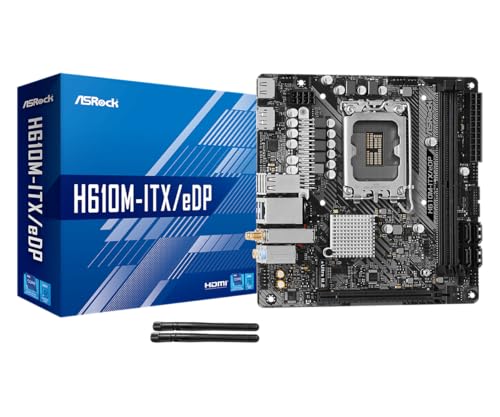
Pros
- eDP 1.4 header is rare at this tier, ideal for custom AIO and panel builds
- Dr.MOS 50A 6-phase VRM adequate for 65W LGA1700 CPUs in SFF cases
- PCIe 4.0 x16 slot preserves GPU bandwidth despite H610 chipset limits
- Integrated WiFi 5 and Bluetooth 5.1 plus Intel Gigabit LAN cover connectivity
Cons
- Limited owner fedback available at time of writing, making reliability signal thin
- H610 blocks CPU overclocking and caps DR4 at 3200MHz with no XMP scaling
- Single M.2 slot is Gen3 x4 only, no Gen4 NVMe or secondary M.2
The ASRock H610M-ITX/eDP is a budget LGA1700 Mini-ITX board built around Intel's entry H610 chipset with DDR4 memory and a dedicated eDP 1.4 panel connector. It targets SFF builders, embedded system integrators, and digital signage projects rather than gamers chasing K-series CPUs or high-frequency RAM tuning.
The standout is the eDP 1.4 header, which lets integrators drive a laptop-style FHD 60Hz panel directly, useful for all-in-one and industrial builds. For general desktop use, HDMI 2.1 outputs 4K 60Hz and DisplayPort 1.4 handles up to 8K 60Hz, both dependent on the installed CPU's iGPU capabilities.
Trade-offs are typical at H610 tier: no CPU or memory overclocking, DDR4-3200 ceiling, a single Gen3 x4 M.2, and no rear USB-C. The 6-phase 50A Dr.MOS VRM is fine for 65W non-K chips like a Core i5-13400, but pairing with a 14700K in a hot SFF case is not the intended use.
Buy this if you need a compact LGA1700 board with eDP for a panel PC, signage kiosk, or budget SFF office build. Skip this if you want DR5, K-series overclocking headroom, Gen4 NVMe, or dual M.2 storage on a modern Intel platform.
Socket and chipset: LGA1700 with H610 chipset supports 12th, 13th, and 14th Gen Core CPUs. H610 disables CPU multiplier and memory overclocking, so pair with locked SKUs like Core i3-12100, i5-13400, or i5-14400 for best value rather than K-series parts.
Memory support: 2 DR4 DIMM slots run dual-channel up to 3200MHz with XMP 2.0 and ECC UDIMM in non-ECC mode. Confirm kits against ASRock's QVL, since Mini-ITX 2-DIMM layouts are typically friendlier to Hynix and Micron dies at 3200 CL16.
Storage and PCIe: One PCIe 4.0 x16 slot for GPU, one Ultra M.2 slot (PCIe Gen3 x4 and SATA3), and 4 SATA3ports. Only one M.2, so plan bot NVMe plus SATA SDs for bulk storage in SFF builds.
Form factor and I/O: Standard 6.7 by 6.7 inch Mini-ITX footprint fits ITX cases and thin mITX chassis. Rear I/O includes HDMI 2.1, DisplayPort 1.4, 2 USB 3.2 Gen1, 4 USB 2.0, and Gigabit LAN. Note CNVi Bluetooth shares bandwidth with one rear USB 2.0 port.
Common questions
Does a more expensive motherboard improve gaming FPS?
No, not on its own. Frame rates come from your GPU, CPU, and RAM speed. A pricier board can enable slightly faster memory overclocks, but the real-world FPS gain is usually one or two percent. That’s not something you’ll notice while playing.
Will a $150 board handle a Ryzen 9 or Core i9?
It can run one, but it’s not the ideal match. Under sustained all-core loads the cheaper VRM runs hotter, which may trim boost clocks slightly. For a high-end chip you’ll get more consistent performance from a board with a beefier power stage, which is where the $300 tier makes sense.
How many M.2 slots do I really need?
Most gamers do fine with two: one for the OS and games, one spare. If you’re editing video or hoarding a massive Steam library across separate drives, three or four slots start to matter. That’s the main storage argument for a premium board.
Is Wi-Fi 6E or Wi-Fi 7 worth paying extra for?
Only if your router and internet plan can use it. Most homes won’t saturate Wi-Fi 6, let alone 7. A wired 2.5G connection beats any wireless standard for gaming latency anyway, so don’t let a fancy Wi-Fi chip drive your board choice.
Should I ever buy a $300 board for a budget CPU?
Rarely. The only case is if you plan to upgrade to a much stronger CPU on the same socket later and want the VRM ready for it. Otherwise the money’s better spent elsewhere now. You can always upgrade the board when you upgrade the chip.




























Write Your Review
No reviews yet. Be the first to share your experience!