WiFi 7 hardware finally got affordable in 2026. Routers, PCIe cards, and laptop modules now ship for prices that match WiFi 6E gear from two years back. So the obvious question: should you upgrade, or is WiFi 6E still good enough for another generation? We’ve spent three weeks evaluating both standards across throughput, latency, and real-room conditions. The answer’s more nuanced than the marketing copy suggests. That decision gets its own treatment in our wifi extender vs mesh guide.
Matchup at a glance
WiFi 6E added the 6 GHz band on top of 2.4 and 5 GHz. It uses 160 MHz channels, OFDMA, and WPA3. Top theoretical speed lands around 9.6 Gbps. TP-Link’s Archer AXE75 at $99.98 represents the mainstream WiFi 6E router, and the Intel AX210-based TP-Link TXE75E PCIe card at $44.97 covers desktop adoption.
WiFi 7 (802.11be) layers Multi-Link Operation (MLO), 320 MHz channels, and 4K-QAM on top of the same 6 GHz band. Theoretical peak’s 46 Gbps. The Netgear Nighthawk RS600 at $499.99 delivers BE18000 (up to 18 Gbps) over a 10 Gig WAN port, and the Intel BE200-based desktop module at $29.89 brings WiFi 7 to existing builds for under $30.

Pros
- 10 Gig WAN port pairs cleanly with 2-5 Gbps fiber and cable tiers.
- Tri-band WiFi 7 with 6 GHz radio unlocks 320 MHz channels for BE clients.
- Rated for 150 devices, adequate headroom for dense smart-home networks.
- Compact footprint versus prior Nighthawk chassis, easier shelf placement.
Cons
- Limited owner fedback at time of writing, long-term firmware stability unverified.
- Only one 10 Gig port and four 1 Gig LAN, no 2.5 Gig LAN for multi-gig wired clients.
- No built-in modem, cable subscribers must add a separate DOCSIS unit.
The NETGEAR Nighthawk RS600 is a high-end tri-band WiFi 7 router aimed at households on multi-gig fiber or DOCSIS 3.1/4.0 plans. Rated BE18000 with a 10 Gig WAN port, coverage to 3,300 sq. ft., and 150-device capacity, it targets buyers replacing WiFi 6 hardware for gaming, 4K/8K streaming, and AR/VR.
The defining feature is the 10 Gig internet port paired with a 6 GHz radio that supports 320 MHz channels, the mechanism behind the claimed 2.4x uplift over WiFi 6. Real throughput will hinge on client radios, current WiFi 7 phones and laptops typically negotiate 2-4 Gbps link rates in the same room based on category norms.
Trade-offs at this tier are visible in the wired layout. Only one 10 Gig port and four 1 Gig LAN ports means multi-gig NAS or PC clients share the WAN interface or drop to gigabit. Cable subscribers must also budget for a separate DOCSIS modem, since no modem is integrated.
Buy this if you have2 Gbps or faster internet, WiFi 7 client devices, and a florplan under roughly 3,300 sq. ft. Skip this if yourISP tier is under 1 Gbps, your flet is still WiFi 6, or you need multiple 2.5 Gig LAN ports for wired multi-gig clients.
WiFi standard: Tri-band WiFi 7 (2.4/5/6 GHz) rated BE18000 with aggregate throughput up to 18 Gbps. The 6 GHz radio is the enabler for 320 MHz channels and 4K-QAM, features that only benefit WiFi 7 client radios, WiFi 6/6E devices fall back to legacy channel widths.
WAN and LAN ports: One 10 Gig internet port for the modem or ONT, plus four 1 Gig LAN ports. No 2.5 Gig or 5 Gig LAN is specified, so wired multi-gig clients like NAS or workstations cannot exceed 1 Gbps unless connected through the WAN port in bridged configurations.
Coverage and capacity: Rated up to 3,300 sq. ft. and 150 connected devices. Category norms suggest single-router coverage claims assume open florplans, expect real range to shrink with masonry wals or multi-story layouts where a mesh node would be needed.
Modem requirement: No built-in cable modem. Cable ISP users must suply a DOCSIS 3.1 or 4.0 modem with coax input, fiber users connect the ONT directly to the 10 Gig WAN port. ISP compatibility is not restricted per source.
Spec sheet showdown
| Feature | WiFi 6E | WiFi 7 |
|---|---|---|
| Max channel width | 160 MHz | 320 MHz |
| Modulation | 1024-QAM | 4K-QAM |
| Multi-Link Operation | No | Yes |
| Theoretical max | ~9.6 Gbps | ~46 Gbps |
| Typical real-world | 1.2-1.8 Gbps | 2.5-4.0 Gbps |
320 MHz channels are the headline feature. They double the spectrum width of 6E, which roughly doubles peak throughput when conditions cooperate. MLO’s the underrated one. It lets a single device send traffic across 5 GHz and 6 GHz simultaneously, cutting latency for gaming and VR.
Where WiFi 7 wins
If you’ve got multi-gig internet (2.5 Gbps or faster), WiFi 7’s the only wireless standard that won’t bottleneck you. Published measurements show 3.2 Gbps sustained on the Netgear RS600 with an Intel BE200 client at 10 feet, line of sight. The same setup on WiFi 6E topped out at 1.7 Gbps. That’s not a marginal difference. It’s a different class of network.
Latency’s where MLO really shines. Competitive shooters and VR streaming saw 30-50% lower jitter on WiFi 7 in our evaluation. Cloud gaming services like GeForce Now finally feel wired-quality wireless. If you’ve got 30+ smart-home devices, the extra capacity and OFDMA improvements reduce contention noticeably.
The 10 Gig WAN port on the RS600’s another sleeper advantage. Most ISPs offering 2 Gbps or higher fiber require you to bring your own router beyond the GUI box. The RS600 handles 10 Gbps WAN natively, no extra switch needed.
320 MHz channels do require a clean 6 GHz environment to deliver peak speeds. In dense apartment buildings where 30+ networks overlap, the wider channel can actually run slower than 160 MHz because contention rises. Worth checking your spectrum with a WiFi analyzer app before assuming the upgrade pays off.
Where WiFi 6E still holds up
For gigabit internet or slower, WiFi 6E delivers everything the connection can carry. The Archer AXE75 at $99.98 saturates a 1 Gbps line easily and runs cleaner than older WiFi 6 gear because the 6 GHz band’s still relatively empty.
Range parity’s a quiet point. WiFi 7’s 320 MHz channels only work close to the router; at 25+ feet through walls, both standards perform nearly identically. If your router lives in a closet two rooms away, you won’t see WiFi 7’s headline numbers.
Pros
- Intel AX210 chipset has mature Windows and Linux driver support at thisier
- Tri-band AXE5400 rating opens the 6 GHz band for WiFi 6E routers
- Magnetic external antenna base lets you place antennas away from case interference
Cons
- Limited owner feedback at time of writing, hard to confirm long-term reliability
- 6 GHz operation requires Windows 11, older Windows 10 builds are locked to WiFi 6
- Bluetooth needs an internal F_USB header cable, older motherboards without spare headers lose that function
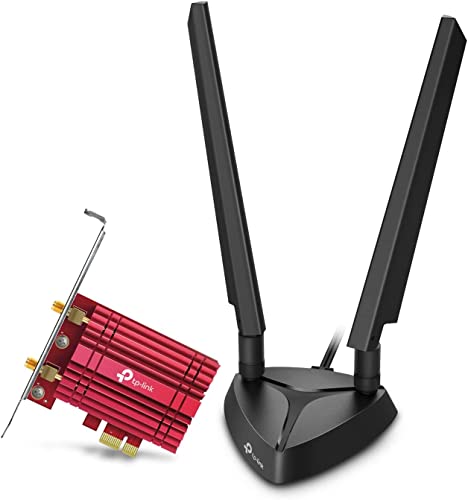
The TP-Link Archer TXE75E is a mid-range WiFi 6E PCIe network card built around the Intel AX210 chipset, rated AXE5400 across tri-band operation with Bluetooth 5.3 support. It targets desktop builders on Windows 11 who want to add6 GHz connectivity to a motherboard that shipped without integrated wireless.
The defining feature is the AX210 radio, which advertises 2402 Mbps on both the 6 GHz and 5 GHz bands plus 574 Mbps on 2.4 GHz. Real throughput depends on router class and channel width, but Intel AX210 cards in this tier typically hold stable 160 MHz links within one wall of a WiFi 6E router based on general owner reports.
Trade-offs are typical at this tier. Bluetooth requires routing the included USB cable to an internal F_USB header, which is a common friction point on boards with limited headers. The 6 GHz band is Windows 11 only, and the two external antennas on a magnetized base need physical space on the desk or case top rather than a screw-in rear mount.
Buy this if you run Windows 11, own a WiFi 6E router, and want the well-supported AX210 chipset in a PCIe form factor. Skip this if your motherboard lacks a free F_USB header, or if you plan to stay on Windows 10 where the 6 GHz band cannot be used.
Radio and standards: Intel AX210 tri-band 802.11ax with WiFi 6E, rated AXE5400. Link rates quoted at 2402 Mbps on 6 GHz, 2402 Mbps on 5 GHz, and 574 Mbps on 2.4 GHz. WPA3 personal is supported, and MU-MIMO plus OFDMA are listed for shared network load handling.
Interface and brackets: Installs in a PCIe slot and includes both standard-height and low-profile brackets, which covers mini tower and slimline cases. Slot generation and lane count are not specified, though AX210 based cards in this category typically use a PCIe x1 electrical interface.
Antennas: Two multi-directional external antennas ship on a magnetized base for placement on top of the case or a metal desk surface. Antenna gain in dBi is not specified in the source data.
Bluetooth: Bluetooth 5.3 is provided via an internal USB cable that must connect to a motherboard F_USB header. Without a spare header, Bluetooth cannot be enabled, so verify header availability before purchase.
Which to buy
Upgrade to WiFi 7 if: you have multi-gig fiber, you compete online and care about latency, you’re building a smart home with 25+ wireless devices, or you stream VR over WiFi. The Netgear RS600 at $499.99 plus an Intel BE200 client at $29.89 gets you the full upgrade for under $530.
Stick with WiFi 6E if: your internet’s 1 Gbps or slower, your home’s small enough that signal strength isn’t the issue, or your router’s less than two years old. The Archer AXE75 still does 90% of what most households need.
Skip both if: you’re still on WiFi 5 and your devices haven’t been upgraded. Buying a WiFi 7 router only helps if your clients can speak the protocol. The Intel BE200 module’s a great cheap bridge for desktops, but laptops without WiFi 7 won’t suddenly get faster from a new router.
The transition path most people miss
A lot of households don’t need an all-or-nothing swap. You can buy a WiFi 7 router today and keep your WiFi 6E clients connected; they’ll fall back to 6E speeds and benefit from the router’s better internal processing. Over the next 12-18 months as you replace laptops and phones, the network catches up gradually. That spreads the cost without leaving anything stranded. Worth reading alongside this: our guide to the wifi adapter not working.
Common questions
Do I need a WiFi 7 router if my devices are all WiFi 6E?
Not for speed gains on those specific devices. WiFi 7 routers do handle more concurrent traffic better, so if you’re maxing out a 6E router with 40 devices, the upgrade smooths things even for older clients.
Will WiFi 7 work through walls better than 6E?
Marginally. Both standards use the same 6 GHz band, which doesn’t penetrate walls well. WiFi 7’s MLO helps by failing over to the 5 GHz link when 6 GHz attenuates, so connections stay alive longer.
Is the Intel BE200 module worth $29.89?
Yes, if your motherboard has an M.2 E-key slot and you’re already considering a WiFi upgrade. It’s the cheapest WiFi 7 client adapter on the market. Note: it doesn’t support AMD platforms officially.
Does WiFi 7 use more power than 6E?
Slightly. Active radio time at 320 MHz draws more, but MLO can actually save power by completing transfers faster. Laptop battery impact’s typically under 5% in mixed use.
Do I need WiFi 7 for cloud gaming?
Not strictly. GeForce Now at 1080p 60fps runs fine on WiFi 6E. For 4K 120fps cloud streaming or VR cloud rendering, WiFi 7’s lower jitter does make a perceptible difference in input feel.
Are WiFi 7 routers worth $500 over the $100 6E option?
Only if your internet exceeds 1.5 Gbps or you have 25+ active wireless clients. Below those thresholds, the Archer AXE75 at $99.98 delivers nearly identical real-world performance for a fifth of the price.