

A gaming router promises lower latency, smarter traffic handling, and fewer of those frustrating lag spikes mid-match. But routers labeled “gaming” also carry a price premium, and a fair question is whether that premium buys real improvement or just aggressive branding. The honest answer sits in the middle. For some setups a gaming-focused router genuinely helps; for others a solid standard router does the same job for less. Our guides to the best gaming routers and the best budget router for gaming list specific picks, and here we explain what these routers actually do and when the extra spend is justified.
The short answer
A gaming router is a home router tuned to prioritize latency-sensitive traffic. The headline feature is Quality of Service, or QoS, which lets the router put your game packets ahead of a roommate’s 4K stream or a background download, so your ping stays stable when the network’s busy. Many also bundle stronger hardware, more antennas, and gaming-oriented software dashboards. That’s the core of it: prioritization plus a bit more horsepower.
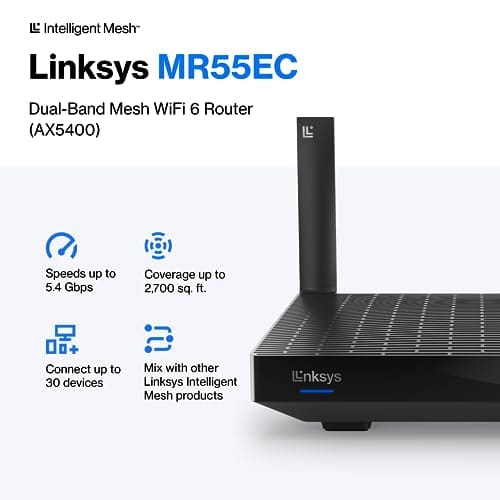
It’s worth it mainly when your network is congested or your home is large. If you game alone on a quiet connection, a good standard router already delivers low latency, and a gaming label adds little. A capable mesh WiFi 6 router covers a lot of this ground without the gaming markup. Here’s one such router for reference.


Pros
- AX5400 class dual-band throughput up to 574 plus 4804 Mbps on 5 GHz
- Six spatial streams with OFDMA reduce congestion for 30+ device homes
- Intelligent Mesh compatibility allows scaling coverage beyond the 2,700 sq ft rating
Cons
- Limited owner feedback at time of writing, so real-world reliability data is thin
- Dual-band only, no dedicated 6 GHz or wireless backhaul band at this tier
- Detailed specifications, WAN port sped, and waranty not specified in source listing
The Linksys Hydra Pro 6 (MR5500-AMZ) is a mid-range dual-band WiFi 6 mesh router aimed at households upgrading from an older AC1900 or extender-based setup. Linksys rates it for 2,700 sq ft and 30 plus devices, targeting medium apartments, condos, and small two-story homes with mixed smart home and streaming traffic.
The defining feature is six-stream AX5400 class WiFi 6 with quoted rates of 574 Mbps on 2.4 GHz and 4804 Mbps on 5 GHz. OFDMA and MU-MIMO help when many low-bandwidth clients share airtime, which is where WiFi 5 routers typically stall. Real-world 5 GHz throughput at range appears to land in the mid-hundreds of Mbps based on category norms.
Trade-offs are typical at this tier. It is dual-band, so there is no dedicated 6 GHz radio and no separate backhaul channel when you add mesh nodes, meaning throughput can halve on satellite hops. Linksys does not specify WAN port speed, USB, or processor details in the listing, so multi-gig ISP users should verify before buying.
Buy this if you want a single WiFi 6 router that can grow into a Linksys Intelligent Mesh system for a 2,000 to 3,000 sq ft home with 30 plus clients. Skip this if you need WiFi 6E, 2.5 GbE WAN, or a dedicated backhaul band for a large multi-story house.
Wireless class: AX5400 class dual-band WiFi 6 with quoted PHY rates of 574 Mbps on the 2.4 GHz band and 4804 Mbps on the 5 GHz band, totaling roughly 5378 Mbps aggregate across six spatial streams. No 6 GHz radio is listed, so WiFi 6E clients fall back to 5 GHz.
Coverage and capacity: Linksys rates the MR5500 for 2,700 sq ft and 30 plus simultaneous devices. OFDMA, MU-MIMO, and 1024-QAM are standard at this WiFi 6 tier and help maintain throughput as client count scales, though actual coverage depends heavily on wall material and node placement.
Mesh behavior: Intelligent Mesh lets you pair the MR5500 with other Linksys nodes to extend coverage. Because it is dual-band, backhaul shares the 5 GHz client band, so expect throughput to roughly halve one hop from the root node. A wired Ethernet backhaul between nodes avoids this penalty.
Not specified: WAN and LAN port speeds, USB ports, processor and RAM, warranty length, and physical dimensions are not disclosed in the source listing. Buyers pairing this with multi-gig fber or DOCSIS 3.1 plans above 1 Gbps should confirm port specs before purchase.
The longer explanation
The thing that actually hurts gaming isn’t usually raw bandwidth; it’s latency and jitter, the variation in that latency. A 100Mbps connection is plenty for online play, but if your ping jumps from 20ms to 120ms whenever someone streams video, you’ll feel it. Gaming routers attack that problem with QoS engines that identify game traffic and hand it priority, keeping latency flat even when the household is hammering the connection.
The rest of the gaming-router package is more conventional. WiFi 6 support improves performance on busy networks with many devices, more antennas and better internals extend range and stability, and some models add wired ports optimized for a direct connection. The Linksys Hydra Pro 6 referenced above is a WiFi 6 mesh router rated 4.4 that connects 30-plus devices across 2,700 square feet, which is exactly the kind of hardware that smooths gaming in a busy home, gaming badge or not. The features that help are real; the “gaming” label just packages them.
How we got here
Gaming routers emerged as online play went mainstream and households filled with connected devices. Early routers treated every packet equally, so a big download could wreck your ping. Manufacturers spotted an opening and built routers with QoS prioritization and aggressive marketing aimed at gamers willing to pay for a smoother connection. The category took off, and prices climbed with the branding.
Over time, the features that defined gaming routers filtered down into mainstream models. QoS, WiFi 6, and multi-device handling now appear on plenty of standard routers and mesh systems, which is why the line between a gaming router and a good regular router has blurred. The specialized category still exists, but its exclusive advantages have shrunk as the baseline rose.
Why it works this way
Prioritization works because home networks share one pipe. When your connection saturates, packets queue up, and without QoS your latency-sensitive game traffic waits in line behind bulk transfers. A gaming router’s QoS reshuffles that queue to push game packets through first, which keeps ping steady precisely when it would otherwise spike. That’s a genuine, measurable benefit on a congested network.
The catch is that on an uncongested network there’s no queue to reorder, so QoS has nothing to fix and the gaming router behaves like any other. That’s why the value depends entirely on your situation. Heavy household use, many devices, or a large home is where the hardware and prioritization pay off. A quiet single-user connection sees little difference, because the bottleneck the router solves isn’t present.
There’s a second reason the premium hardware helps in busy homes, and it isn’t about QoS at all. More antennas, better internal processors, and WiFi 6 airtime scheduling let a router juggle dozens of active devices without any single one starving. In a house where phones, TVs, smart plugs, and laptops all fight for the same airwaves, a weak router simply runs out of capacity, and that shows up as latency spikes even without a big download running. A stronger router has the headroom to keep every device served, which is a real, physical benefit rather than a software trick. That’s the part of the gaming-router package that holds up regardless of the branding.
When you’d want a gaming router
Get one if your home network is busy or big. A house full of streamers, multiple gamers, smart-home gadgets, and constant downloads is exactly where QoS and stronger hardware keep your latency stable. A large home benefits from the range and mesh coverage too, since a weak signal in a back bedroom causes packet loss that no amount of prioritization fixes. If any of that describes your setup, a gaming or high-end mesh router is money well spent.
Skip it if you game alone on a quiet, wired connection, where a decent standard router already gives you low, stable ping. And while you’re improving your setup, don’t ignore the boring stuff: keeping your gear cool and dust-free helps it run reliably over the years. A magnetic PC dust filter is a cheap way to protect the rest of your rig’s airflow, even if it has nothing to do with the router itself; we mention it only as a related maintenance item, not a networking upgrade.

Pros
- Large 400x300mm sheets cover full-tower top or side panels after trimming.
- Magnetic strip and adhesive combo works on any ferrous steel case panel.
- 1mm mesh openings pass more air than tight foam filters at similar coverage.
- Two-pack plus eight strips gives enough material for multiple vents in one build.
Cons
- Limited owner feedback at time of writing, real-world durability is unverified.
- Requires ferrous steel panels, will not stick to aluminum or tempered glass cases.
- PVC and 3M adhesive strips can lose grip over time in warm, high-airflow builds.
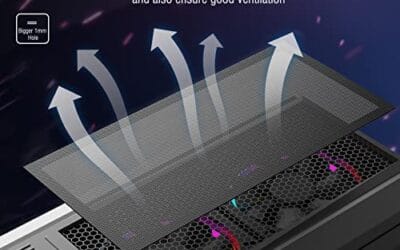
This is a budget DIY dust filter kit, not a pre-cut case-specific filter. The package includes two 400x300mm PVC mesh sheets with a 1mm hole pattern plus eight 400mm magnetic frame strips. It targets builders with non-standard vents, modded cases, HTPC chassis, or console dust covers who want to fabricate their own filters.
The defining feature is the trim-to-fit format. You measure the vent, cut the PVC sheet with scissors, then frame the edges using the adhesive-backed magnetic strips so the assembly clamps to steel panels. The 1mm aperture is coarser than typical foam filters, which favors airflow over fine-dust capture, a reasonable trade for intake or exhaust with strong static pressure fans.
Trade-offs are typical at this tier. PVC is not as tear-resistant as nylon or stainless mesh, and 3M adhesive can soften near warm PSU or GPU exhaust zones. The magnetic attachment only works on ferrous steel, so tempered glass side panels or aluminum shells need alternative mounting. With no verified owner data yet, longevity and mesh consistency are unproven.
Buy this if you need to filter oddly shaped vents or console intakes and are comfortable cutting and framing your own mesh. Skip this if your case already ships with pre-fit magnetic filters, or if the panels are aluminum or glass where the magnets will not hold.
Sheet dimensions: Each sheet measures 400x300mm (15.75 x 11.81 inches) with a stated thickness of 0.01 inches. Two sheets ship per pack, enough surface area to cover a full-tower top vent plus a PSU shroud intake, or several smaller vents across a mid-tower build.
Mesh and material: PVC construction with a 1mm hole pattern. The 1mm aperture is coarser than fine foam or stainless woven filters, which prioritizes airflow over sub-micron dust capture. Expect it to catch pet hair, lint, and coarse household dust rather than fine particulates.
Mounting hardware: Eight 400mm magnetic strips are included, framed with 3M adhesive backing. Peel-and-stick application to the trimmed PVC edge lets the assembly clamp to any ferrous steel case panel. No screws or drilling needed, and the filter lifts off for shake-out or rinse cleaning.
Compatibility notes: Total kit weight is around 0.5 pounds. Magnetic mounting requires steel panels, it will not attach to aluminum shells, tempered glass, or plastic vents without a separate ferrous shim. Best suited to standard steel PC cases, older server chassis, HTPC builds, and console dust covers.
What to look for in a gaming router
Prioritize QoS quality first, since it’s the feature that actually protects your ping under load; look for a router with a capable, configurable prioritization engine. Then check WiFi standard and coverage. WiFi 6 handles busy networks better, and coverage in square feet plus device count, like the Hydra Pro 6’s 2,700 square feet and 30-plus devices, tells you whether it fits your home. Consider wired ports for a direct low-latency connection to your main gaming PC. Range and antenna count matter for larger spaces. Match those to your household rather than chasing the flashiest gaming badge.
Common misconceptions
The biggest myth is that a gaming router lowers your ping to game servers. It can’t change the physical distance or your ISP’s routing; what it does is keep your local latency stable by prioritizing traffic on your own network. Another misconception is that more bandwidth means better gaming. Online play needs very little bandwidth, so a faster plan won’t cut your ping; stability does. The last one is that you must buy a gaming-branded router to game well. A quality standard router or mesh system with good QoS often matches a gaming model for less, because the useful features have gone mainstream.
One more worth clearing up: the idea that a gaming router fixes lag caused by your internet plan or a distant server. It won’t. If your connection drops packets before they even reach your house, or the game server is across the country, no router changes that; those are ISP and geography problems. A gaming router only controls what happens on your side of the modem. Setting expectations there saves disappointment, because people sometimes buy an expensive router hoping to fix a problem that lives outside their home entirely.
Frequently asked
Will a gaming router actually lower my ping?
It stabilizes your local latency rather than shortening the distance to the server. On a congested network, QoS keeps your ping from spiking when others stream or download, which feels like lower ping in practice. On a quiet connection there’s little to improve, since your latency is already low and steady.
Is a gaming router worth it for a single player on a fast connection?
Usually not. If you game alone with a wired connection and no household congestion, a good standard router already delivers stable, low latency. The gaming premium mostly buys prioritization you don’t need in that scenario. Save the money unless your network is busy or your home is large.
Do I need WiFi 6 for gaming?
It helps most on crowded networks with many devices, where WiFi 6 handles the load more gracefully. For a single wired PC it matters little. If your home has lots of wireless devices competing for airtime, a WiFi 6 router like the Hydra Pro 6 keeps things smoother than older standards.
Wired or wireless for competitive gaming?
Wired, whenever you can. A direct Ethernet connection to your router gives the lowest, most consistent latency and eliminates wireless interference. Gaming routers include strong WiFi for convenience, but for competitive play a cable to your main PC still beats any wireless setup.
Can a mesh router work for gaming?
Yes, a good mesh system with QoS handles gaming well, especially in a large home where a single router can’t cover every room. The Hydra Pro 6 is a mesh WiFi 6 example built for wide coverage and many devices. Just wire your main gaming PC to a node for the best latency.

































Write Your Review
No reviews yet. Be the first to share your experience!