

Here’s the number that ends most of these arguments before they start: in the vast majority of games, 32GB and 64GB return frame rates within a percent or two of each other at 1080p and 1440p. So the real fight isn’t about gaming at all. It’s about how many browser tabs, virtual machines, and 8K video timelines you keep open at once. If you’re picking a kit today, the honest question is what you actually run, not what a spec sheet promises. We’ve researched both tiers across pricing, latency, and real workloads, and the answer leans one way for most builders. For a deeper look at kits, our best 32GB RAM kit guide and budget RAM roundup pair well with this breakdown.
Matchup at a glance
Think of 32GB as the current default for a mainstream gaming or general-use PC, and 64GB as the headroom tier for people who treat their computer like a workstation. A modern game plus Windows, Discord, a browser, and a couple of background apps rarely pushes past 20GB in use. That’s why 32GB feels roomy for gamers right now. It leaves margin without you paying for capacity that just sits idle.
64GB flips the logic. It’s not there to make games faster. It’s there so a 4K editing project, a local AI model, or three virtual machines don’t slam into a ceiling and start swapping to disk. Owner reports across creator forums consistently show the jump paying off in multitasking-heavy sessions and almost nowhere else. If your daily driver is Chrome and Steam, that extra 32GB mostly stays asleep.

Spec sheet showdown
| Factor | 32GB tier | 64GB tier | Who cares | Verdict |
|---|---|---|---|---|
| Gaming FPS | Full performance | Same, within margin | Gamers | Draw |
| Heavy multitask | Can fill up | Lots of headroom | Creators | 64GB |
| Typical price | Around $130 to $230 | Roughly double | Budget buyers | 32GB |
| Future margin | Good for 3-4 years | Longer runway | Long holders | 64GB |
| Idle waste | Rarely wasted | Often unused | Value seekers | 32GB |
Notice what’s missing from that table: any gaming row where 64GB wins. That absence is the whole story. Capacity only matters once you exceed what you have, and 32GB is hard to exceed with games alone. There’s a second detail worth catching too. Speed and latency, the parts of a memory spec that games actually respond to, don’t change with capacity. A tight 32GB kit can outperform a loose 64GB kit in the exact workloads gamers care about, which flips the “more is better” instinct on its head.
32GB strengths
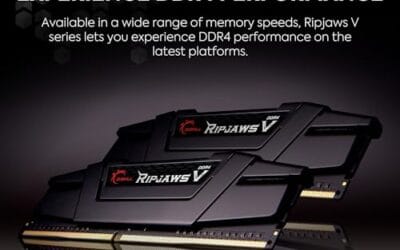
32GB is the value pick, and it isn’t close for most people. A kit like the G.SKILL RipjawsV DDR4 32GB (2x16GB) runs $229.99 with a 4.6 rating, ships at 3600MT/s with CL18-22-22-42 timings at 1.35V, and covers Intel and AMD desktops. That’s plenty of speed and capacity for gaming, office work, and light creative tasks. You get dual-channel bandwidth, XMP for one-click tuning, and enough room that Windows almost never has to lean on the page file during normal use.
The tradeoff shows up only at the extremes. Open a 100-tab browser session on top of a 4K render and a couple of VMs, and 32GB will fill. For the person who games, streams occasionally, and edits the odd clip, that ceiling stays out of reach. It’s the tier that spends your money where you’ll feel it, which is why we point most first-time builders and mixed-use gamers here. Our gaming and video editing RAM picks lean on this same logic.
64GB strengths
64GB earns its keep the moment your workload stops being casual. Photogrammetry, 6K and 8K timelines, large Photoshop composites with dozens of layers, running Docker stacks, or hosting local language models: these eat memory in ways games never do. Owner reports show creators who bounce between a heavy editor and a browser full of references simply stop thinking about RAM once they hit 64GB. No more mid-render stalls, no more apps getting killed in the background.
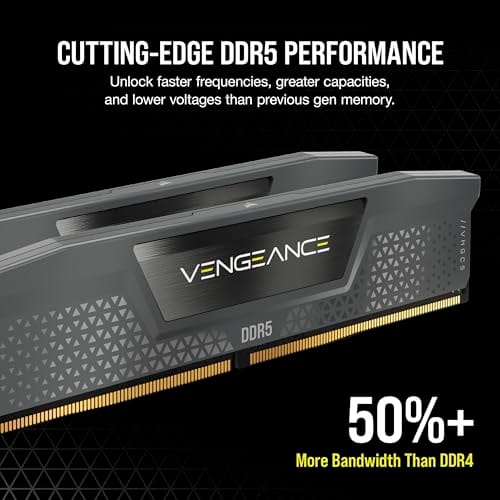
The catch is cost and idle waste. You’ll usually pay close to double, and if your sessions never cross 25GB, that second half of the kit does nothing but look good in Task Manager. There’s also the newer-platform angle. Moving to DDR5 opens higher speeds and easier paths to 64GB and beyond, and a starter kit shows the direction. The Corsair Vengeance DDR5 (2x8GB) runs $234.99 at up to 5200MHz CL40 with AMD EXPO and Intel XMP 3.0, a modest capacity but a clean on-ramp to a DDR5 board you can later stuff with more.

Pros
- AMD EXPO profile activates 5200MHz CL40-40-40-77 with a single BIOS toggle on Ryzen 7000 boards.
- Low 35mm module height clears virtually any AM5 or LGA1700 tower cooler without physical conflict.
- 1.25V operating voltage sits within DDR5 spec, reducing thermal stress on integrated PMIC under sustained load.
- Aluminum heatspreader aids passive heat dissipation in open-air cases without requiring active cooling.
Cons
- 16GB total capacity is increasingly marginal for content creation workflows and modern open-world titles running texture packs.
- 5200MHz CL40 offers modest latency compared to DDR5-6000 CL30 kits that hit the Ryzen 7000 FCLK 1:1 ratio sweet spot.
The CORSAIR Vengeance DDR5 16GB 2x8GB is a mid-range DDR5 kit targeting AMD Ryzen 7000 series and Intel 12th-generation-or-newer desktop builds. It ships with both AMD EXPO and Intel XMP 3.0 profiles, making it broadly compatible across AM5 and LGA1700 or LGA1851 platforms without manual timing configuration.
The standout feature is dual-profile support at a frequency that loads with a single BIOS toggle. At 5200MHz CL40-40-40-77 and 1.25V, it sits within DDR5 JEDEC specification territory, and onboard voltage regulation on the module itself reduces dependency on motherboard power delivery for the memory rail, which matters on budget AM5 boards with fewer VRM phases dedicated to DRAM.
The honest trade-off at this tier is frequency positioning. Ryzen 7000 performs best at DDR5-6000 with CL30 timings, where FCLK and memory controller run at a clean 1:1 ratio. This kit at 5200MHz places it below that threshold, meaning buyers on AM5 leave some CPU bandwidth on the table. The 16GB total capacity is also worth scrutinizing for any workload beyond gaming or light productivity.
Buy this if you are building a budget-to-mid AM5 or Intel DDR5 system and need reliable plug-and-play EXPO or XMP activation without manual overclocking. Skip this if your platform is AM5 and you plan to run a Ryzen 7000 CPU near its performance ceiling, where DDR5-6000 CL30 kits deliver measurably better throughput and latency at comparable pricing.
Platform Requirements: DDR5 requires AMD 600-series or newer motherboards paired with Ryzen 7000 series or newer CPUs, or Intel 600-series or 700-series boards with 12th-generation Core or newer. DDR5 is not backward compatible with DDR4 slots. Verify your motherboard QVL lists this kit before purchasing.
EXPO and XMP Activation: The rated 5200MHz speed requires enabling AMD EXPO or Intel XMP 3.0 in BIOS. Without activation, the kit defaults to DDR5-4800 JEDEC. On Ryzen 7000, DDR5-6000 is the accepted 1:1 FCLK sweet spot; this kit at 5200MHz runs below that threshold, which carries a small but measurable bandwidth and latency penalty versus a tuned DDR5-6000 kit.
Physical Clearance: Module height is 35mm, which clears nearly all air coolers without conflict. The 1.25V operating voltage and onboard PMIC mean power comes from the module itself rather than solely from the motherboard, reducing stress on budget boards with lighter DRAM power stages.
Capacity and Channel Config: The 2x8GB configuration fills two slots in dual-channel. CORSAIR explicitly advises against mixing kits, so expansion to 32GB requires replacing both modules with a validated 2x16GB kit rather than adding a second 2x8GB pair.
Real-world scenarios
Pure gaming rig
Playing at 1080p or 1440p with a browser and Discord open? 32GB is the correct answer, full stop. Spending the extra money on 64GB buys you nothing you’ll notice on the frame counter. Put that cash toward a faster GPU or an NVMe drive instead. Even the most demanding recent titles allocate memory generously but rarely commit more than 16GB, so a 32GB pool leaves you a wide buffer for the operating system and background apps at the same time.
Streamer plus gamer
Encoding, chat overlays, browser sources, and the game all run together during a stream. 32GB usually handles it, but heavy setups with lots of scenes and browser widgets can creep toward the edge. If you stream daily and multitask hard, 64GB gives comfortable breathing room. The margin matters most when your capture software caches footage in memory or you keep a second monitor loaded with dashboards and alerts the whole session.
Video and 3D creator
This is where 64GB stops being a luxury. 4K and higher timelines, cached previews, and 3D scenes with dense assets can march past 32GB fast. Creators who work daily report far fewer stalls after the jump. It pays for itself in saved time. Editors scrubbing long timelines lean hard on RAM caching, and once that cache spills to disk, playback stutters and exports slow. Extra headroom keeps the whole project resident.
Developer or home lab
Running several VMs, containers, or a local AI model at once is a memory workload first and a CPU workload second. 64GB, or more, is the tier that keeps everything resident instead of thrashing your SSD. If that’s your day, don’t skimp. A single language model or a Kubernetes cluster on your desktop can reserve tens of gigabytes before you’ve opened anything else, and swapping to disk turns a snappy lab into a sluggish one.
Pricing and availability
Pricing is where the decision gets sharp. A quality 32GB kit like the G.SKILL RipjawsV at $229.99 sits in the range most people should target, and DDR4 kits often dip lower on sale. A 64GB kit typically costs close to double for capacity you may never touch. Both DDR4 and DDR5 are widely stocked, though DDR5 pricing swings more with market cycles. If you’re on an older AM4 or LGA1200 board, DDR4 keeps you cheap and stocked. Building fresh on AM5 or current Intel? DDR5 is the path, and a small kit like the Corsair Vengeance at $234.99 lets you start now and scale later.
Which to buy
For most builders reading this, get 32GB. It runs every game at full speed, handles mixed daily work, and leaves budget for parts that actually change your experience. The G.SKILL RipjawsV 32GB kit at $229.99, 4.6-rated with proven 3600MT/s DDR4 timings, is a dependable pick that won’t leave you wanting during gaming or general use. It’s the tier we recommend by default.
Choose 64GB only if you already know why you need it: pro video, heavy 3D, VMs, or local AI. Those workloads justify the premium, and nothing else really does. If you’re building a fresh DDR5 system and want a cheap starting point before expanding, the Corsair Vengeance DDR5 kit at $234.99 gets you onto the platform with room to grow. For 9800X3D owners eyeing DDR5, our DDR5 for 9800X3D guide digs deeper.

Pros
- DDR4-3600 XMP at 1.35V is the Ryzen AM4 sweet spot, aligning FCLK 1:1 at 1800MHz for best latency.
- Matched 2x16GB kit is factory-tested as a pair, reducing dual-channel instability compared to mixing sticks.
- Compatible with both Intel XMP and AMD DOCP/A-XMP BIOS profiles without manual sub-timing adjustments.
- Ships with JEDEC SPD fallback so the system always boots safe at default clocks before XMP is enabled.
Cons
- CL18 primary latency is mid-range; DDR4-3600 CL16 kits exist for buyers prioritizing tighter timings.
- No ECC support, so workstation or Threadripper ECC builds need a different kit entirely.
The G.SKILL RipjawsV F4-3600C18D-32GVK is a mid-range DDR4 desktop kit targeting Intel and AMD mainstream platform builders who want 32GB capacity at DDR4-3600 without overpaying for CL14 or CL16 enthusiast kits. It ships as a matched 2x16GB dual-channel pair in the standard 288-pin U-DIMM form factor.
The defining spec here is the XMP profile: DDR4-3600 at CL18-22-22-42, 1.35V. On AMD AM4 Ryzen systems, 3600MHz is the well-documented sweet spot for achieving a 1:1 FCLK ratio at 1800MHz, which keeps infinity fabric latency in check and translates to measurable gains in lightly-threaded workloads and gaming frame times compared to DDR4-3200 or lower.
CL18 is a genuine trade-off at this speed. Competing DDR4-3600 kits with CL16 or CL14 exist and offer lower absolute latency, though they typically carry a price premium. Owners report stable XMP operation across a wide range of B450, X570, and Z490/Z590 boards, but reaching rated speed on some budget AM4 boards may require manual sub-timing adjustments or AGESA microcode updates.
Buy this if you are building or upgrading an AM4 Ryzen or Intel LGA1700 desktop and want reliable 32GB DDR4-3600 dual-channel performance without tuning. Skip this if you need CL16 or tighter for competitive latency, or if your board has a limited QVL and you have not verified compatibility via G.SKILL's configurator tool first.
Platform Support: This kit uses 288-pin DDR4 U-DIMM and is compatible with Intel LGA1700 (Z690/Z790) and AMD AM4 (B450/X470/B550/X570) platforms. AM5 uses DDR5 exclusively, so this kit is not compatible with Ryzen 7000/9000 series builds on AM5 boards.
XMP and DOCP Activation: Rated speed of DDR4-3600 CL18-22-22-42 at 1.35V requires enabling XMP (Intel) or DOCP/A-XMP (AMD) in BIOS. Default JEDEC SPD boots at DDR4-2133 or DDR4-2400. On AM4, DDR4-3600 aligns FCLK at 1800MHz for a 1:1 ratio, which is the recommended operating point for Ryzen 3000 and 5000 series CPUs.
Slot Population and Mixing: Install both sticks in the recommended dual-channel slots per your motherboard manual, typically A2 and B2 in a 4-slot board. G.SKILL explicitly warns against mixing this kit with other modules; doing so voids the matched-pair guarantee and risks instability at XMP speeds.
Cooler Clearance: Exact heatspreader height is not specified in the source data, but RipjawsV modules are noted for a lower profile than Trident Z or RGB variants, reducing conflicts with wide tower coolers. Verify clearance if using a low-clearance cooler on a tight ITX board.
Common questions
Does 64GB improve gaming performance over 32GB?
Not in any way you’ll feel. Benchmarks put the two within a percent or two at common resolutions, since games rarely need more than 16 to 20GB. The GPU and CPU decide your frame rate, not the second 32GB of memory sitting idle.
Is 32GB enough in 2026?
For gaming and general use, yes, comfortably. It covers modern titles plus a browser, chat, and background apps without stress. You’d only outgrow it with pro creative work or serious virtualization, and most people never go there.
Should I run faster RAM or more RAM?
If you’re a gamer with 32GB already, faster and lower-latency memory helps more than extra capacity you won’t use. On AMD X3D chips especially, tight timings matter. Add capacity only when your workload actually fills what you have.
Can I mix a 32GB kit with another later to reach 64GB?
You can, but it’s risky. Mismatched kits can refuse to run at rated speed or fail to boot at XMP settings. Buying a single matched 64GB kit up front is the reliable route if you know you need the capacity.
DDR4 or DDR5 for a new build?
If your platform is current AM5 or recent Intel, go DDR5 for the speed headroom and easier expansion. On older AM4 or LGA1200 boards, DDR4 stays cheaper and plenty capable. Match the memory to what your motherboard supports, since the two aren’t interchangeable.




























Write Your Review
No reviews yet. Be the first to share your experience!