

A 1TB NVMe drive fills up faster than most builders expect. Two or three modern games, a Windows install, and a handful of creative projects can eat 700GB before you’ve noticed. That’s the real question behind 1TB vs 2TB SSD shopping: not which one is faster, but which capacity tier stops you from playing the delete-and-reinstall shuffle every month. The performance gap between the two is usually tiny. The headroom gap is enormous. We researched current Gen4 drives, including the Samsung 990 PRO 2TB at $389.99 and the WD_Black SN7100 2TB at $289.99, to figure out where your money actually goes. If you’re already deep into 2TB NVMe picks or eyeing a gaming-focused 2TB drive, this breakdown frames the decision cleanly.
Matchup at a glance
Here’s the short version. On the same product line, a 1TB and a 2TB drive share the same controller, the same NAND type, and nearly identical sequential read speeds. What changes is the amount of flash on the board and, on many models, the sustained write behavior once the fast cache runs out. Larger drives tend to hold their write speed longer because they carry a bigger dynamic cache. So the 2TB isn’t just “more room.” It’s often a touch more consistent under heavy sustained loads too.
The tradeoff is money and value-per-gigabyte. A 2TB drive costs more up front, but the cost per terabyte usually drops as capacity climbs. That’s why the 2TB tier so often wins on paper. The catch is simple: if you genuinely never fill 1TB, you paid for storage you’ll never touch. Most gamers and creators do fill it. Plenty of office and browsing rigs never come close.

Spec sheet showdown
The table below pairs the general tier differences with the two real 2TB drives we researched. Note the 1TB column reflects typical same-line behavior, not invented benchmark figures.
| Spec | 1TB tier (general) | 2TB tier (general) | Samsung 990 PRO 2TB | WD_Black SN7100 2TB |
|---|---|---|---|---|
| Capacity | 1TB | 2TB | 2TB | 2TB |
| Interface | PCIe Gen4 M.2 2280 | PCIe Gen4 M.2 2280 | PCIe Gen4, M.2 2280 | PCIe Gen4, M.2 2280 |
| Peak read | Same as 2TB on most lines | Highest rated | Up to 7,450 MB/s | Up to 7,250 MB/s |
| Peak write | Slightly lower on some models | Full rated | High-end rated | Up to 6,900 MB/s |
| Rating / price | Lower entry cost | Better $/TB | 4.2 stars, $389.99 | 4.1 stars, $289.99 |
Two things stand out. First, peak read speeds barely move between the drives: 7,450 MB/s on the Samsung, 7,250 MB/s on the WD_Black. You won’t feel that 200 MB/s difference in real use. Second, the WD_Black SN7100 undercuts the Samsung by $100 at the same capacity, which reshapes the whole value math.
1TB strengths
The 1TB tier’s pitch is cost and simplicity. You get a modern Gen4 drive at the lowest entry price, and for a lot of people that’s plenty. A boot drive holding Windows, Office, a browser, and one or two live games rarely crosses 600GB. If that’s your rig, spending less and pocketing the difference is a rational call. It’s the honest budget answer.
There’s a second, quieter advantage. Because 1TB drives are the volume sellers, they go on sale constantly and pair well with a second drive later. Buy 1TB now, add a bulk 2TB drive down the road for your library, and you’ve split hot and cold storage without overpaying on day one. Owner reports across the WD_Black and Samsung lines suggest the 1TB versions run cool and boot fast, same as their bigger siblings. The only ceiling is space. And space is exactly what runs out.
2TB strengths
The 2TB tier is where most enthusiasts land, and it’s easy to see why. Double the room means you’re not babysitting a capacity meter. Modern games routinely run 100GB to 200GB each, so a 2TB drive comfortably holds a rotation of six to ten titles plus your OS and apps. The Samsung 990 PRO 2TB, rated 4.2 stars, targets high-end desktops and workstations with read speeds up to 7,450 MB/s. That’s overkill for gaming and genuinely useful for heavy file work.
The WD_Black SN7100 2TB makes the more interesting money argument. At $289.99 with up to 7,250 MB/s reads and 6,900 MB/s writes on next-gen TLC 3D NAND, it delivers nearly the same real-world snappiness as the pricier Samsung while costing $100 less. It’s built for laptops and handheld gaming devices too, so it’s flexible. For a single drive that holds a full library without compromise, this is the value pick of the two.

Pros
- Rated 7,250 MB/s read and 6,900 MB/s write keeps pace with faster Gen4 drives in this tier
- Single-sided M.2 280 form factor fits handhelds like Steam Deck, ROG Ally, and Legion Go
- Up to 100% claimed power efficiency gain helps battery life on portable gaming devices
- TLC NAND at 2TB gives usable capacity for large modern game libraries
Cons
- Limited owner feedback at time of writing, so long-term reliability signal is thin
- Manufacturer does not publish TBW endurance, DRAM vs HMB design, or controller model in listing
- WD_BLACK Dashboard is Windows only, leaving Linux and SteamOS handheld users without vendor tooling
The WD_Black SN7100 2TB is a mid-range to high-end PCIe Gen4 NVMe SSD in a single-sided M.2 2280 form factor. Sandisk positions it for gamers upgrading laptops and handhelds like Steam Deck, ROG Ally, or Legion Go, rather than desktop enthusiasts chasing peak Gen5 sequential numbers.
The defining feature is the eficiency angle. Sandisk advertises up to 7,250 MB/s read and 6,900 MB/s write with up to 100% better power efficiency than the previous generation. In practice, DRAM-less HMB Gen4 drives at this tier typically deliver near-rated sequentials and strong random4K reads that matter for game load times and DirectStorage.
Trade-offs are typical at this tier and mostly around what is not disclosed. The listing does not publish TBW endurance, controller model, or confirm HMB vs DRAM, so sustained write behavior after the SLC cache exhausts is unknown from source. The WD_BLACK Dashboard is Windows only, which is a real gap for SteamOS handheld owners.
Buy this if you want a single-sided 2TB Gen4 drive for a handheld or thin gaming laptop where power draw and thickness mater more than raw peak throughput. Skip this if you are building a desktop with a Gen5 slot free, or if you need a published TBW figure for a heavy write workload.
Interface and form factor: PCIe Gen4 x4 NVMe in M.2 2280, described as built for laptops and handheld gaming devices, which implies a single-sided PCB layout. That fits Steam Deck, ROG Ally, Legion Go, and most modern ultrabook M.2 slots without clearance issues against the chassis.
Sequential throughput: Sandisk rates the 1TB and 2TB models at up to 7,250 MB/s read and 6,900 MB/s write, near the practical ceiling of the PCIe Gen4 x4 lane budget. Game load times and large asset copies should track within a few percent of higher-priced Gen4 drives at this class.
NAND and controller: The drive uses next generation TLC 3D NAND from Sandisk. Controller model, DRAM vs HMB configuration, and TBW endurance are not specified in the listing, so sustained write performance past the SLC cache and long-term wear behavior are not verifiable from source data.
Software and platform fit: WD_BLACK Dashboard on Windows handles firmware updates, health monitoring, and optimization. Linux and SteamOS users can still use the drive normally but will need third-party tools like smartctl for SMART data, since no vendor utility is offered outside Windows.
Real-world scenarios
The gaming rig
Big libraries kill 1TB drives. Call of Duty alone can demand 150GB-plus. If you keep more than three or four AAA titles installed at once, 2TB is the answer, and a gaming-tuned drive like those in our gaming SSD roundup pays for itself in fewer reinstalls.
The console expansion
PS5 owners feel the squeeze fast, since the internal drive fills within a handful of games. A 2TB Gen4 stick roughly doubles usable storage. Our PS5 SSD guide covers heatsink requirements, but the capacity call is the same: go 2TB and stop juggling downloads.
The office and browsing box
Here 1TB genuinely wins. Documents, spreadsheets, and a light Steam habit won’t fill half of it. Spending on 2TB you’ll never use isn’t value. It’s waste. Buy the 1TB, run it for years, done.
The creator workstation
Video editors and photographers should skip straight past 1TB. Raw footage and project caches balloon quickly, and the Samsung 990 PRO’s sustained speed helps with scratch-disk work. Many pros still pair internal capacity with an external SSD for archival.
Pricing and availability
Both drives we researched are current, in-stock 2TB models. The Samsung 990 PRO 2TB sits at $389.99, positioning it as the premium option for high-end computing and heavy workstations. The WD_Black SN7100 2TB lands at $289.99, a full $100 cheaper for near-identical peak throughput. On a straight cost-per-gigabyte basis, the WD_Black is the stronger deal today.
As for the 1TB versions of these lines, they typically retail for roughly half their 2TB counterparts, though sale prices swing week to week. That’s the number to watch. If a 1TB drive drops far enough, the savings can justify skipping the bigger tier, especially on a secondary machine. Just remember the cost-per-terabyte usually favors the 2TB the moment both are near MSRP.
Which to buy
Default to 2TB if you game, create, or hate managing storage. The extra room removes a recurring headache, and the price gap between the tiers has narrowed enough that most builders won’t regret it. Between our two picks, the WD_Black SN7100 2TB at $289.99 is the smart-money choice: it matches the Samsung’s real-world feel and saves you $100 you can put toward RAM or a better cooler.
Step up to the Samsung 990 PRO 2TB at $389.99 only if you’re building a serious workstation or want the highest rated sequential reads at 7,450 MB/s for sustained professional work. It’s the premium answer, not the value answer. And if your rig is a simple office or browsing box that’ll never fill a terabyte, a 1TB drive is the honest, cheaper call. Don’t buy space you won’t use.

Pros
- Rated 7,450 MB/s sequential read pushes close to the PCIe Gen4 x4 ceiling for game loads.
- Rated 6,900 MB/s sequential write helps large file transfers and 4K editing scratch workflows.
- Samsung claims 55 percent random IOPS uplift vs the 980 PRO, benefiting bot and app launch responsiveness.
Cons
- Limited owner feedback available at time of writing, so long-term reliability signal remains thin.
- TBW endurance rating not specified in listing, worth confirming for sustained write workloads.
- No heatsink on this SKU, sustained Gen4 writes may need a motherboard M.2 cooler to avoid throttling.
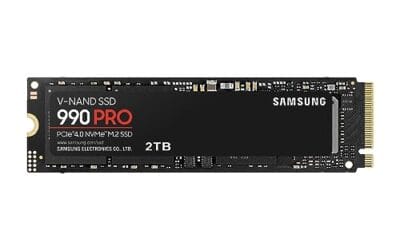
The Samsung 990 PRO 2TB is a high-end PCIe Gen4 NVMe SSD in the M.2 2280 form factor, rated up to 7,450 MB/s sequential read and 6,900 MB/s sequential write. It targets desktop gamers, PS5 upgraders, and content creators who want Gen4 headroom without stepping up to a Gen5 drive.
The defining pitch is near-ceiling Gen4 bandwidth paired with a claimed 55 percent uplift in random IOPS over the 980 PRO. In practice, drives at this tier typically shave a second or two off open-world level loads and accelerate DirectStorage titles, though real-world gaming deltas over solid Gen4 rivals remain modest.
Gen4 flagships like this tend to run hot under sustained sequential writes, and the bare version without a heatsink relies on motherboard M.2 cooling to hold peak speeds. TBW endurance is not specified in the listing, so buyers running heavy write workloads should confirm the rating from Samsung's own datashet.
Buy this if you want a top-shelf Gen4 drive for a gaming PC, editing rig, or PS5 with a well-cooled M.2 slot. Skip this if you already own a fast Gen4 SD, need Gen5 bandwidth for scratch work, or want a factory heatsink model included in the box.
Sequential throughput: Samsung rates the 990 PRO at up to 7,450 MB/s sequential read and 6,900 MB/s sequential write over PCIe Gen4 x4. That is close to the practical Gen4 x4 ceiling near 7,500 MB/s, so large file copies are limited more by the source disk than by this drive.
Random performance: The listing calls out a 55 percent improvement in random performance versus the 980 PRO. Random 4K IOPS drives OS snappiness, shader cache loads, and small file operations, so the uplift matters more day to day than the sequential headline for most users.
Form factor and platform: The drive uses M.2 2280 single-sided layout and PCIe Gen4 x4, dropping into standard desktop M.2 slots, most Gen4 laptops, and the PS5 storage bay. Capacity spans 1TB to 4TB in the family, with this SKU at 2TB for a balanced game library.
Power and thermals: Samsung claims up to 50 percent better performance per wat versus the 980 PRO, helping in fanless laptop bays and compact ITX builds with limited airflow. Under sustained writes, this bare version benefits from a motherboard M.2 heatsink to avoid thermal throttling on long transfers.
Common questions
Is a 2TB SSD twice as fast as a 1TB?
No. On the same product line, peak read speeds are nearly identical. The Samsung 990 PRO hits up to 7,450 MB/s and the WD_Black SN7100 up to 7,250 MB/s regardless of the capacity conversation. Larger drives sometimes hold sustained write speeds a bit longer thanks to a bigger cache, but you won’t feel a 2x difference. Capacity buys room, not raw speed.
Will one SSD hold my whole game library?
A 2TB drive comfortably holds six to ten modern AAA titles plus your OS and apps, since games often run 100GB to 200GB each. A 1TB drive fits three or four before you’re deleting things. If you keep a large rotation installed, 2TB is the safer bet.
Does a bigger SSD last longer?
Generally yes, in terms of write endurance. A 2TB drive spreads writes across more NAND cells, so the same daily workload wears it more slowly than an identical 1TB model. For typical home use, both will outlast the rest of your build. Heavy creators writing terabytes weekly benefit most from the larger capacity’s endurance headroom.
Can I add a second drive later instead?
Absolutely, and it’s a valid budget path. Buy 1TB now for your boot drive, then add a bulk drive later for your library. Most ATX boards have two or more M.2 slots. The tradeoff is you’ll manage two volumes instead of one clean pool, and you may pay more per gigabyte overall than buying 2TB up front.
Do I need a heatsink on these drives?
For desktop use, the M.2 heatsink built into most modern motherboards handles a Gen4 drive fine. Sustained heavy writes can push temperatures up, so a heatsink helps consistency on workstation loads. For PS5 installs, a low-profile heatsink is required to fit the console’s bay, so check clearance before you buy.




























Write Your Review
No reviews yet. Be the first to share your experience!