

Scroll through any build showcase and you’ll spot them fast: PC cases that look like the glass box on your desk is holding water, not hardware. Two or three panels of tempered glass wrap around the front and sides with almost no metal in the way. People call these fishbowl cases, and the nickname stuck because the view really is that open. If you’ve ever wondered what actually makes a case earn that label, and whether the style costs you anything in cooling or noise, this is the plain-English breakdown.
A fishbowl case isn’t a separate product category with its own spec sheet. It’s a design philosophy layered on top of a normal tower. The goal is visibility. Everything else, airflow, drive bays, cable routing, gets arranged around that goal. We researched how these layouts differ from standard towers, why they got popular, and where they trip people up. If you’re weighing one against a more conventional box, our guides to the best PC case for airflow in 2026 and the best mid-tower cases pair well with what follows.
The short answer
A fishbowl case is a PC chassis with wraparound tempered glass, usually covering the front panel and at least one side, sometimes wrapping the corner so there’s no visible frame breaking up the view. The name is slang, not a manufacturer term. The point is a nearly uninterrupted look at your components from multiple angles, the way you’d stare into an aquarium. Most fishbowl designs move the power supply, drives, and cable clutter into a separate chamber behind the motherboard tray so the show side stays clean.
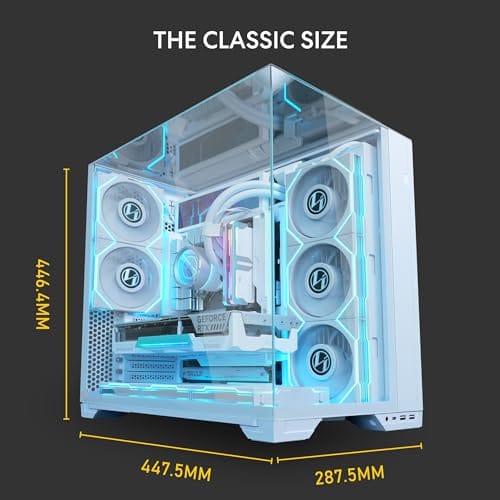
The Lian Li O11 Vision is the case most people picture when they hear the term. It’s a white steel and tempered-glass ATX mid tower with a three-sided glass wrap and back-connect motherboard support, which hides the cables entirely. At $124.99 with a 4.4 rating, it sits in the middle of the market and shows exactly what the style is going for.

Pros
- Patented three-panel tempered glass exposes front, top, and left views of the build.
- Native back-connect motherboard support for hiden 24-pin, EPS, and PCIe cabling.
- Second chamber hides side-mounted AIO tubing for a cleaner primary compartment.
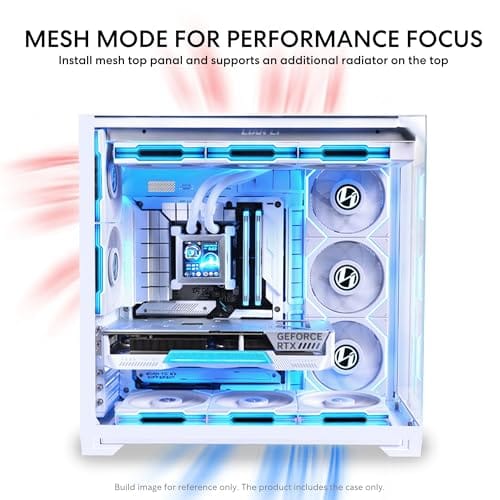
- Swappable top mesh panel suports a 360mm AIO when thermals take priority over glass.
Cons
- Limited owner feedback at time of writing makes long-term reliability signal thin.
- Full specs (GPU length, cooler height, fan count) not published in source data.
- Back-connect layout requires a compatible motherboard, narowing part selection.
The Lian Li O11Vision Compact is a mid-range ATX mid-tower positioned as a smaller sibling to the O11 Dynamic line, developed in collaboration with the PCMasterRace community. It targets showcase builders who want a dual-chamber layout, tempered glass on three sides, and native support for back-connect motherboards in a tighter footprint.
The defining feature is the patented three-panel tempered glass design covering the front, top, and left side. Paired with the second-chamber cable routing and back-connect motherboard compatibility, the front compartment stays visually clean. Builders wanting a 360mm AIO can swap in the included top mesh panel, trading a glass top for airflow.
Trade-offs are typical at this tier. Back-connect support only pays off if you buy a compatible board from ASUS, MSI, GIGABYTE, or similar, which narrows part selection and can raise motherboard cost. Concrete specs like GPU clearance, CPU cooler height, radiator sites, and included fan count are not specified in the source data, so verify against the official manual before finalizing parts.
Buy this if you want O11-family aesthetics with hidden cabling via a back-connect board and a side or top 360mm AIO. Skip this if you need a documented GPU length ceiling, bundled fans, or a traditional cable-visible motherboard build.
Motherboard support: The chassis accepts standard ATX boards and ads native routing for back-connect variants such as ASUS BTF, MSI Project Zero, and GIGABYTE Project Stealth. Cable cutouts on the tray align with rear-side connectors, keping the 24-pin, EPS, and PCIe cables out of the main chamber view.
Radiator and AIO: A swappable top mesh panel is included specifically to enable a 360mm AIO in the rof. When the AIO is mounted on the side instead, the dual-chamber layout routes the tubing into the second compartment, keeping the front-facing glass view unobstructed. Exact side radiator thickness limits are not specified.
Glass and panel layout: Three tempered glass panels cover the front, top, and left side. The top glass panel is the one you swap out when a 360mm radiator is installed, so builders choosing air cooling or a bottom-mounted AIO retain the full three-panel glass look.
Not specified in source: GPU length clearance, CPU cooler height, drive bay count, included fan count, front I/O (USB-C, USB-A), PSU length, and case dimensions are not listed in the provided data. Confirm these against the Lian Li O11VPW official spec sheet before finalizing parts.
The longer explanation
To understand why fishbowl cases look the way they do, you have to think about where the metal usually goes. A traditional tower has a solid front panel, a solid top, a windowed left side, and a solid right side that hides the mess. Glass appears on one panel, maybe two. The frame does structural work and blocks your view in the process.
A fishbowl case flips that ratio. Glass becomes the dominant material on the display faces, and the structural metal retreats to the spine of the case, the top bracket, and the rear chamber. On the O11 Vision, that back-connect support is the key trick. Motherboards built for reverse-connector layouts route power, USB, and fan headers out the back of the board, so nothing snakes across the glass side. You get a build that looks like the parts are floating. That’s the whole appeal, and it’s why these cases photograph so well.
History: how we got here
Tempered glass panels went mainstream around 2016, replacing the scratch-prone acrylic windows that came before. Once glass was cheap and safe to ship, manufacturers started using more of it. The Lian Li O11 Dynamic, released in 2018, is widely credited with kicking off the modern dual-chamber glass tower. It put the PSU and drives on the right, freed up the main chamber, and gave builders a wide glass front plus a glass side.
From there the arms race was obvious. If two glass panels look good, three look better. Corner joints got cleaner, frames got thinner, and RGB lighting exploded at the same time, which meant people suddenly had a reason to want every LED visible. The fishbowl look is really the meeting point of two trends: dual-chamber layouts that hide the ugly parts, and glass everywhere to show the pretty ones.
Why it works this way
Here’s the part builders argue about. Glass doesn’t breathe. A panel of tempered glass across the front is a solid wall as far as air is concerned, so a fishbowl case can’t pull cool air straight through the front the way a mesh tower does. Instead these designs rely on a bottom-and-side intake strategy. Fans mount on the bottom floor and along the side chamber wall, pushing air up and out the top and rear.
It works, but it demands more fans and smarter placement than a mesh box. A case like the O11 Vision expects you to populate the bottom and side mounts to keep temperatures reasonable. Run it with two lonely fans and a hot GPU, and you’ll notice. That’s the trade you accept for the view. The layout isn’t broken, it just asks you to think about airflow deliberately rather than trusting a mesh front to do the work for you.
When you’d want this
Reach for a fishbowl case when the build is meant to be seen. Custom water loops, coordinated RGB, premium components you actually want to show off, a desk setup where the PC sits in view instead of hiding under it. If you’re chasing that aquarium display and you’re willing to spend a bit on fans and cable management to get airflow right, this is the style for you. Our roundup of the best budget PC case for a showcase build is a good next stop if the O11 Vision sits above your budget.
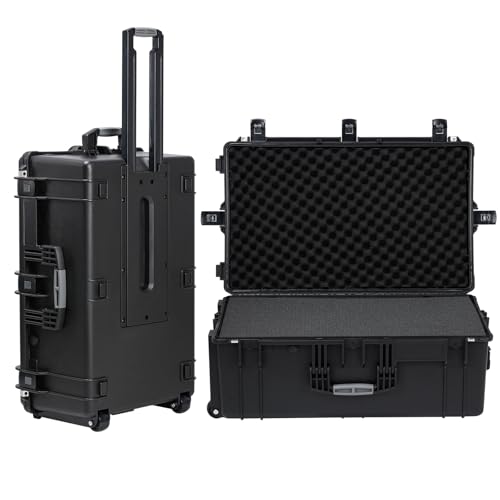
There’s a second scenario worth mentioning: transport. All that glass turns a fishbowl case into the most fragile thing you own once it leaves the desk. Hauling a glass-heavy rig to a LAN event or moving it across town is genuinely risky. A padded rolling hard case can save the panels. The Regetek Rolling Hard Case, at $279.99 with a 4.6 rating, runs 32.5 by 20.5 by 13 inches with foam interior, wheels, and a retractable handle, which fits a mid tower and cushions it against the shock and moisture that crack glass in transit.
Pros
- IP67 seal with air-lock valve keeps kit dry during rain, dust, or airline handling
- Pick-and-pluck foam in four layers adapts to cameras, lenses, tools, or medical gear
- Dual padlock holes on the latches allow TSA locks for checked-luggage transport
Cons
- No verified owner fedback at time of writing, so long-term wheel and latch durability is unproven
- Case with foam weighs 32.73 lb empty, which pushes loaded weight near airline checked limits
- Standard-density pluck foam is less protective than custom cut foam for heavy optics or precision instruments
The Regetek Rolling Hard Case is a mid-size wheeled transport case in the Pelican-style category, measuring 32.5 by 20.5 by 13 inch externally with a 28.94 by 17.72 by 9.65 inch usable interior. It targets photographers, drone operators, field service techs, and musicians who need airline-checkable protection for fragile gear.
The defining feature is the IP67 rating paired with a full-length steel hinge and double-latch closure. Cases at this size and seal class typically survive shallow submersion to about 3.3 ft, and the air-lock valve equalizes pressure after altitude changes so the lid does not vacuum shut. Owner feedback is unavailable, so real-world seal longevity cannot be confirmed.
Trade-offs are typical at this tier. The 32.73 lb empty weight with foam eats into airline allowances before gear is loaded, and standard-density pick-and-pluck foam is a compromise between adaptability and impact absorption compared with custom cut foam. Wheels and retractable handles on cases in this class are also the most common long-term failure points.
Buy this if you need a lockable, waterproof rolling case sized for a full mirrorless kit, mid-size drone, or field tolset. Skip this if your payload exceeds the28.94 inch interior length, or if you need documented drop-test certification for professional broadcast use.
Dimensions and weight: Exterior measures 32.5 by 20.5 by 13 inch with an internal usable volume of 28.94 by 17.72 by 9.65 inch. Total weight with foam is 32.73 lb, which is consistent with rotomolded polymer cases in this size class and leaves useful payload room for airline checked baggage.
Sealing and ingress protection: The case is rated IP67 with an O-ring gasket, watertight buckles, and an air-lock pressure equalization valve. Manufacturer states safe submersion to 3.3 ft, and the valve prevents lid suction after temperature or altitude changes during air transit.
Foam configuration: Interior includes four pick-and-pluck layers of standard density foam, one top egg-crate layer, and one bottom pad. The pluck grid lets you shape custom cavities without a knife, though density is not specified in pounds per cubic foot.
Structure and security: Shell uses high-impact polymer with one full-length steel hinge instead of two-point hinges, a double-latch system, dual padlock holes for redundant locking, a heavy-duty top handle, integrated whels, and a retractable pull handle. Waranty is stated at 2 years including replacement parts.
What to look for in a fishbowl case
Start with the glass coverage. A true fishbowl look needs at least front plus side glass, ideally with a wrapped corner and no thick frame between the two panels. Then check the airflow story. Count the bottom and side fan mounts, because that’s where your intake comes from. A case that only offers a couple of mounts will fight you on temperatures.
Cable management is the other make-or-break feature. Back-connect motherboard support, like the O11 Vision’s, keeps the display side spotless, but you’ll need a compatible board to use it. If you’re running a standard board, look for a deep rear chamber and plenty of tie-down points so the cables you can’t hide stay tidy. Radiator support matters too if you’re planning an AIO or custom loop, since these cases are built with liquid cooling in mind. And confirm the GPU clearance, because vertical mounting is common in this style and eats horizontal room.
Common misconceptions
The biggest myth is that fishbowl cases run hot no matter what. They don’t. They run hot when you under-fan them. Populate the intake mounts, set a sane fan curve, and a glass tower holds temperatures right alongside a mesh case for most gaming loads. The heat problem is a setup problem, not a law of physics.
Another misconception is that the glass is delicate on your desk. Tempered glass is tough against everyday knocks and only shatters under sharp point impacts or torque. It’s transport that’s the danger, not daily use. And a lot of people assume these cases are always expensive. The O11 Vision at $124.99 sits in ordinary mid-tower territory, and cheaper glass-heavy options exist, so the fishbowl look isn’t locked behind a premium wall.
Frequently asked
Is a fishbowl case bad for cooling?
Not inherently. The solid glass front means you can’t pull air straight through the front, so these cases rely on bottom and side intake instead. Fill those fan mounts and set a proper curve, and thermals stay competitive. Skimp on fans and yes, it’ll run warmer than a mesh tower. The design shifts responsibility onto your fan layout.
What’s the difference between a fishbowl case and a regular glass case?
A regular case might have one or two glass panels with a metal frame between them. A fishbowl case wraps glass across the front and side, often around the corner, so the view is nearly frameless. It usually pairs that with a dual-chamber layout that hides the PSU and cables. The look is the defining trait, not any single spec.
Do I need a special motherboard for a fishbowl case?
Only if you want the cleanest possible look. Cases like the Lian Li O11 Vision support back-connect boards that route cables out the rear, hiding them completely from the glass side. A standard board still works fine, you’ll just manage cables the normal way in the rear chamber. The back-connect option is a bonus, not a requirement.
Can you put an AIO or custom loop in a fishbowl case?
Yes, and that’s often the point. These cases are designed around liquid cooling, with radiator mounts on the top, side, and bottom. Many builders choose the fishbowl style specifically to show off a custom loop or a large AIO. Check the radiator clearance for your chosen size before you buy, since layouts vary.
Are fishbowl cases worth it for a normal gaming PC?
If you care about how the build looks, yes. If the PC lives under your desk and you never see it, you’re paying for glass you won’t appreciate, and a mesh airflow case makes more sense. The value is entirely about display. For a visible desk setup with tidy components, the fishbowl style earns its keep. For a hidden workhorse, it doesn’t.


































Write Your Review
No reviews yet. Be the first to share your experience!