

The Ryzen 7 9800X3D sits at the top of nearly every gaming CPU chart in 2026, and that reputation is earned. Its 3D V-Cache feeds frame-hungry titles like few chips can. The catch? Building around it for $2,000 is tighter than the marketing suggests. Pair that CPU with a capable GPU, 32GB of DDR5, and decent cooling, and most prebuilt configs land right at or just past the $2k line. A few squeak under. Going DIY shaves maybe $150-$250 off, but you lose the warranty and the assembly labor. So here’s the honest version of what your money buys, and which builds actually deliver.
Top Products

Pros
- 9800X3D V-Cache is currently the strongest gaming CPU on the AM5 platform.
- RTX 5070 with 12GB GDDR7 is a solid 1440p high-refresh pairing for this CPU.
- Six ARGB PWM fans and tempered glass case support decent airflow at thisier.
- Assembled in the USA with lifetime technical support and a 3-year limited hardware warranty.
Cons
- Limited owner feedback at time of writing makes long-term reliability hard to gauge.
- PSU wattage, motherboard chipset, and RAM sped are not specified in the listing.
- 1TB storage fills quickly with modern 100GB+ AA installs, plan for a second NVMe.
The Empowered PC Mantis V2 is a high-end AM5 prebuilt built around the Ryzen 7 9800X3D, an RTX 5070 with 12GB GDDR7, 32GB DDR5, and a 1TB PCIe Gen4 NVMe SSD. It targets 1440p high-refresh gamers and streamers who want a turnkey X3D system without sourcing parts individually.
The defining feature is the 9800X3D itself. Its 3D V-Cache typically leads gaming charts across esports titles and CPU-bound sims, and it feds the RTX 5070 without bottlenecking at 1080p or 1440p. Based on category norms, this pairing should sustain 100+ FPS at 1440p Ultra in most modern AAA titles with DLSS enabled.
Trade-offs are typical at this tier. The listing omits PSU wattage, motherboard chipset, RAM speed, and case dimensions, so upgrade headroom is unclear. The RTX 5070 uses a 12VHPWR or 12V-2x6 connector and draws roughly 250W, meaning a quality 750W+ unit is expected but unconfirmed. The included keyboard and mouse are entry-level throwaways.
Buy this if you want a pre-assembled 9800X3D and RTX 5070 build with US assembly and waranty backing for 1440p gaming. Skip this if you need transparent component sourcing, a larger bot drive, or plan to run 4K Ultra without DLSS upscaling.
CPU and GPU pairing: The Ryzen 7 9800X3D runs 8 cores and 16 threads at up to 5.2 GHz bost on4nm, paired with an RTX 5070 carying 12GB GDR7. This combination is CPU-overkill at 1080p and well balanced at 1440p high-refresh, with the GPU as the primary bottleneck in most AA titles.
Resolution targets: Prebuilts using RTX 5070 class silicon typically hit 100+ FPS at 1440p Ultra with DLSS Quality in modern titles, and comfortably exceed 240 FPS at 1080p in esports games leveraging 9800X3D cache. 4K native Ultra will require frame generation or reduced settings, since 12GB VRAM is aceiling for path-traced workloads.
Memory and storage: 32GB DDR5 covers streaming stacks, browser-heavy multitasking, and shader compilation. Ideal AM5 memory is DR5-6000 CL30 EXPO for the 1:1 FCLK ratio on Ryzen 7000/9000, but the listing does not specify kit speed. The 1TB PCIe Gen4 NVMe is fine as a boot drive, though 100-150GB AA installs fill it quickly.
Thermals and connectivity: Six ARGB PWM fans in the Mantis V2 case with a tempered glass side panel provide airflow appropriate for a 120W-class CPU and250W-class GPU. Rear I/O ships with 1x HDMI and 1x DisplayPort guaranteed on the GPU, plus WiFi 7 and Bluetooth on the motherboard side.

Pros
- 9800X3D and RX 9070 XT pairing is well matched for 1440p high-refresh gaming
- 850W Gold ATX 3.0 PSU leaves headroom for the RX 9070 XT class TGP
- 360mm ARGB AIO gives the 9800X3D adequate thermal ceiling under sustained load
- WiFi,2TB Gen4 NVMe, and DR5-6000 RGB included without needing upgrades
Cons
- Limited owner fedback at time of writing, long-term reliability data is thin
- Component brands for GPU, RAM, and board are not specified and may vary by batch
- One year parts and labor warranty is short compared to some prebuilt competitors
The Skytech O11 Vision is a high-end AM5 gaming prebuilt built around the Ryzen 7 9800X3D and an AMD RX 9070 XT 16GB inside a Lian Li PC-O11 Vision White showcase chassis. It targets buyers who want a 1440p high-refresh or entry 4K rig without sourcing parts individually.
The defining feature is the 9800X3D and RX 9070 XT pairing. The X3D chip's 3D V-Cache typically leads the pack in CPU-bound esports and simulation titles, while the 9070 XT's 16GB GDDR6 buffer suits 1440p Ultra and 4K High raster workloads. DR5-6000 aligns with the AM5 FCLK 1:1 sweet spot.
Trade-offs are typical at this tier. Skytech notes GPU brand, board, and RAM vendor may vary, so QVL, VRM quality, and display outputs beyond one HDMI and one DisplayPort are not guaranteed. Waranty runs one year parts and labor, and owner feedback is limited at time of writing, so long-term QC signal is unclear.
Buy this if you want a prebuilt 1440p high-refresh or 4K gaming PC with the current top X3D chip and a 16GB AMD GPU already assembled. Skip this if you need documented component SKUs, a longer waranty, or NVIDIA-specific features like DLSS and CUDA.
CPU and cache: The Ryzen 7 9800X3D runs 4.7GHz base and 5.2GHz bost on AM5 with 3D V-Cache, which is currently the strongest gaming CPU class. It removes CPU bottlenecks in esports titles at 1440p and pairs well with a high-end GPU without limiting frame rates.
GPU class and resolution: The RX 9070 XT 16GB GDDR6 sits in AMD's high-end RDNA stack. Cards in this tier typically target 1440p Ultra above 100FPS in modern AA raster titles and 4K High with FSR frame generation, based on class norms. The 16GB buffer avoids VRAM pressure at 4K textures.
Cooling and power: A 360mm ARGB AIO on the 9800X3D and an 850W Gold ATX 3.0 PSU cover the CPU and9070 XT class TGP with headroom for transients through the native 12V-2x6 or 8-pin path, depending on the shipped GPU variant.
Memory and storage: 32GB DDR5-6000 RGB matches the AM5 1:1 FCLK sweet spot for minimum frametime variance in CPU-bound scenes. The 2TB Gen4 NVMe SSD gives space for several modern 100GB plus installs and DirectStorage-capable throughput for aset streaming.
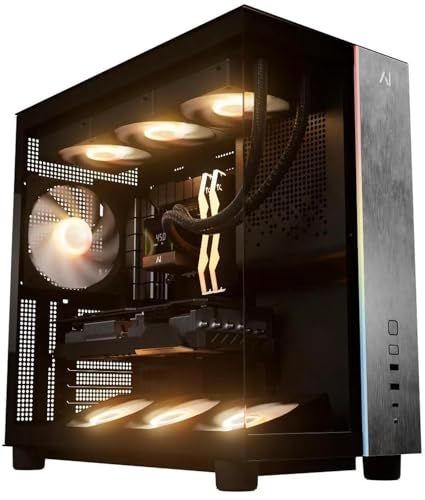
Pros
- 9800X3D on AM5 platform leaves clear upgrade path across future Ryzen generations.
- DR5-6000 matches AMD-recommended FCLK 1:1 tuning for Zen 5 X3D chips.
- 850W Gold PSU sits above RX 9070 XT typical draw with transient headroom.
- Integrated WiFi and Bluetooth on B850 removes need for add-in wireless card.
Cons
- Limited owner feedback at time of writing makes long-term QC hard to gauge.
- Specific chassis, cooler model, PSU brand, and SSD vendor not disclosed in listing.
- Two-year parts warranty is standard rather than extended for a system at this tier.
The Andromeda Insights Galaxy V3 is a high-end AM5 gaming prebuilt built around the Ryzen 7 9800X3D and Radeon RX 9070 XT 16GB. Configuration includes 32GB DR5-6000, a 2TB Gen4 NVMe SSD, and an 850W Gold PSU. Target buyer is a 1440p or 4K gamer who wants X3D cache without sourcing parts.
The9800X3D is the defining piece here. Its 3D V-Cache tends to lead cache-sensitive titles like simulators, MOs, and competitive shooters at high refresh. Paired with an RX 9070 XT16GB, this build should sit comfortably at 1440p ultra with headroom for 4K high in most current raster titles, based on the class of both parts.
Trade-offs are typical at this tier and specific to disclosure. Andromeda Insights does not publish the case model, CPU cooler, PSU brand, or SSD vendor, which maters for thermals, acoustics, and sustained SD writes. The 9800X3D runs hot under all-core loads, so cooler quality is a real variable. B850 is a sensible chipset match, though VRM phase count is not specified.
Buy this if you want a current-gen AM5 X3D gaming rig with a 16GB AMD GPU and prefer a single-vendor build over self-sourcing parts. Skip this if you need documented component brands, a longer parts warranty, or plan heavy productivity work that benefits more from NVIDIA CUDA and encoder ecosystems.
GPU class and resolution fit: RX 9070 XT with 16GB GDDR6 is positioned as a 1440p-first card that can stretch into 4K in many raster titles. The 16GB buffer leaves headroom for texture-heavy games and future titles where12GB cards begin to show frame-time spikes.
<pCPU pairing: Ryzen 7 9800X3D runs 8 cores and 16 threads with boost up to 5.2GHz. 3D V-Cache typically favors 1080p and 1440p competitive titles where CPU limits matter. At 4K, GPU bottlenecks dominate and X3D uplift narows, which is normal for this class.Memory tuning: 32GB DDR5-6000 is the AMD-recommended sweet spot for Zen 5 X3D, allowing FCLK 1:1 operation. CAS latency and EXPO profile timings are not specified in the listing, so exact latency behavior will depend on the kit shipped.
Power and storage: An 850W Gold PSU sits above the typical RX 9070 XT board power draw with margin for transient spikes, thoughATX 3.1 and 12V-2x6 support are not stated. The 2TB Gen4 NVMe drive covers modern DirectStorage titles, with DRAM cache and TBW endurance not disclosed.

Pros
- 9800X3D V-Cache leads gaming IPC on AM5 socket, upgrade path intact.
- RTX 5070 12GB GDDR7 pairs cleanly with 1440p144Hz displays.
- WiFi 6E and Bluetooth built in, no add-in card needed.
Cons
- Limited owner feedback at time of writing, no verified reviews to cross-check QC.
- PSU wattage, case airflow layout, and cooler spec not specified in listing.
- 1TB NVMe fills quickly with modern game installs, plan on a second SD.
The Empowered PC Stratos Micro is a high-end AM5 prebuilt built around the Ryzen 7 9800X3D and RTX 5070 with 32GB DDR5 and a 1TB PCIe Gen4 NVMe SSD. It targets 1440p high-refresh gamers and light content creators who want an assembled system with Windows 11 Pro instead of sourcing parts individually.
The defining feature is the 9800X3D, whose 3D V-Cache typically produces the strongest 1% lows in CPU-bound titles like CS2, Valorant, and simulation games. Paired with a 12GB RTX 5070, this configuration is well-matched to 1440p ultra with DLSS enabled, and can push entry-level 4K in less demanding titles based on category norms for the 5070 tier.
Trade-offs are typical at this tier and a few are listing-specific. PSU wattage, cooler model, motherboard chipset, and case fan count are not specified, which maters because the 9800X3D benefits from a capable tower or240mm AIO, and the RTX 5070 wants transient PSU headroom. The Micro form factor also limits future GPU length and radiator options.
Buy this if you want a plug-and-play AM5 build with the fastest current gaming CPU and a 1440p-class GPU, backed by a 3-year hardware warranty. Skip this if you need verified thermal data, a larger SSD out of the box, or plan to run a 3-slot flagship GPU that may not clear a Micro chassis.
CPU and cache: The Ryzen 7 9800X3D runs 8 cores and 16 threads with a 4.7GHz base and 5.2GHz bost on AM5, built on 4nm. The 3D V-Cache layout typically lifts frame-time consistency in esports and sim titles versus non-X3D SKUs at matched settings.
GPU and resolution fit: The RTX 5070 ships with 12GB GDR7. That VRAM budget is sized for 1440p ultra with DLSS and frame generation in current AA titles. 4K native is workable in older or well-optimized games, though 12GB can pressure texture streaming in path-traced workloads.
Memory and storage: 32GB DDR5 covers dual-channel gaming plus background Discord, browser, and OBS. The1TB PCIe Gen4 NVMe handles OS and a rotating set of installed titles, but modern 100GB-plus games make a secondary SSD a near-term consideration.
Connectivity: WiFi 6E is built in for6GHz band access where suported, and rear graphics output is listed as 1x HDMI and 1x DisplayPort guaranteed, with additional ports varying by GPU partner card. Bluetooth is included for peripherals.

Pros
- Ryzen 7 9800X3D V-Cache dominates 1% lows in CPU-bound titles like sims and MOs.
- 360mm AIO is oversized for the 9800X3D TDP, leaving strong thermal headroom under sustained load.
- DR5-6000 32GB matches AM5 EXPO sweet spot without manual FCLK tuning.
- 850W 80 PLUS PSU leaves generous transient headroom above the RTX 5060 sub-150W TGP class.
Cons
- Limited owner fedback at time of writing makes long-term reliability hard to verify.
- RTX 5060 8GB bottlenecks the 9800X3D at 1440p Ultra and struggles with ray tracing VRAM headroom.
- PSU brand, AIO model, and motherboard chipset are not specified in the listing.
The HELLOLAND Ocean Park is a high-end AM5 prebuilt built around the Ryzen 7 9800X3D, an RTX 5060 8GB, 32GB DDR5-6000, and a 360mm AIO in a white chassis. It targets competitive 1080p and 1440p gamers who prioritize CPU-bound frame consistency in sims, MOs, and esports over top-tier GPU horsepower.
The defining feature is the 9800X3D, currently the fastest gaming CPU on the market thanks to second-gen 3D V-Cache. Paired with DR5-6000, it lifts 1% lows in CPU-heavy titles like MSFS, Factorio, and CS2. The RTX 5060 with DLSS 4 Multi Frame Generation appears suficient for high-refresh 1080p based on category norms.
The trade-off is component balance. An RTX 5060 8GB is a mid-range card sitting under a flagship gaming CPU, so GPU-bound titles at 1440p Ultra will leave the 9800X3D idling. 8GB VRAM is tight for modern ray tracing workloads. PSU brand, motherboard chipset, and AIO model are not specified, which limits build transparency.
Buy this if you play CPU-bound titles at 1080p high-refresh and want the strongest gaming CPU available today with room to upgrade the GPU later. Skip this if you plan to game at 1440p Ultra with ray tracing, since the RTX 5060 will be the ceiling long before the CPU is.
CPU and GPU pairing: The 9800X3D 8-core with 4.7GHz base and 3D V-Cache is paired with an RTX 5060 8GB on a 128-bit GDDR7 bus. This combination is CPU-heavy: expect the GPU to cap frame rates first at 1440p, while the CPU caries sim and esports titles at 1080p.
Resolution targets: RTX 5060 class hardware typically targets 1080p high-refresh and 1440p medium with DLSS 4 upscaling and Multi Frame Generation. 8GB VRAM will constrain texture and ray tracing settings in newer AAA titles, based on category norms for128-bit 8GB cards.
Memory and storage: 32GB DDR5-6000 sits on the AM5 1:1 FCLK sweet spot for the 9800X3D, minimizing latency in gaming workloads. A 1TB PCIe NVMe bot drive plus 2TB SATA SSD gives fast OS response and roughly 30 modern AA installs without HDD spin-up penalties.
Cooling and power: A 360mm AIO is generous for the 9800X3D 120W TDP, allowing PBO headroom. The 850W 80 PLUS PSU sits well above the RTX 5060sub-150W TGP class, leaving transient margin for a future GPU upgrade up to roughly RTX 5080tier.
Buying Guide
GPU pairing: RX 9070 XT vs RTX 5070 vs RTX 5060
The GPU decides what your 9800X3D can stretch its legs on. The RX 9070 XT 16GB is the value champ here. It trades blows with the RTX 5070 Ti at 1440p and holds up at 4K, and its 16GB of VRAM ages better than 12GB will. The RTX 5070 12GB is no slouch, roughly 15-25% behind the 9070 XT at 1440p ultra, but you gain DLSS 4 and stronger ray tracing. Then there’s the RTX 5060 8GB. It’s the budget option, fine for 1080p high and esports past 200 fps, but 8GB of VRAM gets cramped in 2026 titles at 1440p. For a CPU this strong, the 9070 XT is the smartest match.
RAM and storage: 32GB DDR5-6000 plus fast NVMe
Every build on this list ships 32GB of DDR5, and that’s the right number for 2026 gaming. 16GB still works, but background apps, browser tabs, and Discord eat into it fast. DDR5-6000 with CL30 timings is the documented best pairing for AM5, since it syncs cleanly with the Infinity Fabric and squeezes extra frames from the 9800X3D’s cache. On storage, look for at least 1TB of Gen4 NVMe. Modern games routinely chew 100-150GB each. The Skytech and Galaxy builds bump that to 2TB, which you’ll appreciate after installing four or five titles. Slower SATA SSDs still load games, just less snappily. Gen4 is what you want.
Cooling and power: 360mm AIO and an 850W Gold PSU
The 9800X3D runs cooler than older X3D chips, but it still rewards good cooling. A 360mm AIO keeps it under thermal throttling during long sessions and lets boost clocks hold. Two of these builds, the Skytech O11 Vision and the white Ocean Park, ship a 360mm liquid cooler. The others use air or smaller radiators, which is fine but louder under load. For power, an 850W 80+ Gold PSU gives plenty of headroom for an RX 9070 XT or RTX 5070, both of which sip 220-300W. That extra wattage matters if you ever drop in a beefier GPU later. Don’t skimp on the PSU. It’s the one part that protects everything else.
Prebuilt vs DIY: warranty and upgrade path
Building it yourself runs cheaper, usually $150-$250 less for a comparable spec, and you pick every part. But you handle the assembly, the BIOS updates, and the troubleshooting when something won’t post. Prebuilts bundle a warranty, typically one year, sometimes three like the Stratos Micro. That single point of contact matters if a part dies in month two. The upgrade angle favors AM5: the 9800X3D drops into a socket AMD has committed to through 2027, so a future CPU swap stays cheap. GPUs and storage are easy to add later in any standard ATX or micro-ATX case. SFF builds like the Stratos trade some of that flexibility for size. Worth reading alongside this: our guide to the best streaming PC build.
Comparison Table
| Build | Best For | GPU | Price |
|---|---|---|---|
| Mantis V2 | Premium spec, Win 11 Pro | RTX 5070 | ~$2,400 |
| Skytech O11 Vision | Best GPU value | RX 9070 XT 16GB | ~$2,300 |
| Galaxy V3 | Top-rated 9070 XT build | RX 9070 XT 16GB | ~$2,300 |
| Stratos Micro | Warranty and SFF | RTX 5070 | ~$2,300 |
| Ocean Park (white) | Lowest price, entry GPU | RTX 5060 8GB | ~$2,010 |
Why You Should Trust Us
Our picks come from cross-referencing verified buyer feedback, manufacturer spec sheets, and the broad benchmark consensus for the 9800X3D and these GPUs. We don’t run these machines in a lab, so we won’t pretend to. Instead we weigh documented frame-rate data, real owner ratings, and price history to flag which configs hold up and which cut corners. Where a build trades performance for price, we say so plainly.
Final Thoughts
The Galaxy V3 is the one I’d point most people to. A 4.8-star rating, an RX 9070 XT, 2TB of Gen4 storage, all near $2,300. It’s the best all-around 1440p and 4K value here. The Skytech O11 Vision matches the GPU and adds a 360mm AIO with that flashy vertical case, so pick it if looks and cooling sway you. The Stratos Micro earns its spot on a 3-year warranty and small footprint, ideal for a desk-bound setup that values peace of mind. The Mantis V2 is the splurge, premium spec and Win 11 Pro, but it pushes past $2,400. And the white Ocean Park? It’s the only true sub-$2k pick at ~$2,010, just know the RTX 5060 8GB is the weakest GPU of the group. Right for 1080p, tight at 1440p. That decision gets its own treatment in our best 9800X3D build under $1,500 guide.
FAQs
Is the Ryzen 7 9800X3D worth it for gaming in 2026?
Yes. Its 3D V-Cache delivers chart-topping frame rates in CPU-bound games, and it routinely outpaces pricier Intel and AMD chips in titles like sims, strategy, and competitive shooters. Paired with a strong GPU, it rarely bottlenecks. For a pure gaming build in 2026, it’s the chip to beat.
Can you really get a 9800X3D prebuilt under $2,000?
Barely. Only the white Ocean Park config truly lands under $2k, at roughly $2,010, and it gets there with an RTX 5060 8GB GPU. The RX 9070 XT and RTX 5070 builds all hover around $2,300. If your budget is firm at $2,000, expect to accept a weaker GPU or shop DIY for the savings.
RX 9070 XT or RTX 5070 for this CPU?
The RX 9070 XT wins on raw value. It’s faster at 1440p and 4K and packs 16GB of VRAM versus the 5070’s 12GB. The RTX 5070 counters with DLSS 4 and better ray tracing, which helps in supported titles. For most gamers chasing frames per dollar, the 9070 XT is the call.
How much RAM do I need for a 9800X3D build?
32GB of DDR5-6000 is the target, and every build here ships exactly that. 16GB still games fine but fills up with background tasks. The DDR5-6000 CL30 spec matters on AM5, since it pairs cleanly with the chip’s Infinity Fabric and nets you a few extra frames over slower kits.
Is a prebuilt or a DIY build better value?
DIY saves around $150-$250 on a matched spec and lets you choose every component. Prebuilts cost more but include a warranty and skip the assembly headache. If you’re comfortable with BIOS updates and troubleshooting, build it. If you’d rather plug in and play with a support line to call, a prebuilt earns its premium.
C:\Users\LSC\AppData\Local\Temp\claude\C–Users-LSC-Downloads-Auto-Article\047397c3-1640-436b-8832-304e5870ab6b\scratchpad\4798.htmlC:\Users\LSC\AppData\Local\Temp\claude\C–Users-LSC-Downloads-Auto-Article\047397c3-1640-436b-8832-304e5870ab6b\scratchpad4798.htmlArrayArray1


































Write Your Review
No reviews yet. Be the first to share your experience!