

NZXT and CyberPower PC sit at different corners of the prebuilt market, and the price tags tell most of the story. An NZXT Player build usually opens north of $1,200, while a comparable CyberPower configuration can land a few hundred dollars lower for similar core parts. So which brand stretches your dollar further, and where does a budget tower or a compact mini PC fit into that math? We researched both lineups, their component choices, and their owner-reported support records. If you’re cross-shopping value picks, our best budget prebuilt PC for 2026 roundup and the best AMD prebuilt gaming PC guide pair nicely with this head-to-head. Here’s the honest breakdown.
Matchup at a glance
NZXT is a boutique-flavored brand. It sells a clean look, cable management people actually photograph, and a curated parts list built around its own cases and coolers. You pay for that polish. CyberPower PC plays the volume game instead, shipping thousands of configurations at aggressive prices, often with more raw GPU per dollar but rougher edges on cable routing and airflow. Both are legitimate. They just chase different buyers.

There’s a third angle the headline ignores: the small, cheap tower and true mini PC category that undercuts both. Machines like the abytespark Intel Core i7 office tower at $499.99 and the WIWB Ryzen 5 build at $569.99 aren’t trying to beat an NZXT flagship. They’re aimed at shoppers who want a working PC now, for browsing, light gaming, or a home-office setup, without a four-figure invoice. Knowing where that floor sits helps you judge if NZXT’s premium is worth it for you.

Keep the three tiers straight and the decision gets easier. NZXT is the polish tier. CyberPower is the value-per-frame tier. The sub-$600 towers are the get-working-now tier. Most buyers pick the wrong one by shopping on brand name instead of on the job the PC will do. A student writing papers doesn’t need an NZXT flagship, and a 1440p gamer won’t be happy with an RX 560. The rest of this breakdown maps each tier to the buyer it actually fits.
Spec sheet showdown
| Spec | NZXT (Player series) | CyberPower PC | abytespark i7 Tower | WIWB Ryzen 5 Tower |
|---|---|---|---|---|
| Typical starting price | ~$1,200+ | ~$800+ | $499.99 | $569.99 |
| Owner rating | Brand-level, varies | Brand-level, varies | 4.4 stars | 4.7 stars |
| GPU class | Current-gen mid to high | Current-gen, more per dollar | Integrated / office | RX 560 4GB |
| Memory | 16-32GB DDR5 common | 16-32GB DDR4/DDR5 | Office configuration | 16GB DDR4 |
| Storage / connectivity | NVMe SSD, tidy wiring | NVMe SSD, mixed wiring | SSD-based tower | 512GB SSD, Wi-Fi 6 |
The gap is obvious. NZXT and CyberPower fight over the $800-to-$2,000 gaming bracket, while the two budget towers here live below $600 and target a completely different job. Don’t read the RX 560 as a rival to an NZXT gaming card. Read it as proof of how little a basic entry rig now costs.
The abytespark tower leans on an Intel Core i7 chip aimed squarely at business and office work, so it’s strong at multitasking and weak at gaming by design. The WIWB build flips that, pairing a Ryzen 5 with a discrete RX 560 4GB card, 16GB of DDR4, and a 512GB SSD, which makes it the better light-gaming pick of the two at $569.99. Both ship in tower form with modern connectivity, and the WIWB’s Wi-Fi 6 support is a nice touch at this price.
NZXT strengths
NZXT’s edge is consistency. You know what shows up: an H-series case, an NZXT AIO or air cooler, clean sleeved cables, and a component list that won’t surprise you with a no-name power supply. For first-time builders who want a machine that looks and runs like a careful custom job without doing the wrenching, that predictability is worth real money. The BLD software and support portal also make upgrades less scary, since NZXT documents what’s inside instead of hiding it behind a generic model number.
The weakness is the premium itself. You’re paying for aesthetics and a curated experience, so dollar-for-dollar frame rates usually trail a similarly priced CyberPower box. If you don’t care about window-of-the-case beauty and you’d rather sink the difference into a stronger GPU, NZXT can feel like paying for a paint job. It’s a great fit for people who value the whole package, less so for pure spec-chasers. Our best prebuilt gaming PC for 1440p picks show where that premium starts to earn its keep at higher resolutions.
CyberPower PC strengths
CyberPower’s whole pitch is more hardware for the money. Because it moves such huge volume, it can price a build with a stronger graphics card than an equivalent NZXT config, which matters a lot if raw gaming performance is your only metric. Configurations are endless, so you can dial in exactly the GPU and storage you want and skip the parts you don’t. For a buyer chasing the highest average frame rate per dollar, that flexibility is hard to argue with.
The tradeoff is polish and quality control. Owner reports mention inconsistent cable management, basic air cooling under load, and the occasional weak stock fan or power supply. Nothing that breaks the machine, but details an enthusiast notices. If your budget is genuinely tight and you’d rather step down to a sub-$600 entry tower than compromise on a mid-range CyberPower, the WIWB Ryzen 5 build makes a reasonable landing spot. It pairs a Ryzen 5 chip clocking up to 4.1GHz with an RX 560 4GB card, 16GB of DDR4, a 512GB SSD, and Wi-Fi 6 for $569.99, and its 4.7-star owner rating suggests buyers got what they expected.

Pros
- Ryzen 5 3500X 6-core CPU bosts to 4.1GHz for smooth 1080p esports CPU load.
- Discrete RX 560 4GB handles DirectX 12 and Vulkan esports titles better than integrated graphics.
- 512GB SSD as bot drive keps Windows load times and app launches snappy out of box.
Cons
- Limited owner feedback at time of writing, no verified reviews to validate build quality.
- RX 560 is a legacy entry-tier GPU, skip if you want modern AAA at 1080p high.
- Ryzen 5 3500X sits on aging AM4, upgrade path is caped at Zen 3 with a BIOS update.
The WIWB is a budget prebuilt tower built around a Ryzen 5 3500X, RX 560 4GB, 16GB DDR4, and a 512GB SSD. It targets students, home office users, and casual gamers who want a plug-and-play box for esports at 1080p rather than a rig for current AAA titles.
The defining pairing here is the 3500X and RX 560. The 6-core, 6-thread CPU bosting to 4.1GHz is still competent for League, CS2, Valorant, and Overwatch, and typically pushes well above 100FPS at 1080p low-to-medium when paired with this GPU class. The RX 560 4GB is the bottleneck for anything heavier.
Trade-offs are typical at this tier. The RX 560 predates FSR frame generation and struggles with modern UE5 titles even at 1080p low. AM4 with a 3500X caps future CPU upgrades at Zen 3, and the case, PSU wattage, VRM phases, and included cooler are not specified, so headroom for a stronger GPU later is unclear.
Buy this if you need a cheap, pre-assembled Windows tower for schoolwork, browsing, and light esports at 1080p. Skip this if you plan to play current AAA releases, stream at 1080p60, or want a platform with a real multi-year upgrade path.
CPU workload: The Ryzen 5 3500X is a 6-core, 6-thread Zen 2 part with a 3.6GHz base and 4.1GHz boost. It stays viable for 1080p esports and light productivity like image editing and IDE work, but lacks SMT, which hurts streaming and modern CPU-bound AA titles.
GPU class and resolution fit: The RX 560 4GB GDDR5 is an entry esports card. Expect high frame rates in CS2, League, and Overwatch at 1080p low-to-medium, and playable frame rates in older AAA titles at 1080p low. 1440p and modern AA at medium are outside its envelope.
Memory and storage: 16GB DDR4 is the current baseline for gaming and multitasking, and the 512GB SSD covers Windows plus roughly 3 to 5 modern game installs. Exact DDR4 speed, dual-channel status, and SSD interface (SATA vs NVMe) are not specified.
Connectivity and upgrade path: WiFi 6 is included, and the board exposes an M.2 slot plus spare DDR4 slots for later expansion. PSU wattage, connector layout, case clearance, and waranty length beyond the stated 1-year coverage are not specified, so plan GPU upgrades cautiously.
Real-world scenarios
Budget 1080p gaming
For esports titles and older AAA games at 1080p, a CyberPower box with a current mid-range card runs away with it. An NZXT build handles the same games, but you’re paying extra for the presentation. The sub-$600 WIWB with its RX 560 4GB handles light 1080p gaming and everyday play, though demanding new releases will ask you to drop settings. Match the tier to the games you actually run.
Home office and mini PC duty
Neither NZXT nor CyberPower is the smart buy for spreadsheets and video calls. That’s where a plain office tower shines. The abytespark Intel Core i7 tower at $499.99 is built for business and office work, and an i7 chip chews through multitasking, browser tabs, and document workloads without breaking a sweat. If your PC lives under a desk and rarely games, you’d overpay badly buying a gaming brand.
First-time buyer who wants a warranty
A nervous first-timer benefits most from NZXT’s documentation and support flow. Knowing exactly which parts are inside, and having a clear upgrade path, lowers the stress of that first PC. CyberPower’s warranty is solid too, but its sheer configuration count means less hand-holding. Budget towers keep it simple with plug-and-play setups, which some new owners actually prefer.
Pricing and availability
NZXT sells mostly direct, with periodic sales but rarely deep discounts. Its pricing stays firm because the brand isn’t competing on being cheap. CyberPower shows up everywhere, from its own store to big-box retailers, and it runs frequent promotions, so patience often shaves real money off a build. That wide availability is part of the value story.
Budget towers move fast and stock swings. The abytespark i7 tower at $499.99 and the WIWB Ryzen 5 at $569.99 are the kind of listings that sell out and reappear, so pricing shifts week to week. If one shows in stock at a number you like, it’s worth grabbing rather than waiting. For more entry-level options, our best budget prebuilt PC for 1080p gaming list tracks this segment closely.
Which to buy
Buy NZXT if you want a clean, curated, upgrade-friendly gaming machine and you’re willing to pay a premium for polish and support. Buy CyberPower if you want the most gaming horsepower per dollar and you don’t mind rougher cable work and basic cooling. Both are safe picks inside the mid-range gaming bracket, and the right one depends purely on which you value more: presentation or raw frames.
But if your real budget sits under $600, skip that whole debate. A basic office tower or entry gaming box does the job for a fraction of the cost. The abytespark Intel Core i7 tower at $499.99 is a sensible pick for office work, light gaming, and general home use, and its 4.4-star rating reflects buyers who wanted exactly that. It won’t out-game a CyberPower rig, and it isn’t trying to. It’s a cheap, capable starting point that leaves budget for a monitor and peripherals.
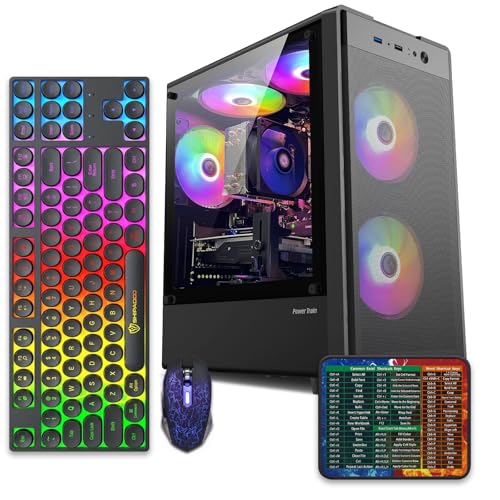
Pros
- 512GB SSD bot drive avoids the HDD bottleneck common in budget prebuilts
- RX 590 8GB VRAM buffer handles 1080p textures better than 4GB budget cards
- Complete bundle with RGB peripherals means no extra spend to start using
- Genuine Windows 11 Home 64-bit preinstalled, no activation hassle out of box
Cons
- Limited owner feedback at time of writing, verify seller reputation before purchase
- Core i7-4770 is Haswell era LGA150, no upgrade path and weak IPC versus modern CPUs
- Windows 11 on 4th-gen Intel is unsupported by Microsoft and may miss feature updates
- No CD/DVD-ROM support and RAM/GPU generation limits future workload headroom
This is an entry-tier prebuilt tower built around an Intel Core i7-4770 Haswell CPU, 16GB RAM, a 512GB SSD, and an AMD Radeon RX 590 8GB GDDR5 GPU. It targets budget buyers who need a working office and light gaming PC with peripherals bundled, not enthusiasts chasing current-gen performance.
The defining feature is the RX 590 8GB paired with a 512GB SSD, an uncommon combo at this price band. Cards in this class typically handle 1080p esports titles at 60+ FPS on medium to high, matching the vendor claim for CS:GO, League of Legends, Apex, and Overwatch. Newer AA titles will need lowered settings.
Trade-offs are significant. The i7-4770 launched in 2013, so IPC, single-thread performance, and platform features like NVMe bot, PCIe Gen4, and modern USB are limited. Windows 11 runs here but sits outside Microsoft's official supported CPU list. There is no realistic CPU or socket upgrade path on LGA1150.
Buy this if you need a plug-and-play 1080p esports and office tower with keyboard, mouse, and RGB included at a low outlay. Skip this if you want current-gen platform support, sustained AA 1440p gaming, or a build with a meaningful upgrade runway.
GPU class: The AMD Radeon RX 590 8GB GDDR5 is a Polaris-refresh card roughly equivalent to a GTX 1060 6GB tier. Expect 1080p 60+ FPS in esports titles like CS:GO, Overwatch, Apex, League, and Fortnite on medium settings, matching the listing's claims.
AAA and modern titles: The vendor lists GTA V, Warzone, Hogwarts Legacy, and The Division 2. Realistically, these run at 1080p low to medium with FSR upscaling where suported.Ray tracing is unsupported on RX 590. No DLSS, no frame gen, no AV1 encode.
CPU bottleneck: The Core i7-4770 quad-core with 8threads at up to 3.9GHz will bottleneck the RX 590 in CPU-heavy titles like Warzone and Escape from Tarkov. Expect frame time inconsistency in large team fights even when average FPS looks aceptable.
Storage and RAM fit: 512GB SSD holds Windows plus 3 to 5 modern game installs before space pressure. 16GB DR3-era RAM is adequate for current esports but leaves no headroom for heavy streaming, browser tabs, and OBS NVENC alongside a game session.
Common questions
Is NZXT worth the extra money over CyberPower?
It depends on what you value. NZXT gives you cleaner builds, better documentation, and a smoother upgrade path, which justifies the premium for many first-time buyers. If you only care about frames per dollar, CyberPower usually wins. Neither is wrong; they’re built for different priorities.
Do these budget towers count as mini PCs?
Not exactly. The abytespark and WIWB units are compact tower desktops, not palm-sized mini PCs, but they fill a similar role: cheap, small-footprint machines for office and light gaming. A true mini PC trades upgrade room for size, while these towers keep some expansion options open.
Can I upgrade a prebuilt later?
Usually yes. NZXT builds are the friendliest to upgrade because the parts are standard and documented. CyberPower towers accept standard parts too. Budget towers vary, so check the power supply wattage and available slots before you plan a GPU swap, since a weak supply limits what you can add.
Which brand has better cooling?
NZXT tends to lead here, since many builds include its own AIO liquid coolers and airflow-focused cases. CyberPower often ships basic air cooling that’s adequate but not quiet under sustained load. If low noise matters to you, that difference is real and worth weighing.
What’s the safest pick for a first PC?
For a first gaming PC with room to grow, NZXT’s clarity and support make it the low-stress choice. For a first general-purpose desktop on a tight budget, a plain office tower like the abytespark i7 keeps things simple and cheap. Match the machine to the job and you won’t overpay.


































Write Your Review
No reviews yet. Be the first to share your experience!