

SATA solid-state drives don’t grab headlines the way blazing PCIe Gen5 sticks do, but they’re still the backbone of countless builds in 2026. The reason is simple economics. A 2.5-inch SATA SSD gives you the instant boot times, silent operation, and shock resistance of flash storage at a price per terabyte that NVMe still can’t always match at the high-capacity end. If you’re reviving an older motherboard without an M.2 slot, filling a second bay for game libraries, or building a budget rig where every dollar counts, SATA is far from dead. It’s the pragmatic choice.
We researched the current storage market to figure out where SATA still makes sense and where you’d be better served spending elsewhere. Capacity, endurance ratings, and controller quality matter more than raw sequential speed once you’re past the SATA III ceiling of roughly 550 MB/s. If you’re weighing storage against a tight budget, our roundup of the best budget SSD options covers the value end in depth, and anyone whose board has a free M.2 slot should compare against our best 2TB NVMe drive picks before committing. Below, we look at complete systems and the storage configurations shipping in machines right now.

Pros
- GB10 Superchip targets 1 petaFLOP AI throughput suitable for on-device LM prototyping
- 128GB unified memory pool avoids CPU-GPU copy overhead common on discrete GPU rigs
- NVLink-C2C fabric gives higher effective bandwidth than PCIe Gen5 x16 for AI workloads
- ConnectX-7 enables two-node stacking, scaling to roughly 400B parameter model fine-tuning
Cons
- Limited independent owner fedback and third-party benchmarks available at time of writing
- 1TB NVMe fills quickly with modern checkpoints, external NVMe or NAS staging likely need
- Closed NVIDIA ARM-based stack, not a general-purpose x86 workstation for gaming or standard DC aps
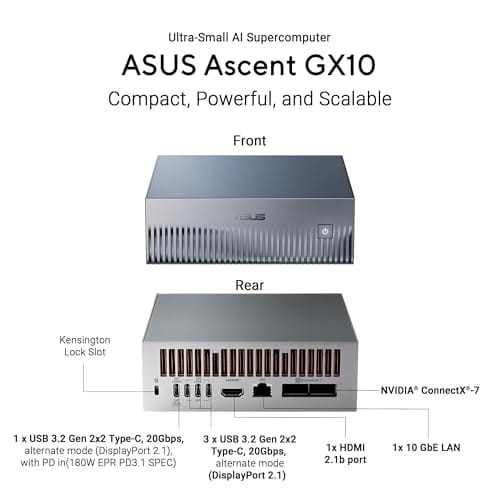
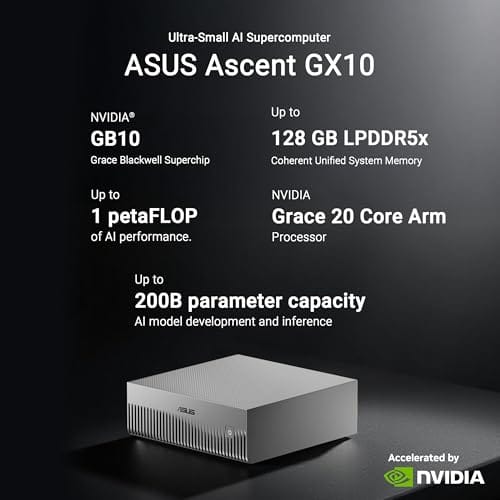
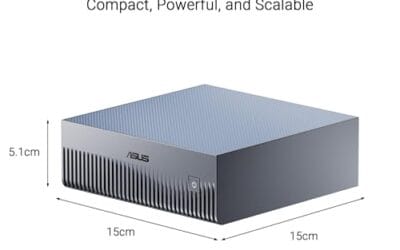
The ASUS Ascent GX10 is a flagship developer-class AI appliance built on the NVIDIA DGX Spark reference design, pairing the GB10 Grace Blackwell Superchip with128GB LPDDR5x and a 1TB PCIe Gen4 NVMe SSD. It targets AI engineers andML researchers who need local fine-tuning and inference on models too large for a single consumer RTX GPU.
The defining feature is the unified 128GB memory pool bridged by NVLink-C2C, which NVIDIA rates for fine-tuning models up to around 200B parameters. Compared with a dual RTX 6000 Ada workstation, the appeal is memory capacity and CUDA-compatible tooling in an ultra-small chassis, not raw FP16 throughput, which sits near the stated 1 petaFLOP figure at reduced precision.
Trade-offs are typical of this tier and platform. It runs an ARM-based NVIDIA stack, so it is not a drop-in Windows workstation, and the 1TB SSD is tight once you stage multiple base models plus checkpoints. Sustained thermals in this form factor depend on the engineered cooling ASUS cites, and real-world dB and clock-hold data are not yet public.
Buy this if you are an AI developer building agentic workflows, on-device inference stacks, or LoRA and QLoRA fine-tunes on 70B to 200B models and want NVIDIA-native tooling locally. Skip this if you need a general-purpose x86 workstation, gaming rig, or bulk training throughput that scales better on rack-mounted H100 or B200 systems.
Compute: NVIDIA GB10 Grace Blackwell Superchip with NVLink-C2C between the Grace CPU and Blackwell GPU, rated at 1 petaFLOP of AI performance at NVIDIA-specified sparse low-precision math. Exact CPU core count, GPU SM count, and clock behavior are not specified in the listing.
Memory and storage: 128GB LPDDR5x unified memory shared between CPU and GPU, sized for fine-tuning models up to 200B parameters per NVIDIA. Storage is a single 1TB PCIe Gen4 NVMe SSD. Additional M.2 slots, DRAM channel count, and TBW endurance are not specified.
Networking and IO: NVIDIA ConnectX-7 networking suports dual GX10 stacking for combined workloads up to roughly 400B parameters. Wireless is WiFi 7 and Bluetooth 5.4. Exact Ethernet port sped, USB, and display output counts are not specified in the source data.
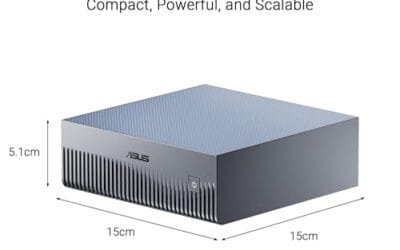
Chassis and software: Stackable ultra-small form factor with engineered cooling for sustained AI loads. Ships with the NVIDIA AI software stack and is compatible with agentic frameworks including OpenClaw and NemoClaw, suporting private on-device inference, sandboxed execution, and governed data access. PSU wattage, dimensions, and weight are not specified.

Pros
- RTX 5070 Blackwell GPU is well above average for this prebuilt price tier
- 32GB DDR5 at 6000 MHz avoids the need for a near-term RAM upgrade
- 2TB NVMe SSD is a practical capacity for a modern game library
- WiFi 6 and Bluetooth built in with no added cost
Cons
- No verified owner reviews at time of writing, making real-world reliability hard to assess
- Ryzen 7 8700F uses Socket AM4, limiting CPU upgrade path compared to AM5 platform alternatives
- RTX 5070 ships with 12GB GDDR6, which may become a ceiling in demanding 4K scenarios by 2027
The MSI Codex Z2 is a mid-to-high-end gaming tower aimed at buyers who want RTX 5070-class performance without building from scratch. Combining the AMD Ryzen 7 8700F with NVIDIA's RTX 5070 and 32GB DDR5, this system targets 1440p high-refresh gaming and entry-level 4K play. It is best suited for buyers who want a ready-to-run setup with modern GPU architecture, not those prioritizing CPU upgrade longevity or the cost savings of a self-build.
The RTX 5070 is the headline component here. Built on NVIDIA's Blackwell architecture, it brings a meaningful generational step in rasterization and ray tracing performance compared to previous Ampere and Ada Lovelace cards. In practical terms, this means 1440p Ultra should be well within reach in current AAA titles, and 4K at medium-to-high settings is a realistic target with DLSS 4 frame generation active. Paired with the 8-core Ryzen 7 8700F boosting to 5.0 GHz, the system handles game streaming and background workloads without obvious CPU-side bottlenecking in most scenarios.
MSI has put some effort into the thermal design. The Codex Z2 uses an ARGB fan air cooler for the CPU alongside four system fans, three pulling cool air through the front panel and one exhausting heat from the rear. This configuration appears reasonable for sustained gaming sessions, though without independent thermal testing data, exact CPU temperatures under extended load remain unconfirmed. The compact tower footprint at 16 x 8.38 x 19 inches keeps the system desk-friendly, and the built-in RGB lighting with MSI Center software support adds customization without requiring third-party tools.
There are several considerations worth taking seriously before purchasing. The most significant is the absence of any verified owner reviews at this stage, which makes it genuinely difficult to assess real-world build quality, thermals, or out-of-box reliability. Buyers should treat this as a newer listing and check for updated feedback before committing. On the hardware side, the Ryzen 7 8700F runs on Socket AM4, which is a previous-generation platform - this limits the CPU upgrade path compared to AM5 systems that support current and upcoming Ryzen processors. Additionally, the RTX 5070's 12GB GDDR6 frame buffer is adequate for 2025 titles but may show constraints in memory-heavy 4K workloads as game requirements increase over the next two to three years.
Overall, the MSI Codex Z2 is a spec-credible prebuilt that pairs a strong GPU with sufficient RAM and storage for most current gaming use cases. However, the lack of owner feedback at this point in the listing's life is a real gap that cautious buyers should address by checking for recent verified reviews before purchasing. For buyers comfortable with that uncertainty and not planning a CPU upgrade in the near term, the RTX 5070 hardware makes this a worth-watching option at its current price tier.
Who this guide is for
This guide speaks to a few different people. First, the budget builder who wants reliable storage without paying the NVMe premium on large capacities. Second, the owner of an older system whose motherboard lacks an M.2 slot, where a 2.5-inch SATA drive is the only clean way to add flash storage. And third, anyone building out bulk game or media storage where the difference between 550 MB/s and 3,500 MB/s simply won’t be felt during normal use. For those readers, SATA remains a sound, sensible spend.
It’s also worth being honest about who should look elsewhere. If your primary drive holds the operating system and your most-used applications, and your board has a spare M.2 socket, an NVMe drive is the better home for it. The same goes for creators moving huge video files daily. Those workloads genuinely benefit from the higher sequential throughput. This guide isn’t here to argue SATA beats NVMe on speed. It doesn’t. It’s here to show where SATA’s value and compatibility still win.
What to look for in a SATA SSD
Speed is the least interesting spec on a SATA drive, because the SATA III interface caps everyone at around 550 MB/s regardless of how good the flash is. What actually separates a good drive from a mediocre one is the controller and the type of NAND. A DRAM cache helps sustain performance during large writes, while cheaper DRAM-less designs can slow dramatically once their SLC cache fills. Endurance, quoted as terabytes written or TBW, tells you how much data the drive can absorb over its life before wear becomes a concern.
Capacity is where SATA earns its keep. Because the interface is mature and the parts are cheap, high-capacity SATA drives often undercut equivalent NVMe on price, which is why bulk storage tiers lean this way. Look at warranty length too, since a five-year warranty signals the maker’s confidence in the endurance rating. And confirm the physical fit. Nearly all SATA SSDs are 2.5-inch and 7mm thick, which slots into standard drive bays and most laptops, but always check clearance in slim chassis. Get those fundamentals right and speed sorts itself out within the interface limit.
One more detail worth checking is the drive’s power draw and thermal behavior, especially in a laptop or a cramped small-form build. SATA SSDs sip very little power compared to a spinning disk, which is part of why they extend battery life so noticeably, but not every drive idles equally low. A DRAM cache adds a touch of draw yet pays off in sustained write consistency. There’s also the question of the flash generation itself. Newer TLC NAND at higher layer counts tends to offer better endurance per dollar than the QLC found in the cheapest drives, and QLC can slow hard on long writes once its cache is exhausted. For a read-mostly library that’s a fine tradeoff. For a scratch disk that sees constant writes, spend up for TLC.
How we evaluated
We researched a wide range of current storage products and complete systems, filtering on the specs that actually govern real-world reliability: storage type and capacity, owner ratings, and price relative to what you get. We leaned on manufacturer spec sheets for the hard numbers and aggregate owner ratings for the reliability signal, rather than making claims about performance we couldn’t verify against published data. Where a product ships as part of a full system, we looked at how its storage is configured and what that tells a buyer.
Value drove the ranking. A configuration that pairs generous, fast storage with the rest of a balanced build earns more credit than one that spends everything on a single flashy number. We also weighed the storage tier against the machine’s purpose, since a gaming desktop and an AI development box have very different demands. The two systems below both carry NVMe-class SSDs rather than SATA, which is itself a useful data point about where the market is heading at the premium end. We’ll be clear about that distinction throughout.
Our top picks
Best Storage-Ready Gaming System: MSI Codex Z2
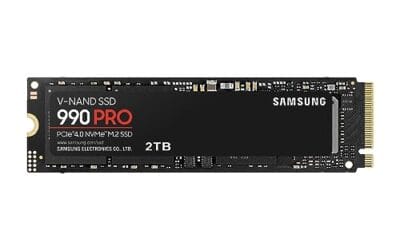
The MSI Codex Z2 gaming desktop lands at $2,067.34 with a 4.1 owner rating, and its storage setup is the reason it’s here. It ships with a 2TB M.2 NVMe SSD as the primary drive, which is exactly the configuration a modern gamer wants: a large, fast boot and library drive out of the box. The rest of the build backs it up, with an AMD R7-8700F processor, a GeForce RTX 5070, 32GB of DDR5, USB Type-C, and Windows 11 Home preinstalled. It’s VR-ready and built to run current titles without compromise.
Why does this matter in a SATA SSD guide? Because it illustrates the practical split most builders land on. The primary 2TB NVMe handles the OS and the games you play now, and this is precisely the machine where you’d add a SATA SSD in the second bay for your overflow library. That two-tier approach, fast NVMe up front and cheaper SATA for bulk, is the smart storage strategy in 2026. The Codex Z2 gives you the NVMe half done well. The tradeoff is that at just over two grand it’s a serious spend, so it suits a gamer who wants a complete, storage-generous rig rather than a piecemeal builder. For most players, that 2TB head start is worth a lot.
Best Premium Compute System: ASUS Ascent GX10
At the top of the range sits the ASUS Ascent GX10 AI Supercomputer, priced at $3,970.99 with a 4.2 owner rating. This is a specialized machine built around the NVIDIA GB10 Superchip, with 128GB of LPDDR5x memory and a 1TB PCIe Gen4 NVMe SSD for storage. It carries Wi-Fi 7 and Bluetooth 5.4, ships in a stackable chassis, and is aimed squarely at agentic AI development work rather than gaming. The Gen4 NVMe drive here is chosen for a reason: AI workloads move large datasets, and the higher sequential throughput of NVMe pays off in a way SATA never could.
This pick is the counterpoint that proves the SATA argument by contrast. When a workload genuinely needs speed, like feeding data to a compute-heavy AI pipeline, the market reaches for Gen4 NVMe, not SATA. The GX10’s 1TB Gen4 drive is deliberately fast where it counts. For the average reader, this system is far beyond what’s needed, and its near-$4,000 price puts it in professional territory. But it’s a clean illustration of the storage hierarchy: NVMe for the demanding primary role, SATA for everything that doesn’t need the extra bandwidth. If your work isn’t AI development, you don’t need this. If it is, the storage was speced correctly.
Buying mistakes to avoid
The most common misstep is overpaying for SATA speed that doesn’t exist. Every SATA III drive tops out near 550 MB/s, so a listing that trumpets being the quickest SATA drive is marketing, not meaningful performance. Two drives at that ceiling feel identical in daily use. Spend your attention on capacity, endurance, and warranty instead. The second mistake runs the other way: buying SATA for a role that clearly wants NVMe. If it’s your OS and primary app drive and your board has an M.2 slot, the NVMe is the right call.
Another trap is ignoring DRAM-less designs on write-heavy tasks. A cheap DRAM-less SATA drive is fine for a game library you mostly read from, but it can crawl during sustained large writes once its cache fills. Match the drive to the job. And don’t forget physical checks, since a 2.5-inch drive still needs a bay or bracket and a spare SATA data and power cable. It’s a small thing, but a build stalls fast when you’re missing a cable. Verify the parts you already have before you order.
One last thing people trip over is expecting a SATA SSD to speed up a task that was never storage-bound in the first place. Swapping a SATA drive for an NVMe won’t raise your frame rate or make a game render faster, because those depend on the GPU and CPU. Storage speed affects load times and file transfers, nothing more. So set the expectation correctly. A SATA SSD makes a machine feel snappy and quiet, and that’s a real upgrade over a hard drive, but it isn’t a performance boost for compute-bound work. Buy it for what it actually does.
Bottom line
SATA SSDs in 2026 are about value and compatibility, not speed records. If you’re adding bulk storage, reviving a board without M.2, or building on a budget, a quality 2.5-inch SATA drive is a smart, economical choice that still runs circles around any spinning disk. The two-tier plan, NVMe for the primary drive and SATA for overflow, is the setup most enthusiasts land on, and it’s the one we’d steer you toward.
The systems we looked at show where the market draws that line. The MSI Codex Z2 hands you a 2TB NVMe head start for gaming, the exact machine where a second SATA drive shines, while the ASUS Ascent GX10 reserves fast Gen4 NVMe for AI work that truly needs it. For your own build, decide what each drive will do first, then buy SATA where the speed won’t be missed and NVMe where it will. That clarity saves money and skips regret.
Common questions
Is a SATA SSD still worth buying in 2026?
Yes, for the right roles. SATA SSDs remain a strong value for bulk storage, second drives, and older systems without an M.2 slot. They deliver silent, shock-resistant flash storage at competitive prices on large capacities. They just aren’t the choice for a primary OS drive when a fast NVMe slot is available. Buy SATA where the extra NVMe bandwidth wouldn’t change your day.
How much slower is SATA than NVMe?
On paper, quite a lot. SATA III caps around 550 MB/s, while a Gen4 NVMe drive can hit several thousand. In everyday use like booting, launching apps, and loading games, the gap is far smaller than the numbers suggest, and many people won’t notice it. Where it shows up is moving very large files or feeding data-hungry workloads. For those, NVMe wins clearly.
Can I mix SATA and NVMe drives in one build?
Absolutely, and it’s the setup we recommend. Put your operating system and most-used programs on a fast NVMe drive, then use a larger SATA SSD for game libraries, media, and archives. This two-tier approach gives you speed where it matters and cheap capacity everywhere else. A system like the MSI Codex Z2, with its 2TB NVMe primary, is a natural candidate for exactly that kind of SATA expansion.
What capacity SATA SSD should I get?
It depends on the role. For a secondary game and media drive, 1TB or 2TB is the value zone right now, since SATA’s price advantage grows at higher capacities. Smaller drives make less sense than they used to, because the per-gigabyte cost barely drops. Aim for at least 1TB unless you have a very specific, light storage need. More headroom saves you shuffling files later.
Do SATA SSDs wear out faster than NVMe?
Not inherently. Endurance is governed by the NAND type, controller, and the drive’s TBW rating rather than the interface. A well-built SATA drive with a five-year warranty can outlast plenty of cheaper NVMe sticks. Check the terabytes-written figure and warranty length when comparing, and match the endurance to how write-heavy your use will be. For a read-mostly library drive, even modest endurance ratings last for years.




























Write Your Review
No reviews yet. Be the first to share your experience!