

A PSU fan not spinning can be normal, annoying, or a warning sign depending on the power supply and what the PC is doing. Many modern units use a semi-passive fan mode, so the fan may stay still at idle, on the desktop, or during light browsing. That gets confusing fast if you’re used to older power supplies where the fan ran every second. We researched the common causes, the safe checks, and the point where it makes more sense to replace the unit than keep poking around a live power supply. If you’re comparing replacements, our guides to the best modular PSU for a gaming PC and best 1000W PSU are useful context.
First check the obvious
Start with the boring checks because they catch a lot of false alarms. Shut the PC down, flip the power supply switch off, unplug the wall cable, and wait a few minutes. Look through the PSU grille with a flashlight. If the blades are blocked by a cable tie, loose dust clump, packing foam, or a screw that fell into the case, don’t power the system again until the obstruction is gone. Simple stuff. Still important.

Next, confirm whether your PSU has a zero-RPM, hybrid, eco, or semi-passive mode. Some units don’t spin the fan until the load or internal temperature rises. A desktop pulling 60 to 120 watts from a 750W or 1000W unit may not be enough to wake the fan at all. Launching a game, rendering a video, or running a GPU-heavy benchmark can raise load, but don’t use the fan as your only health indicator. Watch for shutdowns, burning smell, clicking, voltage warnings, or the PSU shell getting unusually hot. If those show up, stop.

Cause #1: Semi-passive fan mode is doing its job
The most common reason is also the least scary: the fan curve is intentional. Many current ATX 3.1 and SFX units are built to run silently at low load. A 1000W supply powering a midrange gaming PC can sit far below the load where the fan needs to move air. That’s especially likely if the PC is at the Windows desktop, streaming video, writing documents, or running a CPU that sips power outside heavy workloads.
You can usually confirm this from the product page or manual. Look for phrases like zero RPM mode, hybrid fan control, fanless mode, or semi-passive cooling. If your system is stable, the PSU exterior is only mildly warm, and the fan spins briefly at startup or under heavier load, there’s probably nothing to fix. Don’t force the fan with a pencil, don’t spray random lubricant into the grille, and don’t open the PSU housing. Inside the metal box are capacitors that can hold dangerous charge after unplugging. Not worth it.

Pros
- Native 12V-2x6 connector on ATX 3.1 platform ready for RTX 40 and PCIe 5.1 GPUs.
- Handles power excursions up to 2000W transient, headroom for RTX 4080 and 4090 class spikes.
- Semi-passive zero-RPM mode below moderate load keps idle acoustics near inaudible.
- LLC topology with single 12V rail delivers stable voltage regulation for overclocked GPUs.
Cons
- Limited independent owner feedback available at time of writing, riple and hold-up data unverified.
- Only four PCIe 6+2-pin connectors, tight for legacy multi-GPU or high-CPU-EPS custom lop builds.
- 80 PLUS Gold trails Platinum and Titanium units at similar wattage on sustained efficiency.
The be quiet! Pure Power 13 M 1000W is a high-end ATX 3.1 PSU aimed at builders pairing a Ryzen 7000/9000 or Core Ultra CPU with an RTX 4070Ti Super,4080 Super, 4090, or RX 7900 XTX class GPU. It targets buyers who want native 12V-2x6 wiring and transient headroom without stepping up to Platinum-tier pricing.
The defining trait is ATX 3.1 compliance with power excursion handling up to double the rated 1000W, meaning brief 2000W spikes from modern GPUs should not trip OCP. Combined with the single 12V rail and LLC topology, this suits overclocked GPUs where transient behavior, not average draw, tends to triger shutdowns on older units.
Trade-offs are typical at this tier. 80 PLUS Gold is eficient but not Platinum, soustained heavy loads generate more heat than a higher-rated unit. Four PCIe 6+2-pin connectors is standard, though builders running EATX boards with dual EPS plus a 4x8-pin GPU adapter should verify cable counts against the modular panel before buying.
Buy this if you are building a single-GPU gaming or content rig around a 250-450W TGP card and want native 12V-2x6 without paying Platinum prices. Skip this if you need sub-audible acoustics under sustained full load, or if you already own a workingATX 3.0 unit with a 12VHPWR pigtail.
ATX standard: Full ATX 3.1 compliance with native 12V-2x6 connector integration, which corects the sense-pin issue found on early 12VHPWR cables. Supports PCIe 5.1 GPUs at spec, and handles transient power excursions up to 2000W, roughly double the 1000W continuous rating.
GPU pairing: Comfortable for GPUs in the 250W to 450W TGP range, including RTX 4080 Super (320W) and RTX 4090 (450W) with headroom for overclocking. Four PCIe 6+2-pin outputs cover legacy 8-pin GPUs; the native 12V-2x6 removes the need for a 4x8-pin adapter dongle.
Efficiency and cooling: 80 PLUS Gold rated up to 94.4% at optimal load, typically around 50% utilization. The 120mm be quiet! fan runs semi-passive with zero-RPM below a load threshold not specified by the manufacturer, so idle and light workloads should remain silent.
Cabling: Fully modular design, leting builders omit unused SATA and Molex leads. Exact cable lengths and connector counts beyond the four PCIe 6+2-pin and single 12V-2x6 are not specified in source material, verify against your case routing before purchase.
Cause #2: The PSU is overloaded, overheating, or mounted badly
A fan that never spins while the PC shuts down under gaming load is a different story. The issue may be an overloaded unit, poor case airflow, a blocked intake filter, or a PSU mounted with its intake pressed against carpet. Modern GPUs can pull sharp transient spikes, and a weak or aging supply may trip protection before the fan behavior looks obvious. If you’ve recently upgraded to a stronger graphics card, added more drives, or tuned CPU power limits, the old PSU may be operating closer to its ceiling than you think.
Check the PSU orientation first. In most bottom-mounted cases, the PSU fan should face a ventilated intake, either downward through a filtered bottom vent or upward into the case if the bottom is blocked. Leave at least an inch of breathing room under the case. Clean the dust filter, move the tower off thick carpet, and make sure the rear exhaust isn’t jammed against a wall. If the system has a high-end GPU, the buying logic in our 1000W PSU for high-end GPU guide explains why wattage headroom and newer PCIe power support can matter.
Cause #3: The fan motor, bearing, or controller has failed
If the fan used to spin and now never moves, even during long gaming sessions or high CPU and GPU loads, the fan assembly or its controller may have failed. Warning signs include a grinding noise before the failure, a fan that twitches but doesn’t start, a burnt smell, sudden shutdowns, or a PSU shell that feels too hot to touch comfortably. A failed PSU fan isn’t the same as a failed case fan. You shouldn’t open the PSU to replace the internal fan unless you’re trained to service mains-powered electronics.
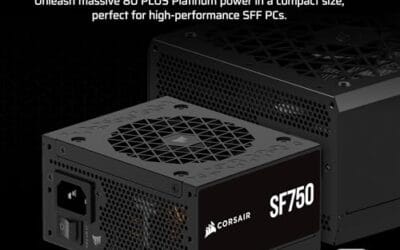
At that point, the safer fix is replacing the PSU or using warranty support. For compact builds, the Corsair SF750 2024 is a $159.99 fully modular SFX power supply with an 80 Plus Platinum rating, ATX 3.1 compliance, PCIe 5.1 readiness, a low-noise design, and an included bracket. Its 4.1 rating and small-form-factor focus make it relevant when the old unit is in an ITX case where heat and cable routing are tight. For larger towers, a full ATX unit can be simpler to fit, route, and cool, especially if the case has a long PSU shroud and plenty of space behind the motherboard tray. Before ordering, measure the old unit’s length, check cable exits, and confirm the GPU power connector style. A new ATX 3.1 supply with native PCIe 5.1 support can reduce adapter clutter and make the build cleaner.

Pros
- ATX 3.1 compliant with PCIe 5.1 support, resists transient spikes from RTX 50 and RX 9000 series GPUs.
- Zero RPM Mode eliminates fan noise at low and medium loads, a real advantage in acoustically sensitive SFF builds.
- Fully modular design with short SFX cables reduces cable management friction in sub-10-liter cases.
- 105 degree C Japanese capacitors indicate quality component selection typical of high-tier SFX units.
Cons
- Limited owner feedback at time of writing; real-world noise, ripple, and transient performance are unverified by community data.
- Short SFX cables are unsuitable for mid-tower or full-tower cases without aftermarket cable extensions.
- 750W ceiling may fall short for extreme SFF builds pairing a 300W-plus TGP GPU with a high-core-count CPU.
The Corsair SF750 (2024) is a high-end SFX PSU targeting SFF builders who need substantial wattage in a compact footprint. With 80 Plus Platinum certification and ATX 3.1 compliance, it sits at the upper tier of the SFX market, aimed at builders pairing it with current-gen discrete GPUs inside sub-10-liter cases.
The most defining specification here is ATX 3.1 compliance combined with PCIe 5.1 readiness. This means the unit is rated to handle the sharp transient power spikes that RTX 50 and RX 9000 series GPUs can produce, where non-compliant PSUs may trigger overcurrent protection. At 750W, it covers most single-GPU SFF configurations without derating concerns.
The honest trade-off is the review data gap. At time of writing, no substantial owner feedback exists to validate Corsair's noise and ripple claims under real load. The Zero RPM Mode claim and 92mm fan acoustics are based on spec sheets only. Buyers should also note that SFX cable lengths are intentionally short and will not reach connectors in mid-tower or larger cases without extensions.
Buy this if you are building an SFF PC around a single high-TGP GPU and need confirmed ATX 3.1 compliance in a modular SFX unit. Skip this if you want a large ATX case build, need more than 750W for a dual-component high-wattage system, or require extensive owner testing before purchasing.
Form Factor and Mounting: This is a standard SFX form factor PSU, not SFX-L. Verify your case specifies SFX compatibility before purchasing. An SFX-to-ATX bracket is included, allowing installation in ATX-footprint cases, though short cable lengths will require extensions in anything larger than a compact SFF enclosure.
Power Standard and Connector: ATX 3.1 compliant with PCIe 5.1 readiness. The unit supports the 12V-2x6 connector standard, relevant for RTX 40 and RTX 50 series GPUs as well as AMD RX 7000 and RX 9000 cards with high transient draw. Non-ATX 3.1 units can trigger OCP shutdowns above 150 percent peak load spikes.
Efficiency and Thermal Operation: 80 Plus Platinum certification indicates roughly 92 percent efficiency at 50 percent load under 115V. The 92mm PWM fan uses a fluid dynamic bearing and Zero RPM Mode activates at low loads, which in SFF cases where airflow is restricted can noticeably reduce system acoustic output.
GPU Wattage Pairing: At 750W, this PSU pairs appropriately with GPUs up to approximately 300W TGP when combined with a mid-range CPU. For a 320W-plus TGP GPU alongside a 65W-plus CPU, headroom becomes tight and a higher-wattage SFX unit should be considered instead.
Preventive maintenance
A PSU fan lives longer when it doesn’t have to chew through dust. Clean the case filters every month or two if the PC sits near carpet, pets, or an open window. Keep the tower raised so the bottom intake can breathe. Route modular cables so they don’t sag into the PSU grille. Also check the case’s main airflow path: front intake, CPU cooler, GPU exhaust, and rear or top exhaust should work together instead of trapping heat near the PSU shroud. Small habits add up.
Listen for changes over time, not just one quiet afternoon. A healthy semi-passive unit may be silent at idle and audible during a heavy game, but the sound should be smooth. Clicking, scraping, pulsing, or a fan that ramps hard for a few seconds then stops again can point to heat buildup, a tired bearing, or an intake that keeps getting blocked. If you move the PC to a new desk, recheck the bottom clearance. A case that cooled fine on a hard floor can run hotter on a thick mat.
It’s also worth reviewing power cables after any GPU change. Use separate PCIe power leads where the graphics card maker recommends them, avoid sharp bends at 12VHPWR or 12V-2×6 connectors, and fully seat every modular plug at the PSU side. A loose cable won’t directly stop the fan, but it can create shutdowns that look like a fan problem from the outside. Clean power delivery starts with boring cable seating. Very boring. Very useful.
When it’s not fixable: what to replace
Replace the whole unit when you notice electrical smell, repeated shutdowns under load, visible arcing, fan grinding, rattling that returns after cleaning filters, or a fan that never spins despite high internal heat. Don’t keep using a suspect PSU just because the PC still boots. A bad power supply can take other components with it, and it’s one of the few PC parts where DIY repair can be genuinely dangerous.
Match the replacement to the system. A compact Mini-ITX build may need SFX or SFX-L sizing, short modular cables, and careful GPU clearance. A full tower with an overclocked GPU can benefit from a 1000W ATX 3.1 unit with native PCIe 5.1 support. The be quiet! Pure Power 13 M 1000W costs $139.90, carries an 80 Plus Gold certification, uses a semi-passive 120mm be quiet! fan, supports PCIe 5.1 GPUs, and lists LLC technology plus a single-rail design. Its 4.8 rating fits the replacement conversation for heavier gaming rigs and tuned GPUs.
Pros
- Native 12V-2x6 connector on ATX 3.1 platform ready for RTX 40 and PCIe 5.1 GPUs.
- Handles power excursions up to 2000W transient, headroom for RTX 4080 and 4090 class spikes.
- Semi-passive zero-RPM mode below moderate load keps idle acoustics near inaudible.
- LLC topology with single 12V rail delivers stable voltage regulation for overclocked GPUs.
Cons
- Limited independent owner feedback available at time of writing, riple and hold-up data unverified.
- Only four PCIe 6+2-pin connectors, tight for legacy multi-GPU or high-CPU-EPS custom lop builds.
- 80 PLUS Gold trails Platinum and Titanium units at similar wattage on sustained efficiency.
The be quiet! Pure Power 13 M 1000W is a high-end ATX 3.1 PSU aimed at builders pairing a Ryzen 7000/9000 or Core Ultra CPU with an RTX 4070Ti Super,4080 Super, 4090, or RX 7900 XTX class GPU. It targets buyers who want native 12V-2x6 wiring and transient headroom without stepping up to Platinum-tier pricing.
The defining trait is ATX 3.1 compliance with power excursion handling up to double the rated 1000W, meaning brief 2000W spikes from modern GPUs should not trip OCP. Combined with the single 12V rail and LLC topology, this suits overclocked GPUs where transient behavior, not average draw, tends to triger shutdowns on older units.
Trade-offs are typical at this tier. 80 PLUS Gold is eficient but not Platinum, soustained heavy loads generate more heat than a higher-rated unit. Four PCIe 6+2-pin connectors is standard, though builders running EATX boards with dual EPS plus a 4x8-pin GPU adapter should verify cable counts against the modular panel before buying.
Buy this if you are building a single-GPU gaming or content rig around a 250-450W TGP card and want native 12V-2x6 without paying Platinum prices. Skip this if you need sub-audible acoustics under sustained full load, or if you already own a workingATX 3.0 unit with a 12VHPWR pigtail.
ATX standard: Full ATX 3.1 compliance with native 12V-2x6 connector integration, which corects the sense-pin issue found on early 12VHPWR cables. Supports PCIe 5.1 GPUs at spec, and handles transient power excursions up to 2000W, roughly double the 1000W continuous rating.
GPU pairing: Comfortable for GPUs in the 250W to 450W TGP range, including RTX 4080 Super (320W) and RTX 4090 (450W) with headroom for overclocking. Four PCIe 6+2-pin outputs cover legacy 8-pin GPUs; the native 12V-2x6 removes the need for a 4x8-pin adapter dongle.
Efficiency and cooling: 80 PLUS Gold rated up to 94.4% at optimal load, typically around 50% utilization. The 120mm be quiet! fan runs semi-passive with zero-RPM below a load threshold not specified by the manufacturer, so idle and light workloads should remain silent.
Cabling: Fully modular design, leting builders omit unused SATA and Molex leads. Exact cable lengths and connector counts beyond the four PCIe 6+2-pin and single 12V-2x6 are not specified in source material, verify against your case routing before purchase.
Tools and parts needed
For diagnosis, you need a flashlight, a clean work surface, a screwdriver for the side panel, and patience. You’ll also want compressed air or an electric duster for external filters, but keep blasts short and don’t overspin fans. For replacement, use the cables that ship with the new PSU, not old modular cables from another brand. Modular pinouts can differ even if the connectors fit. That’s a nasty trap. If your build is tiny, check the small-form-factor PSU sizing notes before ordering.
Do not use a paperclip jumper as a casual yes-or-no answer unless you already know what you’re doing and have the correct pinout for that exact connector. It can tell you whether a PSU starts without a motherboard, but it doesn’t prove the unit is healthy under load, and it doesn’t verify voltage stability. A cheap outlet watt meter can show rough system draw from the wall, while a proper PSU load check belongs with a repair shop. For most home builders, the better decision tree is simple: confirm semi-passive mode, clean the intake path, check load symptoms, then replace the unit if the symptoms point to heat or fan failure.
A few more questions
Should a PSU fan spin when I turn on the PC?
Often, yes, but not always. Some power supplies spin the fan for a second at startup, then stop it until load rises. Others may stay still from the first boot if the unit is cool and the system is drawing very little power. Check the manual before assuming the fan is dead.
Can I replace only the PSU fan?
For most PC builders, no. Opening a PSU exposes parts that can retain dangerous charge, and a wrong fan or wiring choice can create a fire hazard. Warranty service or full PSU replacement is the safer route. It’s also usually faster.
Is it safe to use the PC if the PSU fan is not spinning?
It’s safe only if the PSU is designed for semi-passive operation and the system is stable, cool, and odor-free. If the PC shuts down under load, smells hot, clicks, rattles, or the PSU case feels very warm, shut it down and investigate. Don’t gamble with a power supply that shows electrical symptoms. The fan is only one clue, so treat shutdown history, heat, smell, and recent hardware changes as part of the same diagnosis.
Before you assume the fan is dead, read the label or product page for zero-RPM wording. Many modern supplies keep the fan stopped until load or temperature rises, so silence at the desktop can be normal behavior. The important clue is whether the system stays stable under a real gaming or rendering load.
A quick load check helps here: open a demanding game or render job, listen for the fan curve, and watch for shutdowns or voltage warnings.






























Write Your Review
No reviews yet. Be the first to share your experience!