

A good budget gaming monitor in 2026 is not just the cheapest screen with a high refresh number on the box. The useful picks balance resolution, panel type, refresh rate, adaptive sync support, ports, size, and the price you are actually paying. For most PC gamers, that means choosing between an affordable 24-inch 1080p IPS display, a sharper 27-inch 1440p option, or a curved VA panel that trades some viewing-angle consistency for immersion and contrast.
We researched the best budget gaming monitor 2026 options across several price tiers, from an $89.99 24-inch AOC screen to 27-inch QHD models around $145 to $170. If you’re building a whole setup, your monitor choice should match the rest of the rig, not fight it. A stronger GPU makes 1440p more realistic, so cross-check our best GPU for 1440p gaming before locking in resolution, and a curved panel can pair well with a high-refresh 1440p gaming monitor if you want immersion on a tighter budget. No guesswork. Just the specs that matter.

Pros
- 1440p 180Hz IPS panel via DisplayPort 1.2 hits the current price/perf sweet spot
- 95% DCI-P3 gamut is uncommon at this tier, useful for content viewing
- Full ergonomic stand: 4.7 inch height, 360 swivel, plus/minus 90 pivot, VESA 100
Cons
- Limited owner feedback at time of writing, long-term panel uniformity unverified
- HDMI 2.0 caps at 144Hz; only DisplayPort 1.2 unlocks the full 180Hz refresh
- No USB hub and 2W stereo speakers are strictly a bep-only backup at this tier
The Acer Nitro XV271U M3bmiiprx is a budget-oriented 27inch 1440p IPS gaming monitor targeting builders stepping up from 1080p high refresh. With 2560x1440 resolution, 180Hz over DisplayPort, and FreeSync Premium, it fits users pairing an RTX 4060,X 4060 Ti, or RX 7600 XT class GPU running competitive and AA titles at medium to high settings.
The defining feature is the 180Hz IPS panel with a claimed 0.5ms GtG response, paired with 95% DCI-P3 coverage. In practice, IPS panels at this tier typically deliver around 300to 350 nits SDR brightness and moderate contrast near 1000:1, so blacks will lift in dark rooms. FreeSync Premium adds low framerate compensation, useful when demanding titles drop below 60 FPS.
Trade-offs are typical for the segment. HDMI 2.0 bandwidth caps refresh at 144Hz, so consoles and older GPUs will not reach the full 180Hz ceiling. HDR tier, panel bit depth, and factory calibration are not specified in the listing, and there is no USB hub. The 2W speakers are functional only as a fallback.
Buy this if you want a 1440p 180Hz IPS panel with a full ergo stand and 95% DCI-P3 for mixed gaming and casual creative work. Skip this if you need verified HDR performance, USB-C daisy chaining, or OLED-level contrast for dark-room cinema use.
Panel and Resolution: 27 inch WQHD IPS at 2560x1440 gives a 0.233m pixel pitch, sharp enough that antialiasing needs drop versus 1080p 27 inch panels. IPS delivers wide viewing angles suited to desk sharing or off-axis reference monitors during editing sessions.
Refresh and Response: 180Hz refresh is available only through DisplayPort 1.2; HDMI 2.0 tops out at 144Hz due to bandwidth limits. Acer lists 1ms GtG typical and up to 0.5ms GtG at aggressive overdrive, though inverse ghosting is common at max overdrive on IPS panels in this bracket.
Color and HDR: 95% DCI-P3 coverage is the standout spec, wider than most sub-tier IPS panels that sit near 90% sRGB. HDR certification level, peak brightness, and local dimming are not specified in the source, so treat HDR as a compatibility mode rather than a true HDR experience.
Ports and Ergonomics: 1 DisplayPort 1.2, 2 HDMI 2.0, and audio out cover a PC plus one console. The stand offers minus 5 to 25 degree tilt, 4.7 inch height range, 360 degree swivel, and plus/minus 90 degree pivot, with 100x100 VESA for monitor arms. FreeSync Premium is confirmed, G-SYNC compatibility is not listed.

AOC 24G51F 24-Inch 1080p 144Hz IPS Gaming Monitor
Pros
- IPS panel offers wider off-angle color stability than VA screens common at this price.
- 116% sRGB coverage handles gaming and general content color reproduction adequately.
- Three-year zero-bright-dot warranty coverage is uncommon on entry-tier IPS panels.
Cons
- Limited owner feedback at time of writing, hard to confirm QC consistency across units.
- HDR ready label lacks a VESA tier, so peak brightness likely sits near 250 to 300 nits.
- 1ms MPRT is a strobed figure; real GtG on entry IPS typically lands between 4 and 8ms.
The AOC 24G51F is an entry-level 24-inch FHD gaming monitor built around a 144Hz IPS panel with Adaptive-Sync. It targets budget esports players and console owners who want higher refresh than 60Hz without steping up to 1440p or OLED tiers. Console output tops out at 120Hz over HDMI 2.0.
The defining feature is IPS at 144Hz in the sub-24-inch budget class. Owner data is thin at time of writing, but panels in this tier typically deliver 250 to 300 nits SDR brightness and near-full sRGB coverage. The 1ms MPRT figure is strobing based; real GtG response on entry IPS usually falls between 4 and 8ms.
HDR ready is marketing shorthand rather than VESA HDR400 certification, so expect flat highlights in HDR content. Pixel density on a 23.8-inch 1080p panel is roughly 92 PPI, visibly softer than 1440p at the same size. No USB hub or built-in speakers are listed, which is typical at this tier.
Buy this if you need a second high-refresh IPS display for 1080p esports or a Series X console at 120Hz, and you value the zero-bright-dot coverage. Skip this if you already run a 1440p-class GPU like an RTX 4070, or if you need calibrated color for photo and video work.
Panel and resolution: IPS panel at 1920x1080 across a 23.8-inch viewable diagonal, yielding roughly 92 PPI. Refresh rate reaches 144Hz over DisplayPort. IPS provides wider off-angle color stability than VA panels at this size class, useful for shared or dual-monitor setups.
Response and sync: AOC lists 1ms MPRT, a strobed measurement rather than GtG. Real gray-to-gray on entry IPS panels typically sits between 4 and 8ms. Adaptive-Sync support covers the FreeSync range and works with G-SYNC Compatible mode on NVIDIA cards, cutting tearing when framerate dips.
Color and HDR: Rated 116% sRGB coverage, adequate for gaming and general content but not calibrated for DCI-P3 workflows. HDR ready is unbadged, so no VESA HDR400 tier is specified. Expect peak brightness in the 250 to 300 nit range typical of this segment.
Connectivity: One HDMI 2.0 and one DisplayPort input, no USB hub, no built-in speakers listed. HDMI 2.0 handles 1080p at 120Hz for PS5 and Xbox Series X. The three-sided frameless design suits stacked 24-inch panels with minimal bezel between screns.
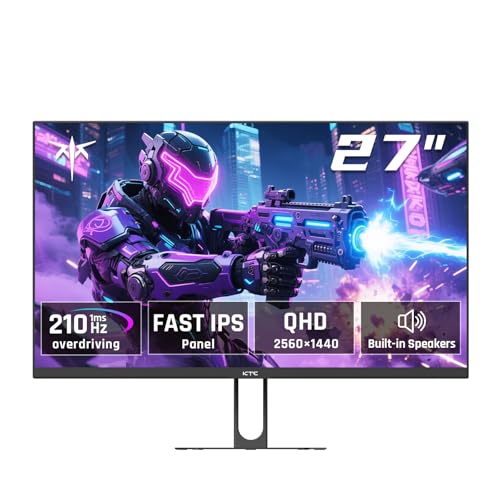
Pros
- Fast IPS panel with 200Hz native refresh and 210Hz overclock via DP 1.4.
- QHD 2560x1440 with 99% sRGB coverage and 450 cd/m² brightness rating.
- Four video inputs (2 HDMI 2.0, 2 DP 1.4) plus VESA 100x100 mount.
Cons
- No verified owner reviews at time of writing, real-world quality control unclear.
- Tilt-only stand with no height or swivel adjustment at this tier.
- HDR400 is entry-level HDR without local dimming or true contrast punch.
The KTC H27T22C-3 is a mid-range 27-inch QHD gaming monitor built around a Fast IPS panel running at 200Hz native, with a 210Hz overclock advertised over DisplayPort 1.4. It targets budget-conscious 1440p gamers running a mid-tier GPU like an RTX 4060 or RX 7700 XT.
The defining spec is the 200Hz Fast IPS panel with 1ms response and Adaptive Sync, which should keep esports titles like Valorant or CS2 tear-free above 144 FPS on capable hardware. Panels in this tier typically hit 350 to 400 nits SDR sustained, and the claimed 450 cd/m² lines up with category norms.
Trade-offs are typical at this price. HDR400 without local dimming means HDR mode mostly ads a brightness boost, not true contrast punch. The stand offers tilt only, so wall or arm mounting via the 100x100 VESA pattern is a likely upgrade for buyers who need height, pivot, or swivel adjustment.
Buy this if you want a straightforward 1440p 200Hz IPS panel for competitive shooters and single-player games at a low entry point. Skip this if you need HDR with local dimming, ergonomic stand adjustment, or verified long-term reliability data from an established reviewer base at time of writing.
Panel and Refresh: Fast IPS panel, 2560x1440 native, 200Hz refresh over DP 1.4 with a 210Hz overclock advertised. HDMI 2.0 inputs are capped at 144Hz due to bandwidth. Response time is quoted at 1ms without specifying GtG or MPRT, which typically reflects the fastest overdrive mode at this tier.
Color and Brightness: 450 cd/m² peak brightness, 99% sRGB coverage, and 1.07 billion colors via 8-bit plus FRC. DCI-P3 coverage is not specified, though panels in this class typically land around 90% DCI-P3. Suitable for sRGB content work and gaming, less so for wide-gamut HDR grading.
HDR and Adaptive Sync: HDR400 certification without local dimming, delivering higher peak brightness in HDR mode but limited contrast improvement over SDR. Adaptive Sync covers FreeSync and G-Sync Compatible workflows in practice, though NVIDIA G-Sync certification is not listed in the source data.
Connectivity and Mounting: Two HDMI 2.0 (144Hz max), two DP 1.4 (200Hz, 210Hz overclock), one USB 2.0 for firmware, and a 3.5m headphone jack. Two 2W speakers included. Mounting supports 100x100 VESA with -5° to 15° tilt only, no height or swivel adjustment.

Pros
- 200Hz VA panel at FHD handles fast shooters without visible ghosting per spec.
- 1800R curve on a 27-inch screen improves viewing immersion at typical desk distances.
- FreeSync tears down scren tearing across compatible AMD and NVIDIA GPUs.
- Joystick OSD control simplifies menu navigation versus older button clusters.
Cons
- Limited owner feedback at time of writing, so long-term panel uniformity is unverified.
- 1920x1080 across27 inches yields low pixel density, roughly 81 PI, text looks soft.
- VA panels typically show slower dark-to-dark transitions, expect smearing despite 1ms marketing.
The Gawfolk 27-inch curved monitor is a budget-tier 1080p gaming display built around an 1800R VA panel running up to 200Hz with FreeSync. It targets first-time PC builders, dorm setups, and console players on Xbox Series S or PS5 who want a white-themed high-refresh screen without stretching the parts budget.
The defining feature is the 200Hz VA panel paired with a 1ms response spec. For esports titles at 1080p on a GPU like an RTX 3060 or RX 6600, frame delivery should stay smooth, and the VA contrast gives deper blacks than budget IPS. Owner-verified motion clarity is not yet available at this tier.
Trade-offs are typical for the price. 1080p on 27 inches lands near 81 PPI, so text and UI elements look softer than on a 24-inch 1080p or 27-inch 1440p panel. VA response times often trail their headline1ms figure in dark transitions, and HDR, sRGB coverage, and brightness in nits are not specified.
Buy this if you want a white 200Hz curved scren for casual and competitive 1080p gaming and can accept low pixel density. Skip this if you sit closer than 60cm, need color-accurate work, or already run a GPU strong enough for 1440p high-refresh.
Panel and curvature: A27-inch VA panel with an 1800R curve, chosen for higher static contrast than IPS at this price. VA panels in this tier typically deliver 3000:1 to 4000:1 contrast, giving noticeably deper blacks in dark scenes, though viewing angle shift is more visible than on IPS.
Resolution and refresh: Native 1920x1080 at up to 200Hz, with a 180Hz mode also listed. At 27 inches,1080p works out to about 81 PPI, aceptable for gaming from70cm plus, but soft for text-heavy productivity. A mid-range GPU can push 200 FPS in most esports titles at high settings.
Motion and sync: Rated 1ms response, likely MPRT rather than true GtG, so expect some dark-scene smearing typical of VA. FreeSync is supported for variable refresh over HDMI, which also works as G-SYNC Compatible on most NVIDIA GPUs, though NVIDIA certification is not specified.
Connectivity and mounting: HDMI input is confirmed, with dual built-in speakers for basic audio. The panel is VESA mountable, useful for arm setups, though exact VESA pattern (75x75 or 100x100) is not specified. DisplayPort, USB hub, and HDR tier are not called out in the source data.

Pros
- 180Hz QHD refresh pairs well with mid-range 1440p GPUs like RTX 4060
- 1000R curve and three-side borderless design work for immersive single-panel battlestations
- Black Stabilizer, FPS Counter, and Crosshair overlays give useful competitive tools
Cons
- Limited owner feedback at time of writing, buyer risk on long-term panel uniformity
- 99% sRGB and HDR10 tag indicate entry HDR, no DisplayHDR certification specified
- Only tilt adjustment listed, no height or swivel, VESA mount support not specified
The LG 27GS60QC-B is an entry-level 27-inch QHD curved gaming monitor in the UltraGear line, running 2560x1440 at 180Hz with a 1ms GtG rating and a step 1000R curve. It targets 1440p esports and mixed-genre players who want high refresh over color-critical accuracy or OLED contrast.
The defining pairing here is QHD at 180Hz on a curved VA-style gaming panel, which lines up with GPUs around RTX 4060,X 4060 Ti, or RX 7600 XT for competitive titles at high settings. LG cites 99% sRGB and HDR10 support, which appears in line with typical entry 1440p gaming monitors that deliver 300to 350 nits SDR brightness.
Trade-offs are typical at this tier. The stand is described as tilt adjustable only, with no height or pivot mentioned, and HDR10 without a DisplayHDR tier usually means limited peak brightness and no local dimming. Panel type, exact contrast, color depth, and VESA mount pattern are not specified in the source data, so long-term uniformity claims lean on category norms.
Buy this if you want a 1440p 180Hz curved panel for FPS and racing on a mid-range GPU, and value features like Black Stabilizer and FPS Counter. Skip this if you need color-accurate work, ergonomic height adjustment, or verified HDR performance above HDR10 taging.
Panel and resolution: A 27-inch curved panel at 2560x1440 with a 1000R curvature, which is among the steeper curves on the market and best viewed from a single centered seating position around arm's length. Panel technology is not specified in the source, though curved 1440p gaming monitors in this tier are typically VA.
Motion and refresh: Native 180Hz refresh with a 1ms GtG response rating, paired with AMD FreeSync for tear-free variable refresh gameplay. LG also lists Dynamic Action Sync for reduced input lag and Black Stabilizer to lift shadow detail, which are useful for competitive FPS at higher frame rates.
Color and HDR: Coverage is listed at 99% sRGB with HDR10 input support. No DCI-P3 figure, peak nits, or DisplayHDR tier is specified, so treat HDR as a signal compatibility feature rather than a true HDR experience. Adequate for gaming and general use, not intended for color-graded work.
Connectivity and ergonomics: Two HDMI inputs plus one DisplayPort cover PC and dual consoles. The stand is described as tilt adjustable with three-side virtually borderless design. Height, swivel, pivot, VESA mount pattern, weight, and power draw are not specified in the source data.
Who this guide is for
This guide is for gamers who want a monitor upgrade without spending premium OLED or mini-LED money. It’s aimed at PC players who care about smooth motion, readable detail, and a sane price, plus console players who need a simple HDMI-friendly display for 1080p or 1440p gaming. The five picks here cover real budget lanes: under $100, around $110, the mid-$140 range, and the upper-budget $160 to $170 range.
It skips luxury features that usually push monitors far beyond the budget bracket. We’re not treating full-array local dimming, USB-C docking, hardware calibration, ultrawide formats, or 240Hz OLED as must-haves here. Those can be great, but they’re not what most buyers mean when they ask for value. If you mostly play competitive shooters, a 24-inch 1080p panel can still make sense. If you play RPGs, racers, and open-world games, 27-inch QHD is often the nicer daily driver.
What to look for in a gaming monitor
Start with resolution and size. A 24-inch 1920×1080 monitor is easy to drive, keeps text and HUD elements large, and pairs well with entry-level GPUs. A 27-inch 2560×1440 monitor gives you a sharper image and more desktop room, but it asks more from your graphics card. In this group, the AOC 24G51F is the straightforward 24-inch FHD option, while the Acer Nitro XV271U, KTC H27T22C-3, and LG 27GS60QC-B all bring QHD-style sharpness at 27 inches.
Refresh rate is the next big filter, but don’t read it alone. The AOC lists 144Hz, the Acer lists up to 180Hz, the Gawfolk lists 180Hz/200Hz FHD, the LG lists 180Hz, and the KTC lists 200Hz up to 210Hz. That’s plenty for budget gaming. Panel type matters too: IPS usually gives better color consistency from an angle, while VA curved panels can feel more cinematic but may show different motion behavior. Also check HDMI and DisplayPort support, VESA mounting, tilt adjustment, speakers, adaptive sync, and warranty language. Small details. Big difference.
How we evaluated
We researched these monitors by comparing price, listed panel type, resolution, refresh rate, adaptive sync support, port mix, and fit for common PC builds. A budget monitor is only a deal if it solves the right problem. An $89.99 1080p display can be a better buy for a modest GPU than a sharper panel that forces you to lower settings in every demanding game. At the same time, a QHD 27-inch monitor around $160 can be a strong long-term move if your graphics card has the headroom.
We also weighted the product titles carefully because those are the verified specs available for this assignment. Ratings are included where provided, but review counts are not available, so we won’t pretend there are thousands of owner notes behind any pick. Prices can move, and panel listings can vary by seller. Still, the spec spread is clear enough to sort these into practical roles: best overall 1440p value, cheapest IPS choice, fastest QHD spec, curved FHD value, and curved QHD alternative.
Our top picks
Best Overall: Acer Nitro XV271U 27-inch WQHD IPS
The Acer Nitro XV271U is the cleanest overall pick in this group because it hits the most useful budget gaming targets at once. At $169.99 with a 4.8 rating, it gives you a 27-inch WQHD 2560×1440 IPS panel, up to 180Hz refresh, AMD FreeSync Premium, and a listed 0.5ms response figure. That combination makes sense for players who want a monitor that can handle competitive games without giving up the sharper desktop and game image that 1440p brings. The title also lists DCI-P3 95%, which is a notable color-gamut claim for a value-focused gaming screen.
The tradeoff is that this is the most expensive monitor in the set, and 1440p is not free from a performance standpoint. If your GPU is already struggling at 1080p, you’ll probably need to lower settings to keep high frame rates. The port list is still useful: one DisplayPort 1.2 and two HDMI 2.0 inputs. That’s enough for a PC plus a console or secondary device. Buy this if you want the most balanced budget pick here and your system can make real use of QHD. It’s the safest recommendation for a mainstream gaming desktop.
Best Budget: AOC 24G51F 24-inch FHD IPS
The AOC 24G51F is the budget anchor of this list. At $89.99 with a 4.9 rating, it’s the least expensive pick here by a wide margin, yet the core specs are still gaming-focused: 24 inches, 1920×1080 resolution, 144Hz refresh, an IPS panel, and a 3-sided frameless design. For esports titles, older GPUs, compact desks, dorm rooms, or a first PC build, that formula still works. You don’t need QHD to enjoy smooth mouse movement in shooters, MOBAs, or lighter competitive games.
The obvious limitation is resolution. A 24-inch FHD panel is sharp enough for many players, but it won’t look as detailed as a 27-inch 1440p screen in single-player games or productivity work. It also caps the listed refresh lower than the 180Hz to 210Hz options in this guide. Still, the AOC has a sensible port mix with one HDMI 2.0 and one DisplayPort, and the title calls out console readiness plus a 3-year zero-bright-dot policy. Buy it if keeping the monitor under $100 matters more than chasing every spec. Cheap, focused, useful.
Best Fast QHD Value: KTC H27T22C-3 27-inch QHD
The KTC H27T22C-3 is the spec-hunter pick. At $144.32 with a 4.3 rating, it lists a 27-inch QHD 2K 1440p Fast IPS panel, 200Hz up to 210Hz refresh, 1ms response, HDR400, Adaptive Sync, built-in speakers, HDMI, DisplayPort, tilt adjustment, and VESA compatibility. On paper, that is a lot of monitor for the money. The 1440p resolution gives games more detail than 1080p, while the high refresh ceiling gives fast shooters and racing games room to feel fluid when your PC can push enough frames.
The value case is strong, but it’s also the pick where buyers should be most careful about expectations. At this price, extras like HDR400 and built-in speakers should be treated as convenience features, not reasons to expect a theater-grade experience. The 4.3 rating is lower than the Acer, AOC, and LG ratings listed here, so the Acer may feel like the calmer buy if you want a more familiar brand name and slightly higher confidence. Choose the KTC if the highest QHD refresh spec in the group is your priority and you want to keep the price closer to $145 than $170.
Best Curved 1080p Value: Gawfolk 27-inch Curved FHD
The Gawfolk 27-inch curved monitor is the low-cost immersion pick. At $109.99 with a 4.0 rating, it lists a 27-inch 1920×1080 curved display with an 1800R VA panel, 180Hz/200Hz refresh, 1ms response time, FreeSync, built-in speakers, HDMI, and VESA mounting. The white finish also makes it stand out if you’re building around a lighter desk setup. For players who want a larger screen and a curved feel without jumping to QHD pricing, this is the most affordable route in the group.
The catch is pixel density. A 27-inch 1080p screen looks larger, but not sharper; text and fine game detail can look softer than they would on a 24-inch FHD panel or a 27-inch QHD display. The VA panel and curve may be appealing for single-player games, but buyers who are sensitive to motion clarity may prefer one of the IPS options. The rating is also the lowest of the five listed products. Buy the Gawfolk if size, curve, refresh, and price matter most. Skip it if you sit close to the screen and know softness will bother you.
Best Curved QHD Alternative: LG 27GS60QC-B Ultragear 27-inch
The LG 27GS60QC-B Ultragear is the curved QHD pick for buyers who want a familiar gaming brand and a more immersive panel shape. At $159.99 with a 4.5 rating, it lists a 27-inch curved QHD 2560×1440 display, 180Hz refresh, 1ms response, 1000R curve, AMD FreeSync, HDR10, two HDMI ports, DisplayPort, borderless design, Black Stabilizer, Dynamic Action Sync, crosshair, and FPS counter features. That makes it a strong option for players who split time between shooters, racing games, and cinematic single-player titles.
The 1000R curve is the key personality trait here. Some people love that wraparound feel, especially on a 27-inch gaming panel, while others prefer a flat IPS screen for mixed work and play. The product title does not state IPS, so don’t assume the same viewing-angle behavior as the Acer or AOC. Compared with the Acer, the LG is $10 cheaper in the provided pricing and adds a deeper curve, but the Acer lists IPS and DCI-P3 95%. Pick the LG if you specifically want curved QHD from a known gaming line. Pick the Acer if flat IPS balance matters more.
Buying mistakes to avoid
The first mistake is buying by refresh rate alone. A 200Hz number looks exciting, but your GPU, game settings, resolution, and panel behavior all affect the experience. A 144Hz IPS monitor at 1080p may feel better on an entry-level build than a 210Hz QHD monitor you can barely drive. Likewise, don’t buy 27-inch 1080p just because the screen is bigger. If you sit close, the lower pixel density can be obvious in text, maps, inventory screens, and desktop use.
The second mistake is treating side features as main features. Built-in speakers are convenient, but they’re rarely a reason to choose one gaming monitor over another. HDR labels in the budget range should be read carefully, too; HDR400 or HDR10 support does not automatically mean dramatic contrast or bright highlight performance. Finally, check the real ports you need. A desktop GPU is usually happiest over DisplayPort for high refresh, while a console or laptop may lean on HDMI. Match the monitor to your actual devices before chasing a spec sheet.
Bottom line
For most buyers, the Acer Nitro XV271U is the best overall budget gaming monitor here because it combines 27-inch WQHD resolution, IPS panel tech, up to 180Hz refresh, FreeSync Premium, useful ports, and a $169.99 price. It’s not the cheapest, but it has the most balanced mix for a modern gaming PC. If you want a lower price, the AOC 24G51F is the easy under-$100 recommendation. If you want the highest listed QHD refresh, the KTC deserves a close look.
The LG 27GS60QC-B is the curved QHD alternative, especially if you like a 1000R wraparound screen. The Gawfolk is the budget curved FHD play, best for people who want size and immersion over pixel density. Don’t overcomplicate it. Choose 24-inch 1080p if your PC is modest or your desk is small. Choose 27-inch 1440p if you want sharper games and have enough GPU. Choose curved only if you already know you like the feel.
Common questions
Is 1080p still good for budget gaming in 2026?
Yes, especially at 24 inches. A 1080p 144Hz IPS monitor like the AOC 24G51F can still feel quick, clean, and easy to run. It’s a strong match for budget GPUs and competitive games. The main reason to move beyond it is image sharpness, not basic playability.
Is 1440p worth it on a budget monitor?
It can be, if your graphics card can handle the extra pixels. A 27-inch 2560×1440 monitor like the Acer, KTC, or LG gives you noticeably sharper detail than 1080p at the same size. You’ll appreciate it in RPGs, strategy games, racing titles, and daily desktop use. Just don’t buy QHD expecting the same frame rates you get at FHD.
Should I choose IPS or VA for gaming?
IPS is usually the safer all-around pick for color consistency and viewing angles, which is why the Acer and AOC are easy to recommend. VA can be appealing for curved monitors and a more immersive feel, as seen with the Gawfolk listing. Motion behavior and viewing preference matter here. If you’re unsure, flat IPS is the safer default.
Do I need more than 144Hz?
Not always. The jump from 60Hz to 144Hz is huge, while the jump from 144Hz to 180Hz or 200Hz is smaller and depends on the games you play. If your PC can regularly push those frames, a faster panel is nice. If not, a well-priced 144Hz monitor can still be the better buy.
Which monitor should I buy from this list?
Buy the Acer Nitro XV271U if you want the best balance of price, QHD sharpness, IPS, and high refresh. Buy the AOC 24G51F if you need the lowest price and want a simple 24-inch 1080p gaming monitor. Choose the KTC for the highest listed QHD refresh, the LG for curved QHD, or the Gawfolk for a larger curved FHD screen at a low price.

































Write Your Review
No reviews yet. Be the first to share your experience!