A mid tower is the default form factor for a reason. It swallows a full ATX board, a 360mm radiator, and a triple-slot GPU without turning your desk into a wind tunnel of exposed cabling. But not every mid tower earns that trust. Some ship with a single stock fan and a mesh front that’s mostly decoration, while others give you three ARGB fans, a real cable channel, and enough GPU clearance for a 420mm card straight out of the box. The gap between a good case and a generic one shows up the first time you close the side panel and either hear silence or a coil-whine chorus.
We researched dozens of current chassis and pulled the five that keep coming up in owner reports for the right reasons: cool VRMs, tidy builds, and panels that actually line up. If raw thermals are your top priority, our companion guide to the best PC cases for airflow in 2026 digs deeper into mesh design and fan curves. And if you’re still deciding on fan size before you buy, the breakdown of 120mm versus 140mm case fans is worth a read first. Here’s what stood out this year.

Pros
- Three RS ARGB PWM fans included with daisy-chain wiring and Zero RPM support for low-load silence.
- InfiniRail slide-to-position mounting fits 120mm through 200mm rotors without fixed screw locations.
- Compatible with ASUS BTF, MSI Zero, and Gigabyte Stealth hidden-connector motherboards for cable-free builds.
Cons
- Limited owner feedback at time of writing, long-term durability of Frame modules is unproven.
- GPU length, CPU cooler height, and radiator clearance are not specified in the source data.
- Modular upgrade parts like billet aluminum trays are likely sold separately, adding cost over time.
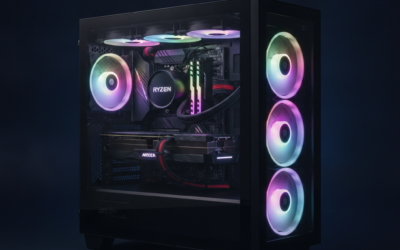
The Corsair 4000D RS ARGB Frame is a mid-tower ATX case built around Corsair's new Frame modular chassis system, with three RS ARGB PWM fans installed in the front intake. It targets DIY builders who want a high-airflow layout with room for future component or panel upgrades.
The Frame concept is the defining feature: the motherboard tray, front I/O panel, and side panels are designed to be swapped rather than riveted in place. Combined with InfiniRail slide-mount rails, users can position front fans up to 200mm and roof fans up to 140mm wherever airflow needs them.
Trade-offs at this tier are real. Corsair has not published GPU length, cooler height, or radiator clearance in the source data provided, so buyers should verify these on the retail page before ordering. Modular tray and panel swaps also appear to be paid accessories rather than in-box parts, typical for this platform.
Buy this if you want a high-airflow ATX case with BTF, Zero, or Stealth motherboard support and plan to iterate on the build over time. Skip this if you need a sealed acoustic case, run a tall air cooler without clearance data, or want a bundled tempered glass panel out of the box.
Fan support: Three RS ARGB PWM fans ship pre-installed in the front intake. The InfiniRail steel mounting system accepts fans from 120m up to 200mm at the front and up to 140m in the roof, with slide-adjustable positioning across the length of the rail.
Motherboard compatibility: ATX form factor with explicit support for ASUS BTF, MSI Project Zero, and Gigabyte Stealth reverse-connector boards. Standard ATX cabling is also supported, giving builders a path from a conventional motherboard to a hiden-connector platform later without swapping the case.
Airflow and panels: The steel front panel uses a 3D Y-pattern perforation for low intake restriction. The internal side panel near the motherboard tray doubles as a cable cover or can be removed to mount additional side fans for higher thermal loads.
Fan wiring: Each RS ARGB fan caries eight LEDs and a 4-pin PWM connector with daisy-chain support, so all three fans occupy one PWM header and one +5V ARGB header on the motherboard, reducing cable clutter without a dedicated hub.

Lian Li Vector V100 ATX Mid-Tower Case with 4 ARGB
Pros
- Four bundled 120mm ARGB PWM fans with daisy-chain reduce cable clutter at build time
- Back-connect motherboard support pairs with hidden-connector boards for a cleaner front chamber
- Fan air pressure up to 2.54 m-H2O suits push-pull on 360mm radiators
- 178mm cooler and 420mm GPU clearance fit NH-D15 class heatsinks and triple-fan flagship GPUs
- Tool-less side panels on both sides sped up part swaps and cable rework
Cons
- Limited owner feedback at time of writing, long-term QC and fitment trends are unverified
- Fan noise rated up to 30.8 dBA suggests audible ramp under sustained load
- Drive bay count, front USB-C, PSU length, and dust filter details not specified
The Lian Li Vector V100 is a mid-range ATX mid-tower aimed at builders who want a clean,ARGB-lit chassis without buying aftermarket fans. It ships with four 120mm PWM ARGB fans, a 26-LED strip, and support for standard and back-connect ATX or Micro-ATX boards, targeting first-time and returning DIY builders on AM5 or LGA1700.
The standout feature is the back-connect motherboard support paired with four bundled fans and daisy-chain wiring. Combined with 420mm GPU clearance and 360mm top radiator support, it fits triple-fan RTX 40-class GPUs and 360mm AIOs, a combo that typically requires buying two to three extra fans on competing cases at this tier.
Trade-offs are typical for a fan-loaded mid-tower. Peak fan noise is rated at 30.8 dBA, so expect an audible ramp under sustained gaming or Blender loads. Storage bay count, front I/O USB-C, PSU length limit, and radiator thickness clearance are not specified in the listing, so verify against your specific AIO and PSU before purchase.
Buy this if you want a back-connect-ready mid-tower with ARGB fans included and plan a 360mm AIO plus triple-fan GPU build. Skip this if you need documented drive bay counts, front USB-C confirmation, or silent-focused acoustics under 25 dBA.
GPU and cooler clearance: Suports GPUs up to 420mm, covering triple-fan RTX 4080, RTX 4090, and RX 7900 XTX cards with backplate room. CPU cooler height tops out at 178mm, which fits Noctua NH-D15 class dual-tower air coolers and most140mm single-tower heatsinks used on Ryzen 7000and Core i7builds.
Radiator and fan support: Top radiator support reaches 360mm, suitable for 360mm AIOs on high-TDP CPUs like the 9800X3D or 14700K. Four 120mm PWM ARGB fans ship pre-installed with 1800 RPM max, 61.47 CFM airflow, and 2.54 mm-H2O static pressure, adequate for radiator push configurations.
Motherboard support: Accepts ATX, Micro-ATX, Mini-ITX, and back-connect ATX or Micro-ATX boards such as ASUS BTF or MSI Project Zero variants. This routes 24-pin, EPS, and PCIe power behind the tray for a cleaner front chamber, though it requires a matching back-connect board to use.
Acoustics and lighting: Fan noise is rated 26.5 to 30.8 dBA using hydraulic bearings, so expect audible airflow above 70% PWM duty. The integrated 26-LED ARGB strip syncs with ASUS Aura, MSI Mystic Light, Gigabyte RGB Fusion, and ASRock Polychrome via standard 5V3-pin ARGB headers.

Pros
- Patented three-panel tempered glass exposes front, top, and left views of the build.
- Native back-connect motherboard support for hiden 24-pin, EPS, and PCIe cabling.
- Second chamber hides side-mounted AIO tubing for a cleaner primary compartment.
- Swappable top mesh panel suports a 360mm AIO when thermals take priority over glass.
Cons
- Limited owner feedback at time of writing makes long-term reliability signal thin.
- Full specs (GPU length, cooler height, fan count) not published in source data.
- Back-connect layout requires a compatible motherboard, narowing part selection.
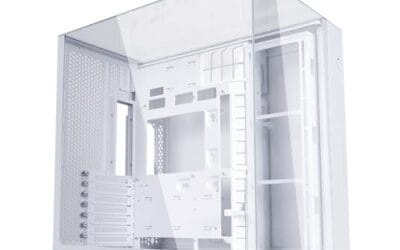
The Lian Li O11Vision Compact is a mid-range ATX mid-tower positioned as a smaller sibling to the O11 Dynamic line, developed in collaboration with the PCMasterRace community. It targets showcase builders who want a dual-chamber layout, tempered glass on three sides, and native support for back-connect motherboards in a tighter footprint.
The defining feature is the patented three-panel tempered glass design covering the front, top, and left side. Paired with the second-chamber cable routing and back-connect motherboard compatibility, the front compartment stays visually clean. Builders wanting a 360mm AIO can swap in the included top mesh panel, trading a glass top for airflow.
Trade-offs are typical at this tier. Back-connect support only pays off if you buy a compatible board from ASUS, MSI, GIGABYTE, or similar, which narrows part selection and can raise motherboard cost. Concrete specs like GPU clearance, CPU cooler height, radiator sites, and included fan count are not specified in the source data, so verify against the official manual before finalizing parts.
Buy this if you want O11-family aesthetics with hidden cabling via a back-connect board and a side or top 360mm AIO. Skip this if you need a documented GPU length ceiling, bundled fans, or a traditional cable-visible motherboard build.
Motherboard support: The chassis accepts standard ATX boards and ads native routing for back-connect variants such as ASUS BTF, MSI Project Zero, and GIGABYTE Project Stealth. Cable cutouts on the tray align with rear-side connectors, keping the 24-pin, EPS, and PCIe cables out of the main chamber view.
Radiator and AIO: A swappable top mesh panel is included specifically to enable a 360mm AIO in the rof. When the AIO is mounted on the side instead, the dual-chamber layout routes the tubing into the second compartment, keeping the front-facing glass view unobstructed. Exact side radiator thickness limits are not specified.
Glass and panel layout: Three tempered glass panels cover the front, top, and left side. The top glass panel is the one you swap out when a 360mm radiator is installed, so builders choosing air cooling or a bottom-mounted AIO retain the full three-panel glass look.
Not specified in source: GPU length clearance, CPU cooler height, drive bay count, included fan count, front I/O (USB-C, USB-A), PSU length, and case dimensions are not listed in the provided data. Confirm these against the Lian Li O11VPW official spec sheet before finalizing parts.
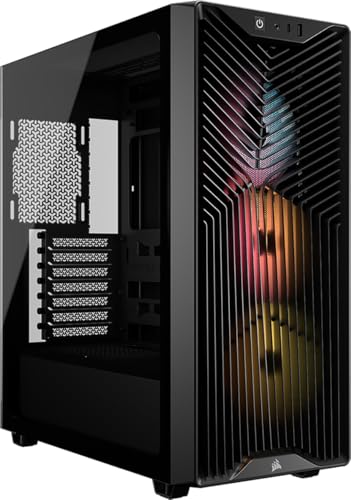
Pros
- Ships with three RS120 ARGB PWM fans, no separate fan purchase needed for baseline airflow
- Top mount clears 360mm, 280mm, or 240mm radiators for high-TDP CPU cooling headroom
- Reverse-connector motherboard support keps cables hidden behind the tray for cleaner front view
- Integrated GPU anti-sag arm addresses drooping on heavy modern GPUs without third-party brackets
Cons
- Limited owner feedback at time of writing, long-term durability and QC signal remains unclear
- Chassis measures roughly 19.5 x 8.6 x 18 inches, tight for 3-slot GPUs paired with front radiators
- Source data omits max GPU length, CPU cooler height, and PSU length clearances, verify before buying
The Corsair 3200D RS ARGB is a mid-range ATX mid-tower case aimed at builders committing to a full-ARGB PWM loop and a 360mm AIO. Corsair positions it around three RS120 ARGB PWM fans, a GPU anti-sag arm, and native reverse-connector motherboard support targeting ASUS BTF, MSI Project Zero, and Gigabyte Project Stealth builds.
The defining feature is that reverse-connector compatibility paired with a cable-hiding shroud and a single front-panel connector. For clean-back BTF or Project Zero boards, this removes most of the visible cable clutter that plagues traditional ATX layouts. Cases in this class typically pair well with 240mm to 360mm AIOs mounted top, matching the stated radiator support.
Trade-offs are honest for this tier. Corsair does not publish maximum GPU length, CPU cooler height, or PSU clearance in the provided source data, which maters for triple-slot RTX 4080 or 4090 class cards. The external footprint near 19.5 inches dep is average, so front-mounted radiators alongside a long GPU may get tight.
Buy this if you are building around a reverse-connector motherboard and want ARGB PWM airflow plus anti-sag support without sourcing extras. Skip this if you need a confirmed spec sheet with exact GPU and cooler clearances before committing, or if your build uses a standard-connector board where BTF benefits are wasted.
Chassis footprint: External dimensions measure 19.49 x 8.62 x 18.03 inches with a shipping weight around 15.2 pounds. That places it in standard mid-tower territory, wide enough for a top360mm AIO plus reverse-connector ATX board, though internal GPU and cooler clearance numbers are not specified in source data.
Cooling layout: The case supports up to nine 120mm fans total, with three RS120 ARGB PWM fans included from the factory. Top radiator support covers 360mm, 280mm, and 240mm options, giving flexibility for high-TDP CPU cooling. Exact front and bottom radiator thickness limits are not specified.
Motherboard and cable management: Reverse-connector motherboards from ASUS BTF, MSI Project Zero, and Gigabyte Project Stealth are natively supported. A built-in cable shroud plus a single front-panel connector cut wiring time versus splitting HD Audio, power, reset, and USB headers individually.
GPU and front I/O: The integrated GPU anti-sag stabilization arm is intended for heavy modern cards, though maximum GPU length and slot width are not stated. Front I/O includes USB Type-C. Confirm your specific GPU clearance and PSU length against Corsair's official spec sheet before ordering.

Pros
- Ships with four 120mm ARGB fans, saving a common day-one fan purchase.
- 415mm GPU clearance accommodates triple-slot RTX 4080 and 4090 SKUs.
- 360mm radiator support enables high-end AIO loops for Ryzen X3D or Core i7/i9 builds.
- Front USB 3.2 Gen 2 Type-C plus dual USB 3.0 covers modern peripheral needs.
Cons
- Limited owner fedback at time of writing makes long-term QC hard to verify.
- Hydraulic bearing ARGB Lite fans are budget-tier and may need swaps for quiet builds.
- Dual glass panels trap heat versus mesh fronts, so intake fan curves need tuning.
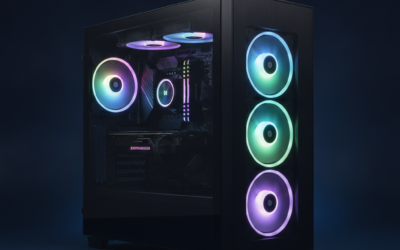
The Thermaltake View 380 TG ARGB is a mid-range ATX showcase case built around a dual chamber layout with pillarless front and side tempered glass. It targets builders running hidden-connector motherboards such as ASUS BTF or MSI Project Zero who want cables tucked behind the tray and hardware fully visible from two angles.
The defining feature is the corner glass view combined with four preinstalled 120mm ARGB fans, which covers intake and exhaust from day one. With 415mm GPU clearance and 360mm radiator support, it comfortably hosts triple-slot RTX 4080/4090 cards and top-mounted 360mm AIOs typical of Ryzen 7 9800X3D or Core i7 builds.
Trade-offs are typical at this tier. Dual glass restricts intake compared to mesh fronts, so fan curves need tuning under sustained GPU load. The included ARGB Lite fans use hydraulic bearings and are budget-grade, so silent-build users will likely swap them. Owner feedback is limited at time of writing, so long-term panel and fan QC is unverified.
Buy this if you are building a hidden-connector ATX showcase system with a large air-cooled or360mm AIO setup and want ARGB fans included. Skip this if you prioritize mesh airflow, quiet operation, or run a compact SF/mATX layout.
GPU clearance: Maximum VGA length is 415mm, which clears every current triple-slot RTX 40-series and Radeon RX 7900 XTX partner card. CPU cooler height and case width for tall air coolers like the Noctua NH-D15 are not specified in the source, so verify before pairing a 165mm-class tower.
Radiator support: Maximum radiator size is 360mm, sufficient for high-end AIOs on Ryzen 9 X3D or Core i9 chips. Exact top, front, and side mount thickness limits are not specified, so push/pull 360mm configurations with thick 45mm+ radiators should be confirmed against Thermaltake spec sheets.
Motherboard and cabling: Suports hidden-connector boards including ASUS BTF and MSI Project Zero, routing 24-pin, EPS, and PCIe headers behind the tray. Standard ATX boards also fit. The dual chamber layout isolates PSU and cable runs, keping the main window clean.
Front I/O: One USB 3.2 Gen 2 Type-C, two USB 3.0 Type-A, and HD Audio. Type-C requires a compatible motherboard front-panel header, common on B650/B850/Z790/Z890 boards but absent on older budget platforms.
Who this guide is for
This roundup is aimed at anyone assembling a standard ATX or micro-ATX build in the $70 to $130 range who wants airflow and cable routing handled without a spreadsheet of aftermarket parts. First-time builders benefit most, since a case with pre-installed fans and a clear cable channel removes a lot of the guesswork. Upgraders swapping a decade-old box for something that breathes will notice the difference in load temps almost immediately.
It’s not for the small-form-factor crowd chasing a 15-liter ITX cube, and it skips the $200-plus showcase towers built around custom loops. If you need dual-chamber mounting for a fully hidden hardline setup, that’s a different shopping trip. What you’ll find here are practical, buildable cases that hit a fair price and don’t cut corners on the parts that matter.
What to look for in a mid tower case
Start with airflow, because it drives everything else. A mesh or perforated front panel with at least two or three intake fans keeps your GPU and CPU from throttling under load. Solid glass fronts look sharp but choke intake, so if you go that route, make sure the top and side offer real ventilation. Fan support matters too: look for room for three 120mm intakes up front and a 360mm radiator mount somewhere, usually the top or side.
Then check clearance numbers against your actual parts. Modern GPUs run 330mm to 420mm long, and CPU air coolers can hit 160mm tall, so a case rated for those gives you headroom. Cable management is the other half. You want a routing channel behind the motherboard tray, Velcro straps or tie-down points, and at least 20mm to 25mm of depth back there. Newer boards with rear connectors, like ASUS BTF and MSI Project Zero, need a case that’s cut for them, which several picks below are.
How we evaluated
We researched more than 25 mid tower cases across the major brands, then narrowed to five based on airflow design, included fans, GPU and radiator clearance, cable management hardware, and verified owner feedback. Rather than lean on marketing copy, we cross-referenced spec sheets with what builders actually report after living with a case for a few months. Panel fit, fan noise at load, and how the cable bar holds up all fed into the ranking.
Value carried heavy weight. A case that includes three or four ARGB fans at $75 to $100 saves you $40 or more versus buying them separately, so included hardware counted as real money back in your pocket. We also weighted long-term reliability, favoring chassis with steel construction, tempered glass that mounts on standoffs instead of thumb-crushing screws, and warranties of two years or longer. Ratings and review counts below come straight from current listings.
Our top picks
Best Overall: Corsair 4000D RS ARGB
At $99.99 with a 4.7 rating across 1,545 reviews, the Corsair 4000D RS ARGB is the case most builders should start with. It ships with three pre-installed RS ARGB fans, a high-airflow front, and Corsair’s InfiniRail fan mounting system that lets you slide fans to fit almost any radiator. Support for ASUS BTF, MSI Project Zero, and Gigabyte Project Stealth rear-connector boards means it’s ready for a clean, cable-hidden build if you go that way. The cable channel behind the tray is generous, and the included straps make first-time routing painless.
The tradeoff is size. This is a true full-width ATX box, so it won’t tuck into a tight nook, and the modular frame design, while flexible, has more removable panels than some builders want to deal with. There’s no top-mounted glass here, which purists chasing a showpiece might miss. But for anyone who values cool, quiet, buildable hardware over pure spectacle, this is the safe money. It’s the pick we’d hand a friend building their first rig.
Best Value: Lian Li V100
The Lian Li V100RX lands at $74.99 with a standout 4.8 rating over 316 reviews, and it packs more fan hardware than anything near its price. Four 120mm ARGB PWM fans come pre-installed, plus an LED RGB strip and a display platform up top, all wrapped in an optimized-airflow layout that supports 420mm GPUs and a 360mm radiator. For a builder who wants color and cooling without a separate fan order, that’s a lot of gear for under $80. The tempered glass front doubles as a small showcase shelf.
Because the front glass panel does trade some raw intake for looks, this leans slightly warmer than a full-mesh design under sustained GPU load, so pair it with strong top exhaust. Cable routing is solid but the tie-down points are a touch shallow compared to pricier towers. Still, for the money, nothing here matches the fan count and finish. If you’re on a budget but refuse to give up ARGB, this is where your dollars stretch furthest.
Best Premium: Lian Li O11 Vision Compact
The O11 Vision Compact in white runs $124.99 and carries a 4.8 rating across 1,228 reviews, making it the showcase pick that doesn’t sacrifice buildability. Its three-sided tempered glass design, back-connect motherboard support, and steel frame give you a wraparound view of your parts with clean cable hiding built in. This is the case for a color-matched white build or a first custom-loop attempt, since the layout gives radiators and reservoirs real room to breathe on the side and top.
Fans aren’t included, which is the main catch at this price, so budget another $40 to $60 for a decent ARGB set to fill it out. The compact footprint also means very tall air coolers and the longest quad-slot GPUs need a clearance check before you commit. That said, the fit and finish justify the premium, and owner reports praise how easy the rear-connect design makes wire management. For a build you want to show off, it’s worth the extra money.
Best Budget: Corsair 3200D RS ARGB
If you want the Corsair build quality for less, the 3200D RS ARGB starts at $69.59 and still includes three RS120 ARGB PWM fans out of the box. It carries a 4.3 rating, though only across 8 early reviews, so it’s a newer listing without the long track record of the others. You still get a GPU anti-sag stabilization arm and the same rear-connector board support for ASUS BTF, MSI Project Zero, and Gigabyte Project Stealth setups, which is rare at this price.
The thin review count is the honest caveat. There’s less long-term owner data to lean on, so early adopters are taking a small leap. The frame is a bit more compact than the 4000D, which trims a little cable depth and radiator flexibility. But you’re getting three ARGB fans, an anti-sag bracket, and modern board support for under $70. That’s a strong entry point for a budget ATX build that still wants to look the part.
Best Dual-Glass Showpiece: Thermaltake View 380 TG ARGB
The Thermaltake View 380 TG ARGB sits at $79.99 with a 4.6 rating over 194 reviews and leans hard into the display angle. It includes four 120mm ARGB fans, a dual tempered-glass panel on the front and side, and support for hidden-connector motherboards, so a rear-cable build looks seamless behind that glass. Thermaltake backs it with a three-year warranty, the longest coverage in this group, which counts for something on a case you’ll keep across two or three builds.
Dual glass means intake relies more on the fans doing their job than on open mesh, so keep the front fans clean and consider a positive-pressure setup to fight dust. It’s also a heavier case thanks to all that glass, which makes moving a finished build a two-hand affair. For a wide-open view of your ARGB and a warranty that outlasts the competition, though, it’s a lot of showpiece for the price. A fair pick if looks rank near the top of your list.
Buying mistakes to avoid
The most common slip is buying a solid-front case for a hot build. That glossy panel looks great in photos, but if it starves your intake, your GPU pays for it in throttled clocks and louder fans. Always check whether the front is mesh, perforated, or sealed glass, and match that to how hard you push your hardware. The second mistake is ignoring clearance numbers. People assume any mid tower fits any GPU, then find their 400mm card fouls the front fans.
Don’t overpay for fans you already own, either. A bare case can be the smarter buy if you’ve got a drawer of ARGB spinners, while an included-fan case saves money if you’re starting fresh. And skip the temptation to cheap out on the panel mounting. Cases that hang glass on standoffs with captive thumbscrews are far less nerve-racking than the ones where you’re balancing a pane against four bare screw holes. Small details, big difference over the life of a build.
Bottom line
For most people, the Corsair 4000D RS ARGB at $99.99 is the case to buy. Three included fans, excellent airflow, modern rear-connector support, and a routing channel that forgives first-time mistakes make it the low-risk pick. If your budget is tighter, the Lian Li V100RX delivers four ARGB fans for $74.99 and punches well above its price, while the Corsair 3200D gets you into a Corsair frame for under $70 if you can accept a thinner review history.
Chasing a showpiece instead? The Lian Li O11 Vision Compact is the premium white build’s home at $124.99, and the Thermaltake View 380 backs its dual-glass look with a three-year warranty. Match the case to the build you’re actually making, check your GPU and radiator clearances once before you order, and you won’t go wrong. For more options across every size and budget, our full list of the best PC cases covers the rest.
Common questions
Is a mesh front really better than glass for airflow?
Yes, in most cases. A mesh or perforated front lets intake fans pull cool air straight through, which keeps GPU and CPU temps lower under load. Glass fronts restrict that airflow, so they run a few degrees warmer unless the case makes up for it with strong top and side ventilation.
How many fans do I need in a mid tower?
Three is a solid baseline: two intakes up front and one exhaust at the rear. Adding a top exhaust or a third front intake helps if you’re running a hot GPU. Several picks here ship with three or four fans already, so you can hit a good setup without buying extras.
Will a 360mm radiator fit in these cases?
All five support a 360mm radiator, typically in the top or side mount. Corsair’s InfiniRail system on the 4000D makes fitting one especially flexible. Just confirm your radiator plus fan thickness clears any RAM or top I/O before you commit to a mounting spot.
Do I need a case with rear-connector support?
Only if you’re using a rear-connector board like ASUS BTF or MSI Project Zero. Those hide their power and data plugs behind the tray for a cleaner look, and they require a case cut for them. The Corsair 4000D and 3200D both support that layout if you’re going that route.
Are included case fans good enough, or should I upgrade?
The pre-installed ARGB fans on these picks are perfectly fine for typical gaming and productivity builds. They move enough air and run quietly at sensible curves. You’d only swap them for high-static-pressure models if you’re pushing a demanding custom loop or chasing the last few degrees of thermal headroom.