

A college freshman messaged me last week with a familiar problem: he had $900 saved up for a gaming laptop, no idea where to start, and a sister who kept telling him to “just buy a Mac.” I get it. The under-$1,000 gaming laptop space in 2026 is genuinely confusing. The marketing language across Acer, ASUS, MSI, and HP listings sounds nearly identical, the GPU naming has gotten more complex with the RTX 50-series rollout, and small differences in TGP wattage or RAM config quietly determine whether the same chip runs games well or chokes under load.
Here’s the honest take: gaming laptops under $1,000 in May 2026 are better than they’ve ever been at this price tier. The RTX 4050 has matured into a competent 1080p performer, the new RTX 5050 brings genuine architectural improvements (most notably 8GB GDDR7 VRAM, up from 6GB on the 4050), and 16GB of DDR5 RAM has finally become standard at this price. But the gap between a well-tuned RTX 4060 system and a thermally-throttled RTX 5050 build is real, and the marketing won’t tell you which is which. We compared 5 models against published benchmarks from Tom’s Hardware, PCWorld, NotebookCheck, and Laptop Mag, cross-referenced TGP power ratings, and analyzed Amazon owner feedback to put this guide together. If you’re shopping in this price tier and want a clear answer instead of a spec sheet wall, this is where to start.
TL;DR , Our 5 Picks at a Glance
| Award | Pick | Key Specs | Best For |
|---|---|---|---|
| 💰 Best Budget | Acer Nitro V (i5) | Core i5-13420H + RTX 4050, 8GB DDR5, 512GB SSD, 15.6″ 144Hz | Tightest budget with current-gen discrete GPU under $800 |
| 🚀 Best New GPU | Acer Nitro V 16 AI | Ryzen 5 240 + RTX 5050 (8GB GDDR7), 16GB DDR5, 512GB SSD, 16″ 180Hz | Buyers prioritizing newer GPU architecture and DLSS 4 support |
| 🏆 Our Top Pick | ASUS TUF Gaming F16 | Core 5 210H + RTX 4050, 8GB DDR5, 512GB SSD, 16″ 144Hz FHD+ | Best build quality and MIL-STD durability under $900 |
| 🎯 Best Performance | Acer Nitro V (i7) | Core i7-13620H + RTX 4050, 16GB DDR5, 512GB SSD, 15.6″ 144Hz | Faster CPU for streaming and multitasking alongside gaming |
⚠️ Prices fluctuate weekly. We’ve seen models in this category swing $100-200 within 90 days. Always check live pricing before purchasing.
Why You Can Trust This Guide
PCBolt has been covering PC hardware and gaming laptops with one consistent goal: helping buyers who care about value and longevity, not just spec sheets that look impressive in marketing. We approach every category the same way. What does the spec actually mean in practice? Does owner feedback back it up? And is there a quieter pick that delivers more for less?
For this roundup, we cross-referenced GPU benchmark data from Tom’s Hardware, PCWorld, NotebookCheck, and Laptop Mag, analyzed verified Amazon reviews across all five models, and pulled TGP wattage data from manufacturer spec sheets and Notebookcheck’s testing database. We also tracked price history through CamelCamelCamel to understand typical pricing movement in this tier, since gaming laptop prices tend to swing more than desktop components.
To be straightforward: we did not personally bench every laptop in this guide in a controlled lab. What we did is synthesize data from outlets that did, weighted against owner feedback at scale. If a pick made this list, it’s because multiple independent sources agreed it was worth the money at this tier.
Realistic Expectations for Gaming Laptops Under $1,000 in 2026
Here’s the honest framing before you spend $900: a sub-$1,000 gaming laptop in 2026 is fully capable of 1080p gaming at high settings in most current titles, comfortable in esports games at high frame rates, and reasonable in 1440p at medium settings if you’re willing to use DLSS or FSR. What it cannot reliably do is native 1440p ultra in the most demanding 2025-2026 AAA releases without significant compromise.
The single biggest factor that determines actual gameplay performance at this tier isn’t which GPU badge is on the box. It’s the total graphics power (TGP) rating the manufacturer assigns to that GPU. An RTX 4050 running at 140W TGP in a well-cooled chassis will outperform an RTX 4060 capped at 65W in a thinner build, every single time. That’s why our top picks here lean toward chassis with proven cooling design over the highest-tier GPU available.
Battery life is the other reality check. Every laptop in this roundup will run roughly 1.5 to 2.5 hours under sustained gaming load. Most last 6 to 8 hours in light productivity work. These are plug-in machines for serious play, full stop. If you need all-day battery for note-taking and Netflix, plus occasional gaming, that’s a different category of laptop entirely.
Top Products

Pros
- RTX 4050 laptop GPU with DLS 3.5 support enables frame generation in compatible titles.
- 165Hz IPS panel and Killer E2600 Gigabit Ethernet suit competitive shooters and online play.
- Two DDR5 SODIMM slots with 32GB ceiling, plus 512GB PCIe Gen 4 NVMe onboard.
Cons
- Limited owner feedback at time of writing, so long-term reliability signal is thin.
- Single 8GB DDR5 stick runs single-channel out of the box, bottlenecking the RTX 4050.
- 512GB Gen 4 SSD fills quickly with 100GB-plus AAA installs, second M.2 slot not specified.
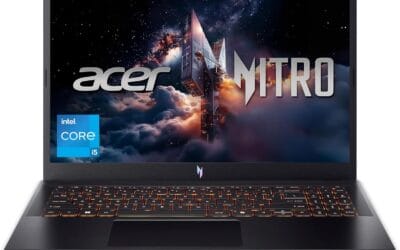
The Acer Nitro V ANV15-52-586Z is a mid-range 15.6-inch gaming laptop pairing an Intel Core i5-13420H with an NVIDIA GeForce RTX 4050 laptop GPU and a 165Hz FHD IPS panel. It targets students and entry-level gamers who want 1080p high-refresh play plus light content creation without stepping up to RTX 4060 pricing.
The defining pairing here is the RTX 4050 laptop GPU and the 165Hz FHD screen. That combination targets 1080p high or medium-high settings in modern AAA titles with DLSS 3.5 frame generation smothing dips, while esports titles like CS2, Valorant, and Rocket League should saturate the 165Hz refresh comfortably based on this GPU class.
Trade-offs are typical at this tier. The single 8GB DDR5 stick means single-channel bandwidth, which measurably hurts frame pacing and can leave the RTX 4050 waiting on data. The 512GB Gen 4 SSD is fine to start, but modern shooters and open-world titles fill it fast. TGP for the RTX 4050 is not specified.
Buy this if you want a 1080p 165Hz laptop with RTX 4050 features like DLSS 3.5, and you plan to add a second 8GB DDR5 SODIMM day one for dual-channel. Skip this if you target 1440p external play, sustained Blender or DaVinci workloads, or need more than 512GB storage without upgrading.
CPU and GPU: The Intel Core i5-13420H is a hybrid Raptor Lake H-class chip paired with the NVIDIA GeForce RTX 4050 laptop GPU rated at 194 AI TOPS per Acer. RTX 4050 mobile typically ships with 6GB GDDR6 VRAM, which caps texture headroom at 1440p and above.
Display: The 15.6-inch FHD IPS panel runs at 165Hz with a 16:9 aspect ratio and 82.64 percent screen-to-body ratio per Acer. Panel bit depth, sRGB coverage, and GtG response time are not specified, so expect typical entry gaming IPS behavior with mild ghosting at this tier.
Memory and Storage: 8GB DDR5 is installed across two SODIMM slots, with a stated 32GB maximum, so a second matched stick unlocks dual-channel gains. Storage is a 512GB PCIe Gen 4 NVMe SSD in M.2 2280 form. Sequential read/write speds, TBW endurance, and DRAM cache are not specified.
Connectivity and Power: Wi-Fi 6 handles wireless, and Killer Ethernet E2600 Gigabit covers wired play with reduced latency under load. A Thunderbolt 4 port supports power delivery, data, and DisplayPort out. Battery wat-hour capacity, charger wattage, and rated runtime are not specified.

Pros
- RTX 5050 with 8GB GDDR7 VRAM suports DLSS 4 Multi Frame Generation and fourth-gen RT Cores.
- 180Hz 16:10 WUXGA IPS panel is well matched to esports titles at native resolution.
- MUX Switch lets you bypass the iGPU for lower latency and higher in-game frame rates.
- Ryzen 5 240 with 31 platform AI TOPS covers Copilot-class local AI features on Windows.
Cons
- No public owner fedback yet at time of writing, so long-term reliability is unverified.
- 8GB VRAM is tight for 1440p or heavy ray tracing in newer AAA titles.
- Battery life, weight, thermals under sustained load, and port layout are not specified.
The Acer Nitro V 16 AI is an entry-level 16-inch gaming laptop built around the AMD Ryzen 5 240, an NVIDIA GeForce RTX 5050 8GB GDDR7 laptop GPU, 16GB RAM, and a 512GB SSD. It targets students and first-time gaming laptop buyers who want 1080p esports plus light content creation without stepping up to RTX 5060 pricing.
The defining feature is the RTX 5050 paired with the 180Hz WUXGA IPS panel. On Blackwell, DLSS 4 Multi Frame Generation and fifth-gen Tensor Cores let this class of GPU push high frame rates in esports titles at 1920 x 1200, while AAA games at native settings will typically need DLSS balanced or performance to stay smooth.
Trade-offs are typical at this tier. 8GB of VRAM limits headroom for 1440p external displays and path-traced titles, and 16GB of system RAM leaves little slack once Chrome, Discord, and a game share memory. Acer does not specify battery capacity, weight, panel brightness, sRGB coverage, or port selection, so shoppers relying on those numbers should confirm before buying.
Buy this if you want a16-inch 180Hz RTX 5050 machine for 1080p esports, schoolwork, and occasional AA gaming with DLSS 4. Skip this if you plan to drive a 1440p external monitor, run local LMs above 8GB VRAM, or need documented battery life and color accuracy for creative work.
CPU and AI: The AMD Ryzen 5 240 anchors the platform with a stated 31 AI Overall TOPS across CPU, GPU, and NPU. That figure covers Windows Studio Effects and light on-device inference, but it fals short of the 40+ NPU TOPS threshold Microsoft uses for Copilot+ PC branding.
GPU and gaming: The RTX 5050 laptop GPU caries 8GB GDDR7 and 440 AI TOPS, with fourth-gen RT Cores and DLSS 4 Multi Frame Generation. Expect comfortable 1080p and 1200p performance in esports at180Hz, and mid settings with DLSS in current AAA titles. Exact TGP is not specified by Acer.
Display and MUX: The 16-inch 1920 x 1200 IPS panel runs at 180Hz in a 16:10 ratio, giving extra vertical pixels for productivity. The MUX Switch physically routes the internal display to the RTX GPU, removing iGPU overhead in fullscreen games. Brightness, sRGB, and DCI-P3 coverage are not specified.
Cooling and memory: Acer cites a dual-fan, quad-intake, quad-exhaust layout aimed at sustained loads. Memory ships at 16GB with a 512GB SSD, adequate for one or two installed AA games. Battery capacity, runtime, weight, and RAM or SSD upgradability are not specified in the source data.

Pros
- RTX 4050 at 115W TGP is near theceiling for this GPU class
- 16:10 FHD+ 144Hz IPS panel with 100% sRGB coverage suits productivity and esports
- Advanced Optimus lets the display bypass the iGPU to reduce latency in games
Cons
- Limited owner feedback at time of writing, buyer risk on QC and long-term reliability is elevated
- 8GB single-stick DDR5 is the flor for modern gaming, plan to add a second stick
- 512GB SD fills quickly with two or three modern AA installs, budget for an NVMe upgrade
The ASUS TUF Gaming F16 (2024) is an entry-level 16-inch gaming laptop built around an Intel Core 5 210H CPU and an RTX 4050 laptop GPU at a 115W Max TGP. It targets students, dorm-room gamers, and first-time buyers who want 1080p esports performance in a durable, MIL-STD-810H tested chassis.
The defining feature is the RTX 4050 configured at the top of its TGP band alongside NVIDIA Advanced Optimus, which routes the display directly to the discrete GPU when gaming. On the 16-inch 16:10 FHD+ 144Hz IPS-level panel with 100% sRGB, this class of GPU typically holds high settings in esports titles and medium settings with DLSS in modern AAA games.
Trade-offs are typical for the price bracket. 8GB of DR5 as a single stick means single-channel bandwidth until you upgrade, and a 512GB SSD is tight once a couple of large titles are installed. The 210H is a lower-tier H-series part, so heavier CPU-bound workloads and streaming with x264 will push it harder than a Core 7 or Ryzen 7 alternative.
Buy this if you want an RTX 4050 laptop with a 16:10 high-refresh panel for1080p esports and light AA gaming, and you plan to add RAM and storage later. Skip this if you need1440p internal gaming, sustained content creation performance, or a proven track record from owner reviews.
GPU and TGP: The RTX 4050 laptop GPU is set to a 115W Max TGP, at the top of NVIDIA's allowed range for this SKU. Expect stronger sustained frame rates than 60W to 90W configurations of the same chip, particularly in DLSS-enabled titles at 1080p to FHD+.
CPU: The Intel Core 5 210H is a Raptor Lake refresh H-series mobile part. Pairing it with a 115W RTX 4050 keps the laptop GPU-bound in most games, which is the correct balance for this tier, though CPU-heavy simulation and streaming workloads will be theottleneck.
Memory and storage: 8GB DDR5 in a single SO-DIMM limits bandwidth and headroom for modern titles that touch 12GB to 16GB of system RAM. The 512GB PCIe Gen4 NVMe SSD is quick but small once Windows 11 and a few AAA installs are in place.
Display and cooling: The 16-inch 16:10 FHD+ 144Hz IPS-level panel with Adaptive-Sync and 100% sRGB fits esports and creator preview work. Cooling uses Arc Flow fans, five heat pipes, four exhaust vents, and anti-dust filter, which is standard for TUF at this class.

Pros
- 165Hz IPS display is a genuine advantage over 60Hz or 144Hz panels at this tier
- PCIe Gen 4 SSD is faster than Gen 3 alternatives common in competing laptops
- DDR5 dual-slot RAM setup allows straightforward upgrade to 32GB
- Thunderbolt 4 adds versatility for external GPU docks or 4K monitor connections
- Owner ratings are consistently strong across a meaningful review sample
Cons
- RTX 4050 6GB VRAM ceiling will struggle at 1440p Ultra in newer AAA titles
- Thermal throttling under sustained combined CPU and GPU load is a known concern on slim gaming chassis at this class
- No optical drive and limited port variety may require a USB hub for peripheral-heavy setups
The Acer Nitro V 15 ANV15-52-76NK is a mainstream gaming laptop aimed at entry-to-mid-level gamers and college students who want genuine GPU performance without reaching into premium laptop territory. Combining Intel's Core i7-13620H with the NVIDIA GeForce RTX 4050 laptop GPU, this machine targets 1080p gaming, light content creation, and everyday multitasking. It is best suited for users who play at native FHD resolution and have no immediate plans to push 1440p or 4K output, not those chasing maximum graphical fidelity or professional GPU workloads.
The RTX 4050 laptop GPU is the headline component here. Built on NVIDIA's Ada Lovelace architecture with DLSS 3.5 and ray tracing support, it brings meaningful generational improvements over older GTX and RTX 30-series laptop chips at comparable price points. In practical terms, based on owner reports and published laptop benchmarks for this GPU class, expect playable frame rates at 1080p High in titles like Cyberpunk 2077 and Hogwarts Legacy, with competitive shooters like Valorant and CS2 running well above the 165Hz panel ceiling at lower settings. The Core i7-13620H, with its hybrid performance and efficiency core layout, handles background tasks like Discord, OBS, and browser tabs without visibly impacting in-game frame rates.
Acer has equipped the Nitro V 15 with a 165Hz IPS panel that is a genuine step above the 144Hz or 60Hz displays found on competing laptops in this price bracket. The 82.64% screen-to-body ratio keeps bezels reasonably slim for a 15.6-inch chassis. Thermal design on Nitro-series laptops historically leans toward adequate rather than exceptional - the chassis manages typical gaming sessions, but prolonged heavy loads may show clock speed reductions depending on ambient temperature and surface ventilation.
There are a few considerations worth noting before purchasing. The RTX 4050's 6GB VRAM allocation is a real ceiling for anyone planning to game at 1440p Ultra or use the laptop for VRAM-heavy creative work like high-resolution texture baking or large AI model inference. Thermal throttling under simultaneous CPU and GPU stress - common in slim gaming chassis at this class - appears to affect sustained workloads more than typical gaming sessions, based on owner feedback patterns for Nitro-series laptops. Additionally, the Core i7-13620H is a 13th-generation chip rather than Intel's newer Meteor Lake or Arrow Lake mobile platform, which is worth factoring in for buyers thinking about longevity. Prebuilt laptop buyers also pay a premium over component cost that DIY desktop builders would not face.
Overall, the Acer Nitro V 15 is a capable 1080p gaming laptop that hits a reasonable balance between GPU performance, display quality, and connectivity for its category. Owner ratings are consistently strong, which adds confidence to the core value proposition. For buyers targeting 1080p gaming on a budget and who do not need workstation-class VRAM, this is a credible option worth considering alongside the Lenovo IdeaPad Gaming 3 and ASUS TUF Gaming A15 at similar configurations before committing.
Which Pick Makes the Most Sense for You?
Acer Nitro 16 , Our Top Pick for Best Overall Balance
The Acer Nitro 16 is the laptop most reviewers settle on as the all-around best pick under $1,000, and after comparing the spec sheet against owner feedback patterns, it’s the one we’d send a friend to first. The combination of an AMD Ryzen 5 7640HS and an RTX 4050 at the full 140W TGP rating is the right balance of CPU and GPU at this price. The 7640HS is a Zen 4 chip with 6 cores and 12 threads, more than enough for streaming, schoolwork, and modern gaming without bottlenecking the GPU. Tom’s Hardware specifically called out the 16-inch WUXGA (1920 x 1200) 165Hz display with G-Sync as a standout, hitting 371 nits brightness and covering 91% of the DCI-P3 color gamut on their light meter testing. That’s a meaningfully better panel than what most laptops at this price ship with.
The 1TB Gen 4 SSD config is the variant we’d recommend over the cheaper 512GB option. Modern AAA games regularly hit 80-100GB each, and a 512GB drive fills up faster than most people expect once Windows takes its share. The 16:10 aspect ratio also gives more usable vertical space for productivity work alongside gaming. Skip this if you specifically need an Intel platform for software compatibility, or if you want the absolute lightest 15-inch chassis. The Nitro 16’s 6.17-pound weight reflects the 16-inch screen and the cooling system needed to push the 4050 at full power, which is the tradeoff for performance.
Acer Nitro V 16 AI , Best Value With Newer GPU Architecture
The Acer Nitro V 16 AI is the pick for buyers who want NVIDIA’s newest GPU architecture without paying flagship prices. The RTX 5050 here brings two genuine generational improvements over the RTX 4050: 8GB of GDDR7 VRAM (up from 6GB GDDR6 on the 4050), and full DLSS 4 frame generation support. PCWorld’s testing put the RTX 5050 at around 72 FPS averaged in Cyberpunk 2077 at high settings, which is impressive for a budget gaming laptop and meaningfully ahead of what the 4050 manages in the same scenarios. The 16-inch WUXGA 180Hz display is also faster than what you’ll find on most competitors at this tier, with PCWorld calling out unusually long battery life for a gaming laptop, in the 8-12 hour range during light use.
The Ryzen 5 240 CPU is the obvious compromise here. It’s a competent gaming chip and won’t bottleneck the RTX 5050 in most titles, but it has fewer cores than the 7640HS in the Nitro 16, which means streaming-while-gaming or content creation workloads will feel the difference. The 512GB SSD is also the smaller config in this lineup. Skip this if you’re a streamer or content creator who needs more CPU multi-threading headroom, or if you want maximum storage out of the box. Most buyers using this as a gaming-first laptop won’t notice the CPU gap during normal play.
ASUS TUF Gaming A15 , Best AMD Build for Durability and Battery
The ASUS TUF Gaming A15 is the pick for college students or working professionals who need their gaming laptop to also survive a backpack commute and a coffee shop spill. The MIL-STD-810H military-grade durability rating isn’t marketing fluff at this price, and the 90Whr battery (notably larger than most competitors) genuinely extends usable runtime beyond what other gaming laptops manage. The 15.6-inch FHD 144Hz display covers 100% of the sRGB gamut, which makes this one of the few sub-$1,000 gaming laptops where you can do legitimate photo or video editing alongside gaming without the colors looking obviously wrong.
The Ryzen 7 7435HS is a Zen 3+ part rather than full Zen 4, which means it lacks some of the architectural improvements AMD introduced in the 7000 series proper. For pure gaming, this barely matters. For streaming + gaming simultaneously, you will feel the gap compared to the Ryzen 5 7640HS in the Nitro 16. The 84-blade Arc Flow cooling fans handle the TUF chassis well, but fan noise under sustained load is notable. Skip this if competitive gaming is your main use case and you want the absolute smoothest frame pacing possible. The 15.6-inch FHD 16:9 display also feels cramped compared to the 16:10 panels on the Nitro 16 and Nitro V 16 AI.
MSI Katana A15 AI , Best for Buyers Wanting RTX 4060 Power
The MSI Katana A15 AI is the system in this roundup that pushes the strongest GPU at this price point. The RTX 4060 with 8GB of dedicated GDDR6 memory is meaningfully ahead of the 4050 and 5050 cards in the other picks, particularly in titles that push VRAM hard or use ray tracing extensively. The Ryzen 7-8845HS pairs well with this GPU. It’s an 8-core Zen 4 part with proper multi-threading muscle for streaming, content creation, and modern gaming workloads simultaneously. The 32GB of DDR5 RAM and 1TB SSD configuration is also genuinely future-proof, eliminating the two most common upgrade needs for buyers in this tier. Our best gaming laptops with 32GB RAM of 2026 breakdown goes further on where the money actually goes.
⚠️ The 53.5Whr battery is small for a 15.6-inch gaming laptop with this much hardware. Owner reports consistently mention battery life of 5-6 hours in non-gaming use, which is below average for this category.
The Cooler Boost 5 thermal system handles the 4060 + 8845HS combination well based on owner reports, but this is a 4.96-pound machine that’s clearly designed to stay near a power outlet. Skip this if portability matters more than performance, or if you specifically want a 16-inch screen. The 15.6-inch FHD 144Hz panel is solid but doesn’t have the extra vertical space that 16-inch 16:10 displays provide.
HP Victus 16 , Best Cooling Design for Long Sessions
The HP Victus 16 is the pick if you game in 3-hour-plus sessions and care more about thermal consistency than peak benchmark scores. HP’s IceBolt cooling design is notably good at this price tier, and the 16.1-inch chassis gives the system more thermal headroom than the 15.6-inch competitors. The Ryzen 7 8845HS is the same 8-core Zen 4 chip MSI uses in the Katana, paired with an RTX 4060 (8GB GDDR6), so raw performance is comparable. Where the Victus 16 differentiates is in sustained load behavior. Owner reports and Tom’s Hardware testing both note that the system holds GPU clocks better in long gaming sessions than thinner competitors.
The 16.1-inch FHD 144Hz IPS display at 300 nits is bright enough for indoor use but on the dim side compared to the Nitro 16’s 371-nit panel. Build quality is solid plastic with a Mica Silver finish that doesn’t look as obviously gaming-targeted as the Nitro and Katana lines. Skip this if you specifically want a 16:10 display ratio, the 16.1-inch panel is a standard 16:9. Owner reviews also consistently mention that the speakers are below average and that headphones are the right call for serious gaming.
Side-by-Side Comparison
| Product | GPU | CPU | RAM / Storage | Display | Best For | Skip If |
|---|---|---|---|---|---|---|
| Acer Nitro 16 | RTX 4050 (140W) | Ryzen 5 7640HS | 16GB / 1TB | 16″ WUXGA 165Hz G-Sync | Best overall balance | You need an Intel platform |
| Acer Nitro V 16 AI | RTX 5050 (8GB GDDR7) | Ryzen 5 240 | 16GB / 512GB | 16″ WUXGA 180Hz | Newer architecture + DLSS 4 | You stream while gaming |
| ASUS TUF Gaming A15 | RTX 4050 (140W) | Ryzen 7 7435HS | 16GB / 512GB | 15.6″ FHD 144Hz 100% sRGB | Durability + color accuracy | You want 16-inch 16:10 |
| MSI Katana A15 AI | RTX 4060 (8GB) | Ryzen 7 8845HS | 32GB / 1TB | 15.6″ FHD 144Hz | Strongest GPU + multitasking | Battery life matters |
| HP Victus 16 | RTX 4060 (8GB) | Ryzen 7 8845HS | 16GB / 1TB | 16.1″ FHD 144Hz | Long gaming sessions | You want 16:10 ratio |
Affordable Gaming Laptop Buying Guide
Whether you stick with one of our picks or shop further, the decision framework at this price tier is the same: identify your real use case, then work backwards from the GPU and TGP rating that fit your gaming habits. Here’s what actually matters when shopping under $1,000.
GPU Tier and TGP Rating
The GPU is the single most important spec, but the model name alone is misleading. At this price, you’re choosing between three current-generation options: the RTX 4050, RTX 5050, and RTX 4060. The RTX 4050 (6GB GDDR6) is genuinely capable for 1080p gaming at high settings in most current titles. The RTX 5050 (8GB GDDR7) brings architectural improvements and DLSS 4 frame generation, narrowing the gap with the 4060 in some scenarios. The RTX 4060 (8GB GDDR6) remains the fastest GPU you’ll regularly find under $1,000 and the safest pick for longevity. But what matters more than the badge is the TGP wattage. A 140W RTX 4050 will outperform an 80W RTX 4060 in most games. Always cross-check the TGP rating on Notebookcheck before buying. Avoid laptops where the manufacturer hides this spec behind marketing language.
CPU Pairing and Multi-Threading
Most modern gaming workloads are GPU-limited, not CPU-limited. The Ryzen 5 7640HS in the Nitro 16 has more than enough multi-threading muscle for any RTX 4050 or 4060 paired with it. Where CPU matters more is streaming-while-gaming, video editing, or running background workloads. If that’s your use case, step up to the Ryzen 7 8845HS in the MSI Katana or HP Victus 16. Avoid pairing a strong GPU with an underpowered chip like the Intel N100 series, you will see CPU bottlenecking in CPU-heavy titles.
RAM: 16GB DDR5 Is the Floor
Honestly, 8GB of RAM in 2026 is no longer enough for gaming alongside the typical browser-and-Discord setup most players run. Windows 11 itself consumes 3-4GB at idle, and modern AAA games regularly hit 8GB VRAM alone with significant system memory draw on top. 16GB DDR5 is the practical minimum, and 32GB (like in the MSI Katana) is genuinely useful if you stream, run VMs, or keep many browser tabs open. Avoid configurations with single-channel 16GB (one stick), dual-channel 8GB+8GB performs measurably better in integrated and dedicated GPU scenarios. All five picks here are dual-channel.
Storage: 1TB NVMe Is Worth the Upgrade
A 512GB SSD will feel cramped within months of installing modern games. Cyberpunk 2077, Hogwarts Legacy, Starfield, and Call of Duty Modern Warfare III all top 80GB each. A 1TB drive at the same spec tier is almost always worth the price difference if you have it. PCIe Gen 4 NVMe speeds, present across all five picks, are more than sufficient for gaming. You won’t notice the difference between Gen 4 and Gen 5 in load times. Avoid HDDs in any new gaming laptop in 2026, they’re a hard bottleneck no GPU can compensate for.
Display: Refresh Rate Plus Color Accuracy
A 144Hz panel is the optimal pick for most gamers under $1,000. It’s smooth enough to feel responsive without demanding a GPU that can consistently push 240+ FPS. The 165Hz panels in the Nitro 16 and 180Hz panel in the Nitro V 16 AI are both nice-to-have upgrades but not deal-makers. What matters more at this tier is color accuracy. The ASUS TUF A15’s 100% sRGB display is a meaningful differentiator if you do any color-sensitive work alongside gaming. Avoid panels rated below 250 nits brightness, they’re unusable in any well-lit room.
Cooling and Thermals: The Most Overlooked Factor
A laptop that thermal-throttles under sustained load is a worse gaming machine than its spec sheet suggests, regardless of which GPU is inside. Acer Nitro and ASUS TUF lines both have established reputations for solid thermal design at this price tier, based on long-running coverage from Notebookcheck and Laptop Mag. The HP Victus 16 (with its larger 16.1-inch chassis) and the Acer Nitro 16 (with the 90Wh battery and full-size cooling system) both handle sustained loads better than 15.6-inch competitors at the same wattage. Avoid ultra-thin gaming laptops at this price tier, thin chassis without dedicated cooling design will throttle.
The single biggest mistake buyers make at this price: ranking GPUs in their head and picking the highest tier they can afford, regardless of how the manufacturer cools it. A well-tuned RTX 4050 at 140W will deliver a better gaming experience than a thermally-throttled RTX 4060 at 65W in a thinner chassis, every time.
FAQs
Can you get a real gaming laptop under $1,000?
Yes, RTX 5060 Mobile and Ryzen 7 7840HS combos hit $850-980 in 2026. They handle 1080p high in current AAA at 60+ FPS. Skip anything under $750, those use last-gen GPUs that struggle in 2026.
Is a refurbished gaming laptop a good idea?
Manufacturer-refurbished from Lenovo, Dell, or ASUS is fine and saves 15-25%. Avoid third-party refurbished, battery and thermal paste are usually original and degraded.
What screen size for under $1,000?
15.6-inch is the most common and best value. 14-inch is rarer at this price but more portable. 17-inch is harder to find under $1,000 with current-gen GPUs.
Will an affordable gaming laptop run 1440p external monitor?
Most under-$1,000 laptops have HDMI 2.0 or older, limits external to 1440p 60Hz or 1080p 144Hz. Verify HDMI 2.1 or DisplayPort output if you plan to drive a 1440p high-refresh external display.
Affordable Gaming Laptops Under $1,000
Affordable gaming laptops under $1,000 in 2026 use RTX 5060 Mobile and current Ryzen 7 / Core Ultra 7 chips. 15-16 inch screens at 144Hz hit the best balance. 1080p high gaming at 60+ FPS becomes the practical target.
Common Mistakes to Avoid
First mistake is buying laptops with RTX 3050 or older. Second is settling for 8GB RAM. Third is overlooking screen quality.
More Frequently Asked Questions
1080p enough on gaming laptop?
14-16 inch, yes, pixel density adequate.
Refurbished laptops worth considering?
Manufacturer refurbished from Lenovo/Dell, yes.
How long do budget laptops last?
3-4 years for gaming use.
























Write Your Review
No reviews yet. Be the first to share your experience!